2011 Peugeot 3008 Hybrid 4 USB
[x] Cancel search: USBPage 256 of 280
254
05
1
1
2
PEUGEOT CONNECT USB
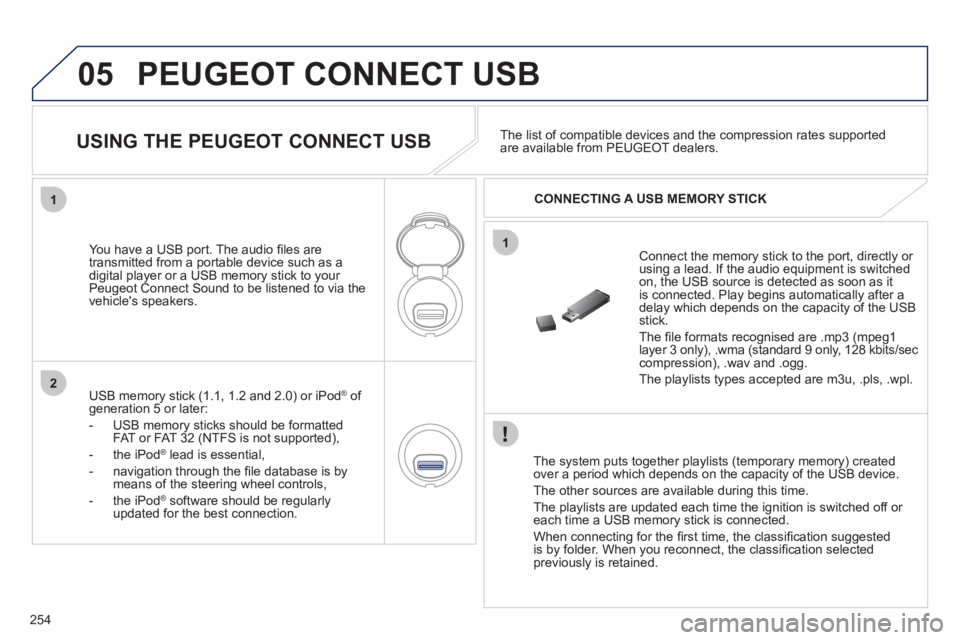
The system puts together playlists (temporary memory) createdover a period which depends on the capacity of the USB device.
The other sources are available durin
g this time.
The pla
ylists are updated each time the ignition is switched off or each time a USB memory stick is connected.
When connectin
g for the fi rst time, the classifi cation suggested
is by folder. When you reconnect, the classifi cation selected
previously is retained.
Connect the memory stick to the port, directly or using a lead. If the audio equipment is switched
on, the USB source is detected as soon as it
is connected. Play begins automatically after a
delay which depends on the capacity of the USB stick.
The fi le formats reco
gnised are .mp3 (mpeg1 layer 3 only), .wma (standard 9 only, 128 kbits/seccompression), .wav and .ogg.
The playlists types accepted are m
3u, .pls, .wpl.
You have a U
SB port. The audio fi les are
transmitted from a portable device such as a
digital player or a USB memory stick to your
Peugeot Connect Sound to be listened to via the
vehicle's speakers.
USB memor
y stick (1.1, 1.2 and 2.0) or iPod Æof generation 5 or later:
- USB memor
y sticks should be formattedFAT or FAT 32 (NTFS is not supported),
- th
e iPodÆ
lead is essential, Æ
- navigation through the fi le database is bymeans of the steering wheel controls,
- th
e iPodÆ
software should be regularlyÆ
updated for the best connection.The list o
f compatible devices and the compression rates supported are available from PEUGEOT dealers.
USING THE PEUGEOT CONNECT USB
CONNECTING A USB MEMORY STICK
Page 257 of 280
255
05
42
3
1
5
PEUGEOT CONNECT USB
USING THE PEUGEOT CONNECT USB
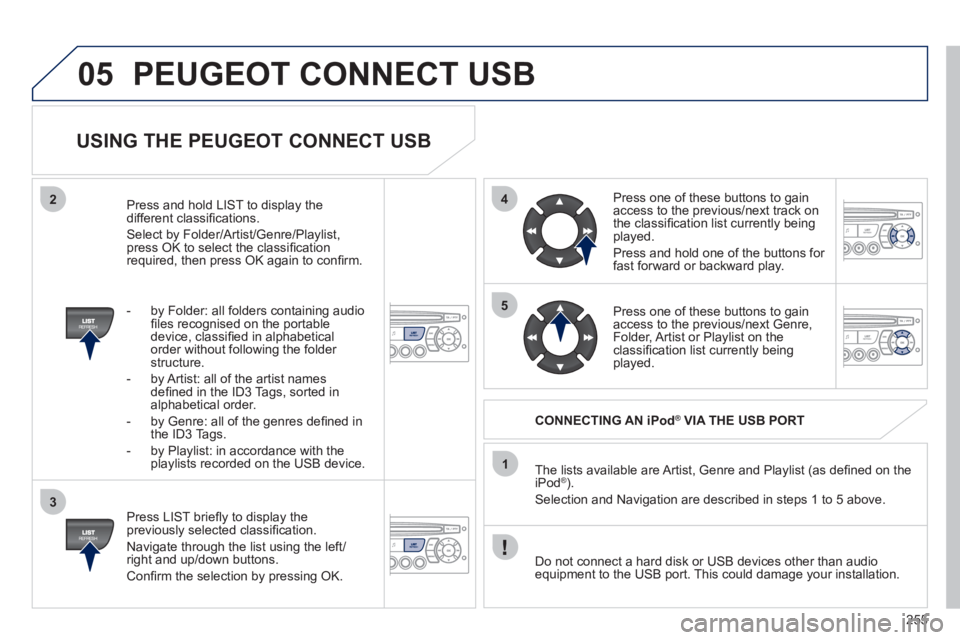
Press LIST briefl y to display thepreviously selected classifi cation.
Navi
gate through the list using the left/right and up/down buttons.
Confi rm the selection by pressing OK. The lists available are Artist, Genre and Pla
ylist (as defi ned on the
iPod® ).®
Selection and Navigation are described in steps 1 to 5 above.
CONNECTING AN iPod® VIA THE USB PORT®
Press one of these buttons to gain
access to the previous/next track on
the classifi cation list currently beingplayed.
Pr
ess and hold one of the buttons for fast forward or backward play.
Press one of these buttons to
gain
access to the previous/next Genre,
Folder, Artist or Playlist on theclassifi cation list currently being played.
Press and hold LI
ST to display the different classifi cations.
Select b
y Folder/Artist/Genre/Playlist, press OK to select the classifi cation required, then press OK again to confi rm.
- b
y Folder: all folders containing audio fi les recognised on the portable
device, classifi ed in alphabetical
order without
following the folder structure.
- b
y Artist: all of the artist names
defi ned in the ID3 Tags, sorted inalphabetical order.
- b
y Genre: all of the genres defi ned in
the ID3 Tags.
-
by Playlist: in accordance with the
playlists recorded on the USB device.
Do not connect a hard disk or
USB devices other than audioequipment to the USB port. This could damage your installation.
Page 258 of 280
256
05
1
2
1
2
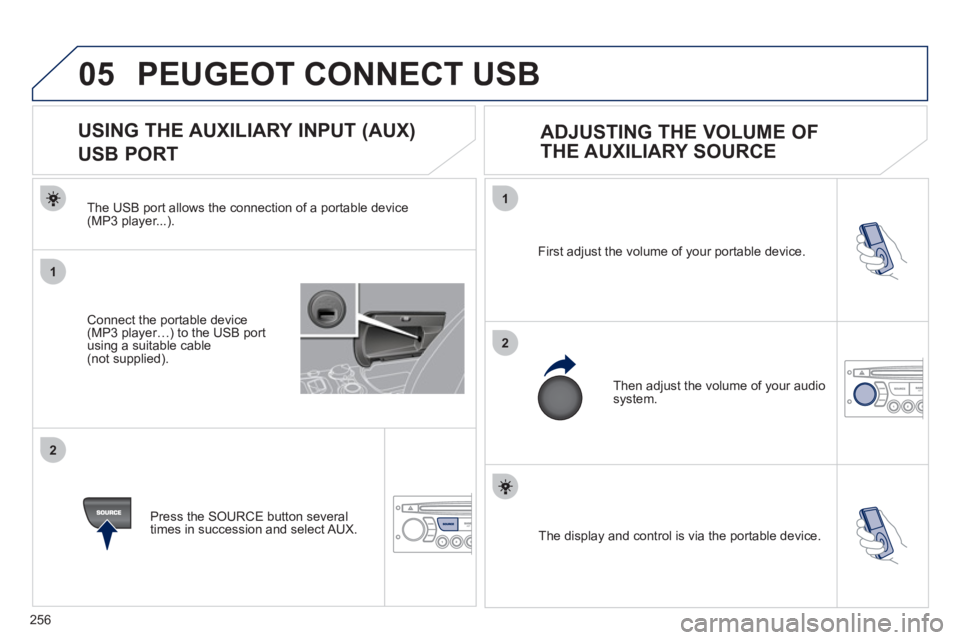
The display and control is via the portable device. First ad
just the volume of your portable device.
Then ad
just the volume of your audio system.
USING THE AUXILIARY INPUT (AUX)
USB PORT
ADJUSTING THE VOLUME OF
THE AUXILIARY SOURCE
PEUGEOT CONNECT USB
The USB port allows the connection of a portable device(MP3 player...).
Press the
SOURCE button several
times in succession and select AUX.
Connect the portable device(MP3 player…) to the USB port using a suitable cable(not supplied).
Page 263 of 280
261
09 SCREEN MENU MAP
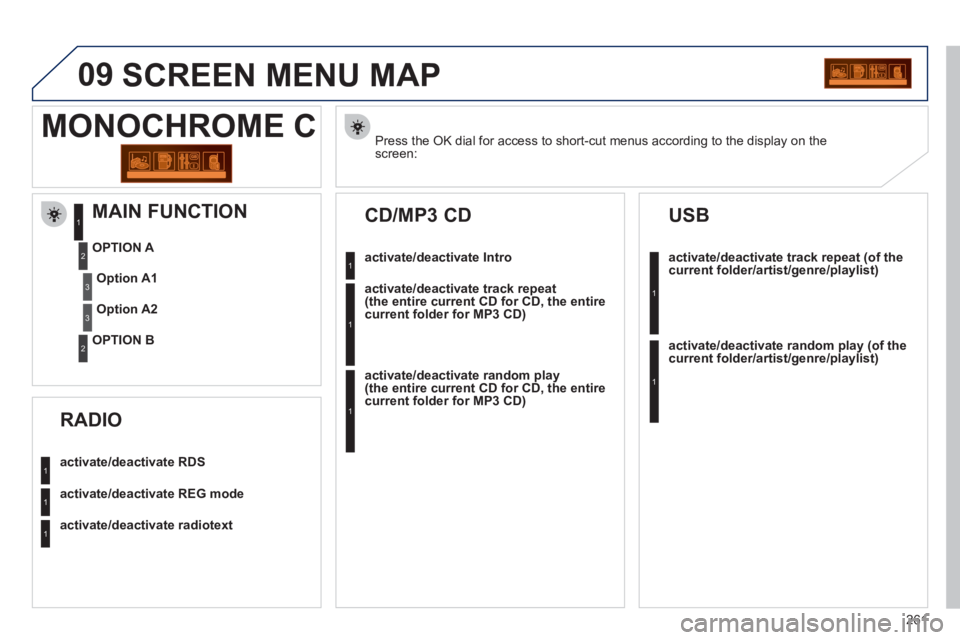
Press the OK dial for access to short-cut menus according to the display on thescreen:
MONOCHROME C
activate/deactivate RDS
activate/deactivate REG mode
activate/deactivate radiotext
RADIO
activate/deactivate Intro
CD/MP3 CD
activate/deactivate track repeat (the entire current CD for CD, the entire current folder for MP3 CD)
activate/deactivate random play (the entire current CD for CD, the entire current folder for MP3 CD)
activate/deactivate track repeat (of the current folder/artist/genre/playlist)
USB
activate/deactivate random play(of thecurrent folder/artist/genre/playlist)
1
1
1
1
1
1
1
1
MAIN FUNCTION
OPTION A
OPTION B
Option A1
Option A2
1
2
3
2
3
Page 266 of 280
264
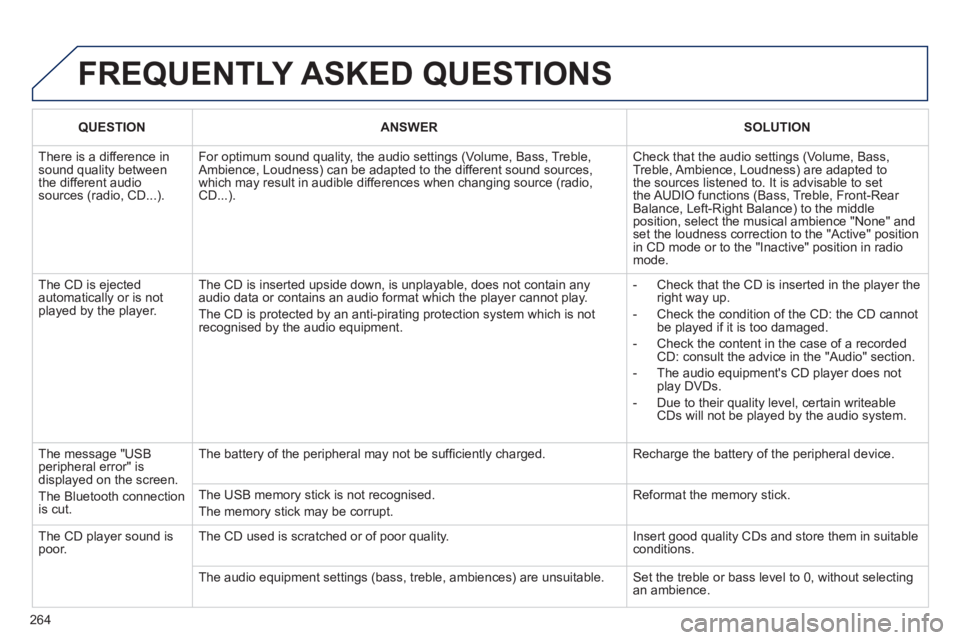
FREQUENTLY ASKED QUESTIONS
QUESTIONANSWERSOLUTION
There is a difference in sound quality betweenthe different audiosources (radio, CD...).
For optimum sound quality, the audio settings (Volume, Bass, Treble, Ambience, Loudness) can be adapted to the different sound sources,which may result in audible differences when changing source (radio,CD...).
Check that the audio settings (Volume, Bass, Treble, Ambience, Loudness) are adapted tothe sources listened to. It is advisable to setthe AUDIO functions (Bass, Treble, Front-Rear Balance, Left-Right Balance) to the middle position, select the musical ambience "None" and set the loudness correction to the "Active" position in CD mode or to the "Inactive" position in radio mode.
The CD is ejected automatically or is not played by the player.
The CD is inserted upside down, is unplayable, does not contain any audio data or contains an audio format which the player cannot play.
The CD is protected by an anti-pirating protection system which is not recognised by the audio equipment.
- Check that the CD is inserted in the player the right way up.
- Check the condition of the CD: the CD cannot be played if it is too damaged.
- Check the content in the case of a recordedCD: consult the advice in the "Audio" section.
- The audio equipment's CD player does notplay DVDs.
- Due to their quality level, certain writeableCDs will not be played by the audio system.
The message "USB peripheral error" isdisplayed on the screen.
The Bluetooth connectionis cut.
The battery of the peripheral may not be suffi ciently charged.
Recharge the battery of the peripheral device.
The USB memory stick is not recognised.
The memory stick may be corrupt.
Reformat the memory stick.
The CD player sound ispoor.The CD used is scratched or of poor quality.
Insert good quality CDs and store them in suitable conditions.
The audio equipment settings (bass, treble, ambiences) are unsuitable. Set the treble or bass level to 0, without selectingan ambience.
Page 271 of 280
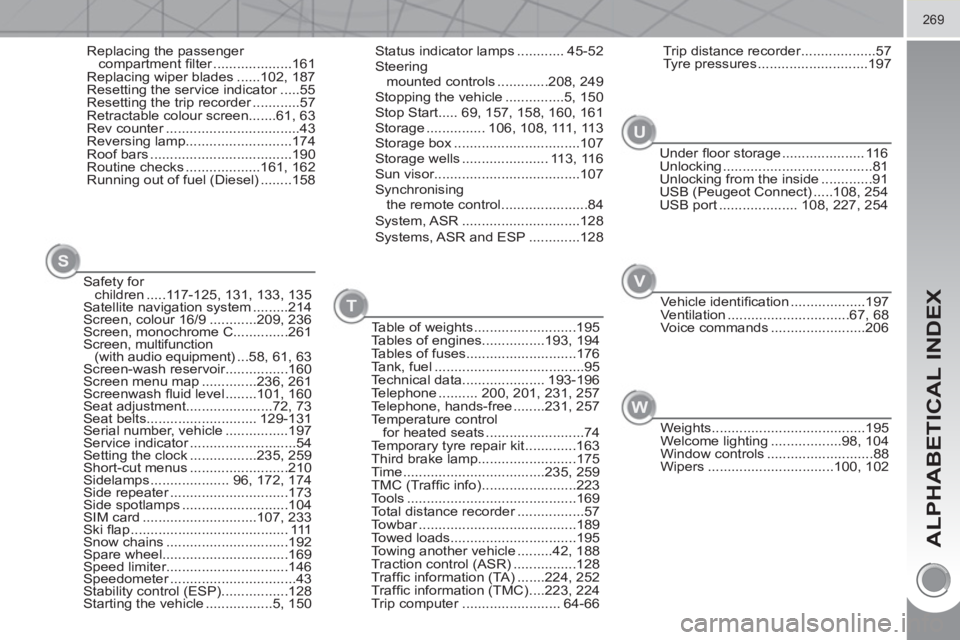
ALPHABETICAL INDEX
269
Replacing the passenger
compartment fi lter ....................161
Replacing wiper blades ......102, 187
Resetting the service indicator .....55
Resetting the trip recorder ............57
Retractable colour screen.......61, 63
Rev counter ..................................43
Reversing lamp...........................174
Roof bars ....................................190
Routine checks ...................161, 162
Running out of fuel (Diesel) ........158Status indicator lamps ............ 45-52
Steering
mounted controls .............208, 249
Stopping the vehicle ...............5, 150
Stop Start..... 69, 157, 158, 160, 161
Storage ............... 106, 108, 111, 113
Storage box ................................107
Storage wells ...................... 113, 116
Sun visor.....................................107
Synchronising
the remote control ......................84
System, ASR ..............................128
Systems, ASR and ESP .............128
Table of weights ..........................195
Tables of engines................193, 194
Tables of fuses............................176
Tank, fuel ......................................95
Technical data..................... 193-196
Telephone .......... 200, 201, 231, 257
Telephone, hands-free ........231, 257
Temperature control
for heated seats .........................74
Temporary tyre repair kit .............163
Third brake lamp.........................175
Time ....................................235, 259
TMC (Traffi c info) ........................223
Tools ...........................................169
Total distance recorder .................57
Towbar ........................................189
Towed loads................................195
Towing another vehicle .........42, 188
Traction control (ASR) ................128
Traffi c information (TA) .......224, 252
Traffi c information (TMC) ....223, 224
Trip computer ......................... 64-66
TU
Safety for
children .....117-125, 131, 133, 135
Satellite navigation system .........214
Screen, colour 16/9 ............209, 236
Screen, monochrome C..............261
Screen, multifunction
(with audio equipment) ...58, 61, 63
Screen-wash reservoir................160
Screen menu map ..............236, 261
Screenwash fl uid level ........101, 160
Seat adjustment......................72, 73
Seat belts............................ 129-131
Serial number, vehicle ................197
Service indicator ...........................54
Setting the clock .................235, 259
Short-cut menus .........................210
Sidelamps .................... 96, 172, 174
Side repeater ..............................173
Side spotlamps ...........................104
SIM card .............................107, 233
Ski fl ap ........................................ 111
Snow chains ...............................192
Spare wheel................................169
Speed limiter...............................146
Speedometer ................................43
Stability control (ESP).................128
Starting the vehicle .................5, 150
S
Trip distance recorder ...................57
Tyre pressures ............................197
V
Under fl oor storage ..................... 116
Unlocking ......................................81
Unlocking from the inside .............91
USB (Peugeot Connect) .....108, 254
USB port .................... 108, 227, 254
Vehicle identifi cation ...................197
Ventilation ...............................67, 68
Voice commands ........................206
W
Weights .......................................195
Welcome lighting ..................98, 104
Window controls ...........................88
Wipers ................................100, 102
Page 274 of 280
VISUAL SEARCH
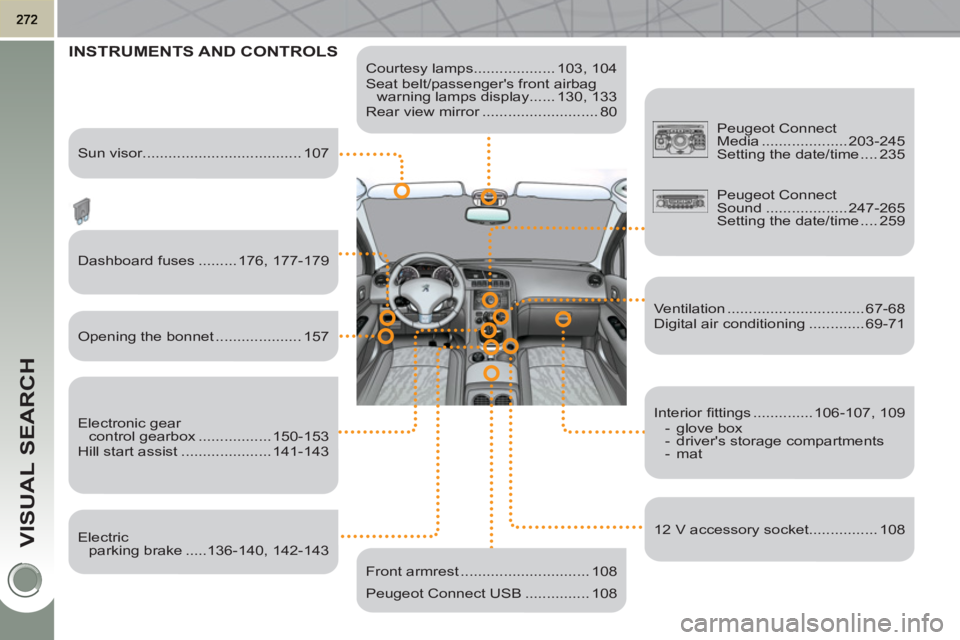
Courtesy lamps................... 103, 104
Seat belt/passenger's front airbag
warning lamps display ...... 130, 133
Rear view mirror ........................... 80
INSTRUMENTS AND CONTROLS
Dashboard fuses ......... 176, 177-179
Electronic gear
control gearbox ................. 150-153
Hill start assist ..................... 141-143
Peugeot Connect
Sound ................... 247-265
Setting the date/time .... 259
Front armrest .............................. 108
Peugeot Connect USB ............... 108
Sun visor..................................... 107
Opening the bonnet .................... 157
Electric
parking brake .....136-140, 142-143
Interior fi ttings .............. 106-107, 109
- glove box
- driver's storage compartments
- mat
12 V accessory socket................ 108
Peugeot Connect
Media .................... 203-245
Setting the date/time .... 235
Ventilation ................................ 67-68
Digital air conditioning ............. 69-71