2011 Peugeot 3008 Hybrid 4 lock
[x] Cancel search: lockPage 41 of 280
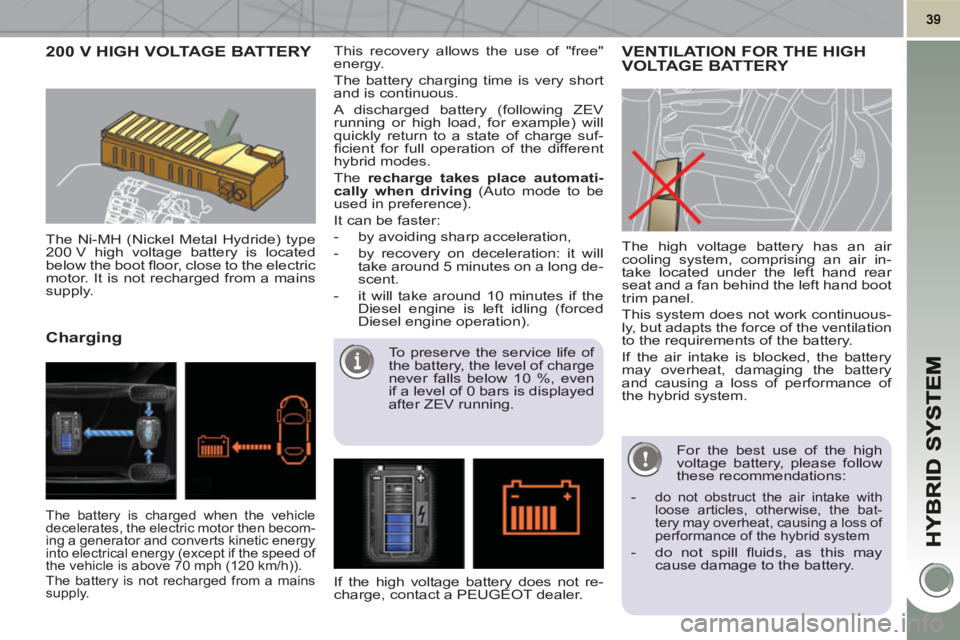
200 V HIGH VOLTAGE BATTERY
The Ni-MH (Nickel Metal Hydride) type
200 V high voltage battery is located
below the boot fl oor, close to the electric
motor. It is not recharged from a mains
supply.
Charging
This recovery allows the use of "free"
energy.
The battery charging time is very short
and is continuous.
A discharged battery (following ZEV
running or high load, for example) will
quickly return to a state of charge suf-
fi cient for full operation of the different
hybrid modes.
The recharge takes place automati-
cally when driving
(Auto mode to be
used in preference).
It can be faster:
- by avoiding sharp acceleration,
- by recovery on deceleration: it will
take around 5 minutes on a long de-
scent.
- it will take around 10 minutes if the
Diesel engine is left idling (forced
Diesel engine operation).
The high voltage battery has an air
cooling system, comprising an air in-
take located under the left hand rear
seat and a fan behind the left hand boot
trim panel.
This system does not work continuous-
ly, but adapts the force of the ventilation
to the requirements of the battery.
If the air intake is blocked, the battery
may overheat, damaging the battery
and causing a loss of performance of
the hybrid system. VENTILATION FOR THE HIGH VOLTAGE BATTERY
For the best use of the high
voltage battery, please follow
these recommendations:
-
do not obstruct the air intake with
loose articles, otherwise, the bat-
tery may overheat, causing a loss of
performance of the hybrid system
- do not spill fl uids, as this may
cause damage to the battery.
The battery is charged when the vehicle
decelerates, the electric motor then becom-
ing a generator and converts kinetic energy
into electrical energy (except if the speed of
the vehicle is above 70 mph (120 km/h)).
The battery is not recharged from a mains
supply.
If the high voltage battery does not re-
charge, contact a PEUGEOT dealer.
To preserve the service life of
the battery, the level of charge
never falls below 10 %, even
if a level of 0 bars is displayed
after ZEV running.
Page 42 of 280
40
The high voltage battery must not in any
circumstances be charged from an ex-
ternal source and must only be handled
by a workshop technician.
There is the risk of serious burns, as
well as electric arcs that could cause
serious injury or even death.
A used Ni-MH (Nickel Metal Hydride)
type high voltage battery must be re-
moved in an appropriate manner by a
repair workshop, so that its recycling
presents no risk to the environment.
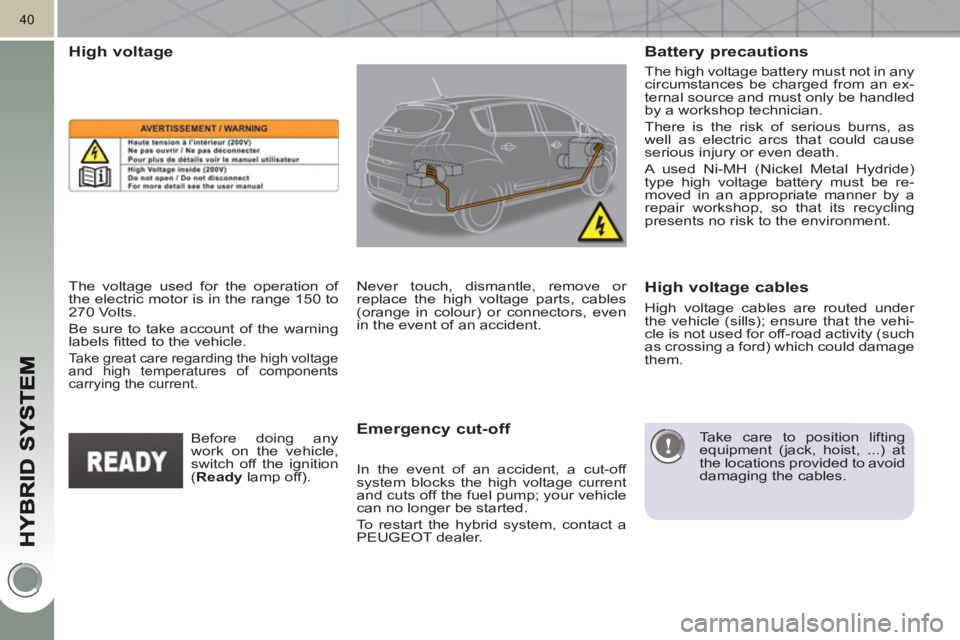
High voltage
The voltage used for the operation of
the electric motor is in the range 150 to
270 Volts.
Be sure to take account of the warning
labels fi tted to the vehicle.
Take great care regarding the high voltage
and high temperatures of components
carrying the current.
Emergency cut-off
Never touch, dismantle, remove or
replace the high voltage parts, cables
(orange in colour) or connectors, even
in the event of an accident.
In the event of an accident, a cut-off
system blocks the high voltage current
and cuts off the fuel pump; your vehicle
can no longer be started.
To restart the hybrid system, contact a
PEUGEOT dealer.
High voltage cables are routed under
the vehicle (sills); ensure that the vehi-
cle is not used for off-road activity (such
as crossing a ford) which could damage
them.
Before doing any
work on the vehicle,
switch off the ignition
( Ready
lamp off).
Battery precautions
High voltage cables
Take care to position lifting
equipment (jack, hoist, ...) at
the locations provided to avoid
damaging the cables.
Page 47 of 280
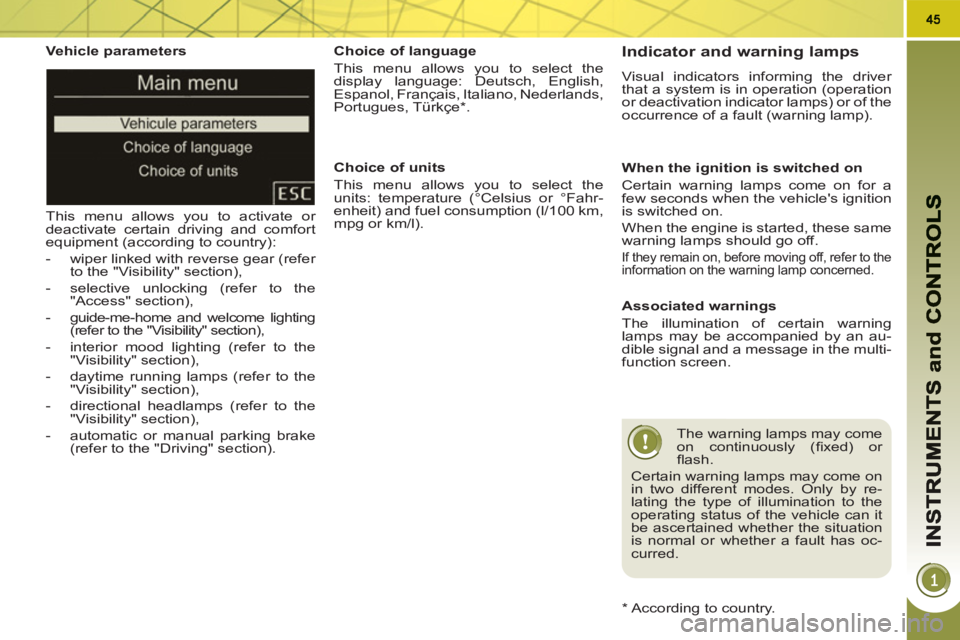
Vehicle parameters
This menu allows you to activate or
deactivate certain driving and comfort
equipment (according to country):
- wiper linked with reverse gear (refer
to the "Visibility" section),
- selective unlocking (refer to the
"Access" section),
- guide-me-home and welcome lighting
(refer to the "Visibility" section),
- interior mood lighting (refer to the
"Visibility" section),
- daytime running lamps (refer to the
"Visibility" section),
- directional headlamps (refer to the
"Visibility" section),
- automatic or manual parking brake
(refer to the "Driving" section).
Choice of units
This menu allows you to select the
units: temperature (°Celsius or °Fahr-
enheit) and fuel consumption (l/100 km,
mpg or km/l).
Choice of language
This menu allows you to select the
display language: Deutsch, English,
Espanol, Français, Italiano, Nederlands,
Portugues, Türkçe * .
*
According to country. Indicator and warning lamps
Visual indicators informing the driver
that a system is in operation (operation
or deactivation indicator lamps) or of the
occurrence of a fault (warning lamp).
When the ignition is switched on
Certain warning lamps come on for a
few seconds when the vehicle's ignition
is switched on.
When the engine is started, these same
warning lamps should go off.
If they remain on, before moving off, refer to the
information on the warning lamp concerned.
Associated warnings
The illumination of certain warning
lamps may be accompanied by an au-
dible signal and a message in the multi-
function screen.
The warning lamps may come
on continuously (fi xed) or
fl ash.
Certain warning lamps may come on
in two different modes. Only by re-
lating the type of illumination to the
operating status of the vehicle can it
be ascertained whether the situation
is normal or whether a fault has oc-
curred.
Page 51 of 280
49
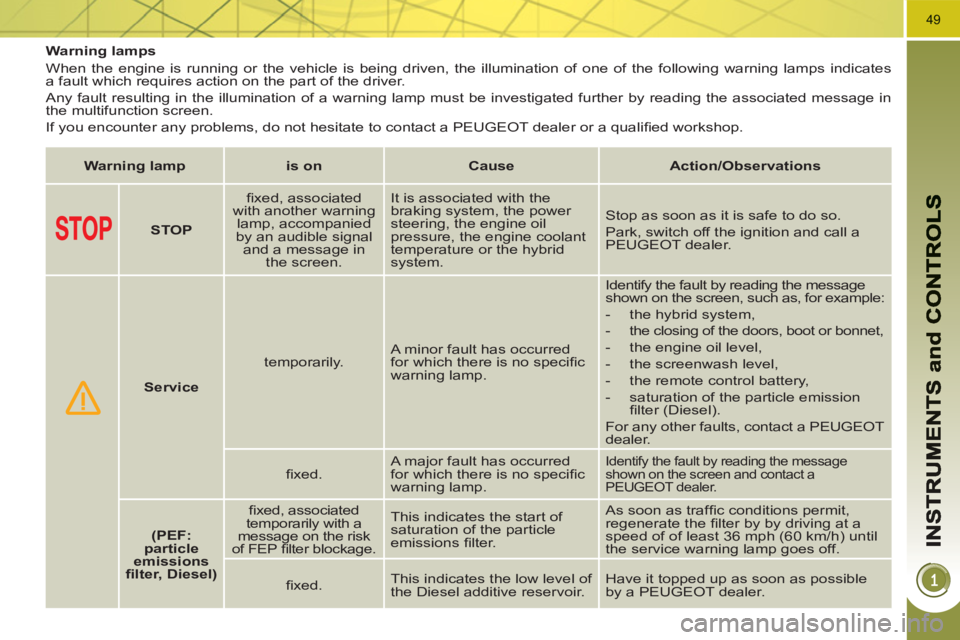
Warning lamps
When the engine is running or the vehicle is being driven, the illumination of one of the following warning lamps indicates
a fault which requires action on the part of the driver.
Any fault resulting in the illumination of a warning lamp must be investigated further by reading the associated message in
the multifunction screen.
If you encounter any problems, do not hesitate to contact a PEUGEOT dealer or a qualifi ed workshop.
Warning lamp
is on
Cause
Action/Observations
STOP
fi xed, associated
with another warning
lamp, accompanied
by an audible signal
and a message in
the screen. It is associated with the
braking system, the power
steering, the engine oil
pressure, the engine coolant
temperature or the hybrid
system. Stop as soon as it is safe to do so.
Park, switch off the ignition and call a
PEUGEOT dealer.
Service
temporarily. A minor fault has occurred
for which there is no specifi c
warning lamp. Identify the fault by reading the message
shown on the screen, such as, for example:
- the hybrid system,
- the closing of the doors, boot or bonnet,
- the engine oil level,
- the screenwash level,
- the remote control battery,
- saturation of the particle emission
fi lter (Diesel).
For any other faults, contact a PEUGEOT
dealer.
fi xed. A major fault has occurred
for which there is no specifi c
warning lamp.
Identify the fault by reading the message
shown on the screen and contact a
PEUGEOT dealer.
(PEF:
particle
emissions
fi lter, Diesel)
fi xed, associated
temporarily with a
message on the risk
of FEP fi lter blockage. This indicates the start of
saturation of the particle
emissions fi lter. As soon as traffi c conditions permit,
regenerate the fi lter by by driving at a
speed of of least 36 mph (60 km/h) until
the service warning lamp goes off.
fi xed. This indicates the low level of
the Diesel additive reservoir. Have it topped up as soon as possible
by a PEUGEOT dealer.
Page 53 of 280
51
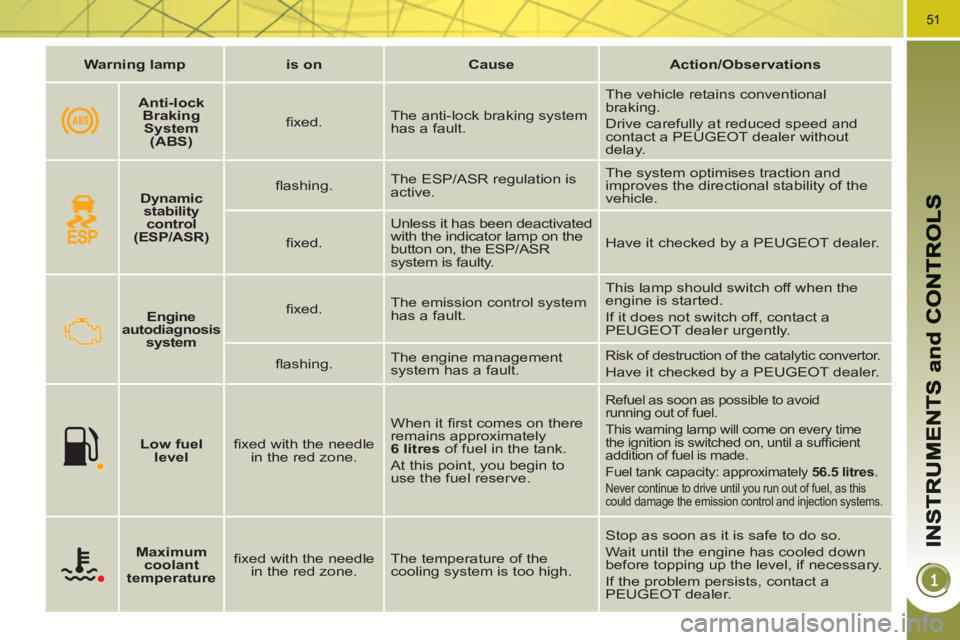
Warning lamp
is on
Cause
Action/Observations
Engine
autodiagnosis
system
fi xed. The emission control system
has a fault. This lamp should switch off when the
engine is started.
If it does not switch off, contact a
PEUGEOT dealer urgently.
fl ashing. The engine management
system has a fault.
Risk of destruction of the catalytic convertor.
Have it checked by a PEUGEOT dealer.
Low fuel
level
fi xed with the needle
in the red zone. When it fi rst comes on there
remains approximately
6 litres
of fuel in the tank.
At this point, you begin to
use the fuel reserve.
Refuel as soon as possible to avoid
running out of fuel.
This warning lamp will come on every time
the ignition is switched on, until a suffi cient
addition of fuel is made.
Fuel tank capacity: approximately 56.5 litres
.
Never continue to drive until you run out of fuel, as this
could damage the emission control and injection systems.
Maximum
coolant
temperature
fi xed with the needle
in the red zone. The temperature of the
cooling system is too high. Stop as soon as it is safe to do so.
Wait until the engine has cooled down
before topping up the level, if necessary.
If the problem persists, contact a
PEUGEOT dealer.
Dynamic
stability
control
(ESP/ASR)
fl ashing. The ESP/ASR regulation is
active. The system optimises traction and
improves the directional stability of the
vehicle.
fi xed. Unless it has been deactivated
with the indicator lamp on the
button on, the ESP/ASR
system is faulty. Have it checked by a PEUGEOT dealer.
Anti-lock
Braking
System
(ABS)
fi xed. The anti-lock braking system
has a fault. The vehicle retains conventional
braking.
Drive carefully at reduced speed and
contact a PEUGEOT dealer without
delay.
Page 57 of 280
55
Following this operation, if you
wish to disconnect the battery,
lock the vehicle and wait at
least fi ve minutes for the zero reset
to be taken into account.
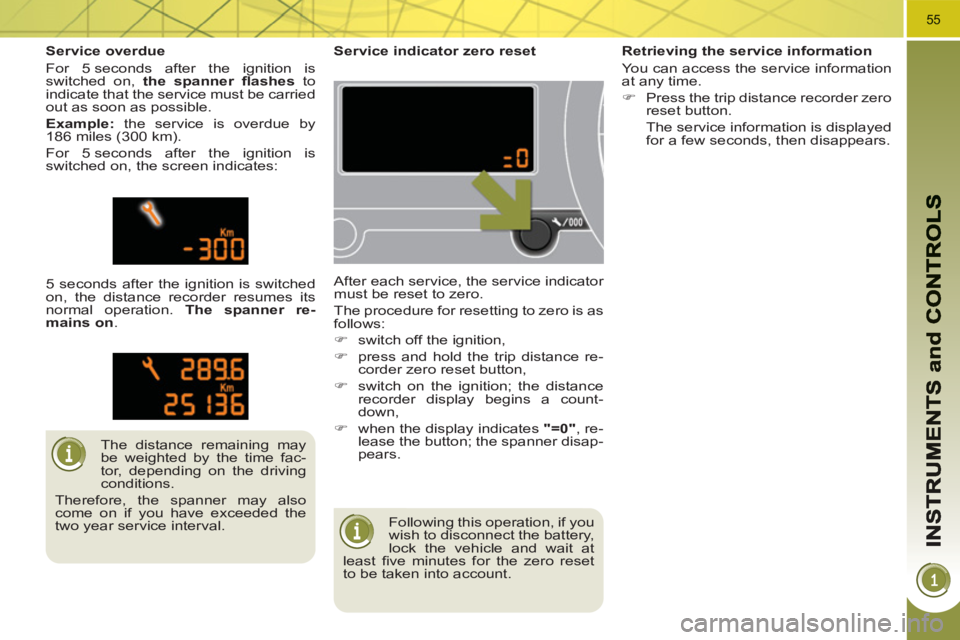
Service indicator zero reset
After each service, the service indicator
must be reset to zero.
The procedure for resetting to zero is as
follows:
)
switch off the ignition,
)
press and hold the trip distance re-
corder zero reset button,
)
switch on the ignition; the distance
recorder display begins a count-
down,
)
when the display indicates "=0"
, re-
lease the button; the spanner disap-
pears.
The distance remaining may
be weighted by the time fac-
tor, depending on the driving
conditions.
Therefore, the spanner may also
come on if you have exceeded the
two year service interval.
Service overdue
For 5 seconds after the ignition is
switched on, the spanner fl ashes
to
indicate that the service must be carried
out as soon as possible.
Example:
the service is overdue by
186 miles (300 km).
For 5 seconds after the ignition is
switched on, the screen indicates:
5 seconds after the ignition is switched
on, the distance recorder resumes its
normal operation. The spanner re-
mains on
.
Retrieving the service information
You can access the service information
at any time.
)
Press the trip distance recorder zero
reset button.
The service information is displayed
for a few seconds, then disappears.
Page 59 of 280
57
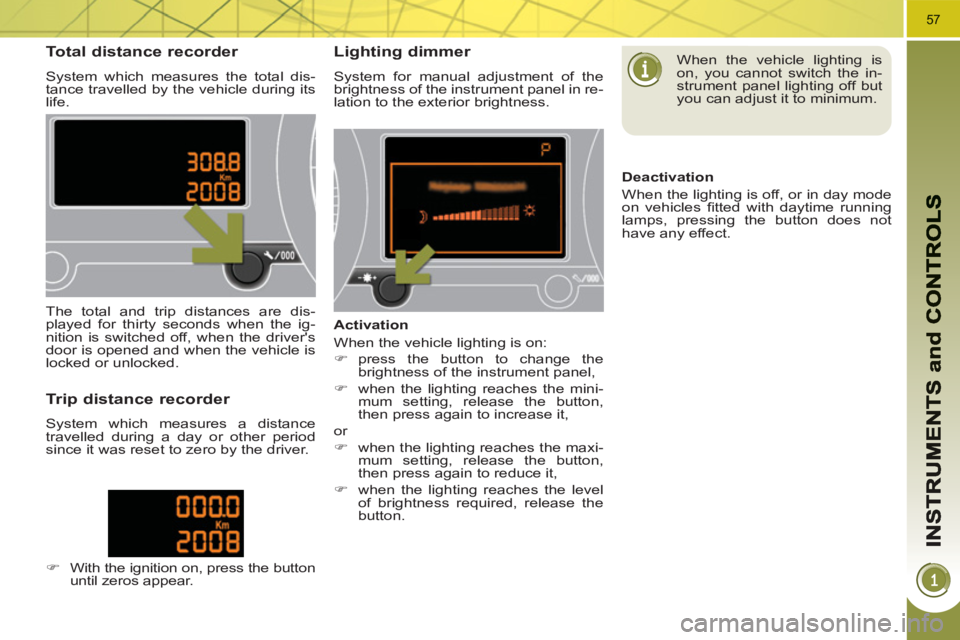
Total distance recorder
System which measures the total dis-
tance travelled by the vehicle during its
life.
Lighting dimmer
System for manual adjustment of the
brightness of the instrument panel in re-
lation to the exterior brightness.
The total and trip distances are dis-
played for thirty seconds when the ig-
nition is switched off, when the driver's
door is opened and when the vehicle is
locked or unlocked.
Trip distance recorder
System which measures a distance
travelled during a day or other period
since it was reset to zero by the driver.
)
With the ignition on, press the button
until zeros appear.
Activation
When the vehicle lighting is on:
)
press the button to change the
brightness of the instrument panel,
)
when the lighting reaches the mini-
mum setting, release the button,
then press again to increase it,
or
)
when the lighting reaches the maxi-
mum setting, release the button,
then press again to reduce it,
)
when the lighting reaches the level
of brightness required, release the
button.
When the vehicle lighting is
on, you cannot switch the in-
strument panel lighting off but
you can adjust it to minimum.
Deactivation
When the lighting is off, or in day mode
on vehicles fi tted with daytime running
lamps, pressing the button does not
have any effect.
Page 61 of 280
59
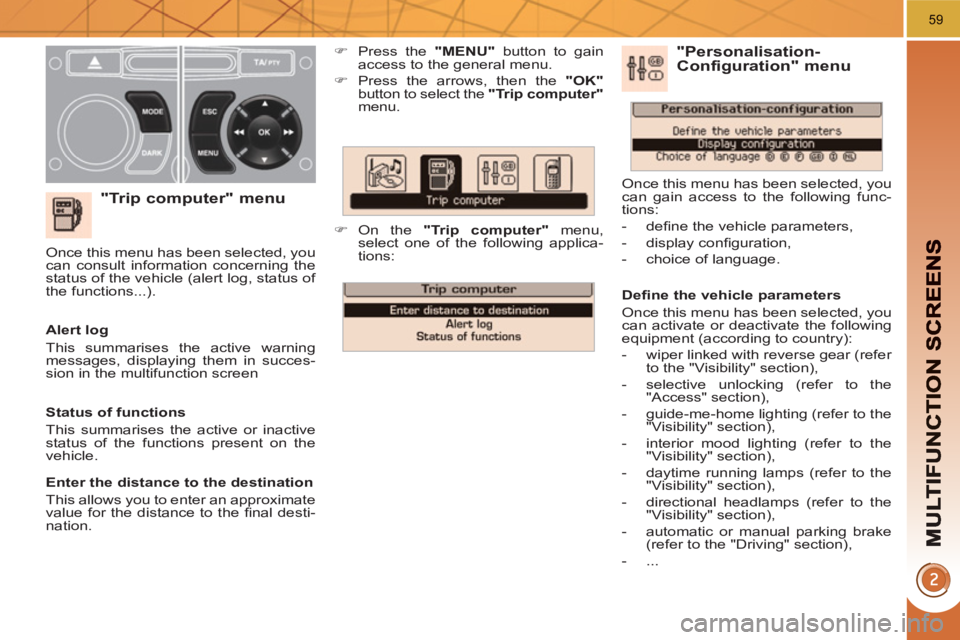
"Trip computer" menu
)
Press the "MENU"
button to gain
access to the general menu.
)
Press the arrows, then the "OK"
button to select the "Trip computer"
menu.
)
On the "Trip computer"
menu,
select one of the following applica-
tions:
Alert log
This summarises the active warning
messages, displaying them in succes-
sion in the multifunction screen Once this menu has been selected, you
can consult information concerning the
status of the vehicle (alert log, status of
the functions...).
Defi ne the vehicle parameters
Once this menu has been selected, you
can activate or deactivate the following
equipment (according to country):
- wiper linked with reverse gear (refer
to the "Visibility" section),
- selective unlocking (refer to the
"Access" section),
- guide-me-home lighting (refer to the
"Visibility" section),
- interior mood lighting (refer to the
"Visibility" section),
- daytime running lamps (refer to the
"Visibility" section),
- directional headlamps (refer to the
"Visibility" section),
- automatic or manual parking brake
(refer to the "Driving" section),
- ...
"Personalisation-
Configuration" menu
Once this menu has been selected, you
can gain access to the following func-
tions:
- defi ne the vehicle parameters,
- display confi guration,
- choice of language.
Status of functions
This summarises the active or inactive
status of the functions present on the
vehicle.
Enter the distance to the destination
This allows you to enter an approximate
value for the distance to the fi nal desti-
nation.