2011 PEUGEOT 207 reset
[x] Cancel search: resetPage 205 of 248
203
10
1
TRIP COMPUTER
TRIP COMPUTER
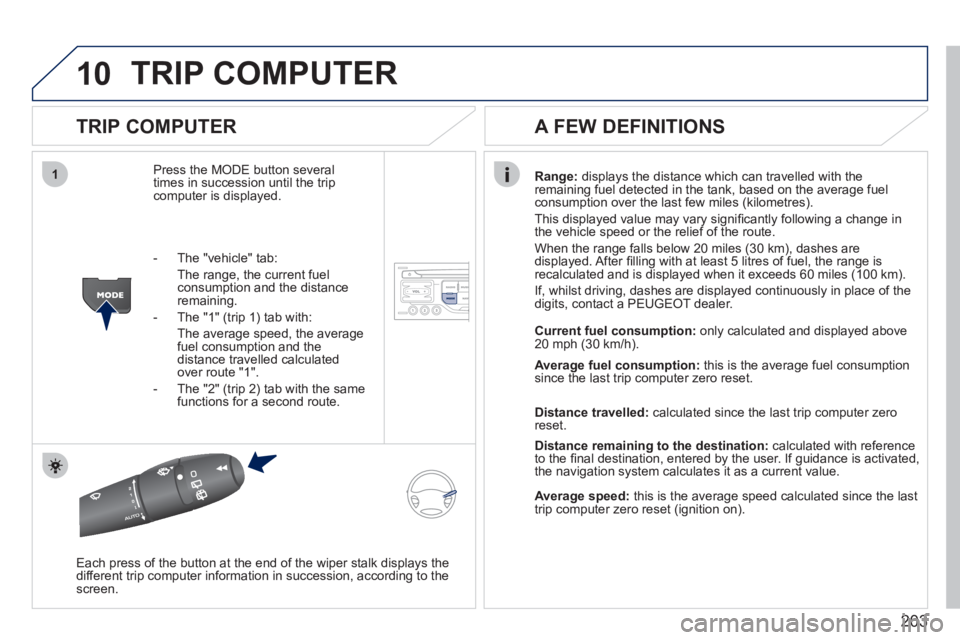
Press the MODE button several
times in succession until the tripcomputer is displayed.
Range: displays the distance which can travelled with the
remaining fuel detected in the tank, based on the average fuelconsumption over the last few miles (kilometres).
This displa
yed value may vary signifi cantly following a change in
the vehicle speed or the relief of the route.
When the range
falls below 20 miles (30 km), dashes are
displayed. After fi lling with at least 5 litres of fuel, the range is
recalculated and is displayed when it exceeds 60 miles (100 km).
If, whilst drivin
g, dashes are displayed continuously in place of the
digits, contact a PEUGEOT dealer.
Each press o
f the button at the end of the wiper stalk displays the
different trip computer information in succession, according to thescreen.
A FEW DEFINITIONS
- The "vehicle" tab:
The ran
ge, the current fuel consumption and the distance
remaining.
- The "1"
(trip 1) tab with:
The average speed, the average fuel consumption and thedistance travelled calculated over route "1".
- The "2"
(trip 2) tab with the same
functions for a second route.Current fuel consum
ption:only calculated and displayed above
20 mph (30 km/h).
Average fuel consumption: this is the average fuel consumption
since the last trip computer zero reset.
Distance travelled: calculated since the last trip computer zero
reset.
Distance remaining to the destination:calculated with referenceto the fi nal destination, entered by the user. If guidance is activated,
the navigation system calculates it as a current value.
Average speed:this is the average speed calculated since the last
trip computer zero reset (ignition on).
Page 206 of 248
204
11
RADIO
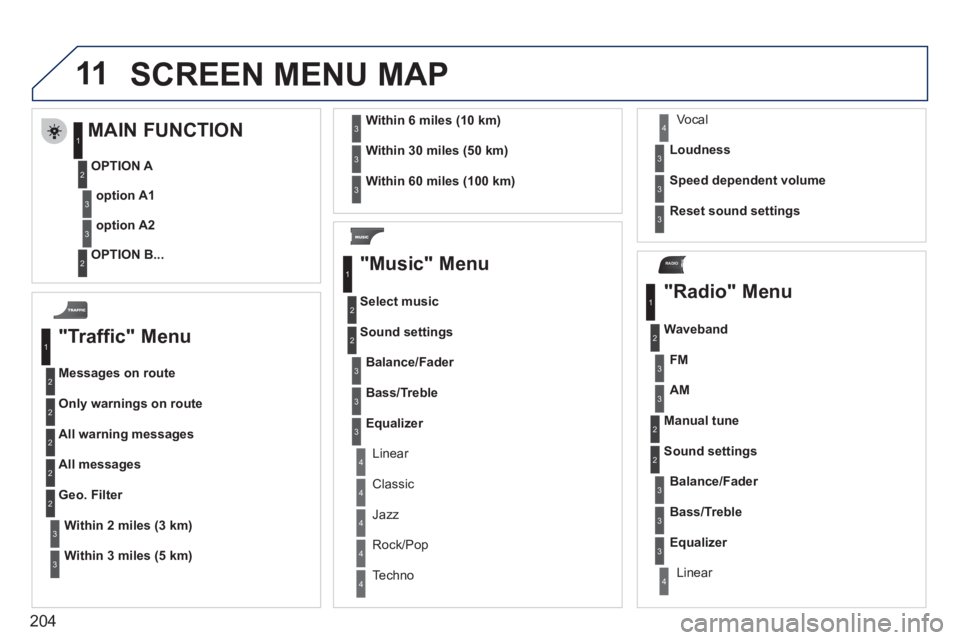
SCREEN MENU MAP
"Traffic" Menu
Messages on route
Onl
y warnings on route
All warning messages
All messages
Within2 miles (3 km)
Geo. Filter
Within
3 miles (5 km)
Within6 miles (10 km)
Within30 miles (50 km)
Within 60 miles (100 km)
"Music" Menu
Select music
Sound settin
gs
Balance/Fade
r
Bass/Treble
Linear
Equalizer
Classic
Jazz
Rock/Po
p
Techno
Vocal
Loudness
S
peed dependent volume
Reset sound settings
"Radio" Menu
Waveband
A
M
Linear F
M
Manual tune
Sound settin
gs
Balance
/Fader
Bass
/Treble
Equalizer
MAIN FUNCTION
OPTION A
option A1
option A2
OPTION B...
1
2
3
1
2
4
1
2
3
4
3
3
3
3
2
2
2
2
4
4
4
4
4
3
3
3
3
3
2
3
2
2
3
3
3
3
1
2
3
2
3
Page 207 of 248

205
Abort guidance/Resume guidance
Destination input Geo
position
Ma
p
Stopovers
Add stopover
Navi
gate HOME
Choose from address book Rearran
ge route
Choose from last destinations Replace stopover
Delete stopover
Recalculate
Fast route
Short route
Optimized route
POI search
POI nearby
Route options
Route t
ype
Short route F
ast route
"Navigation" Menu
City
Street
Enter new address
Country
Navigate HOME Cit
y district
H
ouse number Start route
guidance
P
ostal code
Save to address book
Int
ersection
Address in
put
POI near destination
POI in city
POI in country
POI near route
Choose from address book
3
3
Choose from last destinations
TMC station information Lou
dness
S
peed dependent volume
Reset sound settings
3
3
3
1
2
4
4
4
4
4
4
4
4
4
4
4
3
2
3
3
2
3
4
4
4
4
3
3
3
3
4
4
4
2
4
2
3
3
3
3
3
3
4
Classic
Jazz
Rock/Pop
Techno
Vocal
4
4
4
4
4
Page 209 of 248
207
* Available according to model. D
ark blue
Map colour
Ni
ght mode for map
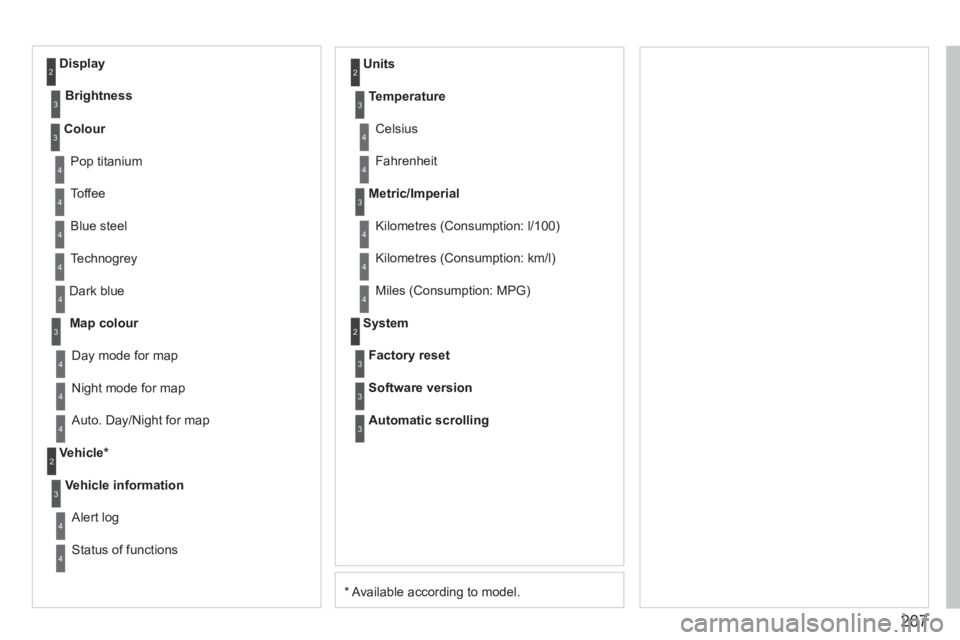
Units
Da
y mode for map
Vehicle *
Vehicle information
Alert log
Status of functions
Temperature
Celsius
F
ahrenheit
Metric/Imperial
Kilometres (Consumption: l/100)
Kilometres
(Consumption: km/l)
Miles
(Consumption: MPG)
System
Auto. Day/Night for map Factor
y reset
Software version
Automatic scrolling
3
4
4
2
4
3
4
4
2
3
4
4
3
4
4
4
2
4
3
3
3
Colour
Pop titanium
T
offee
Bl
ue steel
Techno
grey
3
4
4
4
4
Display
Brightness
2
3
Page 229 of 248
227
11
08
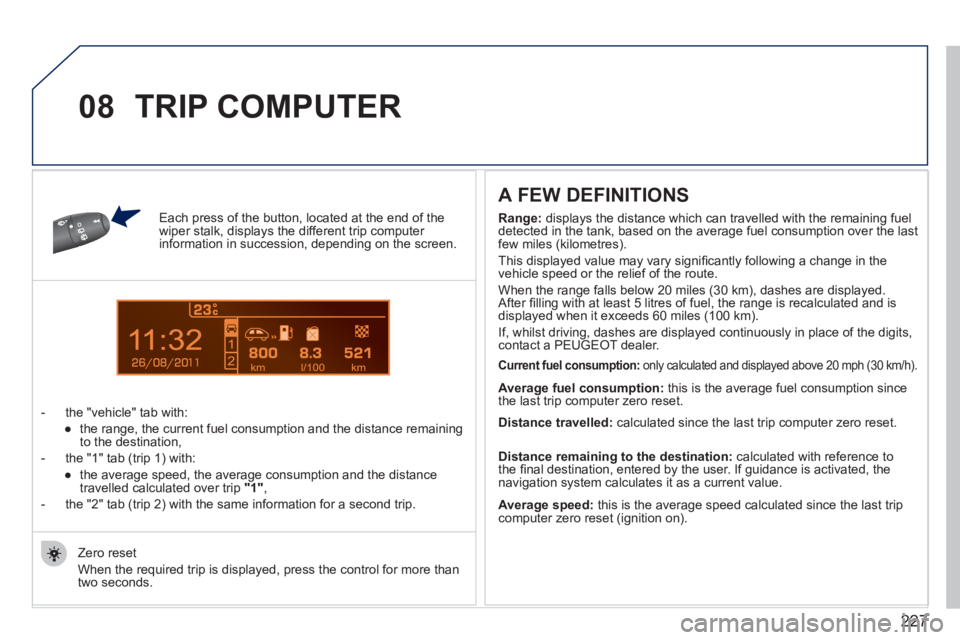
Each press of the button, located at the end of the wiper stalk, displays the different trip computer information in succession, depending on the screen.
- t
he "vehicle" tab with:
●
the ran
ge, the current fuel consumption and the distance remainingto the destination,
- the "1" tab
(trip 1) with:
●
the avera
ge speed, the average consumption and the distance
travelled calculated over trip "1",
- the "2" tab
(trip 2) with the same information for a second trip.
A FEW DEFINITIONS
Zero reset
When the required trip is displa
yed, press the control for more than
two seconds.
TRIP COMPUTER
Range:
displays the distance which can travelled with the remaining fuel
detected in the tank, based on the average fuel consumption over the last few miles (kilometres).
This displayed value may vary signi
fi cantly following a change in the
vehicle speed or the relief of the route.
When the ran
ge falls below 20 miles (30 km), dashes are displayed.
After fi lling with at least 5 litres of fuel, the range is recalculated and is
displayed when it exceeds 60 miles (100 km).
If, whilst drivin
g, dashes are displayed continuously in place of the digits,contact a PEUGEOT dealer.
Current fuel consumption: only calculated and displayed above 20 mph (30 km/h).
Average fuel consumption:
this is the average fuel consumption since
the last trip computer zero reset.
Average speed: this is the average speed calculated since the last trip computer zero reset (ignition on).
Distance travelled:
calculated since the last trip computer zero reset.
Distance remaining to the destination:calculated with reference to
the fi nal destination, entered by the user. If guidance is activated, the
navigation system calculates it as a current value.
Page 244 of 248

242
ALPHABETICAL INDEX
Navigation.......................................185Number plate lamps ...............144,146
Oil change ......................................128Oil filter...........................................r130Oil level .....................................30,128Opening the bonnet ........................124Opening the boot........................76,77Opening the doors............................74
Radio......................................195, 217Rear foglamps..................82,144, 146Rear head restraints.........................54Rear parcel shelf..............................f64Rear quarter panel windows............73
Paint colour code............................175Panoramic sunroof...........................f78Parking brake .........................112, 130Parking sensors ..............................121Particle emission filter....................r130Passenger compartment filter........r130Petrol engine ............................80, 126PEUGEOT CONNECT ASSISTA NCE..............................178Peugeot Connect
Navigation.....................40, 182, 204PEUGEOT CONNECT SOS ..........178Peugeot Connect Sound...........35,37,155,214,215,228, 230Peugeot Connect USB.....................60Player, CD MP3 ......................197, 219Priming the fuel system..................125Protecting children.....90,93,94,96-99Puncture.........................................132
Rear screen (demisting).....................................49Rear seats..................................54,56Rear view mirror...............................r58Recharging the battery ...................153Reduction of electrical load ............155Refitting a wheel .............................137Reinitialising the electric
windows.........................................72Reinitialising the remote control............................................70Remote control...........................68,71Removing a wheel ..........................137Removing the mat ............................60Repair kit, puncture ........................132Replacing bulbs..............142,144,146Replacing fuses ..............................148Replacing the air filter....................r130Replacing the oil filter.....................r130Replacing the particleemission filter..............................r130Replacing the passenger compartment filter.......................r130Replacing wiper blades ..................155Resetting the service indicator.........................................r29Resetting the trip recorder................r32Rev counter......................................r19Reversing lamps.....................144,146Roof bars ........................................159Roof blind.........................................78Routine checks ...............................130Routine maintenance .......................17Running out of fuel (Diesel) ........................................125
Main beam ................................82,142Manual gearbox ..............112,113,130Map reading lamps...........................89Markings, identification ...................175Mat....................................................60Menu, main.....................................216Mini fuel level....................................79Misfuel prevention............................81Monitoring .........................................19Monochrome screen.......216,228,230Motorway function(direction indicators) ....................101Mountings for ISOFIX seats .............96MP3 CD..................................197,219Multifunction screen (with audio equipment) ......35,37,40Multifunction screen (without audio equipment) .............33Music media players.......................196
M
N
O
P
R
Opening the fuel filler flap ................79Opening the panoramicsunroof blind..................................78Operation indicator lamps ..........20, 22