FRONT WIPER AND WASHER SYSTEMWW-13
< SERVICE INFORMATION >
C
DE
F
G H
I
J
L
M A
B
WW
N
O P
ACTIVE TEST
Display Item List
CONSULT-III Function (IPDM E/R)INFOID:0000000005929216
CONSULT-III can display each diagnostic item using the diagnostic test modes shown following.
DATA MONITOR
All Signals, Main Signals, Selection From Menu
NOTE:
FR WIPER LOW “ON/OFF” Displays “FRONT WIPER LOW (ON)/Other (OFF)” status as judged from combination switch
(wiper switch) signal.
FR WIPER INT “ON/OFF”Displays “FRONT WIPER INT (ON)
/Other (OFF)” status as judged from combination switch
(wiper switch) signal.
FR WASHER SW “ON/OFF” Displays “FRONT WASHER Swit
ch (ON)/Other (OFF)” status as judged from combination
switch (wiper switch) signal.
INT VOLUME “1 - 7”Displays intermittent operation dial position setting (1 - 7) as judged from combination switch
(wiper switch) signal.
FR WIPER STOP “ON/OFF” Displays “Stopped (ON)/Operati ng (OFF)” status as judged from auto-stop signal.
VEHICLE SPEED “km/h” Displays vehicle speed stat us as judged from vehicle speed signal.
RR WIPER ON “ON/OFF”Displays “REAR WIPER (ON)/Other (OFF)” status as judged from combination switch (wiper
switch) signal.
RR WIPER INT “ON/OFF” Displays “REAR WIPER INT (ON)/Other (OFF)” status as judged from combination switch (wip-
er switch) signal.
RR WASHER SW “ON/OFF” Displays “FRONT WASHER Swit
ch (ON)/Other (OFF)” status as judged from combination
switch (wiper switch) signal.
RR WIPER STOP “ON/OFF” Displays “Stopp ed (ON)/Operating (OFF)” status as judged from auto-stop switch 1.
RR WIPER STP2 “ON/OFF” Displays “Stopp ed (ON)/Operating (OFF)” status as judged from auto-stop switch 2.
Monitor item
Contents
Test item Display on CONSULT-III screen Description
Front wiper output FR WIPEROperates front wiper in (INT), (LO), or (HI).
Rear wiper output RR WIPEROperates rear wiper in (ON) or (OFF)
IPDM E/R diagnostic Mode Description
SELF DIAGNOSTIC RESULT Displays IPDM E/R self-diagnosis results.
DATA MONITOR Displays IPDM E/R input/output data in real time.
CAN DIAG SUPPORT MNTR The result of transmit/receive diagnosis of CAN communication can be read. ACTIVE TEST Operation of electrical loads can be checked by sending drive signal to them.
ALL SIGNALS Monitors all items.
MAIN SIGNALS Monitor the predetermined item.
SELECTION FROM MENU Selects items and monitors them.
Item name CONSULT-III
screen display Display or unit Monitor item selection
Description
ALL
SIGNALS MAIN
SIGNALS SELECTION
FROM MENU
FR wiper request FR WIP REQ STOP/1LOW/
LOW/HI×× ×
Signal status input from BCM
Wiper auto stop WIP AUTO STOP ACT P/STOP P ×× ×Output status of IPDM E/R
Wiper protection WIP PROT OFF/BLOCK ×× ×Control status of IPDM E/R
Revision: May 2010 2011 Versa
WW-14
< SERVICE INFORMATION >
FRONT WIPER AND WASHER SYSTEM
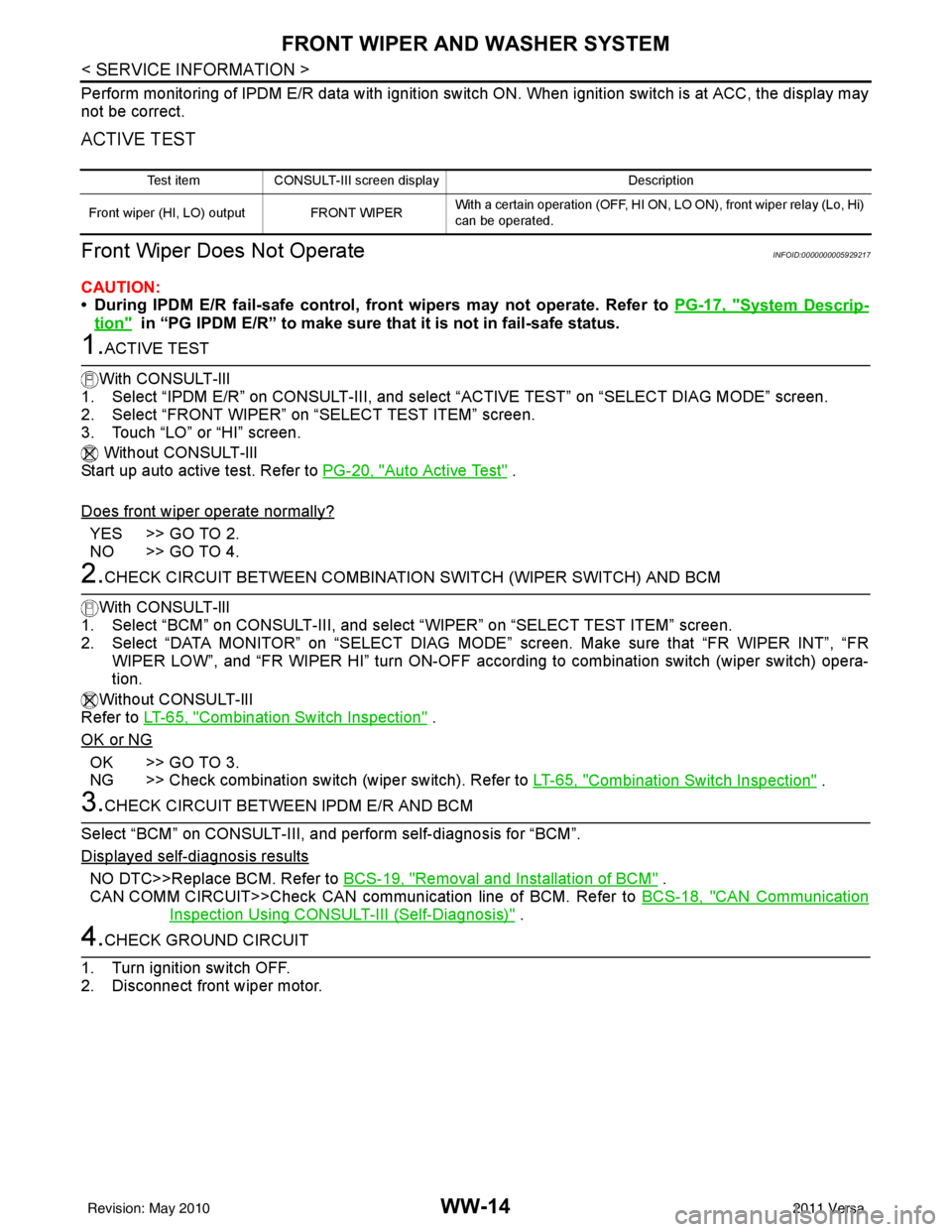
Perform monitoring of IPDM E/R data with ignition switch ON. When ignition switch is at ACC, the display may
not be correct.
ACTIVE TEST
Front Wiper Does Not OperateINFOID:0000000005929217
CAUTION:
• During IPDM E/R fail-safe control, front wipers may not operate. Refer to PG-17, "
System Descrip-
tion" in “PG IPDM E/R” to make sure that it is not in fail-safe status.
1.ACTIVE TEST
With CONSULT-lIl
1. Select “IPDM E/R” on CONSULT-III, and sele ct “ACTIVE TEST” on “SELECT DIAG MODE” screen.
2. Select “FRONT WIPER” on “SELECT TEST ITEM” screen.
3. Touch “LO” or “HI” screen.
Without CONSULT-lIl
Start up auto active test. Refer to PG-20, "
Auto Active Test" .
Does front wiper operate normally?
YES >> GO TO 2.
NO >> GO TO 4.
2.CHECK CIRCUIT BETWEEN COMBINATION SWITCH (WIPER SWITCH) AND BCM
With CONSULT-llI
1. Select “BCM” on CONSULT-III, and sele ct “WIPER” on “SELECT TEST ITEM” screen.
2. Select “DATA MONITOR” on “SELECT DIAG MODE ” screen. Make sure that “FR WIPER INT”, “FR
WIPER LOW”, and “FR WIPER HI” turn ON-OFF accord ing to combination switch (wiper switch) opera-
tion.
Without CONSULT-lIl
Refer to LT-65, "
Combination Switch Inspection" .
OK or NG
OK >> GO TO 3.
NG >> Check combination switch (wiper switch). Refer to LT-65, "
Combination Switch Inspection" .
3.CHECK CIRCUIT BETWEEN IPDM E/R AND BCM
Select “BCM” on CONSULT-III, and perform self-diagnosis for “BCM”.
Displayed self
-diagnosis results
NO DTC>>Replace BCM. Refer to BCS-19, "Removal and Installation of BCM" .
CAN COMM CIRCUIT>>Check CAN communi cation line of BCM. Refer to BCS-18, "
CAN Communication
Inspection Using CONSULT-III (Self-Diagnosis)" .
4.CHECK GROUND CIRCUIT
1. Turn ignition switch OFF.
2. Disconnect front wiper motor.
Test item CONSULT-III screen display Description
Front wiper (HI, LO) output FRONT WIPER With a certain operation (OFF, HI ON,
LO ON), front wiper relay (Lo, Hi)
can be operated.
Revision: May 2010 2011 Versa