Page 3081 of 3787
FRONT FOG LAMPLT-49
< SERVICE INFORMATION >
C
DE
F
G H
I
J
L
M A
B
LT
N
O P
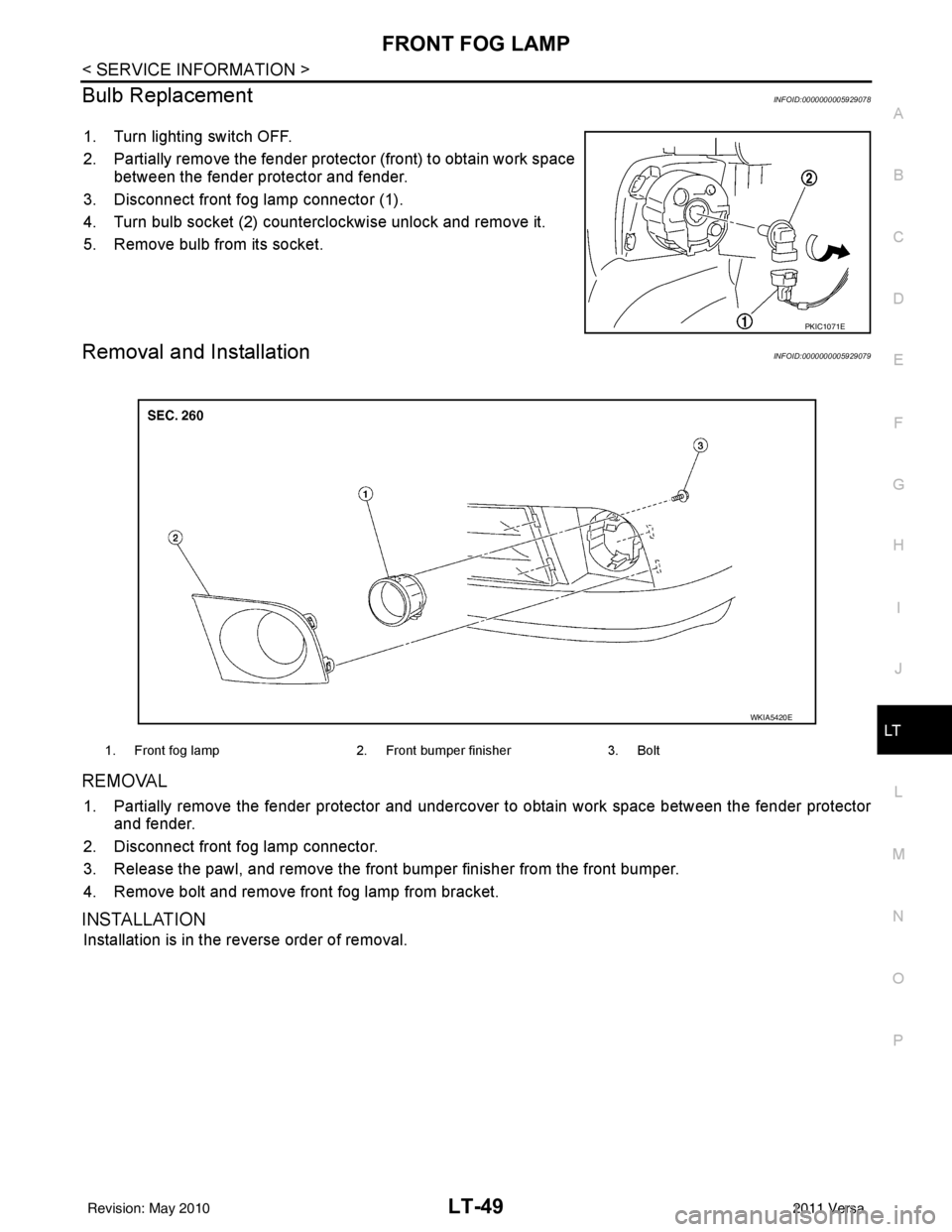
Bulb ReplacementINFOID:0000000005929078
1. Turn lighting switch OFF.
2. Partially remove the fender protec tor (front) to obtain work space
between the fender protector and fender.
3. Disconnect front fog lamp connector (1).
4. Turn bulb socket (2) counterclockwise unlock and remove it.
5. Remove bulb from its socket.
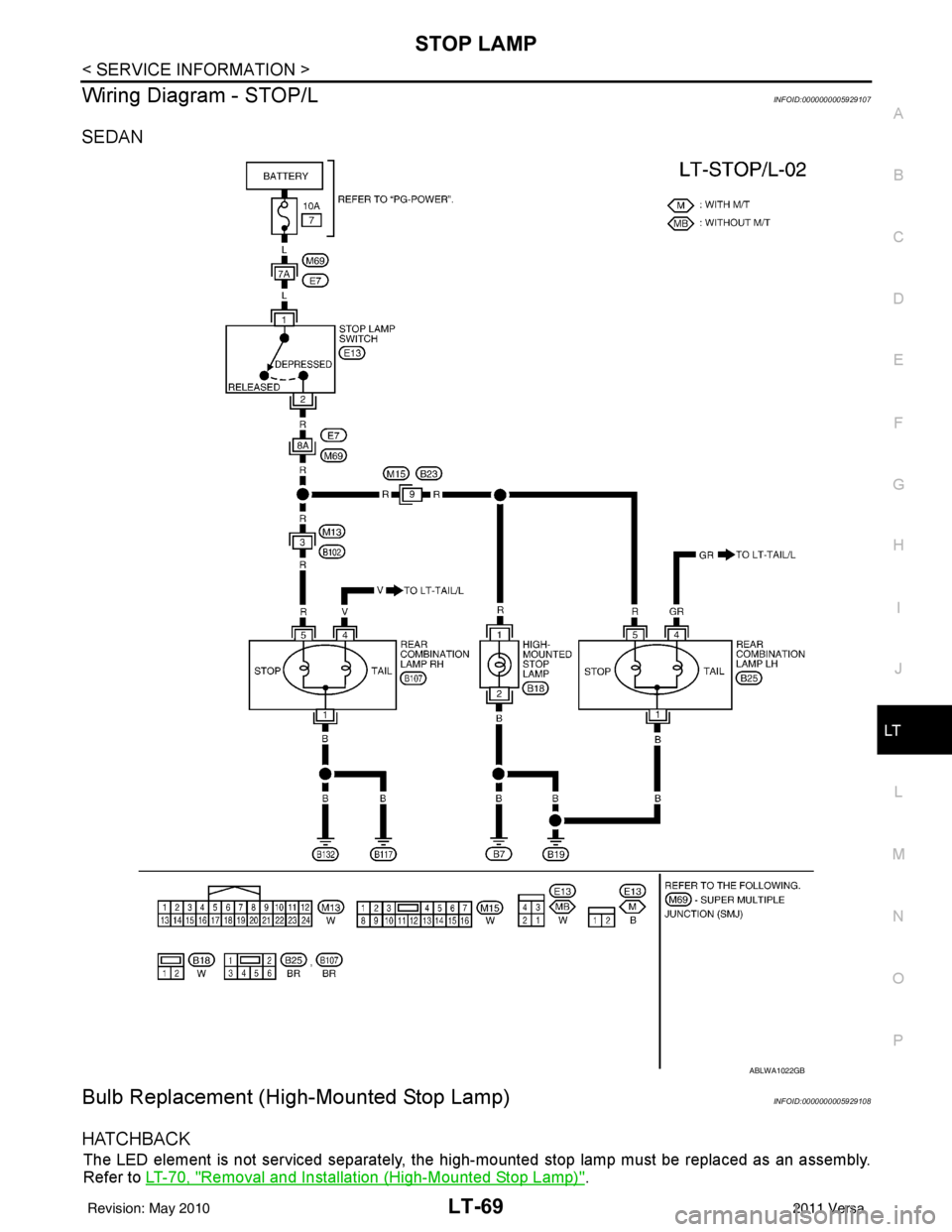
Removal and InstallationINFOID:0000000005929079
REMOVAL
1. Partially remove the fender protector and undercover to obtain work space between the fender protector
and fender.
2. Disconnect front fog lamp connector.
3. Release the pawl, and remove the front bumper finisher from the front bumper.
4. Remove bolt and remove front fog lamp from bracket.
INSTALLATION
Installation is in the reverse order of removal.
PKIC1071E
1. Front fog lamp 2. Front bumper finisher3. Bolt
WKIA5420E
Revision: May 2010 2011 Versa
Page 3090 of 3787
LT-58
< SERVICE INFORMATION >
TURN SIGNAL AND HAZARD WARNING LAMPS
3. Perform the preliminary check. Refer to LT-58, "Preliminary Check" .
4. Check symptom and repair or replace the cause of the malfunction.
5. Do turn signal and hazard warning lamps operate no rmally? If YES, GO TO 6. If NO, GO TO 4.
6. INSPECTION END
Preliminary CheckINFOID:0000000005929087
CHECK POWER SUPPLY AND GROUND CIRCUIT FOR BCM
Refer to BCS-16, "BCM Power Supply and Ground Circuit Inspection" .
CONSULT-III Function (BCM)INFOID:0000000005929088
Refer to BCS-17, "CONSULT-III Function (BCM)" .
Turn Signals Do Not OperateINFOID:0000000005929089
1.CHECK COMBINATION SWITCH (LIGHTING AND TURN SIGNAL SWITCH) INPUT SIGNAL
With CONSULT-III
1. Select “BCM” on CONSULT-III. Select “FLASHER” on “SELECT TEST ITEM” screen.
2. Select “DATA MONITOR” on “SELECT DIAG MODE ” screen. Make sure that “TURN SIGNAL R” and
“TURN SIGNAL L” turns ON-OFF linked with operation of lighting switch.
Without CONSULT-III
Refer to LT-65, "
Combination Switch Inspection" .
OK or NG
OK >> Replace the BCM. BCS-19, "Removal and Installation of BCM"
NG >> Check combination switch (lighting and turn signal switch). Refer to LT-65, "Combination Switch
Inspection" .
Front Turn Signal Lamp Does Not OperateINFOID:0000000005929090
1.CHECK BULB
Verify the bulb standard of each turn signal lamp is correct. Refer to LT-116, "
Exterior Lamp" .
OK or NG
OK >> GO TO 2.
NG >> Replace turn signal lamp bulb. Refer to LT-61, "
Bulb Replacement for Front Turn Signal Lamp" .
2.CHECK FRONT TURN SIGNAL LAMP CIRCUIT
1. Turn ignition switch OFF.
2. Disconnect BCM connector and front combination lamp LH or RH connector.
3. Check continuity between BCM harness connector M20 (A) ter- minal 60 and front combination lamp LH harness connector E29
(B) terminal 4.
4. Check continuity between BCM harness connector M20 terminal 61 (A) and front combination lamp RH harness connector E30
(B) terminal 4.
OK or NG
When turn signal switch is
right position : TURN SIGNAL R ON
When turn signal switch is
left position : TURN SIGNAL L ON
60 - 4
: Continuity should exist.
61 - 4 : Continuity should exist.
WKIA5612E
Revision: May 2010 2011 Versa
Page 3091 of 3787
TURN SIGNAL AND HAZARD WARNING LAMPSLT-59
< SERVICE INFORMATION >
C
DE
F
G H
I
J
L
M A
B
LT
N
O P
OK >> GO TO 3.
NG >> Repair harness or connector.
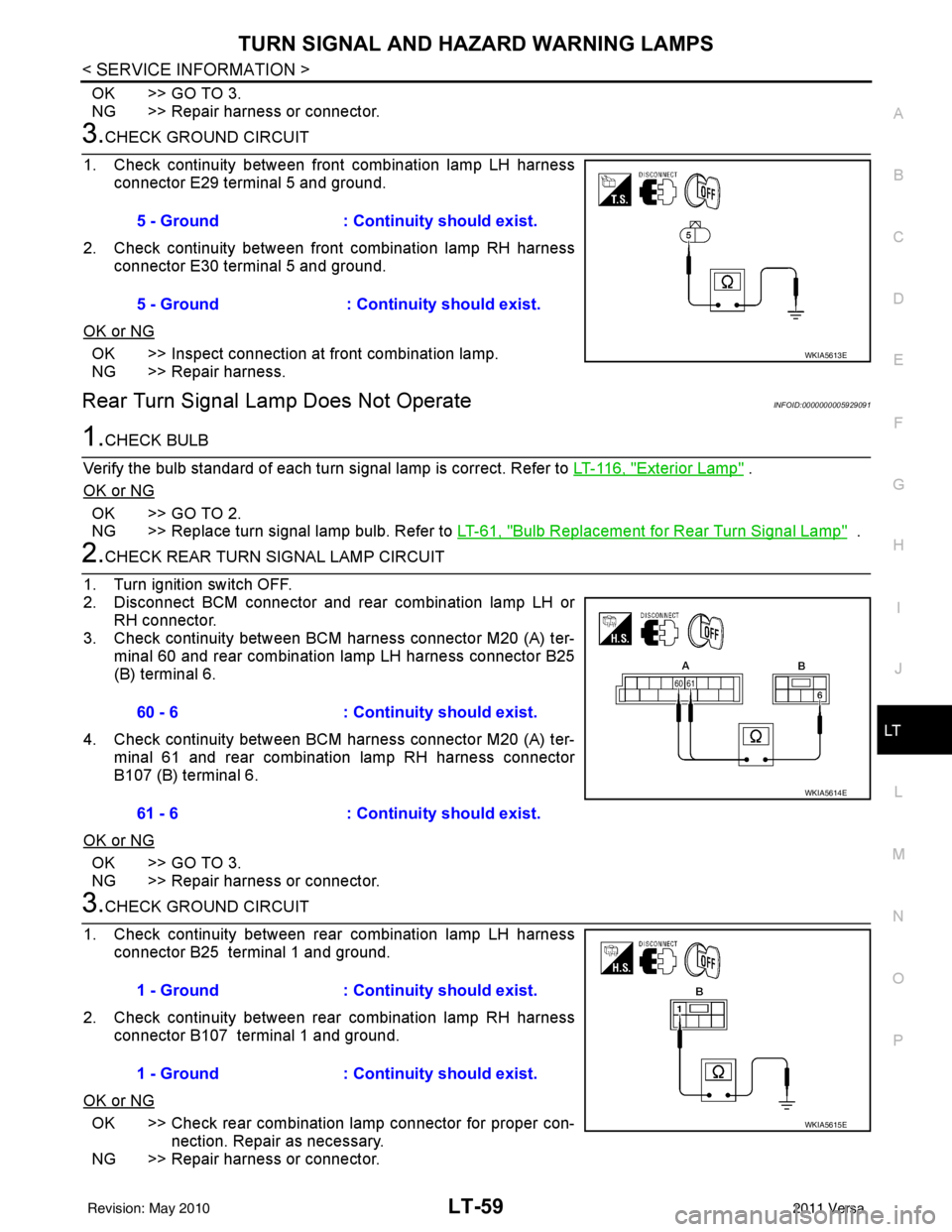
3.CHECK GROUND CIRCUIT
1. Check continuity between front combination lamp LH harness connector E29 terminal 5 and ground.
2. Check continuity between front combination lamp RH harness connector E30 terminal 5 and ground.
OK or NG
OK >> Inspect connection at front combination lamp.
NG >> Repair harness.
Rear Turn Signal Lamp Does Not OperateINFOID:0000000005929091
1.CHECK BULB
Verify the bulb standard of each turn signal lamp is correct. Refer to LT-116, "
Exterior Lamp" .
OK or NG
OK >> GO TO 2.
NG >> Replace turn signal lamp bulb. Refer to LT-61, "
Bulb Replacement for Rear Turn Signal Lamp" .
2.CHECK REAR TURN SIGNAL LAMP CIRCUIT
1. Turn ignition switch OFF.
2. Disconnect BCM connector and rear combination lamp LH or RH connector.
3. Check continuity between BCM harness connector M20 (A) ter- minal 60 and rear combination lamp LH harness connector B25
(B) terminal 6.
4. Check continuity between BCM harness connector M20 (A) ter- minal 61 and rear combination lamp RH harness connector
B107 (B) terminal 6.
OK or NG
OK >> GO TO 3.
NG >> Repair harness or connector.
3.CHECK GROUND CIRCUIT
1. Check continuity between rear combination lamp LH harness connector B25 terminal 1 and ground.
2. Check continuity between rear combination lamp RH harness connector B107 terminal 1 and ground.
OK or NG
OK >> Check rear combination lamp connector for proper con- nection. Repair as necessary.
NG >> Repair harness or connector. 5 - Ground : Continuity should exist.
5 - Ground : Continuity should exist.
WKIA5613E
60 - 6
: Continuity should exist.
61 - 6 : Continuity should exist.
WKIA5614E
1 - Ground: Continuity should exist.
1 - Ground : Continuity should exist.
WKIA5615E
Revision: May 2010 2011 Versa
Page 3093 of 3787
TURN SIGNAL AND HAZARD WARNING LAMPSLT-61
< SERVICE INFORMATION >
C
DE
F
G H
I
J
L
M A
B
LT
N
O P
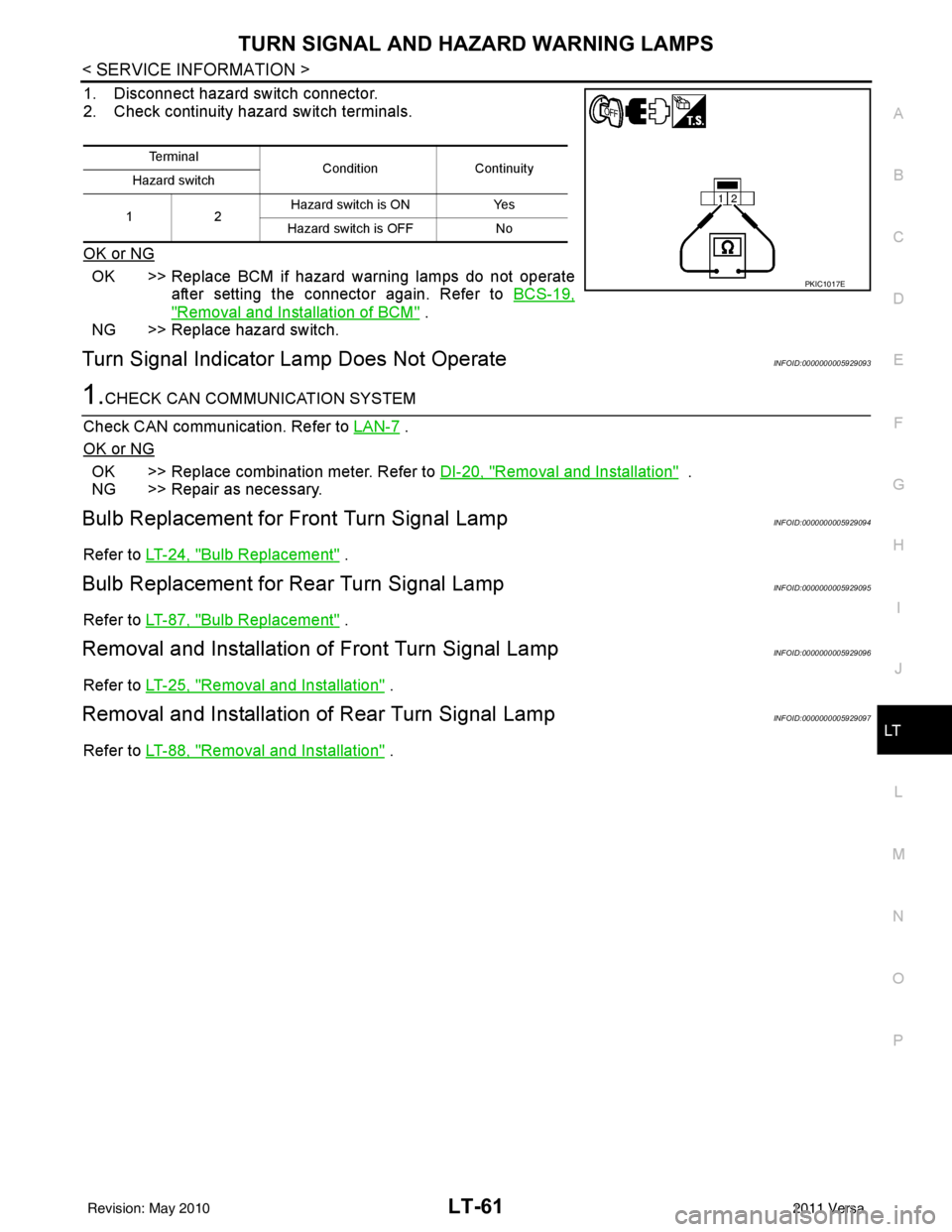
1. Disconnect hazard switch connector.
2. Check continuity hazard switch terminals.
OK or NG
OK >> Replace BCM if hazard warning lamps do not operate after setting the connector again. Refer to BCS-19,
"Removal and Installation of BCM" .
NG >> Replace hazard switch.
Turn Signal Indicator Lamp Does Not OperateINFOID:0000000005929093
1.CHECK CAN COMMUNICATION SYSTEM
Check CAN communication. Refer to LAN-7
.
OK or NG
OK >> Replace combination meter. Refer to DI-20, "Removal and Installation" .
NG >> Repair as necessary.
Bulb Replacement for Front Turn Signal LampINFOID:0000000005929094
Refer to LT-24, "Bulb Replacement" .
Bulb Replacement for Rear Turn Signal LampINFOID:0000000005929095
Refer to LT-87, "Bulb Replacement" .
Removal and Installation of Front Turn Signal LampINFOID:0000000005929096
Refer to LT-25, "Removal and Installation" .
Removal and Installation of Rear Turn Signal LampINFOID:0000000005929097
Refer to LT-88, "Removal and Installation" .
Te r m i n a l
Condition Continuity
Hazard switch
12 Hazard switch is ON
Yes
Hazard switch is OFF No
PKIC1017E
Revision: May 2010 2011 Versa
Page 3101 of 3787
STOP LAMPLT-69
< SERVICE INFORMATION >
C
DE
F
G H
I
J
L
M A
B
LT
N
O P
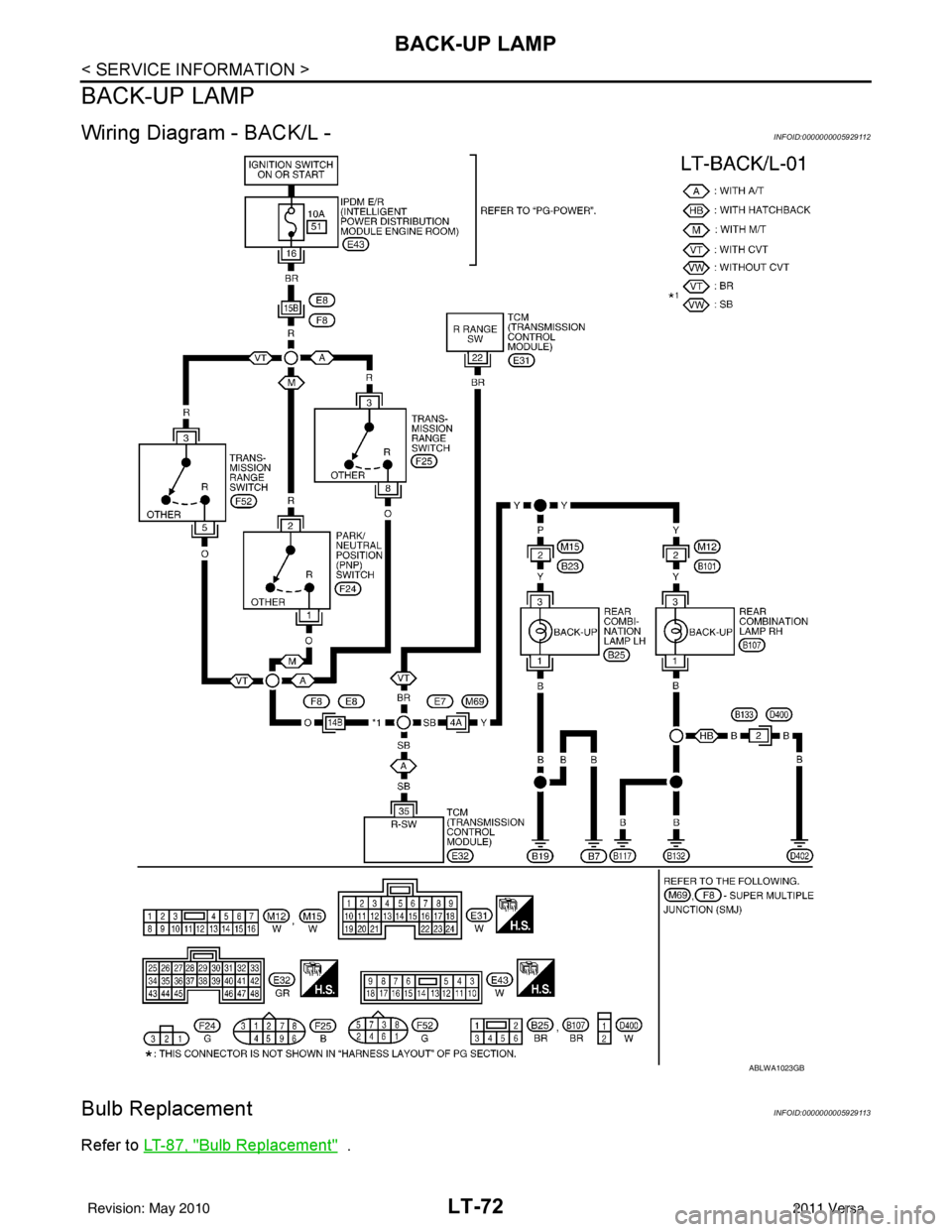
Wiring Diagram - STOP/LINFOID:0000000005929107
SEDAN
Bulb Replacement (High-Mounted Stop Lamp)INFOID:0000000005929108
HATCHBACK
The LED element is not serviced separately, the hi gh-mounted stop lamp must be replaced as an assembly.
Refer to LT-70, "
Removal and Installation (High-Mounted Stop Lamp)".
ABLWA1022GB
Revision: May 2010 2011 Versa
Page 3102 of 3787
LT-70
< SERVICE INFORMATION >
STOP LAMP
SEDAN - WITH REAR AIR SPOILER
The LED element is not serviced separately, the high-mounted stop lamp must be replaced as an assembly.
Refer to LT-70, "
Removal and Installation (High-Mounted Stop Lamp)".
1. Installation is in the reverse order of removal.
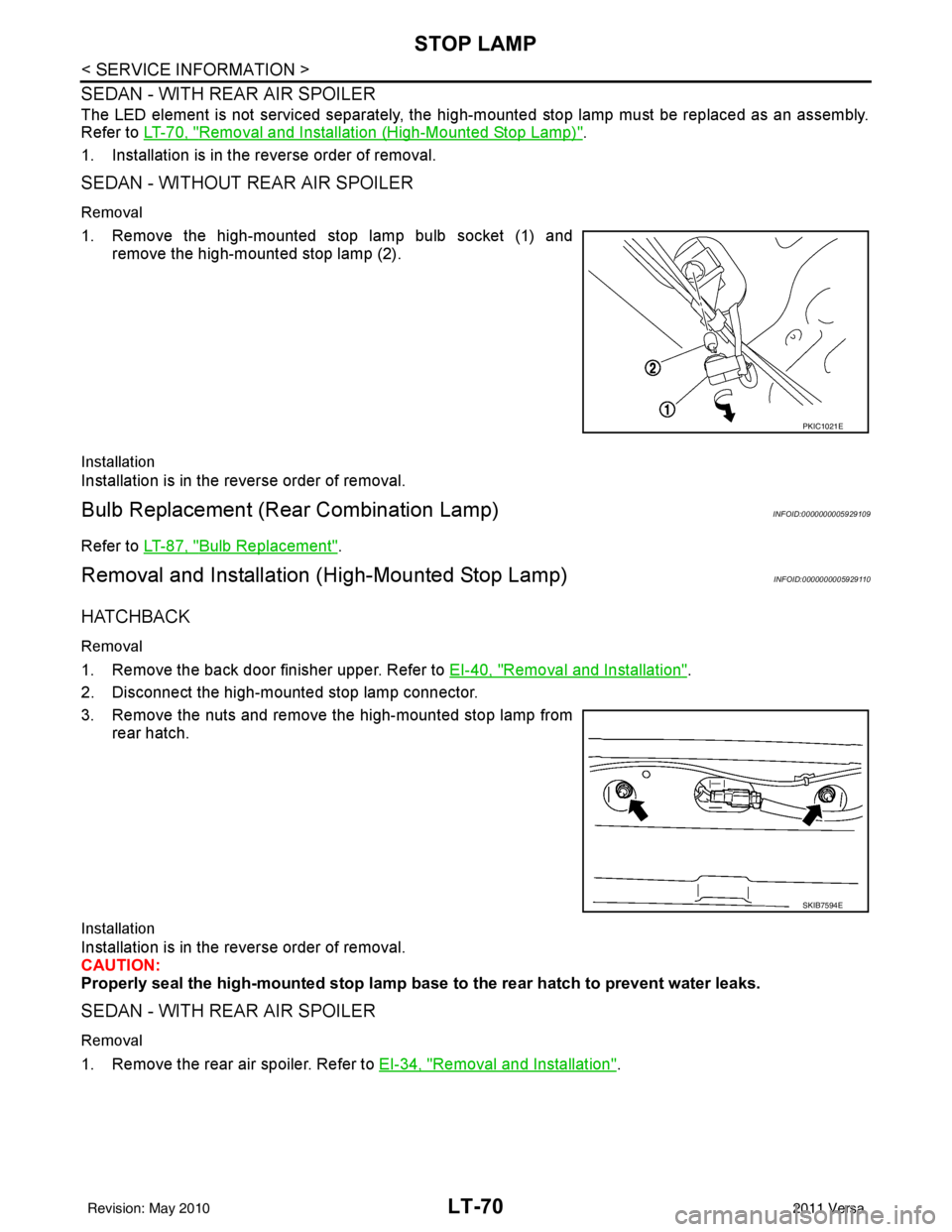
SEDAN - WITHOUT REAR AIR SPOILER
Removal
1. Remove the high-mounted stop lamp bulb socket (1) and remove the high-mounted stop lamp (2).
Installation
Installation is in the reverse order of removal.
Bulb Replacement (Rear Combination Lamp)INFOID:0000000005929109
Refer to LT-87, "Bulb Replacement".
Removal and Installation (High-Mounted Stop Lamp)INFOID:0000000005929110
HATCHBACK
Removal
1. Remove the back door finisher upper. Refer to EI-40, "Removal and Installation".
2. Disconnect the high-mounted stop lamp connector.
3. Remove the nuts and remove the high-mounted stop lamp from rear hatch.
Installation
Installation is in the reverse order of removal.
CAUTION:
Properly seal the high-mounted stop lamp b ase to the rear hatch to prevent water leaks.
SEDAN - WITH REAR AIR SPOILER
Removal
1. Remove the rear air spoiler. Refer to EI-34, "Removal and Installation".
PKIC1021E
SKIB7594E
Revision: May 2010 2011 Versa
Page 3104 of 3787
LT-72
< SERVICE INFORMATION >
BACK-UP LAMP
BACK-UP LAMP
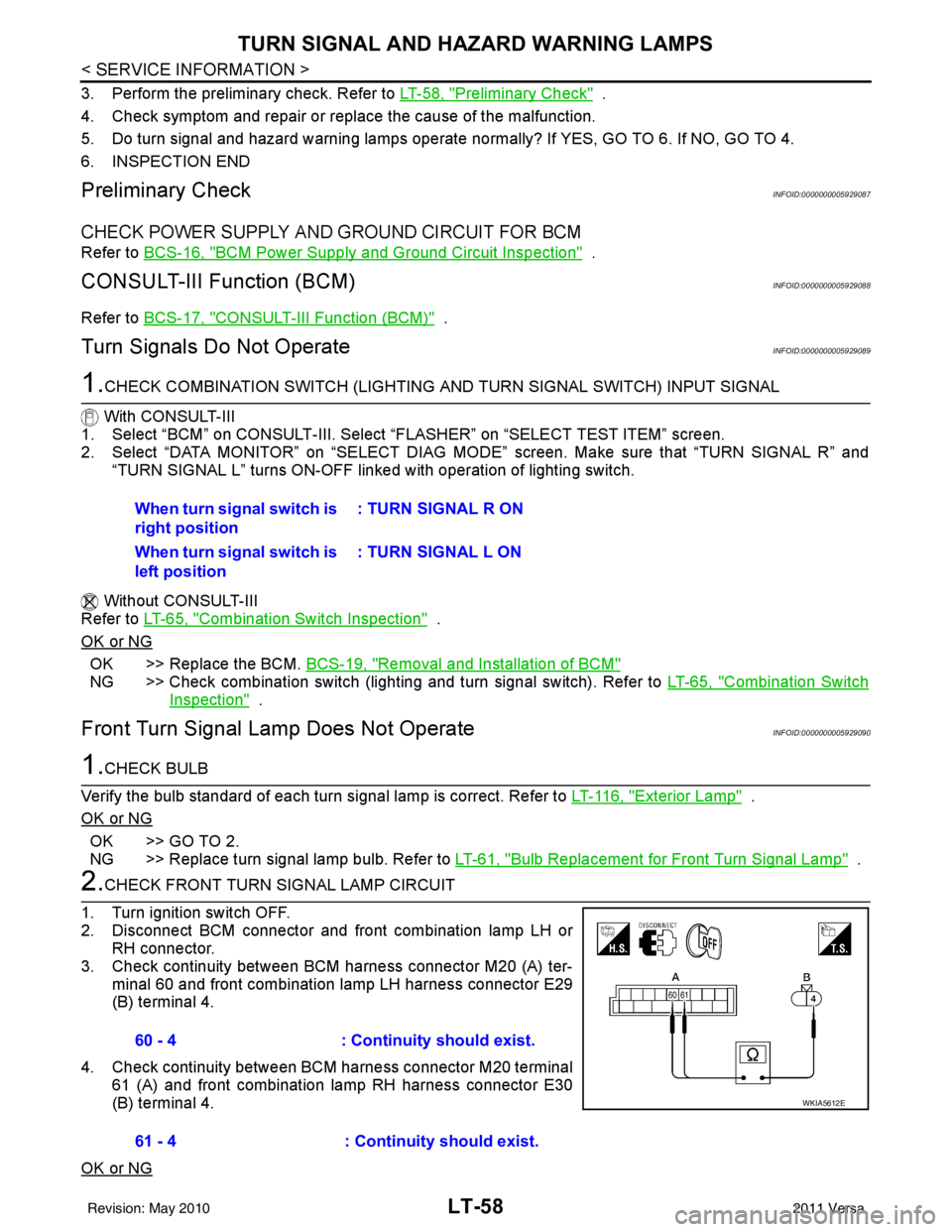
Wiring Diagram - BACK/L -INFOID:0000000005929112
Bulb ReplacementINFOID:0000000005929113
Refer to LT-87, "Bulb Replacement" .
ABLWA1023GB
Revision: May 2010 2011 Versa
Page 3116 of 3787
LT-84
< SERVICE INFORMATION >
PARKING, LICENSE PLATE AND TAIL LAMPS
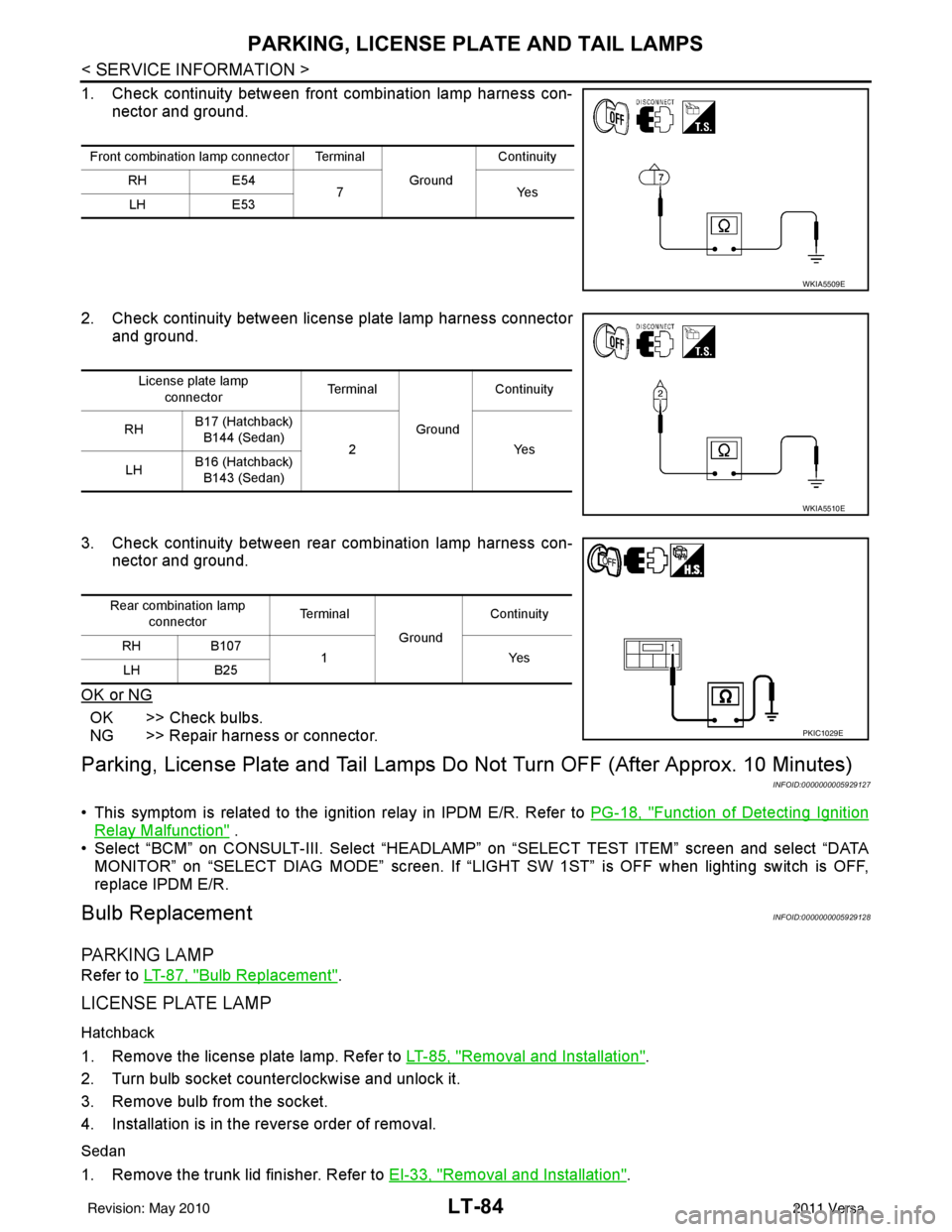
1. Check continuity between front combination lamp harness con-nector and ground.
2. Check continuity between license plate lamp harness connector and ground.
3. Check continuity between rear combination lamp harness con- nector and ground.
OK or NG
OK >> Check bulbs.
NG >> Repair harness or connector.
Parking, License Plate and Tail Lamps Do Not Turn OFF (After Approx. 10 Minutes)
INFOID:0000000005929127
• This symptom is related to the ignition relay in IPDM E/R. Refer to PG-18, "Function of Detecting Ignition
Relay Malfunction" .
• Select “BCM” on CONSULT-III. Select “HEADLAMP” on “SELECT TEST ITEM” screen and select “DATA
MONITOR” on “SELECT DIAG MODE” sc reen. If “LIGHT SW 1ST” is OFF when lighting switch is OFF,
replace IPDM E/R.
Bulb ReplacementINFOID:0000000005929128
PA R K I N G L A M P
Refer to LT-87, "Bulb Replacement".
LICENSE PLATE LAMP
Hatchback
1. Remove the license plate lamp. Refer to LT-85, "Removal and Installation".
2. Turn bulb socket counterclockwise and unlock it.
3. Remove bulb from the socket.
4. Installation is in the reverse order of removal.
Sedan
1. Remove the trunk lid finisher. Refer to EI-33, "Removal and Installation".
Front combination lamp connector Terminal
GroundContinuity
RH E54
7Y es
LH E53
WKIA5509E
License plate lamp
connector Te r m i n a l
GroundContinuity
RH B17 (Hatchback)
B144 (Sedan) 2 Yes
LH B16 (Hatchback)
B143 (Sedan)
WKIA5510E
Rear combination lamp connector Te r m i n a l
GroundContinuity
RH B107
1Y es
LH B25
PKIC1029E
Revision: May 2010 2011 Versa