Page 95 of 312

Black plate (93,1)
Model "R35-N" EDITED: 2009/ 11/ 6
accidents, construction work, traffic restric-
tions, emergencies, etc., the prediction
accuracy of the system may be reduced.
. Traffic jam information displayed on the map
screen is not statistical traffic information.
. When [Use Statistical Traffic Information] is
turned on, the system may lead to a road
where a traffic jam occurs or to a detour
even though the shortest route does not
have a traffic jam.
. Even when [Use Real Time Traffic Informa-
tion] is turned on, if traffic information has
not been provided for the area, sometimes it
is possible that a detour will not be indicated
in a location where a traffic jam occurs.
. The system may not lead to a detour if traffic
closure or a traffic jam occurs far from the
present location.
. The system calculates to reduce the time
required for the entire route from the start to
the destination. If there are no appropriate
routes, the system may lead to a route where
a traffic jam occurs instead of leading to a
detour.
. This system can learn and memorize the
route that is most frequently used. However,
despite driving on the same route several
times so that the system can learn the route,
the system may have difficulty learning the route under the following conditions.
— [Use Time Restricted Roads] is set to on.
— [Use Real Time Traffic Information] is set to on.
ROUTE GUIDANCE SETTINGSVarious guidance information can be set to be
played during route guidance and the route and/
or voice guidance can be activated or deacti-
vated.Basic operation1. Push .
2. Highlight [Navigation] and push .
3. Highlight [Guidance Settings] and push .
4. Highlight the preferred item and push .
5. Push to return to the previous screen. Push
Page 96 of 312
![NISSAN GT-R 2011 Owners Manual Black plate (94,1)
Model "R35-N" EDITED: 2009/ 11/ 6
“ROUTE GUIDANCE SETTINGS”
page 2-67
. [Guidance Display Settings]:
Activates or deactivates small turn arrow
display on the map.“Displaying s](/manual-img/5/58175/w960_58175-95.png "NISSAN GT-R 2011 Owners Manual Black plate (94,1)
Model \"R35-N\" EDITED: 2009/ 11/ 6
“ROUTE GUIDANCE SETTINGS”
page 2-67
. [Guidance Display Settings]:
Activates or deactivates small turn arrow
display on the map.“Displaying s")
Black plate (94,1)
Model "R35-N" EDITED: 2009/ 11/ 6
“ROUTE GUIDANCE SETTINGS”
page 2-67
. [Guidance Display Settings]:
Activates or deactivates small turn arrow
display on the map.“Displaying small turn arrow on map”
page 2-69
. [Estimated Time]:
Switches the display of the estimated travel
time to the destination or waypoint that is
displayed on the map screen.“Switching estimated arrival time dis-
play” page 2-69
. [Others]:
— [Set Average Speeds]: Sets an average vehicle speed for each
type of road, which is reflected in the
calculation of the required time to the
destination.
“Set average speeds” page 2-70
— [Auto Reroute]: If the vehicle deviates from the sug-
gested route, the system automatically
recalculates a route that leads the
vehicle to the suggested route.“Setting Auto Reroute” page 2-63
Setting voice guidance at intersec-
tions1. Push .
2. Highlight [Navigation] and push .
3. Highlight [Guidance Settings] and push .
4. Highlight [Voice Guidance Settings] and push .5. Highlight [Intersection Guidance Settings] and push
.
6. Highlight the preferred item and push
.
Available setting items
. [Voice Announcements]:
Sets how many times the voice guidance is
announced before the vehicle reaches an
intersection.
1. Highlight [Voice Announcements] and
push .
2. Highlight the preferred item and push .
— [Full]: The system announces three kinds of
voice guidance: “Turning Point”, “1
Guide” and “2 Guide”.
— [Concise]: The system announces two kinds of
2-68
Navigation
Page 97 of 312
![NISSAN GT-R 2011 Owners Manual Black plate (95,1)
Model "R35-N" EDITED: 2009/ 10/ 30
voice guidance: “Turning Point” and “1
Guide”.
. [Turning Point]:
Turns on the sound that chimes when a
maneuver is supposed to be occurri](/manual-img/5/58175/w960_58175-96.png "NISSAN GT-R 2011 Owners Manual Black plate (95,1)
Model \"R35-N\" EDITED: 2009/ 10/ 30
voice guidance: “Turning Point” and “1
Guide”.
. [Turning Point]:
Turns on the sound that chimes when a
maneuver is supposed to be occurri")
Black plate (95,1)
Model "R35-N" EDITED: 2009/ 10/ 30
voice guidance: “Turning Point” and “1
Guide”.
. [Turning Point]:
Turns on the sound that chimes when a
maneuver is supposed to be occurring.
Displaying small turn arrow on mapThe guidance screen displayed when the vehicle
passes through an intersection can be changed.1. Push .
2. Highlight [Navigation] and push .
3. Highlight [Guidance Settings] and push .
4. Highlight [Guidance Display Settings] and push .
5. Highlight [Small Turn Arrow on Map] and
push to activate or deactivate
Small Turn Arrow on the Map (simplified turn
indicator) displayed in the upper left corner
of the map screen. The indicator illuminates
if the Small Turn Arrow on the Map is
displayed.Switching estimated arrival time
displayThe display of the travel time on the map screen
can be switched between the travel time to the
destination and the travel time to the waypoint.
Example: Switching the display to the travel time
to the waypoint
1. Push .
2. Highlight [Navigation] and push .
3. Highlight [Guidance Settings] and push .
4. Highlight [Estimated Time] and push
TER>.5. Highlight [Waypoint] and push .
The indicator for the selected condition
illuminates.
6. Push
Page 98 of 312

Black plate (96,1)
Model "R35-N" EDITED: 2009/ 10/ 30
7. The icon displayed on the map screen isswitched, and the travel time to the waypoint
is displayed.
Displayed icon
:Displayofthetraveltimetothe
destination:Displayofthetraveltimetothewaypoint
Set average speedsThe required time to the destination can be
calculated based on the set vehicle speeds.1. Push .
2. Highlight [Navigation] and push .
3. Highlight [Guidance Settings] and push .
4. Highlight [Others] and push .
5. Highlight [Set Average Speeds] and push .
6. Highlight the preferred item and push .
7. Use the main directional buttons or the center dial to make an adjustment. The
speed can be increased/decreased by 5
MPH (5 km/h) .
8. After finishing the setting, push or
to activate the setting.
9. Push to return to the previous
screen. Push
Page 99 of 312
![NISSAN GT-R 2011 Owners Manual Black plate (97,1)
Model "R35-N" EDITED: 2009/ 10/ 30
[].
. [Town Road]:
Adjust the average vehicle speed on a town
road by moving the main directional buttons
or the center dial in the direction of](/manual-img/5/58175/w960_58175-98.png "NISSAN GT-R 2011 Owners Manual Black plate (97,1)
Model \"R35-N\" EDITED: 2009/ 10/ 30
[].
. [Town Road]:
Adjust the average vehicle speed on a town
road by moving the main directional buttons
or the center dial in the direction of")
Black plate (97,1)
Model "R35-N" EDITED: 2009/ 10/ 30
[].
. [Town Road]:
Adjust the average vehicle speed on a town
road by moving the main directional buttons
or the center dial in the direction of [+] or
[].
. [Residential]:
Adjust the average vehicle speed in a
residential area by moving the main direc-
tional buttons or the center dial in the
direction of [+] or [ ].
. [Reset]:
Sets the average vehicle speeds to the
default values.
STORING LOCATIONOften visited locations can be stored in the
Address Book. The stored addresses can be
easily retrieved to set them as a destination or
waypoint.
INFO:
. The Address Book can store up to 300
locations.
. New information placed in the same storage
position will overwrite the old data.
Storing location by searchingAfter a location is searched for once, it can be
stored for future use.
1. Push .2. Highlight [Navigation] and push .
3. Highlight [Address Book] and push
TER>.4. Highlight [Stored Location] and push
TER>.
Navigation
2-71
STORING A LOCATION/ROUTE
Page 100 of 312
![NISSAN GT-R 2011 Owners Manual Black plate (98,1)
Model "R35-N" EDITED: 2009/ 10/ 30
5. Highlight [Home Location (None)] or [AddNew] and push <ENTER>.6. Highlight the appropriate method to search
for a location and push <ENTER>.
â€](/manual-img/5/58175/w960_58175-99.png "NISSAN GT-R 2011 Owners Manual Black plate (98,1)
Model \"R35-N\" EDITED: 2009/ 10/ 30
5. Highlight [Home Location (None)] or [AddNew] and push <ENTER>.6. Highlight the appropriate method to search
for a location and push <ENTER>.
â€")
Black plate (98,1)
Model "R35-N" EDITED: 2009/ 10/ 30
5. Highlight [Home Location (None)] or [AddNew] and push .6. Highlight the appropriate method to search
for a location and push .
“SETTING DESTINATION” page 2-23
7. When a preferred location is displayed at
the center of the map, confirm the address
of the location and push .
A message is displayed, and the address of
the location is stored in the Address Book.8. Adjust the location of the stored item and edit the contents of the stored item as
necessary. After finishing the setting, high-
light [OK] and push .
INFO:
. When the location is stored in the
Address Book, [Address Book] can be
used to search for the location.
. A location can be adjusted by selecting
[Move Location] using the same method
as the one for a destination.
“Moving location of destination”
page 2-46
Other settings:An address can also be stored using the
following procedure.1. Push .
2. Highlight [Address Book] and push
TER>.
3. Highlight [Store/Edit] and push .
4. Highlight [Add New] and push .
2-72
Navigation
Page 101 of 312
Black plate (99,1)
Model "R35-N" EDITED: 2009/ 10/ 30
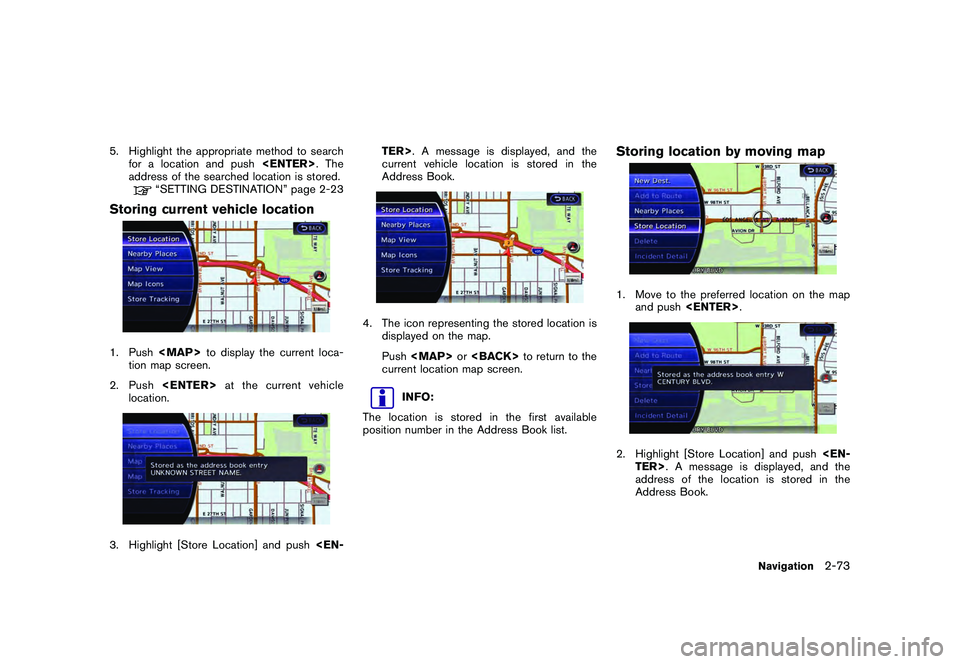
5. Highlight the appropriate method to searchfor a location and push . The
address of the searched location is stored.
“SETTING DESTINATION” page 2-23
Storing current vehicle location1. Push
Page 102 of 312
Black plate (100,1)
Model "R35-N" EDITED: 2009/ 10/ 30
3. The icon representing the stored location isdisplayed on the map.
Push