Page 182 of 312
Black plate (186,1)
Model "R35-N" EDITED: 2009/ 10/ 30
warning. Relying only on XM NavTraf-
fic®information may lead to a collision
and could result in serious personal
injury.
NOTICE
Flow information is provided only for
roads equipped with traffic sensors and
is not available in all markets covered
by the service. Flow data may not be
available on portions of a road that is
under construction.
XM NavTraffic
®information is available in limited
markets. To subscribe or to check if this service
is available in the area:
call 1-800-XM-RADIO (1-800-967-2346) or
see www.xmradio.com/navtraffic
INFO:
If a contract is not completed for XM NavTraffic
®
traffic information service, a message appears,
and it will not be possible to check the
information on the traffic information system.
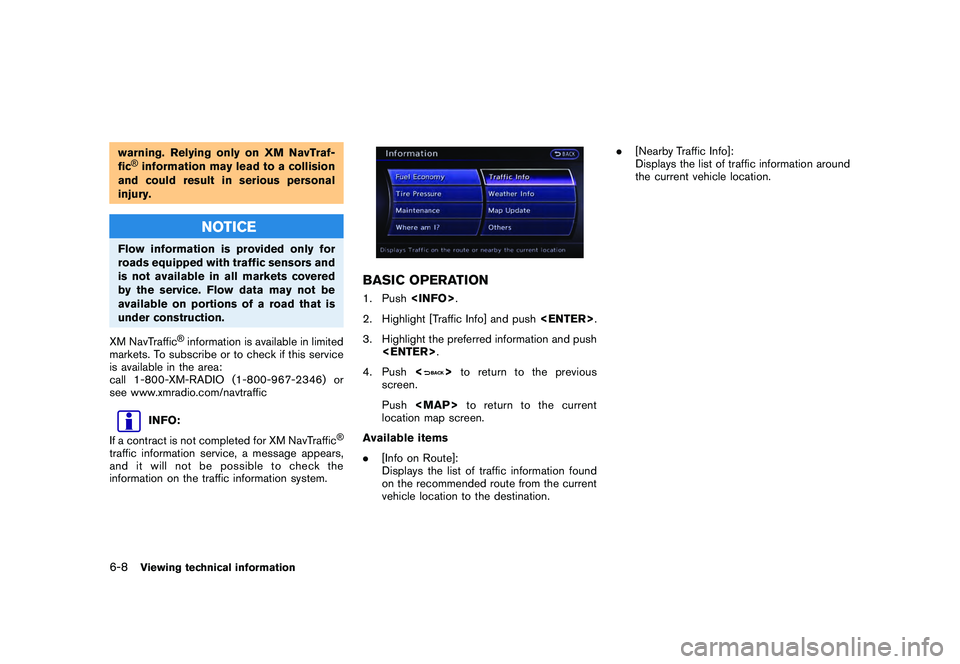
BASIC OPERATION1. Push .
2. Highlight [Traffic Info] and push .
3. Highlight the preferred information and push .
4. Push <
>to return to the previous
screen.
Push
Page 187 of 312

Black plate (191,1)
Model "R35-N" EDITED: 2009/ 10/ 30
4. Highlight the preferred setting and push . The indicator for the selected
setting illuminates.
Available setting items
. Use Traffic Info.:
Enables all traffic information related func-
tions.
. Show Incidents on Map:
Displays the traffic incidents (e.g., accident)
on the map screen.
. Show Traffic Flow on Map:
Displays the traffic flow with an arrow on the
map screen.
. Blink Red Traffic Flow:
Blinks the red traffic flow lines that represent
congestions.
. Traffic Announcements:
Announces the traffic information event on
the route.
INFO:
. Even when “Show Traffic Flow on Map” and
“Show Incidents on Map” are set to off, the
list display of “Info on Route” and “Nearby
Traffic Info” will not be affected.
. Even when “Traffic Announcement” is set to
off, the route guidance will not be affected.
Also, the announcement of emergency
information and weather information will not
be turned off.Setting by voice command
1. Push <
>located on the steering wheel.
2. After the tone sounds, speak a command.
To turn on or off the traffic information system:
“Information” “Traffic Information” (Standard
Mode)
“Traffic Information” (Alternate Command Mode)
XM NavWeather
TM
information is a subscription
service offered by XM®Satellite Radio.
This service provides real-time information
regarding current weather, temperature, warn-
ings, road conditions and forecasts where
available. The weather information is broadcast
to the vehicle by the XM satellites.
The service enables you to view the following
information on the navigation system.
*Current weather information icon of the desti-
nation on the screen of suggested route
*Detailed weather information and forecasts of
an area of interest
*Countrywide and local maps with the current
weather, temperature, warnings and road con-
dition information
*List of warning/watches events detected
around the current location
*Pop-up messages on the navigation screen
with voice announcements when warnings and
watches are detected around the current loca-
tion
WARNING
XM NavWeather
TM
information is not a
substitute for attentive driving. Weather
conditions change constantly and
Viewing technical information
6-13
VIEWING AVAILABLE WEATHER
INFORMATION
Page 188 of 312

Black plate (192,1)
Model "R35-N" EDITED: 2009/ 10/ 30
emergency situations can arise without
warning. Relying only on XM Nav-
Weather
TM
information could result in
serious personal injury.
XM NavWeatherTM
information is available in
limited markets. To subscribe to or check if this
service is available in the area, call 1-800-XM-
RADIO (1-800-967-2346) or access www.
xmradio.com/navweather.
INFO:
. If a contract is not completed for the XM
NavWeather
TM
information service, a mes-
sage appears and it will not be possible to
check the information on the traffic informa-
tion system.
. The weather information is available only for
areas that provide weather information to
XM NavWeatherTM.
INFO:
The reception condition of the XM Weather
information transmitted from the provider can be
confirmed using the “Weather” indicator on the
upper right side of the screen.
Green: The reception condition is good.
Gray: The reception condition is not good.
No mark: A subscription to the XM Nav- Weather
TM
service is not detected.
DISPLAYING WEATHER INFORMA-
TION SCREENBasic Operation1. Push.
2. Highlight [Weather Info] and push
TER>.
3. Highlight the preferred information and push .
4. Push <
>to return to the previous
screen. Push
Page 189 of 312
Black plate (193,1)
Model "R35-N" EDITED: 2009/ 10/ 30
tion.
. Weather Map:
Displays the current weather map for the
preferred area.
. Temperature Map:
Displays the current temperature map for the
preferred area.
. Warnings Map:
Displays the current watches/warnings map
for the preferred area.
. Road Condition Map:
Displays the current road condition map for
the preferred area.
Selecting cityWhen displaying various weather information
screens by pushing , the range can be
specified for the weather information from
among the current location (local) , destination,
countrywide (nation) or a specified city.
The city can be specified by selecting one from
the list that is displayed.
1. Push .
2. Highlight [Weather Info] and push
TER>.3. Highlight the preferred information and push .
4. Highlight [Select Other City from Menu] and
push .5. Highlight the preferred state from the list
and push .
Viewing technical information
6-15
Page 191 of 312

Black plate (195,1)
Model "R35-N" EDITED: 2009/ 10/ 30
Setting by voice command
1. Push <
>located on the steering wheel.
2. After the tone sounds, speak a command.
To display the list for weather information:
“Weather Information” (Alternate Command
Mode)
Warnings and watches historyA list can be displayed for the warning/watch
events detected around the current location. The
detailed information of each event can also be
displayed.1. Highlight [Warnings and Watches History] and push . A list warning/watch
events around the current location is dis-
played.
2. Highlight the event to check the detailed information and push .3. A screen with detailed information of the
event is displayed.
4. Push <
>to return to the previous
screen. Push
Page 193 of 312
Black plate (197,1)
Model "R35-N" EDITED: 2009/ 10/ 30
perature information is shown by numbers
and colors.
4. Push to return to the previous
screen. Push
Page 195 of 312
Black plate (199,1)
Model "R35-N" EDITED: 2009/ 10/ 30
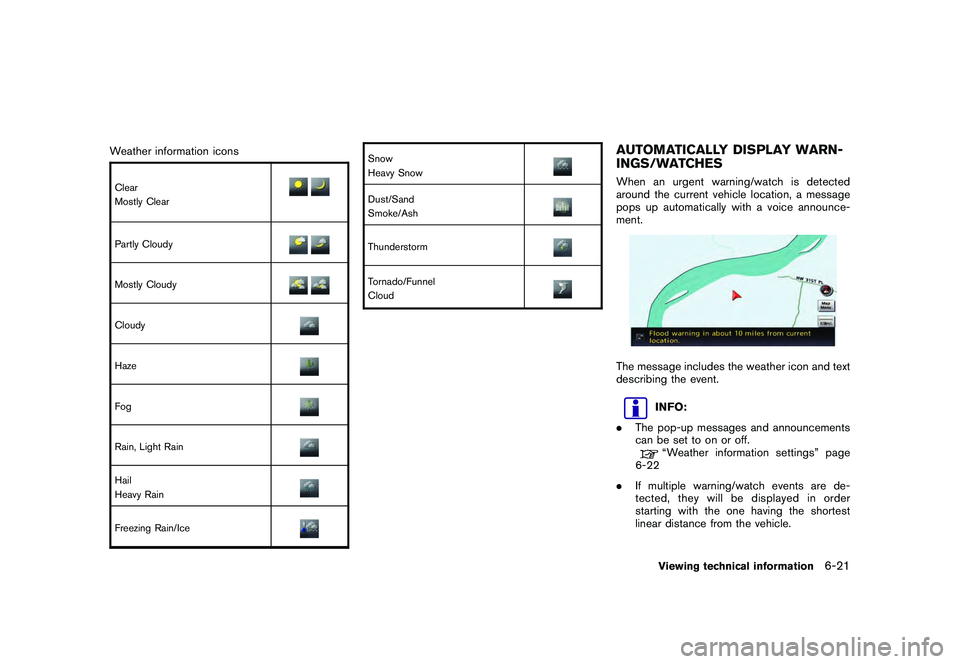
Weather information iconsClear
Mostly ClearPartly CloudyMostly CloudyCloudyHazeFogRain, Light RainHail
Heavy RainFreezing Rain/Ice
Snow
Heavy SnowDust/Sand
Smoke/AshThunderstormTornado/Funnel
Cloud
AUTOMATICALLY DISPLAY WARN-
INGS/WATCHESWhen an urgent warning/watch is detected
around the current vehicle location, a message
pops up automatically with a voice announce-
ment.The message includes the weather icon and text
describing the event.
INFO:
. The pop-up messages and announcements
can be set to on or off.“Weather information settings” page
6-22
. If multiple warning/watch events are de-
tected, they will be displayed in order
starting with the one having the shortest
linear distance from the vehicle.Viewing technical information
6-21
Page 196 of 312

Black plate (200,1)
Model "R35-N" EDITED: 2009/ 10/ 30
Weather information settingsThe settings can be confirmed and changed for
the urgent weather information related functions.1. Push .
2. Highlight [Navigation] and push .
3. Highlight [Weather Info Setting] and push .
4. Highlight the preferred setting and push . The indicator for the setting
illuminates.
Available setting items
. Display an Alert for Weather Warnings:
Displays a message screen automatically
when the system detects urgent warning
information.
. Display an Alert for Weather Watches:
Displays a message screen automatically
when the system detects urgent watch information.
. Voice Announcements:
Provides urgent information announcements
for warnings and watches around the
current location.
Types of warnings/watches
Category Warnings/Watches
Tornado Tornado Watch, Tornado
Hurricane Inland Hurricane Wind, Hurricane
Force Wind, Hurricane, Typhoon
Storm Severe Thunderstorm Watch, Severe
Thunderstorm, Storm, Tropical Storm,
Inland Tropical Storm, Dust Storm
Flood Flood Watch, Flash Flood, Coastal
Flood, Lakeshore Flood, High Surf,
Flood
Winter Winter Watch, Heavy Snow, Heavy
Sleet, Lake Effect Snow, Freeze,
Heavy Freezing Spray, Blizzard, Ice
Storm, Winter Storm
Wind Wind Watch, High Wind, Wind Chill,
Gale
Extremes Excessive Heat
Other Red Flag, Tsunami, Avalanche, Spe-
cial Marine, Earthquake, Law Enfor-
cement, Hazardous Materials,
Nuclear Power Plant, Radiological
Hazard, Civil Danger, Fire, Shelter in
Place, Volcano, Other Watches,
Other Warnings
6-22
Viewing technical information