2011 NISSAN CUBE ignition
[x] Cancel search: ignitionPage 77 of 345
Black plate (75,1)
Model "Z12-D" EDITED: 2010/ 9/ 27
SSI0840
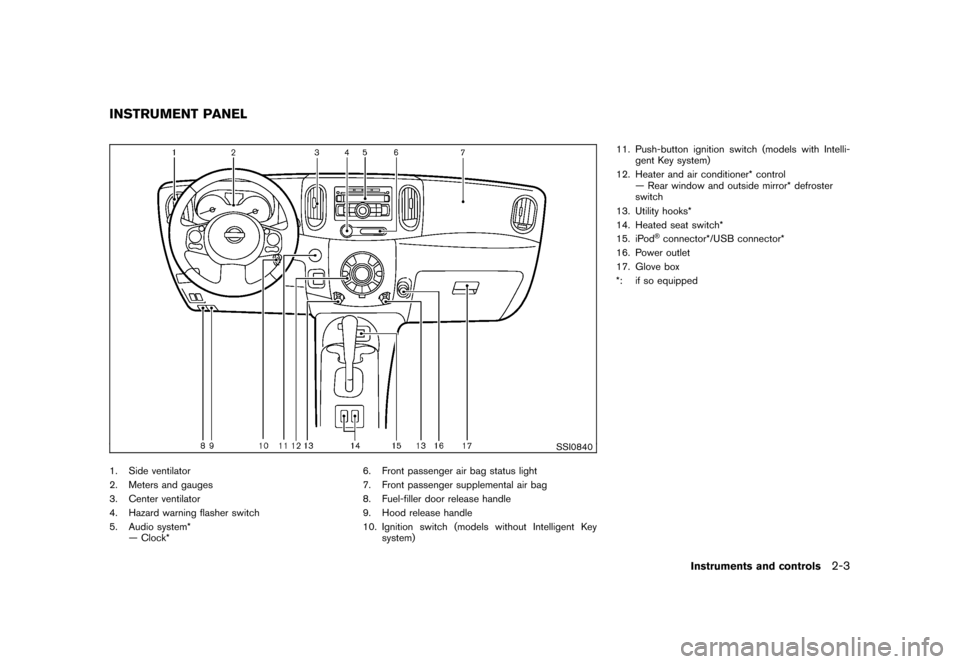
1. Side ventilator
2. Meters and gauges
3. Center ventilator
4. Hazard warning flasher switch
5. Audio system*— Clock* 6. Front passenger air bag status light
7. Front passenger supplemental air bag
8. Fuel-filler door release handle
9. Hood release handle
10. Ignition switch (models without Intelligent Key
system) 11. Push-button ignition switch (models with Intelli-
gent Key system)
12. Heater and air conditioner* control — Rear window and outside mirror* defroster
switch
13. Utility hooks*
14. Heated seat switch*
15. iPod
®connector*/USB connector*
16. Power outlet
17. Glove box
*: if so equipped
INSTRUMENT PANEL
Instruments and controls
2-3
Page 78 of 345

Black plate (76,1)
Model "Z12-D" EDITED: 2010/ 9/ 27
SIC4119
1. Tachometer
2. Engine coolant temperature gauge
3. Vehicle information display— Odometer/twin trip odometer
— Trip computer
— Outside air temperature*
4. Fuel gauge 5. Speedometer
6. Warning/indicator lights
7. Instrument brightness control knob
8. Continuously Variable Transmission (CVT) posi-
tion indicator*
9. RESET switch for trip odometer/Trip computer mode switch *: if so equipped
The needle indicators may move slightly
after the ignition switch is placed in the
OFF or LOCK position. This is not a
malfunction.
METERS AND GAUGES2-4
Instruments and controls
Page 79 of 345
Black plate (77,1)
Model "Z12-D" EDITED: 2010/ 9/ 27
SIC4120
Speedometer
SPEEDOMETER AND ODOMETER
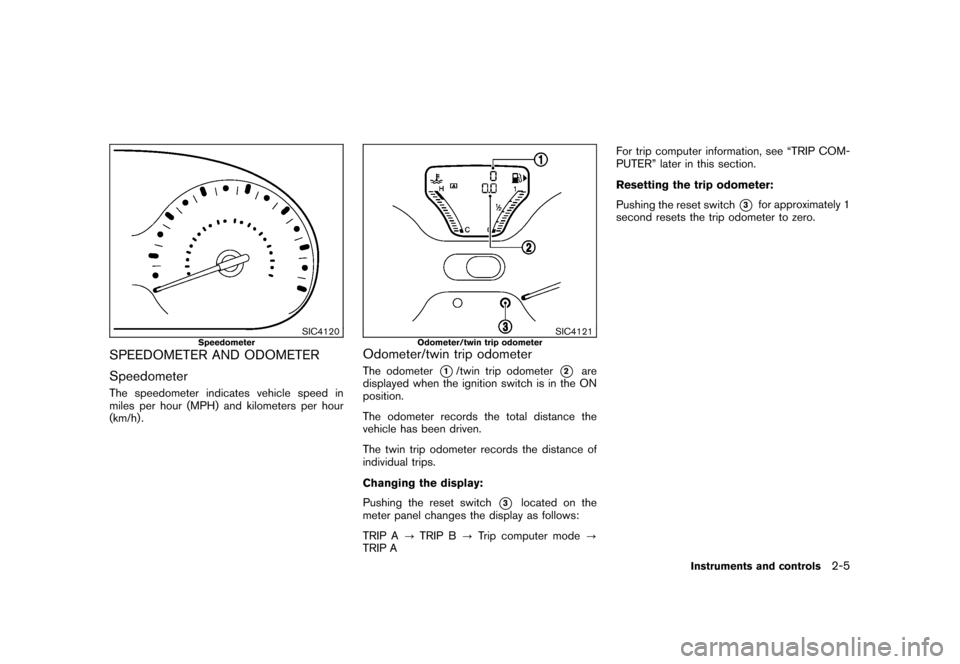
SpeedometerThe speedometer indicates vehicle speed in
miles per hour (MPH) and kilometers per hour
(km/h) .
SIC4121
Odometer/twin trip odometer
Odometer/twin trip odometerThe odometer
*1/twin trip odometer
*2
are
displayed when the ignition switch is in the ON
position.
The odometer records the total distance the
vehicle has been driven.
The twin trip odometer records the distance of
individual trips.
Changing the display:
Pushing the reset switch
*3
located on the
meter panel changes the display as follows:
TRIP A ?TRIP B ?Trip computer mode ?
TRIP A For trip computer information, see “TRIP COM-
PUTER” later in this section.
Resetting the trip odometer:
Pushing the reset switch
*3
for approximately 1
second resets the trip odometer to zero.
Instruments and controls
2-5
Page 82 of 345
Black plate (80,1)
Model "Z12-D" EDITED: 2010/ 9/ 27
SIC4125
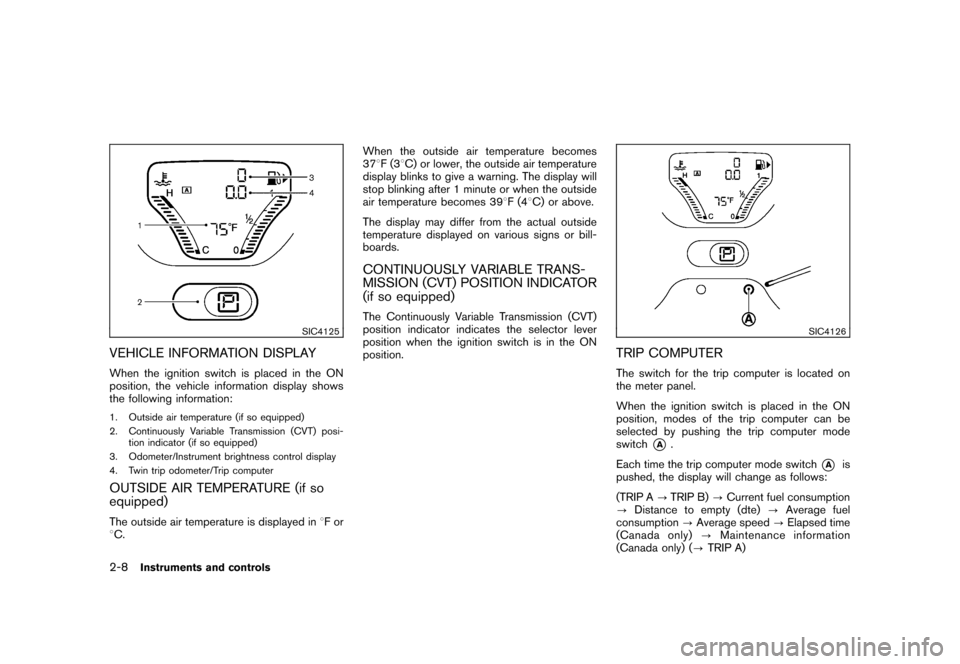
VEHICLE INFORMATION DISPLAYWhen the ignition switch is placed in the ON
position, the vehicle information display shows
the following information:1. Outside air temperature (if so equipped)
2. Continuously Variable Transmission (CVT) posi-tion indicator (if so equipped)
3. Odometer/Instrument brightness control display
4. Twin trip odometer/Trip computerOUTSIDE AIR TEMPERATURE (if so
equipped)The outside air temperature is displayed in 8For
8 C. When the outside air temperature becomes
37
8F(3 8C) or lower, the outside air temperature
display blinks to give a warning. The display will
stop blinking after 1 minute or when the outside
air temperature becomes 39 8F(4 8C) or above.
The display may differ from the actual outside
temperature displayed on various signs or bill-
boards.
CONTINUOUSLY VARIABLE TRANS-
MISSION (CVT) POSITION INDICATOR
(if so equipped)The Continuously Variable Transmission (CVT)
position indicator indicates the selector lever
position when the ignition switch is in the ON
position.
SIC4126
TRIP COMPUTERThe switch for the trip computer is located on
the meter panel.
When the ignition switch is placed in the ON
position, modes of the trip computer can be
selected by pushing the trip computer mode
switch
*A
.
Each time the trip computer mode switch
*A
is
pushed, the display will change as follows:
(TRIP A ?TRIP B) ?Current fuel consumption
? Distance to empty (dte) ?Average fuel
consumption ?Average speed ?Elapsed time
(Canada only) ?Maintenance information
(Canada only) ( ?TRIP A)
2-8
Instruments and controls
Page 83 of 345
Black plate (81,1)
Model "Z12-D" EDITED: 2010/ 9/ 27
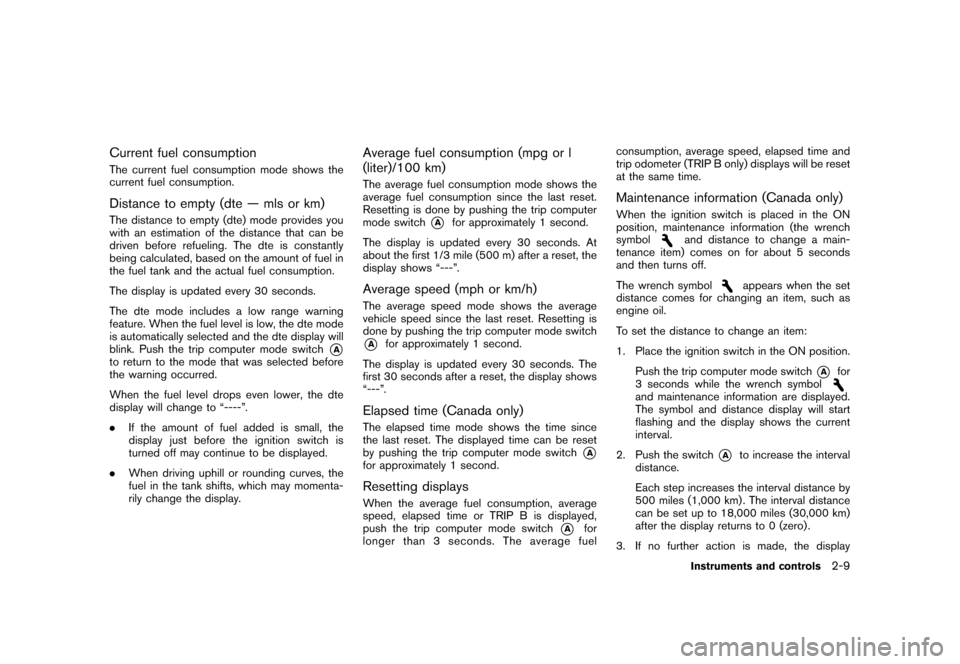
Current fuel consumptionThe current fuel consumption mode shows the
current fuel consumption.Distance to empty (dte — mls or km)The distance to empty (dte) mode provides you
with an estimation of the distance that can be
driven before refueling. The dte is constantly
being calculated, based on the amount of fuel in
the fuel tank and the actual fuel consumption.
The display is updated every 30 seconds.
The dte mode includes a low range warning
feature. When the fuel level is low, the dte mode
is automatically selected and the dte display will
blink. Push the trip computer mode switch
*A
to return to the mode that was selected before
the warning occurred.
When the fuel level drops even lower, the dte
display will change to “----”.
.If the amount of fuel added is small, the
display just before the ignition switch is
turned off may continue to be displayed.
. When driving uphill or rounding curves, the
fuel in the tank shifts, which may momenta-
rily change the display.
Average fuel consumption (mpg or l
(liter)/100 km)The average fuel consumption mode shows the
average fuel consumption since the last reset.
Resetting is done by pushing the trip computer
mode switch
*A
for approximately 1 second.
The display is updated every 30 seconds. At
about the first 1/3 mile (500 m) after a reset, the
display shows “---”.
Average speed (mph or km/h)The average speed mode shows the average
vehicle speed since the last reset. Resetting is
done by pushing the trip computer mode switch*A
for approximately 1 second.
The display is updated every 30 seconds. The
first 30 seconds after a reset, the display shows
“---”.
Elapsed time (Canada only)The elapsed time mode shows the time since
the last reset. The displayed time can be reset
by pushing the trip computer mode switch
*A
for approximately 1 second.Resetting displaysWhen the average fuel consumption, average
speed, elapsed time or TRIP B is displayed,
push the trip computer mode switch
*A
for
longer than 3 seconds. The average fuel consumption, average speed, elapsed time and
trip odometer (TRIP B only) displays will be reset
at the same time.
Maintenance information (Canada only)When the ignition switch is placed in the ON
position, maintenance information (the wrench
symbol
and distance to change a main-
tenance item) comes on for about 5 seconds
and then turns off.
The wrench symbol
appears when the set
distance comes for changing an item, such as
engine oil.
To set the distance to change an item:
1. Place the ignition switch in the ON position.
Push the trip computer mode switch
*A
for
3 seconds while the wrench symbol
and maintenance information are displayed.
The symbol and distance display will start
flashing and the display shows the current
interval.
2. Push the switch
*A
to increase the interval
distance.
Each step increases the interval distance by
500 miles (1,000 km) . The interval distance
can be set up to 18,000 miles (30,000 km)
after the display returns to 0 (zero) .
3. If no further action is made, the display
Instruments and controls
2-9
Page 84 of 345
Black plate (82,1)
Model "Z12-D" EDITED: 2010/ 9/ 27
returns to the previous mode and the new
interval is set.
If the interval distance is set to 0, the display will
skip the maintenance information when the
ignition switch is placed in the ON position.
2-10
Instruments and controls
Page 85 of 345
Black plate (83,1)
Model "Z12-D" EDITED: 2010/ 9/ 27
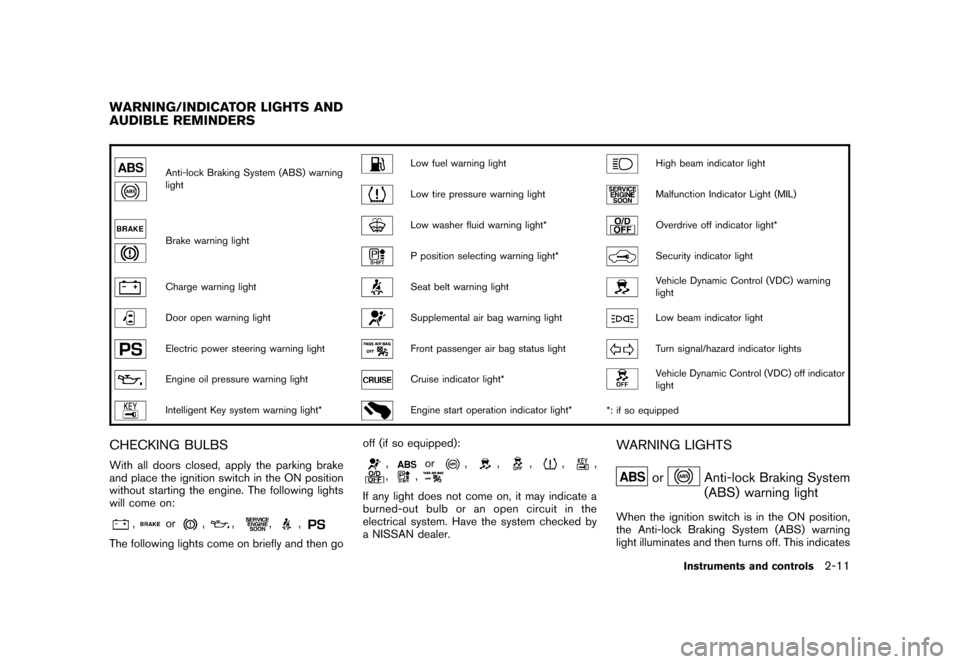
Anti-lock Braking System (ABS) warning
light
Low fuel warning light
High beam indicator light
Low tire pressure warning light
Malfunction Indicator Light (MIL)
Brake warning light
Low washer fluid warning light*
Overdrive off indicator light*
P position selecting warning light*
Security indicator light
Charge warning light
Seat belt warning light
Vehicle Dynamic Control (VDC) warning
light
Door open warning light
Supplemental air bag warning light
Low beam indicator light
Electric power steering warning light
Front passenger air bag status light
Turn signal/hazard indicator lights
Engine oil pressure warning light
Cruise indicator light*
Vehicle Dynamic Control (VDC) off indicator
light
Intelligent Key system warning light*
Engine start operation indicator light**: if so equipped
CHECKING BULBSWith all doors closed, apply the parking brake
and place the ignition switch in the ON position
without starting the engine. The following lights
will come on:
,
or
,
,
,
,
The following lights come on briefly and then go off (if so equipped):
,
or
,
,
,
,
,
,
,
If any light does not come on, it may indicate a
burned-out bulb or an open circuit in the
electrical system. Have the system checked by
a NISSAN dealer.
WARNING LIGHTS
or
Anti-lock Braking System
(ABS) warning light
When the ignition switch is in the ON position,
the Anti-lock Braking System (ABS) warning
light illuminates and then turns off. This indicates
WARNING/INDICATOR LIGHTS AND
AUDIBLE REMINDERS
Instruments and controls
2-11
Page 86 of 345
Black plate (84,1)
Model "Z12-D" EDITED: 2010/ 9/ 27
the ABS is operational.
If the ABS warning light illuminates while the
engine is running, or while driving, it may
indicate the ABS is not functioning properly.
Have the system checked by a NISSAN dealer.
If an ABS malfunction occurs, the anti-lock
function is turned off. The brake system then
operates normally, but without anti-lock assis-
tance. (See “BRAKE SYSTEM” in the “5.
Starting and driving” section.)
or
Brake warning light
This light functions for both the parking brake
and the foot brake systems.
Parking brake indicator:
When the ignition switch is in the ON position,
the light illuminates when the parking brake is
applied.
Low brake fluid warning light:
When the ignition switch is in the ON position,
the light warns of a low brake fluid level. If the
light illuminates while the engine is running with
the parking brake not applied, stop the vehicle
and perform the following:
1. Check the brake fluid level. If brake fluid isnecessary, add fluid and have the system
checked by a NISSAN dealer. (See “BRAKE AND CLUTCH FLUID” in the “8. Mainte-
nance and do-it-yourself” section.)
2. If the brake fluid level is correct, have the warningsystemcheckedbyaNISSAN
dealer.
Anti-lock Braking System (ABS) warning
indicator:
When the parking brake is released and the
brake fluid level is sufficient, if both the brake
warning light and the Anti-lock Braking System
(ABS) warning light illuminate, it may indicate
the ABS is not functioning properly. Have the
brake system checked, and if necessary re-
paired, by a NISSAN dealer promptly. (See
“Anti-lock Braking System (ABS) warning light”
earlier in this section.)
WARNING
. Your brake system may not be
working properly if the warning light
is on. Driving could be dangerous. If
you judge it to be safe, drive care-
fully to the nearest service station
for repairs. Otherwise, have your
vehicle towed because driving it
could be dangerous.
. Pressing the brake pedal with the
engine stopped and/or low brake fluid level may increase your stop-
ping distance and braking will re-
quire greater pedal effort as well as
pedal travel.
. If the brake fluid level is below the
minimum or MIN mark on the brake
fluid reservoir, do not drive until the
brake system has been checked at a
NISSAN dealer.
Charge warning light
If the light illuminates while the engine is running,
it may indicate the charging system is not
functioning properly. Turn the engine off and
check the alternator belt. If the belt is loose,
broken, missing or if the light remains on, see a
NISSAN dealer immediately.
CAUTION
Do not continue driving if the alternator
belt is loose, broken or missing.
Door open warning light
This light illuminates when any of the doors and/
or back door are not closed securely while the
ignition switch is in the ON position.
2-12
Instruments and controls