2011 NISSAN CUBE child lock
[x] Cancel search: child lockPage 55 of 345
Black plate (51,1)
Model "Z12-D" EDITED: 2010/ 9/ 27
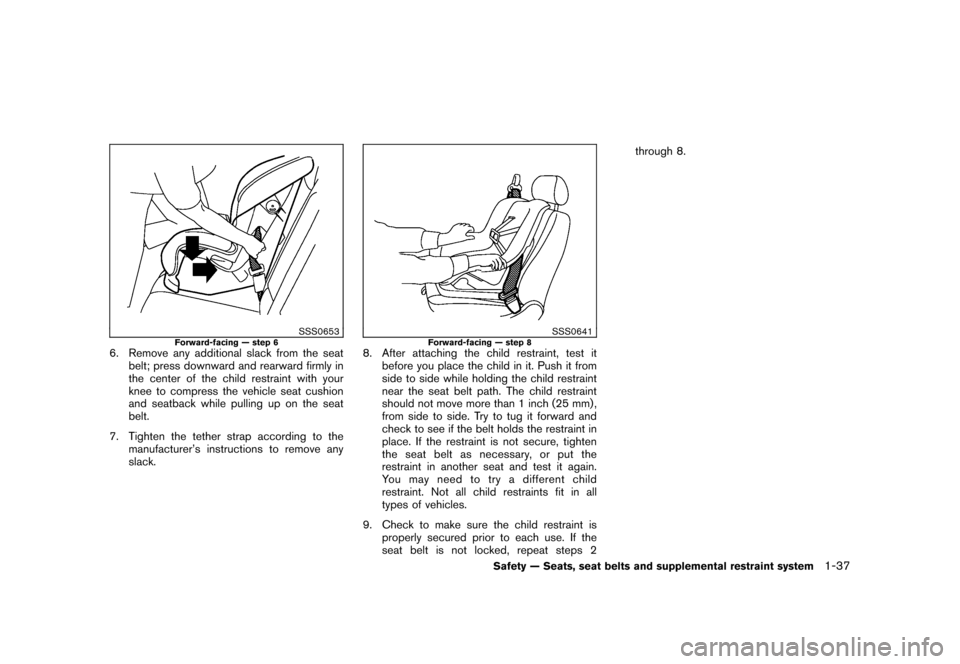
SSS0653
Forward-facing — step 6
6. Remove any additional slack from the seatbelt; press downward and rearward firmly in
the center of the child restraint with your
knee to compress the vehicle seat cushion
and seatback while pulling up on the seat
belt.
7. Tighten the tether strap according to the manufacturer’s instructions to remove any
slack.
SSS0641
Forward-facing — step 8
8. After attaching the child restraint, test itbefore you place the child in it. Push it from
side to side while holding the child restraint
near the seat belt path. The child restraint
should not move more than 1 inch (25 mm) ,
from side to side. Try to tug it forward and
check to see if the belt holds the restraint in
place. If the restraint is not secure, tighten
the seat belt as necessary, or put the
restraint in another seat and test it again.
You may need to try a different child
restraint. Not all child restraints fit in all
types of vehicles.
9. Check to make sure the child restraint is properly secured prior to each use. If the
seat belt is not locked, repeat steps 2 through 8.
Safety — Seats, seat belts and supplemental restraint system
1-37
Page 58 of 345
Black plate (54,1)
Model "Z12-D" EDITED: 2010/ 9/ 27
Booster seat installation
CAUTION
Do not use the lap/shoulder belt Auto-
matic Locking Retractor (ALR) mode
when using a booster seat with the
seat belts.
Refer to all Warnings and Cautions in the “Child
safety”, “Child restraints” and “Booster seats”
sections earlier in this section before installing a
child restraint.
Follow these steps to install a booster seat in the
rear seat or in the front passenger seat:
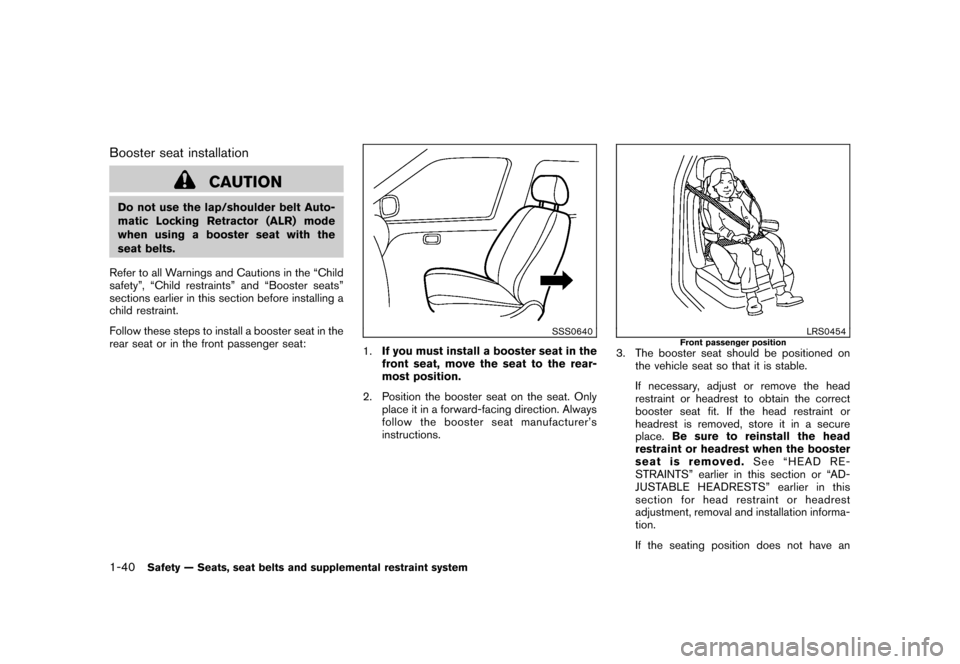
SSS0640
1. If you must install a booster seat in the
front seat, move the seat to the rear-
most position.
2. Position the booster seat on the seat. Only place it in a forward-facing direction. Always
follow the booster seat manufacturer’s
instructions.
LRS0454
Front passenger position
3. The booster seat should be positioned onthe vehicle seat so that it is stable.
If necessary, adjust or remove the head
restraint or headrest to obtain the correct
booster seat fit. If the head restraint or
headrest is removed, store it in a secure
place. Be sure to reinstall the head
restraint or headrest when the booster
seat is removed. See “HEAD RE-
STRAINTS” earlier in this section or “AD-
JUSTABLE HEADRESTS” earlier in this
section for head restraint or headrest
adjustment, removal and installation informa-
tion.
If the seating position does not have an
1-40
Safety — Seats, seat belts and supplemental restraint system
Page 68 of 345
Black plate (64,1)
Model "Z12-D" EDITED: 2010/ 9/ 27
occupant classification sensors are designed to
operate as described above to turn the front
passenger air bag OFF for specified child
restraints. Failing to properly secure child
restrains and to use the Automatic Locking
Retractor (ALR) mode (child restraint mode)
may allow the restraint to tip or move in an
accident or sudden stop. This can also result in
the passenger air bag inflating in a crash instead
of being OFF. (See “CHILD RESTRAINTS”
earlierinthissectionforproperuseand
installation.)
If the front passenger seat is not occupied, the
passenger air bag is designed not to inflate in a
crash. However, heavy objects placed on the
seat could result in air bag inflation, because of
the object being detected by the occupant
classification sensors. Other conditions could
also result in air bag inflation, such as if a child is
standing on the seat, or if two children are on the
seat, contrary to the instructions in this manual.
Always be sure that you and all vehicle
occupants are seated and restrained properly.
Using the passenger air bag status light, you can
monitor when the front passenger air bag is
automatically turned OFF with the seat occu-
pied. The light will not illuminate when the front
passenger seat is unoccupied.
If an adult occupant is in the seat but the
passenger air bag status light is illuminated
(indicating that the air bag is OFF) , it could bethat the person is a small adult, or is not sitting
on the seat properly.
If a child restraint must be used in the front seat,
the passenger air bag status light may or may
not be illuminated, depending on the size of the
child and the type of child restraint being used. If
the air bag status light is not illuminated
(indicating that the air bag might inflate in a
crash) , it could be that the child restraint or seat
belt is not being used properly. Make sure that
the child restraint is installed properly, the seat
belt is used properly and the occupant is
positioned properly. If the air bag status light is
not illuminated, reposition the occupant or child
restraint in a rear seat.
If the passenger air bag status light will not
illuminate even though you believe that the child
restraint, the seat belts and the occupant are
properly positioned, the system may be sensing
an unoccupied seat (in which case the air bag is
OFF) . Your NISSAN dealer can check that the
system is OFF by using a special tool. However,
until you have confirmed with your dealer that
your air bag is working properly, reposition the
occupant or child restraint in a rear seat.
The air bag system and passenger air bag status
light will take a few seconds to register a change
in the passenger seat status. However, if the
seat becomes unoccupied, the air bag status
light will remain off.
If a malfunction occurs in the front passenger air
bag system, the supplemental air bag warning
light
, located in the meter and gauges area,
will blink. Have the system checked by a
NISSAN dealer.
Other supplemental front-impact air bag
precautions
WARNING
. Do not place any objects on the
steering wheel pad or on the instru-
ment panel. Also, do not place any
objects between any occupant and
the steering wheel or instrument
panel. Such objects may become
dangerous projectiles and cause
injury if the front air bags inflate.
. Do not place objects with sharp
edges on the seat. Also, do not
place heavy objects on the seat that
will leave permanent impressions in
the seat. Such objects can damage
the seat or occupant classification
sensors (weight sensors) . This can
affect the operation of the air bag
system and result in serious perso-
nal injury.
. Do not use water or acidic cleaners
1-50
Safety — Seats, seat belts and supplemental restraint system
Page 112 of 345
Black plate (110,1)
Model "Z12-D" EDITED: 2010/ 9/ 27
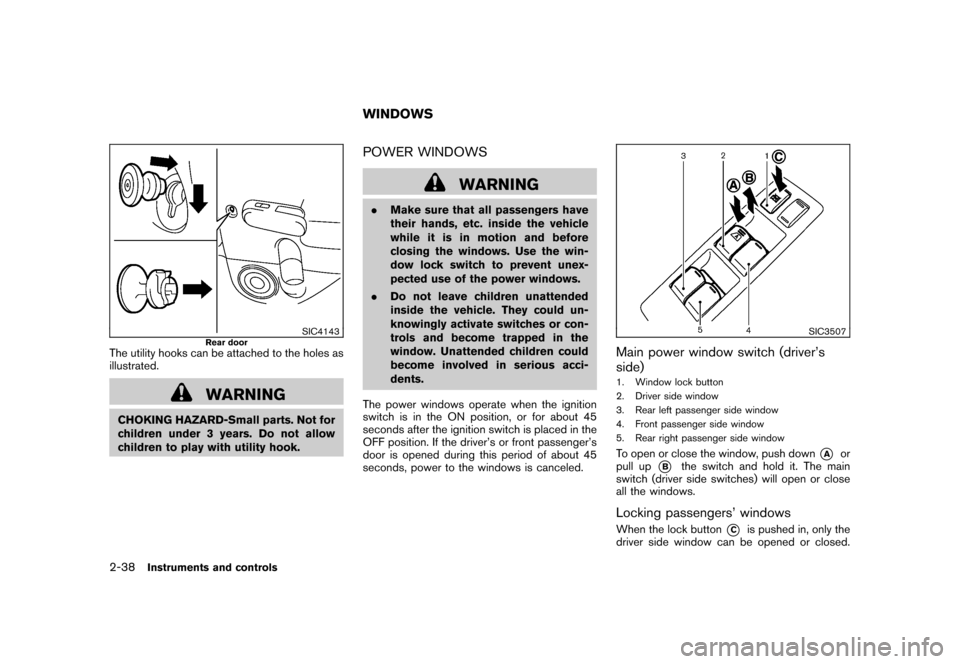
SIC4143
Rear door
The utility hooks can be attached to the holes as
illustrated.
WARNING
CHOKING HAZARD-Small parts. Not for
children under 3 years. Do not allow
children to play with utility hook.
POWER WINDOWS
WARNING
.Make sure that all passengers have
their hands, etc. inside the vehicle
while it is in motion and before
closing the windows. Use the win-
dow lock switch to prevent unex-
pected use of the power windows.
. Do not leave children unattended
inside the vehicle. They could un-
knowingly activate switches or con-
trols and become trapped in the
window. Unattended children could
become involved in serious acci-
dents.
The power windows operate when the ignition
switch is in the ON position, or for about 45
seconds after the ignition switch is placed in the
OFF position. If the driver’s or front passenger’s
door is opened during this period of about 45
seconds, power to the windows is canceled.
SIC3507
Main power window switch (driver’s
side)1. Window lock button
2. Driver side window
3. Rear left passenger side window
4. Front passenger side window
5. Rear right passenger side windowTo open or close the window, push down
*A
or
pull up
*B
the switch and hold it. The main
switch (driver side switches) will open or close
all the windows.
Locking passengers’ windowsWhen the lock button
*C
is pushed in, only the
driver side window can be opened or closed.
WINDOWS
2-38
Instruments and controls
Page 119 of 345
Black plate (10,1)
3 Pre-driving checks and adjustments
Model "Z12-D" EDITED: 2010/ 9/ 27
Keys ............................................................... 3-2NISSAN Vehicle Immobilizer System keys ............ 3-2
Intelligent Keys (if so equipped) ......................... 3-3
Doors .............................................................. 3-4
Locking with key ............................................ 3-4
Locking with inside lock knob ........................... 3-5
Locking with power door lock switch .................. 3-5
Automatic door locks ...................................... 3-5
Child safety rear door lock ............................... 3-6
Remote keyless entry system (if so equipped) ........... 3-6
How to use remote keyless entry system ............. 3-7
Intelligent Key system (if so equipped) .................. 3-10
Intelligent Key operating range ........................ 3-12
Door locks/unlocks precaution ........................ 3-12
Intelligent Key operation ................................. 3-13
Battery saver system ..................................... 3-14 Warning lights and audible reminders
............... 3-14
Troubleshooting guide ................................... 3-15
How to use remote keyless entry function .......... 3-17
Hood ............................................................ 3-21
Back door ...................................................... 3-22
Bumpers and side sill extensions (Kro ¯
m models) . .... 3-23
Fuel-filler door ................................................. 3-24
Opening the fuel-filler door ............................. 3-24
Fuel-filler cap .............................................. 3-24
Tilt steering column .......................................... 3-26
Tilt operation ............................................... 3-26
Sun visors ...................................................... 3-26
Mirrors ........................................................... 3-27
Inside mirror ................................................ 3-27
Outside mirrors ............................................ 3-27
Page 122 of 345
Black plate (120,1)
Model "Z12-D" EDITED: 2010/ 9/ 27
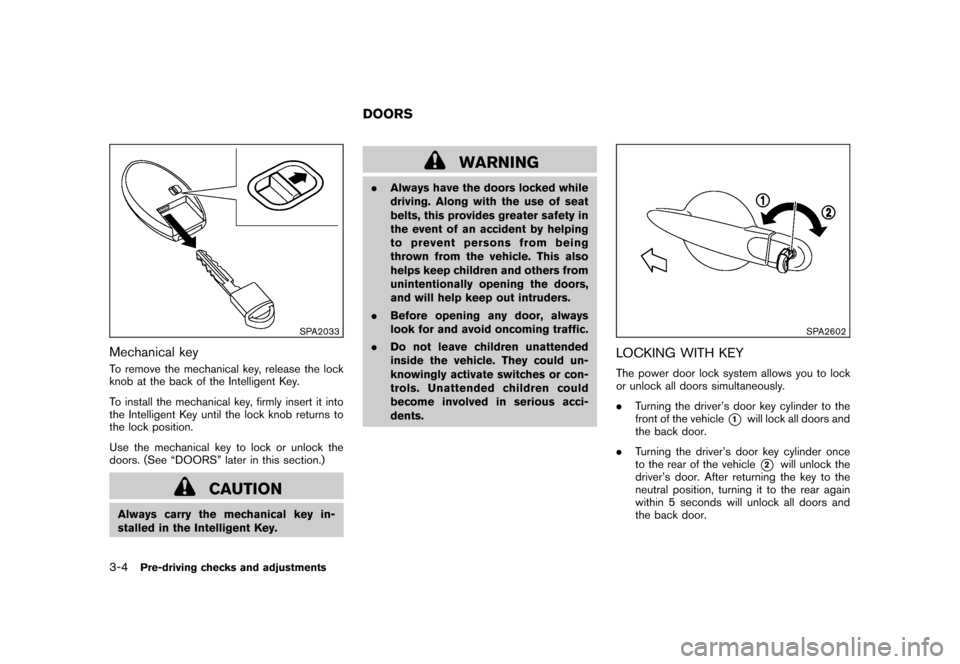
SPA2033
Mechanical keyTo remove the mechanical key, release the lock
knob at the back of the Intelligent Key.
To install the mechanical key, firmly insert it into
the Intelligent Key until the lock knob returns to
the lock position.
Use the mechanical key to lock or unlock the
doors. (See “DOORS” later in this section.)
CAUTION
Always carry the mechanical key in-
stalled in the Intelligent Key.
WARNING
.Always have the doors locked while
driving. Along with the use of seat
belts, this provides greater safety in
the event of an accident by helping
to prevent persons from being
thrown from the vehicle. This also
helps keep children and others from
unintentionally opening the doors,
and will help keep out intruders.
. Before opening any door, always
look for and avoid oncoming traffic.
. Do not leave children unattended
inside the vehicle. They could un-
knowingly activate switches or con-
trols. Unattended children could
become involved in serious acci-
dents.
SPA2602
LOCKING WITH KEYThe power door lock system allows you to lock
or unlock all doors simultaneously.
.Turning the driver’s door key cylinder to the
front of the vehicle
*1
will lock all doors and
the back door.
. Turning the driver’s door key cylinder once
to the rear of the vehicle*2
will unlock the
driver’s door. After returning the key to the
neutral position, turning it to the rear again
within 5 seconds will unlock all doors and
the back door.
DOORS
3-4
Pre-driving checks and adjustments
Page 124 of 345
Black plate (122,1)
Model "Z12-D" EDITED: 2010/ 9/ 27
.All doors unlock automatically when the key
is removed from the ignition switch (models
without Intelligent Key system) .
The automatic unlock function can be
deactivated or activated.
To deactivate or activate the automatic door
unlock system, perform the following procedure.
1. Close all doors.
2. Place the ignition switch in the ON position.
3. Within 20 seconds of performing step 2. — Push and hold the power door lockswitch to the
(UNLOCK) position
for more than 5 seconds.
4. When activated, the hazard warning lights will flash twice. When deactivated, the
hazard warning lights will flash once.
5. The ignition switch must be placed in the OFF and ON position again between each
setting change.
When the automatic door unlock system is
deactivated, the doors do not unlock when the
ignition is placed in the OFF position. To unlock
the door manually, use the inside lock knob or
the power door lock switch (driver’s or front
passenger’s side) .
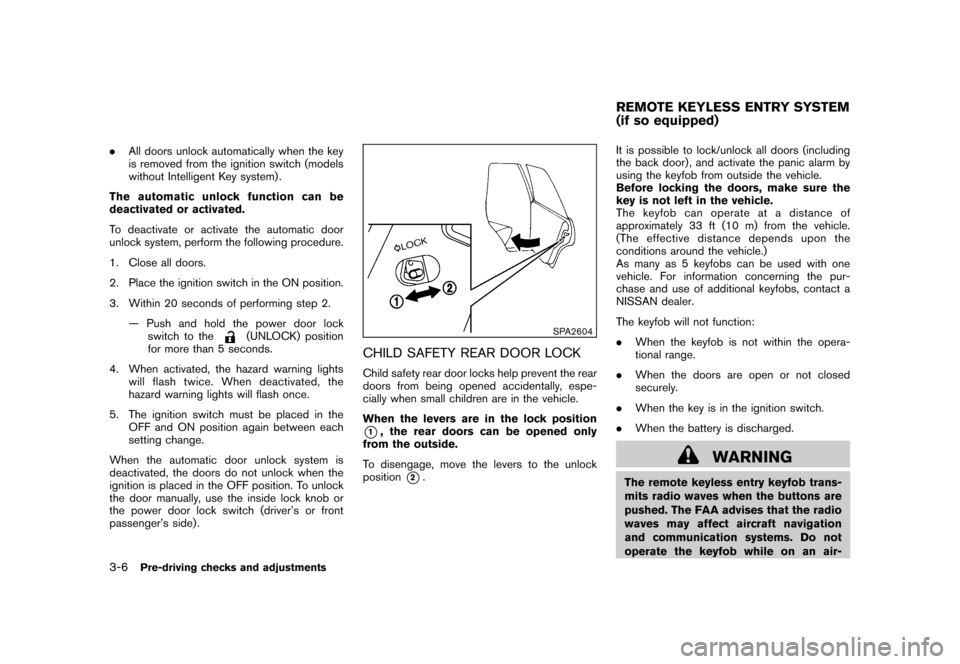
SPA2604
CHILD SAFETY REAR DOOR LOCKChild safety rear door locks help prevent the rear
doors from being opened accidentally, espe-
cially when small children are in the vehicle.
When the levers are in the lock position*1, the rear doors can be opened only
from the outside.
To disengage, move the levers to the unlock
position
*2. It is possible to lock/unlock all doors (including
the back door) , and activate the panic alarm by
using the keyfob from outside the vehicle.
Before locking the doors, make sure the
key is not left in the vehicle.
The keyfob can operate at a distance of
approximately 33 ft (10 m) from the vehicle.
(The effective distance depends upon the
conditions around the vehicle.)
As many as 5 keyfobs can be used with one
vehicle. For information concerning the pur-
chase and use of additional keyfobs, contact a
NISSAN dealer.
The keyfob will not function:
.
When the keyfob is not within the opera-
tional range.
. When the doors are open or not closed
securely.
. When the key is in the ignition switch.
. When the battery is discharged.
WARNING
The remote keyless entry keyfob trans-
mits radio waves when the buttons are
pushed. The FAA advises that the radio
waves may affect aircraft navigation
and communication systems. Do not
operate the keyfob while on an air-REMOTE KEYLESS ENTRY SYSTEM
(if so equipped)
3-6
Pre-driving checks and adjustments
Page 285 of 345
Black plate (283,1)
Model "Z12-D" EDITED: 2010/ 9/ 27
a. Pull the center of the small plastic clipsout.
b. Hold the engine undercover into posi- tion.
c. Insert the clips through the undercover into the holes in the frame, then push the
center of the clips in to lock the clips in
place.
d. Install the bolts that hold the undercover in place. Be careful not to strip the bolts
or over-tighten them.
2. Lower the vehicle carefully to the ground.
3. Dispose of waste oil and filter properly.
WARNING
. Prolonged and repeated contact
with used engine oil may cause skin
cancer.
. Try to avoid direct skin contact with
used oil. If skin contact is made,
wash thoroughly with soap or hand
cleaner as soon as possible.
. Keep used engine oil out of reach of
children. When checking or replacement is required, we
recommend a NISSAN dealer for servicing.
CAUTION
.
Use only Genuine NISSAN CVT Fluid
NS-2. Do not mix with other fluids.
. Using transmission fluid other than
Genuine NISSAN CVT Fluid NS-2
will damage the CVT, which is not
covered by the NISSAN new vehicle
limited warranty. For additional brake and clutch fluid information,
see “CAPACITIES AND RECOMMENDED
FUEL/LUBRICANTS” in the “9. Technical and
consumer information” section of this manual.
WARNING
.
Use only new fluid from a sealed
container. Old, inferior or contami-
nated fluid may damage the brake
andclutchsystems.Theuseof
improper fluids can damage the
brake and clutch systems, and affect
the vehicle’s stopping ability.
. Clean the filler cap before removing.
. Brake and clutch fluid is poisonous
and should be stored carefully in
marked containers out of the reach
of children.
CAUTION
Do not spill the fluid on any painted
surfaces. This will damage the paint. If
fluid is spilled, immediately wash the
surface with water.
CONTINUOUSLY VARIABLE
TRANSMISSION (CVT) FLUID BRAKE AND CLUTCH FLUID
Maintenance and do-it-yourself
8-11