2011 NISSAN 370Z ROADSTER wheel
[x] Cancel search: wheelPage 247 of 419
Black plate (243,1)
Model "Z34-D" EDITED: 2010/ 7/ 27
— This Class B digital apparatus meets allrequirements of the Canadian Interference-
Causing Equipment Regulations.
Bluetooth trademark:
Bluetooth
®is a trademark owned
by Bluetooth SIG, Inc., U.S.A.
and licensed to Visteon Corpora-
tion.
USING THE SYSTEMThe NISSAN Voice Recognition system allows
hands-free operation of the Bluetooth
®Hands-
Free Phone System.
If the vehicle is in motion, some commands may
not be available so full attention may be given to
vehicle operation.
InitializationWhen the ignition switch is pushed to the ON
position, NISSAN Voice Recognition is initia-
lized, which may take up to one minute. If the
button is pushed before the initialization
completes, the system will accept any com-
mand.
Operating tipsTo get the best performance out of the NISSAN
Voice Recognition system, observe the follow-
ing: .
Keep the interior of the vehicle as quiet as
possible. Close the windows to eliminate
surrounding noises (traffic noises, vibration
sounds, etc.) , which may prevent the system
from recognizing voice commands correctly.
. Wait until the tone sounds before speaking a
command. Otherwise, the command will not
be received properly.
. Start speaking a command within 5 seconds
after the tone sounds.
. Speak in a natural voice without pausing
between words.
Giving voice commandTo operate NISSAN Voice Recognition, push
and release the
button located on the
steering wheel. After the tone sounds, speak a
command.
Thecommandgivenispickedupbythe
microphone, and voice feedback is given when
the command is accepted.
. If you need to hear the available commands
for the current menu again, say “Help” and
the system will repeat them.
. If a command is not recognized, the system
announces, “Command not recognized.
Please say again.” Repeat the command in
a clear voice. .
If you want to go back to the previous
command, you can say “Go back” or
“Correction” anytime the system is waiting
for a response.
. You can cancel a command when the
system is waiting for a response by saying,
“Cancel” or “Quit.” The system announces
“Cancel” and ends the VR session. You can
also push and hold the
button for 5
seconds on the steering wheel at any time to
cancel the VR session. Whenever the VR
session is cancelled, a double beep is
played to indicate you have exited the
system.
. If you want to adjust the volume of the voice
feedback, push the volume control switch (+
or) on the steering wheel while being
provided with feedback. You can also use
the radio volume control knob.
. In most cases you can interrupt the voice
feedback to speak the next command by
pressing the
button on the steering
wheel.
. To use the system faster, you may speak the
second level commands with the main menu
command on the main menu. For example,
press the
button and after the tone say,
“Call Redial.” Note: The combined com-
mand of Call and (a Name) cannot be used.
Center display, heater, air conditioner, audio, phone and voice recognition systems
4-93
Page 249 of 419
Black plate (245,1)
Model "Z34-D" EDITED: 2010/ 7/ 27
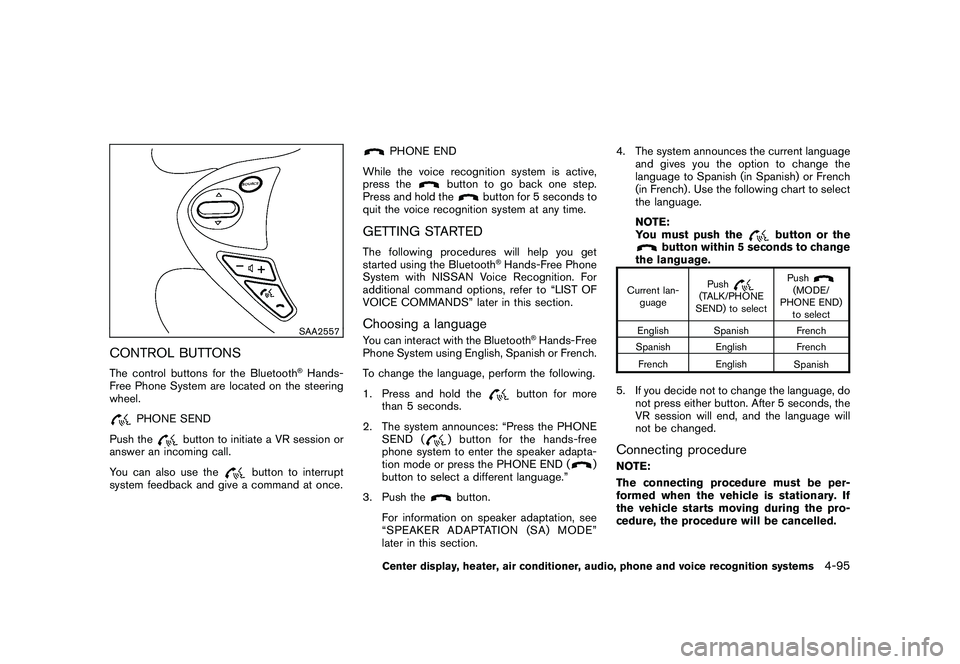
SAA2557
CONTROL BUTTONSThe control buttons for the Bluetooth
®Hands-
Free Phone System are located on the steering
wheel.
PHONE SEND
Push the
button to initiate a VR session or
answer an incoming call.
You can also use the
button to interrupt
system feedback and give a command at once.
PHONE END
While the voice recognition system is active,
press the
button to go back one step.
Press and hold the
button for 5 seconds to
quit the voice recognition system at any time.
GETTING STARTEDThe following procedures will help you get
started using the Bluetooth
®Hands-Free Phone
System with NISSAN Voice Recognition. For
additional command options, refer to “LIST OF
VOICE COMMANDS” later in this section.
Choosing a languageYou can interact with the Bluetooth
®Hands-Free
Phone System using English, Spanish or French.
To change the language, perform the following.
1. Press and hold the
button for more
than 5 seconds.
2. The system announces: “Press the PHONE SEND (
) button for the hands-free
phone system to enter the speaker adapta-
tion mode or press the PHONE END (
)
button to select a different language.”
3. Push the
button.
For information on speaker adaptation, see
“SPEAKER ADAPTATION (SA) MODE”
later in this section. 4. The system announces the current language
and gives you the option to change the
language to Spanish (in Spanish) or French
(in French) . Use the following chart to select
the language.
NOTE:
You must push the
button or the
button within 5 seconds to change
the language.
Current lan-
guage Push
(TALK/PHONE
SEND) to select Push
(MODE/
PHONE END) to select
English Spanish French
Spanish English French
French English Spanish
5. If you decide not to change the language, do
not press either button. After 5 seconds, the
VR session will end, and the language will
not be changed.Connecting procedureNOTE:
The connecting procedure must be per-
formed when the vehicle is stationary. If
the vehicle starts moving during the pro-
cedure, the procedure will be cancelled.
Center display, heater, air conditioner, audio, phone and voice recognition systems
4-95
Page 250 of 419
Black plate (246,1)
Model "Z34-D" EDITED: 2010/ 7/ 27
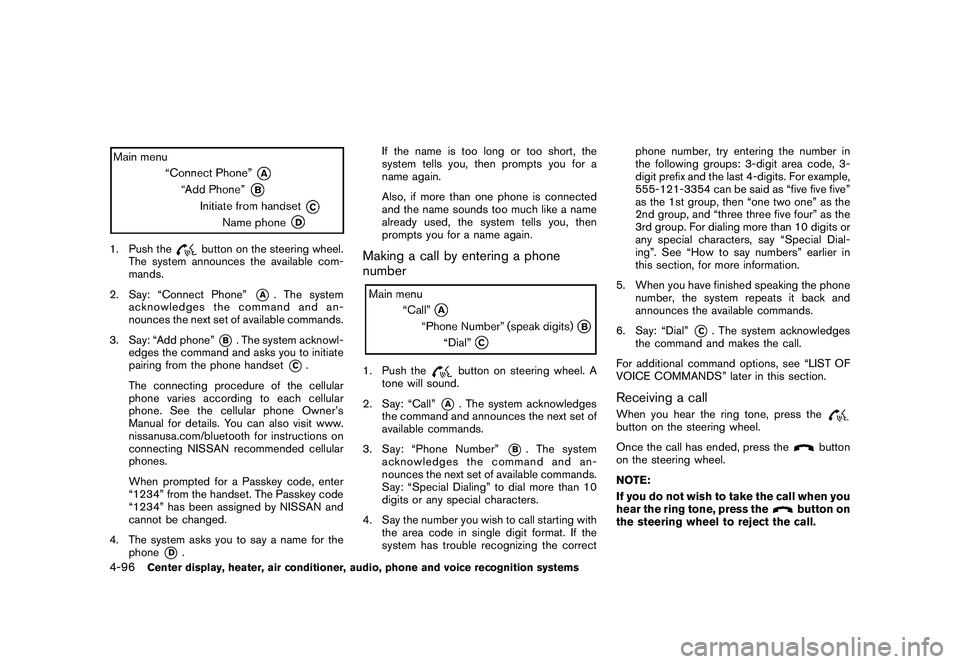
1. Push the
button on the steering wheel.
The system announces the available com-
mands.
2. Say: “Connect Phone”
*A
. The system
acknowledges the command and an-
nounces the next set of available commands.
3. Say: “Add phone”
*B. The system acknowl-
edges the command and asks you to initiate
pairing from the phone handset
*C.
The connecting procedure of the cellular
phone varies according to each cellular
phone. See the cellular phone Owner’s
Manual for details. You can also visit www.
nissanusa.com/bluetooth for instructions on
connecting NISSAN recommended cellular
phones.
When prompted for a Passkey code, enter
“1234” from the handset. The Passkey code
“1234” has been assigned by NISSAN and
cannot be changed.
4. The system asks you to say a name for the phone
*D
. If the name is too long or too short, the
system tells you, then prompts you for a
name again.
Also, if more than one phone is connected
and the name sounds too much like a name
already used, the system tells you, then
prompts you for a name again.
Making a call by entering a phone
number1. Push the
button on steering wheel. A
tone will sound.
2. Say: “Call”
*A
. The system acknowledges
the command and announces the next set of
available commands.
3. Say: “Phone Number”
*B
. The system
acknowledges the command and an-
nounces the next set of available commands.
Say: “Special Dialing” to dial more than 10
digits or any special characters.
4. Say the number you wish to call starting with the area code in single digit format. If the
system has trouble recognizing the correct phone number, try entering the number in
the following groups: 3-digit area code, 3-
digit prefix and the last 4-digits. For example,
555-121-3354 can be said as “five five five”
as the 1st group, then “one two one” as the
2nd group, and “three three five four” as the
3rd group. For dialing more than 10 digits or
any special characters, say “Special Dial-
ing”. See “How to say numbers” earlier in
this section, for more information.
5. When you have finished speaking the phone number, the system repeats it back and
announces the available commands.
6. Say: “Dial”
*C. The system acknowledges
the command and makes the call.
For additional command options, see “LIST OF
VOICE COMMANDS” later in this section.
Receiving a callWhen you hear the ring tone, press thebutton on the steering wheel.
Once the call has ended, press the
button
on the steering wheel.
NOTE:
If you do not wish to take the call when you
hear the ring tone, press the
button on
the steering wheel to reject the call.
4-96
Center display, heater, air conditioner, audio, phone and voice recognition systems
Page 251 of 419
Black plate (247,1)
Model "Z34-D" EDITED: 2010/ 7/ 27
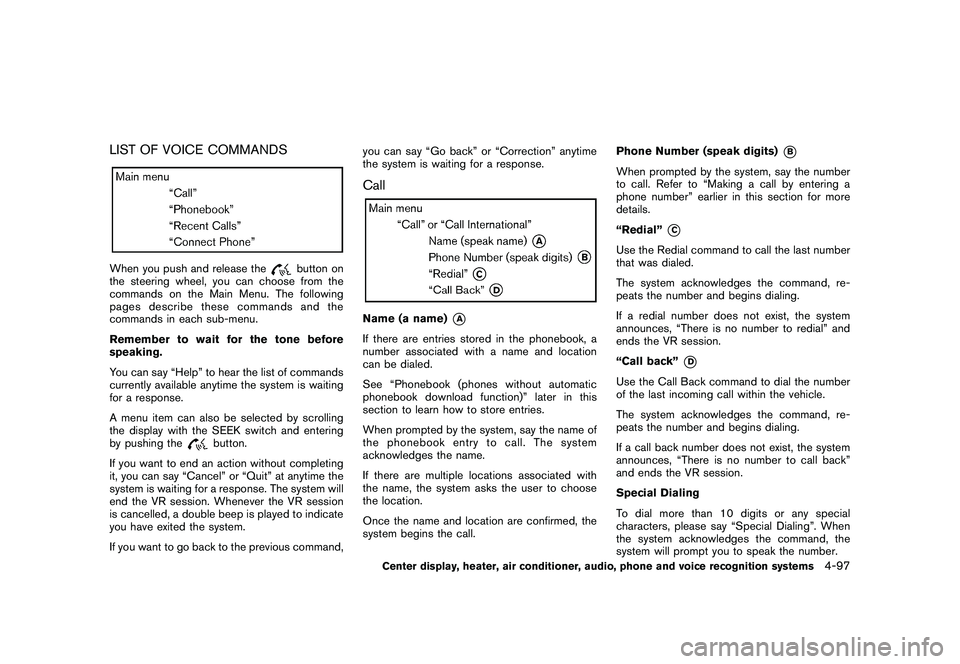
LIST OF VOICE COMMANDSWhen you push and release the
button on
the steering wheel, you can choose from the
commands on the Main Menu. The following
pages describe these commands and the
commands in each sub-menu.
Remember to wait for the tone before
speaking.
You can say “Help” to hear the list of commands
currently available anytime the system is waiting
for a response.
A menu item can also be selected by scrolling
the display with the SEEK switch and entering
by pushing the
button.
If you want to end an action without completing
it, you can say “Cancel” or “Quit” at anytime the
system is waiting for a response. The system will
end the VR session. Whenever the VR session
is cancelled, a double beep is played to indicate
you have exited the system.
If you want to go back to the previous command, you can say “Go back” or “Correction” anytime
the system is waiting for a response.
CallName (a name)
*A
If there are entries stored in the phonebook, a
number associated with a name and location
can be dialed.
See “Phonebook (phones without automatic
phonebook download function)” later in this
section to learn how to store entries.
When prompted by the system, say the name of
the phonebook entry to call. The system
acknowledges the name.
If there are multiple locations associated with
the name, the system asks the user to choose
the location.
Once the name and location are confirmed, the
system begins the call.
Phone Number (speak digits)
*B
When prompted by the system, say the number
to call. Refer to “Making a call by entering a
phone number” earlier in this section for more
details.
“Redial”
*C
Use the Redial command to call the last number
that was dialed.
The system acknowledges the command, re-
peats the number and begins dialing.
If a redial number does not exist, the system
announces, “There is no number to redial” and
ends the VR session.
“Call back”
*D
Use the Call Back command to dial the number
of the last incoming call within the vehicle.
The system acknowledges the command, re-
peats the number and begins dialing.
If a call back number does not exist, the system
announces, “There is no number to call back”
and ends the VR session.
Special Dialing
To dial more than 10 digits or any special
characters, please say “Special Dialing”. When
the system acknowledges the command, the
system will prompt you to speak the number.
Center display, heater, air conditioner, audio, phone and voice recognition systems
4-97
Page 252 of 419
Black plate (248,1)
Model "Z34-D" EDITED: 2010/ 7/ 27
During a call
During a call there are several command options
available. Push the
button on the steering
wheel to mute the receiving voice and enter
commands.
. “Help” — The system announces the avail-
able commands.
. “Go back/Correction” — The system an-
nounces “Go back,” ends the VR session
and returns to the call.
. “Cancel/Quit” — The system announces
“Cancel,” ends the VR session and returns
to the call.
. “Send/Enter/Call/Dial” — Use the Send
command to enter numbers, “*” or “#”
during a call. For example, if you were
directed to dial an extension by an auto-
mated system:
Say: “Send one two three four.”
The system acknowledges the command
and sends the tones associated with the
numbers. The system then ends the VR
session and returns to the call. Say “star” for
“*”, say “pound” for “#”.
. “Transfer call” — Use the Transfer Call
command to transfer the call from the
Bluetooth
®Hands-Free Phone System to the cellular phone when privacy is desired.
The system announces, “Transfer call. Call
transferred to privacy mode.” The system
then ends the VR session.
To reconnect a call from the cellular phone
to the Bluetooth
®Hands-Free Phone sys-
tem, push thebutton.
. “Mute” — Use the Mute command to mute
your voice so the other party cannot hear it.
Use the mute command again to unmute
your voice.
NOTE:
If a call is ended or the cellular phone
network connection is lost while the Mute
feature is on, the Mute feature will be reset
to “off” for the next call so the other party
can hear your voice.
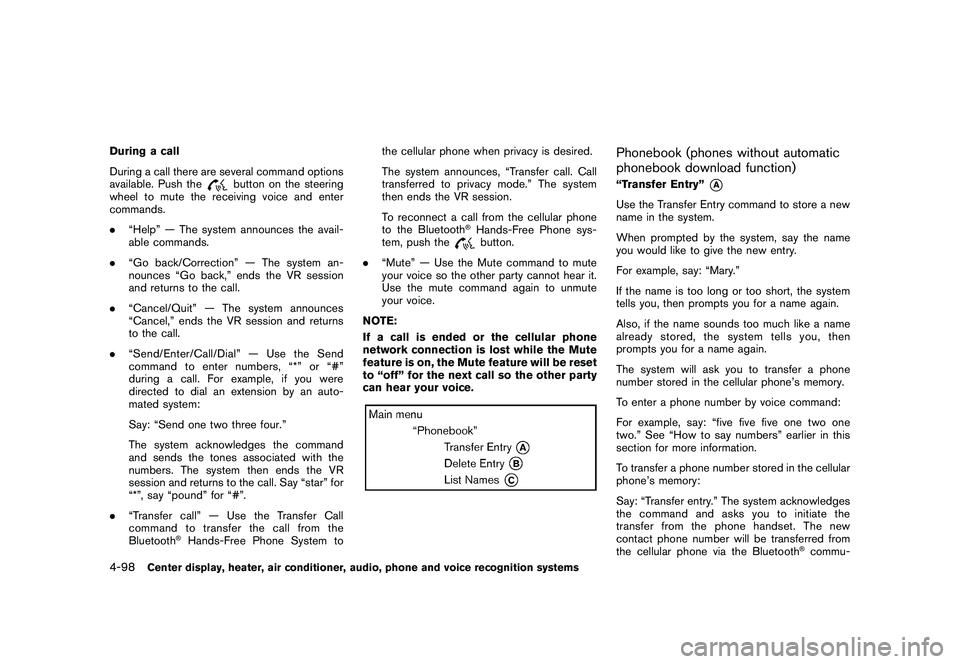
Phonebook (phones without automatic
phonebook download function)“Transfer Entry”
*A
Use the Transfer Entry command to store a new
name in the system.
When prompted by the system, say the name
you would like to give the new entry.
For example, say: “Mary.”
If the name is too long or too short, the system
tells you, then prompts you for a name again.
Also, if the name sounds too much like a name
already stored, the system tells you, then
prompts you for a name again.
The system will ask you to transfer a phone
number stored in the cellular phone’s memory.
To enter a phone number by voice command:
For example, say: “five five five one two one
two.” See “How to say numbers” earlier in this
section for more information.
To transfer a phone number stored in the cellular
phone’s memory:
Say: “Transfer entry.” The system acknowledges
the command and asks you to initiate the
transfer from the phone handset. The new
contact phone number will be transferred from
the cellular phone via the Bluetooth
®commu-
4-98
Center display, heater, air conditioner, audio, phone and voice recognition systems
Page 253 of 419
Black plate (249,1)
Model "Z34-D" EDITED: 2010/ 7/ 27
nication link.
The transfer procedure varies according to each
cellular phone. See the cellular phone Owner’s
Manual for details. You can also visit www.
nissanusa.com/bluetooth for instructions on
transferring phone numbers from NISSAN re-
commended cellular phones.
The system repeats the number and prompts
you for the next command. When you have
finished entering numbers or transferring an
entry, choose “Store.”
The system confirms the name, location and
number.
“Delete Entry”
*B
Use the Delete Entry command to delete one
entry from the phonebook. After the system
acknowledges a command, say the name to
delete or say “List Names” to choose an entry.
“List Names”
*C
Use the List Names command to hear all the
names in the phonebook. The system recites the
phonebook entries but does not include the
actual phone numbers. When playback of the
list is complete, the system returns to the main
menu.
Playback of the list can be stopped at any time
by pushing the
button on the steeringwheel. The system ends the VR session.
Phonebook (phones with automatic
phonebook download function)NOTE:
Phonebook commands are not available
when the vehicle is moving.For phones that support automatic download of
the phonebook (PBAP Bluetooth profile) , the
“Phonebook” command is used to manage
entries to the vehicle phonebook. You can say
the name of an entry at this menu to initiate
dialing of that entry.
The phonebook stores up to 1000 names for
each phone paired with the system. Each name
can have up to 4 locations/phone numbers
associated with it.
When a phone is connected to the system, the
phonebook is automatically downloaded to the
vehicle. This feature allows you to access your
phonebook from the Bluetooth
®system and call
contacts by name. You can record a custom
voice tag for contact names that the system has
difficulty recognizing. For more information see
“Record Name” in this section. NOTE:
Each phone has its own separate phone-
book. You cannot access Phone A’s phone-
book if you are currently connected with
Phone B.
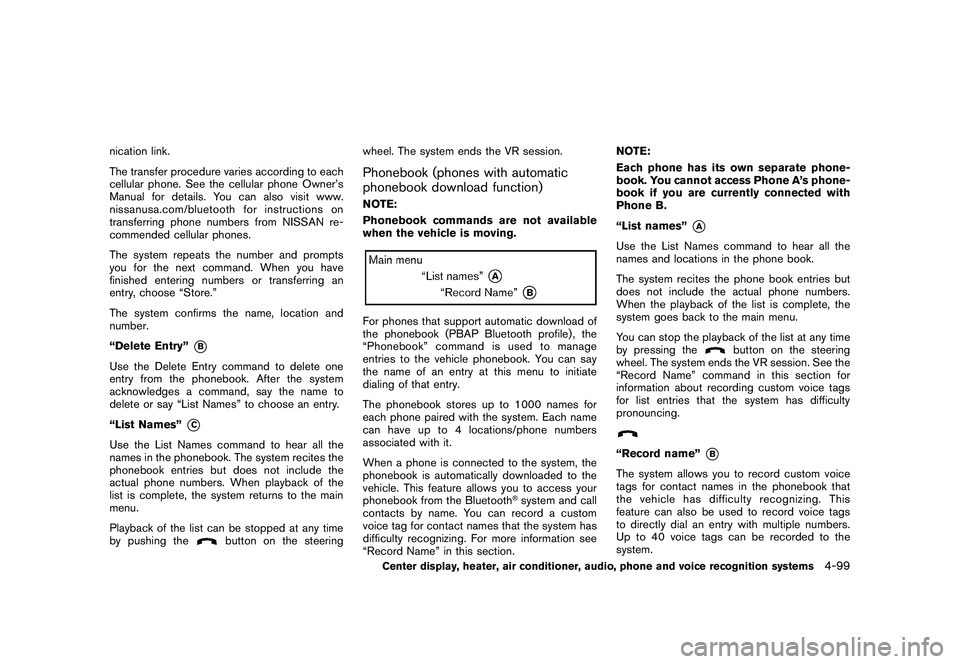
“List names”
*A
Use the List Names command to hear all the
names and locations in the phone book.
The system recites the phone book entries but
does not include the actual phone numbers.
When the playback of the list is complete, the
system goes back to the main menu.
You can stop the playback of the list at any time
by pressing the
button on the steering
wheel. The system ends the VR session. See the
“Record Name” command in this section for
information about recording custom voice tags
for list entries that the system has difficulty
pronouncing.
“Record name”
*B
The system allows you to record custom voice
tags for contact names in the phonebook that
the vehicle has difficulty recognizing. This
feature can also be used to record voice tags
to directly dial an entry with multiple numbers.
Up to 40 voice tags can be recorded to the
system.
Center display, heater, air conditioner, audio, phone and voice recognition systems
4-99
Page 260 of 419
Black plate (256,1)
Model "Z34-D" EDITED: 2010/ 7/ 27
SAA2532
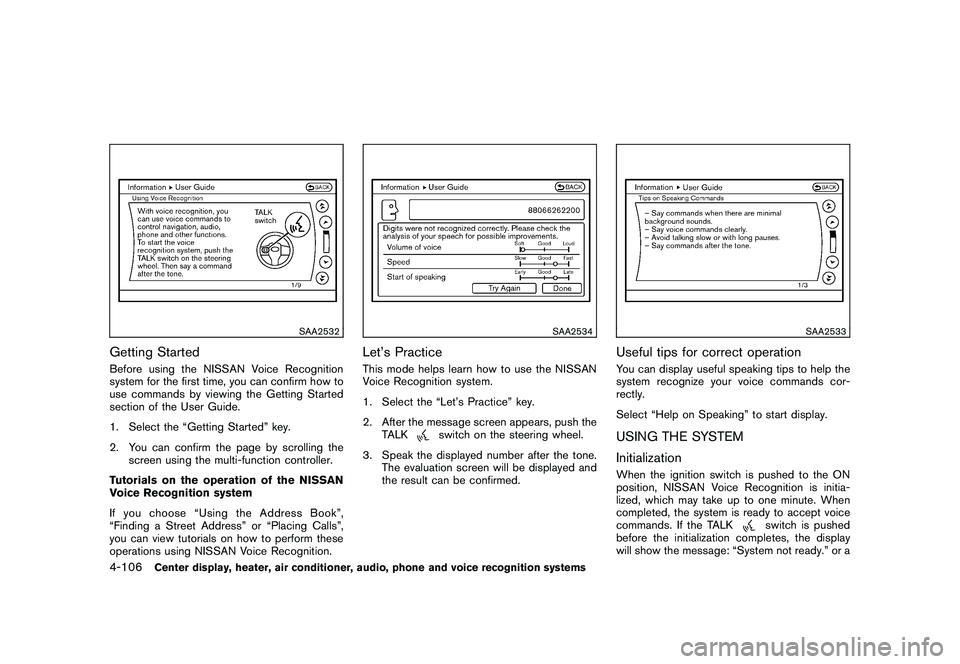
Getting StartedBefore using the NISSAN Voice Recognition
system for the first time, you can confirm how to
use commands by viewing the Getting Started
section of the User Guide.
1. Select the “Getting Started” key.
2. You can confirm the page by scrolling thescreen using the multi-function controller.
Tutorials on the operation of the NISSAN
Voice Recognition system
If you choose “Using the Address Book”,
“Finding a Street Address” or “Placing Calls”,
you can view tutorials on how to perform these
operations using NISSAN Voice Recognition.
SAA2534
Let’s PracticeThis mode helps learn how to use the NISSAN
Voice Recognition system.
1. Select the “Let’s Practice” key.
2. After the message screen appears, push the TALK
switch on the steering wheel.
3. Speak the displayed number after the tone. The evaluation screen will be displayed and
the result can be confirmed.
SAA2533
Useful tips for correct operationYou can display useful speaking tips to help the
system recognize your voice commands cor-
rectly.
Select “Help on Speaking” to start display.USING THE SYSTEM
InitializationWhen the ignition switch is pushed to the ON
position, NISSAN Voice Recognition is initia-
lized, which may take up to one minute. When
completed, the system is ready to accept voice
commands. If the TALK
switch is pushed
before the initialization completes, the display
will show the message: “System not ready.” or a
4-106
Center display, heater, air conditioner, audio, phone and voice recognition systems
Page 261 of 419
Black plate (257,1)
Model "Z34-D" EDITED: 2010/ 7/ 27
beep sounds.Before startingTo get the best recognition performance from
NISSAN Voice Recognition, observe the follow-
ing:
.The interior of the vehicle should be as quiet
as possible. Close the windows to eliminate
the surrounding noises (traffic noise and
vibration sounds, etc.) , which may prevent
the system from correctly recognizing the
voice commands.
. Wait until the tone sounds before speaking a
command.
. Speak in a natural conversational voice
without pausing between words.
. If the air conditioner is set to “Auto”, the fan
speed is automatically lowered so that your
commands can be recognized more easily.
SAA2167
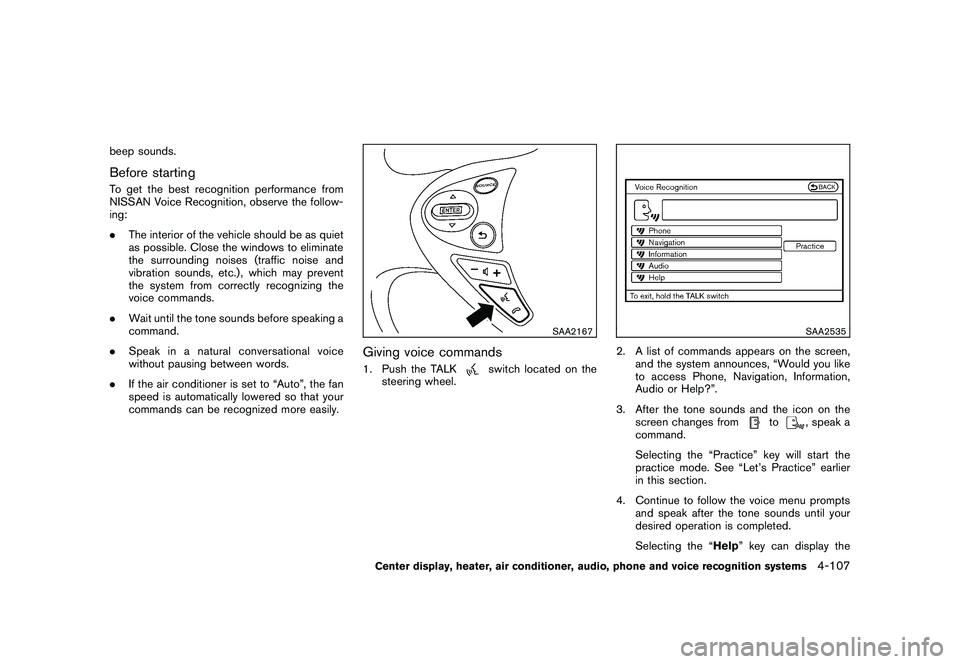
Giving voice commands1. Push the TALK
switch located on the
steering wheel.
SAA2535
2. A list of commands appears on the screen, and the system announces, “Would you like
to access Phone, Navigation, Information,
Audio or Help?”.
3. After the tone sounds and the icon on the screen changes from
to
, speak a
command.
Selecting the “Practice” key will start the
practice mode. See “Let’s Practice” earlier
in this section.
4. Continue to follow the voice menu prompts and speak after the tone sounds until your
desired operation is completed.
Selecting the “Help ” key can display the
Center display, heater, air conditioner, audio, phone and voice recognition systems
4-107