Page 251 of 369
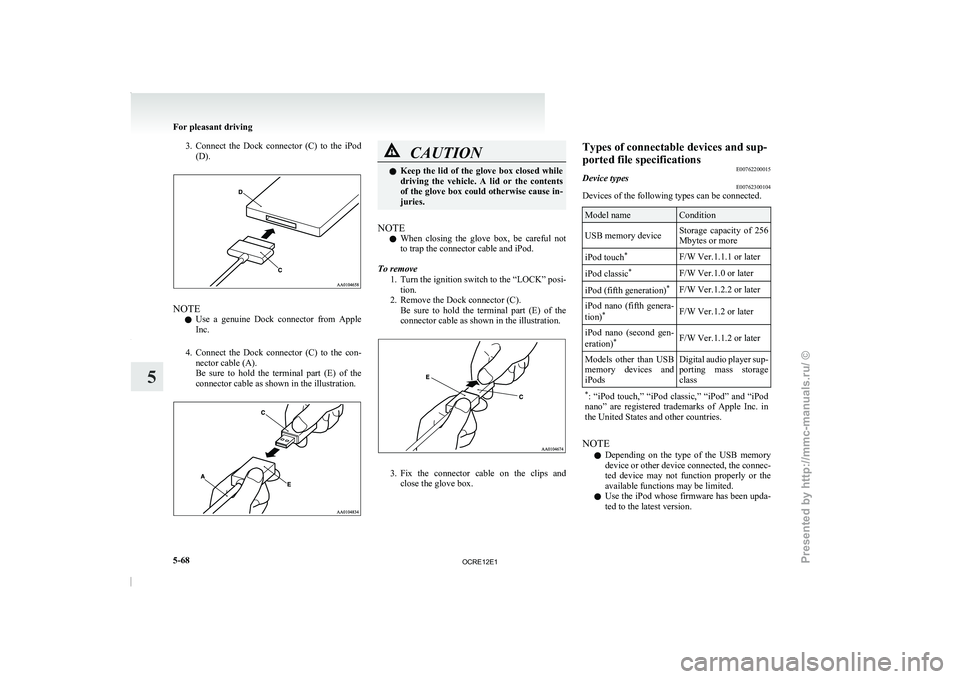
3. Connect the Dock connector (C) to the iPod
(D). NOTE
l Use
a genuine Dock connector
from Apple
Inc.
4. Connect the Dock connector (C) to the con- nector cable (A).
Be sure to hold the terminal part (E) of the
connector cable as shown in the illustration. CAUTION
l
Keep the lid of the
glove box closed while
driving the vehicle. A lid or the contents
of the glove box could otherwise cause in-
juries.
NOTE l When
closing the glove box,
be careful not
to trap the connector cable and iPod.
To remove 1. Turn the ignition switch to the “LOCK” posi-tion.
2. Remove the Dock connector (C). Be sure to hold the terminal part (E) of the
connector cable as shown in the illustration. 3. Fix the connector cable on the clips and
close the glove box. Types of connectable devices and sup-
ported file specifications
E00762200015
Device types E00762300104
Devices of the following types can be connected. Model name Condition
USB memory device Storage capacity of 256
Mbytes or more
iPod touch *
F/W Ver.1.1.1 or later
iPod classic *
F/W Ver.1.0 or later
iPod (fifth generation) *
F/W Ver.1.2.2 or later
iPod nano (fifth genera-
tion) *
F/W Ver.1.2 or later
iPod nano (second gen-
eration) *
F/W Ver.1.1.2 or later
Models other than USB
memory devices and
iPods Digital audio
player
sup-
porting mass storage
class
* : “iPod touch,” “iPod classic,”
“iPod” and “iPod
nano” are registered trademarks of Apple Inc. in
the United States and other countries. NOTE
l Depending
on the
type of
the USB memory
device or other device connected, the connec-
ted device may not function properly or the
available functions may be limited.
l Use the iPod whose firmware has been upda-
ted to the latest version. For pleasant driving
5-68
5
OCRE12E1
Presented by http://mmc-manuals.ru/ \251
Page 252 of 369
l
You can charge your iPod by connecting it to
the USB input terminal
when
the ignition
switch is in the “ACC” or “ON” position.
l Do not keep your USB memory device or
iPod in your vehicle.
l It is recommended that you back up files in
case of data damage.
l Do not connect to the USB input terminal
any device (hard disk, card reader, memory
reader, etc.) other than the connectable devi-
ces specified in the previous section. The de-
vice and/or data may be damaged. If any of
these devices was connected by mistake, re-
move it after turning the ignition switch to
the “LOCK” position.
File specifications E00762400017
You can play music files of the following specifica-
tions that are saved in
a USB memory device or oth-
er device supporting mass storage class. Item Condition
File format MP3, WMA, AAC,
WAV
Maximum number of
levels (including the
root) Level 8
Number of folders 700
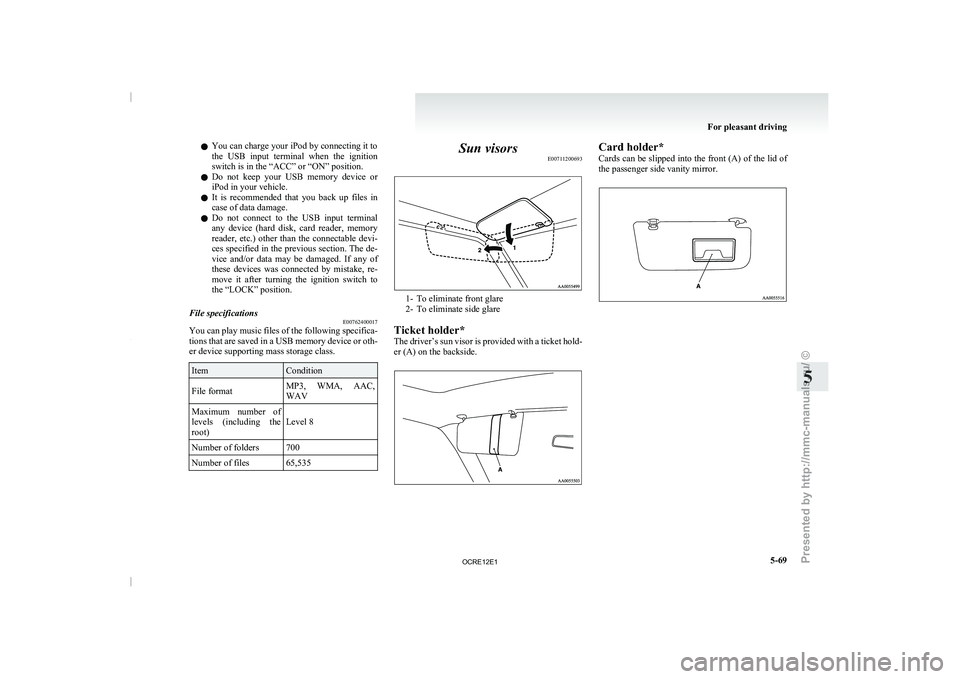
Number of files 65,535 Sun visors
E00711200693 1- To eliminate front glare
2- To eliminate side glare
Ticket holder*
The driver’s sun visor
is provided with a ticket hold-
er (A) on the backside. Card holder*
Cards can be slipped
into
the front (A) of the lid of
the passenger side vanity mirror. For pleasant driving
5-69 5
OCRE12E1
Presented by http://mmc-manuals.ru/ \251
Page 259 of 369
1- Utility box*
2- Glove box
3- Sunglasses holder*
4- Seat under tray*
5-
Front console box*
6-
Floor console box*
7- Secret box (Club cab)
Glove box E00717601478
NOTE l When
the lamp switch is
in the “ ” or
“ ” position, the glove box lamp illumi-
nates.
Refer to “Combination headlamps
and dip-
per switch” on page 3-30.
l The USB input terminal (if so equipped) is lo-
cated in the glove box.
For details, refer to “USB input terminal” on
page 5-67. Type 1
To open, pull the lever (A).
Type 2
The glove box can
be
locked and unlocked using
the key. 1- To lock
2- To unlock
3- To open, pull the leverFront console box*
E00733400161
To open, pull up the knob (A). Floor console box*
E00723300633
Type 1
To open, raise the lid. Type 2
Upper and lower boxes
are
located inside the floor
console box. For pleasant driving
5-76
5
OCRE12E1
Presented by http://mmc-manuals.ru/ \251
Page 359 of 369

Seat under tray 5-78
Seat
Adjustment 2-03
Armrest (Double cab) 2-07
Front seat 2-03
Head restraints 2-08
Heated seats 2-06
Rear seat 2-07
Secret box 5-77
Service precaution 8-02 Side airbag system 2-35
Side turn-signal lamps Bulb capacity 8-24
Replacement 8-28
Snow tyres 8-14
Spare wheel 6-16
Spark plug 9-17
Specifications 9-02
Speedometer 3-03
Starting 4-13
Steering Power steering fluid 8-09,9-22
Power steering system 4-47
Steering wheel height adjustment 4-09Steering wheel lock
4-12
Steering wheel remote control switch 5-40
Stop lamps Bulb capacity 8-23
Replacement 8-30
Storage spaces 5-75
Sun visors 5-69
Sunglasses holder 5-77
Sunroof 1-13 Safety mechanism 1-14
Sunshade 1-14
Switch 1-13
Super select 4WD 4-30
Supplemental restraint system 2-27 How the Supplemental Restraint System
works 2-29
Servicing 2-39
Warning lamp 2-38
T Tachometer 3-03
Tail lamps
Bulb capacity 8-24
Replacement 8-30
Tank capacity 02
Ticket holder 5-69
Tools 6-09 Storage 6-07
Towing 6-20
Trailer towing 4-54
Transfer oil 9-22
Transmission Automatic transmission 4A/T
4-17
Automatic transmission Sports Mode 5A/
T 4-21
Fluid 8-07,9-22
Manual transmission 4-15
Specifications 9-16
Tripmeter 3-03
Turn-signal indication lamps 3-07
Turn-signals lever 3-33
Tyres 8-11 How to change a tyre 6-17
Inflation pressures 8-12
Rotation 8-13
Size (tyre and wheel) 9-18
Snow tyres 8-14
Tyre chains 8-14
Wheel condition 8-13 U USB input terminal 5-67
How to connect an iPod 5-67
USB input terminal device How to connect a USB memory device 5-67
Used engine oils safety
instructions and disposal in-
formation 05
Utility box 5-77
V Vanity mirror 5-70
Vehicle care precautions 7-02
Vehicle dimensions 9-03
Vehicle identification number 9-02
Vehicle identification number plate 9-02
Vehicle information code plate
9-02
Vehicle labeling
9-02
Vehicle performance 9-09
Vehicle weight 9-10
Ventilators 5-02
W Warning lamps 3-08
Washer
Fluid 8-08,9-22
Switch 3-36,3-39
Washing 7-03
Water temperature gauge 3-05
Waxing 7-04
Weatherstripping 8-19
Weight 9-10
Wheel condition 8-13
Wheel Specification 9-18
Wiper Alphabetical index
4
OCRE12E1
Presented by http://mmc-manuals.ru/ \251
Page:
< prev 1-8 9-16 17-24
