Page 183 of 602
3-86 Features and controls
34-wheel drive operation
N00530600156
Your vehicle has been designed primarily for use on pavement.
But its unique 4 -wheel drive system allows you to occasion-
ally travel on unpaved roads, to campgrounds, picnic sites, and
similar locations.
Not only does this ensure better handling on dry, paved roads
but also permits better traction when driving on slippery, wet or
snow-covered roads and when moving out of mud.
But it is not suitable for heavy off road use or towing in rough
conditions.
It is particularly important to note that 4-wheel drive may not
give sufficient hill climbing ability and engine braking on steep
slopes. You should try to avoid driving on steep slopes.
Also, you must exercise caution when driving on sand and mud
and when driving through water because sufficient traction
may not be available in certain circumstances.
Please avoid driving the vehicle through areas where the tires
may get stuck in deep sand or mud.
NOTE�Driving on rough roads can be hard on a vehicle. Before
you leave the pavement, be sure all scheduled mainte-
nance and service has been done, and that you have
inspected your vehicle. Pay special attention to the condi-
tion of the tires, and check the tire pressures.
�Mitsubishi Motors is not responsible to the operator for
any damage or injury caused or liability incurred by
improper and negligent operation of a vehicle. All tech-
niques of vehicle operation depend on the skill and experi-
ence of the operator and other participating parties. Any
deviation from the recommended operating instructions
above is at their own risk.
WA R N I N G
!�Do not over-rely on the 4-wheel drive vehicles. Even
4-wheel drive vehicles have limits to the system and
ability to maintain control and traction. Reckless
driving may lead to accidents. Always drive care-
fully, taking account of the road conditions.�Improperly operating this vehicle on or off-pave-
ment can cause an accident or rollover in which you
and your passengers could be seriously injured or
killed.
• Follow all instructions and guidelines in the
owner’s manual.
• Keep your speed low and do not drive faster than
conditions.
BK0120400US.book 86 ページ 2010年5月12日 水曜日 午前10時50分
Page 236 of 602
Features and controls
3-139
3
�Average fuel consumption may vary depend on the driv-
ing conditions (road conditions, how you drive, etc.) The
actual fuel consumption may differ from the fuel con-
sumption displayed, so treat the fuel consumption dis-
played as just a rough guideline.
�Disconnecting the battery cable will erase from memory
the manual reset mode or auto reset mode setting for the
average fuel consumption display.
�The display setting can be changed to the preferred units
{mpg(US), mpg(UK), L/100km or km/L}.
Refer to “Changing the function settings (With ignition
switch or operation mode in ON)” on page 3-146.Momentary fuel consumption displayWhile driving, the momentary fuel consumption is shown with
a bar graph.
When the momentary fuel consumption surpasses the average
fuel consumption, the momentary fuel consumption is dis-
played with a green bar graph. (Type 2)
Be conscious of maintaining the momentary fuel consumption
above the average fuel consumption, it can help you drive with
the better fuel consumption.NOTE�When the momentary fuel consumption cannot be mea-
sured, a bar graph is not shown.
�The display setting can be changed to the preferred units
{mpg(US), mpg(UK), L/100km or km/L}.
Refer to “Changing the function settings (With ignition
switch or operation mode in ON)” on page 3-146.
�It is possible to cancel the green bar graph.
Refer to “Changing the function settings (With ignition
switch or operation mode in ON)” on page 3-146.
Function setting screenThe “Display language”, “Temperature unit”, “Fuel consump-
tion unit”, and “Average fuel consumption and speed reset
method” settings can be modified as desired.
For further details, refer to “Changing the function settings
(With ignition switch or operation mode in ON)” on page 3-
146.
BK0120400US.book 139 ページ 2010年5月12日 水曜日 午前10時50分
Page 247 of 602
3-150 Features and controls
3
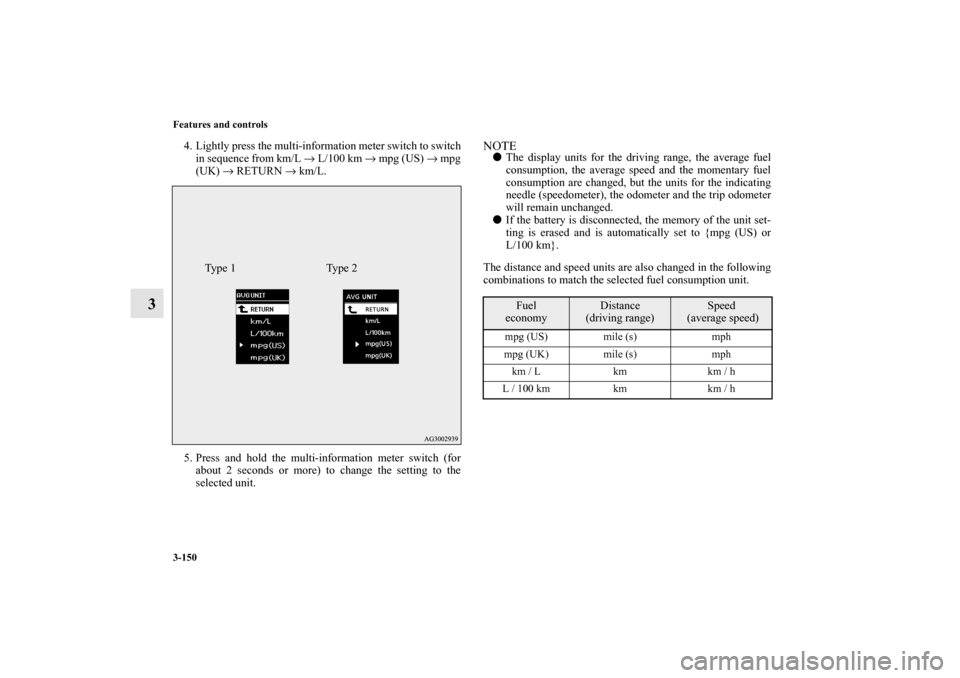
4. Lightly press the multi-information meter switch to switch
in sequence from km/L → L/100 km → mpg (US) → mpg
(UK) → RETURN → km/L.
5. Press and hold the multi-information meter switch (for
about 2 seconds or more) to change the setting to the
selected unit.
NOTE�The display units for the driving range, the average fuel
consumption, the average speed and the momentary fuel
consumption are changed, but the units for the indicating
needle (speedometer), the odometer and the trip odometer
will remain unchanged.
�If the battery is disconnected, the memory of the unit set-
ting is erased and is automatically set to {mpg (US) or
L/100 km}.
The distance and speed units are also changed in the following
combinations to match the selected fuel consumption unit.
Type 1 Type 2
Fuel
economy
Distance
(driving range)
Speed
(average speed)
mpg (US) mile (s) mph
mpg (UK) mile (s) mph
km / L km km / h
L / 100 km km km / h
BK0120400US.book 150 ページ 2010年5月12日 水曜日 午前10時50分
Page 256 of 602
Features and controls
3-159
3
3. Press and hold the multi-information meter switch (for
about 5 seconds or more), the buzzer sounds and all of the
function settings are returned to the factory settings.NOTE�The factory settings are as follows.
• Average fuel consumption and average speed reset
mode: A (Auto reset)
• Fuel consumption display unit: mpg (US) or (L/100 km)
• Temperature unit: °F (Fahrenheit) or °C (Celsius)
• Display language: ENGLISH
• Cooperative language setting: A
• Operation sounds: ON (Operation sound on)
• “REST REMINDER” display: OFF
• Turn signal sound: Turn signal sound 1
• Momentary fuel consumption with the green bar graph
(Type 2): ON
BK0120400US.book 159 ページ 2010年5月12日 水曜日 午前10時50分