Page 229 of 602
3-132 Features and controls
3
NOTE�Warning display screens with a “ ” or “ ” mark dis-
played in the upper right of the screen can be switched. If
you want to switch the display, press the multi-informa-
tion meter switch as follows.
“ ”: Press lightly.
“ ”: Press for about 2 seconds or more.
Redisplay of a warning display screen
When the warning is displayed, if you lightly press the
multi-information meter switch a few times, the warning dis-
play screen you switched from is redisplayed.
Refer to “Information screen (With ignition switch or operation
mode in OFF)” on page 3-128.
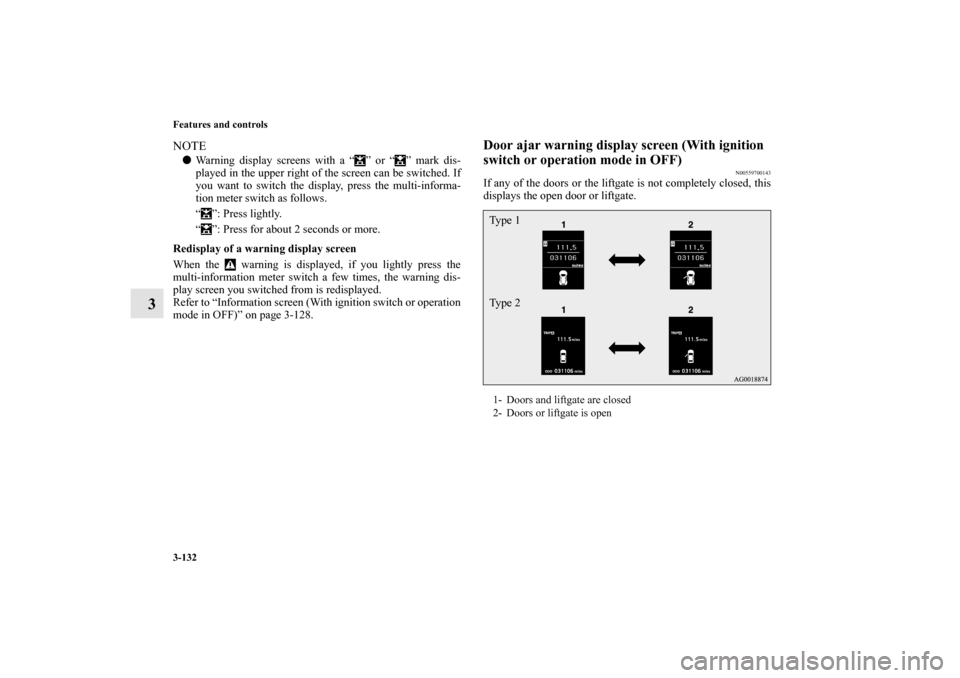
Door ajar warning display screen (With ignition
switch or operation mode in OFF)
N00559700143
If any of the doors or the liftgate is not completely closed, this
displays the open door or liftgate.1- Doors and liftgate are closed
2- Doors or liftgate is openTy p e 1
Ty p e 2
BK0120400US.book 132 ページ 2010年5月12日 水曜日 午前10時50分
Page 232 of 602
Features and controls
3-135
3
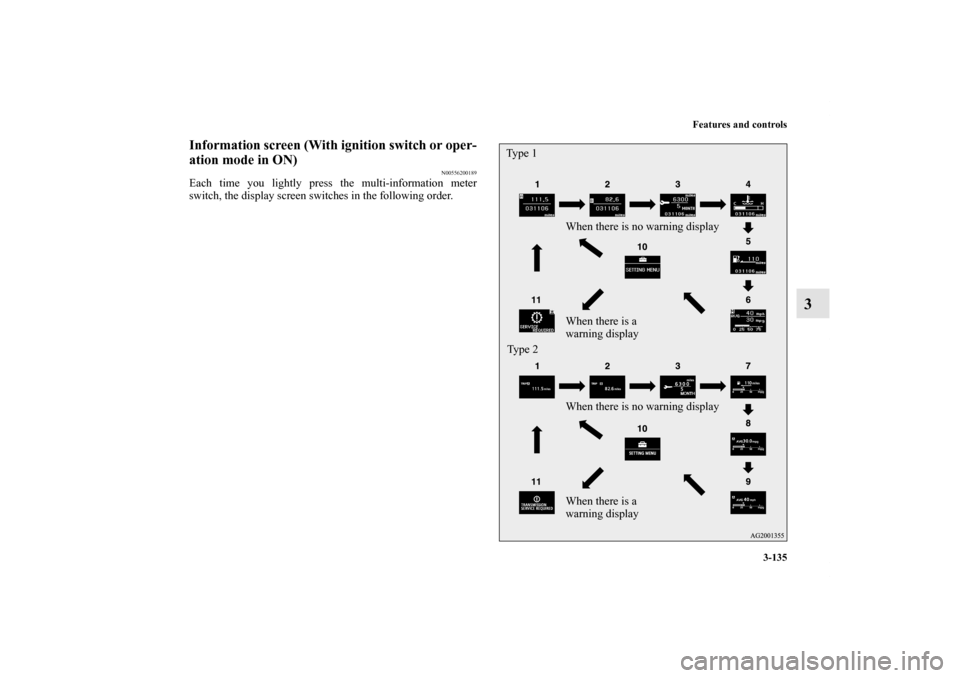
Information screen (With ignition switch or oper-
ation mode in ON)
N00556200189
Each time you lightly press the multi-information meter
switch, the display screen switches in the following order.
When there is no warning display
When there is a
warning display
When there is no warning display
When there is a
warning display Type 1
Ty p e 2
BK0120400US.book 135 ページ 2010年5月12日 水曜日 午前10時50分
Page 237 of 602
3-140 Features and controls
3
Interrupt display screen (With ignition switch or
operation mode in ON)
N00556300148
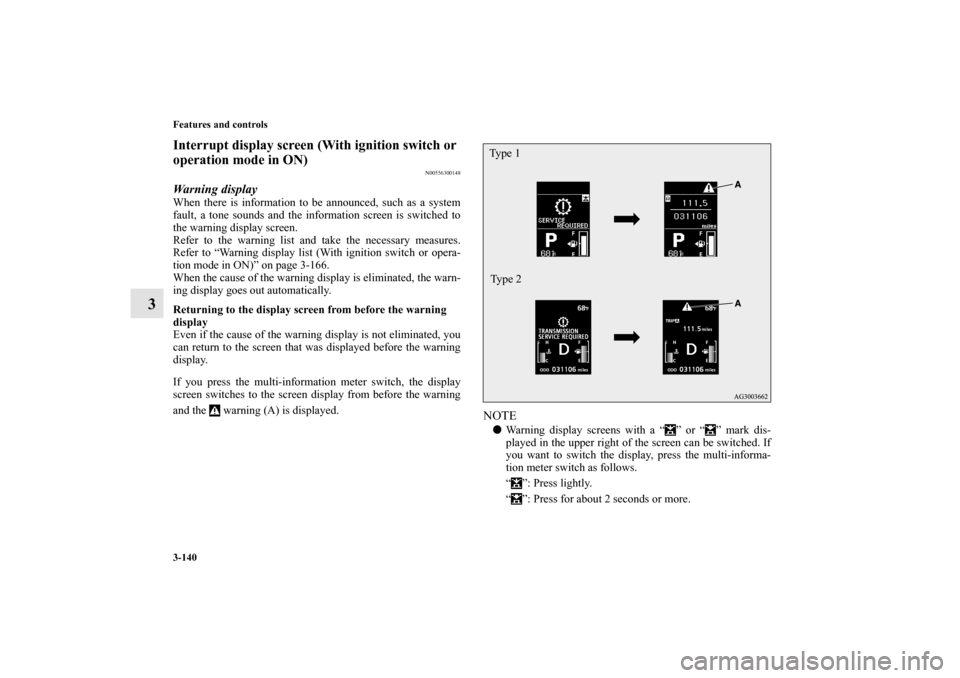
Warning displayWhen there is information to be announced, such as a system
fault, a tone sounds and the information screen is switched to
the warning display screen.
Refer to the warning list and take the necessary measures.
Refer to “Warning display list (With ignition switch or opera-
tion mode in ON)” on page 3-166.
When the cause of the warning display is eliminated, the warn-
ing display goes out automatically.
Returning to the display screen from before the warning
display
Even if the cause of the warning display is not eliminated, you
can return to the screen that was displayed before the warning
display.
If you press the multi-information meter switch, the display
screen switches to the screen display from before the warning
and the warning (A) is displayed.
NOTE�Warning display screens with a “ ” or “ ” mark dis-
played in the upper right of the screen can be switched. If
you want to switch the display, press the multi-informa-
tion meter switch as follows.
“ ”: Press lightly.
“ ”: Press for about 2 seconds or more.Ty p e 1
Type 2
BK0120400US.book 140 ページ 2010年5月12日 水曜日 午前10時50分
Page 238 of 602
Features and controls
3-141
3
Redisplay of a warning display screenWhen the warning is displayed, if you lightly press the
multi-information meter switch a few times, the warning dis-
play screen you switched from is redisplayed.Other interrupt displaysThe operation status of each system is displayed on the infor-
mation screen.
For further details, refer to the appropriate page in the warning
display list.
Refer to “Other interrupt displays” on page 3-173.Selector lever position display screen
(if so
equipped)
N00556400064
Shows the position of the selector lever.
Refer to “Selector lever operation” on page 3-74.Outside temperature display screen
N00556500065
Shows the temperature outside the vehicle.NOTE�The display setting can be changed to the preferred units
(°F or °C).
Refer to “Changing the function settings (With ignition
switch or operation mode in ON)” on page 3-146.
�Depending on factors such as the driving conditions, the
displayed temperature may vary from the actual outside
temperature.
ECO mode indicator
(if so equipped)
N00568700019
This indicator will be displayed when fuel-efficient driving is
achieved.
BK0120400US.book 141 ページ 2010年5月12日 水曜日 午前10時50分
Page 241 of 602
3-144 Features and controls
3
To reset The “---” display can be reset while the ignition switch or the
operation mode is in OFF. When the display is reset, the time
until the next periodic inspection is displayed and the warning
display is no longer displayed when the ignition switch is
switched from the “LOCK” position to the “ON” position or
the operation mode is changed from OFF to ON.
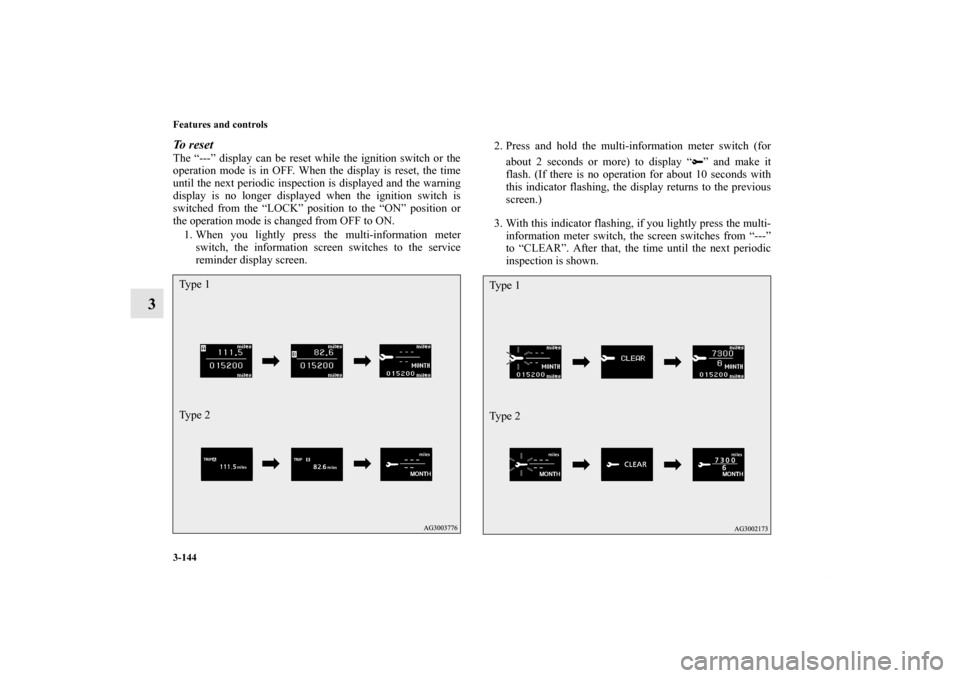
1. When you lightly press the multi-information meter
switch, the information screen switches to the service
reminder display screen.2. Press and hold the multi-information meter switch (for
about 2 seconds or more) to display “ ” and make it
flash. (If there is no operation for about 10 seconds with
this indicator flashing, the display returns to the previous
screen.)
3. With this indicator flashing, if you lightly press the multi-
information meter switch, the screen switches from “---”
to “CLEAR”. After that, the time until the next periodic
inspection is shown.Ty p e 1
Ty p e 2
Ty p e 1
Ty p e 2
BK0120400US.book 144 ページ 2010年5月12日 水曜日 午前10時50分
Page 249 of 602
3-152 Features and controls
3
Changing the display language
N00557300116
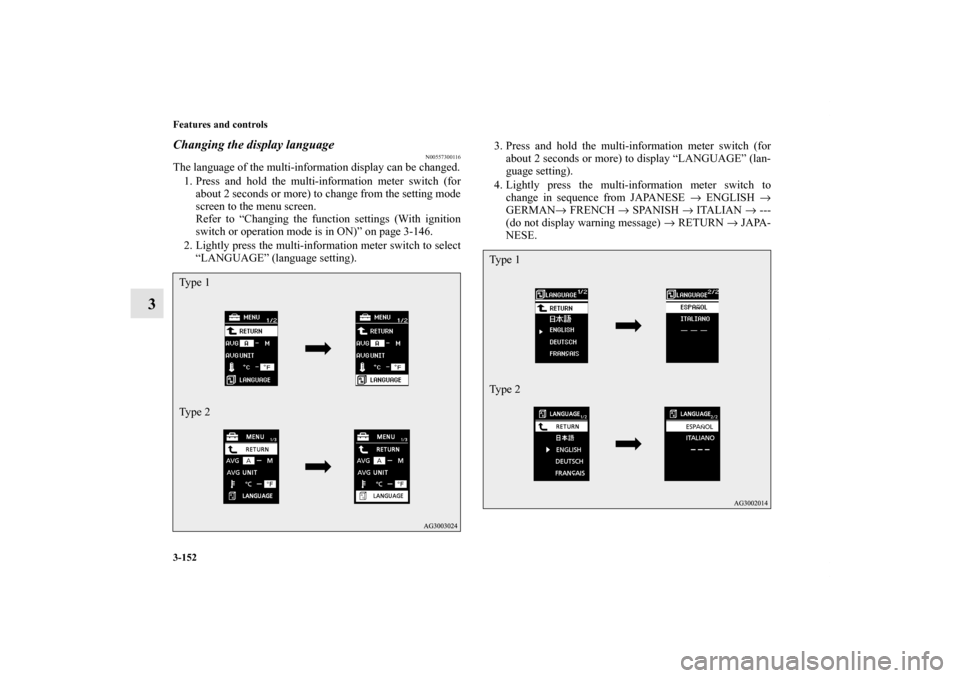
The language of the multi-information display can be changed.
1. Press and hold the multi-information meter switch (for
about 2 seconds or more) to change from the setting mode
screen to the menu screen.
Refer to “Changing the function settings (With ignition
switch or operation mode is in ON)” on page 3-146.
2. Lightly press the multi-information meter switch to select
“LANGUAGE” (language setting).3. Press and hold the multi-information meter switch (for
about 2 seconds or more) to display “LANGUAGE” (lan-
guage setting).
4. Lightly press the multi-information meter switch to
change in sequence from JAPANESE → ENGLISH →
GERMAN→ FRENCH → SPANISH → ITALIAN → ---
(do not display warning message) → RETURN → JAPA-
NESE.Ty p e 1
Ty p e 2
Ty p e 1
Ty p e 2
BK0120400US.book 152 ページ 2010年5月12日 水曜日 午前10時50分
Page 250 of 602
Features and controls
3-153
3
5. Press and hold the multi-information meter switch (for
about 2 seconds or more) to change the setting to the
selected language.NOTE�If the battery is disconnected, the memory of the language
setting is erased and is automatically set to ENGLISH.
�If “---” is selected in the language setting, a warning mes-
sage is not displayed when there is a warning display or
interrupt display.Changing the language on Mitsubishi Multi-Communi-
cation System or Bluetooth
® 2.0 interface to match the
multi-information display
(if so equipped)
N00529800161
The language used in Mitsubishi Multi-Communication Sys-
tem (if so equipped) or Bluetooth
® 2.0 interface (if so
equipped) can be changed automatically to the same language
as that shown in the multi-information display.
1. Press and hold the multi-information meter switch (for
about 2 seconds or more) to switch from the setting mode
screen to the menu screen. Refer to “Changing the func-
tion settings (With ignition switch or operation mode is in
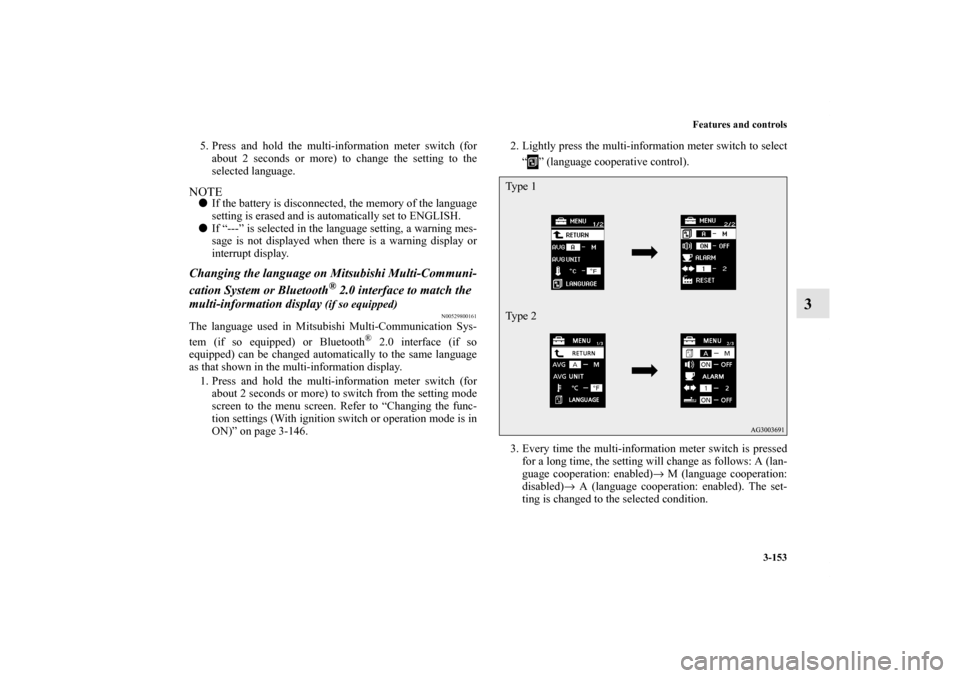
ON)” on page 3-146. 2. Lightly press the multi-information meter switch to select
“ ” (language cooperative control).
3. Every time the multi-information meter switch is pressed
for a long time, the setting will change as follows: A (lan-
guage cooperation: enabled)→ M (language cooperation:
disabled)→ A (language cooperation: enabled). The set-
ting is changed to the selected condition.
Ty p e 1
Ty p e 2
BK0120400US.book 153 ページ 2010年5月12日 水曜日 午前10時50分
Page 252 of 602
Features and controls
3-155
3
NOTE�If the battery is disconnected, the memory of the operation
sound setting is erased and is automatically set to “ON”
(operation sound on).
�The operation sound setting only deactivates the operation
sound of the multi-information meter switch and rheostat
meter illumination button. The warning display and other
sounds cannot be deactivated.
Changing the time until “REST REMINDER” is dis-
played
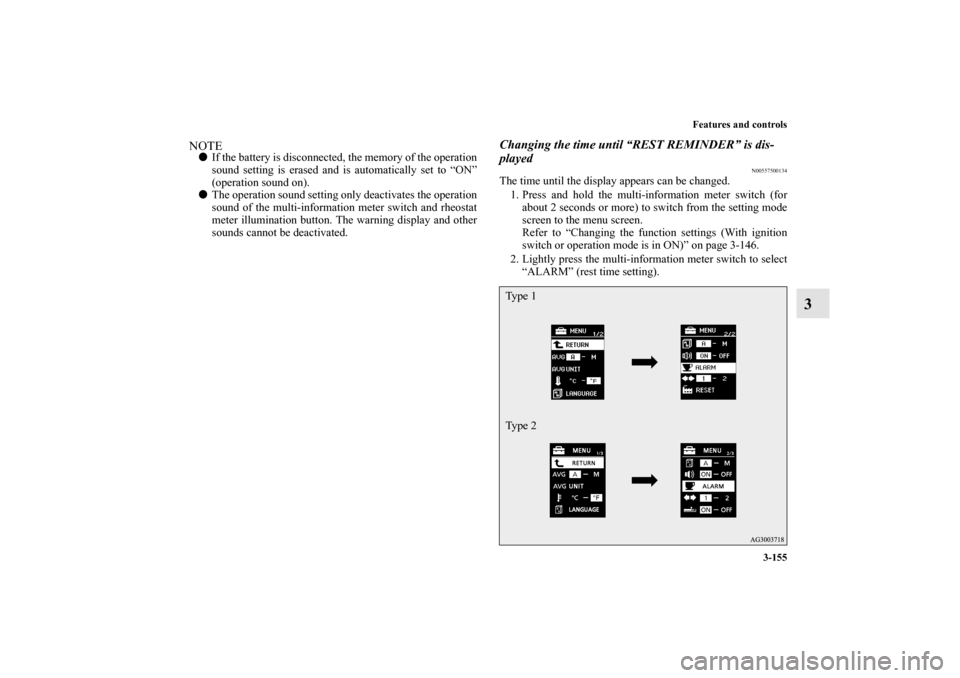
N00557500134
The time until the display appears can be changed.
1. Press and hold the multi-information meter switch (for
about 2 seconds or more) to switch from the setting mode
screen to the menu screen.
Refer to “Changing the function settings (With ignition
switch or operation mode is in ON)” on page 3-146.
2. Lightly press the multi-information meter switch to select
“ALARM” (rest time setting).Ty p e 1
Ty p e 2
BK0120400US.book 155 ページ 2010年5月12日 水曜日 午前10時50分