Page 4 of 69
5 Using this manual
Terms used in this manual
The following terms are used in this manual.
● Video entertainment system owner’s manual
→ (This) manual
● Video entertainment system
→ (The) system
● Video entertainment system remote control
→ (The) remote control
● Infrared headphones
→ Wireless headphones
●
Vehicle standard or manufacturer’s optional audio
→ (the )front audio
● The images and illustrations that appear in this manual were made for this manual. These depictions may differ from the actual screen images.
System overview
Special features of the system
· The 9-inch display and DVD player are components of a single unit mounted on the interior roof.
· The system can be operated using the buttons on the system panel or using the remote control from the rear seats (second row
and third row seats).
· In addition to DVD video, the built-in DVD player supports a range of disc formats including DVD audio, music CD, MP3/WMA,
and others.
· Portable video devices can be used, by connecting them to the video input jacks.
· The wireless headphones can be used to listen to audio. In addition to the wireless headphones, audio can also be played through
the vehicle speakers.
· DVDs being played on the Mitsubishi Multi Communication System (MMCS) at the front of the vehicle can be displayed on the
video entertainment system screen.
·
MMCS and some front audio operations are possible.
�������
���
��� ������� ������
Page 5 of 69
System overview
6System funtions
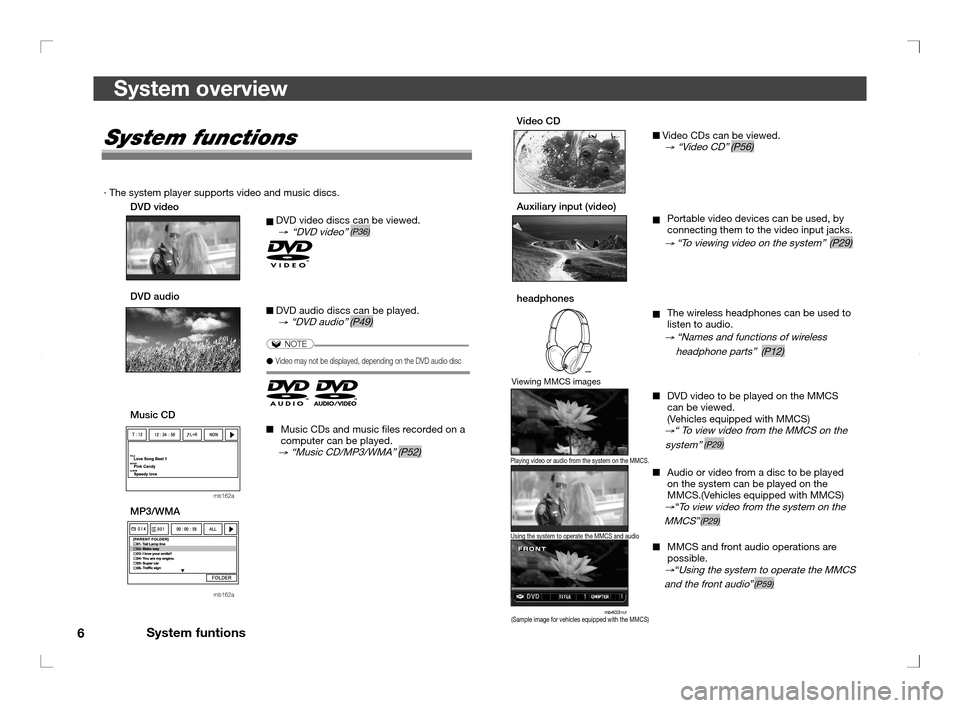
Video CD Video CDs can be viewed. → “Video CD” (P56)
Auxiliary input (video) Portable video devices can be used, by
connecting them to the video input jacks.
→ “To viewing video on the system” (P29)
headphones The wireless headphones can be used to
listen to audio.
→ “Names and functions of wireless
headphone parts” (P12)
DVD video to be played on the MMCS
can be viewed.
(Vehicles equipped with MMCS)
→“ To view video from the MMCS on the
system” (P29)
Audio or video from a disc to be played
on the system can be played on the
MMCS.(Vehicles equipped with MMCS)
→“To view video from the system on the
MMCS”(P29)
MMCS and front audio operations are
possible.
→“Using the system to operate the MMCS
and the front audio”(P59)
System functions
· The system player supports video and music discs.
DVD video
DVD video discs can be viewed.
→ “DVD video” (P36)
DVD audio DVD audio discs can be played.
→ “DVD audio” (P49)
NOTE
● Video may not be displayed, depending on the DVD audio disc
Music CD Music CDs and music les recorded on a
computer can be played.
→ “Music CD/MP3/WMA” (P52)
mb162a
MP3/WMA
MMMMM
M
mb162a
(Sample image for vehicles equipped with the MMCS)
Viewing MMCS images
Playing video or audio from the system on the MMCS.
Using the system to operate the MMCS and audio
�������
���
��� ������� ������
Page 19 of 69
Supported disc types
20
Supported disc types
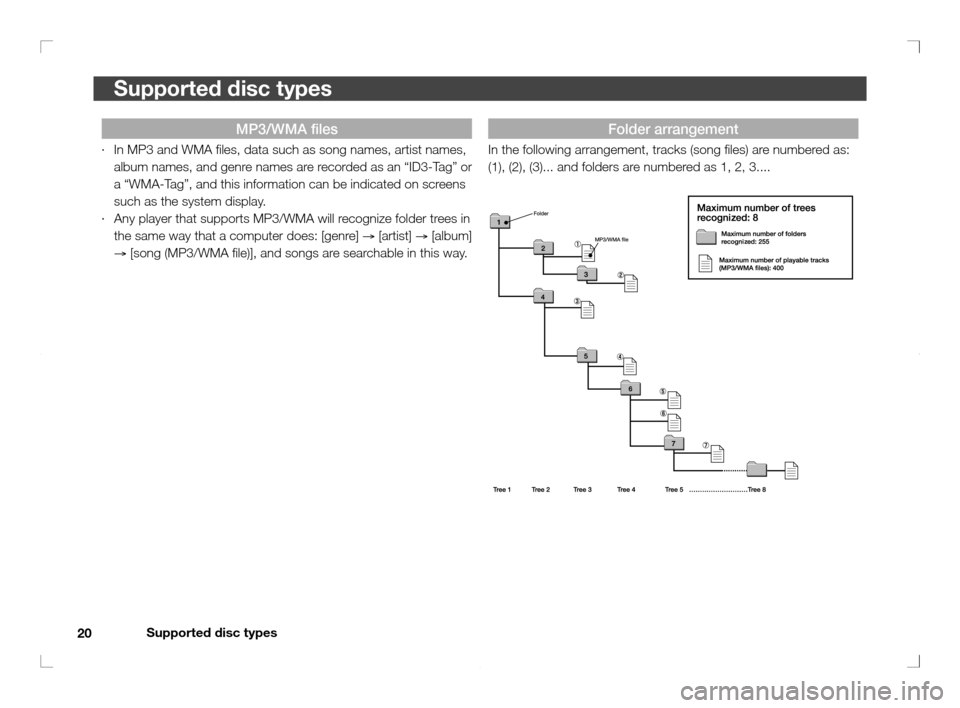
Folder arrangement
In the following arrangement, tracks (song les) are numbered as:
(1), (2), (3)... and folders are numbered as 1, 2, 3....
MP3/WMA fi les
· In MP3 and WMA les, data such as song names, artist names,
album names, and genre names are recorded as an “ID3-Tag” or
a “WMA-Tag”, and this information can be indicated on screens
such as the system display.
· Any player that supports MP3/WMA will recognize folder trees in
the same way that a computer does: [genre]
→ [artist]
→ [album]
→ [song (MP3/WMA le)], and songs are searchable in this way.
�������
���
��� �������� ����
�
Page 67 of 69
Glossary
68
Glossary
Term
Meaning
VBR (Variable Bit Rate):
The bit rate varies according to the rate of
compression. CBR (Constant Bit Rate) is a format that
sets a xed bit rate. The bit rate varies according to the
rate of compression, so players that do not support
VBR cannot play VBR compressed les.
(P18)
WMA:
Abbreviation for Windows Media Audio. An audio
compression technology developed by Microsoft
Corporation.
(P16)
WMA-Tag:
Information such as the title or artist name that is
recorded in a WMA le
(P19)
Language code:
Code for the language set when viewing DVD video
(enter a language code for languages other than
Japanese or English on the system).
Sampling frequency:
Frequency at which sampling (analog samples
digitised at xed intervals) is done to convert analog
audio signals to digital audio signals.
Bit rate:
Value that expresses rate per second of signal transfer
in bits.
(P18)
Multisession:
Recording on several different occasions when
recording onto CD-R.
(P18)
Region number:
There are 6 region numbers (as well as individual
country codes) for DVD videos. Region numbers for
the disc and the player must match in order to play the
disc.
(P15)
Te r m
Meaning
Aspect ratio:
the height to width ratio of a screen or image.
BONUS (bonus track):
Special additional track included on a DVD audio or
other media
(P51)
CD-DA:
Music CD
CD-R:
Recordable CD media. Data can be recorded once
and cannot be rerecorded or erased.
CD-RW:
Recordable CD media. Data can be recorded,
rerecorded, and erased.
CD-TEXT:
Function that records text such as album, song, and
artist names onto music CDs.
Country Code:
Region code set when watching DVD video.
CURSOR:
Mark used to select items in sequence on the screen.
In the system CURSOR menu, items that can be set
change color.
DLIST image:
Background image or photograph that is displayed
during DVD-AUDIO track playback.
ID3-Tag:
Information such as the title or artist name that is
recorded in an MP3 le.
MP3:
Abbreviation for MPEG1 Audio Layer 3.
Term
Meaning
MPEG:
An audio data compression standard.
Abbreviation for Moving Picture Coding Experts Group,
a video compression standard.
NTSC:
Abbreviation for National Television Standards
Committee.
PAL:
Phase Alternating Line.
PBC (Playback control):
A video CD playback format, in which numbers can be
entered and the desired track may be selected on the
displayed screen.
(P56)
PLAY LIST:
A list including the desired playback order and the like.
Made in advance when creating MP3/WMA les.
Rating:
Depending on the DVD video, ratings such as age
restrictions may be set for certain content.
SOURCE:
Type of music or video. System source selections
include DISC and VIDEO (auxiliary input).
(P24)
Titles:
First, DVD videos are set off by titles. Each title is
divided into chapters.
Chapter:
Numbers assigned to titles are called title numbers,
and numbers assigned to chapters are called chapter
numbers.
�������
���
��� �������� �� ���
�