Page 266 of 706

Features and controls
3-171
3
NOTE�If there is no warning display, the switching sequence is:
Odometer/Trip odometer → Odometer/Trip odometer
→ service reminder → Odometer/Trip odometer .
�Both trip odometers and can count up to 9999.9
miles/kilometers.
When a trip odometer goes past 9999.9 miles/kilometers,
it returns to 0.0 miles/kilometers.
�When the battery is disconnected, the memories of trip
odometer displays and are cleared, and their dis-
plays return to “0.0 miles/kilometers”.Service reminder
N00555500039
Shows the distance and number of months until the next peri-
odic inspection.
Refer to “Service reminder” on page 3-183.
Interrupt display screen (With ignition switch in
the “OFF” position)
N00559600184
When there is information to be announced, such as a key
reminder, the buzzer sounds and switches to the warning dis-
play screen. Refer to the appropriate page and take the neces-
sary measures.
When the cause of the warning display is eliminated, the warn-
ing display goes out automatically.
Refer to “Warning display list (With ignition switch in the
“OFF” position)” on page 3-203.1- Information generated
2- Cause eliminatedTy p e 1
Ty p e 2
BK0125300US.book 171 ページ 2010年5月18日 火曜日 午後1時53分
Page 269 of 706
3-174 Features and controls
3
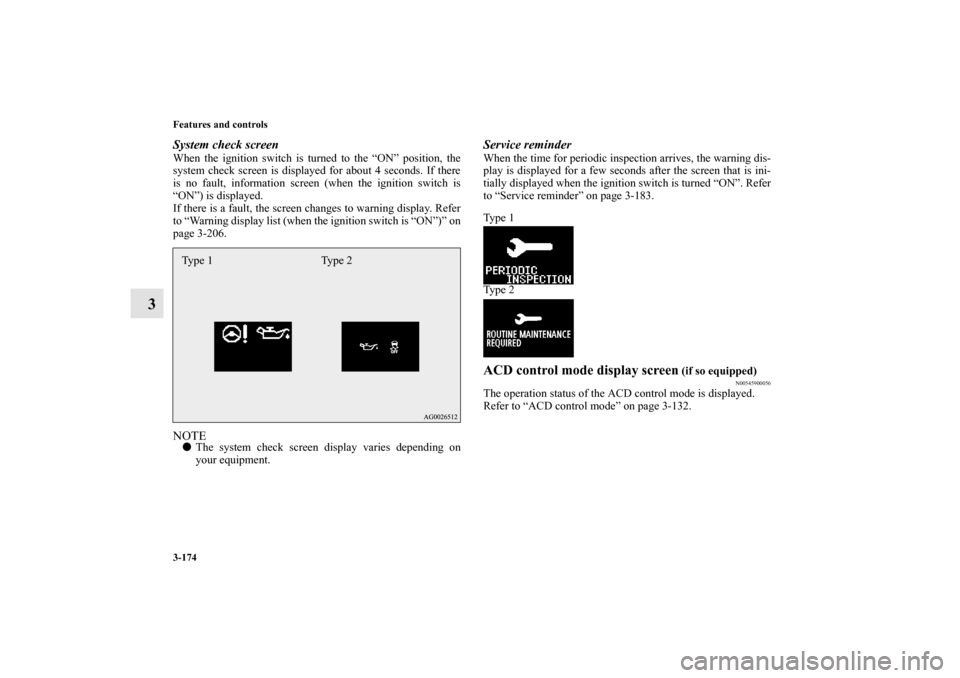
System check screenWhen the ignition switch is turned to the “ON” position, the
system check screen is displayed for about 4 seconds. If there
is no fault, information screen (when the ignition switch is
“ON”) is displayed.
If there is a fault, the screen changes to warning display. Refer
to “Warning display list (when the ignition switch is “ON”)” on
page 3-206.NOTE�The system check screen display varies depending on
your equipment.
Service reminderWhen the time for periodic inspection arrives, the warning dis-
play is displayed for a few seconds after the screen that is ini-
tially displayed when the ignition switch is turned “ON”. Refer
to “Service reminder” on page 3-183.
Ty p e 1
Ty p e 2ACD control mode display screen
(if so equipped)
N00545900056
The operation status of the ACD control mode is displayed.
Refer to “ACD control mode” on page 3-132.
Type 1 Type 2
BK0125300US.book 174 ページ 2010年5月18日 火曜日 午後1時53分
Page 272 of 706

Features and controls
3-177
3
NOTE�While driving, the function setting screen is not displayed
even if you operate the multi-information meter switch.
Always park the vehicle in a safe place before operating.
Refer to “Changing the function settings (With ignition
switch in the “ON” position)” on page 3-187.
�When there is information to be announced, such as a sys-
tem fault, the tone sounds and the screen display is
changed.
Refer to “Interrupt display screen (With ignition switch in
the “ON” position)” on page 3-180.
Odometer/Trip odometerThe operation method is the same as when the ignition switch
is in the “OFF” position.
For further details, refer to “Odometer/Trip odometer” on page
3-170.Service reminderShows the distance and number of months until the next peri-
odic inspection.
Refer to “Service reminder” on page 3-183.Engine coolant temperature displayShows the engine coolant temperature.
If the coolant becomes hot, “ ” will blink.
Pay careful attention to the engine coolant temperature display
while you are driving.
1-
Odometer (Type 1)/Trip odometer
2-
Odometer (Type 1)/Trip odometer
3- Service reminder
4- Engine coolant temperature display (Type 1)
5- Driving range display (Type 1)
6- Average speed display, average fuel consumption display,
momentary fuel consumption display (Type 1)
7- Driving range display, momentary fuel consumption display
(Type 2)
8- Average fuel consumption display, momentary fuel con-
sumption display (Type 2)
9- Average speed display, momentary fuel consumption display
(Type 2)
10- Function setting screen
11- Redisplay of a warning display screen
CAUTION
!�If the engine is overheating, “ ” will blink. In this
case, the bar graph is on the red zone. Immediately
park the vehicle in a safe place and take the required
measures. Refer to “Engine overheating” on page 6-
5.
BK0125300US.book 177 ページ 2010年5月18日 火曜日 午後1時53分
Page 278 of 706
Features and controls
3-183
3
Fuel tank filler door markThe arrow (A) indicates that the fuel tank filler door is located
on the left side of the vehicle. (Refer to “Filling the fuel tank”
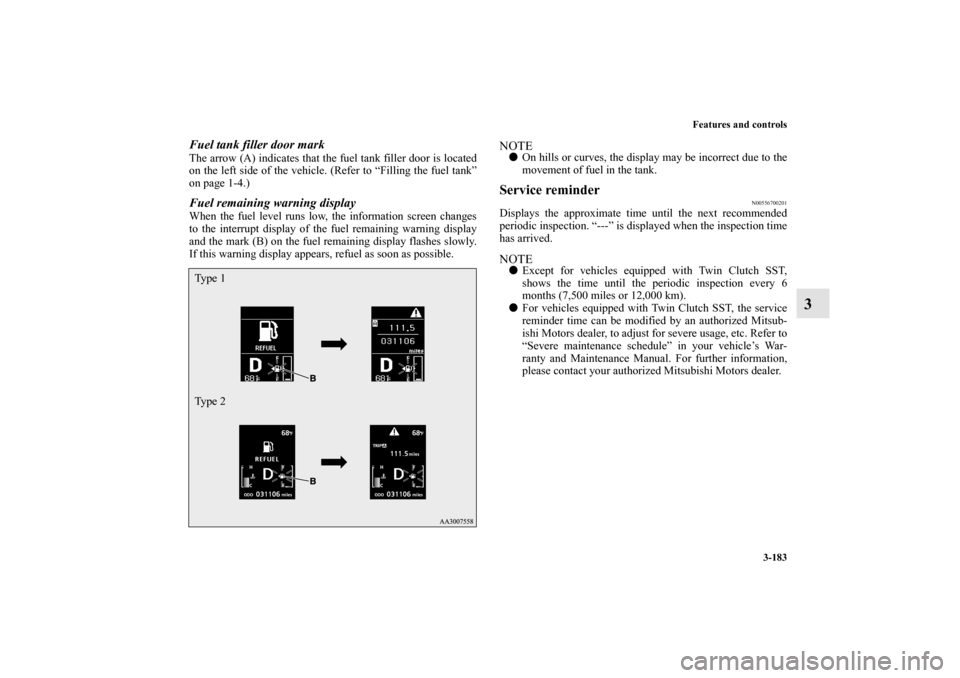
on page 1-4.)Fuel remaining warning displayWhen the fuel level runs low, the information screen changes
to the interrupt display of the fuel remaining warning display
and the mark (B) on the fuel remaining display flashes slowly.
If this warning display appears, refuel as soon as possible.
NOTE�On hills or curves, the display may be incorrect due to the
movement of fuel in the tank.Service reminder
N00556700201
Displays the approximate time until the next recommended
periodic inspection. “---” is displayed when the inspection time
has arrived.NOTE�Except for vehicles equipped with Twin Clutch SST,
shows the time until the periodic inspection every 6
months (7,500 miles or 12,000 km).
�For vehicles equipped with Twin Clutch SST, the service
reminder time can be modified by an authorized Mitsub-
ishi Motors dealer, to adjust for severe usage, etc. Refer to
“Severe maintenance schedule” in your vehicle’s War-
ranty and Maintenance Manual. For further information,
please contact your authorized Mitsubishi Motors dealer.
Ty p e 1
Ty p e 2
BK0125300US.book 183 ページ 2010年5月18日 火曜日 午後1時53分
Page 280 of 706
Features and controls
3-185
3
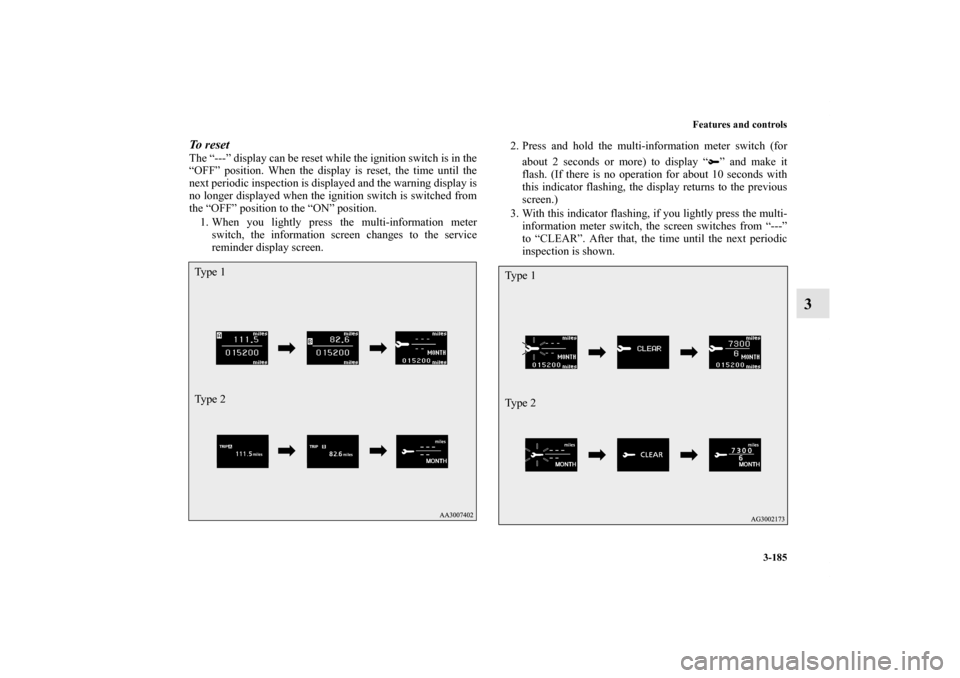
To r e s e t The “---” display can be reset while the ignition switch is in the
“OFF” position. When the display is reset, the time until the
next periodic inspection is displayed and the warning display is
no longer displayed when the ignition switch is switched from
the “OFF” position to the “ON” position.
1. When you lightly press the multi-information meter
switch, the information screen changes to the service
reminder display screen.2. Press and hold the multi-information meter switch (for
about 2 seconds or more) to display “ ” and make it
flash. (If there is no operation for about 10 seconds with
this indicator flashing, the display returns to the previous
screen.)
3. With this indicator flashing, if you lightly press the multi-
information meter switch, the screen switches from “---”
to “CLEAR”. After that, the time until the next periodic
inspection is shown.Ty p e 1
Ty p e 2
Ty p e 1
Ty p e 2
BK0125300US.book 185 ページ 2010年5月18日 火曜日 午後1時53分
Page 296 of 706
Features and controls
3-201
3 Indicator light, warning light, and information screen display list
N00557700035
Indicator and warning light list
N00557800209
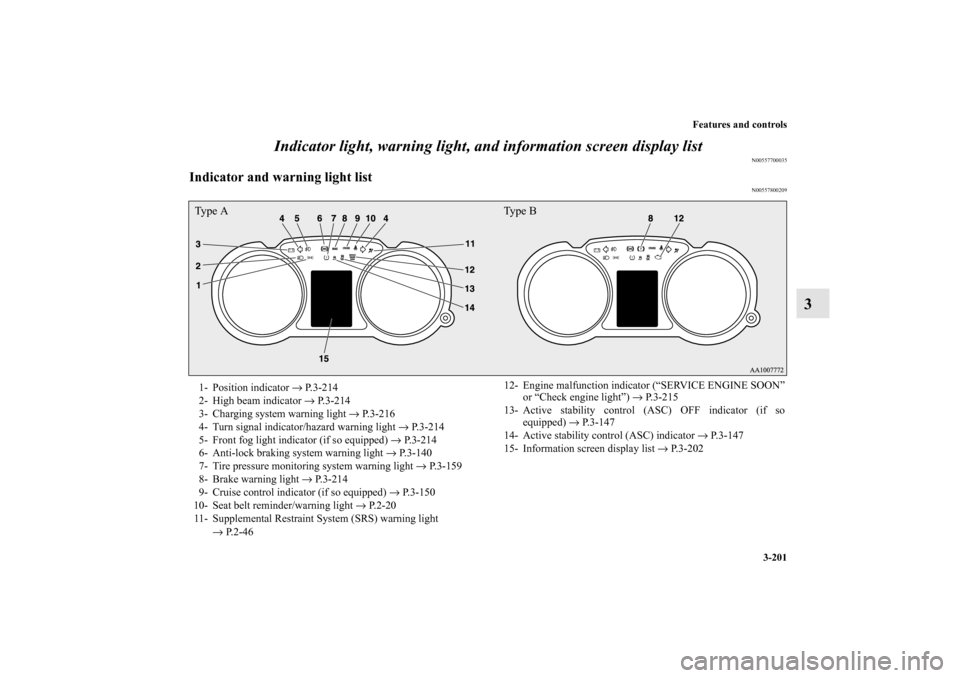
Ty p e A Ty p e B1- Position indicator → P.3-214
2- High beam indicator → P.3-214
3- Charging system warning light → P.3-216
4- Turn signal indicator/hazard warning light → P.3-214
5- Front fog light indicator (if so equipped) → P.3-214
6- Anti-lock braking system warning light → P.3-140
7- Tire pressure monitoring system warning light → P.3-159
8- Brake warning light → P.3-214
9- Cruise control indicator (if so equipped) → P.3-150
10- Seat belt reminder/warning light → P.2-20
11- Supplemental Restraint System (SRS) warning light
→ P.2-4612- Engine malfunction indicator (“SERVICE ENGINE SOON”
or “Check engine light”) → P.3-215
13- Active stability control (ASC) OFF indicator (if so
equipped) → P. 3 - 1 4 7
14- Active stability control (ASC) indicator → P.3-147
15- Information screen display list → P.3-202
BK0125300US.book 201 ページ 2010年5月18日 火曜日 午後1時53分
Page 307 of 706
3-212
Features and controls
3
Other interrupt displays (With ignition switch in the “ON” position)
N00558200200
The operation status of each system is displayed on the information screen. For further details, refer to the appropriate page
for each
system.
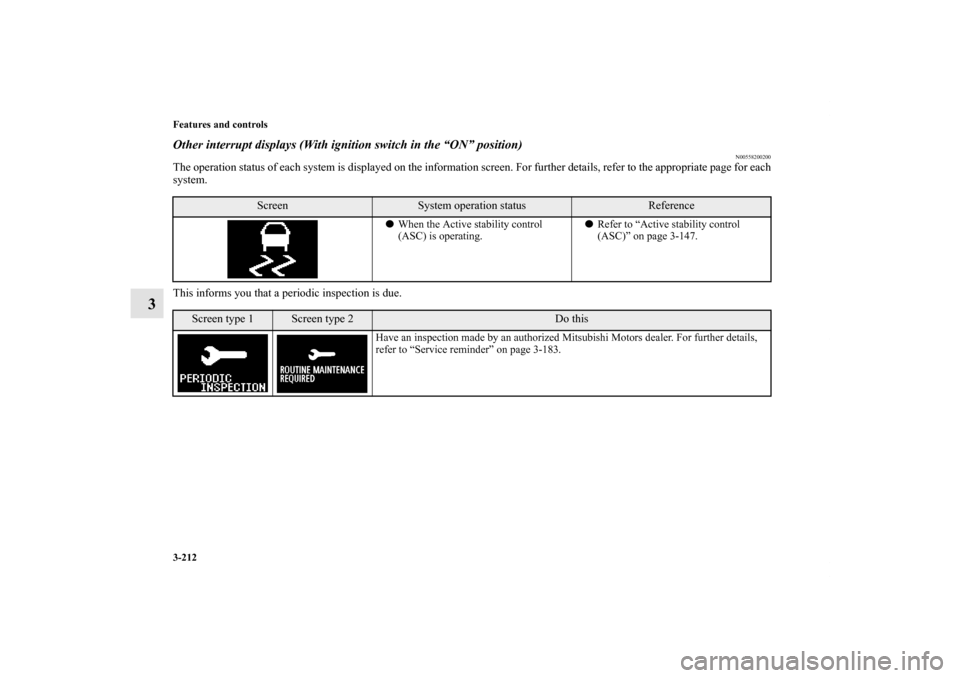
This informs you that a periodic inspection is due.
Screen
System operation status
Reference
� When the Active stability control
(ASC) is operating. �
Refer to “Active stability control
(ASC)” on page 3-147.
Screen type 1
Screen type 2
Do this
Have an inspection made by an authorized Mitsubishi Motors dealer. For further details,
refer to “Service reminder” on page 3-183.
BK0125300US.book 214 \bM\bo\b+ 2010年5月18日 火曜日 午後1時53\f
Page 310 of 706
Features and controls
3-215
3
Engine malfunction indicator (“SERVICE
ENGINE SOON” or “Check engine light”)
N00520500758
This indicator is a part of the onboard diagnostic (OBD) sys-
tem which monitors the emissions, engine control system or
continuously variable transmission (CVT) control system/Twin
Clutch SST control system. If a problem is detected in one of
these systems, this indicator comes on. When the ignition
switch is turned to the “ON” position, this indicator normally
comes on and goes off after the engine has started.
This indicator will come on if the fuel tank filler cap is not
properly tightened. If this indicator comes on and stays on after
refueling, stop the engine and check that the cap is properly
tightened. (Turn the cap clockwise until you hear clicking
sounds.)
If this indicator does not go off after several seconds or lights
up while driving, have the system checked as soon as possible
at an authorized Mitsubishi Motors dealer or a repair facility of
your choice.
�The vehicle should be brought to a halt in the follow-
ing manner when brake performance is deterio-
rated.
• Confirm that the vehicle slows down when you
press down on the brake pedal harder than usual.
In some cases, the brake pedal may go all the way
to the floor.
• Should the brakes fail, use engine braking to
reduce your speed and slowly apply the parking
brake.
Depress the brake pedal to illuminate the stop
lights to alert the vehicles behind you.
�Do not suddenly apply the parking brake while driv-
ing. This may cause the rear wheels to lock and
cause an accident.
CAUTION
!
CAUTION
!�Driving for a long time with the engine malfunction
indicator on may cause more damage to the emission
control system. This could also affect fuel economy
and drivability.�If this indicator does not come on when the ignition
switch is turned to the “ON” position, have the sys-
tem checked at an authorized Mitsubishi Motors
dealer or a repair facility of your choice.
BK0125300US.book 215 ページ 2010年5月18日 火曜日 午後1時53分