Page 267 of 700

3-172 Features and controls
3
Returning to the display screen from before the warn-
ing displayEven if the cause of the warning display is not eliminated, you
can return to the screen that was displayed before the warning
display.
If you press the multi-information meter switch, the display
screen switches to the screen display from before the warning
and the warning (A) is displayed.
NOTE�Warning display screens with a “ ” or “ ” mark dis-
played in the upper right of the screen can be switched. If
you want to switch the display, press the multi-informa-
tion meter switch as follows.
“ ”: Press lightly.
“ ”: Press for about 2 seconds or more.
Redisplay of a warning display screen
When the warning is displayed, if you lightly press the
multi-information meter switch a few times, the warning dis-
play screen you switched from is redisplayed.
Refer to “Information screen (With ignition switch in the
“OFF” position)” on page 3-169.
Ty p e 1
Ty p e 2BK0119300US.book 172 ページ 2010年5月21日 金曜日 午前10時13分
Page 268 of 700
Features and controls
3-173
3
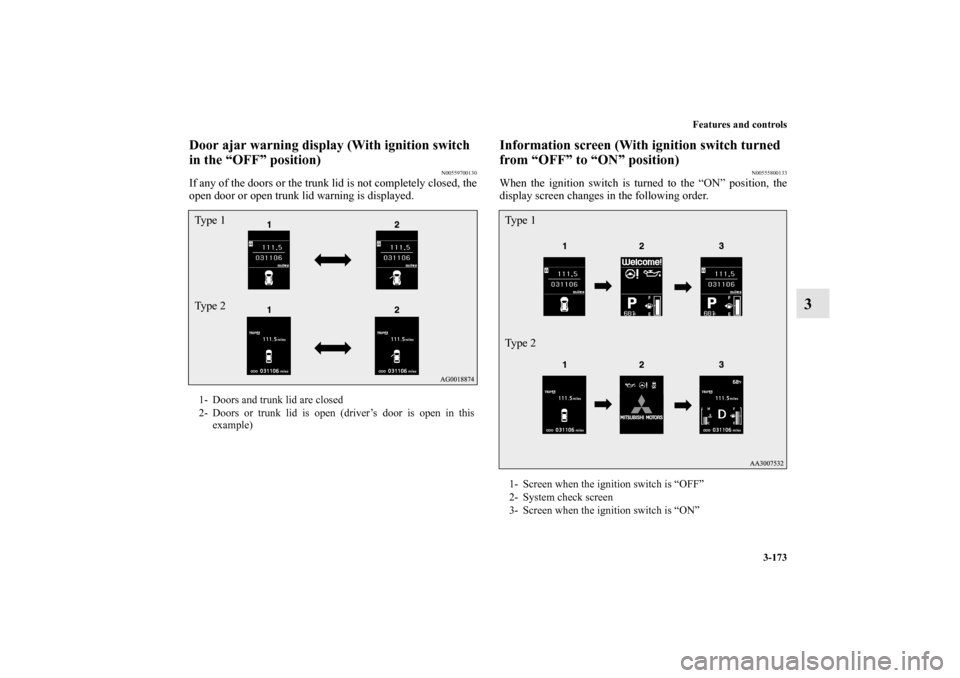
Door ajar warning display (With ignition switch
in the “OFF” position)
N00559700130
If any of the doors or the trunk lid is not completely closed, the
open door or open trunk lid warning is displayed.
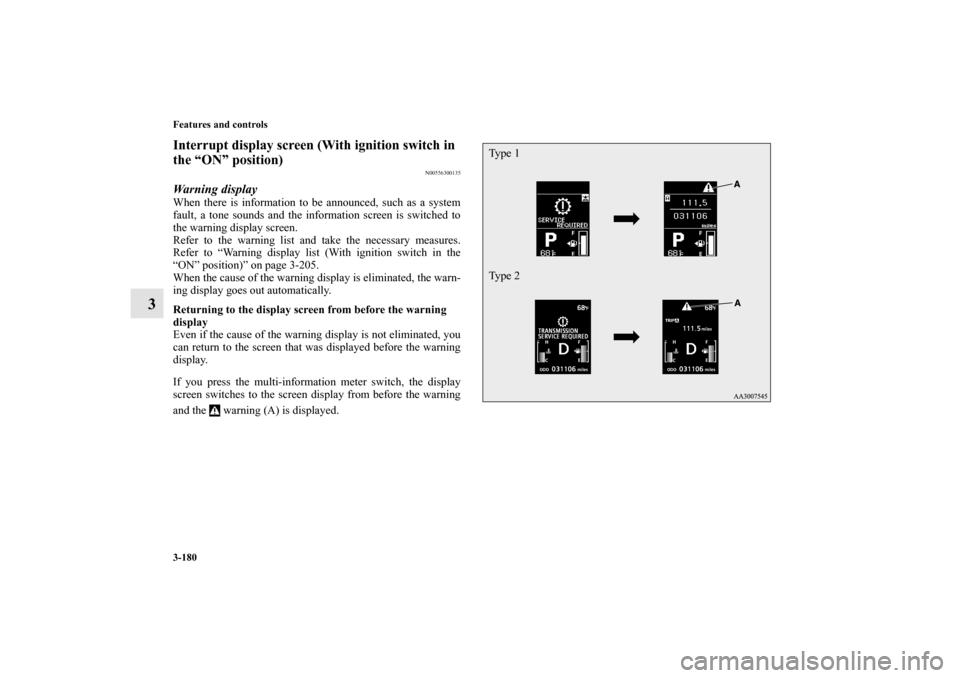
Information screen (With ignition switch turned
from “OFF” to “ON” position)
N00555800133
When the ignition switch is turned to the “ON” position, the
display screen changes in the following order.
1- Doors and trunk lid are closed
2- Doors or trunk lid is open (driver’s door is open in this
example)Ty p e 1
Ty p e 2
1- Screen when the ignition switch is “OFF”
2- System check screen
3- Screen when the ignition switch is “ON”Ty p e 1
Ty p e 2
BK0119300US.book 173 ページ 2010年5月21日 金曜日 午前10時13分
Page 269 of 700
3-174 Features and controls
3
System check screenWhen the ignition switch is turned to the “ON” position, the
system check screen is displayed for about 4 seconds. If there
is no fault, information screen (when the ignition switch is
“ON”) is displayed.
If there is a fault, the screen changes to warning display. Refer
to “Warning display list (when the ignition switch is “ON”
position)” on page 3-205.NOTE�The system check screen display varies depending on
your equipment.
Service reminderWhen the time for periodic inspection arrives, the warning dis-
play is displayed for a few seconds after the screen that is ini-
tially displayed when the ignition switch is turned “ON”. Refer
to “Service reminder” on page 3-184.
Ty p e 1
Ty p e 2ACD control mode display screen
(if so equipped)
N00545900027
The operation status of the ACD control mode is displayed.
Refer to “ACD control mode” on page 3-132.
Type 1 Type 2BK0119300US.book 174 ページ 2010年5月21日 金曜日 午前10時13分
Page 270 of 700
Features and controls
3-175
3
Warning display screen (With ignition switch
in the “ON” position)
N00555200140
This is displayed when you press the multi-information meter
switch and switch the warning display screen.
This mark is also displayed if there is another warning other
than the one displayed.
When the cause of the warning display is eliminated, the
warning goes out automatically.NOTE�When the warning is displayed, the warning display
screen can be redisplayed on the information screen.
Refer to “Information screen (With ignition switch in the
“OFF” position)” on page 3-169 or “Information screen
(With ignition switch in the “ON” position)” on page 3-
175.
“Active stability control (ASC) OFF” display
screen
(if so equipped)
N00556100074
This is displayed when the Active stability control (ASC) is
turned “OFF” with the “ASC OFF” switch.
Also, if an abnormal condition is occurred in the ASC while
driving, the “ASC OFF” display illuminates.
Refer to “ASC OFF switch” on page 3-145.Information screen (With ignition switch in the
“ON” position)
N00556200176
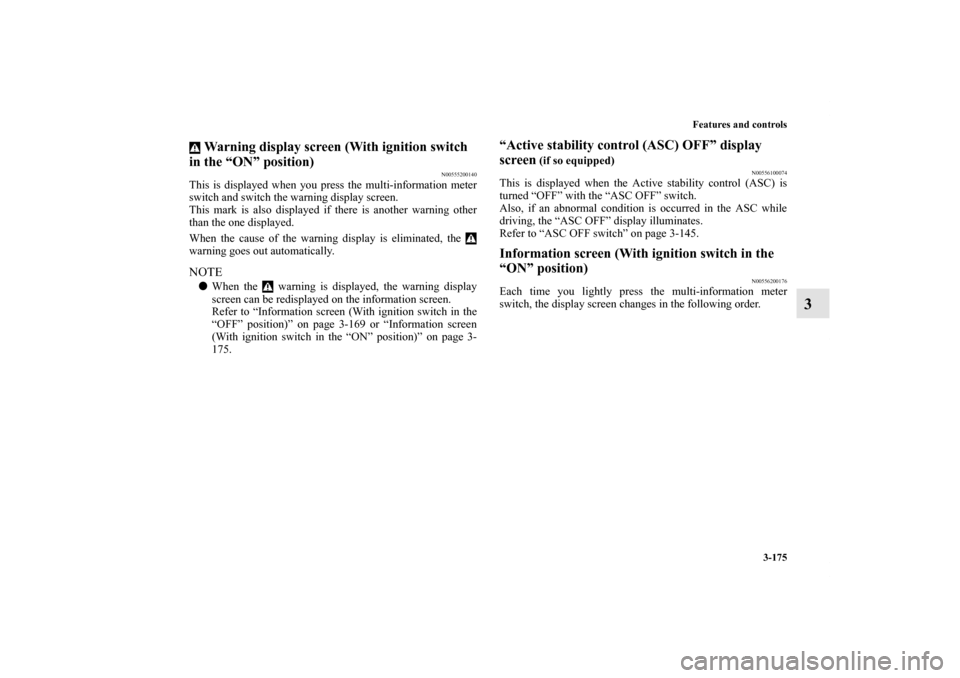
Each time you lightly press the multi-information meter
switch, the display screen changes in the following order.
BK0119300US.book 175 ページ 2010年5月21日 金曜日 午前10時13分
Page 271 of 700

3-176 Features and controls
3
NOTE�While driving, the function setting screen is not displayed
even if you operate the multi-information meter switch.
Always park the vehicle in a safe place before operating.
Refer to “Changing the function settings (With ignition
switch in the “ON” position)” on page 3-187.
�When there is information to be announced, such as a sys-
tem fault, the tone sounds and the screen display is
changed.
Refer to “Interrupt display screen (With ignition switch in
the “ON” position)” on page 3-180.
When there is no warning display
When there is a
warning display
When there is no warning display
When there is a
warning display Ty p e 1
Ty p e 2
1-
Odometer (Type 1)/Trip odometer
2-
Odometer (Type 1)/Trip odometer
3- Service reminder
4- Engine coolant temperature display (Type 1)
5- Driving range display (Type 1)
6- Average speed display, average fuel consumption display,
momentary fuel consumption display (Type 1)
7- Driving range display, momentary fuel consumption display
(Type 2)
8- Average fuel consumption display, momentary fuel con-
sumption display (Type 2)
9- Average speed display, momentary fuel consumption display
(Type 2)
10- Function setting screen
11- Redisplay of a warning display screen
BK0119300US.book 176 ページ 2010年5月21日 金曜日 午前10時13分
Page 275 of 700
3-180 Features and controls
3
Interrupt display screen (With ignition switch in
the “ON” position)
N00556300135
Warning displayWhen there is information to be announced, such as a system
fault, a tone sounds and the information screen is switched to
the warning display screen.
Refer to the warning list and take the necessary measures.
Refer to “Warning display list (With ignition switch in the
“ON” position)” on page 3-205.
When the cause of the warning display is eliminated, the warn-
ing display goes out automatically.
Returning to the display screen from before the warning
display
Even if the cause of the warning display is not eliminated, you
can return to the screen that was displayed before the warning
display.
If you press the multi-information meter switch, the display
screen switches to the screen display from before the warning
and the warning (A) is displayed.
Ty p e 1
Ty p e 2
BK0119300US.book 180 ページ 2010年5月21日 金曜日 午前10時13分
Page 276 of 700

Features and controls
3-181
3
NOTE�Warning display screens with a “ ” or “ ” mark dis-
played in the upper right of the screen can be switched. If
you want to switch the display, press the multi-informa-
tion meter switch as follows.
“ ”: Press lightly.
“ ”: Press for about 2 seconds or more.
Redisplay of a warning display screenWhen the warning is displayed, if you lightly press the
multi-information meter switch a few times, the warning dis-
play screen you switched from is redisplayed.Other interrupt displaysThe operation status of each system is displayed on the infor-
mation screen.
For further details, refer to the appropriate page in the warning
display list.
Refer to “Other interrupt displays (With ignition switch in the
“ON” position)” on page 3-212.Selector lever position display screen {continu-
ously variable transmission (CVT)}
N00556400048
Shows the position of the selector lever.
Refer to “Selector lever operation” on page 3-97.Gearshift lever position display screen (Twin
Clutch SST)
N00545800055
Shows the position of the gearshift lever.
Refer to “Gearshift lever operation” on page 3-109.
BK0119300US.book 181 ページ 2010年5月21日 金曜日 午前10時13分
Page 277 of 700

3-182 Features and controls
3
Outside temperature display screen
N00556500094
Shows the temperature outside the vehicle.NOTE�The display setting can be changed to the preferred units
(°F or °C).
Refer to “Changing the function settings (With ignition
switch in the “ON” position)” on page 3-187.
�Depending on factors such as the driving conditions, the
displayed temperature may vary from the actual outside
temperature.Twin Clutch SST control mode display screen
(Twin Clutch SST)
N00545100029
The operation status of the Twin Clutch SST control mode is
displayed. Refer to “Twin Clutch SST control mode” on page
3-117.ACD control mode display screen
(if so equipped)
N00545900030
The operation status of the ACD control mode is displayed.
Refer to “ACD control mode” on page 3-132.
Fuel remaining display screen
N00556600125
Shows the amount of fuel remaining.NOTE�It may take several seconds to stabilize the display after
refilling the tank.
�If fuel is added with the ignition switch in the “ON” posi-
tion, the remaining fuel display may indicate an incorrect
fuel level.
CAUTION
!�Running out of gas could damage the catalytic con-
verter. If the warning display appears, refuel as soon
as possible.Ty p e 1 Ty p e 2
BK0119300US.book 182 ページ 2010年5月21日 金曜日 午前10時13分