Page 512 of 700

Comfort controls
5-113
5
To play from an iPod
N00762400032
1. Press the PWR button (3) to turn on the audio system. The
system turns on in the last mode used.
2. Connect your iPod to the USB input terminal.
Refer to “How to connect an iPod” on page 3-271.
3. Press the CD button (2) several times to switch to the iPod
mode. The input mode changes every time the CD button
is pressed.
CD mode → iPod mode → Bluetooth
® mode (if so
equipped)
NOTE�If your vehicle is equipped with audio/video input RCA
terminals, pressing and holding the CD button for 2 sec-
onds or more switches the system to the AUX mode.
4. Once the device is selected, playback starts and “i”
appears on the display.NOTE�Depending on the condition of your iPod, it may take a
longer time before the playback starts.5. To stop the playback, press the RADIO button (1) or CD
button (2) to switch to a different mode.
NOTE�Buttons on the iPod are disabled while the iPod is con-
nected to the audio system.
�To adjust the volume and tone, refer to “To adjust the vol-
ume” on page 5-55, 5-83 and “To adjust the tone” on page
5-55, 5-83.To fast-forward/reverse the track
N00762500017
To fast-forward/reverse the current track, press the button
(9) or button (8).
Fast-forward
To fast-forward the current track, press the button (9).
While the button is pressed, the track will be fast-forwarded.
Fast-reverse
To fast-reverse the current track, press the button (8). While
the button is pressed, the track will be fast-reversed.
BK0119300US.book 113 ページ 2010年5月21日 金曜日 午前10時13分
Page 521 of 700

5-122 Comfort controls
5
To play from a USB memory device
N00764000032
1. Press the PWR button (3) to turn on the audio system. The
system turns on in the last mode used.
2. Connect your USB memory device to the USB input ter-
minal.
Refer to “How to connect a USB memory device” on page
3-269.
3. Press the CD button (2) several times to switch to the USB
mode. The input mode changes as follows every time the
CD button is pressed.
CD mode → USB mode → Bluetooth
® mode (if so
equipped)
NOTE�If your vehicle is equipped with audio/video input RCA
terminals, pressing and holding the CD button for 2 sec-
onds or more switches the system to the AUX mode.
4. Once the device is selected, playback starts and “U”
appears on the display.NOTE�Depending on the condition of your USB device, it may
take a longer time before the playback starts.5. To stop the playback, press the RADIO button (1) or CD
button (2) to switch to a different mode.
NOTE�To adjust the volume and tone, refer to “To adjust the vol-
ume” on page 5-55, 5-83 and “To adjust the tone” on page
5-55, 5-83.Supported compressed music files
N00764100033
This audio can play MP3, WMA, AAC and WAV files
recorded in a USB memory device. This audio supports up to
65,535 files in 700 folders on 8 levels.
BK0119300US.book 122 ページ 2010年5月21日 金曜日 午前10時13分
Page 524 of 700

Comfort controls
5-125
5
To play the same file repeatedly
N00764500011
Press the RPT button (6) to show “RPT” in the display. To can-
cel this mode, press the button again.To play the files in the same folder repeatedly
N00764600012
Press and hold the RPT button (6) until you hear a beep to
show “D-RPT” in the display.
All tracks in the current folder are played repeatedly.
To exit this mode, press the button again.To play a folder in random order
N00764700013
Press the RDM button (7) to show “RDM” in the display.
The audio randomly selects tracks from the current folder and
plays the selected tracks.
To exit this mode, press the button again.To play all folders in random order
N00764800014
Press and hold the RDM button (7) until you hear a beep to
show “D-RDM” in the display.
The audio randomly selects tracks from all folders and plays
the selected tracks.
To exit this mode, press the button again.
To find the start of each track in a folder for playback
N00764900028
Press the SCAN button (11). “SCAN” is shown in the display
and the tracks in the current folder are played for several sec-
onds from the beginning.
The file number flashes during this cueing playback.
To exit this mode, press the button again.NOTE�Once all tracks in the folder have been cued, playback will
restart from the beginning of the track that was playing
when cueing started.To find the start of first tracks in all folders for playback
N00765000013
Press and hold the SCAN button (11) until you hear a beep to
show “F-SCAN” in the display.
The first tracks in all folders are played for several seconds
from the beginning.
Playback starts from the folder next to the one currently play-
ing.
The folder number flashes during this cueing playback.
To exit this mode, press the button again.NOTE�Once the cueing playback ends, playback will start from
the track at the beginning of the folder next to the one that
was playing when the cueing started.
BK0119300US.book 125 ページ 2010年5月21日 金曜日 午前10時13分
Page 527 of 700
5-128 Comfort controls
5To play tracks from a Bluetooth
® device
(vehicles with Bluetooth
® 2.0 interface)
N00765300058
You can wirelessly connect a digital audio player or cellular
phone supporting Bluetooth
® to listen to the tracks on the con-
nected device.
Refer to “Bluetooth
® 2.0 interface” for the connecting method,
etc. on page 3-242.
The following explains the basic playback method.
NOTE�This function may not be available depending on the con-
nected device.
�The voice operation is not available to access music files
on the connected Bluetooth
® device.
BK0119300US.book 128 ページ 2010年5月21日 金曜日 午前10時13分
Page 529 of 700

5-130 Comfort controls
5
To listen to tracks from a device connected via
Bluetooth
®
N00765500034
1. Press the PWR button (2) to turn on the audio system. The
system turns on in the last mode used.
2. Press the CD button (1) several times to switch to the
B(Bluetooth
®) mode. The input mode changes as follows
every time the CD button is pressed.
CD mode → USB (iPod) mode → Bluetooth
® mode
NOTE�For vehicles equipped with audio/video input RCA termi-
nals, pressing and holding the CD button for 2 seconds or
more switches the system to the AUX mode.
3. Connect your Bluetooth
® device.
Refer to “Connecting the Bluetooth
® 2.0 interface and
Bluetooth
® device” on page 3-250.
4. Playback starts automatically.
NOTE�Depending on the connected device, the playback may not
start automatically.
In this case, operate the connected device to start the play-
back.To stop the playback (if supported by the device)
N00765600019
To stop the playback, press the DISC DOWN button (7).
To restart the playback, press the DISC UP button (8).
To pause the playback (if supported by the device)
N00765700010
To pause the playback, press the DISC DOWN button (7).
To restart the playback, press the DISC UP button (8).To select a track (if supported by the device)
N00765800011
Press the TRACK button (10) to select the desired track num-
ber.
If the side of the button is pressed once while a track is
playing, playback returns to the start of that track.NOTE�Every time the track selection button is pressed, the track
number in the display changes.To play the same track repeatedly (if supported by the
device)
N00765900012
Press the RPT button (5) during playback to show “RPT” in the
display.
To exit this mode, press the button again.Press : The track number increases by one.
Press : The track number decreases by one.
Press for a long
period (approx. 2
seconds or more): The track number increases continu-
ously while the button is pressed.
Press for a long
period (approx. 2
seconds or more): The track number decreases continu-
ously while the button is pressed.
BK0119300US.book 130 ページ 2010年5月21日 金曜日 午前10時13分
Page 531 of 700
5-132 Comfort controls
5To use the external audio input function
(if
so equipped)
N00702200117
You can listen to commercially available audio equipment,
such as a portable audio system, from your vehicle’s speakers,
by connecting the audio equipment to the audio input connec-
tors (A or B), which are external input connectors (pin jacks).NOTE�For information on using the video input connector (C),
refer to the separate owner’s manual for a Mitsubishi
Multi-Communication System.
Auxiliary Audio connector
(RCA)
Auxiliary Video connector
(RCA) Ty p e 1
Auxiliary Audio connector (RCA)
A- Left audio input connector (white)
B- Right audio input connector (red)
Auxiliary Video connector (RCA)
A- Left audio input connector (white)
B- Right audio input connector (red)
C- Video input connector (yellow)
Auxiliary Audio connector
(RCA)
Auxiliary Video connector
(RCA) Ty p e 2
BK0119300US.book 132 ページ 2010年5月21日 金曜日 午前10時13分
Page 532 of 700

Comfort controls
5-133
5
To activate the external audio input mode1. Use a commercially available audio cable to connect the
audio equipment to the internal audio input connector.
2. Press and hold the CD button (D) for more than 2 seconds.
The display (E) will show “AUX” and then the external
audio input mode will be activated.
3. To deactivate the external audio input mode, press the
RADIO button (F) or the CD button (D) to switch to
another mode.
NOTE�The connected audio equipment cannot be operated with
the vehicle’s audio system.
�Depending on the connected audio equipment, it may pro-
duce noise from the speakers.
�Use the connected audio equipment’s own power source,
such as its battery.
Noise may be produced from the speakers if the connected
audio equipment is used while charging it using the 12 V
power outlet of the vehicle.
�Do not activate the external audio input mode when no
audio equipment is connected.
Otherwise, noise may be produced from the speakers.
�Connect audio equipment when the external audio input
mode is deactivated or lower the vehicle’s speaker volume
before connecting it.
Noise may be produced from the speakers if audio equip-
ment is connected after the external audio input mode is
activated.
�For information on how to connect and operate the audio
equipment, refer to the owner’s manual for the equipment.
CAUTION
!�Do not operate the connected audio equipment while
driving.
This could distract you and an accident might occur.
BK0119300US.book 133 ページ 2010年5月21日 金曜日 午前10時13分
Page 533 of 700
5-134 Comfort controls
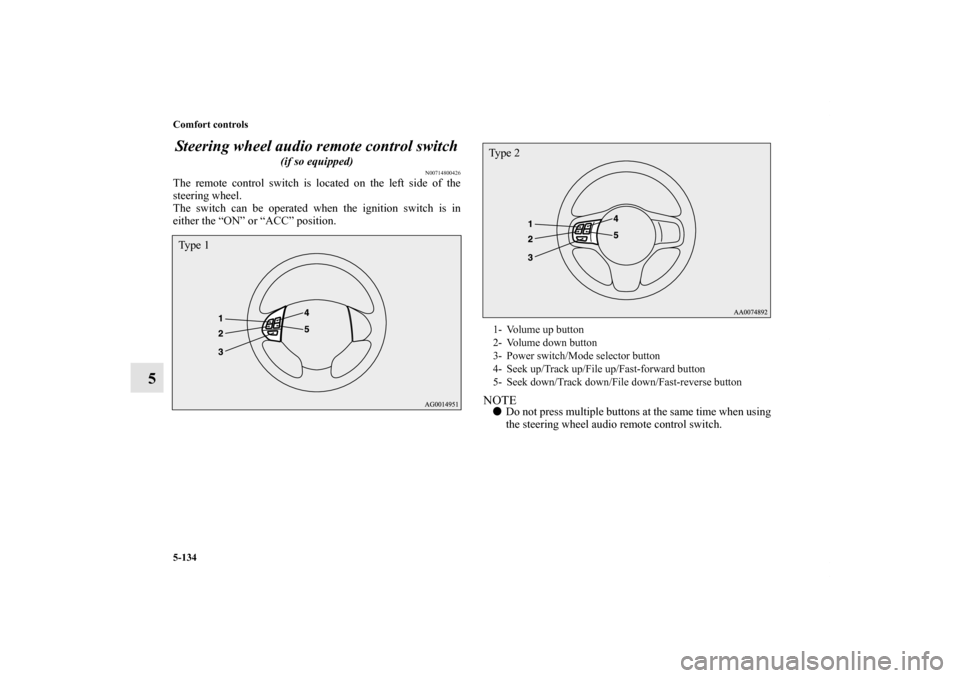
5Steering wheel audio remote control switch
(if so equipped)
N00714800426
The remote control switch is located on the left side of the
steering wheel.
The switch can be operated when the ignition switch is in
either the “ON” or “ACC” position.
NOTE�Do not press multiple buttons at the same time when using
the steering wheel audio remote control switch.
Ty p e 1
1- Volume up button
2- Volume down button
3- Power switch/Mode selector button
4- Seek up/Track up/File up/Fast-forward button
5- Seek down/Track down/File down/Fast-reverse buttonTy p e 2
BK0119300US.book 134 ページ 2010年5月21日 金曜日 午前10時13分