Page 505 of 700
5-106 Comfort controls
5
To fast forward/reverse the discTo fast forward or fast reverse the disc, press the fast-forward
button (11) or the fast-reverse button (10).
Fast forward
You can fast-forward the disc by pressing the fast-forward but-
ton (11). While the button is kept pressed, the disc will be fast-
forwarded.
Fast reverse
You can fast reverse the disc by pressing the fast-reverse button
(10). While the button is kept pressed, the disc will be fast-
reversed.
To select a desired folder (MP3 CDs only)You can select your desired folder by turning the FOLDER
switch (17).
Folder up
Turn the FOLDER switch (17) clockwise until the desired
folder number appears on the display.
Folder down
Turn the FOLDER switch (17) counterclockwise until the
desired folder number appears on the display.
BK0119300US.book 106 ページ 2010年5月21日 金曜日 午前10時13分
Page 547 of 700
5-148 Comfort controls
5Antenna
N00734200426
Roof antenna (except for vehicles with SIRIUS
satellite radio)To r e m o v eTurn the pole (A) counterclockwise.To i n s t a l lScrew the pole (A) clockwise into the base (B) until it is
securely retained.NOTE�Be sure to remove the roof antenna in the following cases:
• When using an automatic car wash
• When covering your vehicle with a car cover
• When driving into a structure that has a low ceiling
Roof antenna (for vehicles with SIRIUS satellite
radio)For securing the best satellite reception, the angle of the
antenna is fixed.
BK0119300US.book 148 ページ 2010年5月21日 金曜日 午前10時13分
Page 548 of 700
Comfort controls
5-149
5
To r e m o v eTurn the pole (A) counterclockwise.To i n s t a l lScrew the pole (A) clockwise into the base (B) until it is
securely retained.NOTE�Be sure to remove the roof antenna in the following cases:
• When entering a place with low clearance
• When using an automatic car wash
• When covering your vehicle with a car cover
Digital clock
N00755000065
The time is displayed when the ignition switch is in the “ON”
or “ACC” position.To set the time1. Press and hold the CLOCK button and the clock display
flashes.
2. Press the various buttons to adjust.H — “Hour” setting
Press this button to fast-forward the “hours”.
M — “Minutes” setting
Press this button to fast-forward the “minutes”.
CLOCK DISP H M :00
BK0119300US.book 149 ページ 2010年5月21日 金曜日 午前10時13分
Page 549 of 700

5-150 Comfort controls
5
3. When the time is set, press the DISP button to stop the
clock display from flashing. After time signal setting,
however, the clock display automatically stops flashing.NOTE�Reset the time after the battery terminals are disconnected
and reconnected.
�Seconds do not appear in the clock display, but after
adjusting the “Minutes” setting and time signal setting,
the clock begins to operate from 0 seconds.
General information about your radio
N00733900383
Your vehicle’s radio receives both AM and FM stations.
The quality of your reception is affected by distance, obstacles,
and signal interference.
This radio complies with Part 15 of Federal Communications
Commission (FCC) Rules (for vehicles sold in U.S.A.). Opera-
tion is subject to the following conditions:
�The device may not cause harmful interference.
�This device must accept any interference recieved, includ-
ing interference that may cause undesirable operation.
:00 — Time signal setting
At the same time the button is pressed, the fol-
lowing modifications are made.
10:00 - 10:29 ......Change to 10:00
10:30 - 10:59 ......Change to 11:00
CAUTION
!�Changes or modifications not expressly approved by
the party meeting the above conditions could void
the user’s authority to operate the equipment.
BK0119300US.book 150 ページ 2010年5月21日 金曜日 午前10時13分
Page 550 of 700
Comfort controls
5-151
5
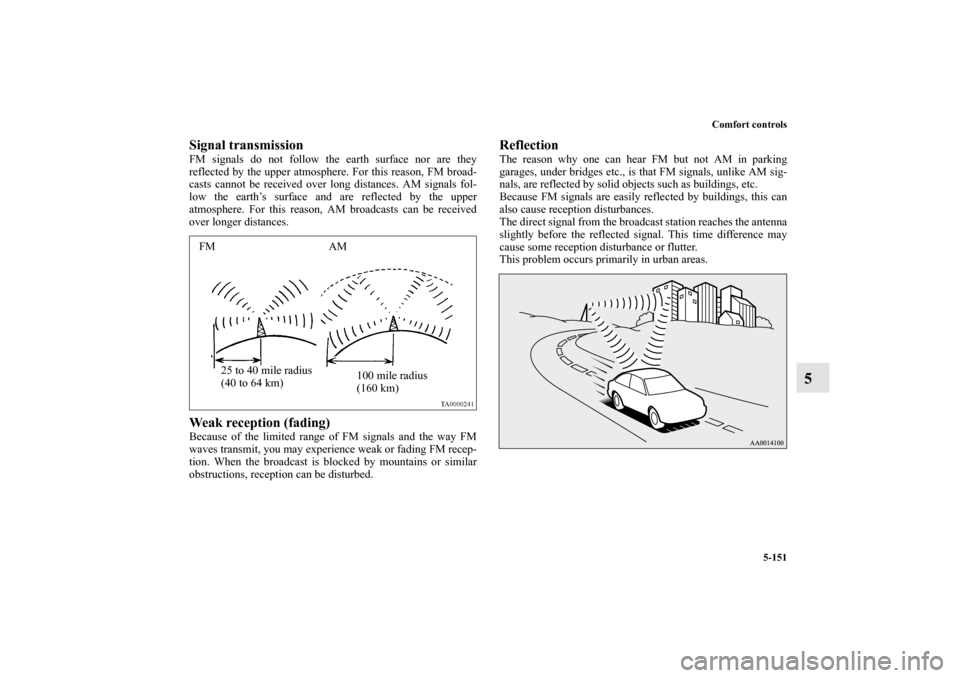
Signal transmissionFM signals do not follow the earth surface nor are they
reflected by the upper atmosphere. For this reason, FM broad-
casts cannot be received over long distances. AM signals fol-
low the earth’s surface and are reflected by the upper
atmosphere. For this reason, AM broadcasts can be received
over longer distances.Weak reception (fading)Because of the limited range of FM signals and the way FM
waves transmit, you may experience weak or fading FM recep-
tion. When the broadcast is blocked by mountains or similar
obstructions, reception can be disturbed.
ReflectionThe reason why one can hear FM but not AM in parking
garages, under bridges etc., is that FM signals, unlike AM sig-
nals, are reflected by solid objects such as buildings, etc.
Because FM signals are easily reflected by buildings, this can
also cause reception disturbances.
The direct signal from the broadcast station reaches the antenna
slightly before the reflected signal. This time difference may
cause some reception disturbance or flutter.
This problem occurs primarily in urban areas.
FM AM
25 to 40 mile radius
(40 to 64 km)100 mile radius
(160 km)
BK0119300US.book 151 ページ 2010年5月21日 金曜日 午前10時13分
Page 554 of 700

For emergencies
6-3
6
3. You could be injured if the vehicles move. Set the parking
brake firmly on each vehicle. Put an automatic transaxle,
CVT or Twin Clutch SST in “P” (PARK) or a manual
transaxle in “N” (Neutral). Turn the ignition key to the
“LOCK” position. NOTE�Turn off all lights, heater, and other electrical loads. This
will avoid sparks and help save both batteries.
4. Make sure your battery electrolyte is at the proper level.
(Refer to “Checking battery electrolyte level” on page 7-
26.)5. For vehicles equipped with turbocharger, remove the air
duct and then the battery upper cover.
(Refer to “Removing and installing the battery upper
cover” on page 7-23.)
6. Connect one end of one jumper cable to the positive (+)
terminal of the discharged battery (A), and the other end
to the positive (+) terminal of the booster battery (B).
NOTE�Open the terminal cover before connecting the jumper
cable to the positive terminal of the battery.
(Refer to “Disconnection and connection” on page 7-27.)
�Use the proper cables suitable for the battery size.
Otherwise heat damage to the cables could result.
�Check the jumper cables for damage and corrosion before
use.
WA R N I N G
!�Turn the ignition key to the “LOCK” position on
both vehicles. Make sure that the cables or your
clothes cannot be caught by the fan or drive belt.
Personal injury could result.
WA R N I N G
!�If the electrolyte fluid is not visible, or looks frozen,
DO NOT ATTEMPT JUMP STARTING!!
The battery might split open or explode if the tem-
perature is below the freezing point or if it is not
filled to the proper level.
BK0119300US.book 3 ページ 2010年5月21日 金曜日 午前10時13分
Page 555 of 700

6-4 For emergencies
6
7. Connect one end of the other jumper cable to the negative
(-) terminal of the booster battery (B), and the other end to
the engine block of the vehicle with the low battery (A) at
the point farthest from the battery.
8. Start the engine in the vehicle providing the boost. Let the
engine idle a few minutes, then start the engine in the
vehicle with the low battery.NOTE�If the engine is started with the air duct removed, the noise
produced as air is drawn into the engine will be greater
than when the duct is installed.9. After the engine is started, disconnect the cables in the
reverse order from the way you connected them.
10. For vehicles equipped with turbocharger, install the bat-
tery upper cover and then the air duct.
(Refer to “Removing and installing the battery upper
cover” on page 7-23.)
WA R N I N G
!�Be sure to follow the proper order when connecting
the batteries, of: →→→. �Make sure that the connection is made to the
engine properly. If the connection is directly made to
the negative side of the battery, the flammable gases
from inside the battery might catch fire and explode,
causing personal injury. �When connecting the jumper cable, do not connect
the positive (+) cable to the negative (-) terminal.
Otherwise sparks can make the battery explode.
CAUTION
!�Make sure that the jumper cable will not be caught
in the cooling fan or other moving parts in the
engine compartment.
WA R N I N G
!�Charging your battery while it is still in your vehicle
might cause the battery to catch fire and explode. If
you have to charge it while in the vehicle, disconnect
the negative terminal. �Keep sparks, cigarettes and flames away from the
battery because the battery may explode.�Keep your work area well vented when charging or
using the battery in an enclosed space. �Remove all the caps before charging the battery. �Electrolyte (battery acid) is corrosive diluted sul-
phuric acid. If electrolyte comes in contact with your
hands, eyes, clothes, or the painted surface of your
vehicle, thoroughly flush with water. If electrolyte
gets in your eyes, flush them immediately and thor-
oughly with water, and get prompt medical atten-
tion.�Always wear protective clothing and goggles when
working near the battery.�Keep the battery out of the reach of children.
BK0119300US.book 4 ページ 2010年5月21日 金曜日 午前10時13分
Page 556 of 700

For emergencies
6-5
6
As your vehicle has anti-lock brakesIf you drive your vehicle with a low battery charge, after the
engine has been started by using jumper cables, the engine may
misfire. This can cause the anti-lock braking system warning
light to blink on and off. This is only due to the low battery
voltage. It is not a problem with the brake system. If this hap-
pens, fully charge the battery and ensure the charging system is
operating properly.
Engine overheating
N00836500323
When the engine has overheated, the information screen in the
multi-information display will be interrupted and the engine
coolant temperature warning display will appear. The screen
will then change to the engine coolant temperature display
screen and “ ” will flash. If this happens:
1. Stop the vehicle in a safe place. Turn on the hazard warn-
ing flashers.
2. With the engine still running, carefully raise the engine
hood to vent the engine compartment.
3. Check that the cooling fan is running. If the fan is not
turning, stop the engine immediately and contact an
authorized Mitsubishi Motors dealer or a repair facility of
your choice for assistance.
4. If you see steam or spray coming from under the hood,
turn off the engine.
WA R N I N G
!�To avoid personal injury, keep hands, hair, jewelry
and clothes away from the cooling fan. The cooling
fan can start at any time.
BK0119300US.book 5 ページ 2010年5月21日 金曜日 午前10時13分


