Page 138 of 424
Features and controls
3-49
3 Anti-lock braking system
N00517900253
The anti-lock braking system helps prevent the wheels from
locking up when braking. This helps you keep control of your
vehicle and its direction. Driving hints �When using the anti-lock brakes (sudden braking), steer-
ing is slightly different from normal driving conditions.
Use the steering wheel carefully.
�Always keep a safe distance from the vehicle in front of
you. If your vehicle is equipped with the anti-lock braking
system, leave a greater braking distance when:
• Driving on gravel or snow-covered roads.
• Driving on uneven road surfaces.
�Operation of anti-lock braking system is not restricted to
situations where brakes are applied suddenly. This system
may also prevent the wheels from locking when you drive
over manholes, steel roadwork plates, road markings, or
any uneven road surface.
�When the anti-lock braking system is in use, you may feel
the brake pedal vibrating and hear a unique sound. You
may also feel as if the pedal resists being pressed.
In this situation, simply hold the brake pedal down
firmly. Do not pump the brake, which will result in
reduced braking performance.
CAUTION
!�The anti-lock braking system cannot prevent acci-
dents. It is your responsibility to take safety precau-
tions and to drive carefully. �To prevent failure of the anti-lock braking system,
be sure all four wheels and tires are the same size
and the same type.
BK0121200US.book 49 ページ 2010年4月14日 水曜日 午前11時24分
Page 141 of 424

3-52 Features and controls
3
NOTE�A whining sound may be heard from the engine compart-
ment in the following situations. The sound is associated
with the ASC self-check operations. It does not indicate a
malfunction.
• When the ignition key is set to the “ON” position.
• When the vehicle is driven for a while after the engine is
turned on.
�When the ASC is activated, you may feel a vibration in
the vehicle body or hear a whining sound from the engine
compartment.
This indicates that the system is operating normally. It
does not indicate a malfunction.
�When the anti-lock braking system warning light is illu-
minated, the ASC is not active.
Traction control function
N00559200063
On slippery surfaces, the traction control function prevents the
drive wheels from spinning excessively, thus helping the vehi-
cle to start moving from a stopped condition. It also provides
sufficient driving force and steering performance as the vehicle
turns while pressing the acceleration pedal.
CAUTION
!�When driving a vehicle on a snowy or icy road, be
sure to install snow tires and drive the vehicle at
moderate speeds.
BK0121200US.book 52 ページ 2010年4月14日 水曜日 午前11時24分
Page 142 of 424
Features and controls
3-53
3
Skid control function
N00546800036
The skid control function is designed to help the driver main-
tain control of the vehicle on slippery roads or during rapid
steering maneuvers. It works by controlling the engine output
and the brake on each wheel.NOTE�The skid control function operates at speeds of about 9
mph (15 km/h) or higher.
ASC OFF switch
N00559400094
The ASC is automatically activated when the ignition key is
turned to the “ON” position. You can deactivate the system by
pressing down the ASC OFF switch for 3 seconds or longer.
When the ASC is deactivated, the indicator will be illumi-
nated. To reactivate the ASC, momentarily press the ASC OFF
switch; the indicator is turned off.
CAUTION
!�For safety reasons, the ASC OFF switch should be
operated when your vehicle is stopped. �Be sure to keep the ASC on while driving in normal
circumstances.
BK0121200US.book 53 ページ 2010年4月14日 水曜日 午前11時24分
Page 145 of 424
3-56 Features and controls
3Power steering system
N00518000189
The power steering system has mechanical steering capability
in case the power assist is lost. If the hydraulic pressure is
interrupted for some reason (such as engine stalling), you will
still be able to steer your vehicle.
If the power assist is lost, you will notice it takes much more
effort to steer and that there is much more “free play” in the
steering wheel. If this happens, take your vehicle to an autho-
rized Mitsubishi Motors dealer or a repair facility of your
choice.
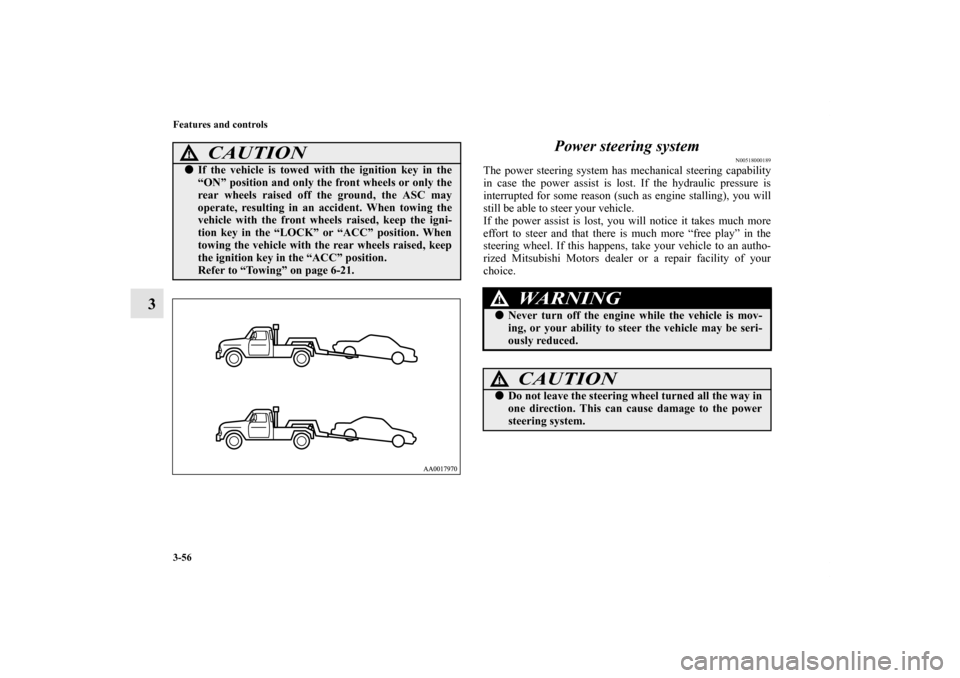
CAUTION
!�If the vehicle is towed with the ignition key in the
“ON” position and only the front wheels or only the
rear wheels raised off the ground, the ASC may
operate, resulting in an accident. When towing the
vehicle with the front wheels raised, keep the igni-
tion key in the “LOCK” or “ACC” position. When
towing the vehicle with the rear wheels raised, keep
the ignition key in the “ACC” position.
Refer to “Towing” on page 6-21.
WA R N I N G
!�Never turn off the engine while the vehicle is mov-
ing, or your ability to steer the vehicle may be seri-
ously reduced.
CAUTION
!�Do not leave the steering wheel turned all the way in
one direction. This can cause damage to the power
steering system.
BK0121200US.book 56 ページ 2010年4月14日 水曜日 午前11時24分
Page 173 of 424
3-84 Features and controls
3
Headlight flasher
N00550000169
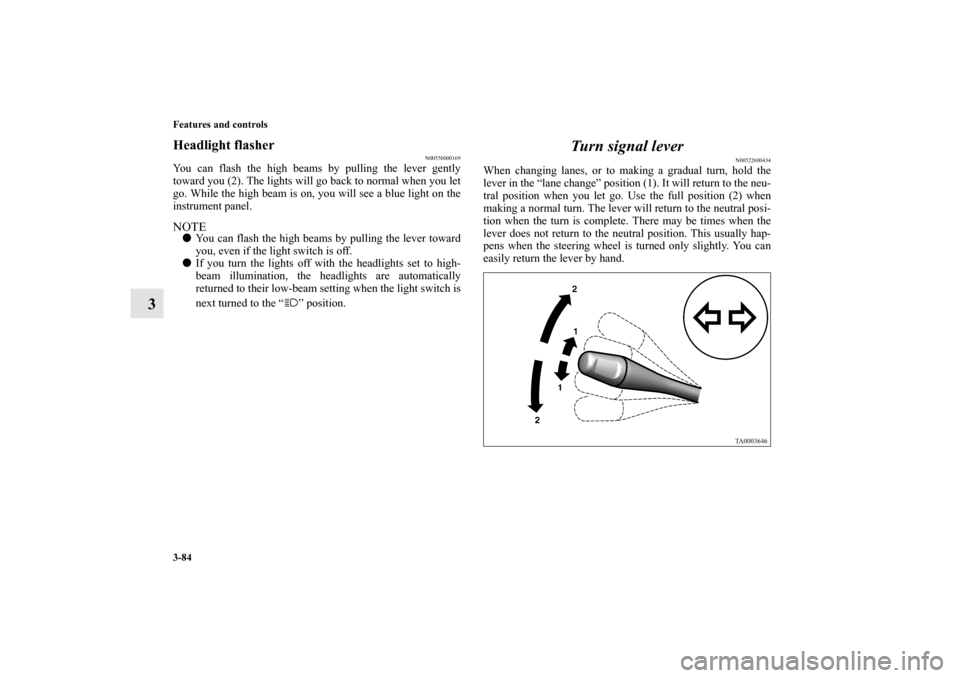
You can flash the high beams by pulling the lever gently
toward you (2). The lights will go back to normal when you let
go. While the high beam is on, you will see a blue light on the
instrument panel.NOTE�You can flash the high beams by pulling the lever toward
you, even if the light switch is off.
�If you turn the lights off with the headlights set to high-
beam illumination, the headlights are automatically
returned to their low-beam setting when the light switch is
next turned to the “ ” position.
Turn signal lever
N00522600434
When changing lanes, or to making a gradual turn, hold the
lever in the “lane change” position (1). It will return to the neu-
tral position when you let go. Use the full position (2) when
making a normal turn. The lever will return to the neutral posi-
tion when the turn is complete. There may be times when the
lever does not return to the neutral position. This usually hap-
pens when the steering wheel is turned only slightly. You can
easily return the lever by hand.
BK0121200US.book 84 ページ 2010年4月14日 水曜日 午前11時24分
Page 180 of 424
Features and controls
3-91
3
NOTE�If your vehicle is equipped with heated mirrors, mist can
also be removed from the outside rearview mirrors when
the rear window defogger switch is pressed. (Refer to
“Heated mirror” on page 3-33.)
Horn switch
N00523800101
To honk the horn, press near the “ ” mark on the steering
wheel.
CAUTION
!�The rear window defogger is not designed to melt
snow. Remove any snow manually before using the
rear window defogger.�Use the rear window defogger only after the engine
has started and is running. Be sure to turn the
defogger switch off immediately after the window is
clear to save on battery power.�Do not place stickers, tape, or other items that are
attached with adhesive over the grid wires on the
rear window.�When cleaning the inside rear window, use a soft
cloth and wipe lightly over the grid wires.
BK0121200US.book 91 ページ 2010年4月14日 水曜日 午前11時24分
Page 238 of 424
5
Comfort controls
Vents. . . . . . . . . . . . . . . . . . . . . . . . . . . . . . . . . . . .5- 2
Manual air conditioning (if so equipped). . . . . . . .5- 5
Automatic air conditioning (if so equipped) . . . . .5- 13
Important air conditioning operating tips . . . . . . .5- 21
Audio system . . . . . . . . . . . . . . . . . . . . . . . . . . . . .5- 22
AM/FM electronically tuned radio with CD
player-Type 1 (if so equipped) . . . . . . . . . . . . . .5- 24
AM/FM electronically tuned radio with CD
autochanger-Type 2 (if so equipped)
AM/FM/Satellite electronically tuned radio
with CD autochanger-Type 3 (if so equipped) . .5- 37
To use the external audio input function . . . . . . . .5- 60
Steering wheel remote control switch
(if so equipped) . . . . . . . . . . . . . . . . . . . . . . . . . .5- 62
Error codes . . . . . . . . . . . . . . . . . . . . . . . . . . . . . . .5- 64
Error codes (SIRIUS Satellite Radio) . . . . . . . . . .5- 66
Handling of compact discs . . . . . . . . . . . . . . . . . . .5- 68
Antenna . . . . . . . . . . . . . . . . . . . . . . . . . . . . . . . . .5- 71
General information about your radio . . . . . . . . . .5- 72
BK0121200US.book 1 ページ 2010年4月14日 水曜日 午前11時24分
Page 299 of 424
5-62 Comfort controls
5Steering wheel remote control switch
(if so
equipped)N00714800312
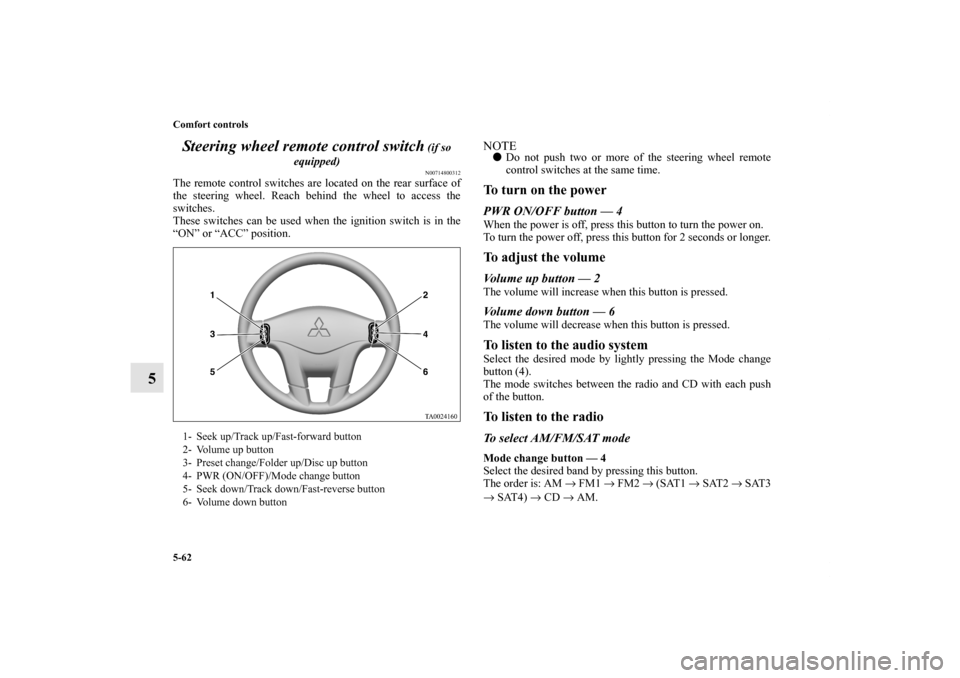
The remote control switches are located on the rear surface of
the steering wheel. Reach behind the wheel to access the
switches.
These switches can be used when the ignition switch is in the
“ON” or “ACC” position.
NOTE�Do not push two or more of the steering wheel remote
control switches at the same time.To turn on the powerPWR ON/OFF button — 4When the power is off, press this button to turn the power on.
To turn the power off, press this button for 2 seconds or longer.To adjust the volumeVolume up button — 2The volume will increase when this button is pressed.Volume down button — 6The volume will decrease when this button is pressed.To listen to the audio systemSelect the desired mode by lightly pressing the Mode change
button (4).
The mode switches between the radio and CD with each push
of the button.To listen to the radioTo select AM/FM/SAT modeMode change button — 4
Select the desired band by pressing this button.
The order is: AM → FM1 → FM2 → (SAT1 → SAT2 → SAT3
→ SAT4) → CD → AM.
1- Seek up/Track up/Fast-forward button
2- Volume up button
3- Preset change/Folder up/Disc up button
4- PWR (ON/OFF)/Mode change button
5- Seek down/Track down/Fast-reverse button
6- Volume down button
BK0121200US.book 62 ページ 2010年4月14日 水曜日 午前11時24分