Page 172 of 514

Features and controls
3-83
3 Indicator
N00519900042
Turn signal indicators/Hazard warning lights
N00520000144
The arrows will flash in time with the corresponding exterior
turn signals when the turn signal lever is used.
Both arrows will flash when the hazard warning flasher switch
is pressed. NOTE�If the indicator flashes faster than usual or if the indicator
stays on without flashing, check for a malfunctioning turn
signal light bulb or turn signal connection.High beam indicator
N00520100031
A blue light comes on when the headlights are on high beam.Front fog light indicator
(if so equipped)
N00520200159
This indicator comes on while the front fog lights are on.
Warning lights
N00520300121
Brake warning light
N00520400294
This light comes on when the ignition key is turned to the
“ON” position (engine off).
When the engine is started, the light should go off.
The light will illuminate under the following conditions:
�When the parking brake pedal is engaged.
�When the brake fluid level in the reservoir falls to a low
level.
�When the brake circuit is not operating correctly.
Before driving your vehicle, release the parking brake and
make certain that the brake warning light has gone out.
CAUTION
!�Brake performance or your ability to control the
vehicle may be compromised or the vehicle may
become unstable if the brakes are applied suddenly
in the following situations:
• The brake warning light does not illuminate when
the parking brake is applied or does not turn off
when the parking brake is released.
• The brake warning light remains illuminated dur-
ing driving.
• If any of the above situations occur, stop the vehi-
cle in a safe location, avoiding any sudden brake
application, and contact your nearest authorized
Mitsubishi Motors dealer or a repair facility of
your choice.
BK0121600US.book 83 ページ 2010年4月12日 月曜日 午前10時39分
Page 232 of 514
Features and controls
3-143
3
• “Keyless entry system confirmation by horn” → P. 3 - 1 4 3
• “Keyless entry system confirmation by turn signal
lights” → P. 3 - 1 4 3
• “Keyless entry automatic relocking time” → P. 3 - 1 4 5
• “Unlock operation using keyless entry system or door
key” → P. 3 - 1 4 6
Keyless entry system confirmation by horn
N00536000093
It is possible to change the confirmation function provided by
the horn when the keyless entry system is used to lock the
doors.
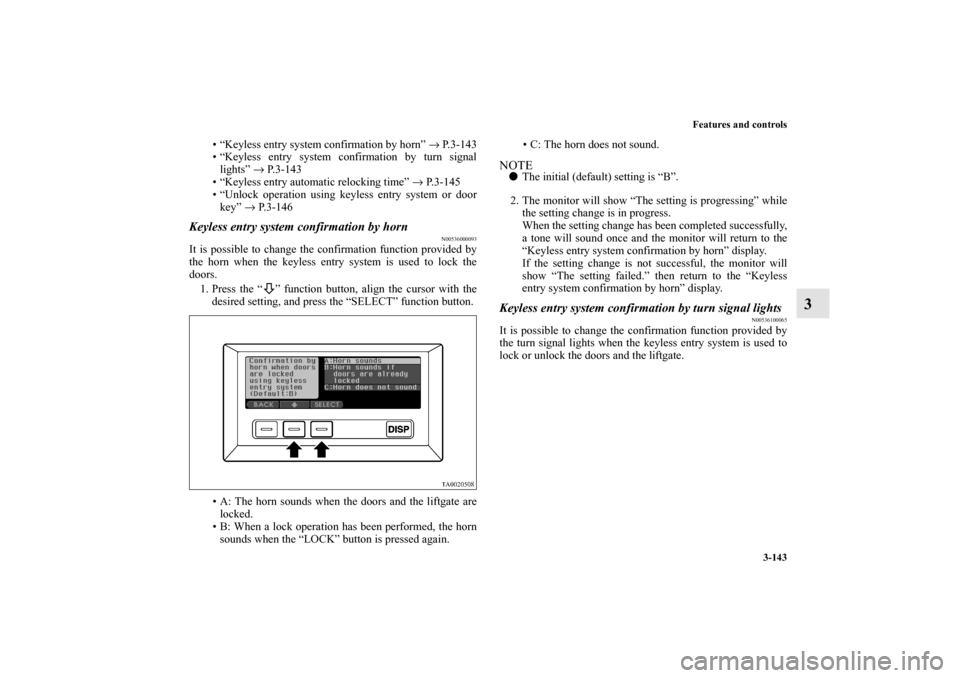
1. Press the “ ” function button, align the cursor with the
desired setting, and press the “SELECT” function button.
• A: The horn sounds when the doors and the liftgate are
locked.
• B: When a lock operation has been performed, the horn
sounds when the “LOCK” button is pressed again.• C: The horn does not sound.
NOTE�The initial (default) setting is “B”.
2. The monitor will show “The setting is progressing” while
the setting change is in progress.
When the setting change has been completed successfully,
a tone will sound once and the monitor will return to the
“Keyless entry system confirmation by horn” display.
If the setting change is not successful, the monitor will
show “The setting failed.” then return to the “Keyless
entry system confirmation by horn” display.Keyless entry system confirmation by turn signal lights
N00536100065
It is possible to change the confirmation function provided by
the turn signal lights when the keyless entry system is used to
lock or unlock the doors and the liftgate.
BK0121600US.book 143 ページ 2010年4月12日 月曜日 午前10時39分
Page 233 of 514
3-144 Features and controls
3
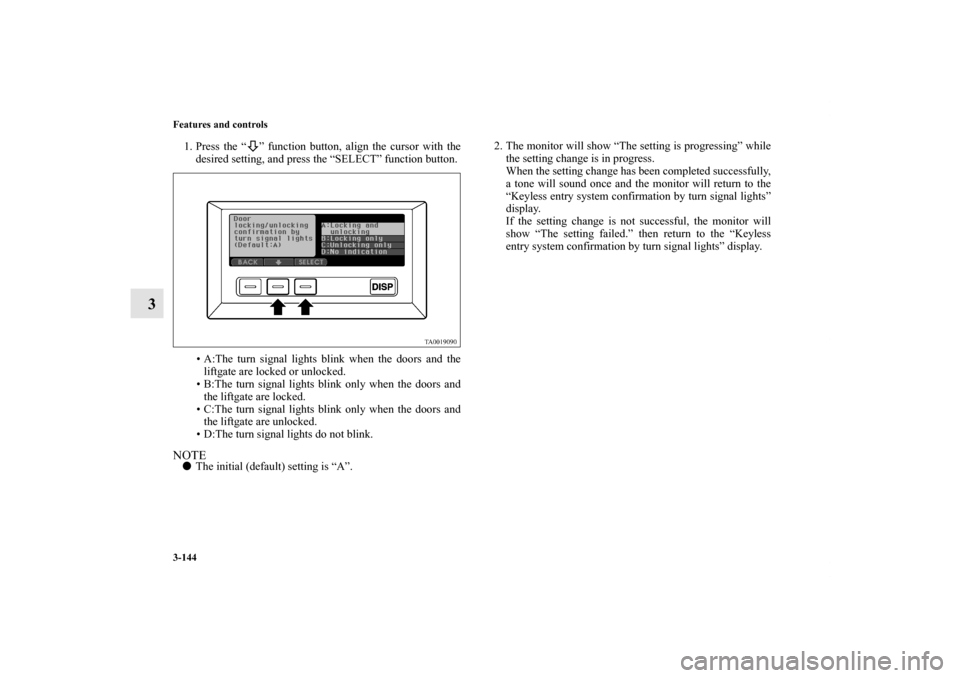
1. Press the “ ” function button, align the cursor with the
desired setting, and press the “SELECT” function button.
• A:The turn signal lights blink when the doors and the
liftgate are locked or unlocked.
• B:The turn signal lights blink only when the doors and
the liftgate are locked.
• C:The turn signal lights blink only when the doors and
the liftgate are unlocked.
• D:The turn signal lights do not blink.NOTE�The initial (default) setting is “A”.2. The monitor will show “The setting is progressing” while
the setting change is in progress.
When the setting change has been completed successfully,
a tone will sound once and the monitor will return to the
“Keyless entry system confirmation by turn signal lights”
display.
If the setting change is not successful, the monitor will
show “The setting failed.” then return to the “Keyless
entry system confirmation by turn signal lights” display.
BK0121600US.book 144 ページ 2010年4月12日 月曜日 午前10時39分
Page 237 of 514
3-148 Features and controls
3
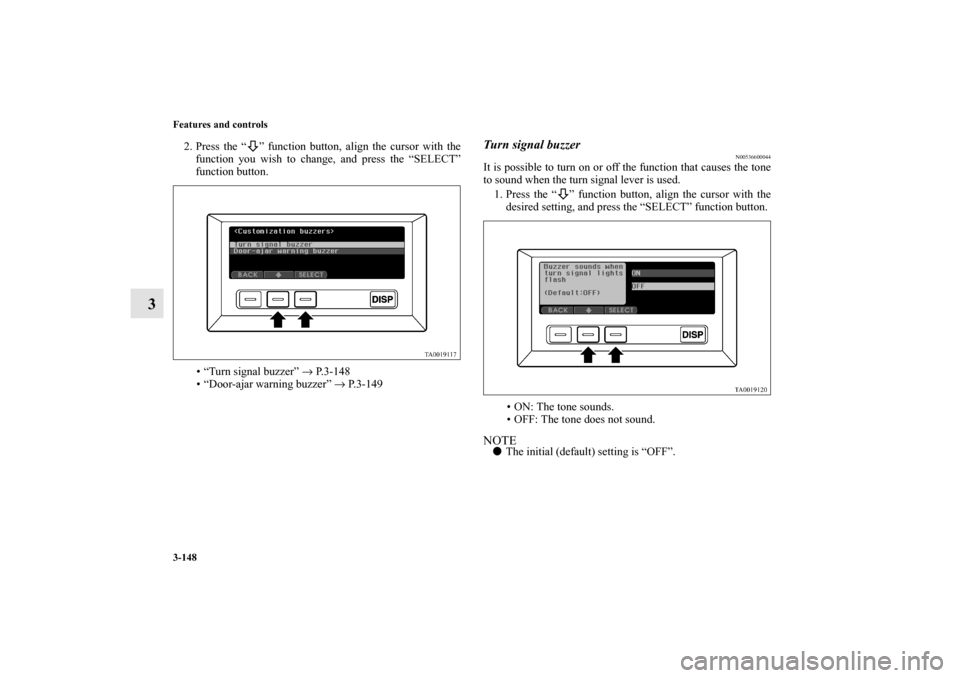
2. Press the “ ” function button, align the cursor with the
function you wish to change, and press the “SELECT”
function button.
• “Turn signal buzzer” → P. 3 - 1 4 8
• “Door-ajar warning buzzer” → P. 3 - 1 4 9
Turn signal buzzer
N00536600044
It is possible to turn on or off the function that causes the tone
to sound when the turn signal lever is used.
1. Press the “ ” function button, align the cursor with the
desired setting, and press the “SELECT” function button.
• ON: The tone sounds.
• OFF: The tone does not sound.NOTE�The initial (default) setting is “OFF”.
BK0121600US.book 148 ページ 2010年4月12日 月曜日 午前10時39分
Page 238 of 514
Features and controls
3-149
3
2. The monitor will show “The setting is progressing” while
the setting change is in progress.
When the setting change has been completed successfully,
a tone will sound once and the monitor will return to the
“Turn signal buzzer” display.
If the setting change is not successful, the monitor will
show “The setting failed.” then return to the “Turn signal
buzzer” display.
Door-ajar warning buzzer
N00536700090
It is possible to change the setting for the door-ajar warning
buzzer.
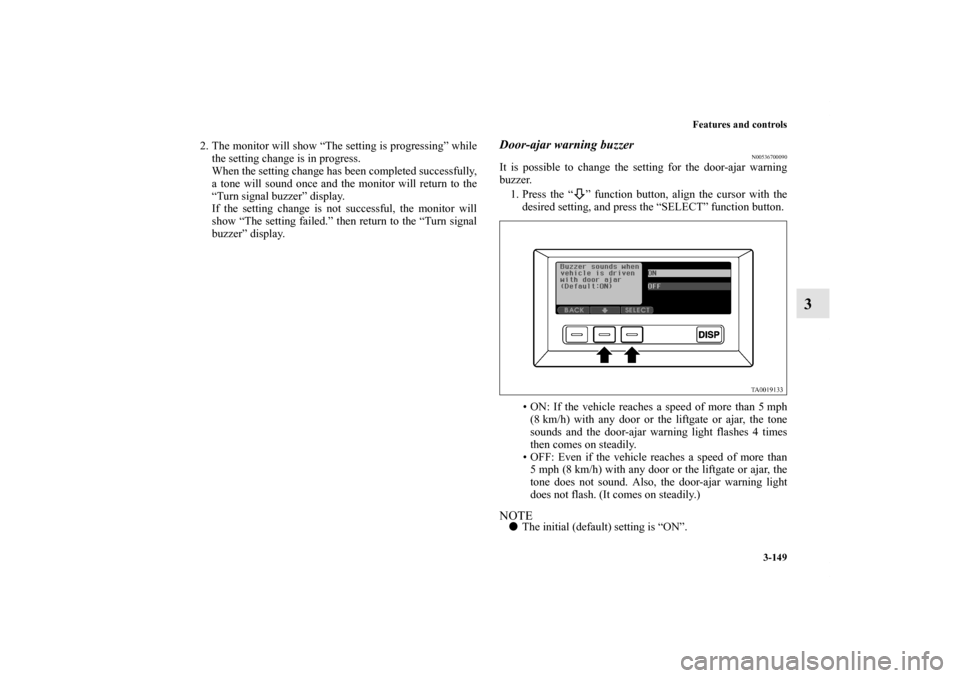
1. Press the “ ” function button, align the cursor with the
desired setting, and press the “SELECT” function button.
• ON: If the vehicle reaches a speed of more than 5 mph
(8 km/h) with any door or the liftgate or ajar, the tone
sounds and the door-ajar warning light flashes 4 times
then comes on steadily.
• OFF: Even if the vehicle reaches a speed of more than
5 mph (8 km/h) with any door or the liftgate or ajar, the
tone does not sound. Also, the door-ajar warning light
does not flash. (It comes on steadily.)NOTE�The initial (default) setting is “ON”.
BK0121600US.book 149 ページ 2010年4月12日 月曜日 午前10時39分
Page 245 of 514
3-156 Features and controls
3
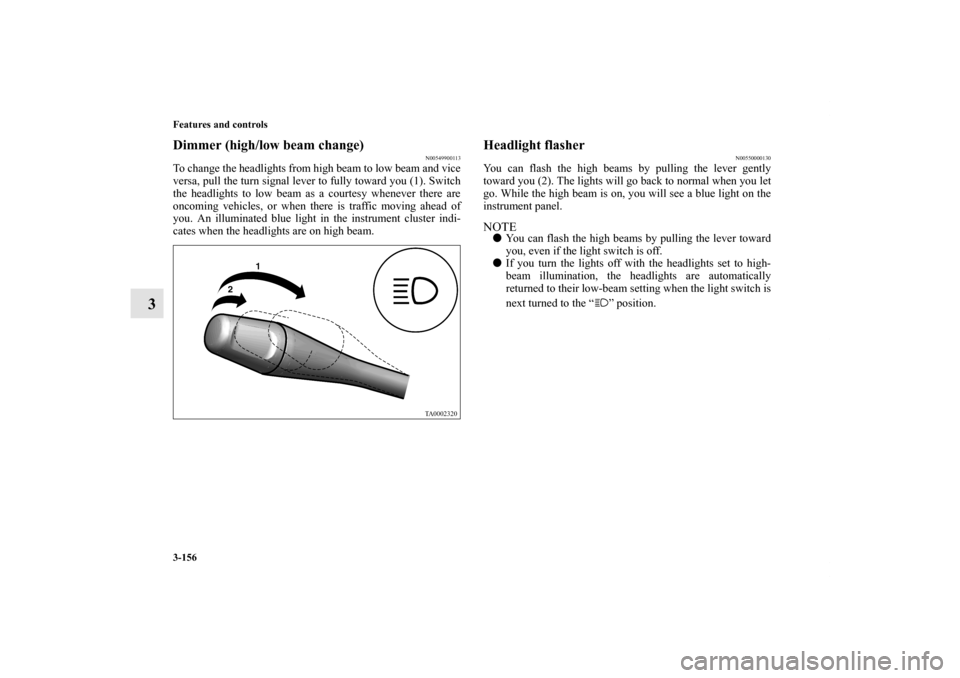
Dimmer (high/low beam change)
N00549900113
To change the headlights from high beam to low beam and vice
versa, pull the turn signal lever to fully toward you (1). Switch
the headlights to low beam as a courtesy whenever there are
oncoming vehicles, or when there is traffic moving ahead of
you. An illuminated blue light in the instrument cluster indi-
cates when the headlights are on high beam.
Headlight flasher
N00550000130
You can flash the high beams by pulling the lever gently
toward you (2). The lights will go back to normal when you let
go. While the high beam is on, you will see a blue light on the
instrument panel.NOTE�You can flash the high beams by pulling the lever toward
you, even if the light switch is off.
�If you turn the lights off with the headlights set to high-
beam illumination, the headlights are automatically
returned to their low-beam setting when the light switch is
next turned to the “ ” position.
BK0121600US.book 156 ページ 2010年4月12日 月曜日 午前10時39分
Page 246 of 514

Features and controls
3-157
3 Turn signal lever
N00522600027
When changing lanes, or making a gradual turn, hold the lever
in the “lane change” position (1). It will return to the neutral
position when you let go. Use the full position (2) when mak-
ing a normal turn. The lever will return to the neutral position
when the turn is complete. There may be times when the lever
does not return to the neutral position. This usually happens
when the steering wheel is turned only slightly. You can easily
return the lever by hand.
NOTE�A light in the instrument panel flashes to show when the
front and rear turn signal lights are working properly.
If this light flashes faster than usual, check for a burned
out lamp bulb or malfunctioning connection.
If the panel light does not come on when the lever is
moved, check for a blown fuse or a burned out bulb in the
panel.
Have the vehicle inspected by an authorized Mitsubishi
dealer or a repair facility of your choice.
�In a vehicle with a multi center display, the multi center
display can be used to select whether the tone will sound
or not sound when the hazard warning flashers are acti-
vated. For details, refer to “Setting and customization” on
page 3-108.
BK0121600US.book 157 ページ 2010年4月12日 月曜日 午前10時39分
Page 247 of 514
3-158 Features and controls
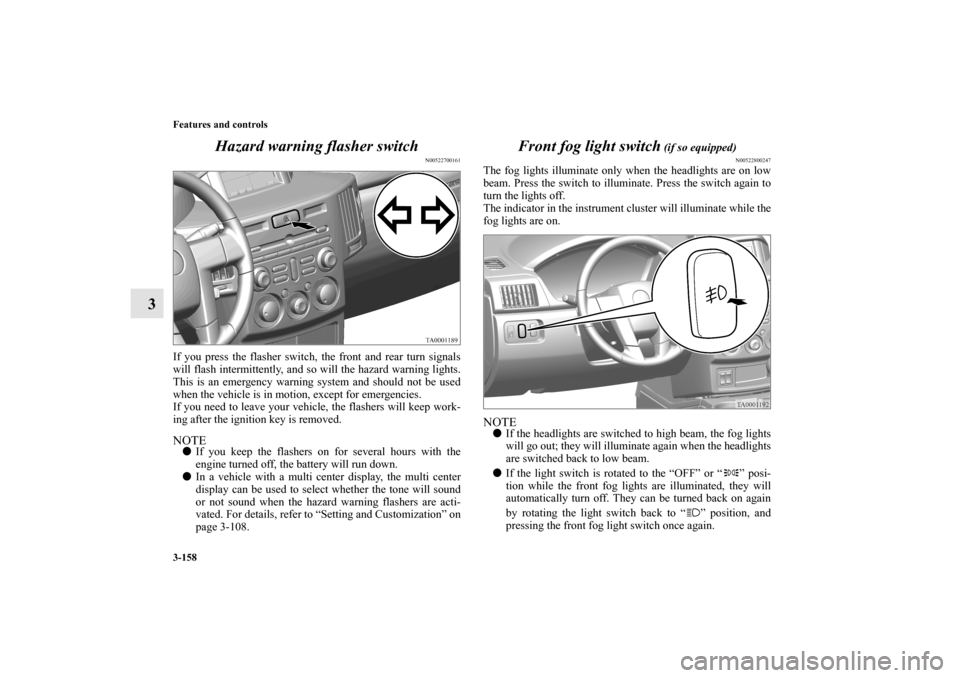
3Hazard warning flasher switch
N00522700161
If you press the flasher switch, the front and rear turn signals
will flash intermittently, and so will the hazard warning lights.
This is an emergency warning system and should not be used
when the vehicle is in motion, except for emergencies.
If you need to leave your vehicle, the flashers will keep work-
ing after the ignition key is removed. NOTE�If you keep the flashers on for several hours with the
engine turned off, the battery will run down.
�In a vehicle with a multi center display, the multi center
display can be used to select whether the tone will sound
or not sound when the hazard warning flashers are acti-
vated. For details, refer to “Setting and Customization” on
page 3-108.
Front fog light switch
(if so equipped)
N00522800247
The fog lights illuminate only when the headlights are on low
beam. Press the switch to illuminate. Press the switch again to
turn the lights off.
The indicator in the instrument cluster will illuminate while the
fog lights are on.NOTE�If the headlights are switched to high beam, the fog lights
will go out; they will illuminate again when the headlights
are switched back to low beam.
�If the light switch is rotated to the “OFF” or “ ” posi-
tion while the front fog lights are illuminated, they will
automatically turn off. They can be turned back on again
by rotating the light switch back to “ ” position, and
pressing the front fog light switch once again.
BK0121600US.book 158 ページ 2010年4月12日 月曜日 午前10時39分