2011 MINI Countryman radio
[x] Cancel search: radioPage 110 of 196

EntertainmentRadio MINI Boost CD
108
Selecting MP3 music tracks
The CD player can also play CDs with com-
pressed audio data, such as MP3 and WMA.
Selecting a track
1. Press the button.
2. Select the desired folder and press the but-
ton on the right.
> : press the button on the right to open
a folder
> : press the button on the right to close
a folder
3. If necessary, select a dditional subfolders
and press the button on the right.
4. Select the desired track and press the button
on the right.
During playback, you can browse through the
folder.
To change to the current track:
Press the button.
Track display
You can call up any input information on the cur-
rent music track:
1. Press the button.
2. Press the button.
Ejecting the CD out of the CD player
Press the button.
The CD is partially ejected from the CD slot.
Operation indicators
>"Insert CD"
The CD slot is empty.
> "Error CD"
The CD can not be read or is defective.
> "Temp. CD"
The operating temperature is too high.
Notes
CD players are laser products of Class 1. Do
not operate if the co ver is damaged; oth-
erwise, serious injury to eyes may result.
Do not use CDs with after-market labels; other-
wise, the labels can loosen as a result of the heat
generated during playback and possibly cause
irreparable damage to the system.
Only use round CDs with a standard diameter of
4.7 in/12 cm and do not pl ay CDs with adapters,
e.g., single CDs; otherwise, the CDs or the adapt-
ers may jam and it may not be possible to eject
them.
Do not use combined CD/DVDs, e.g., DVD
Plus;
otherwise, the CD/DVD may jam and it may not
be possible to eject it. <
General malfunctions
The CD players are optimized for operation in
vehicles. They may be more sensitive to defec-
tive CDs than players for stationary use.
If a CD can not be played, first check if the CD is
properly inserted.
Humidity
If there is high humidity, the CD or the focusing
lens for the laser beam may get fogged up and
playing the CD may temporarily not be possible.
Malfunctions with individual CDs
If there are malfunctions with individual CDs,
then they may be due to the following causes.
CDs that you burned yourself
Potential problems with home-burned CDs are,
for example, inconsistent data generation and
burning processes, as well as low quality or
excessive aging of the blanks that are used.
Only write on the upper surface of CDs with a
writing instrument that is suitable for the pur-
pose.
Page 111 of 196

Radio MINI Boost CDEntertainment
109
Damaged CDs
Avoid finger prints as well as dust, scratches and
moisture.
Store CDs in sleeves.
Do not expose CDs to a temperature greater
than 1227/50 6, elevated humidity or direct
sunlight.
CDs with copy protection
CDs are often provided with copy protection
from the manufacturer. This can result in CDs not
playing or playing back in only a limited fashion.
Care
If necessary, clean the reflecting side of the CD
with a commercially avail able cleaning cloth by
wiping in a straight line from the center out-
wards.
USB audio interface*
> iPods/iPhones or USB devices such as MP3
players and USB memory sticks: connect via
the USB audio interface
> iPhone/mobile phone music players: con-
nection using a snap-in adapter
*, refer to
page 124.
> Only one iPod/iPhone can be connected to
the vehicle. Output fr om an iPod/iPhone to
the USB audio interface is only possible if
there is no iPhone in the snap-in adapter.
> Popular audio files, such as MP3, AAC and
M3U playlists, can be played. Depending on
the audio file, proper playback can not be
ensured in every case,
such as for bit rates greater than 256 kbit/s.
> Music tracks with inte grated Digital Rights
Management (DRM) cannot be played.
Because of the large number of audio devices on
the market, it can not be ensured that every
device will properly operate in the vehicle. Addi-
tional inform ation may be found at
www.mini.com/connectivity or at a dealer.
Connecting
MINI, MINI Convertible, MINI Clubman:
1 Connection for audio playback:
TRS connector 1/8"/3.5 mm
2 USB interface
*
MINI Countryman:
1USB interface
*
2Connection for audio playback:
TRS connector 1/8"/3.5 mm
Apple iPod/iPhone
Use the special cable adapter for Apple iPods/
iPhones to produce the connection. The cable
adapter is required for a proper connection.
For additional information, contact your MINI
dealer or visit the Internet at www.mini.com/
connectivity
To play audio tracks ov er the car's speaker sys-
tem, connect the iPod to ports 1 and 2.
The iPod/iPhone's menu structure is supported
by the USB audio interface.
Page 112 of 196

EntertainmentRadio MINI Boost CD
110
USB device
To play audio tracks over the car's speaker sys-
tem, connect the USB device to port2.
After first connecting, the track information is
transferred to the vehicle. The time required is
dependent on the USB device and on the num-
ber of tracks.
Information from up to four USB devices or
approx. 20,000/ tracks can be stored in the
vehicle.
Starting audio playback
iPod
1. Press the MODE button.
2. Press the button.
USB device
1.Press the MODE button.
2. Press the button.
Changing music tracks
Jumping tracks
Press the … button as often as necessary
until the desired track is reached.
Using the knob on the right:
Turn the knob on the right until the desired track
has been reached.
Fast forward/reverse
1.Press and hold the … button.
The track can be heard but is distorted.
2. To cancel the fast forward/reverse, release
the button.
Random order
Press the button. The current track is played to the end.
Afterwards, the tracks in the current folder are
played back in random order.
To terminate the random generator:
Press the button.
Selecting a track
Select the desired list, e.g., "LIST":
1. Press the button.
2. Select the desired folder and press the but-
ton on the right.
> : press the button on the right to open
a folder
> : press the button on the right to close
a folder
3. If desired, select addi tional subfolders and
press the button on the right.
4. Select the desired track and press the button
on the right.
During playback, you can browse through the
folder.
To change to the current track:
Press the button.
Track display
You can call up any input information on the cur-
rent music track:
Press the button.
Adjusting the iPod volume*
The volume of the iPod can be lower or higher
than the audio sources for the radio.
To adjust the volume of the iPod to the volume
of the other audio sources:
1. Press the button.
2. Select the desired volume and press the but-
ton on the right.
Page 113 of 196

Radio MINI Boost CDEntertainment
111
Notes
>The USB audio interface supplies the con-
nected audio devices with power, provided
that this is supported by the audio device.
For this reason, audio devices are not to be
connected to a receptac le in the vehicle dur-
ing operation.
> Do not expose audio devices to extreme
ambient conditions, for example, very high
temperatures; refer to the operating instruc-
tions for the audio device.
> Do not connect any devices, e.g. fans or
lamps, to the USB audio interface.
> Do not connect USB hard drives.
Page 116 of 196

CommunicationsTelephone
114
Telephone
Overview
The concept
Mobile phones or other external devices, e.g.
audio players, can be connected to the vehicle
via Bluetooth.
Bluetooth® is a registered trademark of Blue-
tooth® SIG, Inc.
Your MINI is equipped with a complete mobile
phone preparation. After a suitable mobile
phone is paired with the vehicle once, the
mobile phone can be controlled via the radio,
the buttons
* on the steering wheel, and by
voice
*.
It may be necessary for some functions to be
activated by the mobile phone provider. Only make entries when traffic conditions
permit. Do not hold the mobile phone in
your hand while you are driving; use the hands-
free system instead. If you do not observe this
precaution, your being distracted can endanger
vehicle occupants and other road users. <
Snap-in adapter*
The snap-in adapter, refer to page124, makes it
possible to:
> Accommodate the mobile phone.
> Recharge its battery.
> Connect it to an exte rnal antenna of the
vehicle.
This assures a better network connection
and constant sound quality.
A mobile phone that is connected to the vehicle
should not be operated via the mobile phone
keypad; otherwise, ma lfunctions may occur.
Suitable mobile phones
For precise information as to which mobile
phones and external devices with Bluetooth
interfaces are supported by the mobile phone
preparation, go to ww w.mini.com/connectivity.
*
Page 117 of 196
TelephoneCommunications
115
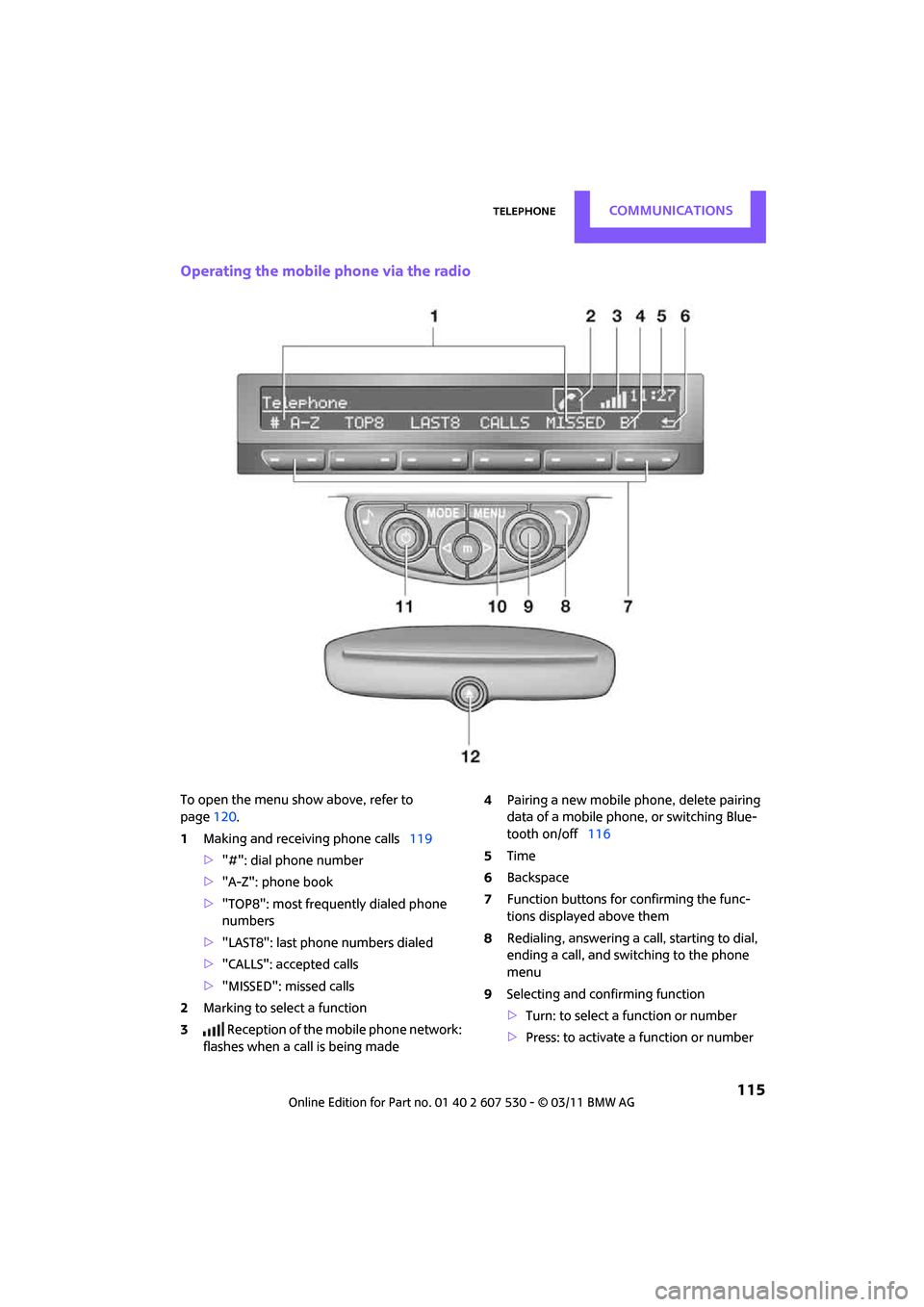
Operating the mobile phone via the radio
To open the menu show above, refer to
page120.
1 Making and receiving phone calls 119
> "#": dial phone number
> "A-Z": phone book
> "TOP8": most frequently dialed phone
numbers
> "LAST8": last phone numbers dialed
> "CALLS": accepted calls
> "MISSED": missed calls
2 Marking to select a function
3 Reception of the mobile phone network:
flashes when a call is being made 4
Pairing a new mobile phone, delete pairing
data of a mobile phon e, or switching Blue-
tooth on/off 116
5 Time
6 Backspace
7 Function buttons for confirming the func-
tions displayed above them
8 Redialing, answering a ca ll, starting to dial,
ending a call, and switching to the phone
menu
9 Selecting and confirming function
>Turn: to select a function or number
> Press: to activate a function or number
Page 118 of 196

CommunicationsTelephone
116
10Switching displays 120
> "PHONE": telephone
> "COMP": computer
> "CONFIG": adjusting
11 Radio on/off, volume
>Press: to switch radio on/off
> Turn: adjusting volume 119
12 Ejecting CD
This symbol appears on the radio display
when a phone call is being made with the
hands-free system.
Pairing/unpairing mobile
phone
Overview
The pairing data of four mobile phones can be
stored simultaneously in the vehicle. When the
engine is running or the ignition is switched on,
each paired mobile phone is automatically
detected as soon as it is present in the passenger
compartment.
Requirements
> Suitable mobile ph one, refer to page114.
> Mobile phone operational.
> Bluetooth activated in vehicle, refer to
page 116, and in the mobile phone.
> Bluetooth presets in the mobile phone are
required, e.g. connection not confirmed or
visible, refer to Owner's Manual for the
mobile phone.
> A number with at least 4 and at most
16 digits has been established as the Blue-
tooth passkey. Only required once for pair-
ing.
> Ignition switched on.
Activating/deactivating Bluetooth link
Bluetooth is not permitted everywhere. Comply
with all safety guidelines and regulations.
To deactivate the Bluetooth connection:
1.Press the MENU button.
2. Press the button.
3. Press the button.
4. Press the button.
5. Press the button.
To reactivate the Bluetooth connection:
1. Press the button.
2. Press the button.
Pairing and connecting
Only pair the mobile phone when the
vehicle is stopped; otherwise, inattention
may lead to endangerment of passengers or
other road users. <
Switching on ignition
1.Insert the remote control as far as possible
into the ignition lock.
2. Switch on the ignition; to do so, press the
Start/Stop button without stepping on the
brake or clutch pedal.
Preparation on the radio display
3.Press the MENU button.
Page 119 of 196

TelephoneCommunications
117
4. Press the button.
5. Press the button.
6. Press the button.
Turn the right rotary knob to display the Blue-
tooth name of your vehicle on the display.
Preparation with mobile phone
7. Other operations must be performed on the
mobile phone and differ depending on the
type of mobile phone, refer to Owner's Man-
ual for the mobile phone, e.g. under Con-
necting or pairing Bluetooth device. The
Bluetooth name of the vehicle appears on
the mobile phone display.
8. Select the Bluetooth name of the vehicle on
the mobile phone display.
Pairing
The mobile phone or the radio display will
prompt you to enter the same Bluetooth pass-
key.
Depending on the mobile phone, you have
approx. 30 seconds to enter the Bluetooth pass-
key using the mobile phone and the radio dis-
play.
If the Bluetooth passkey can be entered using
the radio, then the following appears on the dis-
play:
:
9.Enter the Bluetooth passkey using the num-
ber buttons of the mobile phone. 10.
Press the button to enter the Blue-
tooth passkey using the radio.
11. Using the function buttons 0-9, enter the
same Bluetooth passke y that was entered
into the mobile phone.
To delete the last digit:
Press the button.
12. Press the button to confirm the
Bluetooth passkey.
The following display will appear after a few
seconds:
13. Press the button if necessary.
The following display will appear after the
mobile phone is paired:
If pairing was successful, the mobile phone
appears at the top of the list of mobile phones.
If the pairing was not succ essful: what to do if…,
refer to page 118.
To repeat the pairing procedure:
1. Press the button.
2. Repeat steps 6 to 13.
If the pairing was not successful when repeated:
> Suitable phones can be found at
www.mini.com/connectivity
> E-mail: [email protected]
> Hotline, also refer to page 124.