2011 MINI Countryman radio
[x] Cancel search: radioPage 83 of 196

Practical interior accessoriesControls
81
Practical interior accessories
Integrated universal
remote control*
The concept
The integrated universal remote control can
replace as many as three hand-held transmitters
for various remote-controlled devices, such as
garage and gate openers and lighting systems.
The integrated universal remote control regis-
ters and stores signals from the original hand-
held transmitters.
The signal of an original hand-held transmitter
can be programmed on one of the three mem-
ory buttons 1. The system in question can then
be operated by means of the programmed
memory button 1. The LED 2 flashes to confirm
transmission of the signal.
If you decide to sell your vehicle one day, in the
interest of your own secu rity, remember to clear
the stored programs before the vehicle leaves
your possession, page 82.
To prevent possible damage or injury,
before programming or using the inte-
grated universal remote control, always inspect
the immediate area to make certain that no
people, animals or objects are within the travel
range of the device. Comply also with the safety
instructions supplied with the original hand-held
transmitter. <
Checking compatibility
If this symbol appears on the package
or in the instructions supplied with the
original hand-held transmitter, you can
assume that the radio re mote control device is
compatible with the inte grated universal remote
control.
For additional information, please contact your
MINI dealer or call: 1-800-355-3515. You can also obtain info
rmation on the Internet
at:
www.homelink.com
HomeLink is a registered trademark of Johnson
Controls, Inc.
Programming
1 Memory buttons
2 LED
Fixed-code hand-held transmitters
1.Switch on the ignition, page 41.
2. When starting operation for the first time:
press both outer memory buttons 1 for
approx. 20 seconds until the LED 2 flashes
rapidly. All stored programs are cleared.
3. Hold the original hand-held transmitter at a
distance of approx. 1 in/2.5 cm to 3 in/8 cm
from the memory buttons 1.
The required distance between the
hand-held transmitter and the mem-
ory buttons 1 depends on the system of the
respective original hand-held transmitter
used. <
4. Simultaneously press the transmit key on
the original hand-held transmitter and the
desired memory button 1 on the integrated
universal remote control. The LED 2 flashes
slowly at first. As soon as the LED 2 flashes
rapidly, release both buttons. If the LED 2
does not flash rapidly after approx.
Page 84 of 196

ControlsPractical interior accessories
82
60 seconds, alter the distance and repeat
this step.
Canada: if the LED is not flashing rapidly
after 60 seconds, chan ge the distance and
repeat the step or, if the programming was
interrupted by the hand-held transmitter,
press and hold the memory button and
press the button on the hand-held transmit-
ter for 2 seconds and release several times.
5. To program other original hand-held trans-
mitters, repeat steps 3 and 4.
The corresponding memory button1 is now
programmed with the signal of the original
hand-held transmitter.
You can operate the system with the engine
running or with the ignition switched on.
If the system fails to function even after
repeated programming, check whether
the original hand-held transmitter uses an alter-
nating-code system. To do so, either read the
instructions for the orig inal hand-held transmit-
ter or hold down the programmed memory
button 1 of the integrated universal remote con-
trol. If the LED 2 on the integrated universal
remote control flashes ra pidly and then remains
lit for about two seconds, then the original
hand-held transmitter uses an alternating-code
system. If it uses an alternating-code system,
program the memory buttons 1 as described
under Alternating-code hand-held transmit-
ters. <
Alternating-code hand-held
transmitters
To program the integrat ed universal remote
control, consult the oper ating instructions for
the device to be set. You will find information
there on the possibilities for synchronization or
programming of additional hand-held transmit-
ters.
When programming hand-held transmitters that
employ an alternating code, please observe the
following supplementary instructions: Programming will be easier with the aid of
a second person.
<
1. Park your vehicle within the range of the
remote-controlled device.
Do not exceed a distance of 164 ft/
50 m from the radio remote con-
trolled device. <
2. Program the integrated universal remote
control as described above in the section
Fixed-code hand-held transmitters.
3. Locate the button on the receiver of the
device to be set, e.g. on the drive unit.
4. Press the button on the receiver of the
device to be set. After step 4, you have
approx. 30 seconds for the next step 5.
5. Press and hold the programmed memory
button 1 on the integrated universal remote
control for approx. 3 seconds.
If necessary, repeat the step up to three
times.
The corresponding memory button1 is now
programmed with the signal of the original
hand-held transmitter.
Clearing stored programs
Press both outer memory buttons 1 for approx.
20 seconds until the LED 2 flashes: all stored
programs are cleared.
It is not possible to clear individual programs.
Reassigning individual programs
1. Hold the original hand-held transmitter at a
distance of approx. 1in/2.5cm to 3in/8cm
from the memory buttons 1.
The required distance between the
hand-held transmitter and the mem-
ory buttons 1 depends on the system of the
respective original hand-held transmitter
used. <
2. Press the desired memory button 1 of the
integrated universal remote control.
If the LED 2 flashes slowly after approx.
20 seconds, press the transmit key of the
Page 104 of 196

EntertainmentRadio MINI Boost CD
102
Radio MINI Boost CD
switching Radio on/off
Press the knob on the left. The radio
selects the last set audio source:
>Radio
> HD Radio
*
>Satellite radio*
>CD
> External audio device
> USB audio interface*.
Listening to the radi o when the ignition
is switched off
After turning off the radi o, which was ready for
operation, the radio functions are available for
approx. 20 minutes.
The radio can also be turned on again.
To spare the battery, ensure that the radio
is turned off when leaving the vehicle. <
Adjusting volume
Press left rotary knob. The settings are
stored for the remote control currently
in use.
As soon as you make a phone call using
the hands-free device, the radio will auto-
matically be muted. <
Setting the volume for the PDC* and bell
You can raise or lower the audio signals for the
PDC or bell with respect to the volume of the
audio sources.
The audio signals have a set minimum and max-
imum volume, below which they can not fall and
above which they can not go.
Set the audio source to a high volume to
be able to better set the volume of the
audio signals. < 1.
Press the button.
2. Press the button if necessary.
3. Press the button
or
Press the button.
4. Select the desired volume and press the but-
ton on the right.
Setting the speed-dependent volume
The speed-dependent volume controls auto-
matically increase the volume as the speed of
the vehicle increases. You can set different levels
for increasing the volume.
1.Press the button.
2. Press the button if necessary.
3. Press the button.
4. Select the desired volume and press the but-
ton on the right.
Setting the volume for external audio
devices
Your radio has the option of connecting to an
external audio device, e.g., an MP3 player, and
playing it over the loudspeakers in the vehicle.
You can set the volume by using the radio.
Connecting an external device, refer to
page 109.
To adjust the volume of an external audio device
to the radio:
1. Press the MODE button.
2. Press the button.
3. Press the button.
Page 105 of 196

Radio MINI Boost CDEntertainment
103
4.Select the desired volume and press the but-
ton on the right.
Setting tone controls
You can select between the following settings:
>Bass: bass setting.
> Treble: treble setting.
> Balance: volume distribution right/left.
> Fader: volume distri bution front/back.
The tone settings are set for all audio sources at
once.
Setting the bass, treble and balance
1. Press the button.
2. Select the desired tone setting and press the
button on the right.
3. Select the desired volume and press the but-
ton on the right.
Resetting tone settings
The tone settings are reset to the middle values.
1.Press the button.
2. Press the button.
Time
Setting the time, date and time format
You can set the time, date and time format, refer
to page57.
Radio
Your radio is designed to receive FM and AM sig-
nals.
Listening to the radio
1. Switch on the radio, refer to page 102.
2. If necessary, press the MODE button.
3. Press the button.
4. Press the corresponding button as
often as necessary until the desired wave-
length band is selected.
> AM: AM and AMA
> FM: FM1/FM2 and FMA
Selecting a station
The setting is stored for the remote control in
use.
Next station
Press the … button.
The next station that can be received is selected.
Selecting stations manually by
frequency
1. Press the button.
2. Press the button each time to enter a
desired frequency.
Or, by using the button on the right:
1. Press the button.
2. Turn the knob on the right until the desired
frequency is reached.
Automatically update strongest stations
Press the corresponding button as long
as necessary until "Autostore" is displayed.
Several seconds may go by until the stations are
stored and one of the stations can be heard.
Page 106 of 196
EntertainmentRadio MINI Boost CD
104
If you do not wish to use the Autostore
feature, you can store six stations of your
choice in the FMA or AMA memory levels.<
Playing and selecting stations, scan
You can play all the statio ns that can be received
for approx. 10 seconds.
Press the button.
Interrupting the scan an d selecting a station:
Press the button.
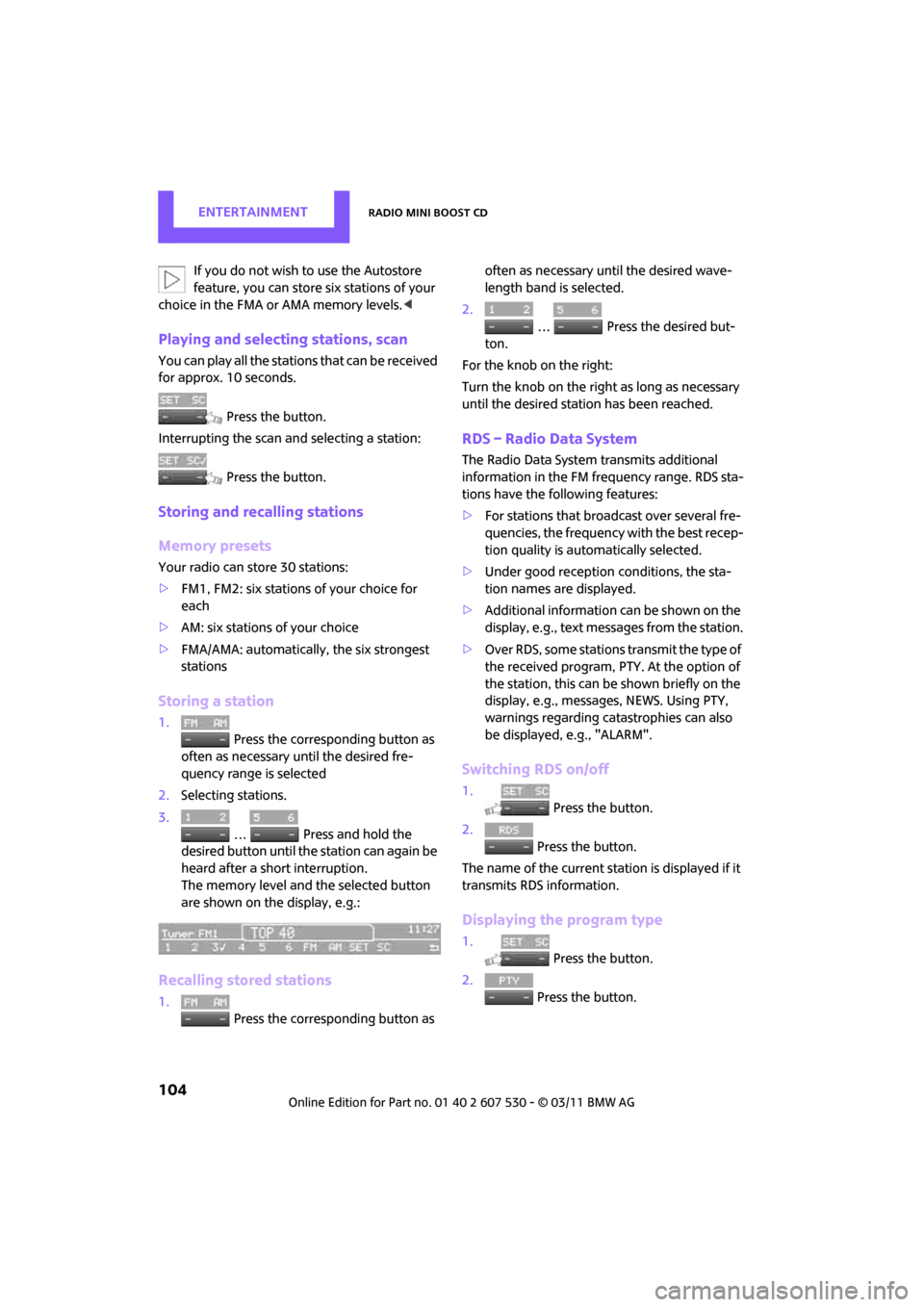
Storing and recalling stations
Memory presets
Your radio can store 30 stations:
> FM1, FM2: six stations of your choice for
each
> AM: six stations of your choice
> FMA/AMA: automatically , the six strongest
stations
Storing a station
1.
Press the corresponding button as
often as necessary until the desired fre-
quency range is selected
2. Selecting stations.
3.
… Press and hold the
desired button until th e station can again be
heard after a short interruption.
The memory level and the selected button
are shown on the display, e.g.:
Recalling stored stations
1. Press the corresponding button as often as necessary until the desired wave-
length band is selected.
2.
… Press the desired but-
ton.
For the knob on the right:
Turn the knob on the right as long as necessary
until the desired stat ion has been reached.
RDS – Radio Data System
The Radio Data System transmits additional
information in the FM frequency range. RDS sta-
tions have the following features:
>For stations that broadcast over several fre-
quencies, the frequency with the best recep-
tion quality is automatically selected.
> Under good reception conditions, the sta-
tion names are displayed.
> Additional information can be shown on the
display, e.g., text me ssages from the station.
> Over RDS, some stations transmit the type of
the received program, PTY. At the option of
the station, this can be shown briefly on the
display, e.g., message s, NEWS. Using PTY,
warnings regarding ca tastrophies can also
be displayed, e.g., "ALARM".
Switching RDS on/off
1. Press the button.
2. Press the button.
The name of the current station is displayed if it
transmits RDS information.
Displaying the program type
1. Press the button.
2. Press the button.
Page 107 of 196

Radio MINI Boost CDEntertainment
105
HD Radio™ reception*
Many radio stations transmit analog and digital
signals. If a digital radio network is available,
these stations can be received digitally and thus
with improved sound quality.
License conditions
HD Radio™ technology is manufactured under
U.S. and Foreign Patents licensed from iBiquity
Digital Corp. HD Radio™ and the HD and HD
Radio logos are proprietary trademarks of iBiq-
uity Digital Corp.
Activating/deactivating digital radio
reception
1.Press the MODEbutton.
2. Press the button.
3. Press the button.
4. Press the button.
"HD": a station has been received digitally.
"(HD)": a station is transmitting digital signals;
however, digital radio re ception is switched off.
For some stations, the digital signals are not
broadcast simultaneously with the analog sig-
nals. If you are in an area where the selected sta-
tion can not be continuously received digitally,
then the playback switches between analog and
digital reception. As a result, the reception can
be interrupted and then resume from time to
time. In this type of situation, it is suggested that
digital radio reception be turned off.
Selecting programs from a digital
station*
Some stations broadcast several programs. To
select one of these programs:
1. Press the … button as often as neces-
sary until the desired digital station is dis- played.
If a station broadcasts several programs,
then, e.g., "HD1" is displayed.
2. Press the button.
3. Select the desired program.
Up to eight programs per station can be
selected, "HD1" to "HD8".
Displaying additional information
For digital stations, addi tional information about
the current track is displayed, e.g., the name of
the artist.
Press the button.
The information is displayed.
Operation indicators
Acquiring
A search for digital stat ions is being conducted.
No Signal
No digital station has been found.
Satellite radio*
You can receive more than 100 different chan-
nel with higher audio quality.
The channels are offere d in defined packages.
To receive the channels of your choice, you have
to approve the package.
You may experience signal drops and
muting events related to this new technol-
ogy. <
Enabling or blocking channels
1.Press the MODEbutton.
Page 108 of 196

EntertainmentRadio MINI Boost CD
106
2. Press the button.
3. Press the button.
4. Select the desired category.
The channels are displayed. This symbol indicates the current channel.
Activating
1. Turn the knob on the right to select a chan-
nel that is not yet activated.
2. Press the knob on the right to confirm a
channel.
A phone number and th e electronic serial
number, ESN, are displayed. When activat-
ing, the electronic serial number is required.
3. To activate the channels:
Dial the phone number.
Blocking
1.Press the MODEbutton.
2. Press the button.
3. Press the button for a longer
period.
A phone number and th e electronic serial
number, ESN, are displayed. For blocking,
the electronic serial number is required. 4.
To block channels:
Dial the phone number.
To select and store a channel
1.Press the MODEbutton.
2. Press the button.
3. Press the button.
4. Select the desired category.
5. Select desired channel.
To display all the channels: Press the button.
To store a channel:
1. Press the button.
2. Press the button as often as nec-
essary until the desired memory level, SAT 1
or SAT 2, is reached.
3.
... Keep the desired but-
ton pressed until the channel can again be
heard after a short interruption.
Changing to the current channel
Press the button.
Page 109 of 196

Radio MINI Boost CDEntertainment
107
Additional information
The name of the channel and additional infor-
mation about the current track is displayed, e.g.,
the name of the artist.
1.Selecting a desired channel.
2. Press the button.
Changing channels using buttons
Press the … button for the corresponding
direction.
The next activated channel is recalled.
Search function
1.Press and hold the button for the cor-
responding direction.
The activated channels are shown, one after
another, on the display.
2. Release the button to select the displayed
channel.
Notes
When there is a signal blockage or the transmis-
sion is suspended mome ntarily for more than
4 seconds, a message appears on the Control
Display.
Service may be interrupted or unavailable
for specific reasons such as environmental
or topographic conditions and others that Satel-
lite Radio cannot directly control.
Signals may not be available under tunnels, in
parking garages, next to tall buildings, nearby
trees with dense foliage, nearby mountains or
other possible stro ng sources of radio interfer-
ence.
Service should resume no rmally after the source
of signal unavailabil ity has been cleared.<
CD player
Starting the CD player
Some time may pass until the CD player starts.
1.Turning on the radio, refer to page 102.
2. Insert the CD with the printed side up into
the CD slot.
If there is already a CD in the CD slot:
1. Switch on the radio, if necessary.
2. Press the MODE button.
3. Press the button.
Changing the music track
Jumping tracks
Press the … button as often as necessary
until the desired track is reached.
Using the knob on the right:
Turn the knob on the right until the desired track
has been reached.
Fast forward/reverse
1.Press and hold the … button.
The track can be heard but is distorted.
2. To cancel the fast fo rward/reverse, release
the button.
Random order
Press the button.
To terminate the random generator:
Press the button.
Playing a track and selecting, scan
Press the button.
To cancel the scan and select a track:
Press the button.