2011 MINI COOPER belt
[x] Cancel search: beltPage 79 of 210

Technology for driving comfort and safetyCONTROLS
77
Most child seats are detected by the
system. This particularly applies to
child seats that were required by NHTSA at
the time of manufacture of the vehicle. After
installing a child seat, check that the indica-
tor lamp for the front passenger airbags
lights up. It indicates that the child seat has
been detected and that the front passenger
airbags are deactivated. <
> The indicator lamp does not come on as long
as a person of sufficient size and in a correct
sitting position is detected on the seat.
The front and side airbags for the front
passenger are activated.
> The indicator lamp does not come on if the
seat is empty.
The front and side airbags for the front
passenger are not activated.
Operational readiness of airbag system
As of radio readiness, page 46, the warning
lamp lights up briefly to indicate that the entire
airbag system and the belt tensioners are
operational.
Airbag system malfunction
> The warning lamp does not come on when
radio readiness is switched on.
> The warning lamp stays lit continuously.
In the event of a fault in the airbag system,
have it checked without delay; otherwise,
there is the risk that the system will not function
as intended even if a severe accident occurs. <
MINI Convertible:
Rollover protection
system
The rollover system is automatically activated
during an accident or dangerous driving situa-
tion, during extreme tilt of the longitudinal axis,
or during loss of ground contact. The roll bar
located behind the rear seat headrest is
projected within a fraction of a second.
In addition to the reinforced windshield frame,
the rollover protection system ensures the
necessary head clearanc e for all occupants of
the vehicle.
Never block the travel path of the rollover
protection system with any objects.
Always wear your safety belt, it protects you in
a minor car accident and, depending on the
severity of the accident, the seat belt tensioner
and the multilevel airb ag system will protect
you. <
Lowering
If the rollover protecti on system releases
accidentally, have your MINI dealer check it.
If the rollover protective system is
extended, do not operate the convertible
top.
Never attempt to modify the individual compo-
nents or the electrical wiring of the rollover
protective system.
Have the necessary work on the rollover protec-
tion system of your MINI only carried out by an
authorized MINI dealer.
Faulty repair may lead to the failure of the
system or malfunctions.
Check the system regularly and in order to
ensure a long service life of all functions, it is
mandatory to ma intain the service intervals,
refer to page 62.<
Page 102 of 210

DRIVING TIPSThings to remember when driving
100
Split-folding rear seats
To be able to transport larger objects, the rear
backrest can be folded down.
1.If necessary, use the integrated key to open
the backrest lock 1.
2. Press button 2 and fold down backrest
together with the belt strap.
3. Fold the backrest forward.
When folding the backrest back into its
original position, alwa ys ensure that the
catch engages securely. A loose backrest might
fail to prevent cargo from entering the passen-
ger compartment during sudden braking or
evasive maneuvers, posing a potential hazard
to occupants.
The belt guide loop, refer to page 41, must be
closed. <
Determining cargo limit
1.Locate the following statement on your
vehicle's placard
*:
The combined weight of occupants
and cargo should never exceed
XXX lbs. or YYY kg. Otherwise, damage to
the vehicle and unstable driving conditions
may result. < 2.
Determine the combined weight of the
driver and passengers that will be riding in
your vehicle.
3. Subtract the combined weight of the driver
and passengers from XXX pounds or
YYY kilograms.
4. The resulting figure equals the available
amount of cargo and luggage load capacity.
For example, if the XXX amount equals
1,400 lbs. and there will be four 150-lb.
passengers in your vehicle, the amount of
available cargo and luggage load capacity is
650 lbs.:
1,400 lbs. minus 750 lbs. = 650 lbs.
5. Determine the combined weight of luggage
and cargo being loaded on the vehicle. That
weight may not safely exceed the available
cargo and luggage load capacity calculated
in step 4.
6. If your vehicle will be towing a trailer, part of
the load from your trailer will be transferred
to your vehicle. Consult the manual for
transporting a trailer to determine how this
may reduce the available cargo and luggage
load capacity of your vehicle.
Load
The permissible load is the sum of the occu-
pants' weights and the we ight of the cargo. The
greater the weight of the occupants, the less
cargo/luggage can be transported.
Page 103 of 210

Things to remember when drivingDRIVING TIPS
101
Stowing cargo
>Position heavy objects as low and as far
forward as possible, id eally directly behind
the rear seat backrests.
> Cover sharp edges and corners.
> For very heavy cargo when the rear seat is
not occupied, secure each safety belt in the
respective opposite buckle.
> Do not stack higher than the top edge of the
backrests.
MINI
MINI Convertible Securing cargo
>
Secure smaller and lighter items using
retaining or draw straps
*.
> Heavy-duty cargo straps
* for securing larger
and heavier objects ar e available at your
MINI dealer. Four lashing eyes are provided
for attaching the cargo straps. Two of them
are located on the forward wall of the cargo
area.
Comply with the information enclosed with
the load-securing devices.
Always position and secure the cargo as
described above, so that it cannot endan-
ger the car's occupants, for example if sudden
braking or swerves are necessary.
Do not exceed the approved gross vehicle
weight and axle loads, page 191; otherwise, the
vehicle's operating safety is no longer assured
and the vehicle will not be in compliance with
the construction and use regulations.
Heavy or hard objects should not be carried
loose inside the car, since they could be thrown
around, for example as a re sult of heavy braking,
sudden swerves, etc., and endanger the occu-
pants. Do not secure ca rgo using the fastening
points for the tether strap, page 44; they may
become damaged. <
Page 143 of 210

Wheels and tiresMOBILITY
141
MINI John Cooper Works Convertible tire inflation pressures
Tire coding
Knowledge of the labeling on the side of the
tire makes it easier to identify and choose the
right tires.
Tire size
Speed letter
Q = up to 100 mph/160 km/h
T = up to 118 mph/190 km/h
H = up to 131 mph/210 km/h
V = up to 150 mph/240 km/h
W = up to 167 mph/270 km/h
Y = up to 186 mph/300 km/h
Tire size Pressure specifications in psi/kPa
Speeds up to a
max. of 100 mph / 160 km/h Speeds including those
exceeding
100 mph / 160 km/h
All pressure specifications in the
table are indicated in psi/kilo-
pascal with cold tires.
Cold = ambient temperature
185/50 R 17 86 H M+S XL RSC
205/45 R 17 84 V M+S RSC
205/45 R 17 84 W RSC 39/270 39/270 42/290 42/290
205/40 R 18 82 W RSC 42/290 42/290 45/310 45/310
More details on the perm issible load and weights can be found on page 192.
e.g.
Nominal width in mm
Aspect ratio in Ξ
Radial belt construction
Rim diameter in inches
Load rating,
not on ZR tires
Speed code letter,
in front of the R on ZR tires225/45 R 17 91 V
Page 158 of 210

MOBILITYCare
156
Especially when the leather has a light color, it
should be cleaned regularly since it tends to get
heavily soiled.
Treat the leather twice a year using a leather
lotion since dirt and grease will gradually attack
the leather's protective layer.
Carpets/floor mats*
Keep floor mats, carpet, and other objects
out of the movement range of the pedals;
otherwise, they may inhibit the function of the
pedals during driving.
Do not place additional floor mats onto an
existing one or onto other objects.
Only use floor mats that have been approved for
the vehicle and can be appropriately fastened.
Make sure that the floo r mats are securely fas-
tened again after they ha ve been removed, e.g.
for cleaning. <
Floor mats can be removed to be cleaned.
If the carpets are very di rty, clean with a microfi-
ber cloth and water or an interior cleaner. When
doing so, rub forward and back in the driving
direction; otherwise, the carpet may become
matted.
Interior plastic parts
These include:
> Plastic surfaces
> Lamp glass
> Display panes
> Mat parts
Only clean with water an d, if necessary, solvent-
free plastic cleaners.
Do not use solvents such as alcohol, lac-
quer thinner, cold cleaners, fuel, or similar,
as these will damage the surfaces. <
Decorative strips*
Only clean decorative strips with moist cloths.
Wipe dry with a soft cloth.
Safety belts
Dirty belt straps impede the reeling action and
thus have a negative impact on safety.
Do not clean chemically, as this may
destroy the webbing. <
Displays
To clean displays such as radios or display ele-
ments, use a display cleaning cloth or a soft,
non-scratching, lint-free cloth.
Avoid pressing too hard when cleaning
the display as this can cause damage. <
Do not use chemical or abrasive house-
hold cleaning agents. Keep fluids of any
kind away from the device. Surfaces or electrical
components may otherwise become corroded
or damaged. <
CD/DVD drives
Do not use cleaning CDs as this could
damage parts of the drive. <
Vehicle storage
If you are not going to drive your car for more
than three months, please ask for advice from
your MINI dealer or a workshop that works
according to MINI manufacturer specifications.
Page 175 of 210

Indicator and warning lampsMOBILITY
173
Indicator and warning lamps
Indicator and warning lamps can light up in var-
ious combinations and colors in indicator area 1 or
2. Refer to the table for information on causes
and how to react. Note wh ether a lamp lights up
alone or in combinatio n with another. Some
lamps can light up in different colors. Corre-
sponding distinctions are made in the text.
12Cause What to do
Turn signals
High beams/head lamp flasher
switched on
Fog lamps switched on
Rear fog lamp switched on
Fasten safety belts Fasten your safety belt, refer also to page41.
Indication in US models
Parking brake applied Release the parking brake.
Indication in Canadian models
Parking brake applied Release the parking brake.
External temperature wa rningDrive cautiously, refer also to page 57.
Page 178 of 210
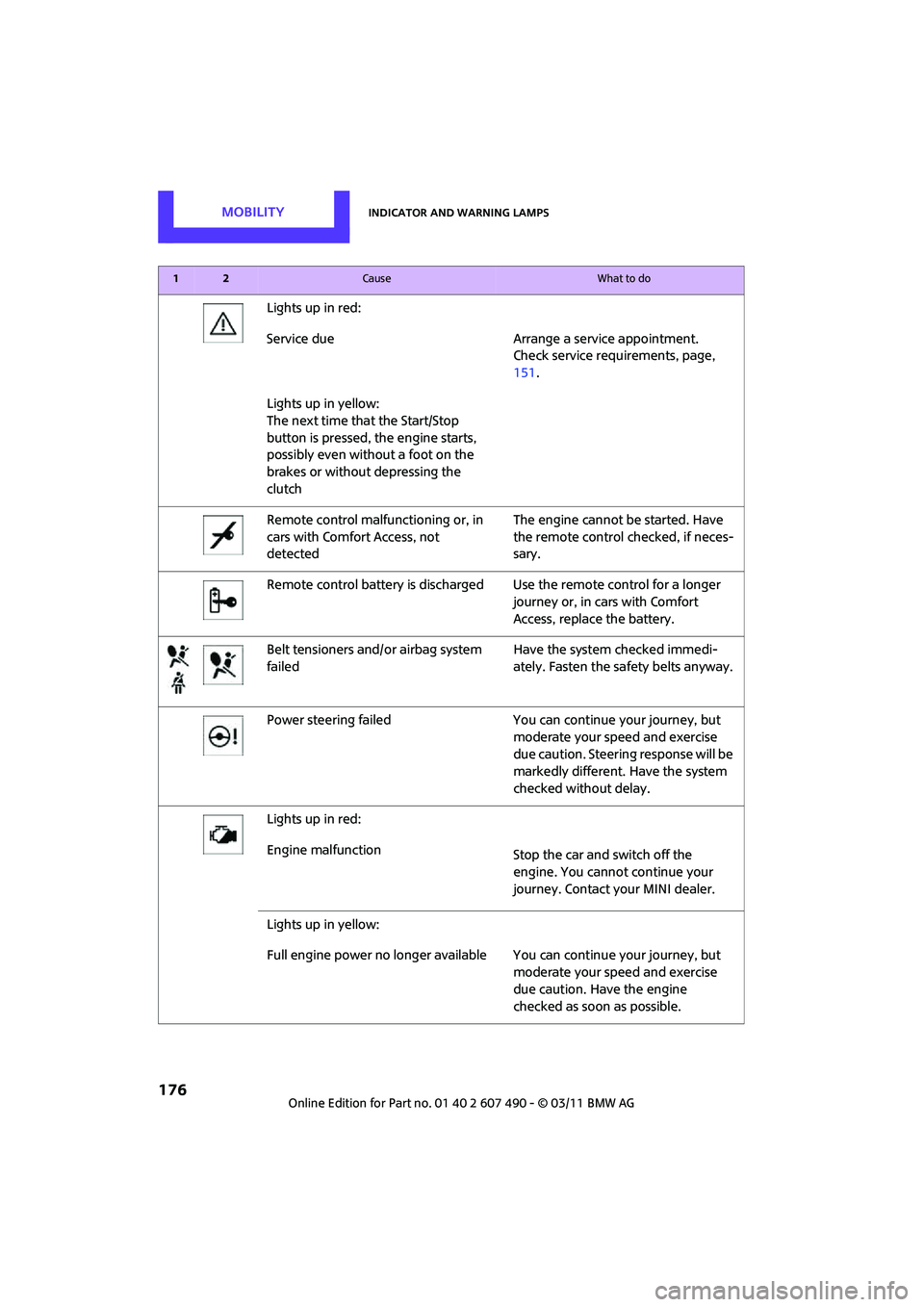
MOBILITYIndicator and warning lamps
176
Lights up in red:
Service due Arrange a service appointment.Check service requirements, page,
151.
Lights up in yellow:
The next time that the Start/Stop
button is pressed, the engine starts,
possibly even without a foot on the
brakes or without depressing the
clutch
Remote control malfunctioning or, in
cars with Comfort Access, not
detected The engine cannot be started. Have
the remote control
checked, if neces-
sary.
Remote control battery is discharged Use the remote control for a longer journey or, in cars with Comfort
Access, replace the battery.
Belt tensioners and/ or airbag system
failed Have the system checked immedi-
ately. Fasten the safety belts anyway.
Power steering failed You can continue your journey, but moderate your speed and exercise
due caution. Steering response will be
markedly different. Have the system
checked without delay.
Lights up in red:
Engine malfunction Stop the car and switch off the
engine. You cannot continue your
journey. Contact your MINI dealer.
Lights up in yellow:
Full engine power no longer available Y ou can continue your journey, but
moderate your speed and exercise
due caution. Have the engine
checked as soon as possible.
12Cause What to do
Page 197 of 210

Everything from A to ZREFERENCE
195
Base plate for telephone or mobile phone
– refer to Snap-in adapter 129
Battery 167
– charging 168
– disposal 30,168
– jump-starting 169
– temporary power failure 168
Battery renewal
– remote control 30
Being towed 171
Bell
– volume 106
Belts, refer to Safety belts 40
Belt tensioner, refer to Safety belts 40
Beverage holders, refer to Cupholders 93
Black ice, refer to External
temperature warning 57
Blower, refer to Air flow rate 85,87
Bluetooth, activating/ deactivating 120
Bottle holders, refer to
Cupholders 93
Brake Assist 67
Brake fluid, refer to Service
requirements 62
Brake lamps
– replacing bulbs 162
Brake pads, breaking in 96
Brake rotors 98
– brakes 96
– breaking in 96
Brakes
– ABS 67
– breaking in 96
– MINI Maintenance
System 151
– parking brake 48
– service requirements 62
Brakes, refer to Braking safely 97 Brake system
96
– breaking in 96
– disc brakes 98
– MINI Maintenance
System 151
Breakdown service, refer to Roadside Assistance 169
Breaking in the clutch 96
Break-in period 96
Bulb changing, refer to Lamps
and bulbs 158
Button for starting the engine 46
Buttons on the steering wheel 11
C
California Proposition 65
warning 5
Call
– accepting 124
– ending 124
– rejecting 124
Calling, refer to Phone
numbers, dialing 124
Can holders, refer to Cupholders 93
Capacities 193
Car battery, refer to Vehicle
battery 167
Car care 153
Care 153
– car-care products 153
– car washes 153
– CD/DVD drives 156
– external 153
– high-pressure washers 154
– internal 155
– leather 155
– manual washing 154
– upholstery and fabrics 155
– windows 154
– wiper blades 154
Cargo, securing 101 Cargo area
98
– capacity 191
– Comfort Access 29
– cover 98
– lamp 82
– opening from outside 26
Cargo area, expanding 98
Cargo area lamp 82
Cargo area lid, refer to Liftgate 26
Cargo loading 100
– securing cargo 101
– stowing cargo 101
– vehicle 98
Car key, refer to Keys/remote controls 20
Carpets, care 156
Car phone
– installation location, refer to
Center armrest 92
– refer to separate Owner's Manual
Car phone, refer to Telephone 118
Car wash, care 153
Car washes 153
Catalytic converter, refer to Hot exhaust system 96
CD player 111
– changing the track 112
– fast forward/reverse 112
– playing a track 112
– ran
dom order 112
– starting 111
– volume 106
Center armrest 92
Center brake lamp 163
Center console, refer to Around the center
console 14
Central locking system 21
– Comfort Access 28
– from inside 25
– from outside 21
Changing bulbs 158
Changing wheels 165