2011 MERCEDES-BENZ SLS AMG wipers
[x] Cancel search: wipersPage 20 of 436
voice control for ............................ 215
ZAGAT ®
Rating Service ..................131
Possible lane, defined ....................... 135
Power assistance .............................. 349
Power outlets .................................... 308
Power seats see Seats
Power washer .................................... 355
Power windows ................................. 255
Cleaning ......................................... 358
Operation ....................................... 255
Synchronizing ................................ 256
Practical hints ................................... 362
Predictive speller ................................ 86
destination memory list .................122
for points of interest (POIs) ...128, 130
house number list ..........................119
street junction list .......................... 120
street list ....................................... 118
zip code list ................................... 117
Preparation phase (driving
maneuvers) ........................................ 133
Problems While driving .................................. 260
With vehicle ..................................... 29
With wipers .................................... 255
Product information ............................ 26
Production options weight ............... 346
Program mode selector dial Automatic shift program ........267, 269
Province of destination,
selecting .................................... 114, 213
Proximity key see Key, SmartKey
PSI (air pressure unit) ....................... 346
R
RACE START ....................................... 292
RACETIMER ........................................ 288
Radio
satellite radio ................................. 169
via station
search
169 , 170 , 171 , 172 , 221 , 222 , 228 , 279
Searching a channel ......................172
via station
search
169 , 170 , 171 , 172 , 221 , 222 , 228 , 279
Selecting a channel from channel
list .................................................. 172 via station
search
169 , 170 , 171 , 172 , 221 , 222 , 228 , 279
selecting stations .......................... 222
via station
search
169 , 170 , 171 , 172 , 221 , 222 , 228 , 279
Selecting stations ..........................279
via station
search
169 , 170 , 171 , 172 , 221 , 222 , 228 , 279
Storing stations ............................. 171
via station
search
169 , 170 , 171 , 172 , 221 , 222 , 228 , 279
switching to ................................... 169
via station
search
169 , 170 , 171 , 172 , 221 , 222 , 228 , 279
Switching wavebands ....................170
via station
search
169 , 170 , 171 , 172 , 221 , 222 , 228 , 279
Tuning to a station .........................171
via station
search
169 , 170 , 171 , 172 , 221 , 222 , 228 , 279
voice control with ..................221, 228
via station
search
169 , 170 , 171 , 172 , 221 , 222 , 228 , 279
Radio transmitters ............................ 351
Rain sensor see Intermittent wiping
Random track playback .................... 18918IndexBA 197 USA, CA Edition A 2011; 1; 27, en-UShereepeVersion: 3.0.3.52010-03-24T15:31:10+01:00 - Seite 18
Page 27 of 436
Volume (loudness)COMAND ......................................... 89
external audio sources ..........197, 206
mobile phones ............................... 151
muting COMAND ............................. 89
navigation announcements ......89, 137
phone calls ...................................... 89
voice command ............................. 208
W
Warning sounds Driver’s or passenger’s seat belt .....55
Electronic parking brake ................372
Parktronic system ..........................296
Seat belt telltale ............................ 391
Warranty coverage ............................ 420
Washer and headlamp cleaning
system ................................................ 429
Washer fluid Messages in the multifunction
display ........................................... 380
Mixing ratio .................................... 429
Refilling .......................................... 325
Washing the vehicle .......................... 354
Wear pattern (tires) .......................... 340
Weights (vehicle) see Vehicle specification
Wheel
Changing ....................................... 405
Removing ....................................... 407
Tightening torque ........................... 409
Wheels, sizes ..................................... 422
Wheels, Tires and .............................. 326
Windows see Power windows
Windows, cleaning ............................ 358
Windshield Cleaning wiper blades .................... 358
Defogging ...................................... 303
Washer fluid ................................... 429
Wipers ........................................... 253
Windshield wipers
Replacing wiper blades ..................400
Winter driving
Instructions .................................... 348
Snow chains .................................. 347
Tires ............................................... 347
Winter tires ....................... 347, 422, 424
Wipers Notes ............................................. 253
Problems with ................................ 255
Windshield wipers ..........................253
Z
ZAGAT ®
Rating Service ..................... 131
Zip code of destination, selecting .... 117
Index25BA 197 USA, CA Edition A 2011; 1; 27, en-UShereepeVersion: 3.0.3.52010-03-24T15:31:10+01:00 - Seite 25
Page 34 of 436
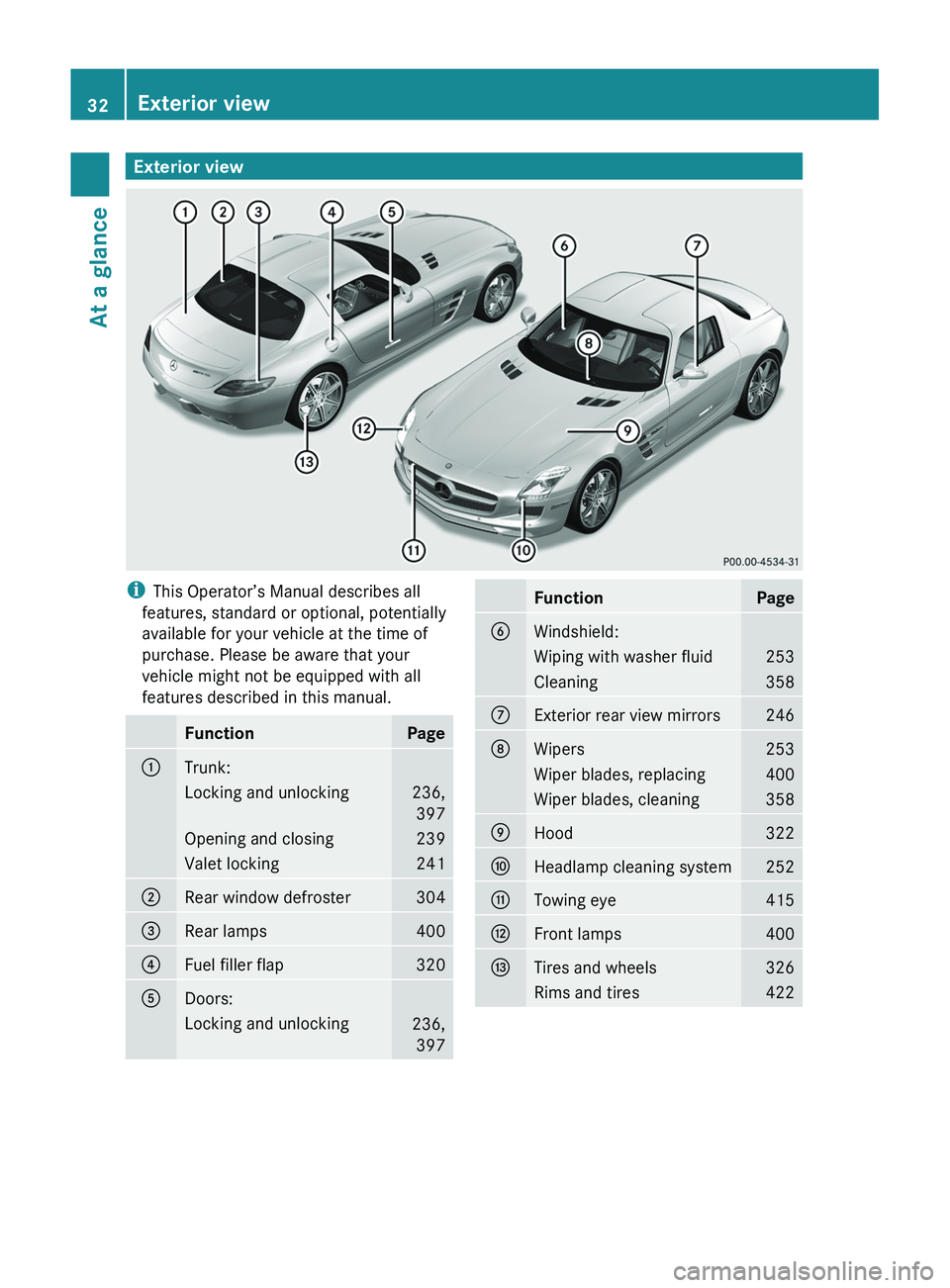
Exterior viewiThis Operator’s Manual describes all
features, standard or optional, potentially
available for your vehicle at the time of
purchase. Please be aware that your
vehicle might not be equipped with all
features described in this manual.FunctionPage0046Trunk:Locking and unlocking236, 397Opening and closing239Valet locking2410047Rear window defroster304008ARear lamps4000088Fuel filler flap3200086Doors:Locking and unlocking236,397FunctionPage0087Windshield:Wiping with washer fluid253Cleaning358006EExterior rear view mirrors246006FWipers253Wiper blades, replacing400Wiper blades, cleaning3580070Hood3220071Headlamp cleaning system2520072Towing eye4150073Front lamps4000074Tires and wheels326Rims and tires42232Exterior viewAt a glance
BA 197 USA, CA Edition A 2011; 1; 27, en-UShereepeVersion: 3.0.3.52010-03-24T15:31:10+01:00 - Seite 32
Page 35 of 436
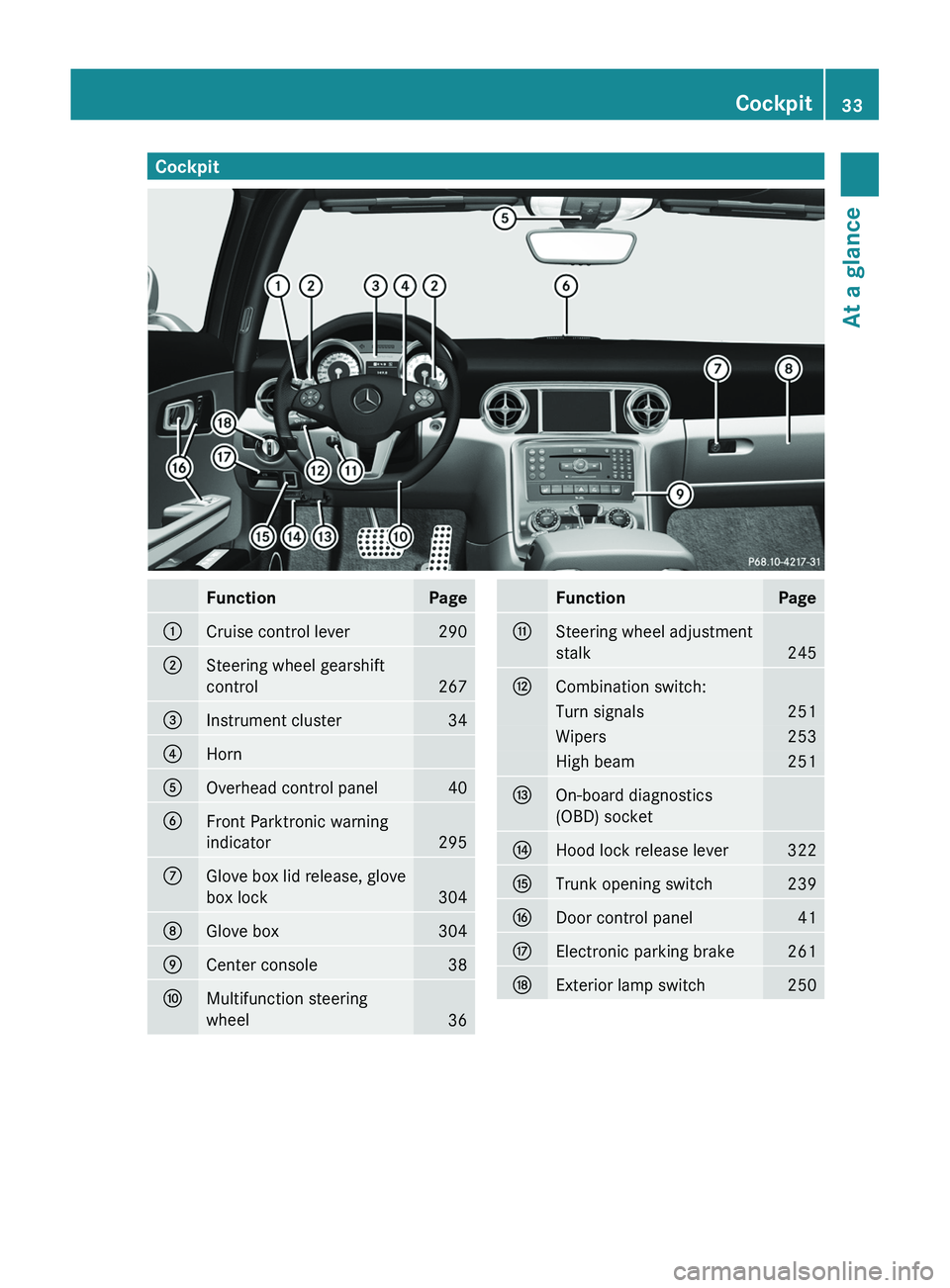
CockpitFunctionPage0046Cruise control lever2900047Steering wheel gearshift
control
267
008AInstrument cluster340088Horn0086Overhead control panel400087Front Parktronic warning
indicator
295
006EGlove box lid release, glove
box lock
304
006FGlove box3040070Center console380071Multifunction steering
wheel
36
FunctionPage0072Steering wheel adjustment
stalk
245
0073Combination switch:Turn signals251Wipers253High beam2510074On-board diagnostics
(OBD) socket0075Hood lock release lever3220076Trunk opening switch2390077Door control panel410078Electronic parking brake2610079Exterior lamp switch250Cockpit33At a glanceBA 197 USA, CA Edition A 2011; 1; 27, en-UShereepeVersion: 3.0.3.52010-03-24T15:31:10+01:00 - Seite 33
Page 237 of 436
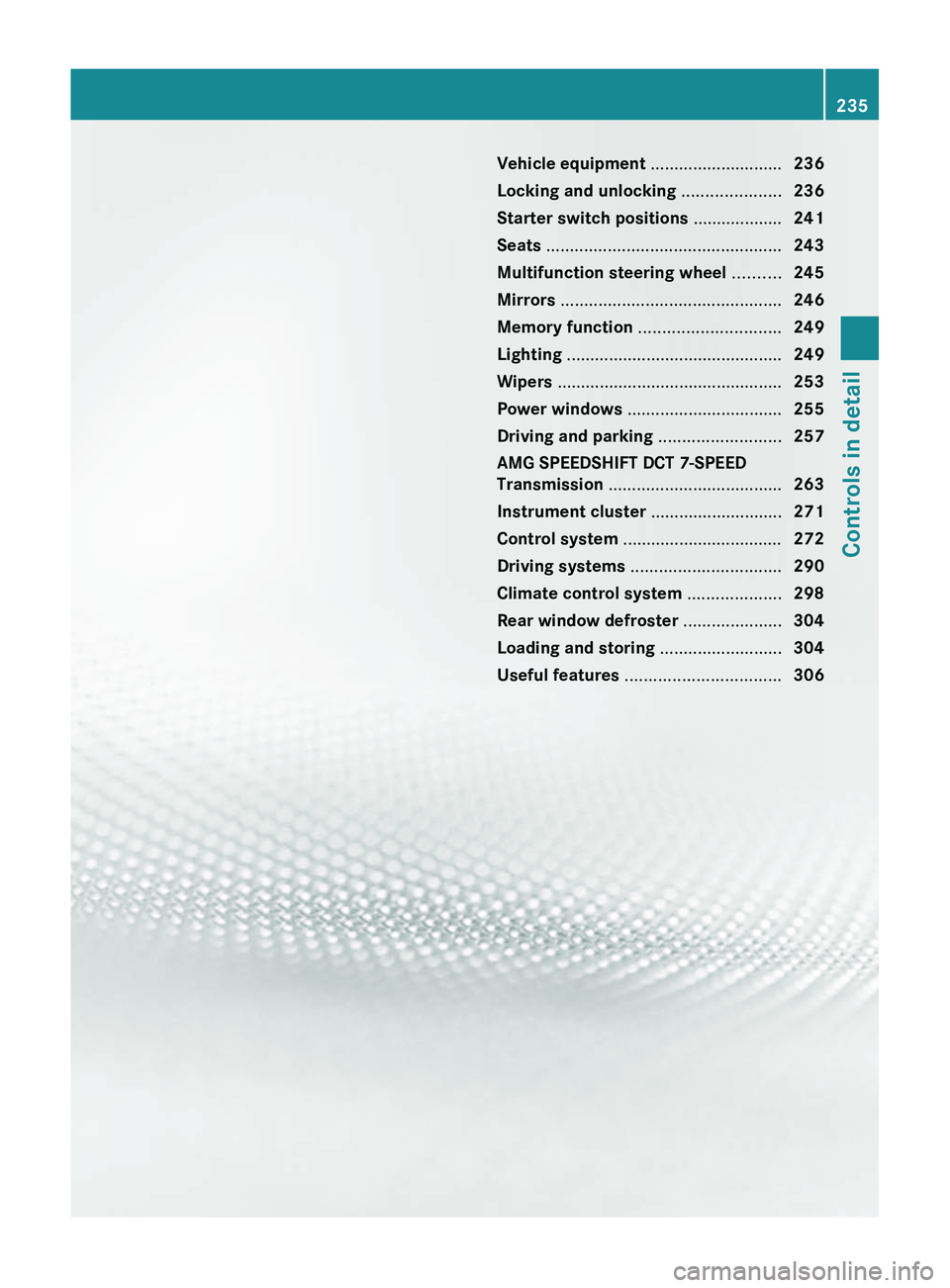
Vehicle equipment ............................236
Locking and unlocking .....................236
Starter switch positions ...................241
Seats .................................................. 243
Multifunction steering wheel ..........245
Mirrors ............................................... 246
Memory function .............................. 249
Lighting .............................................. 249
Wipers ................................................ 253
Power windows ................................. 255
Driving and parking ..........................257
AMG SPEEDSHIFT DCT 7-SPEED
Transmission ..................................... 263
Instrument cluster ............................271
Control system .................................. 272
Driving systems ................................ 290
Climate control system ....................298
Rear window defroster .....................304
Loading and storing ..........................304
Useful features ................................. 306235Controls in detailBA 197 USA, CA Edition A 2011; 1; 27, en-UShereepeVersion: 3.0.3.52010-03-24T15:31:10+01:00 - Seite 235
Page 244 of 436
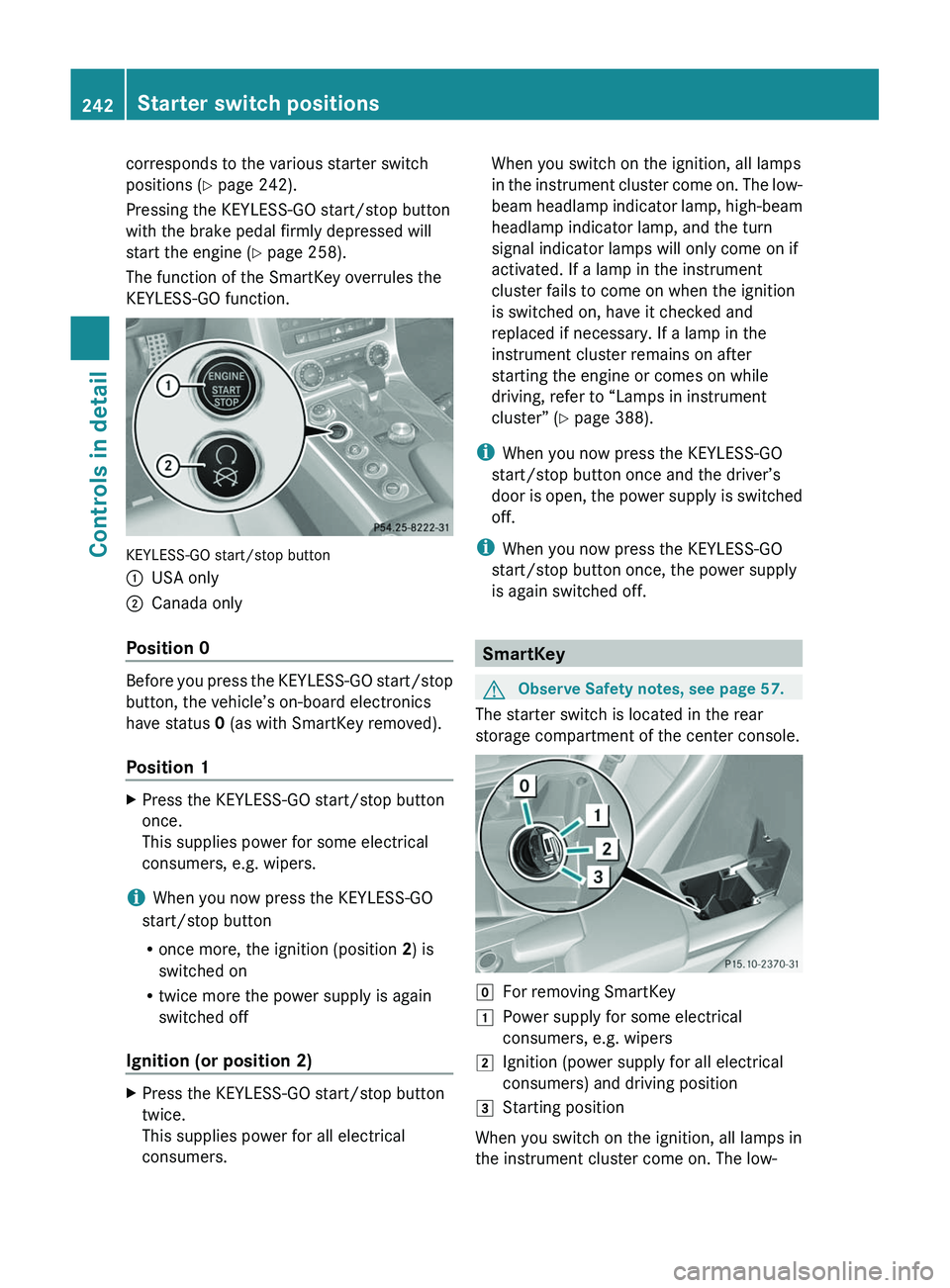
corresponds to the various starter switch
positions (Y page 242).
Pressing the KEYLESS-GO start/stop button
with the brake pedal firmly depressed will
start the engine (Y page 258).
The function of the SmartKey overrules the
KEYLESS-GO function.
KEYLESS-GO start/stop button
\000FUSA only\000GCanada only
Position 0
Before you press the KEYLESS-GO start/stop
button, the vehicle’s on-board electronics
have status 0 (as with SmartKey removed).
Position 1
XPress the KEYLESS-GO start/stop button
once.
This supplies power for some electrical
consumers, e.g. wipers.
iWhen you now press the KEYLESS-GO
start/stop button
Ronce more, the ignition (position 2) is
switched on
Rtwice more the power supply is again
switched off
Ignition (or position 2)
XPress the KEYLESS-GO start/stop button
twice.
This supplies power for all electrical
consumers.
When you switch on the ignition, all lamps
in the instrument cluster come on. The low-
beam headlamp indicator lamp, high-beam
headlamp indicator lamp, and the turn
signal indicator lamps will only come on if
activated. If a lamp in the instrument
cluster fails to come on when the ignition
is switched on, have it checked and
replaced if necessary. If a lamp in the
instrument cluster remains on after
starting the engine or comes on while
driving, refer to “Lamps in instrument
cluster” (Y page 388).
iWhen you now press the KEYLESS-GO
start/stop button once and the driver’s
door is open, the power supply is switched
off.
iWhen you now press the KEYLESS-GO
start/stop button once, the power supply
is again switched off.
SmartKey
GObserve Safety notes, see page 57.
The starter switch is located in the rear
storage compartment of the center console.
\000]For removing SmartKey\000JPower supply for some electrical
consumers, e.g. wipers
\000KIgnition (power supply for all electrical
consumers) and driving position
\000LStarting position
When you switch on the ignition, all lamps in
the instrument cluster come on. The low-
242Starter switch positionsControls in detail
BA 197 USA, CA Edition A 2011; 1; 27, en-UShereepeVersion: 3.0.3.52010-03-24T15:31:10+01:00 - Seite 242
Page 256 of 436
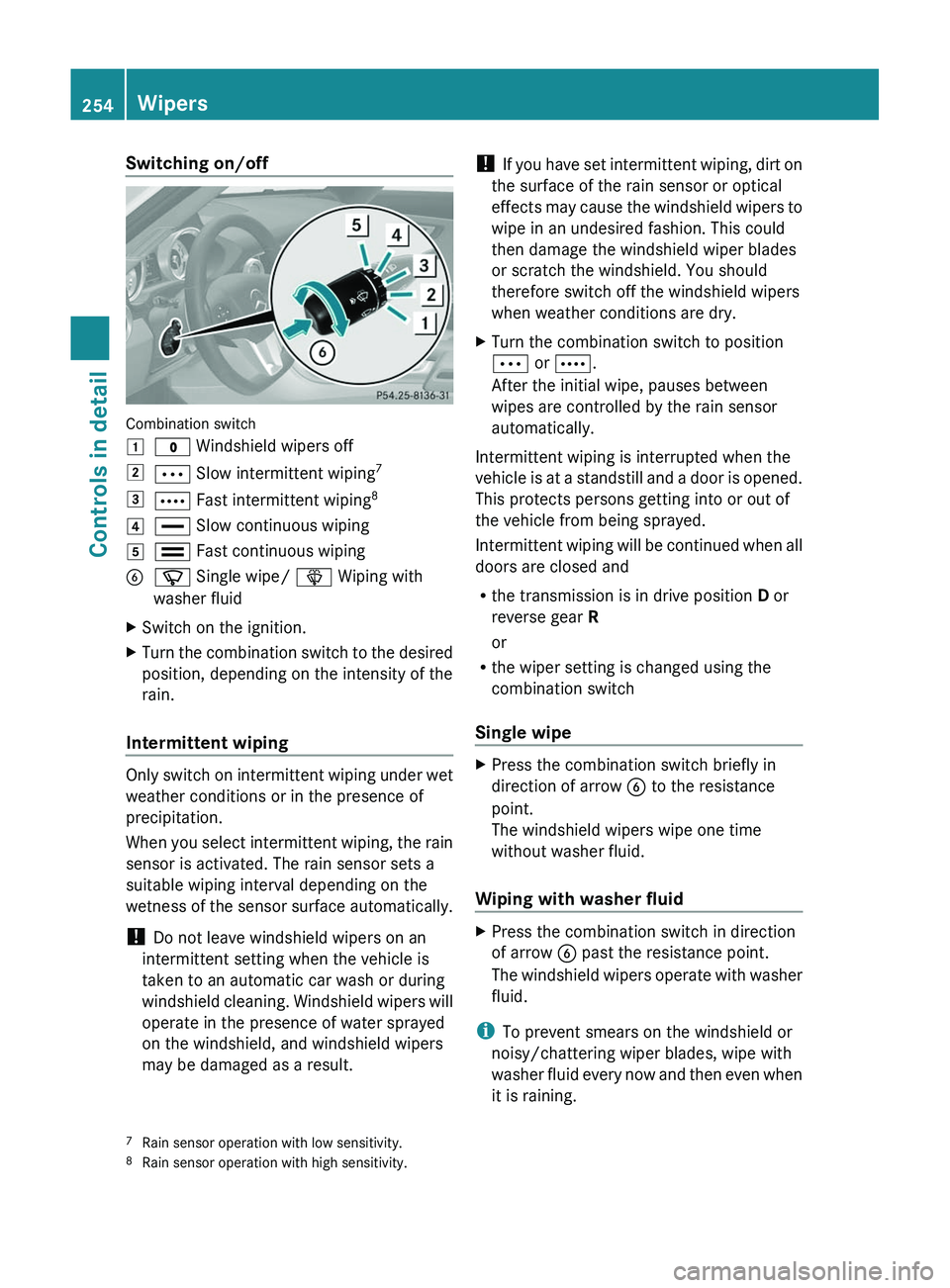
Switching on/off
Combination switch
\000J\000' Windshield wipers off\000K\000b Slow intermittent wiping7\000L\000c Fast intermittent wiping8\000M\000
Page 257 of 436
For information on filling up the washer
reservoir, see “Washer system and headlamp
cleaning system” ( Y page 325).
For information on cleaning the headlamps
with washer fluid, see “Headlamp cleaning
system” ( Y page 252).
Problems with wipers
! If anything blocks the windshield wipers
(leaves, snow, etc.), switch them off
immediately.
For safety reasons, do the following before
attempting to remove any blockage:
R Stop the vehicle in a safe location.
R Turn off the engine by pressing the
KEYLESS-GO start/stop button and
open the driver’s door (with the driver’s
door open, starter switch is in position
0 , same as with SmartKey removed from
starter switch).
or
R Remove the SmartKey from the starter
switch.
R Engage the electronic parking brake.
R Remove blockage.
R Turn the windshield wipers on again.
If the windshield wipers fail to function at
all with the combination switch in position
0062 or 0063 ,
R set the combination switch to the next
higher wiper speed
R have the windshield wipers checked at
the nearest authorized Mercedes-Benz
Center
Power windows
Opening and closing
The door windows are opened and closed
electrically. The switches for all windows are
located on the driver’s door. The switch for
operating the passenger-side windows is
located on the passenger door.GObserve Safety notes, see page 57.GWarning!
When opening or closing the door windows,
make sure there is no danger of anyone being
harmed by the opening/closing procedure.
The door windows are equipped with the
express operation and automatic reversal
function. If in express operation mode a door
window encounters an obstruction that
blocks its path, the automatic reversal
function will stop the door window and open
it slightly.
The door windows operate differently when
the switch is pulled and held. See the “Closing
when a door window is blocked” section in
this chapter for details.
The closing of the door windows can be
immediately halted by releasing the switch or,
if the switch was pulled past the resistance
point and released, by either pressing or
pulling the respective switch.
If a door window encounters an obstruction
that blocks its path in a circumstance where
you are closing the door windows by pressing
and holding button 0037 on the SmartKey the
automatic reversal function will not operate.
i You can also open or close the door
windows using the SmartKey, see
“Summer opening feature” ( Y page 256)
and “Convenience closing feature”
( Y page 257).
i After switching off the ignition or
removing the SmartKey from the starter
switch, you can operate the door windows
until you open a door. If no door was
opened you can operate the door windows
for up to 5 minutes.
Power windows255Controls in detailBA 197 USA, CA Edition A 2011; 1; 27, en-UShereepeVersion: 3.0.3.52010-03-24T15:31:10+01:00 - Seite 255Z