2011 MERCEDES-BENZ SLS AMG park assist
[x] Cancel search: park assistPage 11 of 436
DifficultiesWhile driving .................................. 260
With starting .................................. 258
Dimensions (vehicle)
see Vehicle specification
Direction of rotation (tires) .............. 337
Disc handling ..................... 100, 180, 199
Display, main ....................................... 73
automatic DVD picture switch-off ..199
menus ........................................ 81, 85
with voice command ......................209
Display, map
see Map display
Display design
setting ............................................. 93
Displays
Maintenance service indicator .......352
Messages in the multifunction
display ........................................... 364
Multifunction display .....................273
Symbol messages ..........................370
Text messages ............................... 365
Trip computer ................................ 275
Vehicle status message memory ...282
Vehicle system settings .................282
Distance to destination, displaying . 110
District, selecting as destination ..... 119
with voice commands ....................214
Door control panel .............................. 41
Door handles ........................................ 41
Doors Locking/unlocking (SmartKey) ......236
Messages in the multifunction
display ........................................... 379
Opening/closing ............................ 238
Remote door lock (mbrace) ...........313
Remote door lock (Tele Aid,
Canada only) .................................. 313
Unlocking (Mechanical key) ...........398
DOT (Department of
Transportation) .................................. 345
Downloading address book
content ............................................... 166
Drinking and driving ......................... 349
Driving Abroad ........................................... 351
Hydroplaning ................................. 351Instructions ........................... 258, 348
In winter ........................................ 348
Problems ....................................... 260
RACE START .................................. 292
Safety systems ................................ 61
Systems ......................................... 290
Through standing water .................351
Driving and parking
Safety notes .................................. 257
Driving maneuvers ............................ 133
Driving off .................................. 259, 351
Driving safety systems ....................... 61
ABS .................................................. 61
Adaptive Brake ................................ 65
BAS .................................................. 62
EBP .................................................. 65
ESC .................................................. 62
ETS .................................................. 63
Trunk Wing ....................................... 65
Driving systems
Cruise control ................................ 290
Hill-start assist system ..................293
Parktronic system ..........................294
RACE START .................................. 292
Rear view camera .......................... 296
Driving tips, AMG SPEEDSHIFT DCT
7-SPEED Transmission ...................... 266
DRM (Digital Rights Management) ... 193
DTMF tone transmission .................. 160
DVD Audio, main vehicle .................. 177
ejecting discs ................................. 182
fast forward and reverse ................187
handling and care of discs .....100, 180
loading discs .................................. 180
Notes about ................................... 178
pause function ............................... 186
selecting a track ............................ 187
setting audio format ......................189
starting playback ........................... 184
stopping or pausing playback ........186
voice control with ..................224, 230
DVD changer
loading ........................................... 101
DVD menu operation ......................... 203
DVD playback conditions ................. 199
DVD Video .......................................... 198
automatic picture switch off ..........199
control menu, displaying/hiding ....201Index9BA 197 USA, CA Edition A 2011; 1; 27, en-UShereepeVersion: 3.0.3.52010-03-24T15:31:10+01:00 - Seite 9
Page 12 of 436
DVD menu ..................................... 203
fast forward/rewind ......................202
functional restrictions ....................200
handling and care of discs .............199
interactive content ........................205
menu system ................................. 202
notes on ........................................ 199
operating DVD menu .....................203
picture settings .............................. 203
safety notes ................................... 198
selecting film/track .......................203
stop function ................................. 202
submenu overview .........................201
switching to ................................... 201
voice control with ..................225, 230
Dynamic routing ........................ 107, 143
E
Easy-entry/exit feature ............ 245, 286
EBP (Electronic Brake
Proportioning) ...................................... 65
Ejecting discs and memory cards main audio system ......................... 182
Electrical system
Improper work on or
modifications ................................... 28
Power outlets ................................. 308
Electrical system (Technical data)
see Vehicle specification
Electronic parking brake .................. 261
Electronic Stability Control see ESC
Emergency, in case of
Exiting the vehicle ............................ 57
First aid kit ..................................... 362
Flat tire .......................................... 402
Hazard warning flasher ..................252
Roadside Assistance ................ 27, 311
Towing the vehicle .........................415
Emergency calls
mbrace .......................................... 309
Tele Aid (Canada only) ...................309
Emergency operations
Remote door lock (mbrace) ...........313
Remote door lock (Tele Aid,
Canada only) .................................. 313
Trunk lid, emergency release .........240
Emergency phone calls ..................... 152
Emergency Tensioning Device see ETD
Emission control ............................... 352
Information label ............................ 421
System warranties ...........................26
Ending active phone calls ................. 160
Ending calls .......................................... 84
Engine Break-in recommendations ............320
Cleaning ......................................... 356
Compartment ................................ 322
Malfunction indicator lamp ............394
Messages in the multifunction
display ........................................... 381
Number .......................................... 421
Starting .......................................... 258
Turning off ..................................... 262
Engine (Technical data)
see Vehicle specification
Engine coolant
see Coolant
Engine oil
Adding ........................................... 323
Additives ........................................ 426
Checking level ............................... 323
Consumption ................................. 323
Messages in the multifunction
display ........................................... 383
Oil dipstick ..................................... 323
Recommended engine oils and oil
filter ............................................... 426
Warning lamp ................................. 394
Engine oil temperature gauge .......... 271
ESC (Electronic Stability Control) ...... 62
ETS .................................................. 63
Messages in the multifunction
display ........................... 371, 372, 377
Warning lamp ................................. 393
ETD (Emergency Tensioning
Device) ................................................. 55
Safety guidelines ............................. 46
ETS (Electronic Traction System) ....... 63
Express operation Power windows .............................. 255
Exterior lamp switch ......................... 25010IndexBA 197 USA, CA Edition A 2011; 1; 27, en-UShereepeVersion: 3.0.3.52010-03-24T15:31:10+01:00 - Seite 10
Page 64 of 436
functions as a reminder to take extra care
while driving.
Emergency brake maneuverXKeep continuous full pressure on the brake
pedal.GWarning!
If the ABS malfunctions, other driving safety
systems such as the BAS or the ESC are also
switched off. Observe indicator and warning
lamps that may come on as well as messages
in the multifunction display that may appear.
If the ABS malfunctions, the wheels may lock
during hard braking, reducing steering
capability and extending the braking distance.
BAS
GObserve Safety notes, see page 61.
The Brake Assist System (BAS) operates in
emergency situations. If you apply the brakes
very quickly, the BAS provides full brake
boost automatically, thereby potentially
reducing the braking distance.
XApply continuous full braking pressure until
the emergency braking situation is over.
The ABS will prevent the wheels from
locking.
When you release the brake pedal, the brakes
function again as normal. The BAS is then
deactivated.
GWarning!
If the BAS malfunctions, the brake system still
functions, but without the additional brake
boost available that the BAS would normally
provide in an emergency braking maneuver.
Therefore, the braking distance may increase.
ESC
GObserve Safety notes, see page 61.
The Electronic Stability Control (ESC) is
operational as soon as the engine is running.
It monitors the vehicle’s traction (force of
adhesive friction between the tires and the
road surface) and handling.
The ESC recognizes that the vehicle deviates
from the direction of travel as intended by the
driver. By applying brakes to individual
wheels and by limiting the engine output, the
ESC works to stabilize the vehicle. The ESC is
especially useful while driving off and on wet
or slippery road surfaces. The ESC also
stabilizes the vehicle during braking and
steering maneuvers.
The ESC warning lamp 00F2 in the instrument
cluster comes on when you switch on the
ignition. It goes out when the engine is
running.GWarning!
Never switch off the ESC when you see the
ESC warning lamp 00F2 flashing in the
instrument cluster. In this case proceed as
follows:
R When driving off, apply as little throttle as
possible.
R While driving, ease up on the accelerator
pedal.
R Adapt your speed and driving style to the
prevailing road conditions.
Failure to observe these guidelines could
cause the vehicle to skid. The ESC cannot
prevent accidents resulting from excessive
speed.
! Because the ESC operates automatically,
the engine and ignition must be shut off
(KEYLESS-GO start/stop button in position
0 or 1, or SmartKey in starter switch
position 0 or 1) when the electronic parking
brake is being tested on a brake test
dynamometer or when the vehicle is being
towed with the rear axle raised.
Active braking action through the ESC may
otherwise seriously damage the brake
system which is not covered by the
Mercedes-Benz Limited Warranty.
62Driving safety systemsSafety and security
BA 197 USA, CA Edition A 2011; 1; 27, en-UShereepeVersion: 3.0.3.52010-03-24T15:31:10+01:00 - Seite 62
Page 214 of 436
NavigationGWarning!
For safety reasons, you should only select a
destination when the vehicle is stationary.
While the navigation system provides
directional assistance, the driver must remain
focused on safe driving behavior, especially
pay attention to traffic and street signs, and
should utilize the system’s audio cues while
driving.
The navigation system does not supply any
information on stop signs, yield signs, traffic
regulations or traffic safety rules. Their
observance always remains in the driver’s
personal responsibility. DVD maps do not
cover all areas nor all routes within an area.
Traffic regulations always have priority over
any route recommendations given. Bear in
mind that at a speed of just 30 mph
(approximately 50 km/h), your vehicle is
covering a distance of 44 feet (approximately
14 m) every second.
During route guidance, you will not receive
information on:
R traffic lights
R stop and yield signs
R parking or stopping zones
R one-way streets
R narrow bridges
R other traffic regulation data
You should therefore always strictly observe
traffic regulations while driving. Drive
carefully and always obey traffic laws and
road signs, even if they contradict navigation
system instructions.
GWarning!
Please do not use the Voice Control System
in an emergency, as the tone of your voice
may change in a stressful situation. This could
cause a delay in completing your phone call
in a timely manner. This could distract you in
an emergency situation and cause you to be
involved in an accident.
Operation
You can use voice control to:
R enter a state
R enter a province
R enter a city
R enter a district (center)
R enter a street
R enter an intersection
R enter a house number
R enter an entire address
R enter a zip code
R find address
R enter a point of interest
R select one of your previous destinations
R call up route information
R store a destination
R display the map
R enlarge/reduce the size of the map
R listen to the destination memory
R start and stop route guidance
R switch the guidance instructions on and off
XTo select the navigation application press
the 0062 button on the multifunction
steering wheel.XGive the “Navigation” command.XPress the 0062 button.XGive one of the navigation commands
explained below.
Commands
You cannot start the route guidance until all
the necessary address data has been
entered.
“Help Navigation”/“Help”
Using the “Help navigation” command, you
can have all the essential commands for the
navigation system read out.
212Voice ControlCOMAND APS
BA 197 USA, CA Edition A 2011; 1; 27, en-UShereepeVersion: 3.0.3.52010-03-24T15:31:10+01:00 - Seite 212
Page 259 of 436
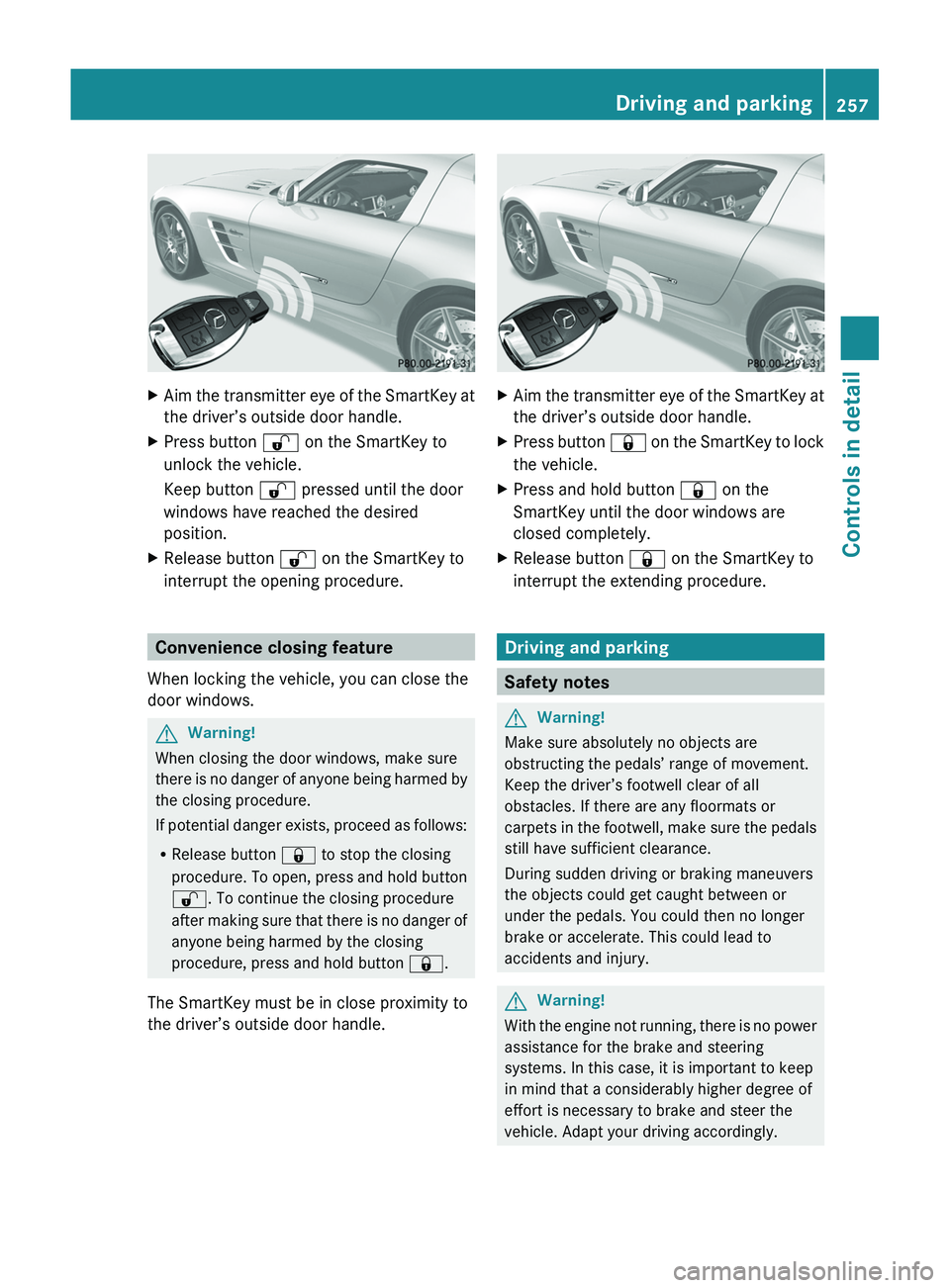
XAim the transmitter eye of the SmartKey at
the driver’s outside door handle.XPress button 0036 on the SmartKey to
unlock the vehicle.
Keep button 0036 pressed until the door
windows have reached the desired
position.XRelease button 0036 on the SmartKey to
interrupt the opening procedure.
Convenience closing feature
When locking the vehicle, you can close the
door windows.
GWarning!
When closing the door windows, make sure
there is no danger of anyone being harmed by
the closing procedure.
If potential danger exists, proceed as follows:
R Release button 0037 to stop the closing
procedure. To open, press and hold button
0036 . To continue the closing procedure
after making sure that there is no danger of
anyone being harmed by the closing
procedure, press and hold button 0037.
The SmartKey must be in close proximity to
the driver’s outside door handle.
XAim the transmitter eye of the SmartKey at
the driver’s outside door handle.XPress button 0037 on the SmartKey to lock
the vehicle.XPress and hold button 0037 on the
SmartKey until the door windows are
closed completely.XRelease button 0037 on the SmartKey to
interrupt the extending procedure.
Driving and parking
Safety notes
GWarning!
Make sure absolutely no objects are
obstructing the pedals’ range of movement.
Keep the driver’s footwell clear of all
obstacles. If there are any floormats or
carpets in the footwell, make sure the pedals
still have sufficient clearance.
During sudden driving or braking maneuvers
the objects could get caught between or
under the pedals. You could then no longer
brake or accelerate. This could lead to
accidents and injury.
GWarning!
With the engine not running, there is no power
assistance for the brake and steering
systems. In this case, it is important to keep
in mind that a considerably higher degree of
effort is necessary to brake and steer the
vehicle. Adapt your driving accordingly.
Driving and parking257Controls in detailBA 197 USA, CA Edition A 2011; 1; 27, en-UShereepeVersion: 3.0.3.52010-03-24T15:31:10+01:00 - Seite 257Z
Page 261 of 436
The engine does not start. You can hear
the starter.
There could be a malfunction in the engine
electronics or in the fuel supply system.
Carry out the following steps:XIf you are starting the engine with the
SmartKey: Turn the SmartKey in the starter
switch to position 0 and repeat the starting
procedure.XIf you are starting the engine with KEYLESS-
GO: Close any doors that may be open to
allow for better detection of the SmartKey.
or
XStart the engine with the SmartKey as radio
signals from another source may be
interfering with the KEYLESS-GO function.XRepeat the starting procedure.
If the engine does not start after several
starting attempts:
XContact an authorized Mercedes-Benz
Center or call Roadside Assistance.
The engine does not start. You cannot
hear the starter.
The battery may not be charged sufficiently.
XGet a jump start ( Y page 413).
If the engine will not start despite a jump
start:
XContact an authorized Mercedes-Benz
Center or call Roadside Assistance.
The starter has been exposed to excessive
temperatures.
XLet the starter cool for about 2 minutes.XRepeat the starting procedure.
If the engine does not start after several
starting attempts:
XContact an authorized Mercedes-Benz
Center or call Roadside Assistance.Driving offGWarning!
On slippery road surfaces, never downshift in
order to obtain braking action. This could
result in drive wheel slip and reduced vehicle
control. Your vehicle’s ABS will not prevent
this type of loss of control.
! Do not run a cold engine at high engine
speeds. Running a cold engine at high
engine speeds may shorten the service life
of the engine. This is not covered by the
Mercedes-Benz Limited Warranty.
Drive off immediately after starting the
engine to warm up the engine efficiently.
The engine must be at operating
temperature before using full engine
power. The engine has reached operating
temperature once the engine oil
temperature indicator in the AMG menu of
the control system has stopped flashing.
At engine temperatures below 32‡ (0†),
the engine’s maximum speed is restricted
in order to protect it from damage. Avoid
driving your vehicle at full speed when the
engine is cold to prevent premature engine
wear and/or diminished comfort.
! You have forgotten to release the
electronic parking brake when driving off if
R an acoustic warning sounds
R the message Release Parking Brake
appears in the multifunction display
R the red indicator lamp for the electronic
parking brake 0049 (USA only) or 0024
(Canada only) in the instrument cluster
flashes
Release the electronic parking brake.
! Avoid spinning of a drive wheel. This may
cause serious damage to the drivetrain
which is not covered by the Mercedes-Benz
Limited Warranty.
! Simultaneously depressing the
accelerator pedal and applying the brakes
reduces engine performance and causes
Driving and parking259Controls in detailBA 197 USA, CA Edition A 2011; 1; 27, en-UShereepeVersion: 3.0.3.52010-03-24T15:31:10+01:00 - Seite 259Z
Page 263 of 436
If the extent of the damage cannot be
determined:
XContact an authorized Mercedes-Benz
Center or call Roadside Assistance.
If no damage on major assemblies, fuel
system, and engine mount can be
determined:
XStart the engine in the usual manner.
Parking
GWarning!
Do not park in areas where the hot exhaust
system could come into contact with
combustible materials. Combustible
materials such as grass, hay or leaves could
be ignited and cause a vehicle fire.
Unintended vehicle movement could cause
serious personal injury or damage to the
vehicle or the vehicle drivetrain. To reduce
such risks, always do the following before
turning off the engine and leaving the vehicle:
RKeep right foot on the brake pedal.
REngage the electronic parking brake.
RShift the transmission into park position P.
RSlowly release the brake pedal.
RWhen parked on an incline, always turn the
front wheels towards the road curb.
RPress the KEYLESS-GO start/stop button,
or turn the SmartKey in the starter switch
to position 0 and remove the SmartKey
from the starter switch.
RTake the SmartKey with you and lock the
vehicle when leaving.
Electronic parking brake
GWarning!
When leaving the vehicle, always remove the
SmartKey from the starter switch, take it with
you, and lock the vehicle. Do not leave
children unattended in the vehicle, or with
access to an unlocked vehicle. Children could
release the electronic parking brake and/or
shift the transmission out of park position P,
either of which could result in an accident
and/or serious personal injury.
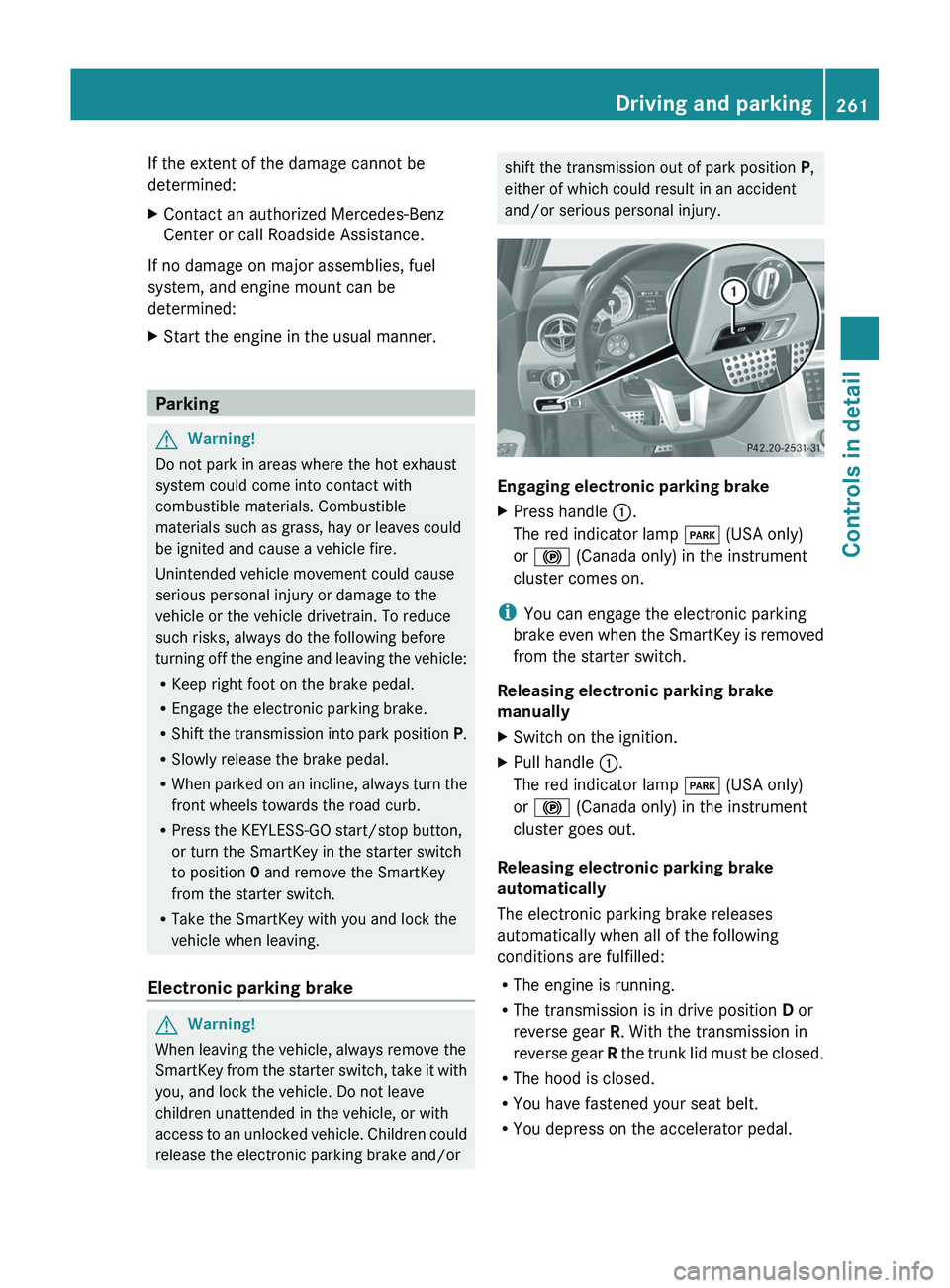
Engaging electronic parking brake
XPress handle \000F.
The red indicator lamp \000I (USA only)
or \000$ (Canada only) in the instrument
cluster comes on.
iYou can engage the electronic parking
brake even when the SmartKey is removed
from the starter switch.
Releasing electronic parking brake
manually
XSwitch on the ignition.XPull handle \000F.
The red indicator lamp \000I (USA only)
or \000$ (Canada only) in the instrument
cluster goes out.
Releasing electronic parking brake
automatically
The electronic parking brake releases
automatically when all of the following
conditions are fulfilled:
RThe engine is running.
RThe transmission is in drive position D or
reverse gear R. With the transmission in
reverse gear R the trunk lid must be closed.
RThe hood is closed.
RYou have fastened your seat belt.
RYou depress on the accelerator pedal.
Driving and parking261Controls in detailBA 197 USA, CA Edition A 2011; 1; 27, en-UShereepeVersion: 3.0.3.52010-03-24T15:31:10+01:00 - Seite 261Z
Page 264 of 436
iIf you have not fastened your seat belt,
the following conditions must be met in
order for the electronic parking brake to
release automatically:
R The driver’s door is closed and you shift
the transmission out of park position P.
or
R The driver’s door is closed and you drive
faster than 2 mph (3 km/h).
Emergency braking with electronic
parking brake
In an emergency situation, you can also brake
your vehicle by using the electronic parking
brake.XWhile driving, press handle 0046.
All four wheels of the vehicle will be braked
for as long as you press and hold the handle
for the electronic parking brake. The longer
you keep the handle pressed, the stronger
your vehicle will be braked.
During the braking procedure
R an acoustic warning sounds
R the message Release Parking Brake
appears in the multifunction display
R the red indicator lamp for the electronic
parking brake 0049 (USA only) or 0024
(Canada only) in the instrument cluster
flashes
Once the vehicle comes to a complete stop,
the electronic parking brake will engage
automatically.
Turning off the engine
GWarning!
Do not turn off the engine before the vehicle
has come to a complete stop. With the engine
not running, there is no power assistance for
the brake and steering systems. In this case,
it is important to keep in mind that a
considerably higher degree of effort is
necessary to brake and steer the vehicle.
XShift the transmission into park position P .With KEYLESS-GOXPress the KEYLESS-GO start/stop button.
With the driver’s door closed, the starter
switch is now in position 1. With the driver’s
door opened, the starter switch is set to
position 0, same as the SmartKey removed
from the starter switch ( Y page 242).
Read and observe messages that may appear
in the multifunction display ( Y page 367).
i The transmission will shift into neutral
position N automatically when you turn off
the engine with the transmission in reverse
gear R or drive position D.
The transmission will remain in neutral
position N for approximately 30 minutes
when you have shifted the transmission to
neutral position N before turning off the
engine.
The transmission will shift into park
position P automatically when you open a
door during this period.
i In an emergency you can turn off the
engine while driving by pressing and
holding the KEYLESS-GO start/stop button
for approximately 3 seconds.
With SmartKey
! Do not remove the SmartKey from the
starter switch while driving. When driving
at low speed, the transmission will
otherwise shift into park position P
automatically. The transmission could be
damaged as a result.
XTurn the SmartKey in the starter switch to
position 0.XRemove the SmartKey from the starter
switch.
Read and observe messages that may appear
in the multifunction display ( Y page 367).
i The transmission will shift into neutral
position N automatically when you turn off
the engine with the transmission in reverse
gear R or drive position D.
262Driving and parkingControls in detail
BA 197 USA, CA Edition A 2011; 1; 27, en-UShereepeVersion: 3.0.3.52010-03-24T15:31:10+01:00 - Seite 262