2011 MERCEDES-BENZ SL CLASS clock
[x] Cancel search: clockPage 8 of 316

Clock ..................................................... 28
Cockpit ................................................. 28
Cold tire inflation pressure .............. 205
Collapsible tire (spare wheel) .......... 303
COMAND system see separate COMAND system
operating instructions
Combination switch ............................ 92
Control system .................................. 113
Multifunction display .....................114
Multifunction steering wheel .........113
Resetting to factory settings ..........121
Control system menus ...................... 115
AMG ............................................... 116
Audio/DVD .................................... 119
Distronic ........................................ 120
Navigation ..................................... 120
Settings ......................................... 121
Standard display ............................ 116
Telephone ...................................... 129
Trip computer ................................ 128
Vehicle status message memory ...120
Control system submenus
Convenience .................................. 127
Instrument cluster .........................122
Lighting .......................................... 124
Vehicle ........................................... 126
Convenience submenu
Easy-entry/exit feature .................. 127
Fold-in function for exterior rear
view mirrors ................................... 127
Coolant
Anticorrosion/antifreeze ...............308
Capacities ...................................... 304
Checking level ............................... 184
Messages in the multifunction
display ........................................... 244
Temperature gauge ........................ 112
Warning lamp ................................. 263
Corner-illuminating lamps .................. 93
Replacing bulbs ............................. 272
Cruise control .................................... 130
Activating ....................................... 131
Canceling ....................................... 132
Changing the set speed .................132
Last stored speed ..........................132
Lever .............................................. 131Messages in the multifunction
display ........................................... 232
Resume function ............................ 132
Setting current speed ....................131
Cup holders ........................................ 164
Curb weight ....................................... 205
Customer Assistance Center (CAC) ... 22
Customer Relations Department ....... 22
D
Dashboard see Instrument cluster
Data recording ..................................... 22
Daytime running lamp mode .............. 90
Switching on or off ......................... 124
Deep water
see Standing water
Defogging (windshield) ..................... 153
Defroster
Front (Climate control system) ......153
Rear window .................................. 155
Delayed shut-off
Exterior lamps ................................ 125
Interior lighting .............................. 126
Department of Transportation
see DOT
Difficulties
While driving .................................. 101
With starting .................................... 99
Digital clock
see Clock
Digital speedometer ......................... 116
Dimensions (vehicle) see Vehicle specification
Direction of rotation (tires) .............. 197
Displays
Digital speedometer ......................116
Distronic ........................................ 135
Maintenance service indicator .......214
Messages in the multifunction
display ........................................... 226
Multifunction display .....................114
Outside temperature ...................... 116
Symbol messages ..........................237
Text messages ............................... 227
Trip computer ................................ 128
6Index230_AKB; 6; 22, en-USd2ureepe,Version: 2.11.8.12009-07-28T18:49:58+02:00 - Seite 6
Page 79 of 316

XMake sure you have the SmartKey with
KEYLESS-GO with you.
XPress KEYLESS-GO locking/closing
switch \000F briefly.
With all doors closed:
RThe locking knobs in the doors move
down.
RThe trunk lid starts to close
automatically.
RAll turn signal lamps flash three times
once the trunk has closed completely.
RAn acoustic signal sounds three times
once the trunk has closed completely.
RThe anti-theft alarm system is armed.
Trunk lid emergency release
The trunk lid can be opened from inside the
trunk with the emergency release button.
XBriefly press emergency release
button \000F.
The trunk lid unlocks and opens slightly.
XPush up the trunk lid to fully open.
The emergency release button unlocks the
trunk while the vehicle is standing still or in
motion.
Illumination of the emergency release button:
RThe button flashes for 30 minutes after
opening the trunk.
RThe button flashes for 60 minutes after
closing the trunk.
The emergency release button does not
unlock the trunk, if the vehicle battery is
discharged or disconnected.
Valet locking
You can lock the trunk separately with the
mechanical key. This denies unauthorized
access to the trunk, e.g. when you valet park
the vehicle.
XLeave only the SmartKey less its
mechanical key with the vehicle.
XValet locking: Close the trunk.XRemove the mechanical key from the
SmartKey (Y page 267).
XInsert the mechanical key in the trunk lid
lock.
XTurn the mechanical key clockwise to
position \000K and remove the mechanical
key in that position to lock the trunk.
The trunk remains locked even when the
vehicle is centrally unlocked.
You can then only open the trunk with the
mechanical key.
XCanceling: Insert the mechanical key in
the trunk lid lock.
XTurn the mechanical key counterclockwise
to neutral position \000J and remove the
mechanical key in that position to unlock
the trunk.
You can now open the trunk.
Locking and unlocking77Controls in detail230_AKB; 6; 22, en-USd2ureepe,Version: 2.11.8.12009-07-28T18:49:58+02:00 - Seite 77Z
Page 114 of 316
As a result, you will not be able to see
information about your driving conditions,
such as
Rspeed
Routside temperature
Rwarning/indicator lamps
Rmalfunction/warning messages
Rfailure of any systems
Driving characteristics may be impaired.
If you must continue to drive, do so with added
caution. Contact an authorized Mercedes-
Benz Center as soon as possible.
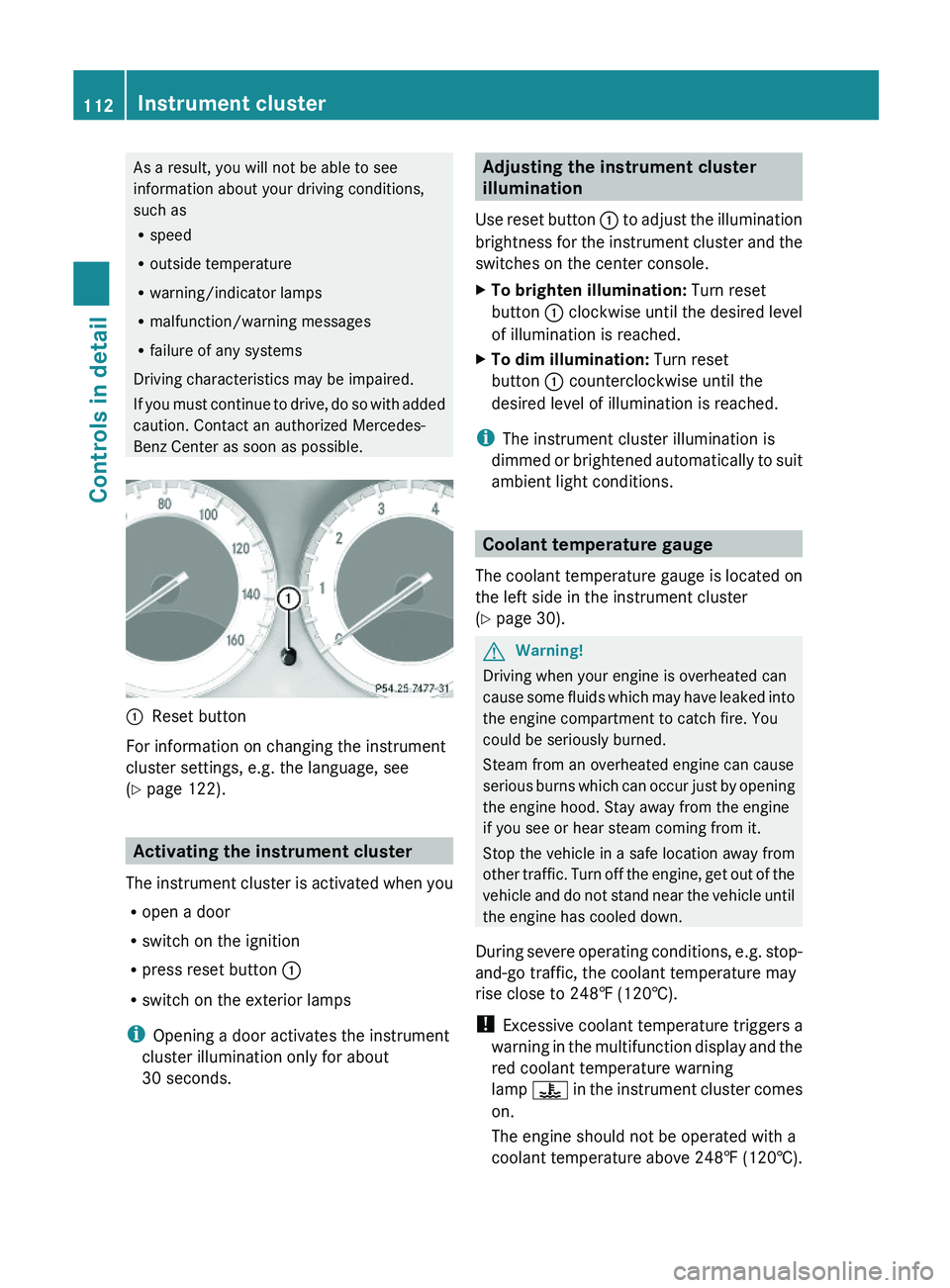
\000FReset button
For information on changing the instrument
cluster settings, e.g. the language, see
(Y page 122).
Activating the instrument cluster
The instrument cluster is activated when you
Ropen a door
Rswitch on the ignition
Rpress reset button \000F
Rswitch on the exterior lamps
iOpening a door activates the instrument
cluster illumination only for about
30 seconds.
Adjusting the instrument cluster
illumination
Use reset button \000F to adjust the illumination
brightness for the instrument cluster and the
switches on the center console.
XTo brighten illumination: Turn reset
button \000F clockwise until the desired level
of illumination is reached.
XTo dim illumination: Turn reset
button \000F counterclockwise until the
desired level of illumination is reached.
iThe instrument cluster illumination is
dimmed or brightened automatically to suit
ambient light conditions.
Coolant temperature gauge
The coolant temperature gauge is located on
the left side in the instrument cluster
(Y page 30).
GWarning!
Driving when your engine is overheated can
cause some fluids which may have leaked into
the engine compartment to catch fire. You
could be seriously burned.
Steam from an overheated engine can cause
serious burns which can occur just by opening
the engine hood. Stay away from the engine
if you see or hear steam coming from it.
Stop the vehicle in a safe location away from
other traffic. Turn off the engine, get out of the
vehicle and do not stand near the vehicle until
the engine has cooled down.
During severe operating conditions, e.g. stop-
and-go traffic, the coolant temperature may
rise close to 248‡ (120†).
! Excessive coolant temperature triggers a
warning in the multifunction display and the
red coolant temperature warning
lamp \000
Page 143 of 316

Example illustration (except SL 63 AMG)
SL 63 AMG:
The distance warning function on/off switch
is located on the right side of the center
console.
XActivating/deactivating: Press
switch \000F.
When the distance warning function is
activated, indicator lamp \000G in switch \000F
comes on. A loudspeaker symbol appears
in the right multifunction display
(Y page 136).
RACE START (SL 63 AMG)
RACE START enables optimum acceleration
from a standing start with suitable high-grip
road surface conditions.
GWarning!
RACE START is only available when the SPORT
handling mode is switched on. The SPORT
handling mode stabilizes the vehicle only to a
limited extent if the vehicle starts to skid or
when a wheel is spinning.
RACE START should be used only on closed
tracks. Always adapt your speed and driving
to the prevailing road and weather conditions.
Conditions for activation
RACE START can be activated when
Rthe doors are closed
Rthe engine is running and has reached its
operating temperature of approximately
80†. This is the case when the engine oil
temperature indicator in the multifunction
display stops flashing.
Rthe SPORT handling mode is switched on
(Y page 58)
Rthe multifunction steering wheel is in the
straight-ahead position
Rthe vehicle is standing still and the brake
pedal is depressed (left foot)
Rthe automatic transmission is in drive
position D
Activating RACE START
XDepress the brake pedal with your left foot
and keep it depressed.
XTurn the program mode selector dial
clockwise (Y page 107) until the RS lamp
on the dial comes on.
The message RACE START Cancel:
Paddle DOWN appears in the left
multifunction display and the message
RACE START Confirm: Paddle UP
appears in the right multifunction display.
iWhen the activation conditions are not
fulfilled anymore, RACE START is canceled.
The message RACE START appears in the
left multifunction display and the message
Canceled appears in the right
multifunction display.
XTo cancel: Pull left steering wheel gearshift
control (Y page 108).
or
XTo confirm: Pull right steering wheel
gearshift control (Y page 108).
The message RACE START appears in the
left multifunction display and the message
Available Depress Gas Pedal appears
in the right multifunction display.
iIf you do not depress the accelerator
pedal within 2 seconds, RACE START is
canceled. The message RACE START
appears in the left multifunction display
and the message Not Possible See
Driving systems141Controls in detail230_AKB; 6; 22, en-USd2ureepe,Version: 2.11.8.12009-07-28T18:49:58+02:00 - Seite 141Z
Page 152 of 316

XTurn temperature controls 006E or 0073
( Y page 148) clockwise or
counterclockwise.
The indicator lamp in button 0061 goes out.
or
XPress button 005A.
The indicator lamp in button 005A comes
on. The air volume and air distribution are
adjusted automatically.
or
XPress button 0066.
The indicator lamp in button 0061 goes out.
Air conditioning
The air conditioning is operational while the
engine is running and cools the interior air to
the temperature set by the operator. In
addition, the air conditioning dehumidifies
the interior air and helps prevent window
fogging.
GWarning!
If you deactivate the air conditioning, the
vehicle will not be cooled when weather
conditions are warm. The windows can fog up
more quickly. Window fogging may impair
visibility and endanger you and others.
i Condensated water may drip out from
underneath the vehicle. This is normal and
not an indication of a malfunction.
The air conditioning uses the refrigerant
R134a. This refrigerant is free of CFCs which
are harmful to the ozone layer.
Deactivating
It is possible to deactivate the air
conditioning. The interior air will then no
longer be cooled or dehumidified.
XPress button 0058.
The indicator lamp in the button goes out.
The cooling function switches off after a
short delay.Activating
Moist air can fog up the windows. You can
dehumidify the interior air with the air
conditioning.
XPress button 0058.
The indicator lamp in the button comes on.
Automatic mode
Air distribution and air volume can be
adjusted automatically by the climate control
system. You can also adjust the settings for
air distribution and air volume manually.
When operating the climate control system in
automatic mode, the interior air temperature,
air volume and air distribution are adjusted
automatically.
In automatic mode, cooling with
dehumidification is switched on. This function
can be switched off if necessary.
GWarning!
If you deactivate the air conditioning, the
vehicle will not be cooled when weather
conditions are warm. The windows can fog up
more quickly. Window fogging may impair
visibility and endanger you and others.
XSet the desired temperature
( Y page 151).XActivating: Press button 005A.
The indicator lamp in the button comes on.
The air volume and air distribution are
adjusted automatically.XDeactivating: Press button 005A.
The indicator lamp in the button goes out.
The blower will run at speed setting 3. The
air flows through the center and side air
vents.
or
XPress one button 0056.
The indicator lamp in button 005A goes out.
The climate control settings for the
respective side of the passenger
compartment is adjusted manually.150Climate control systemControls in detail
230_AKB; 6; 22, en-USd2ureepe,Version: 2.11.8.12009-07-28T18:49:58+02:00 - Seite 150
Page 155 of 316

Adjusting air distribution
The air distribution can be adjusted
separately on each side of the passenger
compartment with buttons 0056.
The symbols on the controls represent the
following functions:SymbolFunction0063Directs air through the
defroster air vents to the
windshield and door windows009EDirects air through the center
and side air vents009DDirects air to the footwells009CDirects air through the center,
side air vents and to the
footwells0088Directs air through the
defroster air vents to the
windshield, door windows and
footwellsXPress one button 0056 until the desired
setting for the respective side of the
passenger compartment appears in air
distribution display 0046 or 0086 (Y page 148).
Adjusting air volume
XDecreasing/increasing: Turn air volume
control 0071 (Y page 148) clockwise or
counterclockwise.
Front defroster
You can use this setting to defrost the
windshield, for example if it is iced up.
You can also defog the windshield and the
door windows.
i Keep this setting selected only until the
windshield or the door windows are clear
again.XActivating: Press button 0066.
The indicator lamp in the button comes on.
The climate control switches to the following
functions automatically:
R cooling on to dehumidify
R most efficient blower speed and heating
power, depending on outside temperature
R air flows onto the windshield and the door
windows
R the air recirculation mode is switched off
XDeactivating: Press button 0066 again.
The indicator lamp in the button goes out.
The previous settings are once again in
effect. The cooling remains switched on.
The air recirculation remains switched off.
or
XPress button 005A.
The indicator lamp in button 0066 goes out.
Air volume and air distribution are adjusted
automatically.
or
XTurn temperature controls 006E and 0073
( Y page 148) clockwise or
counterclockwise.
or
XTurn air volume control 0071 (Y page 148)
clockwise or counterclockwise.
Windshield fogged on the outside
XSwitch the windshield wipers on
( Y page 95).XPress one button 0056 until the setting
009E , 009C or 009D appears in air
distribution display 0046 or 0086 (Y page 148).
Maximum cooling MAX COOL
MAX COOL is only available in U.S. vehicles.
Climate control system153Controls in detail230_AKB; 6; 22, en-USd2ureepe,Version: 2.11.8.12009-07-28T18:49:58+02:00 - Seite 153Z
Page 186 of 316

! Excess oil must be siphoned or drained
off. It could cause damage to the engine
and emission control system not covered
by the Mercedes-Benz Limited Warranty.
XScrew filler cap \000F back on filler neck.
For more information on engine oil, see the
“Technical data” section (Y page 303) and
(Y page 305).
Transmission fluid level
The transmission fluid level does not need to
be checked. If you notice transmission fluid
loss or gearshifting malfunctions, have an
authorized Mercedes-Benz Center check the
transmission.
Active Body Control (ABC) fluid level
Regular fluid level check is not required. If you
notice fluid leaks or malfunction messages in
the multifunction display, have an authorized
Mercedes-Benz Center check the ABC
system.
Coolant level
The engine coolant is a mixture of water and
anticorrosion/antifreeze.
When checking the coolant level, the vehicle
must be parked on level ground, and the
coolant temperature must be below 158‡
(70†).
GWarning!
In order to avoid any potentially serious burns:
RUse extreme caution when opening the
hood if there are any signs of steam or
coolant leaking from the cooling system, or
if the coolant temperature gauge indicates
that the coolant is overheated.
RDo not remove the cap on the coolant
expansion tank if the coolant temperature
is above 158‡ (70†). Allow the engine to
cool down before removing the cap. The
coolant expansion tank contains hot fluid
and is under pressure.
RUsing a rag, slowly open the cap
approximately 1/2 turn counterclockwise
to relieve excess pressure. If opened
immediately, scalding hot fluid and steam
will be blown out under pressure.
RDo not spill antifreeze on hot engine parts.
Antifreeze contains ethylene glycol which
may burn if it comes into contact with hot
engine parts.
XUsing a rag, slowly open cap approximately1/2 turn counterclockwise to relieve excess
pressure.
XContinue turning the cap counterclockwise
and remove it.
The coolant level is correct if the level
Rfor cold coolant: is up to the upper mark
on the bracing rib of coolant expansion
tank \000F (translucent)
Rfor warm coolant: is approximately 0.6 in
(1.5 cm) higher
XAdd coolant as required.XScrew cap back on and tighten it.
! SL 600 and SL 65 AMG: Only open the cap
on the coolant expansion tank. Never open
the cap between the two charge-air
coolers. Otherwise, the engine could be
damaged.
184Engine compartmentOperation
230_AKB; 6; 22, en-USd2ureepe,Version: 2.11.8.12009-07-28T18:49:58+02:00 - Seite 184
Page 270 of 316

Unlocking the driver’s doorXInsert mechanical key \000G into the driver’s
door lock.
XTurn mechanical key \000G counterclockwise
to position \000J until the locking knob moves
up.
The driver’s door is unlocked.
XPull the door handle to open the driver’s
door.
XTurn mechanical key \000G back and remove
it from the driver’s door lock.
Unlocking the trunk
A minimum height clearance of 6.2 ft (1.89 m)
is required to open the trunk lid.
XInsert mechanical key \000