2011 MERCEDES-BENZ S-Class 109
[x] Cancel search: 109Page 11 of 524

Displays in the multifunction
display ........................................... 332
Driving tips .................................... 333
Setting the specified minimum
distance ......................................... 331
Warning lamp ................................. 419
Door
Automatic locking ............................ 83
Display message ............................ 410
Emergency locking ........................... 84
Emergency unlocking .......................84
Opening (from inside) ......................83
Power closing feature ......................84
Door control panel
Overview .......................................... 37
Doors
Important safety notes ....................82
Drinking and driving ......................... 319
Drinks holder see Cup holder
Drive program
Automatic ...................................... 311
Manual ........................................... 311
Driving abroad ................................... 323
Driving Assistance package ............. 352
Driving on flooded roads .................. 322
Driving safety system BAS PLUS (Brake Assist System
PLUS) ............................................... 68
Electronic Brake-force
Distribution ...................................... 71
ESP ®
(Electronic Stability
Program) .......................................... 69
ETS/4ETS (Electronic Traction
System) ........................................... 70
Important safety information ...........66
Driving safety systems
ABS (Anti-lock Braking System) .......67
ADAPTIVE BRAKE ............................. 71
Adaptive brake lamps ......................69
BAS (Brake Assist System) ..............67
Overview .......................................... 66
PRE-SAFE ®
Brake ............................. 71
Driving system
Driving Assistance package ...........352Driving systems
Active Blind Spot Assist .................356
Active Body Control .......................338
Active Driving Assistance
package ......................................... 355
Active Lane Keeping Assist ............359
AIRMATIC ...................................... 336
ATTENTION ASSIST ........................347
Blind Spot Assist ............................ 352
Cruise control ................................ 323
DISTRONIC PLUS ........................... 325
HOLD function ............................... 335
Lane Keeping Assist ......................354
Night View Assist Plus ...................348
Parking Guidance ........................... 342
PARKTRONIC ................................. 339
Rear view camera .......................... 346
Driving tips ........................................ 309
Braking .......................................... 322
DISTRONIC PLUS ........................... 333
Downhill gradients .........................320
Driving on flooded roads ................322
Wet road surface ........................... 321
Winter ............................................ 323
DTMF tones
Sending ......................................... 200
DVD
Copy protection ............................. 225
Data medium ................................. 225
Handling ........................................ 186
Inserting ........................................ 217
Selecting a track ............................ 221
DVD changer ...................................... 217
DVD menu .................................. 240, 253
DVD playback conditions ................. 237
DVD-Video Picture settings .............................. 236
DVD-Video Operation
Automatic picture shutoff ..............235
E
EASY-ENTRY feature ......................... 108
Activating (COMAND) ....................258
EASY-EXIT feature ............................. 108
Activating (COMAND) ....................258
Crash-responsive ........................... 109
Index9
Page 12 of 524

EBD (Electronic Brake force
Distribution) Display message ............................ 389
EBD (Electronic Brake-force
Distribution) Function/notes ................................ 71
ECO function ...................................... 257
ECO start/stop function Deactivating/activating .................303
General information .......................302
Electrical fuses
see Fuses
Electronic Brake-force Distribution
see EBD
Electronic Stability Program
see ESP ®
Electronic Traction System
see ETS/4ETS
Emergency call
see mbrace
Emergency release
Trunk ............................................... 88
Vehicle ............................................. 84
Emergency running mode
Automatic transmission .................313
Emergency spare wheel
Storage location ............................ 462
Emergency tensioning device
Function ........................................... 59
Safety guidelines ............................. 43
Emissions purification
Service and warranty information ....24
Engine
Irregular running ............................ 305
Starting problems ..........................305
Starting the engine with the key ....301
Starting with KEYLESS-GO .............301
Switching off .................................. 316
Warning lamp Check Engine ..........418
Engine electronics
Malfunction .................................... 305
Engine emergency stop .................... 477
Engine number .................................. 510
Engine oil Adding ........................................... 449
Checking the oil level ..................... 447
Display message ............................ 399Filling capacity ............................... 511
Lubricant additives ........................514
Notes about oil grades ................... 513
Temperature (on-board computer) . 371
Viscosity ........................................ 514
Entering characters
In the address and the phone
book .............................................. 130
Using the number pad ...................128
Entry
Deleting ......................................... 129
Saving ............................................ 131
ESP ®
(Electronic Stability
Program) Activating/deactivating ...................70
Activating/deactivating (on-
board computer) ............................ 375
Display message ............................ 381
ETS/4ETS ........................................ 70
Important safety information ...........69
Warning lamp ................................. 416
ETS/4ETS (Electronic Traction
System) ................................................ 70
Example: entering an address .......... 151
Example display Audio CD mode .............................. 219
Example of operation ........................ 126
Exhaust check ................................... 320
Exhaust tail pipe (cleaning
instructions) ...................................... 457
Exterior lighting see Exterior lighting
Exterior mirror parking position
Adjusting (COMAND) .....................258
Exterior mirrors
Adjusting ....................................... 109
Dipping (automatic) .......................110
Folding in/out (automatically) .......110
Folding in/out (electrically) ...........110
Out of position ............................... 110
Storing settings (memory
function) ........................................ 111
Storing the parking position ..........111
Exterior view ........................................ 30
External authorization ...................... 147
Eyeglasses compartment ................. 42310Index
Page 32 of 524

Exterior viewFunctionPage:Trunk lid85Vehicle tool kit462;Lights278=Rear window defroster293?Fuel filler flap313AExterior mirrors109BSliding sunroof93CDefrosting the windshield292Cleaning the windows455FunctionPageDWindshield wipers281EOpens the hood446Engine oil447Coolant450FTowing473GTires and wheels480Flat tire46330Exterior viewAt a glance
Page 39 of 524

Door control panel
Front
FunctionPage:Opens the door83;&% Locks/unlocks
the vehicle from the inside
83
=Adjusts the seat electrically102?r 45=
Memory function
111
w Adjusts the front-
passenger seat from the
driver’s seat
103
Ac Seat heating106s Seat ventilation107B7Zª\
Adjusts and folds the
exterior mirrors in/out
electrically
109
FunctionPageCW Opens/closes the
side windows
89
t Opens/closes the
roller sunblinds in the rear
side windows
90
Do Unlocks the trunk lid86p Vehicles with trunk lid
remote closing feature:
opens/closes the trunk lid
86
En Override feature for
the controls in the rear
compartment
65
Door control panel37At a glance
Page 101 of 524
Vehicle equipment ............................100
Correct driver's seat position ..........100
Seats .................................................. 101
Steering wheel .................................. 107
Mirrors ............................................... 109
Memory functions .............................11199Seats, steering wheel and mirrors
Page 102 of 524
Vehicle equipment
i This manual describes all the standard
and optional equipment of your vehicle
which was available at the time of
purchase. Country-specific differences are
possible. Bear in mind that your vehicle
may not feature all functions described
here. This also refers to safety-related
systems and functions.
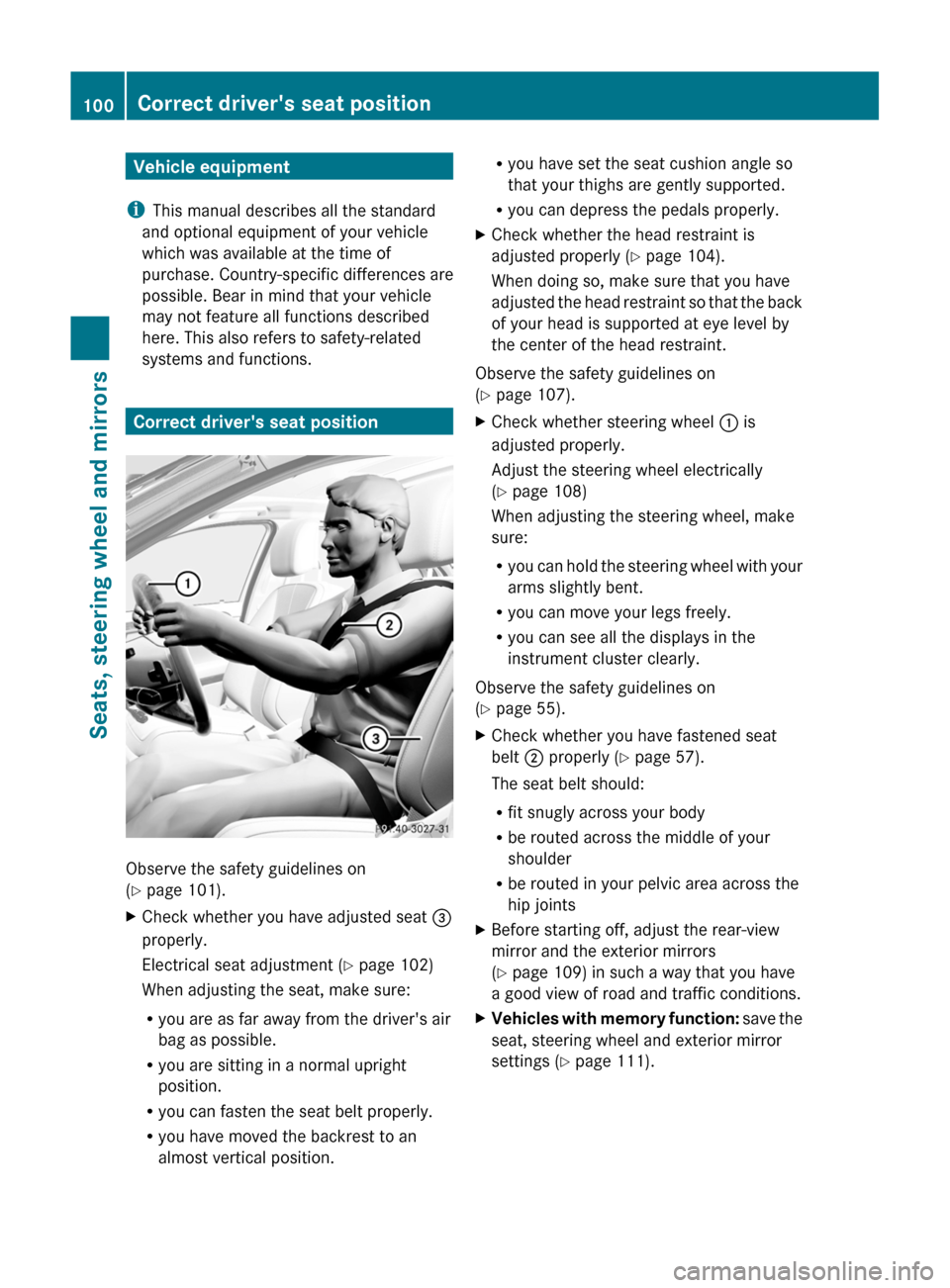
Correct driver's seat position
Observe the safety guidelines on
( Y page 101).
XCheck whether you have adjusted seat =
properly.
Electrical seat adjustment ( Y page 102)
When adjusting the seat, make sure:
R you are as far away from the driver's air
bag as possible.
R you are sitting in a normal upright
position.
R you can fasten the seat belt properly.
R you have moved the backrest to an
almost vertical position.R you have set the seat cushion angle so
that your thighs are gently supported.
R you can depress the pedals properly.XCheck whether the head restraint is
adjusted properly ( Y page 104).
When doing so, make sure that you have
adjusted the head restraint so that the back
of your head is supported at eye level by
the center of the head restraint.
Observe the safety guidelines on
( Y page 107).
XCheck whether steering wheel : is
adjusted properly.
Adjust the steering wheel electrically
( Y page 108)
When adjusting the steering wheel, make
sure:
R you can hold the steering wheel with your
arms slightly bent.
R you can move your legs freely.
R you can see all the displays in the
instrument cluster clearly.
Observe the safety guidelines on
( Y page 55).
XCheck whether you have fastened seat
belt ; properly ( Y page 57).
The seat belt should:
R fit snugly across your body
R be routed across the middle of your
shoulder
R be routed in your pelvic area across the
hip jointsXBefore starting off, adjust the rear-view
mirror and the exterior mirrors
( Y page 109) in such a way that you have
a good view of road and traffic conditions.XVehicles with memory function: save the
seat, steering wheel and exterior mirror
settings ( Y page 111).100Correct driver's seat positionSeats, steering wheel and mirrors
Page 111 of 524
To stop steering wheel and seat movement,
do one of the following:
R move the seat adjustment switch.
R move the steering column adjustment
switch.
R press one of the memory function position
buttons or memory button M.
Do not leave children unattended in the
vehicle, or with access to an unlocked vehicle.
Children could open the driver's door and
unintentionally activate the EASY-ENTRY/
EXIT feature. This could result in an accident
and/or serious personal injury.GWarning
Let the system complete the adjustment
procedure before setting the vehicle in
motion. All steering wheel adjustment must
be completed before setting the vehicle in
motion. Driving off with the steering wheel
still adjusting could cause the driver to lose
control of the vehicle.
! Do not activate the EASY-ENTRY/EXIT
feature, if the seat backrest is reclined too
far backwards. This can damage the front
or rear seats. You must first move the
backrest to a vertical position.
Position of the steering wheel and the
driver's seat when the EASY-ENTRY/
EXIT feature is active
The steering wheel tilts upwards and the
driver's seat moves backwards when you:
R remove the SmartKey from the ignition lock
R open the driver's door when the SmartKey
is in the ignition lock or KEYLESS-GO is in
position 1
i The steering wheel only moves upwards if
it has not already reached the upper end
stop. The driver's seat only moves
backwards if it is not already in the
rearmost position.
Position of the steering wheel and the
driver's seat for driving
If you insert the SmartKey into the ignition
lock with the driver's door closed, depending
on the setting, the position of the steering
wheel and the driver's seat will be changed to
the previously set position.
The last position of the steering wheel or seat
is stored when:
R the ignition is switched off or
R the setting is stored with the memory
function.
Crash-responsive EASY-EXIT feature
If the crash-responsive EASY-EXIT feature is
triggered in an accident, the steering column
will move upwards when the driver's door is
opened. This occurs irrespective of the
position of the SmartKey in the ignition lock.
This makes it easier to exit the vehicle and
rescue the occupants.
The crash-responsive EASY-EXIT feature is
only operational if the EASY-EXIT/ENTRY
feature is activated in the on-board computer.
Mirrors
Exterior mirrors
Adjusting the exterior mirrors
GWarning
Exercise care when using the passenger-side
exterior rear view mirror. The mirror surface
is convex (outwardly curved surface for a
wider field of view). Objects in mirror are
closer than they appear. Check your interior
rear view mirror and glance over your
shoulder before changing lanes.
The exterior mirrors are automatically heated
if the rear window heating is switched on and
the outside temperature is low.
Mirrors109Seats, steering wheel and mirrorsZ
Page 112 of 524

XMake sure that the SmartKey is in position
1 or 2 in the ignition lock.XPress button ; for the right-hand exterior
mirror or button = for the left-hand
exterior mirror.
The indicator lamp lights up in the button
that has been pressed.XPress adjustment button : up, down, to
the right or to the left until the exterior
mirror is set in a way which provides you
with a good overview of traffic conditions.
Folding the exterior mirrors in or out
electrically
XMake sure that the SmartKey is in position
1 or 2 in the ignition lock.XBriefly press button :.
Both exterior mirrors fold in or out.
i Make sure that the exterior mirrors are
always folded out fully while the vehicle is
in motion, as they may otherwise vibrate.
Folding the exterior mirrors in or out
automatically
When the "Automatic mirror folding" function
is activated in COMAND ( Y page 258):
R the exterior mirrors fold in automatically as
soon as you lock the vehicle from the
outside.
R the exterior mirrors fold out again
automatically as soon as you unlock the
vehicle and then open the driver's or front-
passenger door.
i The mirrors do not fold out if they have
been folded in manually.
Exterior mirror out of position
If an exterior mirror has been pushed out of
position, proceed as follows:
XPress the mirror-folding button
( Y page 110) repeatedly until you hear the
mirrors engage in position.
The mirror housing is engaged again and
you can adjust the exterior mirrors as usual
( Y page 109).
Automatic anti-glare mirrors
GWarning!
The auto dimming function does not react if
incoming light is not aimed directly at sensors
in the interior rear view mirror.
The interior rear view mirror and the exterior
rear view mirror on the driver's side do not
react, for example, if the rear window
sunshade is in raised position.
Light hitting the mirror(s) at certain angles
(incident light) could blind you. As a result,
you may not be able to observe traffic
conditions and could cause an accident.
The rear-view mirror and the exterior mirror
on the driver's side automatically go into anti-
glare mode if the ignition is switched on and
incident light from headlamps strikes the
sensor in the rear-view mirror.
110MirrorsSeats, steering wheel and mirrors