2011 MERCEDES-BENZ S-Class Time
[x] Cancel search: TimePage 375 of 524

Resetting the current lapXPress the W button on the steering
wheel to stop the RACETIMER.
XPress X to reset the lap time to "0”.
Deleting all laps
You cannot delete individual stored laps.
XPress the W button on the steering
wheel to stop the RACETIMER.
XPress and hold the X button for a
minimum of three seconds.
XPress the W button to start the
RACETIMER.
All laps are deleted.
or
XPress the W button on the steering
wheel to stop the RACETIMER.
XPress a.
Reset Race Timer appears in the
multifunction display.
XPress : to select Yes and press a
to confirm.
All laps are deleted.
Overall evaluation
This function is shown if you have stored at
least one lap and stopped the RACETIMER.
XPress = or ; on the steering wheel
to select the AMG menu.
XPress the 9 button repeatedly until the
overall evaluation is shown.
:RACETIMER overall evaluation;Total time driven=Top speed?Distance coveredAAverage speed
Lap evaluation
This function is only available if you have
stored at least two laps and have stopped the
RACETIMER.
XPress = or ; on the steering wheel
to select the AMG menu.
XPress the 9 button repeatedly until the
lap evaluation is shown.
Each lap is shown in a separate submenu.
The fastest lap is indicated by flashing
symbol :.
:Lap;Lap time=Top speed during lap?Lap lengthAAverage lap speedXPress 9 or : to select a different lap
evaluation.
Menus and submenus373On-board computer and displaysZ
Page 376 of 524

Telephone menu
Introduction
You can establish a Bluetooth® connection to
COMAND (Y page 192).
GWarning
A driver's attention to the road must always
be his/her primary focus when driving. For
your safety and the safety of others, we
recommend that you pull over to a safe
location and stop before placing or taking a
telephone call. If you choose to use the
telephone while driving, please use the hands-
free device and only use the telephone when
weather, road and traffic conditions permit.
Some jurisdictions prohibit the driver from
using a mobile phone while driving a vehicle.
Bear in mind that at a speed of just 30 mph
(approximately 50 km/h ), your vehicle is
covering a distance of 44 feet (approximately
14 m) every second.
XSwitch on the mobile phone and COMAND
(Y page 131).
XPress the = or ; button on the
steering wheel to select the Telephone
menu.
You will see one of the following display
messages in the multifunction display:
RPhone ready or the name of the network
provider: the mobile phone has found a
network and is ready to receive.
RNo Service: no network is available.
Accepting a call
If someone calls you when you are in the
Telephonemenu, a display message appears
in the multifunction display, for example:
XPress 6 on the steering wheel to accept
an incoming call.
If you are not in the Telephone menu, you can
still accept a call.
Rejecting or ending a call
XPress the ~ button on the steering
wheel.
If you are not in the Telephone menu, you can
still reject or end a call.
Dialing a number from the phone book
You can use the mobile phone to enter new
telephone numbers into the phone book (see
COMAND) (Y page 200). If your mobile phone
is operational, you can select and dial a
number from the phone book at any time.
When you establish a connection to COMAND
via Bluetooth®, COMAND copies the phone
book from the mobile phone. This may take
some time.
While the on-board computer reads in the SIM
card:
Ryou can dial a telephone number from the
redial list (Calls Dialed list).
Ryou can dial a telephone number from the
telephone book stored in COMAND.
Rthe multifunction display shows the
Reading data... display message below
the phone book entries.
When the multifunction display shows the
Updating data... display message,
COMAND has finished importing data. The
multifunction display then shows all the
phone book entries in COMAND and the
mobile phone.
374Menus and submenusOn-board computer and displays
Page 379 of 524

Maintenance menu
In the Service menu you can:
R call up display messages ( Y page 380)
R check the tire pressure electronically
( Y page 487)
R call up the service due date ( Y page 452)
R check the oil level ( Y page 447)
Menu settings
Introduction
In the Settings menu, you have the following
options:
R switching the daytime running lamps on/
off
R switching Adaptive Highbeam Assist on/
off
R showing or hiding the additional
speedometer
R selecting the units for speed and distance
R switching the belt adjustment on/off
R activating/deactivating the radar sensor
system
Switching the daytime running lamps
on/off
This function is not available in Canada.
If you have activated the Day Running
Lights function and the light switch is set to
$ or c , the daytime running lamps are
switched on automatically when the engine is
running.
In the dark, the following also light up:
R the side lamps
R the tail lamps
R the license plate lamp
R the side marker lamp
If you turn the light switch to a different
position, the corresponding lights are
switched on. If you switch off the daytime
running lamps at night, make sure that the
light switch is set to L or c .
The factory setting is Enabled.XPress the = or ; button on the
steering wheel to select the Settings
menu.XPress the 9 or : button to select
Day Running Lights .XPress the a button to confirm.XTo activate/deactivate: press a
again.
Switching Adaptive Highbeam Assist
on/off
XPress the = or ; button on the
steering wheel to select the Settings
menu.XPress the : or 9 button to select
Adapt. High-beam Asst. .XPress the a button to confirm.XTo activate/deactivate: press a
again.
Switching the additional speedometer
on or off
An additional digital speedometer can be
shown in the multifunction display.
Vehicles with a kilometer speedometer: the
digital speedometer has mph units.
Vehicles with a miles speedometer: the digital
speedometer has km/h units.
XPress the = or ; button on the
steering wheel to select the Settings
menu.XPress 9 or : to select Add.
Speedometer .XPress the a button to confirm.XPress the a button to save the setting.
Selecting the unit of measurement for
distance
The Display Unit Speed-/Odometer
function allows you to choose whether
certain displays appear in km/h or mph.
Menus and submenus377On-board computer and displaysZ
Page 380 of 524

The selected unit of measurement for
distance applies to:
R the analog speedometer
R the digital speedometer in the Trip menu
R the odometer and the trip odometer
R the trip computer
R the navigation instruction in the Navi menu
R DISTRONIC PLUS
R ASSYST PLUS service interval display
The digital speedometer shows alternative
speed units ( Y page 377).XPress the = or ; button on the
steering wheel to select the Settings
menu.XPress 9 or : to select Units.XPress the a button to confirm.XPress the a button to save the setting.
The unit switches km/h and mph.
Switching the belt adjustment on/off
Further information on belt adjustment:
( Y page 58).
XPress = or ; on the steering wheel
to select the Settings menu.XPress the 9 or : button to select
Belt Adjustment .XPress the a button to confirm.XTo activate/deactivate: press a
again.
Activating/deactivating the acoustic
locking confirmation
If you activate the Acoustic Lock Feedb.
function, an audible signal sounds when the
vehicle is locked or unlocked. When
unlocking, the signal sounds once. When
locking, it sounds three times.
XPress the = or ; button on the
steering wheel to select the Settings
menu.XPress 9 or : to select Acoustic
Lock Feedb. .XPress the a button to confirm.XTo activate/deactivate: press a
again.
Activating/deactivating the radar
sensor system
The following systems are switched off when
the radar sensor system is deactivated:
R DISTRONIC PLUS ( Y page 325)
R BAS PLUS ( Y page 68)
R PRE-SAFE ®
Brake ( Y page 71)
R Blind Spot Assist ( Y page 352)
R Active Blind Spot Assist ( Y page 356)
i USA only: This device has been approved
by the FCC as a “Vehicular Radar System”.
The radar sensor is intended for use in an
automotive radar system only. Removal,
tampering, or altering of the device will void
any warranties, and is not permitted by the
FCC. Do not tamper with, alter, or use in
any non-approved way.
Any unauthorized modification to this
device could void the user’s authority to
operate the equipment.
i Canada only:
This device complies with RSS-210 of
Industry Canada. Operation is subject to
the following two conditions:
1. This device may not cause interference,
and
2. This device must accept any interference
received, including interference that may
cause undesired operation of the device.
Any unauthorized modification to this
device could void the user’s authority to
operate the equipment.
378Menus and submenusOn-board computer and displays
Page 384 of 524

Display messagesPossible causes/consequences and M SolutionsGRisk of accident
ESP ®
, BAS, PRE-SAFE ®
, HOLD and hill start assist are temporarily
unavailable. BAS PLUS and PRE-SAFE ®
Brake may also have failed.
In addition, the ÷ and å warning lamps light up in the
instrument cluster.
The on-board voltage may be insufficient, for example.
ATTENTION ASSIST 24
is deactivated.
The brake system continues to function normally, but without the
functions listed above.
XDrive on carefully.
If the display message disappears, the functions mentioned
above are available again.
If the display message continues to be displayed:
XVisit a qualified specialist workshop.GRisk of accident
If the display message is shown and the ÷ warning lamp flashes
at the same time, ETS (Electronic Traction System) is deactivated.
The brakes on the drive wheels could otherwise overheat.
XLet the brakes cool down until the display message disappears
and the ÷ warning lamp goes out.
ETS is active again.å
System InoperativeGRisk of accident
ESP ®
, BAS, PRE-SAFE ®
, HOLD and hill start assist are unavailable
due to a malfunction. BAS PLUS and PRE-SAFE ®
Brake may also
have failed. In addition, the ÷ and å warning lamps light up
in the instrument cluster.
ATTENTION ASSIST 24
is deactivated.
XDrive on carefully.XConsult a qualified specialist workshop.24 Not available on HYBRID vehicles.382Display messagesOn-board computer and displays
Page 394 of 524
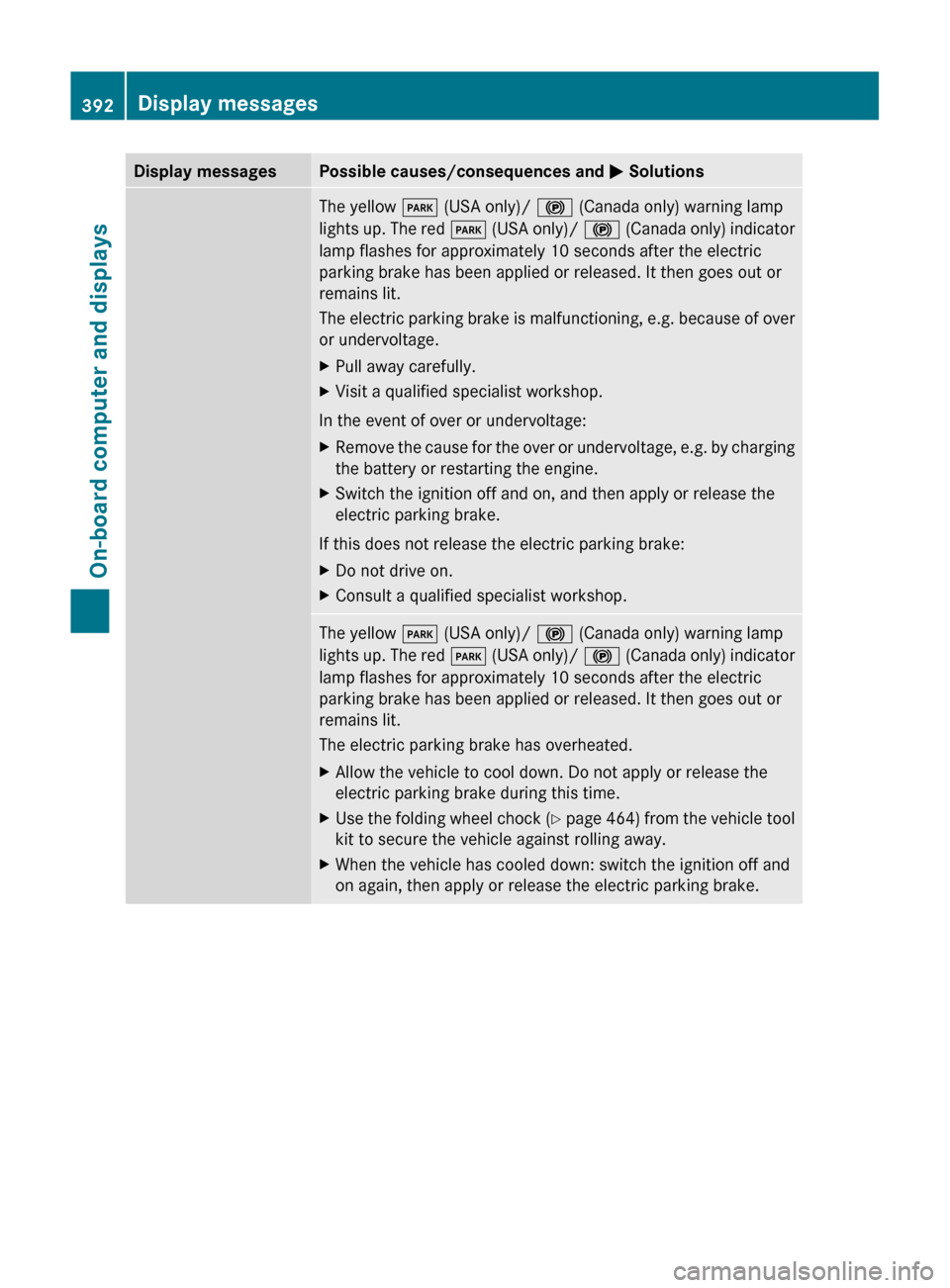
Display messagesPossible causes/consequences and M SolutionsThe yellow F (USA only)/ ! (Canada only) warning lamp
lights up. The red F (USA only)/ ! (Canada only) indicator
lamp flashes for approximately 10 seconds after the electric
parking brake has been applied or released. It then goes out or
remains lit.
The electric parking brake is malfunctioning, e.g. because of over
or undervoltage.XPull away carefully.XVisit a qualified specialist workshop.
In the event of over or undervoltage:
XRemove the cause for the over or undervoltage, e.g. by charging
the battery or restarting the engine.XSwitch the ignition off and on, and then apply or release the
electric parking brake.
If this does not release the electric parking brake:
XDo not drive on.XConsult a qualified specialist workshop.The yellow F (USA only)/ ! (Canada only) warning lamp
lights up. The red F (USA only)/ ! (Canada only) indicator
lamp flashes for approximately 10 seconds after the electric
parking brake has been applied or released. It then goes out or
remains lit.
The electric parking brake has overheated.XAllow the vehicle to cool down. Do not apply or release the
electric parking brake during this time.XUse the folding wheel chock (Y page 464) from the vehicle tool
kit to secure the vehicle against rolling away.XWhen the vehicle has cooled down: switch the ignition off and
on again, then apply or release the electric parking brake.392Display messagesOn-board computer and displays
Page 398 of 524
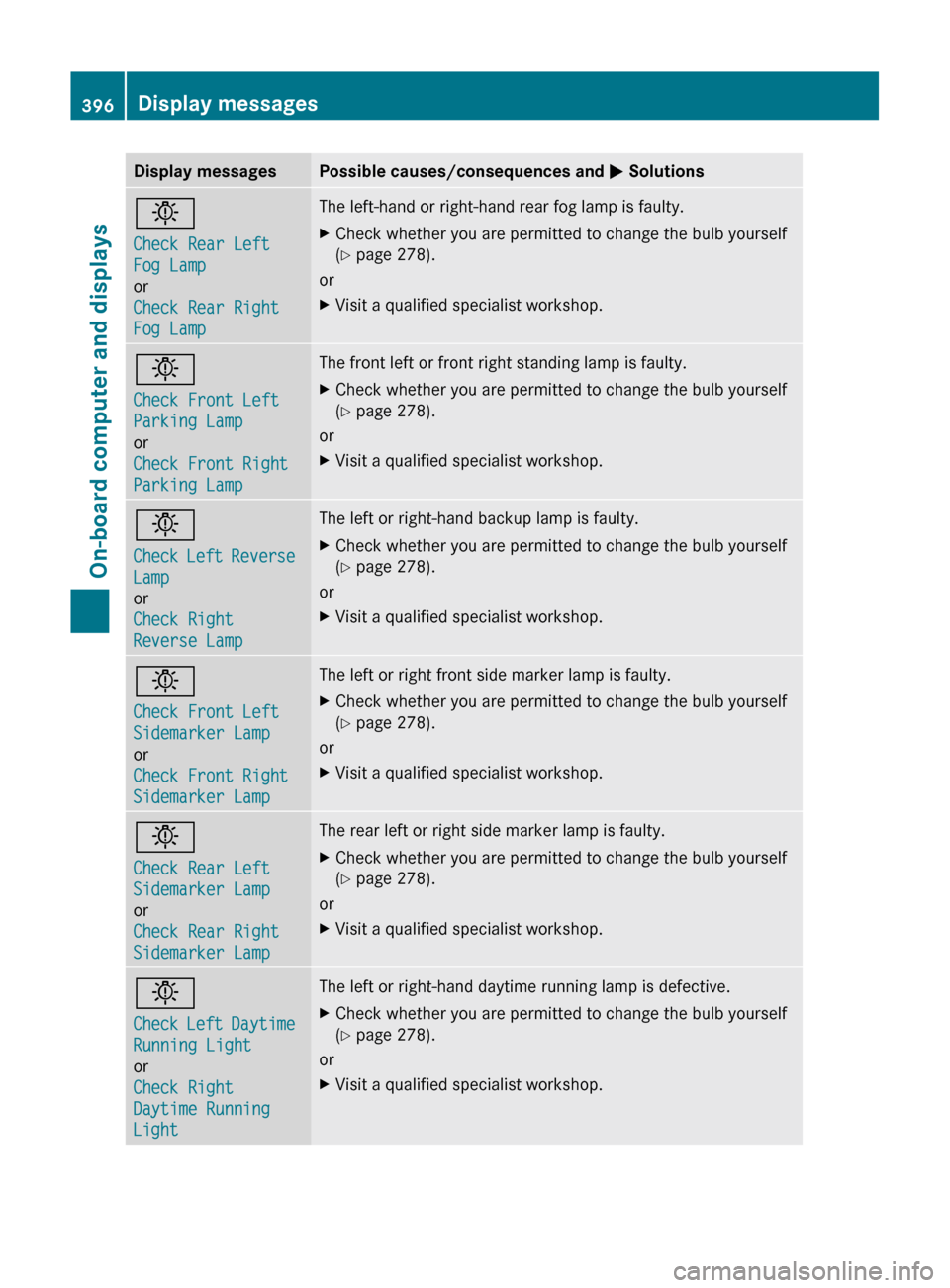
Display messagesPossible causes/consequences and M Solutionsb
Check Rear Left
Fog Lamp
or
Check Rear Right
Fog LampThe left-hand or right-hand rear fog lamp is faulty.XCheck whether you are permitted to change the bulb yourself
( Y page 278).
or
XVisit a qualified specialist workshop.b
Check Front Left
Parking Lamp
or
Check Front Right
Parking LampThe front left or front right standing lamp is faulty.XCheck whether you are permitted to change the bulb yourself
( Y page 278).
or
XVisit a qualified specialist workshop.b
Check Left Reverse
Lamp
or
Check Right
Reverse LampThe left or right-hand backup lamp is faulty.XCheck whether you are permitted to change the bulb yourself
( Y page 278).
or
XVisit a qualified specialist workshop.b
Check Front Left
Sidemarker Lamp
or
Check Front Right
Sidemarker LampThe left or right front side marker lamp is faulty.XCheck whether you are permitted to change the bulb yourself
( Y page 278).
or
XVisit a qualified specialist workshop.b
Check Rear Left
Sidemarker Lamp
or
Check Rear Right
Sidemarker LampThe rear left or right side marker lamp is faulty.XCheck whether you are permitted to change the bulb yourself
( Y page 278).
or
XVisit a qualified specialist workshop.b
Check Left Daytime
Running Light
or
Check Right
Daytime Running
LightThe left or right-hand daytime running lamp is defective.XCheck whether you are permitted to change the bulb yourself
( Y page 278).
or
XVisit a qualified specialist workshop.396Display messagesOn-board computer and displays
Page 399 of 524

Display messagesPossible causes/consequences and M Solutionsb
Active Headlamps
InoperativeThe active light function is faulty.XVisit a qualified specialist workshop.b
Malfunction See
Oper. ManualThe exterior lighting is faulty.XVisit a qualified specialist workshop.b
AUTO Lamp Function
InoperativeThe light sensor is faulty.XVisit a qualified specialist workshop.
USA only:
XSwitch off the daytime running lamps in the on-board computer
( Y page 377).XSwitch the lights on and off using the light switch.b
Please Switch Off
LightsThe lights are still switched on when you leave the vehicle. A
warning tone also sounds.XTurn the light switch to $ or c .
or
XIf the rear fog lamp is switched on: press the light switch in to
the stop.Adaptive High-beam
Assist
InoperativeAdaptive Highbeam Assist is faulty.XVisit a qualified specialist workshop.
Engine
Display messagesPossible causes/consequences and M Solutions+
Check Coolant
Level See Oper.
ManualThe coolant level is too low.XAdd coolant, observing the warning notes when doing so
( Y page 450).XIf coolant needs adding more often than usual, have the engine
coolant system checked at a qualified specialist workshop.GWarning
Do not spill antifreeze on hot engine parts. Antifreeze contains ethylene glycol which may burn
if it comes into contact with hot engine parts. You could be seriously burned.
Display messages397On-board computer and displaysZ