2011 MERCEDES-BENZ E550 4MATIC page 229
[x] Cancel search: page 229Page 209 of 400

If Blind Spot Assist is switched on, indicator
lamp : in the exterior mirrors lights up in
yellow up to a speed of 20 mph (30 km/h). At
speeds above 20 mph (30 km/h), the
indicator lamp goes out and Blind Spot Assist
is operational.
If a vehicle is detected within the monitoring
range of Blind Spot Assist at speeds above
20 mph (30 km/h), warning lamp : on the
corresponding side lights up in red. This
warning is always emitted when a vehicle
enters the blind spot monitoring range from
behind or from the side. When you overtake
a vehicle, the warning only occurs if the
difference in speed is less than 7 mph
(12 km/h).
The yellow indicator lamp goes out if reverse
gear is engaged. In this event, Blind Spot
Assist is no longer active.
The brightness of the indicator/warning
lamps is adjusted automatically according to
the ambient light.
GWarning
Blind Spot Assist is not active at speeds under
approximately 20 mph (30 km/h). The
indicator lamps in the exterior mirrors are
yellow. Vehicles in the monitoring range are
then not indicated.
Always pay attention to traffic conditions and
your surroundings. Otherwise, you may fail to
recognize dangers in time, cause an accident
and injure yourself and others.
Collision warning
If a vehicle is detected in the monitoring range
of Blind Spot Assist and you switch on the turn
signal, a double warning tone sounds. Red
warning lamp : flashes. If the turn signal
remains on, detected vehicles are indicated
by the flashing of red warning lamp :. There
are no further warning tones.
Switching on Blind Spot Assist
XMake sure that the radar sensor system
(Y page 232) and Blind Spot Assist
(Y page 228) are activated in the on-board
computer.
XTurn the SmartKey to position 2 in the
ignition lock.
Warning lamps : light up in red in the
exterior mirrors for approximately 1.5
seconds and then turn yellow.
Lane Keeping Assist
Important safety notes
Lane Keeping Assist monitors the area in
front of your vehicle by means of a camera at
the top of the windshield. Lane Keeping Assist
detects lane markings on the road and warns
you before you leave your lane
unintentionally.
:Lane Keeping Assist camera
If you select km on the on-board computer in
the Display Unit Speed-/Odometer:
function (Y page 229), Lane Keeping Assist
is activated starting at a speed of 60 km/h.
If the miles display unit is selected, the
assistance range begins at 40 mph.
GWarning
Lane Keeping Assist does not keep your
vehicle in its lane. It is only an aid and may
detect the lane markings on the road
incorrectly or not at all.
Driving systems207Driving and parkingBA 212 USA, CA Edition B 2011; 1; 5, en-USdimargiVersion: 3.0.3.62010-05-20T13:33:46+02:00 - Seite 207Z
Page 210 of 400
The system may be impaired or may not
function if:
R there is poor visibility, e.g. due to
insufficient illumination of the road, or due
to snow, rain, fog or spray.
R there is glare, e.g. from oncoming traffic,
the sun, or reflection from other vehicles.
R the windshield is dirty, fogged up or
covered, for instance by a sticker, in the
vicinity of the camera.
R several or no lane markings for a single lane
are present.
R the lane markings are worn away, dark or
covered up, e.g. by dirt or snow.
R the distance to the vehicle in front is too
small and the lane markings thus cannot be
detected.
R the lane markings on the road are unclear,
e.g. near roadworks.
R the lane markings change quickly, e.g.
lanes branch off, cross one another or
merge.
R the road is narrow and winding.
Lane Keeping Assist cannot detect road and
traffic conditions. It is not a substitute for
attentive driving. You are responsible for the
vehicle's speed, braking in good time, and
steering correctly. Always adapt your driving
style to suit the prevailing road and weather
conditions. Always pay attention to traffic
conditions and your surroundings. Otherwise,
you may fail to recognize dangers in time,
cause an accident and injure yourself and
others.
A warning can be given when a front wheel
passes over a lane marking. It will warn you
by means of intermittent vibration in the
steering wheel for up to 1.5 seconds.
In order that you are warned only when
necessary and in good time if you cross the
lane marking, the system recognizes certain
conditions and warns you accordingly.The warning vibration occurs earlier if:
R you approach the outer lane marking on a
bend.
R the road has very wide lanes, e.g. a
freeway.
R the system recognizes solid lane markings.
The warning vibration occurs later if:
R the road has narrow lanes.
R you cut the corner on a bend.
No warning vibration occurs if:
R you clearly and actively steer, brake, or
accelerate.
R you cut the corner on a sharp bend.
R a driving safety system intervenes, such as
ABS, BAS or ESP ®
.
R you switch on the turn signals. In this event,
the warnings are suppressed for a certain
period of time.
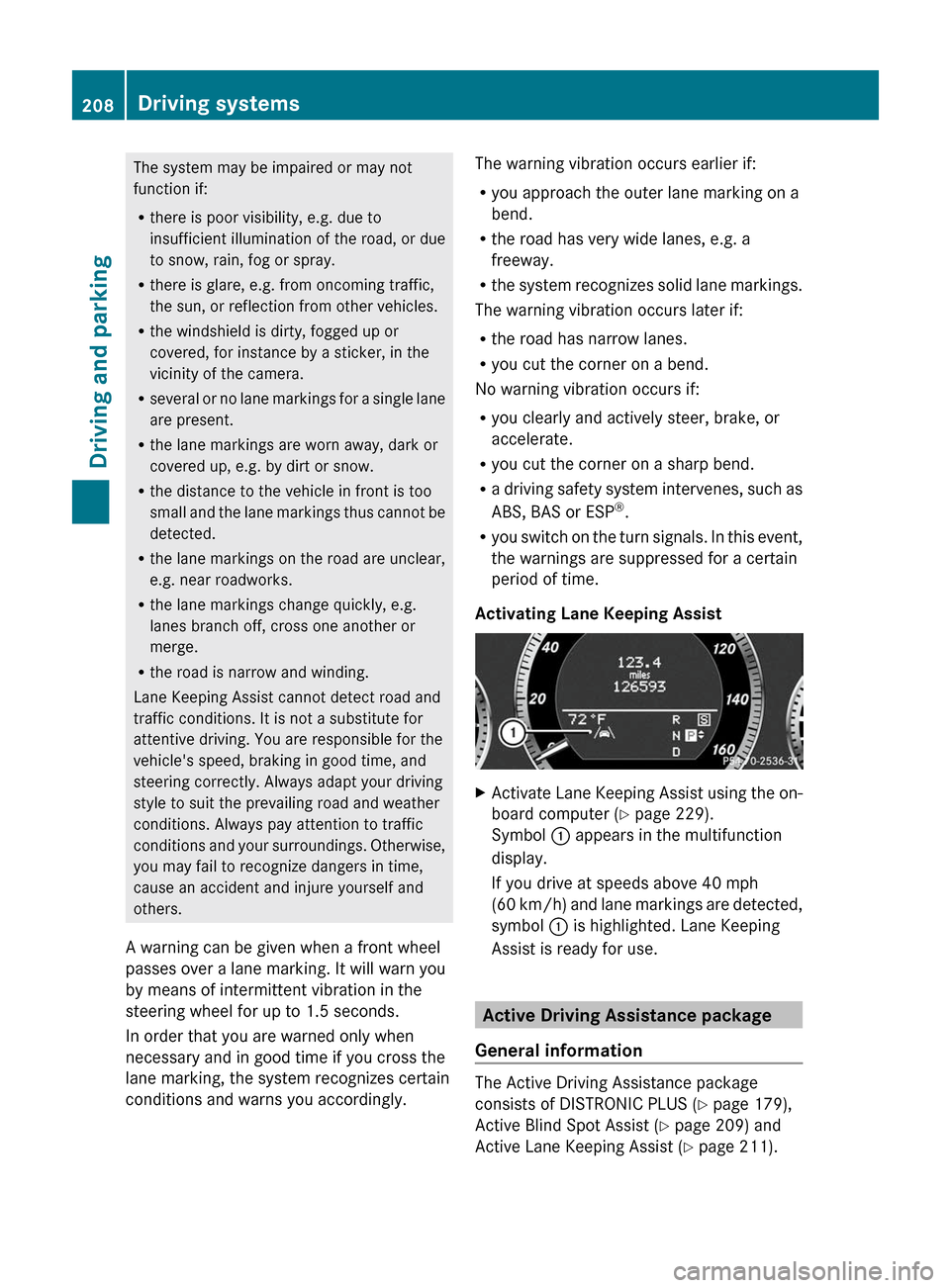
Activating Lane Keeping AssistXActivate Lane Keeping Assist using the on-
board computer ( Y page 229).
Symbol : appears in the multifunction
display.
If you drive at speeds above 40 mph
( 60 km/h) and lane markings are detected,
symbol : is highlighted. Lane Keeping
Assist is ready for use.
Active Driving Assistance package
General information
The Active Driving Assistance package
consists of DISTRONIC PLUS ( Y page 179),
Active Blind Spot Assist ( Y page 209) and
Active Lane Keeping Assist ( Y page 211).
208Driving systemsDriving and parking
BA 212 USA, CA Edition B 2011; 1; 5, en-USdimargiVersion: 3.0.3.62010-05-20T13:33:46+02:00 - Seite 208
Page 214 of 400

Keeping Assist detects lane markings on the
road and warns you before you leave your
lane unintentionally. If you do not react to the
warning, a lane-correcting application of the
brakes can bring the vehicle back into the
original lane.
:Active Lane Keeping Assist camera
If you select km on the on-board computer in
the Display Unit Speed-/
Odometer (Y page 229) function, Active Lane
Keeping Assist is activated starting at a speed
of 60 km/h. If the miles display unit is
selected, the assistance range begins at
40 mph.
GWarning
Active Lane Keeping Assist does not keep
your vehicle in its lane. It is only an aid and
may detect the lane markings on the road
incorrectly or not at all.
The system may be impaired or may not
function if:
Rseveral or no lane markings for a single lane
are present.
Rthere is poor visibility, e.g. due to
insufficient illumination of the road, or due
to snow, rain, fog or spray.
Rthere is glare, e.g. from oncoming traffic,
the sun, or reflection from other vehicles.
Rthe windshield is dirty, fogged up or
covered, for instance by a sticker, in the
vicinity of the camera.
Rthe lane markings are worn away, dark or
covered up, e.g. by dirt or snow.
Rthe distance to the vehicle in front is too
small and the lane markings thus cannot be
detected.
Rthe lane markings on the road are unclear,
e.g. near roadworks.
Rthe lane markings change quickly, e.g.
lanes branch off, cross one another or
merge.
Rthe road is narrow and winding.
Active Lane Keeping Assist cannot detect
road and traffic conditions. It is not a
substitute for attentive driving. You are
responsible for the vehicle's speed, braking in
good time, and steering correctly. Always
adapt your driving style to suit the prevailing
road and weather conditions. Always pay
attention to traffic conditions and your
surroundings. Otherwise, you may fail to
recognize dangers in time, cause an accident
and injure yourself and others.
Warning vibration in the steering wheel
A warning can be given when a front wheel
passes over a lane marking. It will warn you
by means of intermittent vibration in the
steering wheel for up to 1.5 seconds.
In order that you are warned only when
necessary and in good time if you cross the
lane marking, the system recognizes certain
conditions and warns you accordingly.
The warning vibration occurs earlier if:
Ryou approach the outer lane marking on a
bend.
Rthe road has very wide lanes, e.g. a
freeway.
Rthe system recognizes solid lane markings.
The warning vibration occurs later if:
Rthe road has narrow lanes.
Ryou cut the corner on a bend.
No warning vibration occurs if:
Ryou clearly and actively steer, brake, or
accelerate.
Ryou cut the corner on a sharp bend.
212Driving systemsDriving and parking
BA 212 USA, CA Edition B 2011; 1; 5, en-USdimargiVersion: 3.0.3.62010-05-20T13:33:46+02:00 - Seite 212
Page 216 of 400

Active Lane Keeping Assist does not detect
road and traffic conditions. An inappropriate
brake application may be interrupted at any
time if you:
R steer slightly in the opposite direction
R use a turn signal
R clearly brake or accelerate
A lane-correcting brake application is
interrupted automatically if:
R a driving safety system intervenes, such as
ESP ®
, PRE-SAFE ®
Brake or Active Blind
Spot Assist
R lane markings can no longer be recognized
Activating Active Lane Keeping AssistXActivate Active Lane Keeping Assist using
the on-board computer ( Y page 229).
Symbol : appears in the multifunction
display.
If you drive at speeds above 40 mph
(60 km/h) and lane markings are detected,
symbol : is highlighted. Active Lane Keeping
Assist is ready for use.
214Driving systemsDriving and parking
BA 212 USA, CA Edition B 2011; 1; 5, en-USdimargiVersion: 3.0.3.62010-05-20T13:33:46+02:00 - Seite 214
Page 221 of 400

Menus and submenus
Menu overview
The number of menus shown depends on the optional equipment in the vehicle.
Function:Trip menu ( Y page 220);AMG menu in AMG vehicles ( Y page 221)=Navi menu (navigation instructions) ( Y page 224)?Audio menu ( Y page 225)ATel menu (telephone) ( Y page 226)BDriveAssist menu (assistance) ( Y page 227)CServ. menu ( Y page 229)
R call up display messages ( Y page 234)
R tire pressure loss warning system (Canada only) ( Y page 355)
R tire pressure monitor ( Y page 357)
R ASSYST PLUS service interval display ( Y page 313)DSettings menu (Y page 229)Menus and submenus219On-board computer and displaysBA 212 USA, CA Edition B 2011; 1; 5, en-USdimargiVersion: 3.0.3.62010-05-20T13:33:46+02:00 - Seite 219Z
Page 222 of 400

Trip menu
Standard displayXPress and hold the % button on the
steering wheel until the Trip menu with
odometer : and trip odometer ; is
shown.
Trip computer "From start" or "From
reset"
The values in the From Start submenu are
calculated from the start of a journey whilst
the values in the From Reset submenu are
calculated from the last time the submenu
was reset.
XPress = or ; on the steering wheel
to select the Trip menu.XPress 9 or : to select From Start
or From Reset .
Trip computer "After start" (example)
:Distance;Time=Average speed?Average fuel consumption
The From Start trip computer is reset
automatically when
R the ignition has been switched off for more
than 4 hours.
R 999 hours have been exceeded.
R 9999 miles have been exceeded.
The From Reset trip computer is
automatically reset if the trip exceeds
9999 hours or 99,999 miles.
You can select km or miles as the unit of
measurement for distance ( Y page 229).
Displaying the range and current fuel
consumptionXPress = or ; on the steering wheel
to select the Trip menu. XPress the 9 or : button to select
current fuel consumption and approximate
range.:Current fuel consumption 21;Approximate range
Approximate range
; is calculated
according to current driving style and the
amount of fuel in the tank. If there is only a
small amount of fuel left in the fuel tank, the
display shows a vehicle being refueled C
instead of range ;.
Digital speedometer
XPress = or ; on the steering wheel
to select the Trip menu. XPress 9 or : to select the digital
speedometer.21 Not in AMG vehicles.220Menus and submenusOn-board computer and displays
BA 212 USA, CA Edition B 2011; 1; 5, en-USdimargiVersion: 3.0.3.62010-05-20T13:33:46+02:00 - Seite 220
Page 231 of 400

XPress the = or ; button on the
steering wheel to select the DriveAssist
menu.XPress the 9 or : button to select
Blind Spot Asst. .XPress a.
The current selection is displayed.XTo activate/deactivate: press a
again.
Activating/deactivating Lane Keeping
Assist
You can use the Lane Keep. Asst. function
to activate/deactivate Lane Keeping Assist
( Y page 207) or Active Lane Keeping Assist
( Y page 211).
XPress the = or ; button on the
steering wheel to select the DriveAssist
menu.XPress the 9 or : button to select
Lane Keep. Asst. .XPress a.
The current selection is displayed.XTo activate/deactivate: press a
again.
When Lane Keeping Assist is activated, the
à symbol appears in the multifunction
display when the ignition is on.
Maintenance menu
In the Serv. menu, you can:
R call up display messages ( Y page 234)
R restart the tire pressure loss warning
system (Canada only) ( Y page 355)
R
check the tire pressure electronically
( Y page 357)
R call up the service due date ( Y page 313)
Settings menu
Introduction
In the Settings menu, you have the following
options:
R Changing the instrument cluster settings
R Changing the lighting settings
R Changing the vehicle settings
R Changing the convenience settings
R Restoring the factory settings
Instrument cluster
Selecting the unit of measurement for
distance
The Display Unit Speed-/Odometer:
function allows you to choose whether
certain displays appear in km/h or mph.
The selected unit of measurement for
distance applies to:
R the digital speedometer in the Trip menu
R the odometer and the trip odometer
R the trip computer
R the navigation instructions in the Navi
menu
R DISTRONIC PLUS
XPress the = or ; button on the
steering wheel to select the Settings
menu.XPress the : or 9 button to select the
Instr. Cluster submenu.XPress the a button to confirm.Menus and submenus229On-board computer and displaysBA 212 USA, CA Edition B 2011; 1; 5, en-USdimargiVersion: 3.0.3.62010-05-20T13:33:46+02:00 - Seite 229Z