2011 MERCEDES-BENZ E-Class SEDAN cd playback
[x] Cancel search: cd playbackPage 191 of 234

?
Media selection
A Sound settings Fast
forward ing/rew inding
X In full-screen mode,slideXVY andhold the
COMAND controller untilthedesired
position hasbeen reached.
or
X Press andhold theE orF button
until thedesired position isreached.
You seethenavigation menu. Stop
function
X Press Wthe COMAND controller toshow
the menu.
X To interru ptplayback: selectÉby
turning cVdtheCOMAND controller and
press Wtoconfirm .
The Ë displa ychanges toÌ.T he
video image ishidden.
X To continue playback: selectÌand
press Wtoconfirm .
Play back continues fromthepoint where it
was interrupted.
X To stop playback: whileplayback is
interrupted, selectÉagain andpress
W toconfirm .
or
X During playback, confirm Ébypressing
W twice inrapid succession.
Ì ishighlighted.
X To restar tplayback: confirmtheÌ
selection bypressing W.
Play back restarts fromthebeginning. Pause
function
X Press Wthe COMAND controller toshow
the menu.
X To pause playback: selectËby
turning cVdtheCOMAND controller and
press Wtoconfirm .
The Ë displa ychanges toÌ.
X To continue playback: selectÌand
press Wtoconfirm .
The menu ishidden. Selec
tingascene/ch apter
If th ef ilm isdivi ded intos cene so rchapters ,
you can selectthem dire ctly while thef ilm is
run ning,or skip for wards step- by-s tep. So me
DV Ds donotpermit thisatcert ainpoint s(e.g.
during theopenin gcredit s).
It may alsobepossible toselect thescen e/
chapter fromwithin themenu storedon the
DVD .
X To skip forwar dsorback: infull-scr een
mode, turncVd orslide XVY the
COMAND controller.
or
X Press theE orF button onthe
con trol panel.
The navigation menu(Ypage 188)appears
for approximat elyeight secon ds. Selecting
afilm/t itle
This function isonly available ifthe DVD is
divided intos ever alfilms /titles .Ift he DVD
cont ains several films,these canbeselected
directly. Afilm can beselec tedeitherwhen
the DVDisb eing playedback orwhen itis
stopped.
The film canalso beselected fromthemenu
on the DVD itself. Video
DVDmode
189Video Z
Page 219 of 234
The
CD/D VDdrive plays thedisc:
R ifit has been insert edcorrec tlyand isa
permissible disc,and
R after youhave switched ondisc mode
(audio CD/audio DVD/MP3 mode)
(Y page 217).
Data onanMP3 CDfirst needs tobe loaded
by the drive. Loading maytake some time,
depending onthe number offolders and
track s. Removing
aCD/DV D
X Press theþ button.
The drive ejec ts thed isc.
X Tak ethe disco utofthes lot.
If you donot takethe disc outofthe slot,
the drive willdraw itin again autom atically
aft eras hor twhile. Switching
toaudio CD,audio DVDor
MP3 mode
X Insert aCD/DV D(Ypage 216).
The Rear SeatEntertainment Systemloads
the inserted disc.
X Select Disc in
the menu usingthe
9=; buttonsonthe remote
cont roland confirm bypressing the9
button.
The corresponding modeisswitched on.
The Rear SeatEntertainment Systemplays
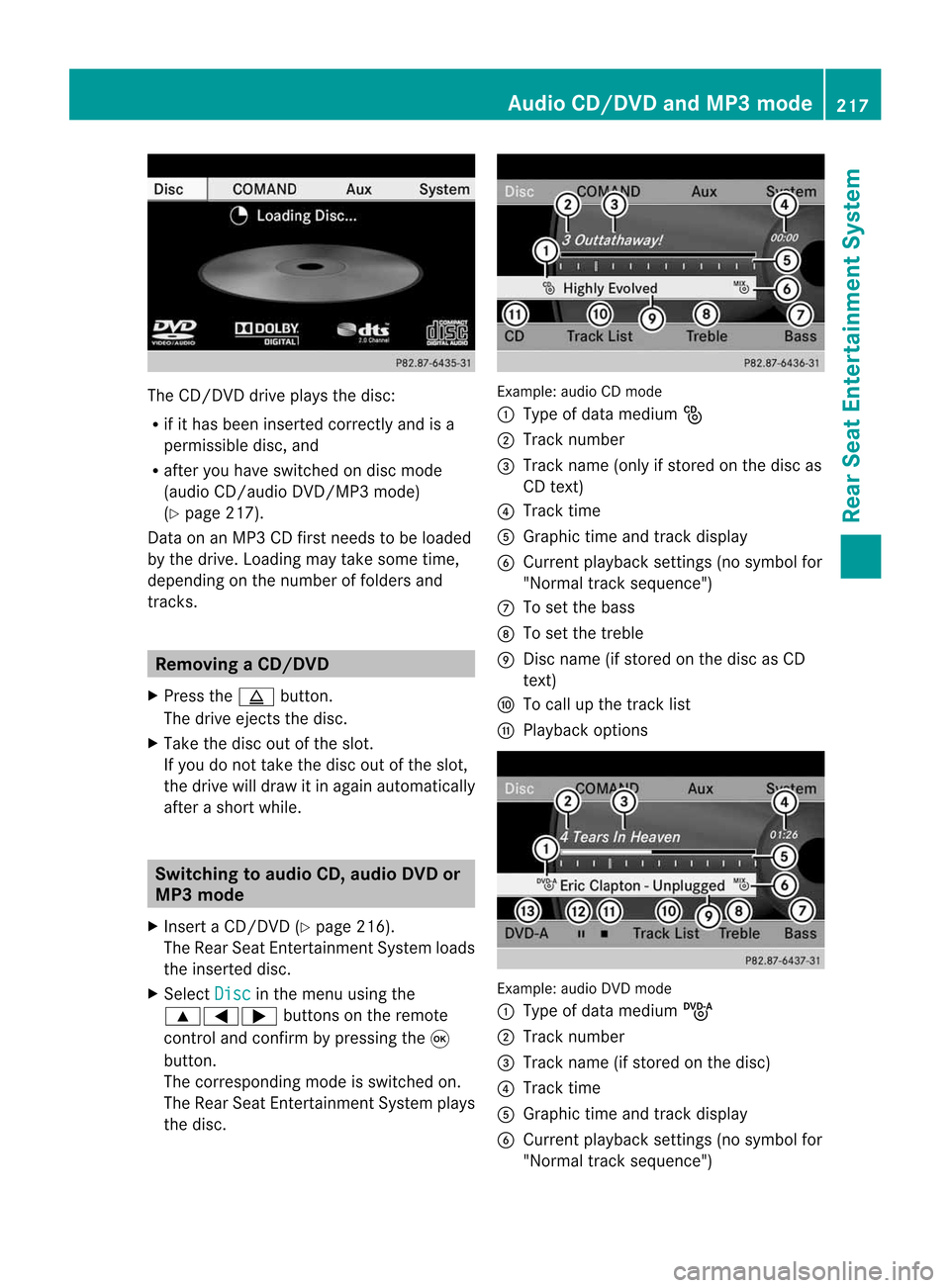
the disc. Example:
audioCDmode
: Type ofdata medium _
; Track number
= Track name (onlyifstored onthe disc as
CD text )
? Track time
A Graphic timeandtrack displa y
B Current playback settin gs(no symbol for
"Normal tracksequence")
C Toset the bass
D Toset the treble
E Disc name (ifstored onthe disc asCD
text )
F Tocall upthe track list
G Play back options Example:
audioDVDmode
: Type ofdata medium ü
; Track number
= Track name (ifstored onthe disc)
? Track time
A Graphic timeandtrack displa y
B Current playback settin gs(no symbol for
"Normal tracksequence") Audio
CD/DVD andMP3 mode
217RearSeatEntertainment System Z
Page 220 of 234

C
Toset the bass
D Toset the treble
E Disc name (ifstored onthe disc)
F Tocall upthe track list
G Stop funct ion
H Pause function
I Playba ckoptions Example:
MP3mode
: Type ofdata medium þ
; Track number
= Track name
? Track time
A Graphic timeandtrack display
B Current playbacksett ings (nosymbol for
"Normal tracksequence")
C Toset the bass
D Toset the treble
E Disc name orcurren tfolder
F Tocall upthe folder list
G Playba ckoptions; toswitch track
inform ationon/of f
i Variable bitrates inMP3 track scan result
in the elapsed timeshown beingdifferent
from theactual elapsed time. Selecting
atrac k
Se lecti ng byskippin gtoat rack X
To skipforwa rds orbac kwards toa
trac k:pre ssthe = or; button on
the rem otecontr ol.
or
X Pre ssthe E orF button.
Th es kipf orwa rdfunctio nskip stot he next
tra ck.
Skip ping backwa rdsrestartsthe current
tra ck (ifi th as been playin gfor mor ethan
eigh tsecon ds)orstart sthe previous track
(if the curren ttrack hasonly been playing
for ashorter time).
If you have selected theplayba ckoptions
Random Tracks or
Random Folder ,t
he
track order israndom.
Sel ecting bytrack list In
audio CDmode, thetrack listcontains all
tracks onthe disc currently playing.
In au dio DVD mode, thetrack listcontains all
tracks inthe currently activegroup;see
"Setting theaudio format" (Ypag e163).
In MP3 mode, thetrack listshow salltracks
in the currently activefolderasw ellasthe
folder structure,allow ingyou toselect any
track onthe MP3 CD.
X Select Tracks (au
dio CD/DVD mode)or
Folder (MP3
mode) using
the :=; buttonsonthe remote
cont rol,and confirm bypressing the9
button.
or
X Press the9button whenthedispla y/
selection windowisselected.
The track listappea rs.The #dot indicates
the current track.
X Select atrack using the9: buttons
and press the9button toconfirm. 218
Audio
CD/DVD andMP3 modeRear
Seat
Entertainment System
Page 222 of 234

X
To paus eplaybac k:sel ect Ë using
the :=; buttons onthe rem ote
contro land pre ssthe 9button toconfi rm.
The Ë displ aycha nge stoÌ .
X To conti nue playback:sel ect Ì and
pre ssthe 9button toconfi rm.
The Ì displ aycha nge stoË . Sto
pfuncti on
This function isonly available inaudio DVD
mode.
X To inte rrupt playbac k:sele ctÉ using
the :=; buttonsonthe remote
control andpress the9button toconfirm.
The Ë displayc hange stoÌ .
X To continue playbac k:sele ctÌ and
press the9button toconfirm.
Pla yback continues fromthepointwhe reit
wa sinterrup ted.
X To stop playbac k:whi lepla yback is
interrup ted,selectÉ againand press
the 9button toconfirm.
Pla yback stops andreturns tothe
begi nning ofthe DVD. Ì ishigh lighted.
X To restart playbac k:sele ctÌ and
press the9button toconfirm.
Pla yback starts fromthebegi nning ofthe
DVD. Settin
gthe audio format
Further informationonaudio formats is
ava ilable inthe "Aud io"section
(Y pag e163).
X Select DVD-A usi
ng the :=;
buttons onthe remote controlle rand pre ss
9 toconfi rm.
X Sel ect Group us
ing the 9: buttons
and pressthe 9button toconfi rm.
The list of availabl ea udioform atsappe ars.
The #dotind ica tes the form atcur rentl y
sel ecte d. X
Sel ect anaudiof orm atusing the
9: buttons andpressthe 9button
to confi rm.
X To exitthe men u:pre ssthe =
or ; button. Pl
ayb acko ptio ns
Fur ther informa tion onplay ba ck opti ons is
ava ilab lein the "Audio" secti on
(Y page 163) .
X Sel ect CD ,
DVD -A or
MP3 us
ing
the :=; buttons onthe remo te
control andpressthe 9button toconfi rm.
The options list appe ars .The # dot
indicates theoption current lyselected.
X Select Normal Track Sequence ,
Random Tracks or
Random Folder using
the
9: buttonsandpress the9button
to confirm .
The option isswitched on.For alloptions
except Normal TrackSequence ,y
ou will
see acorresponding displayint he displa y/
selection window.
i Ifyou change thedisc, theNormal Track
Sequence option
isactivated
automatically .Ifa no ption isselect ed,it
remains selectedafter theRear Seat
En tert ainmen tSyst em isswitc hedonor
off. Switching
track inform ationon/off
(MP3 mode only)
If the func tionisswitc hedon,folder andtrack
names aredisplayed.
If the func tion isswitc hedoff,disc andfile
names aredisplayed.
X Select MP3 using
the:=;
butt ons onthe remot econtro ller and press
the 9butt ontocon firm. 220
Audio
CD/DVDand MP3 modeRear
Seat
Entert ainment
Syst em
Page 223 of 234

X
Sel ect Displa yTrack Inf ormation us
ing the 9: buttons andpressthe
9 button toconfi rm.
The functi onissw itche donOor offª,
de pe ndi ng on the previous statu s. Vide
oDVD mode Gen
eral informati on
Here youw illf ind further informa tion onthe
fol lowi ng topi cs:
R sa fety notes (Ypage 154)
R notes onDVDs (Y pa ge 186) DVD
playbackcondit ions
Playback problems mayoccurwhen playing
cop ieddisc s.Ther eisal arge varietyo fdisc s,
DV Da uth oring sof twar e,writ ingsoftwar eand
writ ersavailab le.This varietym ean sthat
th ere isno guaran teet hatthe Rear Seat
En tertainm entS yst em will beable toplay
vid eo DVDs that you havecopied yourself.
You willfind further informationinthe Video
section (Ypage 187). Information regarding
COMAND alsoapplies tothe Rear Seat
En tert ainment System. Function
restrictions
Dependin gonthe DVD ,iti sp ossible that
cert ainfunct ionsoractions described inthis
section willbetemporarily blockedormay not
funct ionatall. Assoon asyou trytoactivate
these functionsoractions ,you will see the
K symbol inthe display . Inserting
andremoving aCD/DVD
X Proc eed asdes cribed inthe" Audio CD/
DV Da ndMP3 mode"sec tion
(Y page 216) . Sw
itchin gtov ideo DVD mode
X Inse rtav ideo DVD.
The RearSea tEnterta inmentSys tem load s
the disc.
If disc mod ewasthe last mod eselecte d,it
wi llnow beacti ve.
If it wa sn ot, switch onvideo DVD modeas
de scri bedint he followi ng instructio n.
X Sel ect Disc in
the menu using the
9=; buttons onthe rem ote
contro land confi rmbypre ssing the 9
bu tton.
If the video DVD fulfillst he play ba ck
cri teri a,the filme ithe rstar tsautoma tically
or the menu saved onthe DVD appe ars. If
the DVD menu appe ars, yo um usts tart the
fi lm ma nua lly.
X Sel ect the corr espo ndi ngmenu itemi nthe
DVD menu. Hiding/show
ingthe navigation menu
X To show: pressthe9 or: button
on the remote control.
X To hide: press the9 or: button.
or
X Wait forapproximately eightseconds. Navigation
menu
: Disc type
; Current title
= Current scene Video
DVDmode
221RearSeatEntertainment System Z
Page 224 of 234

?
Track time
A Toshow themenu Showing/hiding
themenu
X To show: pressthe9button onthe
remote control.
or
X Select Menu while
thenavigation menuis
shown andpress the9button toconf irm.
X To hide: press the9 button ,select
Full Screen and
press the9button to
conf irm. Menu
system
: Video DVDoptions
; Pause function
= Stop funct ion
? Toset the treble
A Toset the bass Fast
forwar ding/rewinding
X Press andhold theE orF button on
the remote controluntil thedesired
position hasbeen reached.
You seethenavigation menu. Pause
function
X To show themenu: pressthe9button
on the remote control.
or
X Select Menu while
thenavigation menuis
shown andpress the9button toconf irm.
X To pause playback: selectËandpress
the 9button toconf irm.
The Ë display changes toÌ.
X To continue playback: selectÌand
press the9button toconf irm.
The menu ishidden. Stop
function
X To show themenu: pressthe9button
on the remote control.
or
X Select Menu while
thenavigation menuis
shown andpress the9button toconf irm.
X To interr uptplayback: selectÉand
press the9button toconf irm.
The Ë display changes toÌ.T he
video image ishidden.
X To continue playback: selectÌand
press the9button toconfirm .
Play back continues fromthepoint where it
was interrupted. Themenu ishidden.
X To stop playback: whileplayback is
interrupted, selectÉagain andpress
the 9button toconfirm .
Play back stops andreturns tothe
beginning ofthe DVD .Ì ishighlighted.
X To restar tplayback: selectÌand
press the9button toconfirm .
Play back starts fromthebeginning ofthe
DVD . 222
Video
DVDmodeRear
Seat
Entertainment System
Page 231 of 234
playback.
Ifno video image isavailable
from theAUX source connected, youwill
see anaudio menu.
Displaying AUX X
Select thescreen byturn ingthe scro ll
wheel onremot econtro l(Y page 210)until
"L REAR "(left scre en)or"REAR R"(right
scre en)ishighl ighted inthe windo w.
X Sel ect Aux in
the menu using the
9=; buttons onthe rem ote
contro land pre ssthe 9button toconfi rm.
X Sel ect Source from
theAUX menu and
pre ssthe 9button toconfi rm.
X Sel ect Displa yAux and
pressthe 9
bu tton toconfi rm.
Yo uw ills ee and hearthe cont entofthe
video source ifit is switched toplay back. If
no video image isavaila blefrom theAUX
source connected, youwillsee anaudi o
menu. Adjust
ingtreble andbass
X Select Treble or
Bass in
the AUX menu
and press the9button onthe remote
cont roltoconfirm .
An adjustment scaleappea rs.
X Select asettin gusing the9 or:
button andpress the9button toconfirm . Adjust
ingthe brightness, contrastor
colo r
X Select Display Aux or
Disc Drive Aux in
the AUX menu andpress the9button
to confirm .
X Select Brightness ,
Contrast or
Color and
press the9button toconfirm .
An adjustment scaleappea rs.
X Select asettin gusing the9 or:
button andpress the9button toconfirm . Changing
thepicture format
X Select Display Aux or
Disc Drive Aux in
the AUX menu andpress the9button
to confirm .
X Select 16:9Optimized ,
4:3 or
Widescreen using
the9: buttons
and press the9button toconfirm .
The dotinfront ofam enu item indicates
the current setting. AUX
mode
229RearSeatEntertainment System Z