2011 MERCEDES-BENZ E-Class SEDAN cd playback
[x] Cancel search: cd playbackPage 173 of 234

R
MUSIC REGISTER
R USB storage device
X Switch toMUSIC REGISTER (Ypage 168).
X Select Search by
sliding VÆandturning
cVd theCOMAND controller andpress
W toconfirm .
The category listappea rs.
X Select atrack inac ategory (Ypage 165).
Example: openingafolder X
Sele ctFol der in
thec ategor ylist by
tur nin gcVd theC OMA NDcontroller and
pres sW tocon firm.
You seethec ontent so fthe cur ren tfolder. The
name ofthe current folderisat the top
and thetrack current lyplayi ngisindicated by
a # dot.
X To switch tothe next folder up:press the
% backbutton orslide XVthe
COMAND controller.
Changing thefolder/tr ackname X
Switch toMUSIC REGISTER (Ypage 168).
X Select Music Register by
sliding VÆand
turnin gcVd theCOMAND controller and
press Wtoconf irm.
X Select Rename/Delet eFiles and
press
W toconf irm.
X Select afolder/t rackbyturnin gcVd.
X Select Options by
sliding VYandpress
W toconf irm. X
Select Change and
press Wtoconf irm.
X En ter aname forthe folder/t rack.
Inst ruction sfor enter ingcharact erscan be
found inthe "Ent ering charact ersinthe
phone bookandaddress book"section
(Y page 31).
X To save thechanges: select¬and
press Wtoconf irm.
Dele ting folders/tr acks X
Switch toMUSIC REGISTER (Ypage 168).
X Select Music Register by
sliding VÆand
turnin gcVd theCOMAND controller and
press Wtoconf irm.
X Select Rename/Delet eFiles and
press
W toconf irm.
X Select afolder/t rackbyturnin gcVd.
X Select Options by
sliding VYandpress
W toconf irm.
X Select Delete and
press Wtoconf irm.
Aq uery appear s.No is
high light ed.
If you selectYes ,t
he folder s/track sare
delet ed.You seethePle ase wait... mes
sage .Then, youseetheData Deleted message.
If you select No ,t
he process willbeaborted. Playback
options
The following optionsareavaila ble:
R Normal TrackSequence The
track sareplay edinthe normal order
(e.g. track 1,2,3, etc. ).
R Random Medium All
the track sonthe medium areplay edin
random order.
R Random TrackList (MP3
mode only)
The track sint he current lyactive folder/
track listare play edinar andom order. MUSIC
REGISTER
171Audio Z
Page 176 of 234

X
Opt ion 2(Secure SimplePairing): ifthe
digit codes displayed inCOMAND andon
the Bluetoot h®
audio device arethe same,
con firm Yes by
pressing W.
If you select Yes ,a
uthorizat ioncontinues
and theBluetoot h®
audio device is
con nect ed.Playback starts.
If you select No ,a
uthorizat ionwill be
canc eled.
i The Bluetoot h®
audio device must
support theBluetoot h®
version 2.1for
con nect ionviaSecure SimplePairing.
COMAND createsasix-digit code, which is
displayed onthe two devices thataretobe
con nect ed.
X Externa lauthoriz ation: COMAND may
not beable tolocate yourBluetoot h®
audio
device duetothe specific securitysett ings
of the Bluetoot h®
audio device itself.Inthis
case, check whether yourBluetoot h®
audio
device canlocate theCOMAND system
(Y page 118). TheBluetoot h®
device name
of COMAND isMB Bluetoot h .
Aft ersuccess fulauthorizat ion,the
Bluetoot h®
audio device iscon nect edand
start splaying.
Reconnecting aBluet ooth ®
aud io
device The
Bluet ooth®
audio profilesareconnected
automat icallyunder thefollowin g
circ umst ances:
R one ofthe last two mobile phonestohave
been connected has also been usedasa
Bluet ooth®
audio player (ifthis func tion is
support edbythe mobile phone).
R the mobile phonetakes over theautomat ic
con nection itself.
AB luetoo th®
audio player withouttelep hone
func tionsisn otautom atically reconn ected,
even ifit was thelast devic econnec ted.
If the NoBlue toothAudioD evice Conn
ected mess
ageappears, youhave two opt
ions tocon nectaB luetooth®
audio
devic e:
Opt ion 1
X Conf irmConn ectLast Device in
the
basic display bypress ingWthe COMA ND
con troller.
If COMA NDcan locat ethe Bluet ooth®
audio device,itwill becon nected and will
st art playing.
i With some Bluetooth®
audio devices,
playback mustbeinit ially start ed on the
devic eitself, sothat COMA NDcan play the
audio data.
Opt ion 2
X Selec tBT Audi o by
turnin gcVd the
COMA NDcontroller andpress Wto
con firm .
X Conf irmBlue toothAudioD evice List by
press ingWthe COMA NDcontroller.
X Selec taBluet ooth ®
au diod evice byturni ng
cVd theCOMAND controllera nd pre ss
W toconfi rm.
If CO MAND canlocatethe Bluetoo th®
au diod evice ,itw illb ec onnected andwill
star tplaying.
i With some Bluetooth®
audio devices,
playback mustbeinit ially start ed on the
devic eitself, sothat COMA NDcan play the
audio data.
Blu etoot h®
aud iodevice and
simu ltaneous searchfor mobile phones During
thesearc hfor mobile phones
(Y page 116),the connection with the
Bluet ooth®
audio deviceist ermin ated. Inthe
Bluet ooth®
audio basicdisplay
(Y page 176),you willsee theRece ived Busi
ness Cards mess
ageand the
Rece ived Business Cards men
uitem
can not beselec ted. 174
Bluetoot h®
au dio mod eAudio
Page 178 of 234
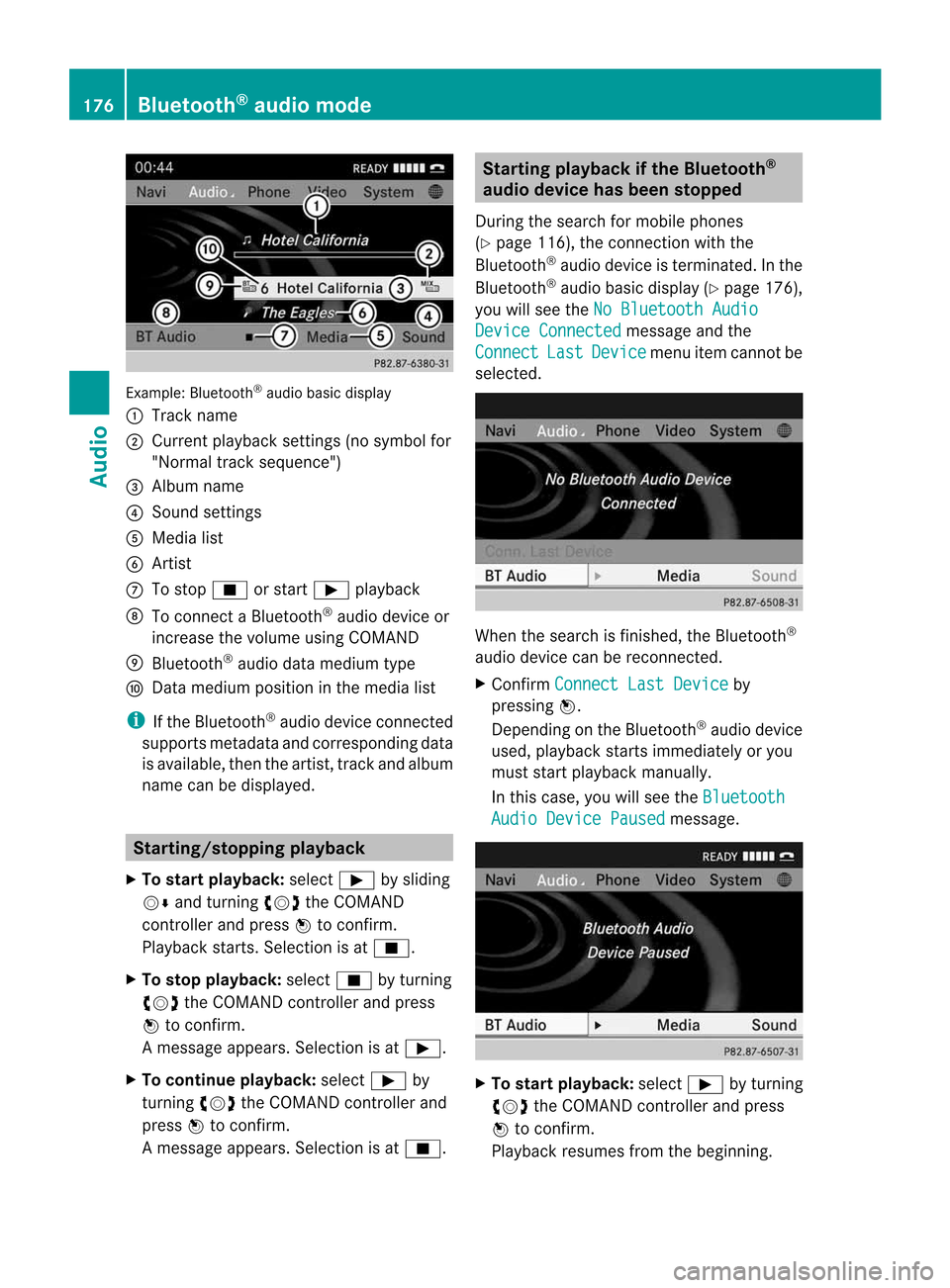
Exam
ple: Blu etoo th®
au diob asic disp lay
: Trac kn ame
; Curren tplayback settings (no symbol for
"Norm altrack sequen ce")
= Album name
? Soun dsettin gs
A Media list
B Artis t
C Tostop É orstart Ì playback
D Tocon nectaB luetooth®
audio deviceor
inc rease thevolume usingCOMA ND
E Bluet ooth®
audio datamedium type
F Datam edium positioninthe media list
i Ifthe Bluet ooth®
audio deviceconnec ted
support smetadata andcorrespo ndingdata
is available, thenthe artist, trackandalbu m
name canbedispla yed. Star
ting/stopping playback
X To star tplayback: selectÌbysliding
VÆ andturning cVdtheCOMAND
cont roller andpress Wtoconfirm .
Play back starts. Selection isat É.
X To stop playback: selectÉbyturning
cVd theCOMAND controller andpress
W toconfirm .
Am essage appears. Selectionisat Ì.
X To continue playback:select Ìby
turn ingcVd theCOMAND controller and
press Wtocon firm.
Am essage appears. Selectionisat É. Sta
rting playba ckifthe Bluet ooth®
aud iodevice hasbeen stopp ed
Durin gthe search formobile phones
(Y page 116),the connection with the
Bluetoot h®
audio device isterm inated. Inthe
Bluetoot h®
audio basicdisplay (Ypage 176),
you willsee theNoBluetoo thAudio Device
Connected message
andthe
Connect Last Device menu
itemcannotbe
select ed. When
thesearch isfinished, theBluetoot h®
audio device canberecon nected.
X Confirm Connect LastDevice by
pressing W.
Depen dingonthe Bluetoot h®
audio device
used, playback startsimmediately oryou
must startplayback manually.
In this case, youwillsee theBluetoo th Audio
Device Paused message.
X
To star tplayba ck:select Ìbyturn ing
cVd theCOMAND controller andpress
W tocon firm.
Playback resumesfromthebeginn ing. 176
Bluetooth®
aud iomod eAudio
Page 179 of 234

Selec
tingatrac k
Th isfunctio nisn otsupported byall
Bluetooth ®
audi odevices.
X To skip forwards orbackwards toa
tra ck: press theE orF button on
COMAND.
or
X Press the9 or: button brieflyon
the multifunction steeringwheel.
X Rapid scroll: pressandhold the9
or : button onthe multifunction
steering wheeluntilthedesired trackis
reached.
If you hold down the9 or: button,
the system runsthrough thelistmore
quickly. Selec
tingplayback options
If the Bluetooth ®
audi odevice supports the
corresponding function,the followi ngoptions
are avail able:
R Normal TrackSequence The
tracks areplay edinthe normal order
(e.g. track 1,2,3, etc. ).
Audio dataplayback isdetermined bythe
order inwhich thetracks arewritten tothe
data carrier. Alphabetical orderisthe most
common. Onceallthe tracks inaf older
have been played,the tracks inthe next
folder areplay ed.
R Random Tracks All
the tracks onthe medium areplay edin
random order(e.g.track 3,8,5e tc.). X
Select BT Audio by
sliding VÆandturning
cVd theCOMAND controller andpress
W toconfirm.
The #dot indicates theoption selected.
X Select theoption byturning cVdthe
COMAND controller andpress Wto
confirm.
If you select Random Tracks ,y
ou will see
ac orresponding symbolinthe displa y/
selection window. Adjusting
thesound settings
The sound settings aredescribed usingradio
mode asan example inthe "Basic function s
of COMAND" section(Ypage 34). Increasin
gthe volume usingCOMAND
X Select BT Audio by
sliding VÆandturning
cVd theCOMAND controller andpress
W toconfirm.
X Select Volume and
press Wtoconfirm.
Am enu appears. The#dot indicat esthe
curren tsett ing. X
Select Standar d or
Boost and
press Wto
con firm.
You willfind furth erinfor mation inthe "Audio
AUX mode" section(Ypage 182). Bluet
ooth®
aud iomod e177Audio Z
Page 182 of 234

The
curren tplayback option (Ypage 163)is
shown withasymbol behindalbum name
E (no display forNorm al Trac
k Sequ
ence ).
i Ifthe devic econnec ted does notcontain
any playable track s,am essage appears to
this effect . Selecting
music files
Not e COMA
NDdisplays thedata stored onthe
iPod ®
or MP3 player accordin gtot he filing
struct ureused inthe respect ivemedium.
Selecting byskipping toatrac k X
To ski pforwa rds orbac ktoat rack:tur n
cVd theCOMAND controllerw hent he
di sp lay/ selectio nwindow isact ive.
or
X Press theE orF button.
The skip forward function skipstot he nex t
tr ack .The skip back function skipstot he
begin ningo fthe curr enttrack ifthe track
has been playing formor ethan eight
seco nds.Ift he track hasbeen playingfor
less than eight seconds, itskips tothe start
of the previous track.Ify ou have selected
ap layb ack option otherthanNormal Track
Sequence ,t
he track sequence is
random.
Selecting usingthenumber keypad X
To mak eane ntr y:press thel button .
An input menu appears. Thenumber of
charact ersavailable forinput depends on
the number ofstor edtrac ks.
X To enter atrack number :press anumber
key, e.g.q.
The digit isent ered inthe first position in
the input line.
i COMAND willignore andnotdisplay an
invalid digit. X
En ter more numbers ifdesired.
The trackplays afterthe last possible
numb erisent ered.
i Press ingand holdin ganumberkey for
mor ethan twoseco ndscom plete sthe
ent ry,and thecorrespo ndingtrack is
played.
Fast forwar ding/r ewinding X
While thedisplay/s electionwindow is
act ive, slide XVY andhold theCOMA ND
con troller untilthe desire dposition has
been reached.
or
X Press andhold theF orE button
until thedesired position isreached.
i OnaniPod ®
/iPhone ®
,f ast rewind only
funct ionswithin thecurrent track. Selecting
acatego ry/play list/fo lder
Ove rview iPo
d®
and certain MP3playe rs
For aniPo d®
or MP3 player,you can select
tracks using catego riesorfold ers.
Depend ingonthe devi ceconnected, the
foll owi ngcatego riesmay beava ilable ,for
examp le:
R Curre ntTrack list R
Playl ists (e.g.
All )
R Artis ts R
Album s R
Track s R
Podca sts R
Genre s R
Compo sers R
Audio books i
Some playback catego riescontain the
entry All .I
ft his entr yhasbeen selected,
the entire contentofthe category selected
will beplay ed. 180
Media
Interface modeAudio
Page 184 of 234

If
different sortingrulesaredefined (e.g.in
iTu nes ®
), the search iscanceled without
any resul t. Playbac
koptio ns
The followi ng opti ons areavailab le:
R Nor mal TrackSeq uence Norm
altrack sequence: youh earthe
track sint heir normal order(e.g.numerical
or alpha betical).
R Random Medium All
the track sonthe medium areplay edin
random order.
R Random TrackList The
track sint he current lyactive category
or folder, including anysubfolders, are
play edinrandom order.
i For MP3 players, therandom playlists
offer amaximum of300 track schosen at
random.
X To selec taplayback option:select
Media Interface in
the basic displa yby
sliding VÆandturning cVdtheCOMAND
cont roller andpress Wtoconfirm .
The options listappea rs.The #dot
indicates theoption selected.
X Select anoption andpress Wtoconfirm . MP3
player instructions
Data forma ts MP3
andWMA aresupported asdata formats
with fixed andvariable bitrates (upto
320 kbits/s ).
Special considerationswhen using MP3
players Up
toeight directory levelswithupto1000
track sperdirectory aresupported.
Do not use USB exten sionleads oradapters.
They canimpair functionality. i
DRM (Digital RightsManagement)
protect edfiles arenot supported bythe
Media Interface. Audio
AUXmode Notes
onaudio AUXmode
If COMAND isequipped withaMedia
Interface, externalaudiosources are
located inthe stowage compartment inthe
center console.
i You willfind further information onlineat
<0012001800180019000F00320032001E001E001E00460014002900250017002A
002F00140027002900230020001B0046001F002700149.O rcall
the Merced es-BenzCustome rAssistance
Center at<0038004600440042004200460002000E00170046001400010017001C00240025
00240020V
(1-800-367-6372) (fortheUSA) or
Customer Relationsat1-800-387-0100
(for Canada). Activating
audioAUXmode
When youconnect anexternal audiosource,
audio AUXisnot selected automatically.
X Select Audio in
the main function barby
sliding ZVandturning cVdtheCOMAND
controller andpress Wtoconfirm.
If AUX mode wasthelast mode selected, it
will now beactive.
If another audiosource isswitched on,you
can now switch toaudio AUXmode inthe
audio menu.
X Select Audio using
ZVandpress Wto
confirm.
The audio menu appears. 182
Audio
AUXmodeAudioAnAUX socket isnot provided. The
You
canconn ectanextern alaudi osource
connections forthe Media Interface are
(AUX)
toCOMAND. Youwillfind the
connected usingthecorresponding cableset.
necessary
socketinthe cent erconsole
stowage compartment .
Page 185 of 234

X
Sel ect Aux us
ing cVd andpressW to
confi rm.
The audioA UX menu appe ars .The medium
in the extern alaudi osource isplay ed,ifthe
source isconn ected andplayback
selected. Please
seetherespective operating
instruct ionsforhow tooperate theextern al
audi osource.
You willfind details onvolume (Ypage 33)
and sound (Ypage 34)settin gsinthe "Ata
glance" section. G
WARNING
Ext ernal audiosources mayhave different
volumes, whichcanmean thatsystem
messages suchastraffic announcemen tsand
navigation systemannouncemen tsare much
louder. Ifnecessary, pleasedeactivate the
system messages oradjust theirvolume
manually . Increasing
thevolume usingCOMAND
In some cases, thevolume ofthe extern al
audi odevice maybequieter orlouder, orthe
usua lmaximum possible volumemaybe
lower. Onsome devices, itis possible to
adjust thevolume separately. Inthis case,
start atam edium volume andincrease it
gradua lly.This enables youtodetermine
whether thesystem isable toplay themusic
at high volume without distorting it. X
Select Volume in
the AUX displa ybyturning
cVd theCOMAND controller andpress
W toconfirm .
Am enu appears. The#dot indicat esthe
curren tsett ing. X
Select Standar d or
Boost and
press Wto
con firm.
Standar d :t
he volume ofthe extern alaudi o
source isadjusted toas tandard value.
Boost :t
he volume ofthe extern alaudi o
source israised byapproximately 10dB. Audio
AUXmode
183Audio Z
Page 189 of 234

Note
sabout dis cs
Pl ay ba ck pro blems mayoccu rwhen playing
copied discs.Therearealarge variety of
discs, DVDauthoring software,writing
software andwriters available.This variety
means thatthere isno guarantee thatthe
system willbeable toplay discs thatyouhave
copied yourself.
! Donot affix stick ersorlabel stot he discs,
as they could peeloffand damage
COMAND. Stickers cancause thedisc to
bend, which canresult inread errors and
disc recognit ionproblems.
! COMAND isdesigned toaccommodate
discs which comply withtheEN60908
standard. Youcantherefore onlyusediscs
with amaximum thickness of1.3 mm.
If you insert thickerdiscs, e.g.those that
cont aindata onboth sides (DVD onone
side andaudiodata onthe other), they
cannot beeject edand candamage
COMAND.
Use round discswithadiameter of12 cm.
Do not use discs withadiameter of8c m,
even withanadapter. DVD
playback conditions
If video DVDsdon otconf orm tothe NTSC or
PAL TVstandards, theymaycreate picture,
sound orother problems duringplayback.
COMAND canplay back video DVDs
produced according tothe following
standards:
R region code1orregion code0(no reg ion
cod e)
R PAL orNTSC standa rd
Yo uw illg en era llyf ind the releva ntdetai ls
ei ther onthe DVD itselfo ro nthe DVD case.
i Ifyo ui nsert avideo DVD with ad ifferent
reg ionc ode, youwillsee amessage tothis
effect . i
COMAND isset toregion code1atthe
factor y.This settingcan bechanged atan
authorized Mercedes-B enzCenter. Thiswill
allow youtoplay video DVDswitha
different regioncode,provided thatthey
are produced inaccordanc ewiththe PAL
or NTSC standard. Theregion codecanbe
changed uptofive times. Function
restrictions
Dependin gonthe DVD ,iti sp ossible that
cert ainfunct ionsoractions willbe
temporarily blockedormay notfunct ionatall.
As soon asyou trytoactivate thesefunctions
or actions ,you will see theKsymbol inthe
display . Inserting
andremoving DVDs
X Proceed asdescribed inthe "Insert ingand
eject ingCDs andDVD s"section
(Y page 154). Switching
tovideo DVDmode
Option 1 X
DVD changer: insertavideo DVD.
X Press theh functionbutton orthe
% backbutton .
COMAND loadsthemedium insertedand
start stop lay it.
Option 2 X
Press theh functionbutton oneormore
times.
COMAND switchestothe previous disc
operating mode. Video
DVDmode
187Video Z