Page 230 of 409
Fitting the adapter
X
Open the socket cover.
X Insert the connector with lug :into
groove ;on the socket and turn the con-
nector clockwise to the stop.
X Let the cover engage.
X If you are using an adapter cable, secure
the cable to the trailer with cable ties.
! Make sure that there is sufficien tcable
play so that the cable canno tbecome
detached when cornering. Towing
atrailer
227Driving an d parking Z
Page 265 of 409

Display messages Possible causes/consequences and
M Solutions
b
Intell. Light Sys‐
tem inoperative The Intelligent Light Syste
mis faulty. The lights remain available
without the Intelligent Light System.
X Visit a qualified specialist workshop. b
Malfunction See
Owner's Manual The exterior lighting is faulty.
X
Visit a qualified specialist workshop. Vehicles with trailer tow hitch: a fuse may have blown.
X
Check the fuses (Y page 359).
X If necessary, replace the blown fuse. Observe the warning notes
as you do so.
If the display message continues to be displayed:
X Visit a qualified specialist workshop. b
AUTO
lights inoper‐
ative The light sensor is faulty.
X
Visit a qualified specialist workshop. b
Switch off lights The lights are still switched on when you leave the vehicle. A
warning tone also sounds.
X
Turn the light switch to Ã.Adaptive Main-beam
Assist inoperative Adaptive Highbeam Assist is faulty.
X
Visit a qualified specialist workshop. Adaptive Main-beam
Assist currently
unavailable See
Owner's Manual Adaptive Highbeam Assist is deactivated and temporarily inoper-
ative. Possible causes:
R
the windscreen is dirty in the camera's field of vision.
R visibility is impaired due to heavy rain, snow or fog.
X Cleant he windscreen.
If the system detects that the camera is fully operational again,
the Adaptive Main-beam Assist available again message
is displayed.
Adaptive Highbeam Assist is operational again. 262
Display messagesOn-board computer and displays
Page 272 of 409

Display messages Possible causes/consequences and
M Solutions
Blind Spot Assist
currently unavail‐
able See Owner's
Manual orActive
Blind Spot Assist
currently unavail‐
able See Owner's
Manual Blind Spot Assis
torActive Blind Spot Assist is temporarily inop-
erative .Possible causes:
R you have established the electrical connection between the
trailer and your vehicle.
R the sensors are dirty.
R function is impaired due to heavy rain or snow.
R the radar sensor system is outside the operating temperature
range.
R the radar sensor system is temporarily inoperative, e.g. due to
electromagnetic radiation emitted by nearby TV or radio sta-
tions or other sources of electromagnetic radiation.
The yellow 9indicator lamps also light up in the exterior mir-
rors.
X When towing a trailer, confirm the display message with a.
If you are driving without a trailer and the display message does
not disappear:
X Pull over and stop the vehicle safely as soon as possible, paying
attention to road and traffic conditions.
X Apply the parking brake.
X Clean the sensors (Y page 330).
X Restart the engine.
If the system detects that the sensors are fully operational, the
display message disappears.
Blind Spot Assist or Active Blind Spot Assist is operational again. Blind Spot Assist
inopera‐
tive orActive Blind
Spot Assist inoper‐
ative Blind Spot Assist or Active Blind Spot Assist is faulty.
The yellow 9indicator lamps also light up in the exterior mir-
rors.
X Visit a qualified specialist workshop. Parking Guidance
inoperative Parking Guidance is malfunctioning (Y
page 203).
X Restart the engine.
If the display message continues to be displayed:
X Visit a qualified specialist workshop. Display messages
269On-board computer and displays Z
Page 280 of 409
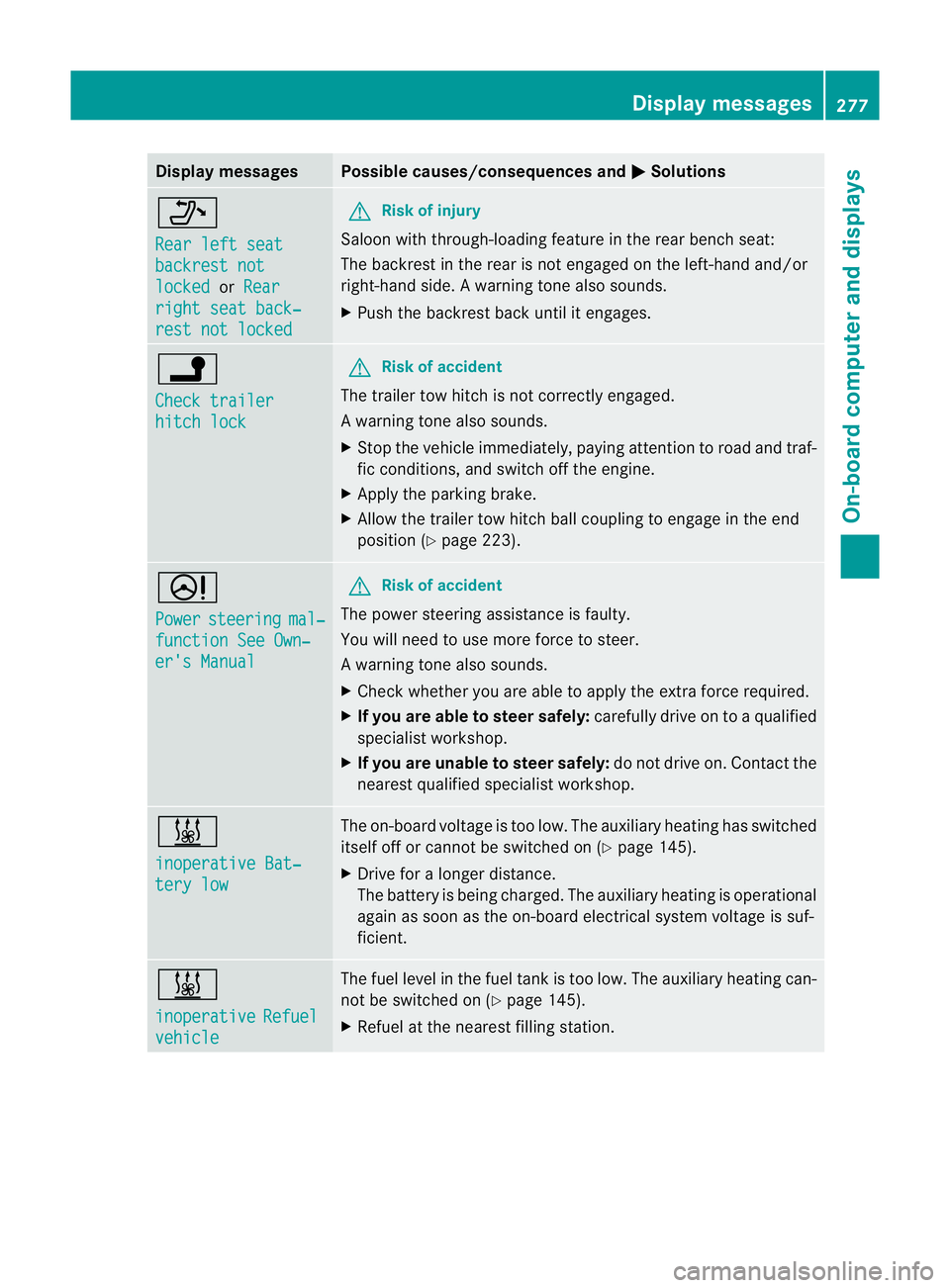
Display messages Possible causes/consequences and
M Solutions
_
Rear left seat
backrest not
locked or
Rear right seat back‐
rest not locked G
Risk of injury
Saloon with through-loading feature in the rear bench seat:
The backrest in the rear is no tengaged on the left-hand and/or
right-hand side .Awarning tone also sounds.
X Push the backres tback until it engages. j
Check trailer
hitch lock G
Ris
kofa ccident
The trailer tow hitch is no tcorrectly engaged.
Aw arning tone also sounds.
X Stop the vehicle immediately, paying attentio ntoroad and traf-
fic conditions, and switch off the engine.
X Apply the parking brake.
X Allow the trailer tow hitch ball coupling to engage in the end
position (Y page 223). D
Power
steering mal‐
function See Own‐
er's Manual G
Risk of accident
The power steering assistance is faulty.
You will need to use more force to steer.
Aw arning tone also sounds.
X Chec kwhether you are able to apply the extra force required.
X If you are able to steer safely: carefully drive on to a qualified
specialist workshop.
X If you are unable to steer safely: do not drive on. Contact the
nearest qualified specialist workshop. &
inoperative Bat‐
tery low The on-board voltage is too low. The auxiliary heating has switched
itself off or cannot be switched on (Y page 145).
X Drive for a longer distance.
The battery is being charged. The auxiliary heating is operational
again as soon as the on-board electrical system voltage is suf-
ficient. &
inoperative
Refuel
vehicle The fuel level in the fuel tank is too low. The auxiliary heating can-
not be switched on (Y page 145).
X Refuel at the nearest filling station. Display messages
277On-board computer and displays Z
Page 283 of 409
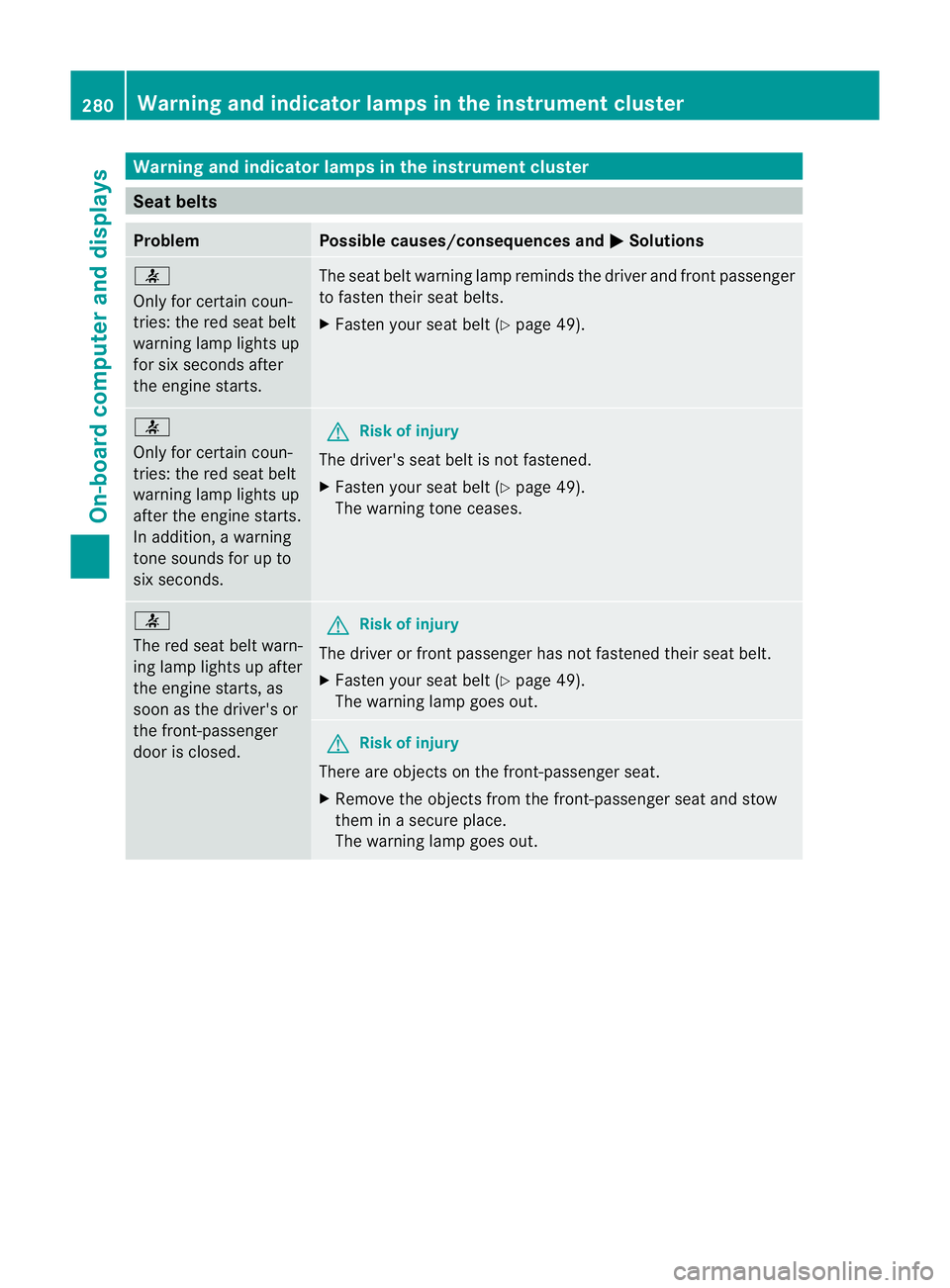
Warning and indicator lamps in the instrument cluster
Seat belts
Problem Possible causes/consequences and
M Solutions
7
Only for certain coun-
tries: the red sea
tbelt
warning lamp lights up
for six seconds after
the engine starts. The seat belt warning lamp reminds the driver and fron
tpassenger
to fasten their seat belts.
X Faste nyour seat belt (Y page 49). 7
Only for certain coun-
tries: the red seat belt
warning lamp lights up
after the engine starts.
In addition, a warning
tone sounds for up to
six seconds. G
Risk of injury
The driver's seat belt is not fastened.
X Fasten your seat belt (Y page 49).
The warning tone ceases. 7
The red seat belt warn-
ing lamp lights up after
the engine starts, as
soon as the driver's or
the front-passenger
door is closed. G
Risk of injury
The driver or front passenger has not fastened their seat belt.
X Fasten your seat belt (Y page 49).
The warning lamp goes out. G
Risk of injury
There are objects on the front-passenger seat.
X Remove the objects from the front-passenger seat and stow
them in a secure place.
The warning lamp goes out. 280
Warning and indicator lamps in the instrument clusterOn-board computer and displays
Page 284 of 409
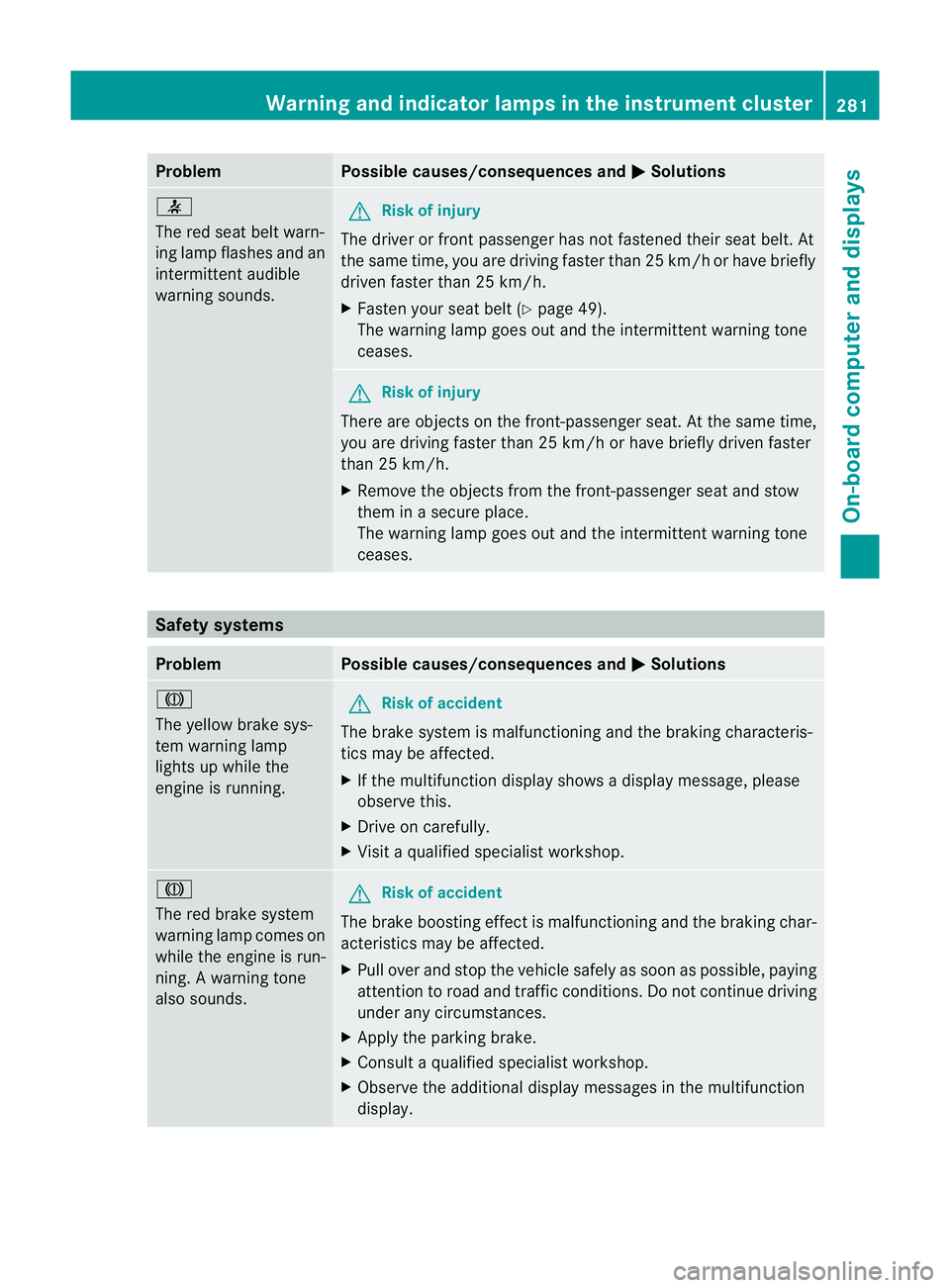
Problem Possible causes/consequences and
M Solutions
7
The red seat belt warn-
ing lamp flashes and an
intermittenta
udible
warning sounds. G
Risk of injury
The driver or fron tpassenger has no tfastened their seat belt .At
the same time, you are driving faste rthan 25 km/h or have briefly
driven faster than 25 km/h.
X Fasten your seat belt (Y page 49).
The warning lamp goes out and the intermittent warning tone
ceases. G
Risk of injury
There are objects on the front-passenger seat. At the same time,
you are driving faster than 25 km/h or have briefly driven faster
than 25 km/h.
X Remove the objects from the front-passenger seat and stow
them in a secure place.
The warning lamp goes out and the intermittent warning tone
ceases. Safety systems
Problem Possible causes/consequences and
M Solutions
J
The yellow brake sys-
tem warning lamp
lights up while the
engine is running.
G
Risk of accident
The brake system is malfunctioning and the braking characteris-
tics may be affected.
X If the multifunction display shows a display message, please
observe this.
X Drive on carefully.
X Visit a qualified specialist workshop. J
The red brake system
warning lamp comes on
while the engine is run-
ning. A warning tone
also sounds. G
Risk of accident
The brake boosting effect is malfunctioning and the braking char-
acteristics may be affected.
X Pull over and stop the vehicle safely as soon as possible, paying
attention to road and traffic conditions. Do not continue driving
under any circumstances.
X Apply the parking brake.
X Consult a qualified specialist workshop.
X Observe the additional display messages in the multifunction
display. Warning and indicator lamps in the instrument cluster
281On-board computer and displays Z
Page 292 of 409
Useful information
............................290
Loading guidelines ............................290
Stowage areas .................................. 290
Features ............................................. 307 289Stowing and features
Page 293 of 409

Useful information
i This Owner's Manual describes all models
and all standard and optional equipment
available to your vehicle at the time of pub-
lication of the Owner's Manual. Country-
specific deviations are possible. Please
note that your vehicle may not be equipped
with all features described. This also
applies to safety-relevan tsystems and
functions.
i Please read the information on qualified
specialist workshops (Y page 25).Loading guidelines
G
WARNING
Secure and position the load as described in
the loading guidelines.
Otherwise, vehicle occupants could
be injured by the load being throw naround in
the event of sharp braking, a sudden change
in direction or an accident.
You will find further informatio ninthe "Secur-
ing a load" section.
Even if you follow all the loading guidelines,
the load will increase the risk of injury in the
event of an accident. G
WARNING
Keep the boot lid/tailgate closed while the
vehicle is in operation. Otherwise, exhaust
fumes could enter the vehicle interior and poi-
son you.
The handling characteristics of a laden vehi-
cle are dependent on the distribution of the
load within the vehicle. For this reason, you
should observe the following notes when
transporting a load:
R when transporting a load, never exceed the
maximum permissible gross vehicle weight or the permissible axle loads for the vehicle
(including occupants).
R position heavy loads as far forwards as pos-
sible and as low down in the boot/luggage
compartmenta s possible.
R the load must not protrude above the upper
edge of the seat backrests.
R always place the load against the rear or
front seat backrests. Make sure that the
seat backrests are securely locked into
place.
R always place the load behind unoccupied
seats if possible.
R secure the load with sufficiently strong and
wear-resistant lashing material. Pad sharp
edges for protection.
i Lashing material is available at any quali-
fied specialist workshop. Stowage areas
Stowage compartments
Important safety notes G
WARNING
The stowage compartments must be closed
when items are stored in them. Luggage nets
are not designed to secure heavy items of
luggage.
You or other vehicle occupants could be
injured by objects being thrown around if you:
R brake sharply
R change direction suddenly
R are involved in an accident
Sharp-edged and fragile objects must not be
placed in the luggage net.
Do not place hard objects in the map pockets.
Objects must not protrude from the map
pockets. 290
Stowage areasStowing and features

