2011 MERCEDES-BENZ E-Class COUPE mirror
[x] Cancel search: mirrorPage 225 of 344

Display messagesPossible causes/consequences and M Solutionsb
Check Left
Cornering Light
or
Check Right
Cornering LightThe left or right-hand cornering light is faulty. XCheck whether you are permitted to change the bulb yourself
( Y page 126).
or
XVisit a qualified specialist workshop.b
Check Left Low Beam
or
Check Right Low
BeamThe left or right-hand low-beam headlamp is faulty. XCheck whether you are permitted to change the bulb yourself
( Y page 126).
or
XVisit a qualified specialist workshop.b
Check Rear Left
Turn Signal
or
Check Rear Right
Turn SignalThe rear left-hand or rear right-hand turn signal is faulty.XCheck whether you are permitted to change the bulb yourself
( Y page 126).
or
XVisit a qualified specialist workshop.b
Check Front Left
Turn Signal
or
Check Front Right
Turn SignalThe front left-hand or front right-hand turn signal is faulty.XCheck whether you are permitted to change the bulb yourself
( Y page 126).
or
XVisit a qualified specialist workshop.b
Check Left Mirror
Turn Signal
or
Check Right Mirror
Turn SignalThe turn signal in the left-hand and/or right-hand exterior mirror
is faulty.XCheck whether you are permitted to change the bulb yourself
( Y page 126).
or
XVisit a qualified specialist workshop.b
Check Center Brake
LampThe high-mounted brake lamp is faulty.XCheck whether you are permitted to change the bulb yourself
( Y page 126).
or
XVisit a qualified specialist workshop.Display messages223On-board computer and displaysBA 207 USA, CA Edition B 2011; 1; 3, en-USd2sboikeVersion: 3.0.3.62010-05-20T10:38:09+02:00 - Seite 223Z
Page 232 of 344
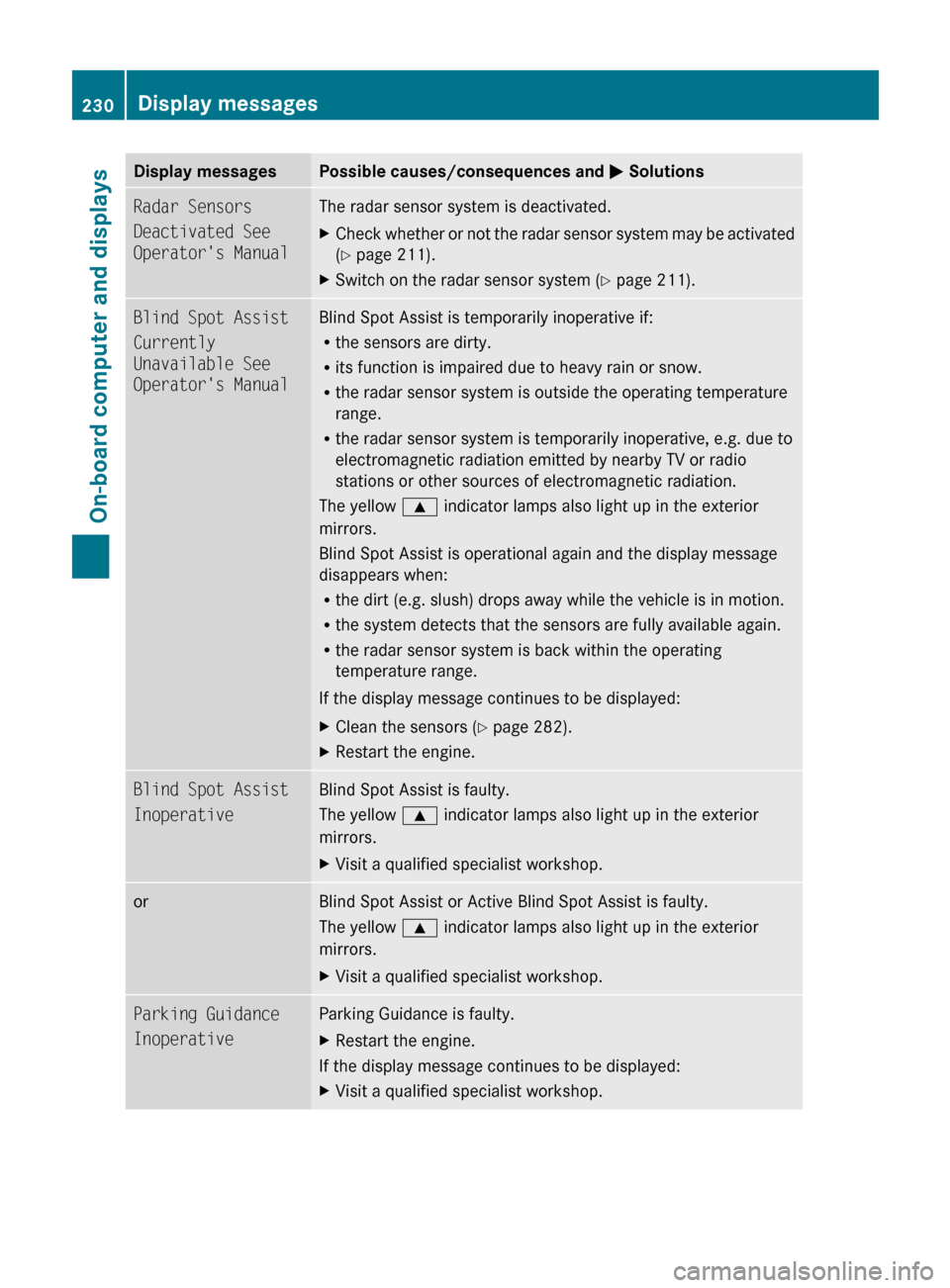
Display messagesPossible causes/consequences and M SolutionsRadar Sensors
Deactivated See
Operator's ManualThe radar sensor system is deactivated.XCheck whether or not the radar sensor system may be activated
( Y page 211).XSwitch on the radar sensor system ( Y page 211).Blind Spot Assist
Currently
Unavailable See
Operator's ManualBlind Spot Assist is temporarily inoperative if:
R the sensors are dirty.
R its function is impaired due to heavy rain or snow.
R the radar sensor system is outside the operating temperature
range.
R the radar sensor system is temporarily inoperative, e.g. due to
electromagnetic radiation emitted by nearby TV or radio
stations or other sources of electromagnetic radiation.
The yellow 9 indicator lamps also light up in the exterior
mirrors.
Blind Spot Assist is operational again and the display message
disappears when:
R the dirt (e.g. slush) drops away while the vehicle is in motion.
R the system detects that the sensors are fully available again.
R the radar sensor system is back within the operating
temperature range.
If the display message continues to be displayed:XClean the sensors ( Y page 282).XRestart the engine.Blind Spot Assist
InoperativeBlind Spot Assist is faulty.
The yellow 9 indicator lamps also light up in the exterior
mirrors.XVisit a qualified specialist workshop.orBlind Spot Assist or Active Blind Spot Assist is faulty.
The yellow 9 indicator lamps also light up in the exterior
mirrors.XVisit a qualified specialist workshop.Parking Guidance
InoperativeParking Guidance is faulty. XRestart the engine.
If the display message continues to be displayed:
XVisit a qualified specialist workshop.230Display messagesOn-board computer and displays
BA 207 USA, CA Edition B 2011; 1; 3, en-USd2sboikeVersion: 3.0.3.62010-05-20T10:38:09+02:00 - Seite 230
Page 258 of 344
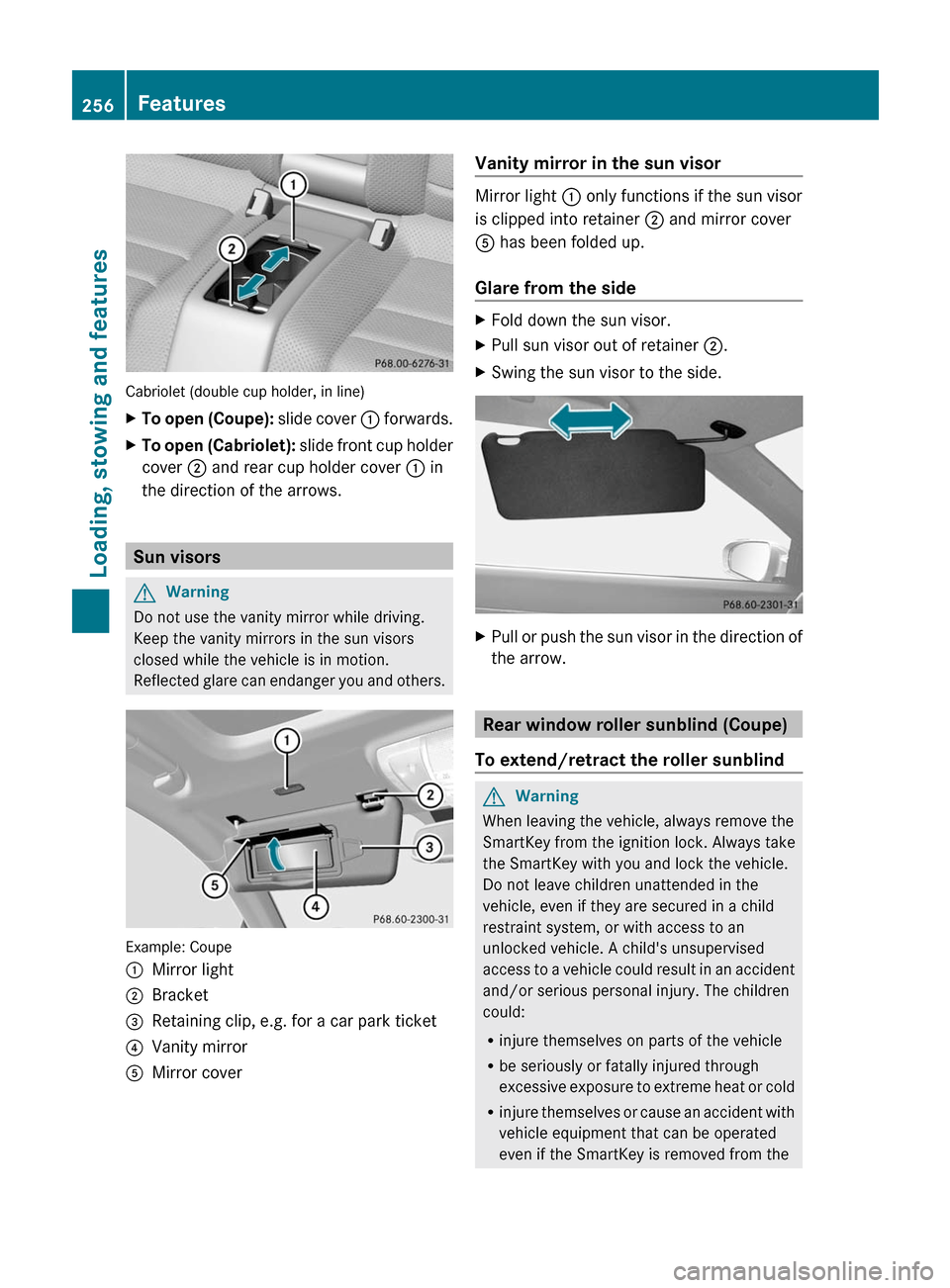
Cabriolet (double cup holder, in line)
XTo open (Coupe): slide cover : forwards.XTo open (Cabriolet): slide front cup holder
cover ; and rear cup holder cover : in
the direction of the arrows.
Sun visors
GWarning
Do not use the vanity mirror while driving.
Keep the vanity mirrors in the sun visors
closed while the vehicle is in motion.
Reflected glare can endanger you and others.
Example: Coupe
:Mirror light;Bracket=Retaining clip, e.g. for a car park ticket?Vanity mirrorAMirror coverVanity mirror in the sun visor
Mirror light : only functions if the sun visor
is clipped into retainer ; and mirror cover
A has been folded up.
Glare from the side
XFold down the sun visor.XPull sun visor out of retainer ;.XSwing the sun visor to the side.XPull or push the sun visor in the direction of
the arrow.
Rear window roller sunblind (Coupe)
To extend/retract the roller sunblind
GWarning
When leaving the vehicle, always remove the
SmartKey from the ignition lock. Always take
the SmartKey with you and lock the vehicle.
Do not leave children unattended in the
vehicle, even if they are secured in a child
restraint system, or with access to an
unlocked vehicle. A child's unsupervised
access to a vehicle could result in an accident
and/or serious personal injury. The children
could:
Rinjure themselves on parts of the vehicle
Rbe seriously or fatally injured through
excessive exposure to extreme heat or cold
Rinjure themselves or cause an accident with
vehicle equipment that can be operated
even if the SmartKey is removed from the
256FeaturesLoading, stowing and features
BA 207 USA, CA Edition B 2011; 1; 3, en-USd2sboikeVersion: 3.0.3.62010-05-20T10:38:09+02:00 - Seite 256
Page 268 of 344
of the garage door. People could otherwise be
injured by the movement of the door.
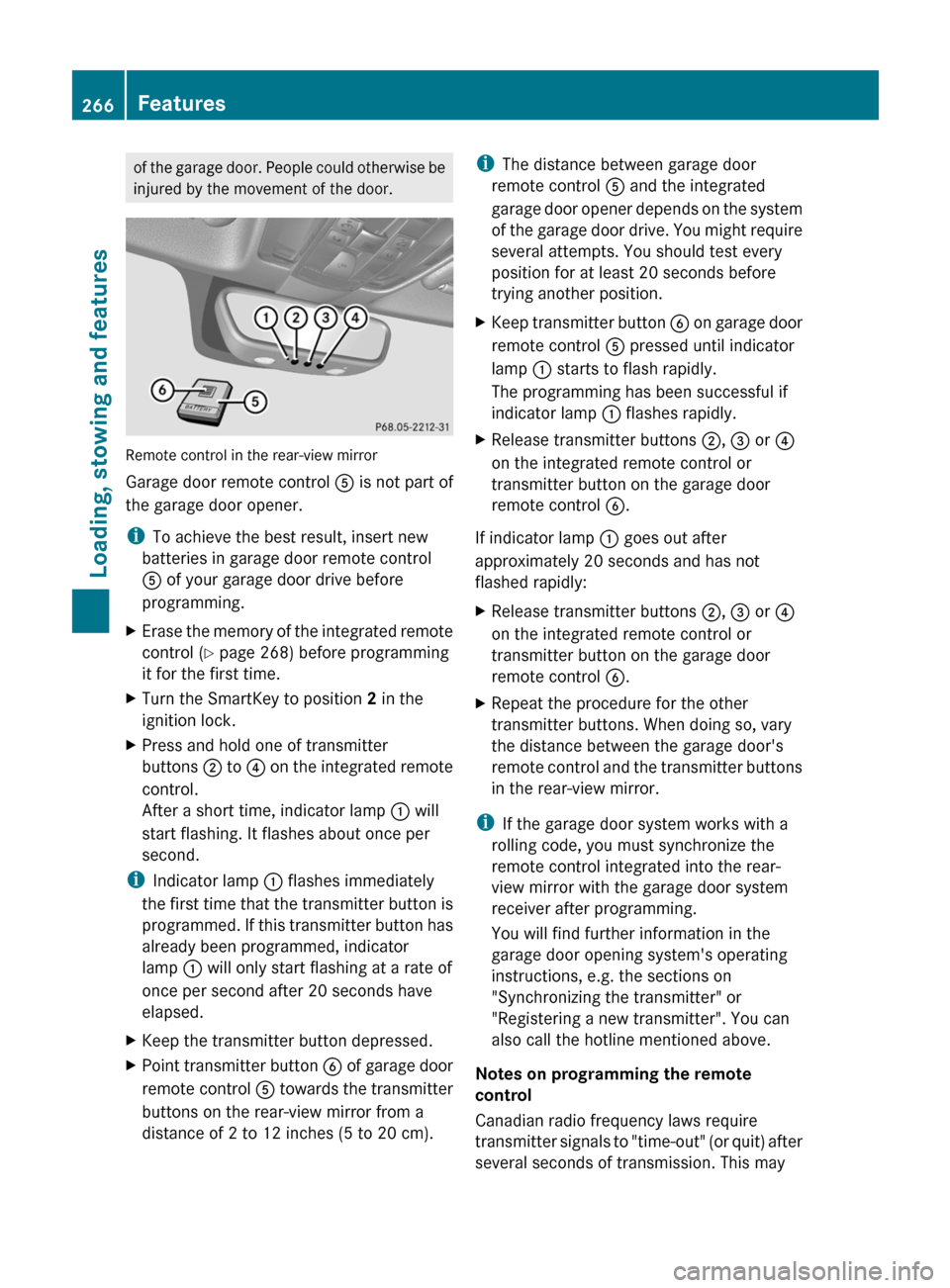
Remote control in the rear-view mirror
Garage door remote control A is not part of
the garage door opener.
i To achieve the best result, insert new
batteries in garage door remote control
A of your garage door drive before
programming.
XErase the memory of the integrated remote
control ( Y page 268) before programming
it for the first time.XTurn the SmartKey to position 2 in the
ignition lock.XPress and hold one of transmitter
buttons ; to ? on the integrated remote
control.
After a short time, indicator lamp : will
start flashing. It flashes about once per
second.
i Indicator lamp : flashes immediately
the first time that the transmitter button is
programmed. If this transmitter button has
already been programmed, indicator
lamp : will only start flashing at a rate of
once per second after 20 seconds have
elapsed.
XKeep the transmitter button depressed.XPoint transmitter button B of garage door
remote control A towards the transmitter
buttons on the rear-view mirror from a
distance of 2 to 12 inches (5 to 20 cm).i The distance between garage door
remote control A and the integrated
garage door opener depends on the system
of the garage door drive. You might require
several attempts. You should test every
position for at least 20 seconds before
trying another position.XKeep transmitter button B on garage door
remote control A pressed until indicator
lamp : starts to flash rapidly.
The programming has been successful if
indicator lamp : flashes rapidly.XRelease transmitter buttons ;, = or ?
on the integrated remote control or
transmitter button on the garage door
remote control B.
If indicator lamp : goes out after
approximately 20 seconds and has not
flashed rapidly:
XRelease transmitter buttons ;, = or ?
on the integrated remote control or
transmitter button on the garage door
remote control B.XRepeat the procedure for the other
transmitter buttons. When doing so, vary
the distance between the garage door's
remote control and the transmitter buttons
in the rear-view mirror.
i If the garage door system works with a
rolling code, you must synchronize the
remote control integrated into the rear-
view mirror with the garage door system
receiver after programming.
You will find further information in the
garage door opening system's operating
instructions, e.g. the sections on
"Synchronizing the transmitter" or
"Registering a new transmitter". You can
also call the hotline mentioned above.
Notes on programming the remote
control
Canadian radio frequency laws require
transmitter signals to "time-out" (or quit) after
several seconds of transmission. This may
266FeaturesLoading, stowing and features
BA 207 USA, CA Edition B 2011; 1; 3, en-USd2sboikeVersion: 3.0.3.62010-05-20T10:38:09+02:00 - Seite 266
Page 269 of 344
not be long enough for the integrated signal
transmitter to pick up the signal during
programming. Similar to this Canadian law,
some U.S. gate operators are designed to
"time-out" in the same manner.
If you live in Canada or have difficulties
programming the garage door opener
(regardless of where you live) when using the
programming steps (see above), proceed as
follows:XPress transmitter button ( ;, = or ?) and
hold it down during the following steps until
the setup has been completed
successfully.XAt the same time, press transmitter button
B of the garage door remote control for
two seconds, then release it for two
seconds, then press it again for two
seconds.XRepeat this sequence on transmitter
button B of the garage door remote
control until the frequency signal has been
learned.XIf the setup procedure is successful,
indicator lamp : flashes once slowly and
goes out after a few seconds.XContinue with the other programming
steps (see above).
Problems when programming
If you have problems when programming the
integrated remote control, please note the
following:
R check the transmitter frequency of garage
door remote control A (which can usually
be found on the rear of the remote control).
The integrated remote control is
compatible with equipment that operates
in the frequency range 280 to 390 MHz.
R replace the batteries in garage door remote
control A. This increases the likelihood of
garage door remote control A sending a
strong and precise signal to the integrated
remote control on the rear-view mirror.
R When aiming the garage door remote
control at the transmitter buttons on the
rear-view mirror, hold garage door remote
control A at differing distances and angles
from the transmitter button that you are
programming. Try different angles from a
distance of 2 to 12 inches (5 to 30 cm) or
the same angle from differing distances.
R If there is another garage door remote
control for the same device, perform the
programming steps again using the remote
control. Before performing these steps,
make sure that new batteries have been
installed in the garage door remote control.
R Align the antenna cable of the garage door
opener unit. This can improve signal
reception/transmission.
Opening or closing the garage door
Once programmed, the integrated remote
control will assume the function of the garage
door system's remote control. Please also
read the operating instructions for the garage
door system.
XTurn the SmartKey to position 2 in the
ignition lock.XPress transmitter button ;, = or ? in the
overhead control panel that you have
programmed to operate the garage door.
Garage door system with fixed code:
indicator lamp : lights up continuously.
Garage door system with rolling code:
indicator lamp : flashes briefly and then
lights up for approximately two seconds.
This is repeated for up to 20 seconds.
i The transmitter will transmit a signal for
as long as the transmitter button is being
pressed. The transmission will be halted
after a maximum of 20 seconds and
indicator lamp : will flash. Press the
transmitter button again, if necessary.
Features267Loading, stowing and featuresBA 207 USA, CA Edition B 2011; 1; 3, en-USd2sboikeVersion: 3.0.3.62010-05-20T10:38:09+02:00 - Seite 267Z
Page 270 of 344
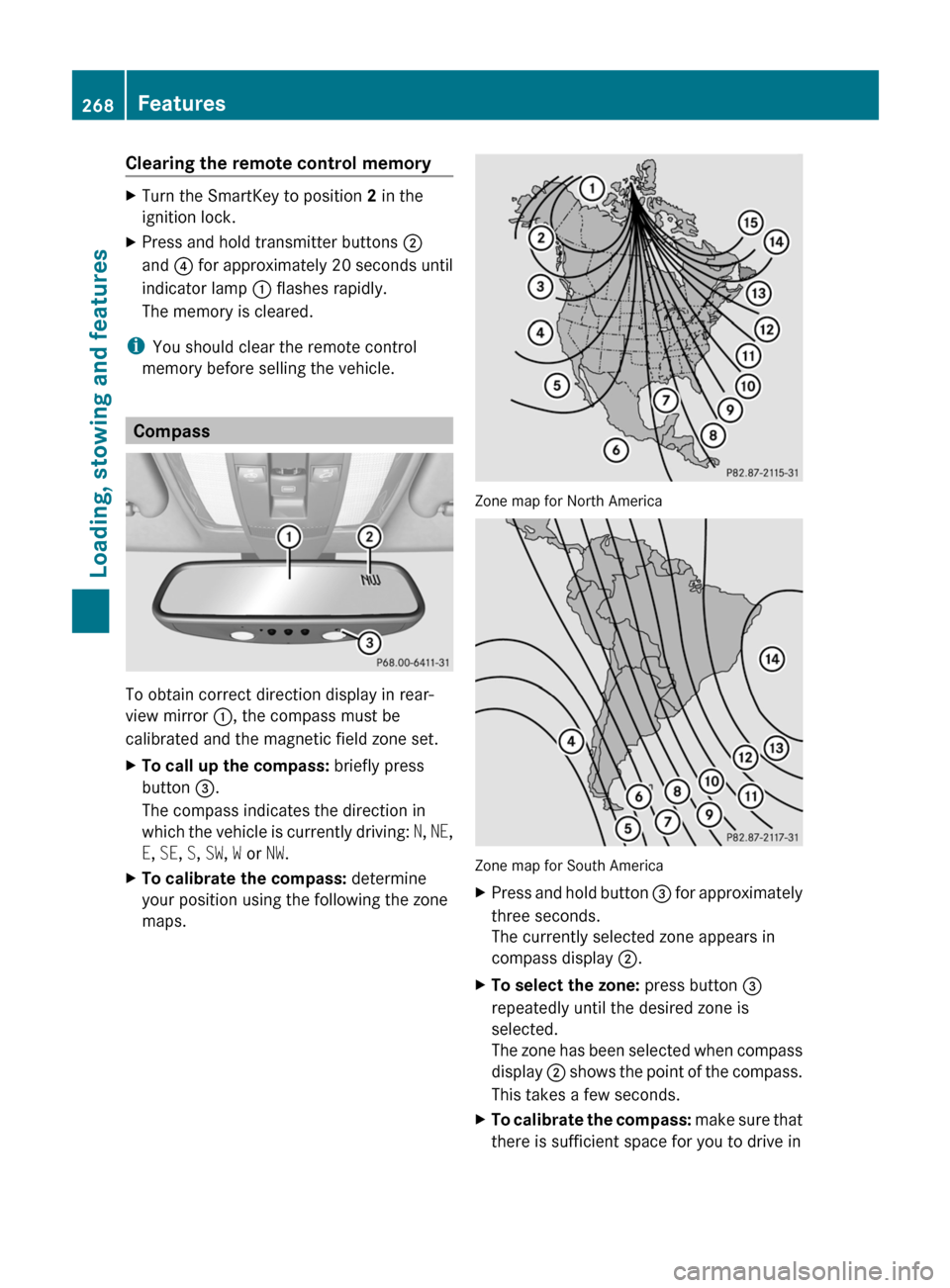
Clearing the remote control memoryXTurn the SmartKey to position 2 in the
ignition lock.XPress and hold transmitter buttons ;
and ? for approximately 20 seconds until
indicator lamp : flashes rapidly.
The memory is cleared.
i You should clear the remote control
memory before selling the vehicle.
Compass
To obtain correct direction display in rear-
view mirror :, the compass must be
calibrated and the magnetic field zone set.
XTo call up the compass: briefly press
button =.
The compass indicates the direction in
which the vehicle is currently driving: N, NE ,
E , SE , S , SW , W or NW.XTo calibrate the compass: determine
your position using the following the zone
maps.
Zone map for North America
Zone map for South America
XPress and hold button = for approximately
three seconds.
The currently selected zone appears in
compass display ;.XTo select the zone: press button =
repeatedly until the desired zone is
selected.
The zone has been selected when compass
display ; shows the point of the compass.
This takes a few seconds.XTo calibrate the compass: make sure that
there is sufficient space for you to drive in268FeaturesLoading, stowing and features
BA 207 USA, CA Edition B 2011; 1; 3, en-USd2sboikeVersion: 3.0.3.62010-05-20T10:38:09+02:00 - Seite 268
Page 341 of 344

The antifreeze/corrosion inhibitor
concentration in the cooling system should:
R be at least 50%. This will protect the cooling
system against freezing down to around
-35 ‡ (-37 †).
R not exceed 55% (antifreeze protection
down to -49 ‡ (-45 †); otherwise, heat will
not be dissipated as effectively.
If the coolant level is too low, MB 326.0
antifreeze/corrosion inhibitor should be
added. Have the cooling system checked for
leaks.
Windshield and headlamp cleaning
system
GWarning
Washer solvent/antifreeze is highly
flammable. Do not spill washer solvent/
antifreeze on hot engine parts, because it may
ignite and burn. You could be seriously
burned.
XUse MB Windshield Washer Concentrate
MB SummerFit.XAt temperatures above freezing: add 1
part MB SummerFit to 100 parts water, e.g.
1.34 fl oz (40 ml) MB SummerFit to 1 gal
(4.0 l) of water.XAt temperatures below freezing: add 1
part MB SummerFit to 100 parts washer
fluid, e.g. 1.34 fl oz (40 ml) MB SummerFit
to 1 gal (4.0 l) of water.
Vehicle data
Vehicle data, E 350
The data quoted here refers specifically to a
vehicle with standard equipment. Contact an
authorized Mercedes-Benz Center for the
data for all vehicle variants and trim levels.
Vehicle dimensions, E 350Vehicle lengthCoupe185.0 in (4698 mm)Cabriolet185.0 in (4698 mm)Vehicle width including exterior mirrorsCoupe79.8 in (2028 mm)Cabriolet79.4 in (2015 mm)Vehicle heightCoupe55.0 in (1397 mm)Cabriolet55.2 in (1402 mm)Wheel baseCoupe108.7 in (2760 mm)Cabriolet108.7 in (2760 mm)Front trackCoupe60.6 in (1538 mm)Cabriolet60.6 in (1538 mm)Rear trackCoupe60.8 in (1544 mm)Cabriolet60.8 in (1544 mm)Turning circleCoupe36.1 ft (11.0 m)Cabriolet36.1 ft (11.0 m)Vehicle weight, E 350Maximum roof
load, Coupe onlyMaximum 220 lb
(100 kg)Maximum trunk
loadMaximum 220 lb
(100 kg)Vehicle data339Technical dataBA 207 USA, CA Edition B 2011; 1; 3, en-USd2sboikeVersion: 3.0.3.62010-05-20T10:38:09+02:00 - Seite 339Z
Page 342 of 344

Vehicle data, E 550
The data quoted here refers specifically to a
vehicle with standard equipment. Contact an
authorized Mercedes-Benz Center for the
data for all vehicle variants and trim levels.Vehicle dimensions, E 550Vehicle lengthCoupe185.0 in (4698 mm)Cabriolet185.0 in (4698 mm)Vehicle width including exterior mirrorsCoupe79.8 in (2028 mm)Cabriolet79.4 in (2015 mm)Vehicle heightCoupe55.0 in (1397 mm)Cabriolet55.3 in (1403 mm)Wheel baseCoupe108.7 in (2760 mm)Cabriolet108.7 in (2760 mm)Front trackCoupe60.6 in (1538 mm)Cabriolet60.6 in (1538 mm)Rear trackCoupe60.8 in (1544 mm)Cabriolet60.8 in (1544 mm)Turning circleCoupe36.7 ft (11.2 m)Cabriolet36.1 ft (11.0 m)Vehicle weight, E 550Maximum roof
load, Coupe onlyMaximum 220 lb
(100 kg)Maximum trunk
loadMaximum 220 lb
(100 kg)340Vehicle dataTechnical data
BA 207 USA, CA Edition B 2011; 1; 3, en-USd2sboikeVersion: 3.0.3.62010-05-20T10:38:09+02:00 - Seite 340