2011 MERCEDES-BENZ E-CLASS CABRIOLET boot
[x] Cancel search: bootPage 195 of 353

X
To revers eintot he parking space: main-
tai nt he steering wheel angle and reverse
carefully.
X Stop as soon as you hear awarning tone,
at the latest when PARKTRONIC sounds the
continuous warning tone.
The Parking Guidance finished mes-
sage appears in the multifunction display
and awarning tone sounds. You may be
asked to steer in adifferen tdirection and
the nchange gear. In this case, further dis-
playsint he multifunction displayw ill direct
you to the final position.
X Manoeuvre if necessary.
X Always observe the warning messages dis-
played by PARKTRONIC (Y page 187).
Cancelling Parking Guidance X
Press the PARKTRONIC button on the
centre console (Y page 188).
Parking Guidance is cancelled immediately
and PARKTRONIC is deactivated.
Parking Guidance is cancelled automatically
if it is no longer possible to guide you into the
parking space, or if amalfunction occurs.
The parking space symbol goes out and a
warning tone sounds. The Parking Guid‐ance cancelled message appears in the
multifunction display.
Trailer towing For vehicles with
atrailer tow hitch, the min-
imum length for parking spaces is slightly
increased.
If you have attached atrailer to your vehicle,
you should not use Parking Guidance. When
the electrical connection is established
between your vehicle and the trailer, Parking
Guidance ceases to be available. PARK-
TRONIC is deactivated for the rear area. Reversing camera
Important safety notes The reversing camera is an optical parking
aid. It shows the area behind your vehicle in
the COMAND APS display.
G
WARNING
Make sure that no persons or animals are in
the manoeuvring range. Otherwise, they
could be injured.
The reversing camera is located in the handle
strip of the boot lid. Example: Coupé
:
Reversing camera
View through the camera The area behind the vehicle is displayed as a
mirror image, as in the rear-view mirror.
G
WARNING
The reversing camera is only an aid and may
display obstacles in adistorted or incorrect
manner, or may not even display them at all.
The reversing camera does not relieve you of
the responsibility to pay attention. The cam-
era cannot show objects:
R very near to the rear bumper
R below the rear bumper
R in the area immediately above the boot lid
handle
You are always responsible for safety and
must continue to pay attention to your imme-
diate surroundings when parking and 192
Driving systemsDriving and parking
Page 196 of 353

manoeuvring. This appliestot
he areas
behind, in front of and next to the vehicle. You
could otherwise endange ryourself and oth-
ers. G
WARNING
Under the following circumstances, the
reversing camera will not function, or will
function in alimited manner:
R if the boot lid is open
R in heavy rain, snow or fog
R at night or in very dark places
R if the camera is exposed to very bright light
R if the area is lit by fluorescent light (the dis-
play may flicker)
R if there is asudden change in temperature,
e.g. when driving into aheated garage in
winter
R if the camera lens is dirty or obstructed
R if the rear of your vehicle is damaged. In this
event,h ave the camera position and setting
checked at aqualified specialist workshop.
Mercedes-Benz recommends that you use
aM ercedes-Benz Service Centre for this
purpose.
Do not use the reversing camera in these
types of situation. You could otherwise injure
others or damage object sand your vehicle
while you are parking.
Activating the reversing camera X
Make sure that the key is in position 2in
the ignition lock.
X Make sure that the "Reversing camera"
function is selected in COMAND APS (see
the separate operating instructions for
COMAND APS).
X Engage reverse gear.
The area behind the vehicle is shown in the
COMAND APS display. Guide lines in the COMAND APS display Depending on the date of manufacture of the
vehicle, the guide lines are shown in the
COMAND APS display.
G
WARNING
Using the reversing camera can be dangerous
if you are colour blind or if your ability to dis-
tinguish colours is impaired.
Only use the reversing camera if you can see
and distinguish between all the coloured
guide lines that are displayed by the reversing
camera in the COMAND APS display. G
WARNING
Please note that object snot at ground level
may appear to be further away than they
actually are. These include:
R the bumper of avehicle that is parked
behind your vehicle
R at railer drawbar
R the ball coupling of atrailer tow hitch
R the tail-end of alorry
R slanted posts
The lines are only guides, not accurate meas-
urements of the distance to an obstacle.
Therefore, you should never pass the red line
when approaching an obstacle. You could oth-
erwise cause an accident and injure yourself
and others. Information in the COMAND APS display (example)
Guide lines
;and =show the approximate
distance to the rear area. Yellow guide
line ;indicates adistance of approximately Driving systems
193Driving and parking Z
Page 209 of 353
data" section to find out whether this applies
to your vehicle. If you utilise any of the added
maximum rear axle load when towin gatrailer,
the vehicle/trailer combination may not
exceed amaximum speed of 100 km/ hfor
reasons concerning the operatin gpermit.
This also applies in countries in which the
permissible maximum speed for vehicle/
trailer combinations is above 100 km/h.
When towin gatrailer, your vehicle's handling
characteristic swill be differen tincomparison
to when driving without atrailer.
The vehicle/trailer combination:
R is heavier
R is restricted in its acceleration and gradi-
ent-climbing capability
R has an increased braking distance
R is affected more by strongc rosswinds
R demands more sensitive steering
R consumes more fuel
On long and steep downhill gradients, you
must shift to alower gear in good time, or on
vehicles with automatic transmission, select
the shift range 1,2or 3.
i This also applies if you have activated
cruise control, SPEEDTRONIC or DIS-
TRONIC PLUS.
This will use the braking effect of the engine,
so less braking will be required to maintain
the speed. This relieves the load on the brake
system and prevent sthe brakes from over-
heating and wearing too quickly. If you need
additional braking, depress the brake pedal
repeatedly rather than continuously.
Driving tips R
Maintain agreater distance from the vehi-
cle in front than when driving without a
trailer.
R Avoid braking abruptly. If possible, brake
gently at first to allow the trailer to run on.
Then, increase the braking force rapidly.
R The values given for gradient-climbing
capabilities from astandstill refer to sea level. When driving in mountainous areas,
notet hat the power output of the engine,
and consequently the vehicle's gradient-
climbing capability, decrease with increas-
ing altitude.
If the trailer swings from side to side:
X Do not accelerate.
X Do not counter-steer.
X Brake if necessary. Folding out the ball coupling
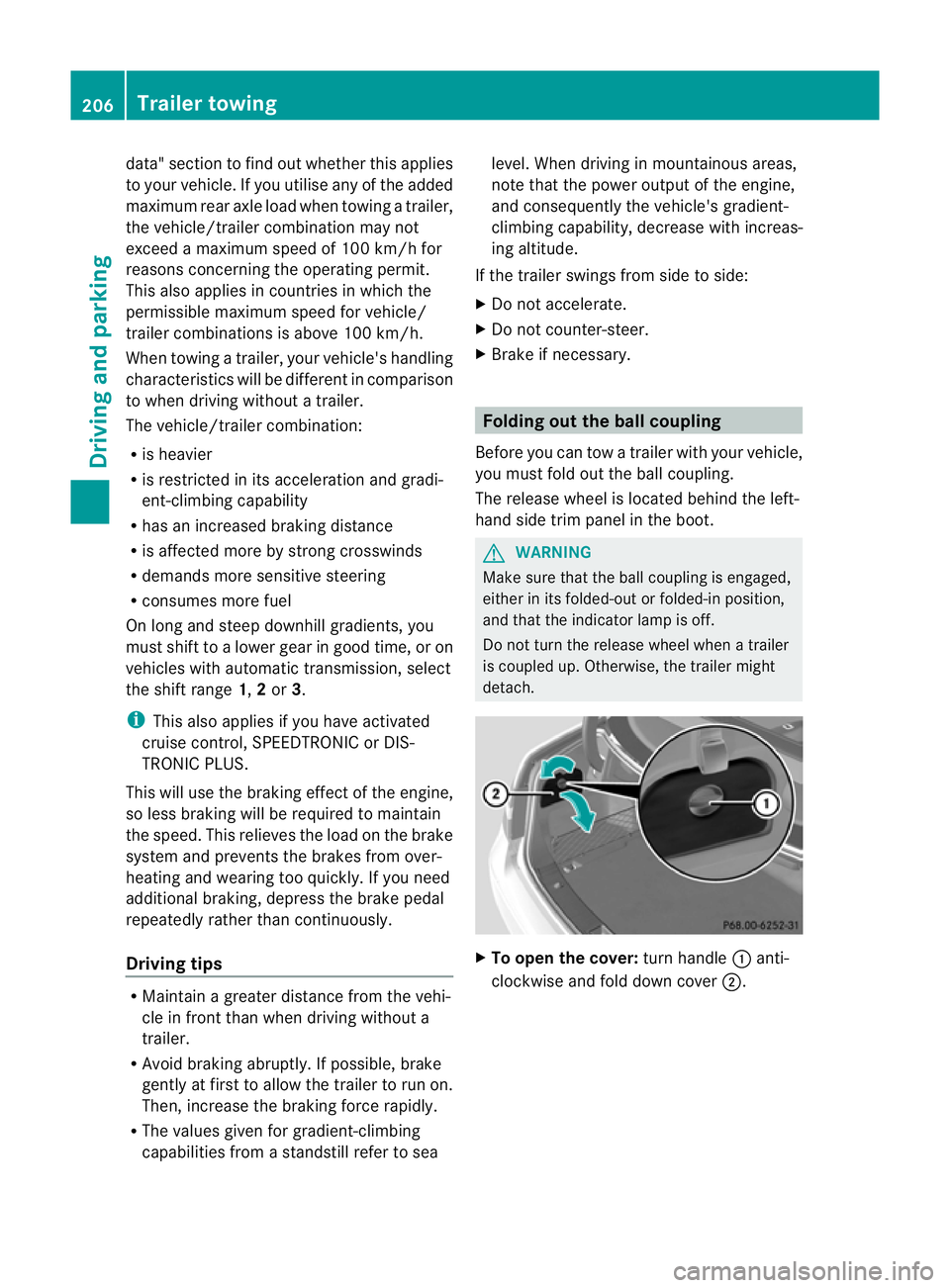
Before you can tow atrailer with your vehicle,
you must fold out the ball coupling.
The release wheel is located behind the left-
hand side trim panel in the boot. G
WARNING
Make sure that the ball coupling is engaged,
either in its folded-out or folded-in position,
and that the indicator lamp is off.
Do not turn the release wheel when atrailer
is coupled up. Otherwise, the trailer might
detach. X
To open the cover: turn handle:anti-
clockwise and fold down cover ;.206
Trailer towingDriving and parking
Page 211 of 353
X
Secure the traile ragainst rolling away.
X Remove the trailer cable and decouple the
trailer. Folding in the ball coupling
i Fold the ball coupling back in if you are
not using the trailer tow hitch. G
WARNING
Make sure that no persons or animals are in
the pivoting range of the ball coupling. Other-
wise, they could be injured.
X Place the protective cap on the ball cou-
pling.
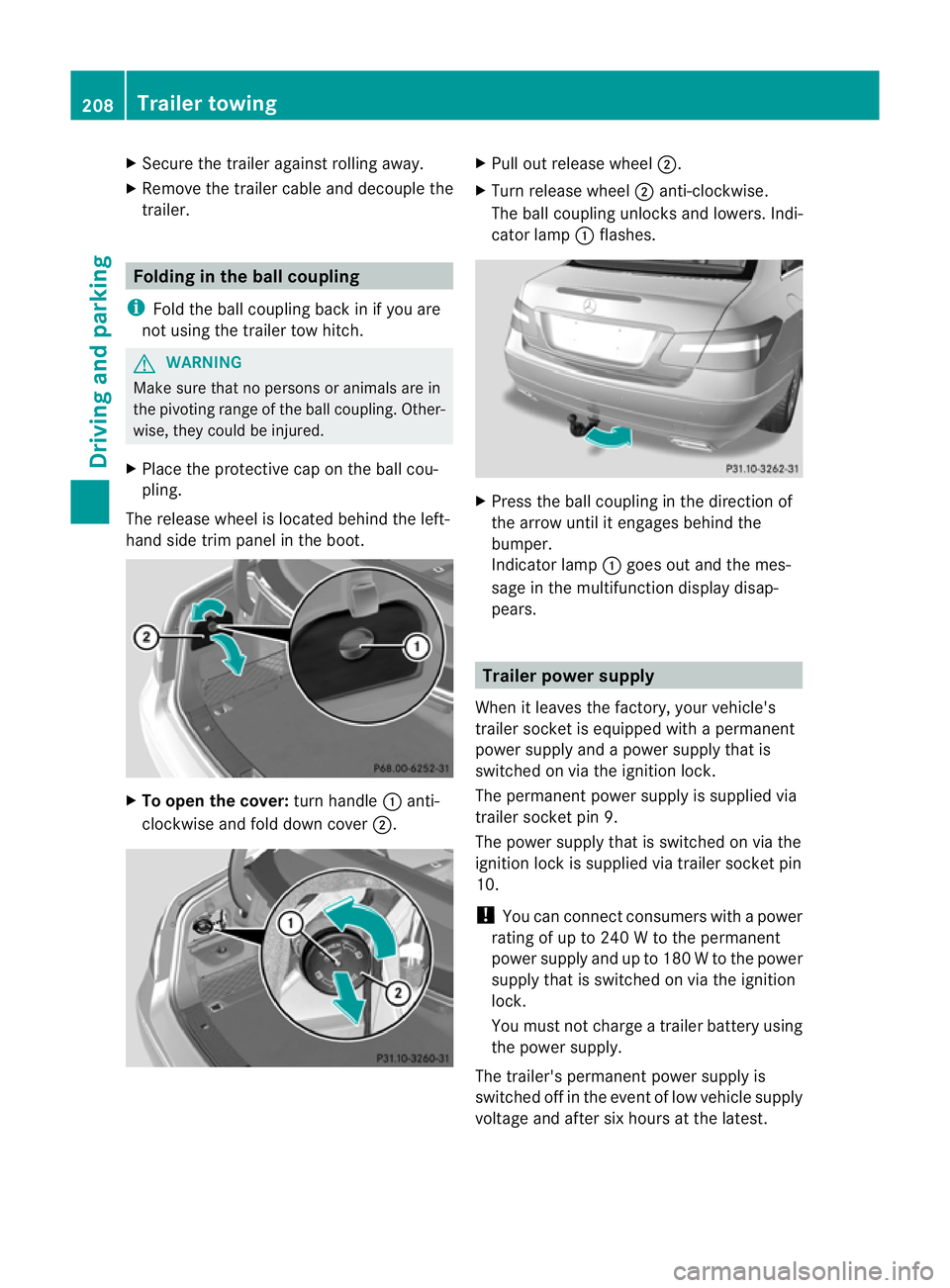
The release wheel is located behind the left-
hand side trim panel in the boot. X
To open the cover: turn handle:anti-
clockwise and fold down cover ;. X
Pull out release wheel ;.
X Turn release wheel ;anti-clockwise.
The ball coupling unlocks and lowers. Indi-
cator lamp :flashes. X
Press the ball coupling in the direction of
the arrow until it engages behind the
bumper.
Indicator lamp :goes out and the mes-
sage in the multifunction display disap-
pears. Trailer power supply
When it leaves the factory, your vehicle's
trailer socket is equipped with apermanent
power supply and apower supply that is
switched on via the ignition lock.
The permanent power supply is supplied via
trailer socket pin 9.
The power supply that is switched on via the
ignition lock is supplied via trailer socket pin
10.
! You can connect consumers with apower
rating of up to 240 Wtothe permanent
power supply and up to 180 Wtothe power
supply that is switched on via the ignition
lock.
You must not charge atrailer battery using
the power supply.
The trailer's permanent power supply is
switched off in the event of low vehicle supply
voltage and after six hours at the latest. 208
Trailer towingDriving and parking
Page 253 of 353

Vehicle
Display messages Possible causes/consequences and
M Solutions
To start engine,
shift to either P
or N Yo
uh avea ttempte dtostart the engine with the transmission in
position Ror D.
X Shift the transmission to position Por N. P
Select Par
k(P) Yo
uh aves witched off the engine with the Start/Sto pbutton and
opene dthe driver' sdoor.
Yo uw anted to lock the vehicle.
Aw arning tone also sounds.
or
You have switched off th eenginew itht he Start/Sto pbutto nand
opene dthe driver's door with the transmission in position N.
X Shift the transmission to position P. While the HOLD functio
norDISTRONIC PLUS is active, you have:
R opened the driver's door and released the seat belt or
R switched off the engine or
R opened the bonnet
At one may also sound at regular intervals. The toneb ecomes
louder if you attempt to lock the vehicle.
You cannot start the engine.
X Shift the transmission to position P.
You can restart the engine. N The boot lid is open.
X
Close the boot lid. M G
Risk of accident
The bonnet is open. Awarning tone also sounds.
X Pull ove rand stop the vehicl esafelyass oonasp ossible,p aying
attention to road and traffic conditions.
X Apply the parking brake.
X Close the bonnet.
If the active bonnet (pedestrian protection) has been triggered:
X Reset the bonnet (Y page 280).
X Close the bonnet. Active bonnet
malfunction See
Owner's Manual The active bonnet (pedestrian protection) is not active due to a
malfunction.
X
Visit aqualified specialist workshop. 250
Display messagesOn-board computer and displays
Page 254 of 353
Display messages Possible causes/consequences and
M Solutions
C At leas
tone door is open. Awarning tone also sounds.
X Close all doors. _
Rea
rl efts eat backrest not locked
or
Rea rr ight seat backrest not locked G
Ris
kofi njury
The backres tinthe rear is not engaged on the left-hand and/or
right-hand side. Awarning tone also sounds.
X Push th ebackres tback until it engages. _
Front lef
tseat backrest not locked
or
Front right sea
tb ackrest not locked The driver'
sorfront-pa ssenger seat backres tisnot engaged. A
warning tone also sounds.
X Push the backrest back until it engages. j
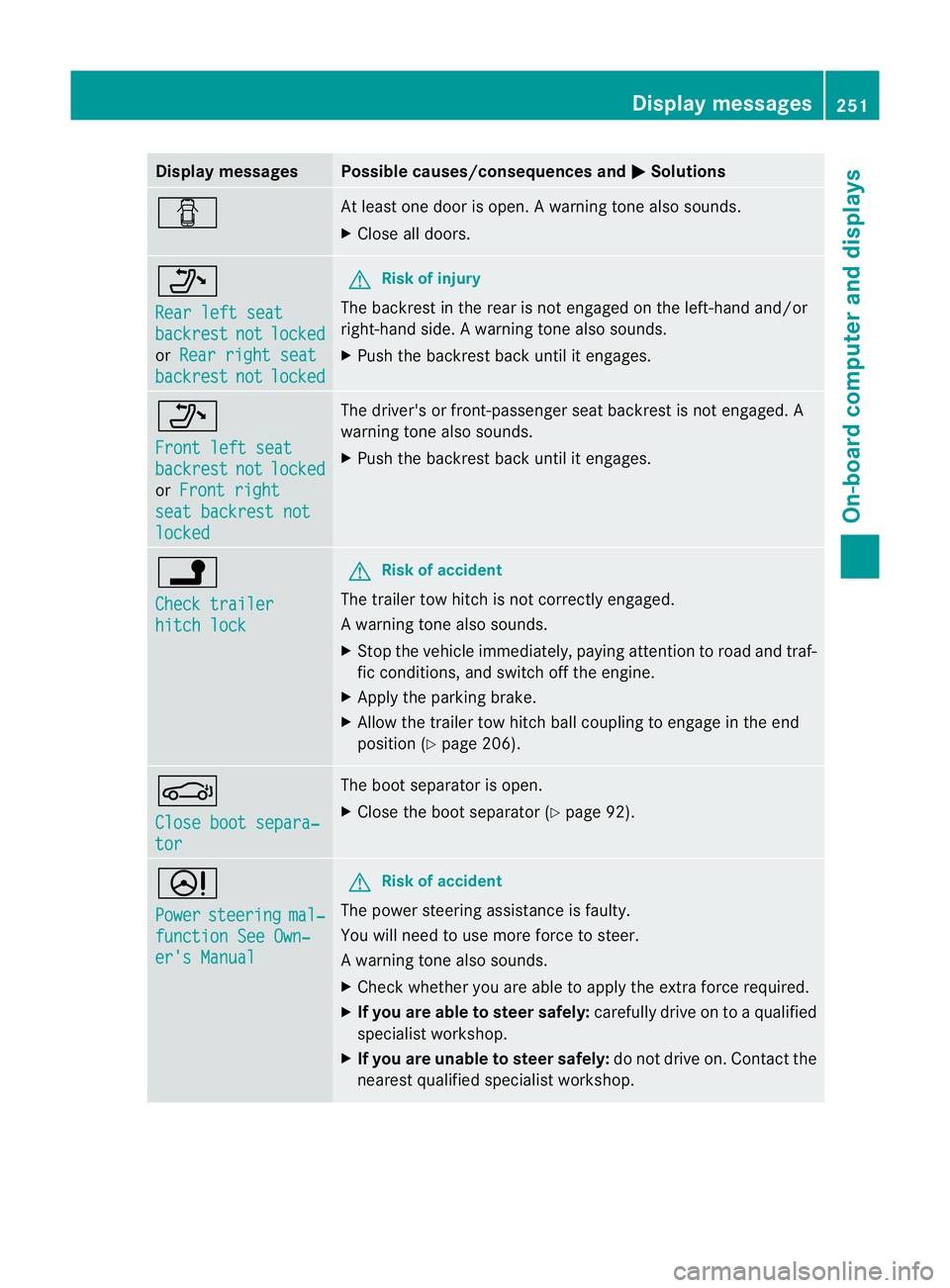
Check trailer
hitch lock G
Risk of accident
The trailer tow hitch is not correctly engaged.
Aw arning tone also sounds.
X Stop th evehicle immediately, payin gattentio ntoroad and traf-
fic conditions, and switch off the engine.
X Apply the parking brake.
X Allow the trailer tow hitch ball coupling to engage in the end
position (Y page 206). J
Close boot separa‐
tor The boot separator is open.
X
Close the boot separator (Y page 92).D
Power
steering mal‐
function See Own‐
er's Manual G
Risk of accident
The power steerin gassistance is faulty.
You will need to use more force to steer.
Aw arning tone also sounds.
X Chec kwhether you are able to apply the extraf orce required.
X If you are able to steer safely: carefully drive on toaqualified
specialist workshop.
X If you are unable to steer safely: do not drive on. Contact the
nearest qualified specialist workshop. Display messages
251On-board computer and displays Z
Page 267 of 353
Useful information
i This Owner's Manual describes all models
and all standard and optional equipment
available to your vehicle at the time of pub-
lication of the Owner's Manual. Country-
specific deviation sare possible. Please
not ethat your vehicle may not be equipped
with all feature sdescribed. This also
applies to safety-relevan tsystems and
functions.
i Pleas ereadt he information on qualified
specialist workshop s(Ypage 22). Loading guidelines (Coupé)
G
WARNING
Secur eand position th eload as described in
th el oadin gguidelines.
Otherwise ,vehicl eoccupant scould
be injured by th eload bein gthrow na round in
the event of sharp braking, asudden change
in directio noranaccident.
You willf ind further informatio ninthe "Secur-
ing aload" section.
Even if you follow all the loading guidelines,
the load will increase the risk of injury in the
event of an accident. G
WARNING
Keep the boot lid closed while the vehicle is
in operation. Otherwise, you could be pois-
oned by exhaust fumes enteringt he vehicle.
The handling characteristics of aladen vehi-
cle are dependent on the distribution of the
load within the vehicle. For this reason, you
should observe the following notes when
transporting aload:
R when transporting aload, never exceed the
maximum permissible gross vehicle weight or the permissible axle loads for the vehicle
(including occupants).
R position heavy loads as far forwards as pos-
sible and as low down in the boot as pos-
sible.
R the load must not protrude above the upper
edge of the seat backrests.
R always place the load against the rear or
front seat backrests. Make sure that the
seat backrests are securely locked into
place.
R always place the load behind unoccupied
seats if possible.
R secure the load with sufficiently stronga nd
wear-resistant lashing material. pad sharp
edges for protection.
i Load restraintsa re available at any quali-
fied specialist workshop, e.g. aMercedes-
Benz Service Centre. Stowage areas
Stowage compartments
Important safety notes G
WARNING
The stowage compartments must be closed
when items are stored in them. Luggage nets
are not designed to secure heavy items of
luggage.
You or other vehicle occupants could be
injured by objectsb eing thrown around if you:
R brake sharply
R change direction suddenly
R are involved in an accident
Sharp-edged and fragile objectsm ust not be
placed in the luggagen et.
Do not place hard objectsint he map pockets.
Objectsm ust not protrude from the map
pockets. 264
Stowage areasStowing and features
Page 269 of 353
Luggage nets
G
WARNING
Only place lightweight object sinthe luggage
net. Do not use it to transport heavy, sharp-
edged or fragile objects. The luggagen et can-
not secure the objectss ufficiently in the event
of an accident.
Luggage nets are located in the front-
passenger footwell and on the left-hand side
of the boot (Coupé) or left and right-hand
sides of the boot (Cabriolet). Through-loading facility in the rear
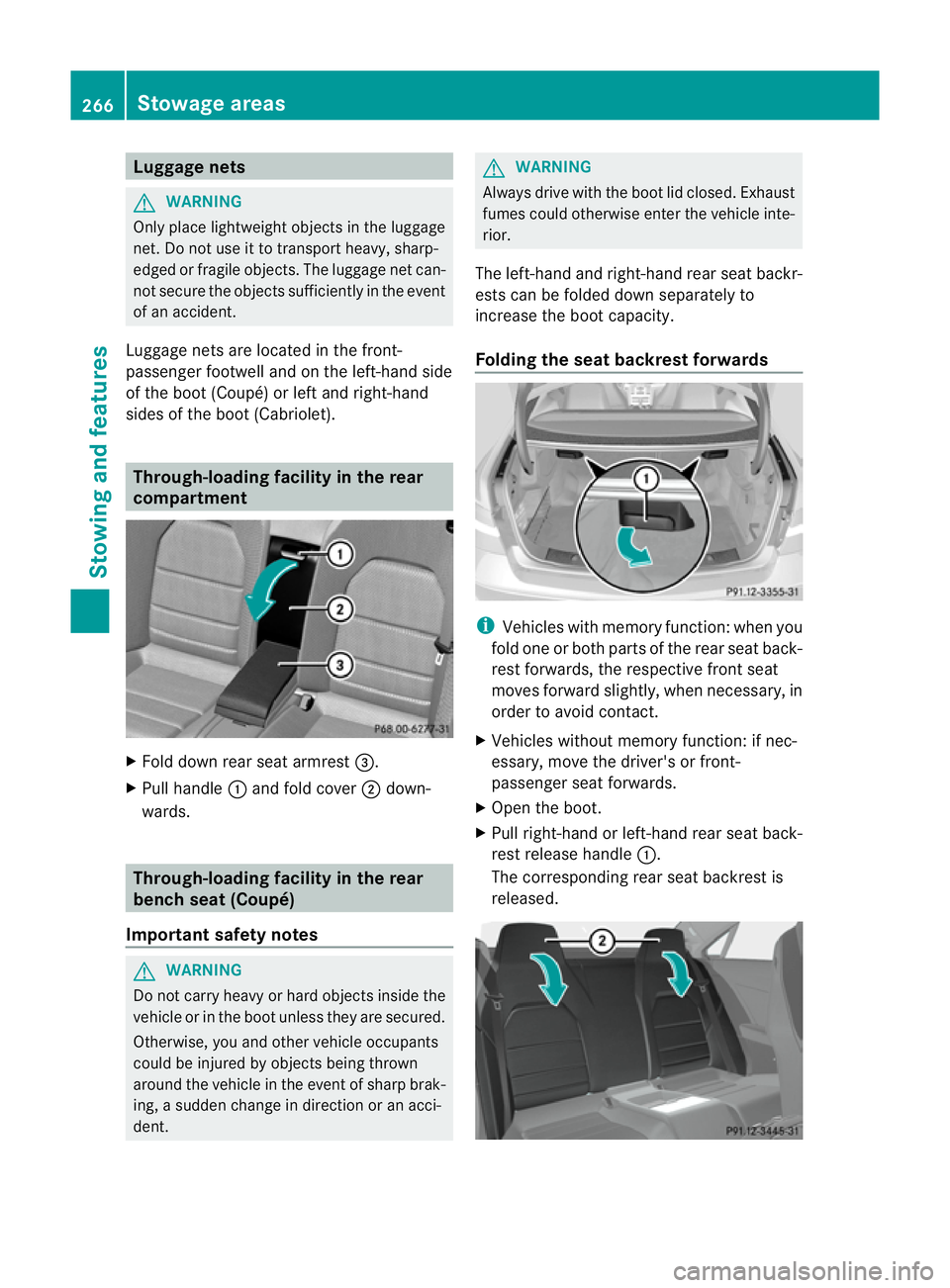
compartment X
Fold down rear seat armrest =.
X Pull handle :and fold cover ;down-
wards. Through-loading facility in the rear
bench seat (Coupé)
Important safety notes G
WARNING
Do not carry heavy or hard objectsi nside the
vehicle or in the boot unless they are secured.
Otherwise, you and other vehicle occupants
could be injured by objects being thrown
around the vehicle in the event of sharp brak-
ing, asudden change in direction or an acci-
dent. G
WARNING
Always drive with the boot lid closed. Exhaust
fumes could otherwise enter the vehicle inte-
rior.
The left-hand and right-hand rear seat backr-
ests can be folded down separately to
increase the boot capacity.
Folding the seat backrest forwards i
Vehicles with memory function :when you
fold one or both parts of the rear seat back-
rest forwards, the respective front seat
moves forward slightly, when necessary, in
order to avoid contact.
X Vehicles without memory function: if nec-
essary, move the driver's or front-
passenger seat forwards.
X Open the boot.
X Pull right-hand or left-hand rear seat back-
rest release handle :.
The corresponding rear seat backrest is
released. 266
Stowage areasStowing and features