2011 MERCEDES-BENZ E-CLASS CABRIOLET comand
[x] Cancel search: comandPage 196 of 353

manoeuvring. This appliestot
he areas
behind, in front of and next to the vehicle. You
could otherwise endange ryourself and oth-
ers. G
WARNING
Under the following circumstances, the
reversing camera will not function, or will
function in alimited manner:
R if the boot lid is open
R in heavy rain, snow or fog
R at night or in very dark places
R if the camera is exposed to very bright light
R if the area is lit by fluorescent light (the dis-
play may flicker)
R if there is asudden change in temperature,
e.g. when driving into aheated garage in
winter
R if the camera lens is dirty or obstructed
R if the rear of your vehicle is damaged. In this
event,h ave the camera position and setting
checked at aqualified specialist workshop.
Mercedes-Benz recommends that you use
aM ercedes-Benz Service Centre for this
purpose.
Do not use the reversing camera in these
types of situation. You could otherwise injure
others or damage object sand your vehicle
while you are parking.
Activating the reversing camera X
Make sure that the key is in position 2in
the ignition lock.
X Make sure that the "Reversing camera"
function is selected in COMAND APS (see
the separate operating instructions for
COMAND APS).
X Engage reverse gear.
The area behind the vehicle is shown in the
COMAND APS display. Guide lines in the COMAND APS display Depending on the date of manufacture of the
vehicle, the guide lines are shown in the
COMAND APS display.
G
WARNING
Using the reversing camera can be dangerous
if you are colour blind or if your ability to dis-
tinguish colours is impaired.
Only use the reversing camera if you can see
and distinguish between all the coloured
guide lines that are displayed by the reversing
camera in the COMAND APS display. G
WARNING
Please note that object snot at ground level
may appear to be further away than they
actually are. These include:
R the bumper of avehicle that is parked
behind your vehicle
R at railer drawbar
R the ball coupling of atrailer tow hitch
R the tail-end of alorry
R slanted posts
The lines are only guides, not accurate meas-
urements of the distance to an obstacle.
Therefore, you should never pass the red line
when approaching an obstacle. You could oth-
erwise cause an accident and injure yourself
and others. Information in the COMAND APS display (example)
Guide lines
;and =show the approximate
distance to the rear area. Yellow guide
line ;indicates adistance of approximately Driving systems
193Driving and parking Z
Page 197 of 353
1.0
mand red guid eline =indicates adis-
tance of approximatel y0.25 m. The distances
onl yapply to objects tha tare at ground level.
Blue guide lines :depict the width required
for the vehicle. They are usedtoa lign the
vehicl ewith the edge of the carriageway, e.g.
the kerb. ATTENTION ASSIST
Important safety notes ATTENTION ASSIST help
syou during long,
monotonous journey ssuch as on motorways
and trunk roads. It is active in the 80 km/h
to 180 km/h range.
If ATTENTION ASSIST detects typical indica-
tors of fatigu eorincreasing lapses in con-
centration on the part of the driver, it sug-
gests taking abreak. G
WARNING
ATTENTION ASSIST is only an aid and may
detect yourt iredness or lapses in concentra-
tion too late or not at all. It is not asubstitute
for aw ell reste dand attentiv edriver.
Fatigue may caus eyou to recognise hazard-
ous situations to olate ,misjudge asituation
or reac tslower. For this reason ,makes ure
you fee lreste dbefore you begin driving and
durin gyour journey. Always tak ebreaks in
good tim eand regularly, especiall yduring
lon gjou rneys. Otherwise, you may fail to rec-
ognise danger sintime, caus eanacciden tand
injure yoursel fand others.
ATTENTIO NASSIST assesses your level of
fatigu eorlapsesinc oncentration by taking
the following criteria into account:
R your persona ldriving style ,e.g. steering
characteristics
R driving conditions ,e.g. time ,driving time The functionality of ATTENTIO
NASSIST is
restricte dand warning smay be delaye dor
not occu ratall:
R if the roa dcondition is poor, e.g. if the sur-
face is uneven or if there are potholes
R if there is astrong sid ewind
R if you have adopted asport ydrivin gstyle
with high cornering speeds or high rates of
acceleration
R if you are predominantly drivin gslower
than 80 km/h or faster than 180 km/h
R if you are currently using COMAND APS or
making atelephon ecall with it
R if the tim ehas been set incorrectly
R in active drivin gsituations, such as when
you change lanes or change your speed
Warning and display messages in the
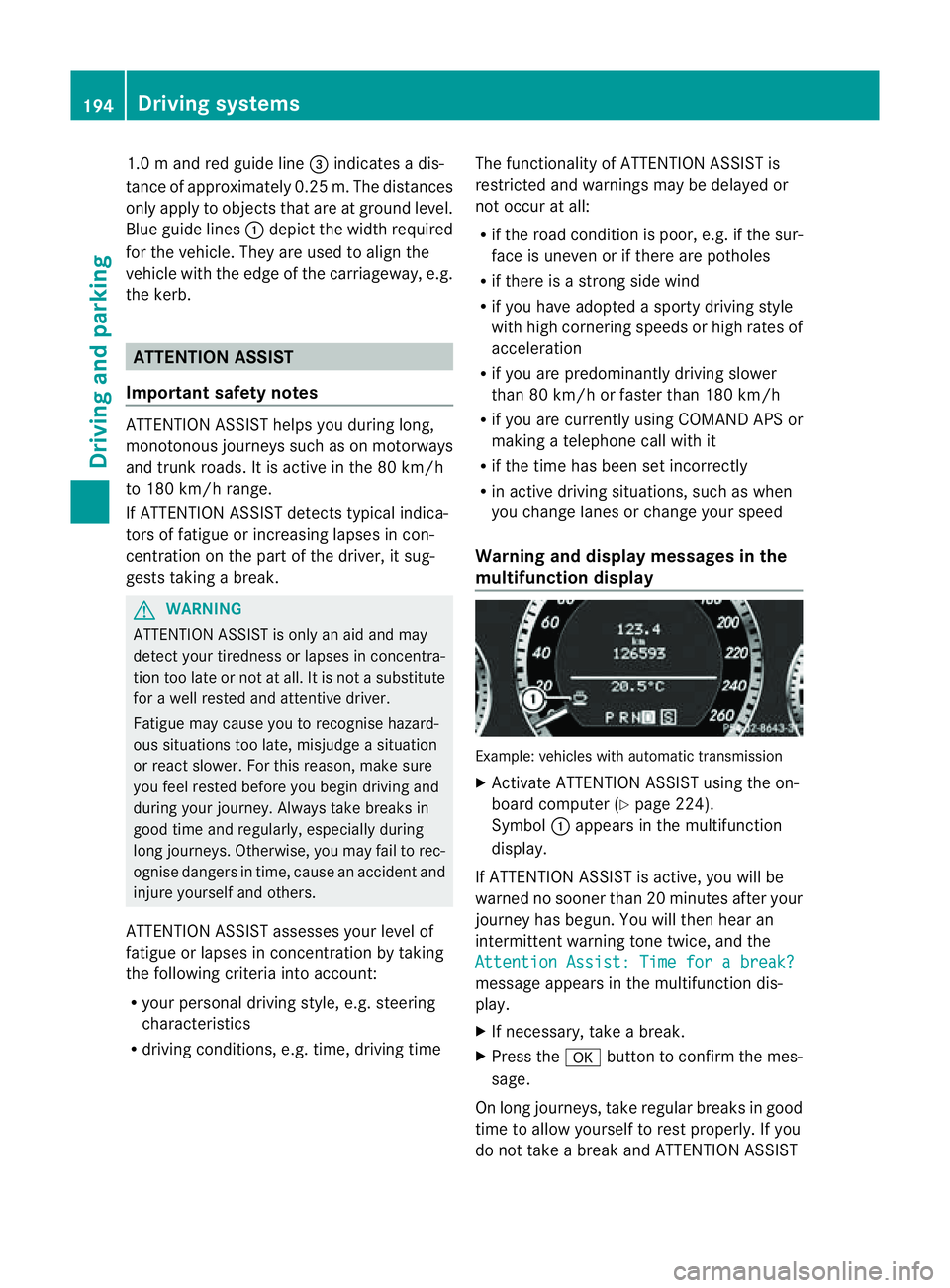
multifunction display Example: vehicles with automatic transmission
X
Activate ATTENTION ASSIS Tusing the on-
board computer (Y page 224).
Symbol :appears in the multifunction
display.
If ATTENTION ASSIS Tisactive, you will be
warne dnosooner than 20 minutes after your
journey has begun. You will the nhear an
intermittentw arning tonetwice, and the
Attention Assist :Timef orab reak? message appears in th
emultifunction dis-
play.
X If necessary, tak eabreak.
X Pres sthe a button to confir mthe mes-
sage.
On long journeys, take regula rbreaks in good
time to allow yourself to rest properly. If you
do not take abreak and ATTENTION ASSIST 194
Driving systemsDriving and parking
Page 219 of 353

Menus and submenus
Menu overview
The number of menus show ndepends on the optional equipment in the vehicle. Function
:
Trip menu (Y
page 217) ;
Navi menu (navigation instructions) (Y
page 218)=
Audio menu (Y
page 219) ?
Tel menu (telephone) (Y
page 221)A
Assist. menu (assistance) (Y
page 222)B
Service menu (Y
page 224)
R calls up display messages ( Ypage 232)
R tyre pressure loss warning (Y page 322)
R ASSYST PLUS servic einterval display (Y page 284) C
Settings menu (Y
page 224) The
Audio ,
Navi and
Tel menus differ slightly in vehicles with an audio system and vehicles
with COMAND APS.T he examples given in this Owner's Manual apply to vehicles equipped
with COMAND APS. 216
Menus and submenusOn-board computer and displays
Page 221 of 353

i
If the gearshift recommendation is shown
in the multifunction display,itisn ot shown
in the status bar.
For further information on gearshift recom-
mendations, see (Y page 154).
Resetting values You can reset the values of the following func-
tions:
R
trip meter
R trip computer "From start"
R trip computer "From reset"
X Press the =or; button on the steer-
ing wheeltos elect theTrip menu.
X Press the 9or: button to select the
function that you wish to reset.
X Press a. Resetting the trip computer "From start" (example)
X Press :to select Yes and press
a
to confirm. Navigation menu
Displaying navigatio ninstructions In the
Navi menu, the multifunction display
shows navigation instructions. For more
information, see the separate operating
instructions.
X Switch on the audio system or COMAND
APS (see the separate operating instruc-
tions).
X Press the =or; button on the steer-
ing wheeltos elect theNavi menu.Route guidance not active :
Direction of travel
; Current street
Activated route guidance No change of directio
nannounced :
Distance to the destination
; Distance to the next change of direction
= Current street
? Symbol for "follow the road's course"
Change of directio nannounced without a
lane recommendation :
Roadtow hich the change of direction
leads
; Distance to change of direction and visual
distance display
= Current street
? Change-of-direction icon
When achange of direction has been
announced, you wills ee visualdistancedis-
play ;nex ttot he symbol for change of 218
Menus and submenusOn-board computer and displays
Page 222 of 353
direction
?.This decreases in size as you
approach the announced change of direction.
Change of direction announced with a
lane recommendation
Lane recommendations are only displayed if
the relevant data is available on the digital
map. :
Road to which the change of direction
leads
; Distancetoc hange of direction and visual
distance display
= Lane recommendation
? Change-of-direction icon
On multi-lane roads, lane recommendation
= may be shown for the next change of
direction. During the change of direction,
additional lanes may be displayed. Lane recommendation display (example)
:
Lane continues through change of direc-
tion
; New lane during achange of direction
Other status indicators of the naviga-
tion system R
O:y ou have reached the destination or an
intermediate destination.
R New route... or
Calculating route :a
new route is being calculated. R
Off map or
Off road :t
he vehicle position
is outside the area of the digital map (off-
map position).
R No route :nor
oute could be calculated to
the selected destination. Audio menu
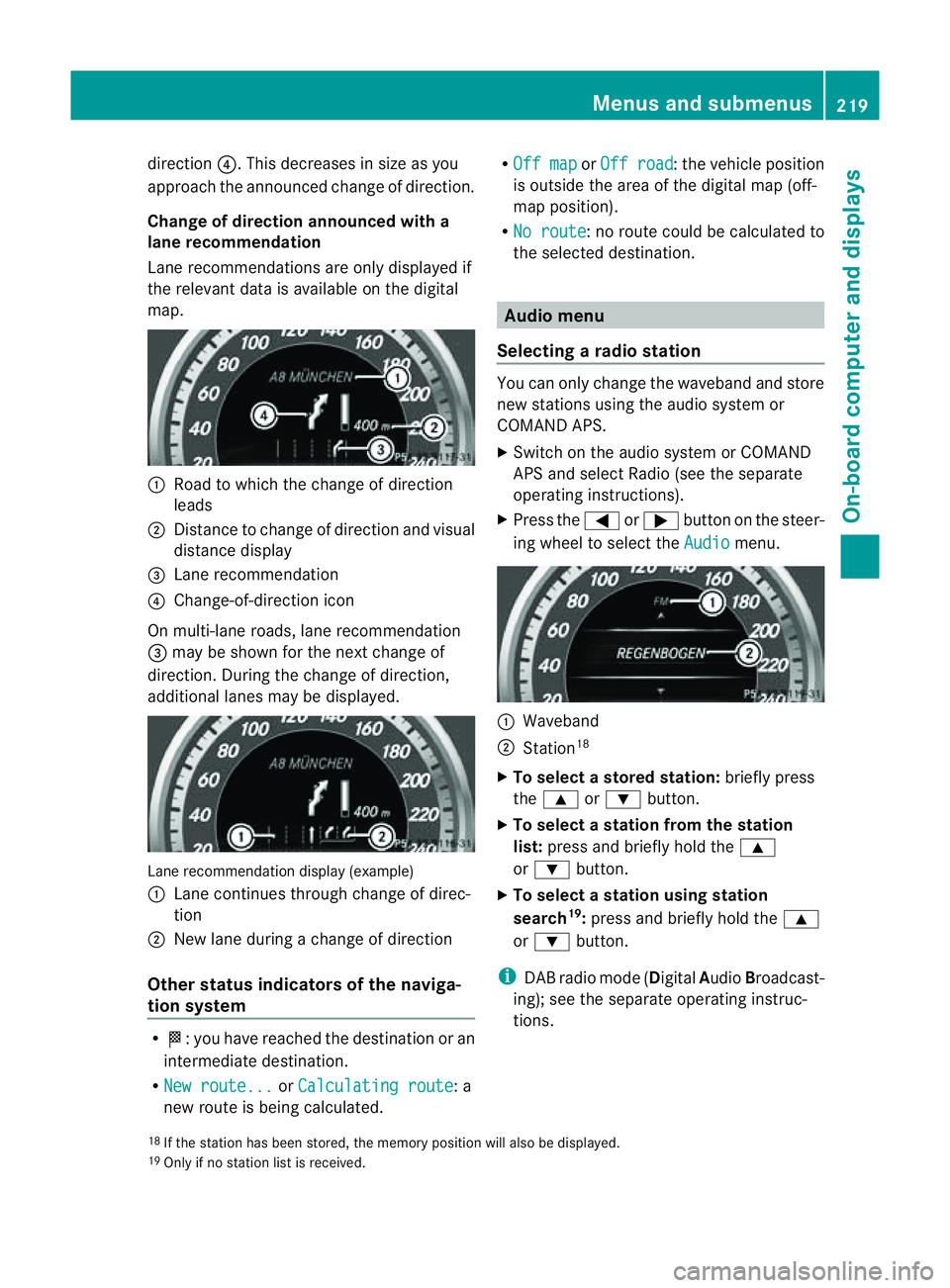
Selecting aradio station You can only change the waveband and store
new stations using the audio system or
COMAND APS.
X Switch on the audio system or COMAND
APS and select Radio (see the separate
operating instructions).
X Press the =or; button on the steer-
ing wheel to select the Audio menu.
:
Waveband
; Station 18
X To selectas toredstation: brieflypress
the 9 or: button.
X To select astation from the station
list: press and briefl yholdt he 9
or : button.
X To select astatio nusing station
search 19
:press and briefl yholdt he 9
or : button.
i DAB radi omode(Digit alAudio Broadcast-
ing); see the separate operating instruc-
tions.
18 If the statio nhas been stored ,the memory position will also be displayed.
19 Onl yifnos tatio nlist is received. Menus and submenus
219On-boardcomputer and displays Z
Page 223 of 353

Audio player or audio media operation
Audio dat
afromv arious audio device sor
media can be played, depending on th eequip-
men tfitte dint hevehicle.
X Switc hont heaudio system or COMAND
AP Sa nd select the audi odeviceorm edium
(see the separate operating instructions).
X Press the =or; button on the steer-
ing whee ltoselect the Audio menu.
CD change
rdisplay (example)
: Curren ttrack
X To select th enext/previou strack:
briefl ypress the 9or: button.
X To select atrac kfromt he trac klist
(rapid scrolling): press and hold the
9 or: button unti lthe desired track
ha sb eenr eached.
If yo upress and hold the 9or: but-
ton, the rapi dscrolling spee disincreased.
Not al laudio devices or media support this
function.
If track information is stored on the audio
device or medium, the multifunctio ndisplay
will show the number and name of the track.
The current track does not appear in audio
AUX mode (Aux iliary audio mode: external
audio sourc econnected).
TV operation i
Dependin gonthe digital TV broadcaster,
radio station scan also be received. The
multifunction display shows TV (Radio) .
For selectin garadio station ,see
(Y page 219). X
Switch on COMAND APS and selec tTV(see
the separate operating instructions).
X Press the =or; button on the steer-
ing wheel to select the Audio menu.
:
Current station
X To select astore dstation: brieflypress
the 9 or: button.
X To select astation from the station
list: press and briefl yholdt he 9
or : button.
Vide oDVD operation X
Switch on COMAND APS and select video
DVD (see the separate operating instruc-
tions).
X Press the =or; button on the steer-
ing whee ltoselect the Audio menu.
DVD change
rdisplay (example)
: Curren tscene
X To select th enext or previous scene:
briefly press the 9or: button.
X To select ascene from th escene list
(rapid scrolling): press and hold the
9 or: buttonuntil the desired
scene ha sbeenr eached. 220
Menus and submenusOn-board computer and displays
Page 224 of 353

Telephon
emenu
Introduction Functions and displays ar
edependen tonthe
optional equipment installed in your vehicle.
You can place your mobile phone in the
mobile phone bracket (Y page 273), or set
up aB luetooth ®
connection to the audios ys-
tem or COMAND APS (see the separate oper-
ating instructions).
i You can obtain further information about
suitable mobile phones and connecting
mobile phones via Bluetooth ®
:
R in any Mercedes Benz Service Centre
R on the Internet at http://
www.mercedes-benz.com/connect G
WARNING
Observe the legal requirements of the country
in which you are currently driving regarding
the use of mobile phones in the vehicle.
If it is permitted to use mobile phones while
the vehicle is in motion, you should only use
them when the road and traffic conditions
allow.O therwise, yo umaybe distracted from
the traffi cconditions ,cause an accident and
injure yourself and others.
X Switch on the mobil ephone and audi osys-
tem or COMAND APS (see the separate
operating instructions).
X Press the =or; button on the steer-
ing whee ltoselect theTel menu.
Yo uw ills ee one of the following displa ymes-
sage sint he multifunctio ndisplay:
R Please enter PIN :t
he mobile phone has
been placed in the mobile phone bracket
and the PIN has not been entered.
X Enter the PIN using the mobile phone, LIN-
GUATRONIC, the audios ystem or
COMAND APS.
The mobile phone will search for anetwork. R
Telephone ready or the name of the net-
work provider: the mobile phone has found
an etwork and is ready to receive.
R Telephone No Service :non
etwork is
available, or the mobile phone is searching
for anetwork.
Accepting acall If someone call
syou whe nyou are in the
Tel menu,
adisplay message appears in the
multifunction display ,for example: X
Press the 6button on the steering
wheel to accept an incomin gcall.
If you are not in the Tel menu, you can still
accept acall.
Rejecting or ending acall X
Press the ~button on the steering
wheel.
If you are not in the Tel menu, you can still
reject or end acall.
Dialling anumber from the phone book If you
rmobile phone is able to receive calls,
you can search for and dial anumber from the
phone book in the audio system or COMAND
APS at any time.
X Copy the telephone book of the mobile
phone into the audio system or to COMAND
APS (see the separate operating instruc-
tions).
X Press the =or; button on the steer-
ing wheel to select the Tel menu.
X Press the 9,:ora button to call
up the phone book. Menus and submenus
221On-board computer and displays Z
Page 228 of 353
R
changing the instrument cluster settings
R changing the time/date settings 20
R changing the light settings
R changing the vehicle settings
R changing the auxiliary heating settings
R changing the convenience settings
R restoring the factory settings
Instrumen tcluster Selecting th
eunit of measurement for dis-
tance
The Display unit Speed-/odometer: function allows you to choose whether cer-
tain displays appear in kilometres or miles.
The selected unit of measurement for dis-
tance applies to:
R the digital speedometer in the Trip menu
R the total distanc erecorder and the trip
meter
R the trip computer
R the current consumption and the range
R the navigation instruction in the Navi menu
R cruis econtrol
R SPEEDTRONIC
R DISTRONIC PLUS
R ASSYS TPLUS service interval display
X Press the =or; button on the steer-
ing wheel to selec tthe Settings menu.
X Press the :or9 button to select the
Inst. cluster submenu.
X Press the abutton to confirm.
X Press the :or9 button to select the
Display unit Speed-/odometer func-
tion.
You will see the selected setting: km or
miles .
X Press the abutton to save the setting. Switching the additional speedometer
on/off
Only vehicles with manual transmission have
this function.
i
Vehicles for the United Kingdom: this
function is not available.
The Dig. speedom [mph]: function allows
you to choose whether the status area in the
multifunction displaya lways shows the speed
in mph instead of the outside temperature.
X Press the =or; button on the steer-
ing wheel to select the Settings menu.
X Press the :or9 button to select the
Inst. cluster submenu.
X Press the abutton to confirm.
X Press :or9 to select the Dig. speedo [mph]: function.
You will see the selected setting: on or
off .
X Press the abutton to save the setting.
Selecting the permanent display function
Only vehicles with automatic transmission
have this function.
i Vehicles for the United Kingdom: this
function is not available.
The Permanent display: function allows
you to choose whether the multifunction dis-
play always shows the outside temperature
or the speed in mph.
X Press the =or; button on the steer-
ing wheel to select the Settings menu.
X Press the :or9 button to select the
Inst. cluster submenu.
X Press the abutton to confirm.
X Press :or9 to select the Perma‐ nent display function.
You will see the selected setting: outside temperature or
Dig. speedom [mph] .
X Press the abutton to save the setting.
20 This function is not available on vehicles with Audio 50 APS, Audio 55 APS or COMAND APS. Menus and submenus
225On-board computer and displays Z