2011 MERCEDES-BENZ CL-Class fuel
[x] Cancel search: fuelPage 27 of 480

If you sell your Mercedes, please leave all
literature with the vehicle to make it available
to the next operator.
If you bought this vehicle used, be sure to
send in the "Notice of Purchase of Used Car"
found in the Service and Warranty
Information Booklet, or call the Mercedes-
Benz Customer Assistance Center (in the
USA) at 1-800-FOR-MERCedes
(1-800-367-6372) or Customer Service (in
Canada) at 1-800-387-0100.
Vehicle operation outside the USA
and Canada
If you plan to operate your vehicle in foreign
countries, please be aware that:
R Service facilities or replacement parts may
not be readily available.
R Unleaded gasoline for vehicles with
catalytic converters may not be available.
The use of leaded fuels can damage the
catalytic converter.
R Gasoline may have a considerably lower
octane rating. Improper fuel can cause
engine damage.
Certain Mercedes-Benz models are available
for delivery in Europe under our European
Delivery Program. For details, consult an
authorized Mercedes-Benz Center or write to
one of the following addresses:
In the USA
Mercedes-Benz USA, LLC
European Delivery Department
One Mercedes Drive
Montvale, NJ 07645-0350
In Canada
Mercedes-Benz Canada, Inc.
European Delivery Department
98 Vanderhoof Avenue
Toronto, Ontario M4G 4C9
Operating safety
Safety notes
GWarning
Work improperly carried out on electronic
components and associated software could
cause them to cease functioning. Because the
vehicle's electronic components are
interconnected, any modifications made may
produce an undesired effect on other
systems. Electronic malfunctions could
seriously impair the operating safety of your
vehicle.
Contact an authorized Mercedes-Benz Center
for repairs or modifications to electronic
components.
Other improper work or modifications on the
vehicle could also have a negative impact on
the operating safety of the vehicle.
Some safety systems only function when the
engine is running. You should therefore never
turn off the engine while driving.
GWarning
Heavy blows against the vehicle underbody or
tires/wheels may cause serious damage and
impair the operating safety of your vehicle.
Such blows can be caused, for example, by
running over an obstacle, road debris or a
pothole. If you feel a sudden significant
vibration or ride disturbance, or you suspect
that damage to your vehicle has occurred:
R turn on your hazard warning flashers.
R slow down carefully.
R drive with caution to an area which is a safe
distance from the road.
Inspect the vehicle underbody and tires/
wheels for possible damage. If the vehicle
appears unsafe, have it towed to the nearest
authorized Mercedes-Benz Center or other
qualified maintenance or repair facility for
further inspection or repairs.
Introduction25Z
Page 32 of 480

Exterior viewFunctionPage:Trunk lid81Vehicle tool kit420;Lights250=Rear window defroster261?Fuel filler flap281AExterior mirrors100BSliding sunroof88CDefrosting the windshield260Cleaning the windows413FunctionPageDWindshield wipers251EOpens the hood404Engine oil405Coolant407FTowing430GTires and wheels438Flat tire42130Exterior viewAt a glance
Page 34 of 480

Instrument cluster
Overview
FunctionPage:Coolant temperature gauge328;Fuel gauge=Front area warning display
for PARKTRONIC310
?Multifunction display330SpeedometerATransmission position276BTachometer329CDrive program277DParking Guidance display310FunctionPageEDisplay unit of the
speedometer
FOutside temperature
display329
GAdditional speedometer341HHOLD function303Ä PRE-SAFE® Brake65IAdaptive Highbeam Assist247Active Lane Keeping Assist323ATTENTION ASSIST31532Instrument clusterAt a glance
Page 35 of 480

Warning and indicator lampsFunctionPage:Turn signal246;Electric parking brake, red375! Electric parking
brake, red (Canada only)375
=Electric parking brake,
yellow375
! Electric parking
brake, yellow (Canada only)375
?Seat belt376AESP®378BDistance warning381FunctionPageCBrakes (USA only)375J Brakes (Canada only)375DESP® OFF378ETire pressure monitor381FEngine diagnostics380GABS377HSRS379IHigh-beam headlamps246JReserve fuel380Instrument cluster33At a glance
Page 75 of 480

Unapproved modifications to this device
may lead to withdrawal of permission to
operate it.
i Canada only:
This device complies with Industry
Canada's RSS–210 regulations. Operation
is subject to the following conditions:
1. This device must not cause any harmful
interference, and
2. This device must be able to
accommodate interference that is
received, including interference which
could cause unwanted functions.
Unapproved modifications to this device
may lead to withdrawal of permission to
operate it.
Locking and unlocking centrally
The SmartKey centrally locks/unlocks:
R the doors
R the trunk lid
R the fuel filler flap
:& To lock the vehicle;F To unlock the trunk lid=% To unlock the vehicle
When unlocking, the turn signals flash once.
When locking, they flash three times.
When it is dark, the surround lighting also
comes on if it is activated in COMAND.
You can also set an audible signal to confirm
that the vehicle has been locked or unlocked.
The audible signal can be activated and
deactivated using the on-board computer
( Y page 342).XTo unlock centrally: press the %
button.
If you do not open a door or the trunk lid within
approximately 40 seconds of unlocking the
vehicle:
R the vehicle is locked again.
R the theft deterrent locking system is armed
again.
XTo lock centrally: press the & button.
KEYLESS-GO
General notes
i USA only:
This device complies with Part 15 of the
FCC regulations. Operation is subject to
the following conditions:
1. This device must not cause any harmful
interference, and
2. This device must be able to
accommodate interference that is
received, including interference which
could cause unwanted functions.
Unapproved modifications to this device
may lead to withdrawal of permission to
operate it.
i Canada only:
This device complies with Industry
Canada's RSS–210 regulations. Operation
is subject to the following conditions:
1. This device must not cause any harmful
interference, and
2. This device must be able to
accommodate interference that is
received, including interference which
could cause unwanted functions.
Unapproved modifications to this device
may lead to withdrawal of permission to
operate it.
SmartKey73Opening and closingZ
Page 77 of 480
X To unlock the vehicle: pull the door
handle.XTo lock the vehicle: touch sensor
surface :.
If you pull on the handle of the trunk lid, only
the trunk of the vehicle is unlocked.
Changing the settings of the locking
system
You can change the setting of the locking
system in such a way that only the driver's
door and the fuel filler flap are unlocked. This
is useful if you frequently travel on your own.
XTo change the setting: press and hold
down the % and & buttons
simultaneously for approximately six
seconds until the battery check lamp
( Y page 76) flashes twice.
The SmartKey now functions as follows:
XTo unlock the driver's door: press the
% button once.XTo unlock centrally: press the %
button twice.XTo lock centrally: press the & button.
The KEYLESS-GO function is changed as
follows:
XTo unlock the driver's door : pull the door
handle on the driver's door.XTo unlock centrally: pull the front-
passenger door handle.XTo lock centrally: touch sensor
surface : on one of the door handles.
Restoring the factory settings
XPress the % and & buttons
simultaneously for approximately six
seconds until the battery check lamp
flashes twice.Mechanical key
General notes
If you use the mechanical key to unlock and
open the driver's door or the trunk lid, the
anti-theft alarm system will be triggered
( Y page 68).
There are several ways to turn off the alarm:
XPress the % or & button on the
SmartKey.
or
XInsert the SmartKey into the ignition lock.
or
XPress the Start/Stop button in the ignition
lock. The SmartKey must be in the vehicle.
or
XLock or unlock the vehicle using KEYLESS-
GO. The SmartKey must be outside the
vehicle.
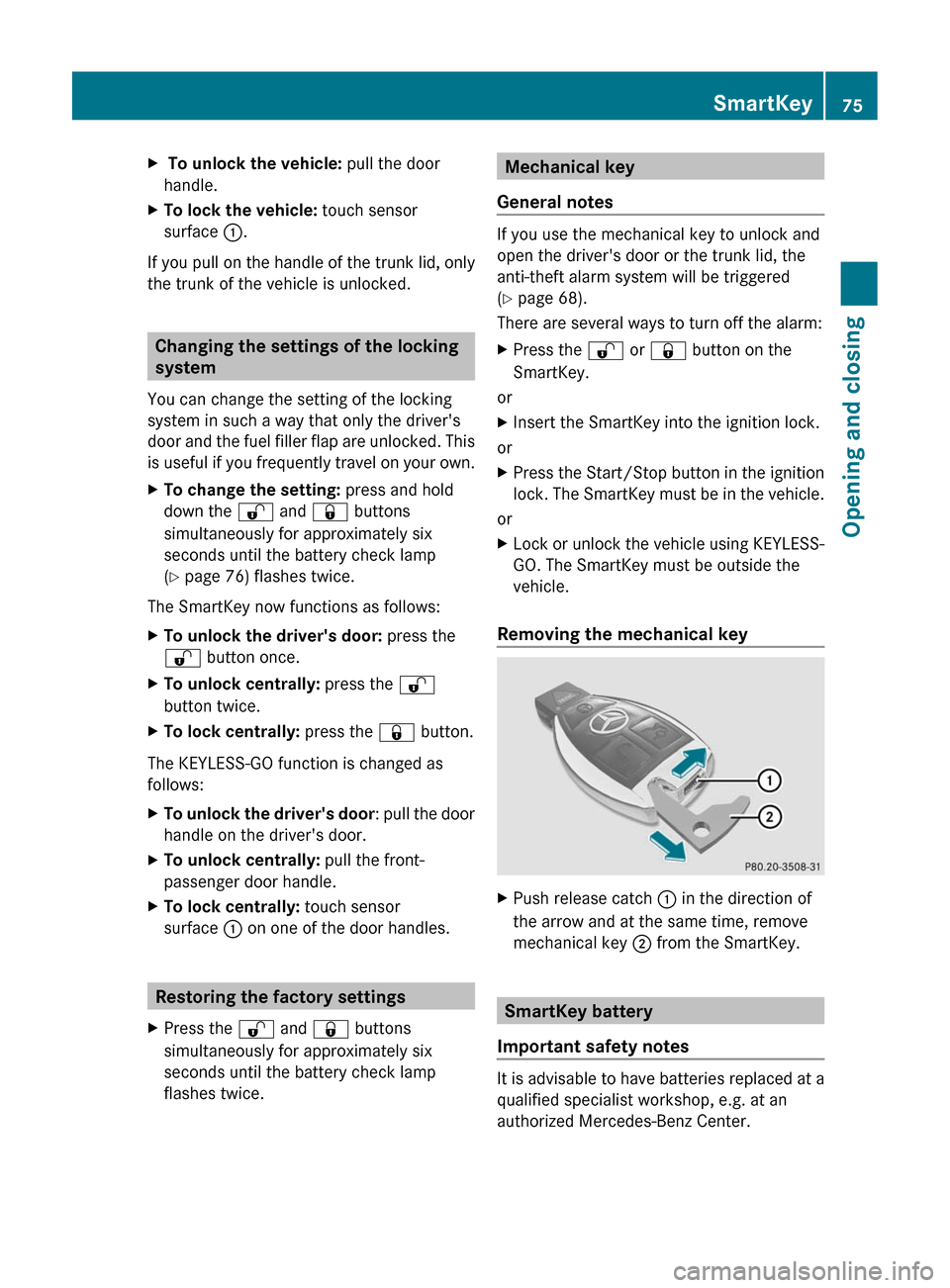
Removing the mechanical key
XPush release catch : in the direction of
the arrow and at the same time, remove
mechanical key ; from the SmartKey.
SmartKey battery
Important safety notes
It is advisable to have batteries replaced at a
qualified specialist workshop, e.g. at an
authorized Mercedes-Benz Center.
SmartKey75Opening and closingZ
Page 81 of 480

Unlocking and opening the doors
from the inside
You can open a door from inside the vehicle
even if it has been locked.
Open the door only when the traffic
conditions permit.
If the vehicle has been opened with the
SmartKey or KEYLESS-GO key, opening from
inside triggers the anti-theft alarm system.
Switch off the alarm (Y page 68).
XPull door handle ;.
If the door is locked, locking knob : pops
up. The door is unlocked and can be
opened.
iWhen a door is opened, the side window
on that side opens slightly. When the door
is closed, the side window closes again.
! The side windows will not open/close if
the battery is discharged or if the side
windows have iced up. It will then not be
possible to close the door. Do not attempt
to force the door closed. You could
otherwise damage the door or the side
window.
Centrally locking and unlocking the
vehicle from the inside
You can centrally lock or unlock the vehicle
from the inside. This feature may be useful if,
for example, you wish to unlock the front-
passenger door from the inside or lock the
vehicle before you pull away.
The central locking/unlocking button does
not lock or unlock the fuel filler flap.
XTo lock: press button ;.
The vehicle locks itself when the front-
passenger door is closed.
XTo unlock: press button :.
You can open a door from inside the vehicle
even if it has been locked. Open the door only
when the traffic conditions permit.
If the vehicle has been locked with the locking
button for the central locking function:
Rand the SmartKey has been reset to the
factory settings, the complete vehicle is
unlocked when a door is opened from the
inside
Rand the SmartKey has been set to an
individual setting, only the door that is
opened from the inside is unlocked
If the vehicle has been locked centrally with
the SmartKey or with KEYLESS-GO, it is not
unlocked if you use the unlocking button for
the central locking system.
Automatic locking
The vehicle locks automatically when the
ignition is switched on and the wheels of the
vehicle are moving at a speed above 9 mph
(15 km/h). Therefore, there is a risk of being
locked out when the vehicle is being pushed,
towed or tested on a dynamometer.
You can switch off the automatic locking
function via COMAND (Y page 233).
Doors79Opening and closingZ
Page 83 of 480

XClose the front-passenger door.XMake sure that the doors and the trunk are
locked.
i If you lock the vehicle as described above,
the fuel filler flap is not locked. The anti-
theft alarm system is not primed.
Trunk
Important safety notes
Do not leave the SmartKey in the trunk. You
could otherwise lock yourself out.
GWarning
When leaving the vehicle, always remove the
SmartKey from the ignition lock. Always take
the SmartKey with you and lock the vehicle.
Do not leave children unsupervised in the
vehicle, even if they are secured in a child
restraint system, and do not give them access
to an unlocked vehicle. A child's unsupervised
access to a vehicle could result in an accident
and/or serious personal injury. They could:
R injure themselves on vehicle parts
R be seriously or fatally injured by extreme
heat or cold
R injure themselves or have an accident with
vehicle equipment that may still be in
operation even after the SmartKey has
been removed from the ignition, such as the
seat adjustment, steering wheel
adjustment or memory function.
If children open a door, they could cause
severe or even fatal injury to other persons; if
they get out of the vehicle, they could injure
themselves when doing so or be seriously or
even fatally injured by any passing traffic.
Do not expose the child restraint system to
direct sunlight. The child restraint system's
metal parts, for example, could become very
hot, and a child could be burned on these
parts.
GWarning!
Do not carry heavy or hard objects in the
passenger compartment or trunk unless they
are firmly secured in place.
Unsecured or improperly positioned cargo
increases a child's risk of injury in the event
of
R strong braking maneuvers
R sudden changes of direction
R an accident
GWarning
Make sure the trunk lid is closed when the
engine is running and while driving. Among
other dangers, deadly carbon monoxide (CO)
gases may enter the vehicle interior resulting
in unconsciousness and death.
! The trunk lid swings upwards when
opened. Therefore, make sure that there is
sufficient clearance above the trunk lid.
You can limit the opening angle of the trunk
lid. This could be useful, for example, if there
is insufficient space above the trunk lid. You
can switch the trunk lid opening height
restriction function on or off via COMAND
( Y page 234).
For the trunk lid to be opened fully, there must
be a minimum clearance from floor to ceiling
of 5.90 ft (1.80 m).
The trunk lid can be:
R opened and closed manually from outside
R opened and closed automatically from
outside
R opened and closed automatically from
inside
R locked separately
R unlocked with the mechanical key
R opened using the emergency release
button inside the trunk
Trunk81Opening and closingZ