2011 MERCEDES-BENZ C-CLASS COUPE trip computer
[x] Cancel search: trip computerPage 12 of 373

Delayed switch-off
Exterior lighting (12-button multi-
function steerin gwheel) ................ 225
Interior lighting (12-button multi-
function steering wheel) ................225
Diesel ................................................. .154
Diesel particle filter ..........................159
Digital speedometer .........................215
Dipped beam Display message (4-button multi-
function steering wheel) ................244
Dipped-beam headlamps
Changing bulbs .............................. 116
Display message (12-button mul-
tifunctio nsteering wheel) ..............248
Setting for driving abroad (sym-
metrical) ........................................ 108
Setting for driving on the right/
left ................................................. 224
Switching on/off ........................... 109
Display (cleaning instructions) ........310
Display message (12-button multi-
function steering wheel) ASSYST PLUS service interva l....... 305
Calling up ....................................... 233
Driving systems ............................. 256
Engine ............................................ 254
General notes ................................ 232
Hiding ............................................ 232
Key ................................................ 271
KEYLESS-GO .................................. 271
Lights ............................................ .247
Safety systems .............................. 238
Tyres .............................................. 263
Vehicle .......................................... .267
Display message (4-button multi-
function steering wheel)
ASSYST PLUS service interva l....... 305
Calling up ....................................... 232
Driving systems ............................. 256
Engine ............................................ 251
General notes ................................ 232
Hiding ............................................ 232
Key ................................................ 270
KEYLESS-GO .................................. 270
Lights ............................................ .244
Safety systems .............................. 234Tyres
.............................................. 262
Vehicle .......................................... .265
Distance display (on-board com-
puter, 12-button multifunction
steering wheel) .................................. 221
Distance recorder 12-button multifunction steering
wheel ............................................. 215
see Trip meter
Distance warning signal (warning
lamp) .................................................. 282
DISTRONIC PLUS Deactivating ................................... 171
Display message (12-button mul-
tifunctio nsteering wheel) ..............260
Displays in the multifunctio ndis-
play ................................................ 171
Drivin gtips .................................... 172
Function/notes ............................. 164
Important safety notes ..................164
Selecting ........................................ 166
Setting the specified minimum
distance ......................................... 170
Warning lamp ................................. 282
Door
Automatic door locking feature
(on-board computer, 12-button
multifunctio nsteering wheel) ........226
Automatic locking (switch) .............. .84
Central locking/unlocking (key) ......78
Control pane l................................... 42
Display message (12-button mul-
tifunctio nsteering wheel) ..............268
Display message (4-button multi-
function steering wheel) ................266
Emergency locking ........................... 85
Emergency unlocking .......................85
Important safety notes ....................83
Opening (from the inside) ................84
Drinks holder
see Cuph olders
Drive program
Automatic ...................................... 148
Display ........................................... 146
Manual .......................................... .150
Drive program selector .....................148
Driver's door see Door Index
9
Page 19 of 373

Multifunction steering wheel (4
buttons)
see 4-button multifunction steer-
ing wheel N
Navigation Menu (on-board computer) ............216
On-board computer (12-button
multifunctio nsteering wheel) ........216
see separate operating instructions
NECK-PRO head restraints
Operation ........................................ .50
Resetting after being triggered ........51
Notes on running in anew vehicle ..136 O
Occupant safety Childre ninthe vehicle ..................... 55
Important safety notes ....................44
Odometer
4-button multifunction steering
wheel ............................................. 209
see Total distance recorder
see Trip meter
Oil
see Engine oil
On-board computer
RACETIMER ................................... 229
On-board computer (12-button
multifunction steering wheel)
AMG menu ..................................... 229
Assist menu ................................... 220
Audi omenu ................................... 217
Convenience submenu ..................228
DISTRONI CPLUS ........................... 171
Important safety notes ..................206
Instrument cluster submenu ..........223
Lights submenu ............................. 224
Menu overview .............................. 214
Navigation menu ............................ 216
Operating ...................................... .211
Operating the vide oDVD ............... 218
Range ............................................ 215
Service menu ................................. 222
Standard display submenu ............215 Telephone menu
............................ 219
Trip menu ...................................... 215
On-board computer (12-button
multifunction steering wheel)
Displaying service messages .........305
Display messages ..........................232
Heating submenu ........................... 227
Message memory .......................... 233
Vehicle submenu ........................... 225
On-board computer (12-button
multifunction steering wheel)Set-
tings menu ......................................... 223
On-board computer (12-button
multifunction steering wheel) sub-
menu
Factory setting ............................... 228
On-board computer (4-button mul-
tifunction steering wheel)
Important safety notes ..................206
Menu overview .............................. 209
Switching daytime driving lights
on/off ............................................ 210
On-board computer (4-button mul-
tifunction steering wheel)
Displaying service messages .........305
Display messages ..........................232
Individual vehicle settings ..............207
Message memory .......................... 232
Operating ...................................... .207
Range ............................................ 210
Standard displa y............................ 209
Trip computer ................................ 210
Opening and closing the side trim
panels ................................................. 117
Operating system see On-board computer
Outside temperature
Display (12-button multifunction
steering wheel) .............................. 211
Display (4-button multifunction
steering wheel) .............................. 207
Overhead control panel ......................41 P
Pain tcode .......................................... 352
Paintwork (cleaning instructions) ...307 16
Index
Page 25 of 373

Couplin
gupatrailer...................... 202
Decoupling atrailer ....................... 202
Driving tips .................................... 199
ESP ®
................................................ 70
Folding in the ball coupling ............202
Folding out the ball coupling ..........201
Important safety notes ..................199
Mounting dimensions ....................361
Parking Guidance ........................... 186
Parktroni c...................................... 182
Power supply ................................. 203
Shift range ..................................... 147
Trailer loads ................................... 362
Transmission
see Automatic transmission
see Manual transmission
Transporting the vehicle ..................332
Trim pieces (cleaning instructions) .311
Trip computer On-board computer (12-button
multifunctio nsteering wheel) ........215
On-board computer (4-button
multifunctio nsteering wheel) ........210
Trip meter
Displaying/resetting (4-button
multifunctio nsteering wheel) ........209
Displaying (12-button multifunc-
tion steering wheel) .......................215
Resetting (12-button multifunc-
tion steering wheel) .......................216
Trip odometer
see Trip meter
Turn signal
Display message (12-button mul-
tifunctio nsteering wheel) ..............248
Display message (4-button multi-
function steering wheel) ................245
Turn signals
Switching on/off ........................... 110
Two-way radio
Frequencies ................................... 351
Installatio n..................................... 351
Transmission output (maximum) .... 351
Type identification plate
see Vehicle identification plate Tyre pressure
Calling up (on-board computer) .....342
Display message (12-button mul-
tifunctio nsteering wheel) ..............263
Display message (4-button multi-
function steering wheel) ................262
Not reached (TIREFIT) ....................319
Pressure loss warning ....................340
Reached (TIREFIT) ..........................320
Recommended ............................... 339
Tyre pressure monitor
Function/notes ............................. 342
Restarting ...................................... 343
Warning lamp ................................. 282
Tyres
Checking ........................................ 336
Direction of rotatio n...................... 344
Display message (12-button mul-
tifunctio nsteering wheel) ..............263
Display message (4-button multi-
function steering wheel) ................262
Grip ................................................ 161
Important safety notes ..................336
Replacing ....................................... 344
Service life ..................................... 337
Storing ........................................... 344
Tyr esize (data) .............................. 345
Tyr etread ...................................... 337
see Flat tyre U
Unladen weight see Technical data
Unlocking
Emergency unlocking .......................85
From inside the vehicle (central
unlocking button) ............................. 84 V
Vanity mirror (in sun visor) ..............290
Vehicle Correct use ...................................... 27
Data acquisition ............................... 27
Electronics ..................................... 351
Equipment ....................................... 25
Implied warranty .............................. 27
Individua lsettings .......................... 22322
Index
Page 212 of 373
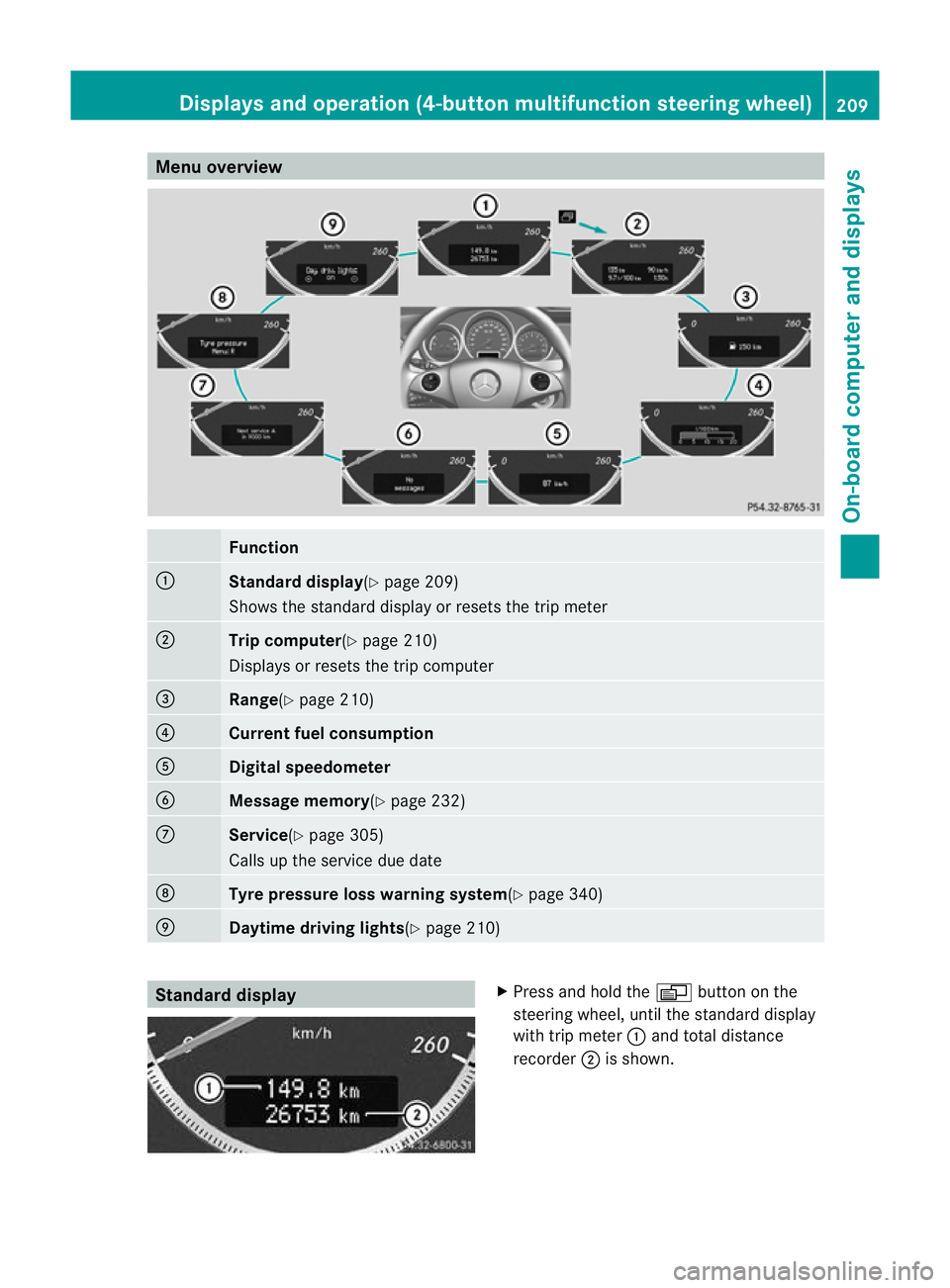
Menu overview
Function
:
Standard display
(Ypage 209)
Shows the standard display or resets the trip meter ;
Trip computer
(Ypage 210)
Displays or resets the trip computer =
Range(Y
page 210) ?
Current fuel consumption
A
Digital speedometer
B
Message memory(Y
page 232)C
Service(Y
page 305)
Calls up the service due date D
Tyre pressure loss warnin
gsystem(Y page 340) E
Daytime driving lights(Y
page 210)Standard display X
Press and hold the Vbutton on the
steering wheel, until the standard display
with trip meter :and total distance
recorder ;is shown. Displays and operation (4-button multifunction steering wheel)
209On-board computer and displays Z
Page 213 of 373

X
To reset the trip meter: press and hold
the V until the standard display
appears.
X Press and hold the Cbutton until the
value has been reset. Trip computer
X Press the Vbutton on the steering
wheel repeatedly until the trip computer
appears. :
Distance
; Average speed
= Time
? Average fuel consumption
X To reset the trip computer: press and
hold the Cbutton on the steering wheel
until the values have been reset. Calling up the range
X Press the Vbutton on the steering
wheel repeatedly until the approximate
range appears.
The approximate range which can be covered
depends on the fuel level and your current
driving style .Ifthere is only a small amount
of fuel left in the fuel tank, the display shows
a vehicle being refuelled Cinstead of the
range. Switching the daytime driving lights
on/off
If you have activated the Day. driv.lights: function and the light switch is in the Ã
position, the daytime driving lights are
automatically switched on during daylight
hours when the engine is running. When it is
dark, the side lamps and the dipped-beam
headlamps are switched on automatically.
On vehicles with daytime driving lamps, the
factory setting is on .
If you want to change the setting for the Day. driv. lights: function, you have to turn
the key in the ignition lock to position 1.
X Press the Vbutton on the steering
wheel repeatedly until the Day. driv. lights: menu appears.
You will see the selected setting: on or
off .
X Press the WorX button to change
the setting. Displays and operation (12-button
multifunction steering wheel)
Coolant temperature gauge
The coolant temperature gauge is in the
instrumentc luster on the left-hand side.
Under normal operating conditions and with
the specified coolan tlevel, the coolant tem-
perature may rise to 120 †.
At high outside temperatures and when driv-
ing uphill, the coolant temperature may rise
to the end of the scale. Rev counter
The red band in the rev counter indicates the
engine's overrevving range.
! Do not drive in the overrevving range.
Doing so will damage the engine.
The fuel supply is interrupted to protec tthe
engine when the red band is reached. 210
Displays and operation (12-button multifunction steering wheel)On-board computer and displays
Page 215 of 373

9
:
Press and hold:
R
In the Audio menu: selects the
previous/next station or selects
an audio track or a video scene
using rapid scrolling
R In the Tel (telephone) menu:
starts rapid scrolling through the
phone book a R
Confirms selection/display mes-
sage
R In the Tel (telephone) menu:
switches to the telephone book
and starts dialling the selected
number
R In the Audio menu: stops the
station search function at the
desired station Right control panel
~ R
Rejects or ends a call
R Exits telephone book/redial
memory 6 R
Makes or accepts a call
R Switches to the redial memory W
X R
Adjusts the volume 8 R
Mute Back button
%
Press briefly:
R
Back
R Switches off LINGUATRONIC
R Hides display messages or calls
up the last Trip menu function
used
R Exits the telephone book/redial
memory %
Press and hold:
R
Calls up the standard display in
the Trip menu
Multifunction display
Values and settings as well as display mes-
sages are shown in the multifunction display. :
Description field
; Menu bar
= Drive program
? Outside temperature or speed
(Ypage 223)
A Transmission position
X To show menu bar ;:press the =
or ; button on the steering wheel.
Vehicles with manual transmission: the
indicators in the lower part of the multifunc-
tion display differ from the display shown
here. 212
Displays and operation (12-button multifunction steering wheel)On-board computer and displays
Page 217 of 373

Menu overview
The number of menus show ndepends on the optional equipment in the vehicle. Function
:
Trip menu (Y
page 215) ;
Navi menu (navigation instructions) (Y
page 216)=
Audio menu (Y
page 217) ?
Tel menu (telephone) (Y
page 219)A
Assist. menu (assistance) (Y
page 220)B
Service menu (Y
page 222)
R calls up display messages ( Ypage 233)
R tyre pressure loss warning (Y page 340)
R Tyre pressure monitor (Y page 342)
R ASSYST PLUS service interval display (Y page 305)C
Settings menu (Y
page 223) D
AMG menu in AMG vehicles (Y
page 229)The
Audio ,
Navi and
Tel menus differ slightly in vehicles with an audio system and vehicles
with COMAND Online. The examples given in this Owner's Manual apply to vehicles equipped
with COMAND Online. 214
Displays and operation (12-button multifunction steering wheel)On-board computer and displays
Page 218 of 373
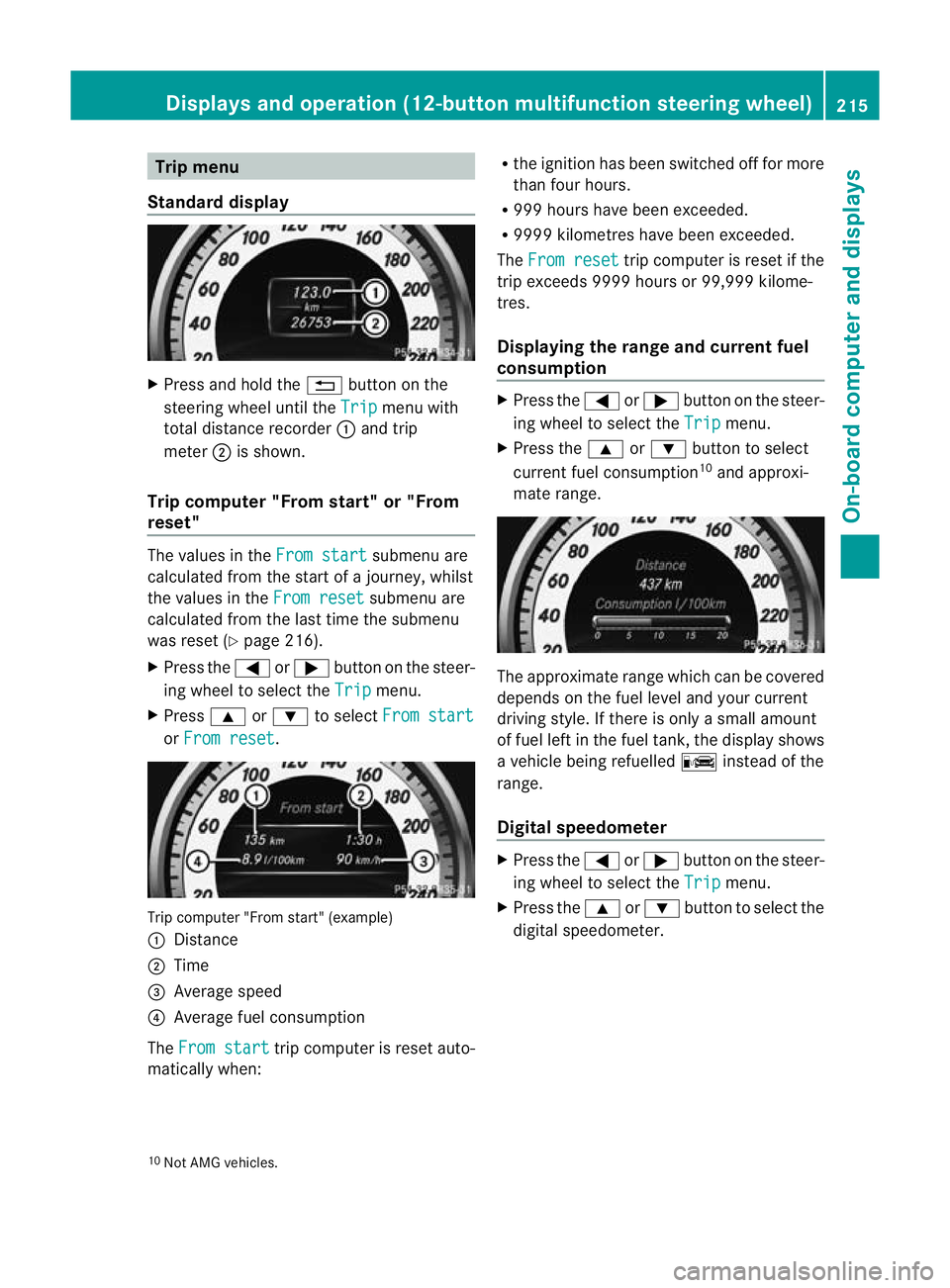
Trip menu
Standard display X
Press and hold the %button on the
steering wheel until the Trip menu with
total distance recorder :and trip
meter ;is shown.
Trip computer "From start" or "From
reset" The values in the
From start submenu are
calculated fro mthe start of a journey, whilst
the values in the From reset submenu are
calculated from the last time the submenu
was reset (Y page 216).
X Press the =or; button on the steer-
ing wheel to select the Trip menu.
X Press 9or: to select From start or
From reset .
Trip computer "From start" (example)
:
Distance
; Time
= Average speed
? Average fuel consumption
The From start trip computer is reset auto-
matically when: R
the ignition has been switched off for more
than four hours.
R 999 hours have been exceeded.
R 9999 kilometres have been exceeded.
The From reset trip computer is reset if the
trip exceeds 9999 hours or 99,999 kilome-
tres.
Displaying the range and current fuel
consumption X
Press the =or; button on the steer-
ing wheel to select the Trip menu.
X Press the 9or: button to select
current fuel consumption 10
and approxi-
mate range. The approximate range which can be covered
depends on the fuel level and your current
driving style. If there is only a small amount
of fuel left in the fuel tank, the display shows
a vehicle being refuelled
Cinstead of the
range.
Digital speedometer X
Press the =or; button on the steer-
ing wheel to select the Trip menu.
X Press the 9or: button to select the
digital speedometer.
10 Not AMG vehicles. Displays and operation (12-button multifunction steering wheel)
215On-board computer and displays Z