2011 MERCEDES-BENZ C-CLASS COUPE change wheel
[x] Cancel search: change wheelPage 10 of 373

Parking brake
................................ 159
Warning lamp ................................. 275
Breakdown
see Flat tyre
see Towing away/tow-starting
Bulbs
see Changing bulbs C
Calling up a fault see Display messages
Capacities
see Technical data
Car
see Vehicle
Care
Automatic car wash .......................306
Display ........................................... 310
Exterior lighting ............................. 309
High-pressure cleaner .................... 307
Matt paintwork .............................. 308
Notes ............................................. 306
Paint .............................................. 307
Plastic trim .................................... 310
Reversing camera ..........................309
Seat bel t........................................ 311
Seat cover ..................................... 311
Sensors ......................................... 309
Tai lpipes ....................................... 309
Trim pieces .................................... 311
Wheels ........................................... 307
Windows ........................................ 308
Wiper blades .................................. 308
Wooden trim .................................. 311
Car key
see Key
Car wash (care) ................................. 306
CD player/CD changer (12-button
multifunction steering wheel) .......... 218
Cell phone see Mobile phone
Central locking
Automatic locking (on-board com-
puter) ............................................. 226
Locking/unlocking (key ).................. 78
Centre console ..................................... 40 Changing bulbs
Brake lamps ................................... 118
Cornering light function .................117
Dipped-bea mheadlamps ............... 116
Important safety notes ..................114
Main-beam headlamps ................... 116
Overview of bul btypes .................. 115
Parking lamps (front) .....................117
Reversing lamps ............................ 118
Standing lamps .............................. 117
Child-proof locks
Child sea tlock ................................. 56
Children
In the vehicle ................................... 55
Restraint systems ............................ 55
Child seat
Automatic recognition .....................57
Child sea tlock ................................. 56
Display message (12-button mul-
tifunction steering wheel) ..............243
Display message (4-button multi-
function steering wheel) ................237
ISOFIX .............................................. 58
On the front-passenger sea t............ 57
Problem (malfunction) .....................61
Recommendations ...........................63
Suitable positions ............................ 61
Cigarette lighter ................................ 291
Cleaning Trailer tow hitch ............................. 309
Climate control
Activating/deactivating rear win-
dow heating ................................... 126
Auxiliary heating/ventilation .......... 128
Controlling automatically ...............124
Convenience opening/closing (air
recirculation) ................................. 127
Cooling with aird ehumidification..124
Demisting the windows .................. 126
Demisting the windscreen .............126
Important safety notes ..................122
Indicator lamp ................................ 124
Notes on using THERMATIC auto-
matic climate control .....................123
Overview of systems ......................122
Problems with cooling with air
dehumidification ............................ 124 Index
7
Page 17 of 373

Convenience opening feature
..........88
Display message (4-button multi-
function steering wheel) ................270
Door central locking/unlocking .......78
Emergency key element ................... 80
Loss ................................................. 82
Modifying the programming .............79
Positions (ignition lock) .................137
Problem (malfunction) .....................82
Starting the engine ........................139
KEYLESS-GO
Convenience closing ........................89
Display message (12-button mul-
tifunctio ndisplay) .......................... 271
Display message (4-button multi-
function display) ............................ 270
Locking ............................................ 79
Start/Stop button .......................... 137
Starting the engine ........................139
Unlocking ......................................... 79
Keyp ositions
Key ................................................ 137
KEYLESS GO .................................. 137
Keys
Display message (12-button mul-
tifunctio nsteering wheel) ..............271
Kickdown
Driving tips .................................... 147
Manual drive program ....................150
Kneebag ............................................... 48L
Lamps see Warning and indicator lamps
Lane-change assistant
see Blind Spot Assist
Lane detection (automatic)
see Lane Keeping Assist
Lane Keeping Assist
Activating/deactivating .................222
Display message (12-button mul-
tifunctio nsteering wheel) ..............258
Function/informatio n.................... 192
Lane package ..................................... 190
Lap time (RACETIMER) ......................229
Lashing eyelets ................................. 287Lighting
see Lights
Lights
Activating/deactivating the exte-
rior lighting delayed switch-off
(12-button multifunction steering
wheel) ............................................ 225
Activating/deactivating the Intel-
ligent Ligh tSystem ........................ 224
Activating/deactivating the inte-
rior lighting delayed switch-off
(12-button multifunction steering
wheel) ............................................ 225
Active light function .......................111
Automatic headlamp mode ............109
Cornering light function .................111
Dipped-bea mheadlamps ............... 109
Driving abroad ............................... 108
Foglamps ....................................... 109
Foglamps (extended range) ...........112
Hazard warning lamps ...................111
Headlamp flasher ........................... 111
Headlamp range ............................ 110
Ligh tswitc h................................... 108
Main-beam headlamps ................... 110
Motorway mode ............................. 112
Parking lamps ................................ 108
Rea rfoglamp ................................. 109
Switching Adaptive Highbeam
Assist on/off ................................. 225
Switching the daytime driving
lights on/off (12-button multi-
function steering wheel) ................224
Switching the daytime driving
lights on/off (4-button multifunc-
tion steering wheel) .......................210
Switching the daytime driving
lights on/off (switch) .....................109
Switching the surround lighting
on/off (12-button multifunction
steering wheel) .............................. 225
Turn signals ................................... 110
see Changing bulbs
see Interior lighting 14
Index
Page 41 of 373
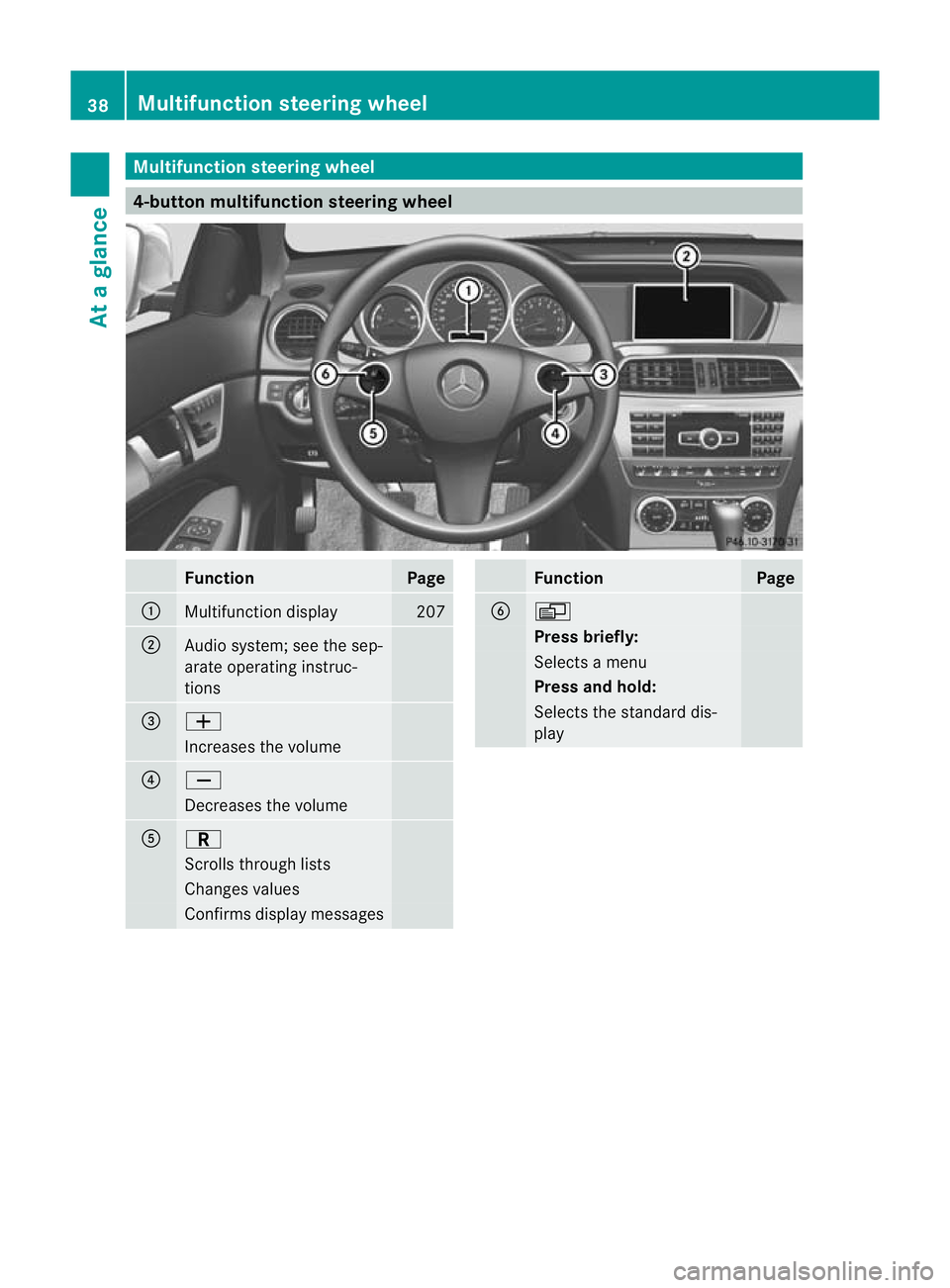
Multifunction steering wheel
4-button multifunction steering wheel
Function Page
:
Multifunction display 207
;
Audio system; see the sep-
arate operating instruc-
tions
=
W
Increases the volume
?
X
Decreases the volume
A
C
Scrolls through lists
Changes values
Confirms display messages Function Page
B
V
Press briefly:
Selects a menu
Press and hold:
Selects the standard dis-
play38
Multifunction steering wheelAt a glance
Page 115 of 373

The cornering light function improves the illu-
mination of the road over a wide angle in the
direction you are turning, enabling better vis-
ibility in tight bends, for example. It can only
be activated when the dipped-beam head-
lamps are switched on.
Active:
R if you are driving at speeds below
40 km/h, the cornering light function is
activated either by the turn signal or by the
steering wheel being turned.
R if you are driving at speeds between
40 km/h and 70 km/h ,the cornering light
function is activated by the steering wheel
being turned.
Not active: if you are driving at speeds above
40 km/h or switch off the turn signal or turn
the steering wheel to the straight-ahead posi-
tion.
The cornering light function may remain lit for
a short time, but is automatically switched off
after no more than three minutes.
Motorway mode Motorway mode increases the range of the
beam.
Active:
R
if you are driving at speeds above
110 km/h and do not make any large steer-
ing movements for 1,000 m
R if you are driving at speeds above
130 km/h
Not active: if you are driving at speeds below
80 km/h following activation Extended range foglamps
The extended range foglamps reduce the
glare experienced by the driver and improve
the illumination of the edge of the carriage-
way.
Active: if you are driving at speeds below
70 km/h and you switch on the rear foglamp
Not active: if you are driving at speeds above
100 km/h or if you switch off the rear foglamp
following activation Adaptive Highbeam Assist
You can use this function to set the head-
lamps to change between dipped beam and
main beam automatically .The system recog-
nises vehicles with their lights on, either
approaching from the opposite direction or
travelling in front of your vehicle, and conse-
quently switches the headlamps from main
beam to dipped beam.
The system automatically adapts the dipped-
beam headlamp range depending on the dis-
tance to the other vehicle. Once the system
no longer detects any other vehicles, it reac-
tivates the main-beam headlamps.
The system's optical sensor is located behind
the windscreen near the overhead control
panel. 112
Exterior lightingLights and windscreen wipers
Page 140 of 373

accelerate or brake suddenly. You will then
no tb e able to brake, declutch or accelerate
as intended. This could lead to accidents and
injury. G
WARNING
Do not change down for additional engine
braking on a slippery road surface. This could
cause the drive wheels to lose their grip and
the vehicle could skid. This could cause you
to lose control of your vehicle and cause an
accident.
! Warm up the engine quickly. Do not use
the engine's full performance until it has
reached operating temperature.
Only set the automatic transmission to the
respective drive positions when the vehicle
is stationary.
Where possible, avoid spinning the drive
wheels when pulling away on slippery
roads. Otherwise, you could damage the
drive train.
! AMG vehicles: at low engine oil tempera-
tures (below +20 †), the maximum engine
speed is restricted in order to protec tthe
engine. To protect the engine and maintain
smooth engine operation, avoid driving at
full throttle when the engine is cold. Key positions
Key g
To remove the key
1 Power supply for some consumers, such
as the windscreen wipers
2 Ignition (power supply for all consumers)
and drive position
3 To start the engine
If the key is at position 0in the ignition lock
for a longer period, it can no longer be turned
in the ignition lock. The steering is then
locked. To unlock it, remove the key and rein-
sert it into the ignition lock.
The steering wheel is locked when the key is
removed from the ignition lock.
i If the key does not belong to the vehicle
it can still be turned in the ignition lock.
However, the ignition will not be switched
on The engine cannot be started.
KEYLESS-GO General notes
Vehicles with KEYLESS-GO are equipped with
a key featuring an integrated KEYLESS-GO
function and a detachable Start/Stop button.
The Start/Stop button must be inserted into
the ignition lock and the key must be in the
vehicle.
Pressing the Start/Stop button several times
in succession corresponds to the different
key positions in the ignition lock. This is only
the case if you are not depressing the brake
pedal. Driving
137Driving and parking Z
Page 142 of 373

Automatic transmission
X
Shift the transmission to position P.
The transmission position display in the
multifunction display shows P.
i You can also start the engine when the
transmission is in position N.
Starting procedure with the key i
To start the engine using the key instead
of KEYLESS-GO ,pull th eStart/Stop button
ou toft he ignition lock.
X To start a petrol engine: turn the key to
position 3in the ignition lock
(Y page 137) and release it as soon as the
engine is running.
X To startad iesel engine: turn the key to
position 2in the ignition lock
(Y page 137).
The % preglow indicator lamp in the
instrumen tcluster lights up.
X When the %preglow indicator lamp
goes out, tur nthe key to position 3
(Y page 137) and release it as soon as the
engine is running.
i You can start the engine without preglow
if the engine is warm.
i Vehicles with automatic transmis-
sion: you can also use the touch-start func-
tion. To do this, turn the key to position 3
(Y page 137) and release it immediately.
The engine then starts automatically.
Using KEYLESS-GO to startt he engineG
WARNING
You rvehicle can be started using a valid KEY-
LESS-GO key. For this reason, children should
never be left unsupervised in the vehicle.
Always take the key with you when leaving the
vehicle, even if you are only leaving it for a
short time.
i The Start/Stop button can be used to
start the vehicle manually without inserting the key into the ignition lock. The key must
be in the vehicle and the Start/Stop button
must be inserted in the ignition lock. This
mode for starting the engine operates inde-
pendently of the ECO start/stop automatic
engine start function.
X Depress the brake pedal and keep it
depressed.
X To star tapetrol engine: press the Start/
Stop button (Y page 137) once.
The engine starts.
X To start adiesel engine: press the Start/
Stop button (Y page 137) once.
Preglow is activated and the engine starts. Pulling away
Manual transmission X
Depress the brake pedal and keep it
depressed.
X Fully depress the clutch pedal.
X Shift to either first gear or reverse gear R.
X Release the parking brake (Y page 159).
X Release the brake pedal.
X Slowly release the clutch pedal and gently
depress the accelerato rpedal.
! Change gear in good time and avoid spin-
ning the wheels. Otherwise, you could dam-
age the vehicle.
i Follow the shift recommendations in the
multifunction display for an economical
driving style (Y page 145).
i The vehicle locks centrally once you have
pulled away. The locking knobs in the doors
drop down.
You can open the doors from the inside at
any time.
You can also deactivate the automatic lock-
ing feature (Y page 226). Driving
139Driving and parking Z
Page 148 of 373

Shifting to neutral N
X
Depress the clutch pedal fully.
X Move the gear lever to position N:.Neutral N with ECO start/stop func-
tion activated
In neutral N, the engine is switched off if the
vehicle speed is below a certain threshold and
the clutch pedal is not depressed.
For further information on the ECO start/stop
function, see (Y page 140). Engaging reverse gear
! Only shift into reverse gear Rwhen the
vehicle is stationary. Otherwise, you could
damage the transmission.
i The ECO start/stop function is not avail-
able when reverse gear is engaged.
For further information on the ECO start/
stop function, see (Y page 140).
X Move the gear lever firmly to the left
beyond the point of resistance and then
forwards. Shift recommendation
The gearshift recommendations assist you in
adopting an economical driving style. The rec-
ommended gear is shown in the multifunction
display. X
Shift gear according to gearshift recom-
mendation :shown in the multifunction
display of the instrumen tcluster. Automatic transmission
Important safety notes
G
WARNING
The movemen tofthe pedals must not be
impaired in any way.D o not keep any objects
in the driver's footwell. Make sure that floor-
mats or carpets are correctly secured and
that there is sufficient clearance for the ped-
als.
Do not place several floormats on top of one
another. G
WARNING
Do not change down for additional engine
braking on a slippery road surface. This could
cause the drive wheels to lose their grip and
the vehicle could skid. This could cause you
to lose control of your vehicle and cause an
accident.
i Bear in mind that the power transmission
between the engine and the transmission
is interrupted when the engine is switched
off. Therefore, to prevent the vehicle from
rolling away, shift the automatic transmis-
sion to position Pand apply the parking
brake when the engine is switched off and
the vehicle is stationary. Automatic transmission
145Driving and parking Z
Page 151 of 373
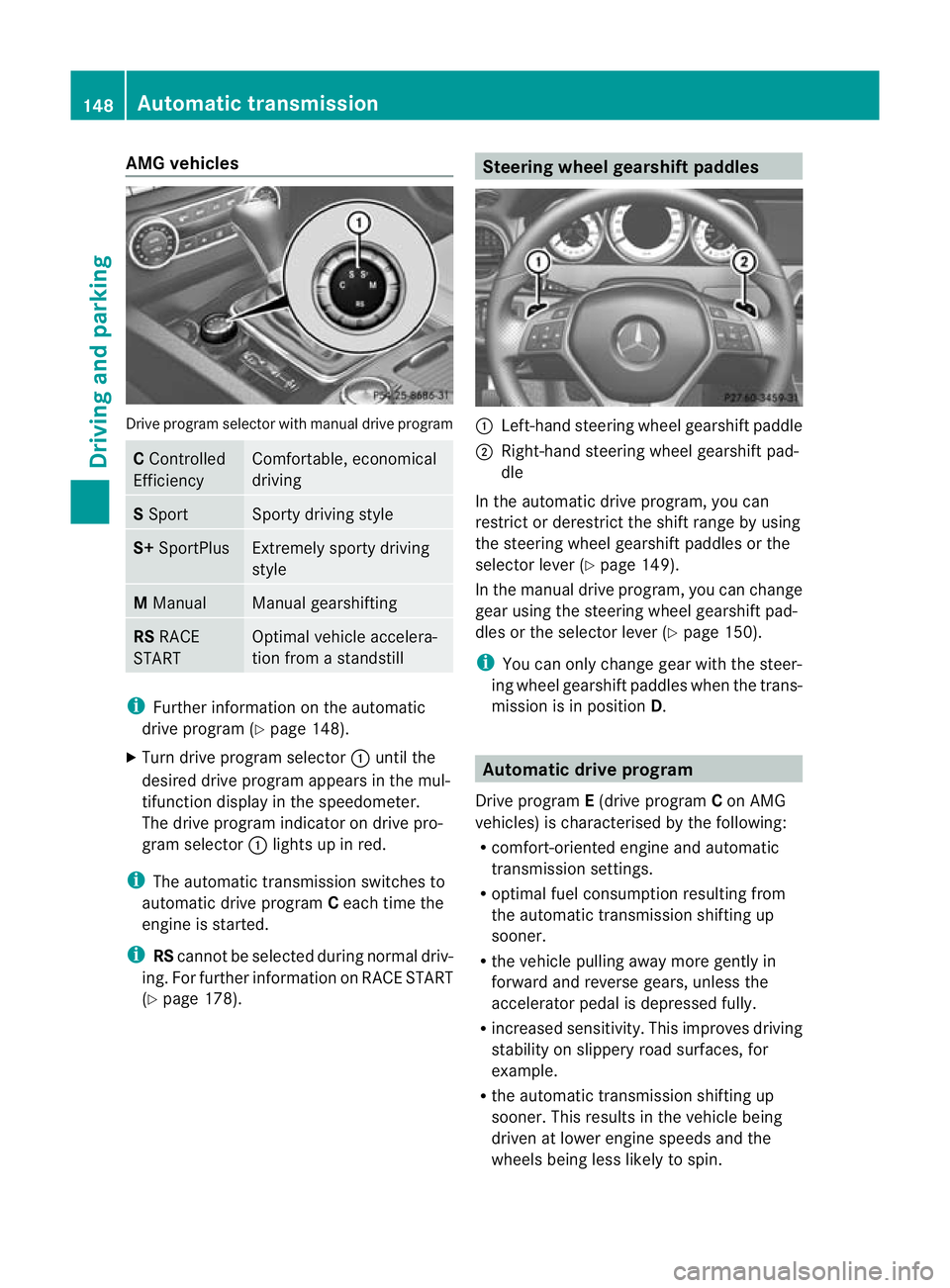
AMG vehicles
Drive progra
mselector with manual drive program C
Controlled
Efficiency Comfortable, economical
driving
S
Sport Sporty driving style
S+
SportPlus Extremely sporty driving
style
M
Manual Manual gearshifting
RS
RACE
START Optimal vehicle accelera-
tion from a standstill
i
Further information on the automatic
drive program (Y page 148).
X Turn drive program selector :until the
desired drive program appears in the mul-
tifunction display in the speedometer.
The drive program indicato rondrive pro-
gram selector :lights up in red.
i The automatic transmission switches to
automatic drive program Ceach time the
engine is started.
i RScannot be selected during normal driv-
ing. For further information on RACE START
(Y page 178). Steering wheel gearshift paddles
:
Left-hand steering wheel gearshift paddle
; Right-hand steering wheel gearshift pad-
dle
In the automatic drive program, you can
restrict or derestrict the shift range by using
the steering wheel gearshift paddles or the
selector leve r(Ypage 149).
In the manual drive program, you can change
gear using the steering wheel gearshift pad-
dles or the selector lever (Y page 150).
i You can only change gear with the steer-
ing wheel gearshift paddles when the trans-
mission is in position D. Automatic drive program
Drive program E(drive program Con AMG
vehicles) is characterised by the following:
R comfort-oriented engine and automatic
transmission settings.
R optimal fuel consumption resulting from
the automatic transmission shifting up
sooner.
R the vehicle pulling away more gently in
forward and reverse gears, unless the
accelerator pedal is depressed fully.
R increased sensitivity. This improves driving
stability on slippery road surfaces, for
example.
R the automatic transmission shifting up
sooner .This results in the vehicle being
driven at lower engine speeds and the
wheels being less likely to spin. 148
Automatic transmissionDriving and parking