Page 338 of 821

266
2-5. Driving information
lWhen restarting after parking on a slope:
With the transmission in the P position, start the engine. Be sure
to keep the brake pedal depressed.
Shift into 3, 2, 1, or the R position (if reversing).
Release the parking brake and brake pedal, and slowly pull or
back away from the wheel blocks. Stop and apply the brakes.
Have someone retrieve the blocks.
nBefore towing
Check that the following conditions are met:
lThe vehicle's tires are properly inflated. (→P. 4 8 7 )
lTrailer tires are inflated according to the trailer manufacturer's recommendation.
lAll trailer lights work.
lAll lights work each time you connect them.
lThe trailer ball is set up at the proper height for the coupler on the trailer.
lThe vehicle remains level when a loaded or unloaded trailer is hitched. Do not
drive if the vehicle is not level, and check for improper tongue load, overloading,
worn suspension, or other possible causes.
lThe trailer cargo is securely loaded.
lThe rear view mirrors conform to all applicable federal, state/provincial or local
regulations. If they do not, install rear view mirrors appropriate for towing pur-
poses.
nBreak-in schedule
If your vehicle is new or equipped with any new power train components (such as
an engine, transmission, differential and wheel bearing), Lexus recommends that
you do not tow a trailer until it has been driven for over 500 miles (800 km).
However, avoid full throttle acceleration.
nMaintenance
lIf you tow a trailer, your vehicle will require more frequent maintenance due to
the additional load. (See “Warranty and Services Guide”, “Owner's Manual Sup-
plement” or “Scheduled Maintenance”.)
lRetighten the fixing bolts of the towing ball and bracket after approximately 600
miles (1000 km) of trailer towing.
STEP1
STEP2
STEP3
STEP4
Page 341 of 821
269
2-5. Driving information
2
When driving
NOTICE
nWhen installing a trailer hitch
lUse only the position recommended by your Lexus dealer. Do not install the
trailer hitch on the bumper; this may cause body damage.
lDo not use axle-mounted hitches, as they can cause damage to the axle housing,
wheel bearings, wheels or tires.
nSafety chain
A safety chain must always be used between the towing vehicle and the trailer.
Leave sufficient slack in the chain for turns. The chain should cross under the trailer
tongue to prevent the tongue from dropping to the ground in the case that it
becomes damaged or separated. For the correct safety chain installation proce-
dure, ask your Lexus dealer.
nDo not directly splice trailer lights
Directly splicing trailer lights may damage your vehicle's electrical system and
cause a malfunction.
Page 342 of 821
270
2-5. Driving information
Dinghy towing
NOTICE
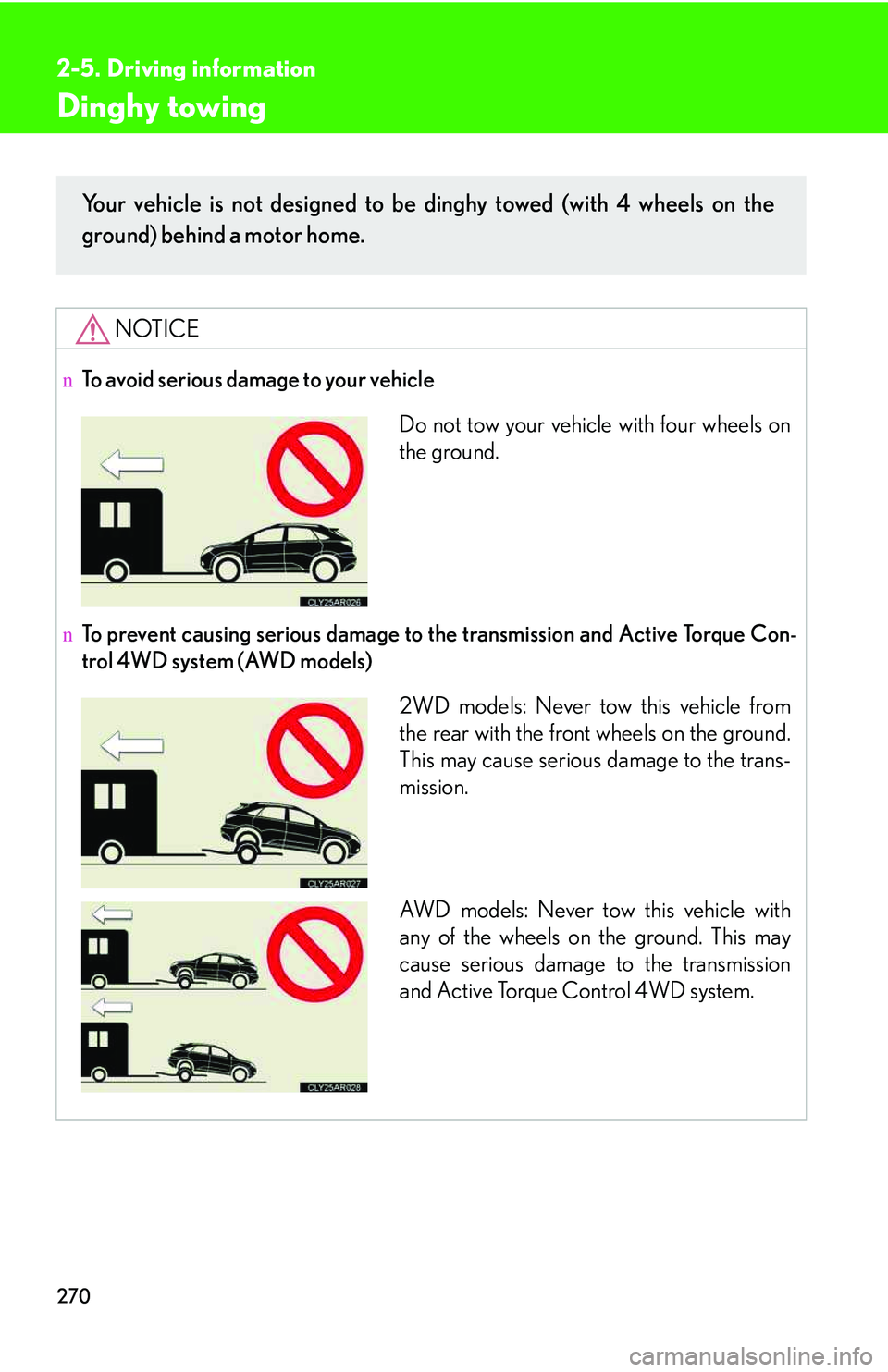
nTo avoid serious damage to your vehicle
nTo prevent causing serious damage to the transmission and Active Torque Con-
trol 4WD system (AWD models)
Your vehicle is not designed to be dinghy towed (with 4 wheels on the
ground) behind a motor home.
Do not tow your vehicle with four wheels on
the ground.
2WD models: Never tow this vehicle from
the rear with the front wheels on the ground.
This may cause serious damage to the trans-
mission.
AW D m o d e l s : N e v e r t ow this vehicle with
any of the wheels on the ground. This may
cause serious damage to the transmission
and Active Torque Control 4WD system.
Page 355 of 821
285
3-2. Using the audio system
3
Interior features
Type C
Ti t l ePa g e
Using the radioP. 2 8 7
Using the CD playerP. 2 9 7
Playing MP3 and WMA discsP. 3 0 7
Operating an iPodP. 3 1 7
Operating a USB memoryP. 3 2 5
Optimal use of the audio systemP. 3 3 4
Using the AUX portP. 3 3 7
Using the steering wheel audio switchesP. 3 3 9
Page 409 of 821
339
3-2. Using the audio system
3
Interior features
Using the steering wheel audio switches
Turning the power on
Press when the audio system is turned off.
The audio system can be turned off by holding the switch down for 1 second
or more.
Some audio features can be controlled using the switches on the steering
wheel.
Turns the power on, selects
an audio source
Increases/decreases volume
Radio mode: Selects a radio
station
CD mode: Selects a track,
file (MP3 and
WMA) and disc
Bluetooth® audio mode
(type A and B):
Selects a track
and album
iPod mode (type A):
Selects a song
USB memory mode (type A):
Selects a file and
folder
Page 411 of 821
341
3-2. Using the audio system
3
Interior features
Selecting an album (type A and B)
Press to select Bluetooth® audio mode.
Press and hold “∧” or “∨” on until you hear a beep.
Selecting a folder (type A)
Press to select USB memory mode.
Press and hold “∧” or “∨” on until you hear a beep.
Selecting a disc in the CD player
Press to select CD mode.
Press and hold “∧” or “∨” on until you hear a beep.
nCanceling automatic selection of a radio station
Press again.
CAUTION
nTo reduce the risk of an accident
Exercise care when operating the audio switches on the steering wheel.
STEP1
STEP2
STEP1
STEP2
STEP1
STEP2
Page 423 of 821
353
3-3. Using the Bluetooth® audio system
3
Interior features
Switching the display
Press .
Each time the button is pressed, the display changes in the following order:
Elapsed time → Album title → Tr a c k t i t l e → Artist name
Using the steering wheel audio switches
→P. 3 3 9
nBluetooth® audio system functions
Depending on the portable player that is connected to the system, certain functions
may not be available.
nDisplay
→P. 3 0 3
nError messages
“Memory Error”: This indicates a problem in the system.
Page 437 of 821
367
3-4. Using the hands-free phone system (for mobile phones)
3
Interior features
nSteering wheel switches
Vol u m e
The voice guidance volume can-
not be adjusted using this but-
ton.
Off-hook switch
Turns the hands-free system
on/starts a call
On-hook switch
Turns the hands-free system
off/ends a call/refuses a call
Talk switch
Turns the voice command
system on (press)/turns the
voice command system off
(press and hold)
nMicrophone