Page 18 of 578
IS350/250_U
17
Type B Type A
Telephone switch *1P. 288
Cruise control switch P. 175
“DISP” switch P. 161
Talk switch *1P. 288
“DISP” switch P. 161
Cruise control switch P. 175
Automatic transmission Manual transmission
VSC off
switch
P. 187
ECT switch P. 140
VSC off
switch
P. 187
ETCS switch P. 146
B
C
*1: For vehicles with a navigation system, refer to the “Navigation System Owner’s Manual”.
*2: Refer to “Navigation System Owner's Manual”.
Page 21 of 578

IS350/250_U
20
Installation of a mobile two-way radio system
As the installation of a mobile two-way radio system in your vehicle could affect
electronic systems such as the multiport fuel injection system/sequential multiport
fuel injection system, cruise control system, anti-lock brake system, SRS airbag sys-
tem and seat belt pretensioner system, be sure to check with your Lexus dealer for
precautionary measures or special instructions regarding installation.
Scrapping of your Lexus
The SRS airbag and seat belt pretensioner devices in your Lexus contain explosive
chemicals. If the vehicle is scrapped with the airbags and seat belt pretensioners left
as they are, this may cause an accident such as fire. Be sure to have the systems of
the SRS airbag and seat belt pretensioner removed and disposed of by a qualified
service shop or by your Lexus dealer before you scrap your vehicle.
Perchlorate Material
Special handling may apply, See www.dtsc.ca.gov/hazardouswaste/perchlorate.
Your vehicle has components that may contain perchlorate. These components may
include airbag, seat belt pretensioners, and wireless remote control batteries.
Page 24 of 578

Before driving1
23
IS350/250_U
1-1. Key informationKeys ............................................... 24
1-2. Opening, closing and locking the doors and
trunk
Smart access system with push-button start ................... 28
Wireless remote control ........ 40
Doors ............................................ 43
Trunk ............................................. 47
1-3. Adjustable components (seats, mirrors,
steering wheel)
Front seats .................................... 51
Driving position memory (driver’s seat) ........................... 53
Head restraints .......................... 57
Seat belts ..................................... 60
Steering wheel (manually adjustable type) ...................... 67
Steering wheel (power-adjustable type) ....... 68
Anti-glare inside rear view mirror ......................................... 70 Outside rear view mirrors...... 72
1-4. Opening and closing the windows and moon roof
Power windows .......................... 75
Moon roof ................................... 78
1-5. Refueling Opening the fuel tank cap ..... 82
1-6. Theft deterrent system Engine immobilizer system ........................................ 85
Alarm............................................ 87
Theft prevention labels (U.S.A.)...................................... 90
1-7. Safety information Correct driving posture .......... 91
SRS airbags ................................ 93
Front passenger occupant classification system............ 104
Child restraint systems ......... 109
Installing child restraints........ 113
Page 25 of 578
24
IS350/250_U
1-1. Key information
Keys
The following keys are provided with the vehicle.
Electronic keys
• Operating the smart accesssystem with push-button start
(→ P. 2 8 )
• Operating the wireless remote control function
(→ P. 4 0 )
Mechanical keys
Key number plate
■ Card key (if equipped)
Electronic key
Operating the smart access sys-
tem with push-button start
(→ P. 2 8 )
Mechanical key
Page 28 of 578

27
1-1. Key information
1
Before driving
IS350/250_U
NOTICE
■To prevent key damage
Observe the following.
●Do not drop the keys, subject them to strong shocks or bend them.
●Do not expose the keys to high temperatures for a long period of time.
●Do not get the keys wet or wash them in an ultrasonic washer etc.
●Do not attach metallic or magnetic materials to the keys or place the keys close to
such materials.
●Do not disassemble the electronic keys.
●Do not place the keys near objects that produce magnetic fields, such as TVs,
audio systems, glass top ranges, or medical electrical equipment, such as low-fre-
quency therapy equipment.
■Precautions for handling the card keys
●Do not apply excess force when inserting the mechanical key to the card key.
Doing so may damage the card key.
●If the battery or card key terminals get wet, the battery may corrode and the card
key may stop working.
If the key is dropped into water, or if drinking water etc. is spilled on the key,
immediately remove the battery cover and wipe the battery and terminals. (To
remove the battery cover, lightly grasp it and pull.) If the battery is corroded, have
your Lexus dealer replace the battery.
●Do not crush the battery cover or use a screwdriver to remove the battery cover.
Forcibly removing the battery cover may bend or damage the key.
●If the battery cover is frequently removed, the battery cover may become loose.
●When installing the battery, make sure to check the direction of the battery.
Installing the battery in the wrong direction may cause the battery to deplete rap-
idly.
●The surface of the card key may be damaged, or its coating may peel off in the
following situations.
• The card key is carried together with hard objects, such as coins or keys.
• The card key is scraped with a sharp object, such as a tip of mechanical pencil.
• The surface of the card key is wiped with thinners or benzene.
Page 29 of 578
28
IS350/250_U
1-2. Opening, closing and locking the doors and trunk
Smart access system with push-button start
The following operations can be performed simply by carrying the elec-
tronic key (including the card key∗) on your person, for example in your
pocket.
(The driver should always carry the electronic key.)
Locks and unlocks the doors ( →P. 2 9 )
Unlocks the trunk ( →P. 2 9 )
Starts the engine ( →P. 1 3 4 )
∗
: If equipped
Electronic key
Electronic keyElectronic key
Page 32 of 578
31
1-2. Opening, closing and locking the doors and trunk
1
Before driving
IS350/250_U■
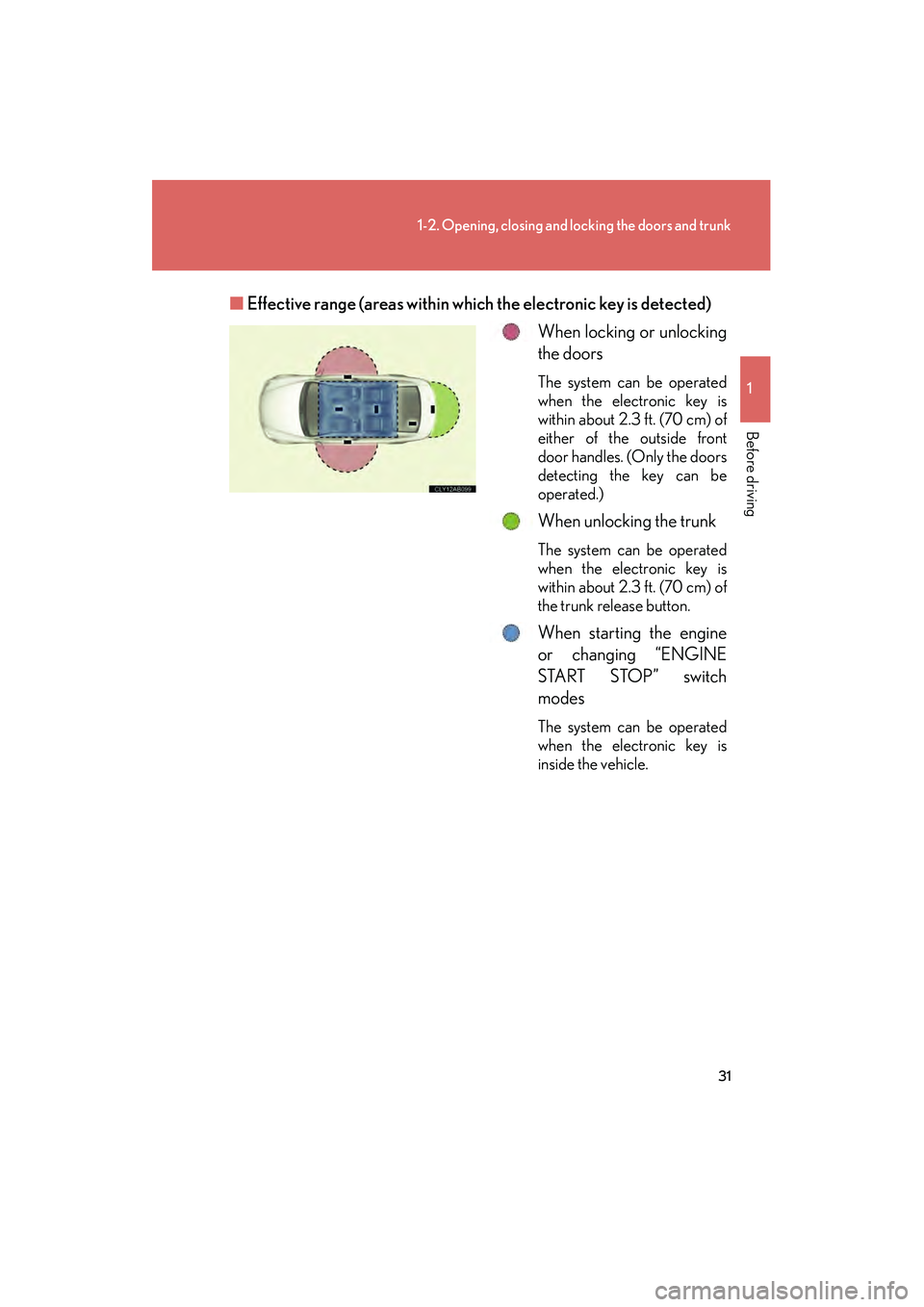
Effective range (areas within wh ich the electronic key is detected)
When locking or unlocking
the doors
The system can be operated
when the electronic key is
within about 2.3 ft. (70 cm) of
either of the outside front
door handles. (Only the doors
detecting the key can be
operated.)
When unlocking the trunk
The system can be operated
when the electronic key is
within about 2.3 ft. (70 cm) of
the trunk release button.
When starting the engine
or changing “ENGINE
START STOP” switch
modes
The system can be operated
when the electronic key is
inside the vehicle.
Page 33 of 578

32
1-2. Opening, closing and locking the doors and trunk
IS350/250_U
■Operation signals
A buzzer sounds and the emergency flashers flash to indicate that the doors have
been locked/unlocked. (Locked: Once; Unlocked: Twice)
■Conditions affecting operation
The smart access system with push-button start uses weak radio waves. In the fol-
lowing situations, the communication between the electronic key and the vehicle
may be affected, preventing the smart access system with push-button start from
operating properly:
(Ways of coping: →P. 4 9 3 )
●When the electronic key battery is depleted
●Near a TV tower, electric power plant, gas station, radio station, large display,
airport or other facility that generates strong radio waves or electrical noise
●When carrying a portable radio, cellular phone, cordless phone or other wire-
less communication devices
●When the electronic key is in contact with, or is covered by the following metal-
lic objects
• Cards to which aluminum foil is attached
• Cigarette boxes that have aluminum foil inside
• Metallic wallets or bags
•Coins
• Hand warmers made of metal
• Media such as CDs and DVDs
●When multiple electronic keys are in the vicinity
●When another wireless key (that emits radio waves) is being used nearby
●When carrying or using the electronic key together with the following devices
that emit radio waves
• Another vehicle's electronic key or a wireless key that emits radio waves
• Personal computer or personal digital assistant (PDA)
• Digital audio player
• Portable game system
●If window tint with a metallic content or metallic objects are attached to the rear
window