Page 172 of 563

170
2-4. Using other driving systems
ES350_U
CAUTION
■Conditions under which the vehicle-to-vehicle distance control may not function
correctly
Apply the brakes as necessary in the following conditions as the radar sensor may
not be able to correctly detect vehicles ahead, and a fatal or serious accident may
result:
●When water or snow thrown up by the surrounding vehicles hinders the function-
ing of the sensor
●When your vehicle is pointing upwards (caused by a heavy load in the trunk etc.)
●When the road curves or when the lanes are narrow
●When steering wheel operation or your position in the lane is unstable
●When the vehicle ahead of you decelerates suddenly
■Handling the radar sensor
Observe the following to ensure the cruise control system can function effectively.
Otherwise, the system may not function correctly and could result in an accident.
●Keep the sensor and front grille cover clean at all times.
Clean the sensor and front grille cover with a soft cloth so you do not mark or
damage them.
●Do not subject the sensor or surrounding area to a strong impact.
If the sensor moves even slightly off position, the system may malfunction. If the
sensor or surrounding area is subject to a strong impact, always have the area
inspected and adjusted by a Lexus dealer.
●Do not disassemble the sensor.
●Do not attach accessories or stickers to the sensor, grille cover or surrounding
area.
●Do not modify or paint the sensor and grille cover.
●Do not replace them with non-genuine parts.
Page 203 of 563

201
2-5. Driving information
2
When driving
ES350_U
Trailer towing tipsYour vehicle will handle differently when towing a trailer. In order to avoid
accident, death or serious injury, keep the following in mind when towing:
● Before starting out, check the trailer’s lights and the vehicle-trailer
connections. Recheck after driving a short distance.
● Practice turning, stopping and rever sing with the trailer attached in an
area away from traffic until you become accustomed to the feel of the
vehicle.
● Reversing with a trailer attached is difficult and requires practice. Grip
the bottom of the steering wheel and move your hand to the left to
move the trailer to the left. Move your hand to the right to move the
trailer to the right. (This is generally opposite to reversing without a
trailer attached.) Avoid sharp or prolonged turning. Have someone
guide you when reversing to reduce the risk of an accident.
● As stopping distance is increased when towing a trailer, vehicle-to-
vehicle distance should be increased. For each 10 mph (16 km/h) of
speed, allow at least one vehicle and trailer length.
NOTICE
■Safety chain
A safety chain must always be used between the towing vehicle and the trailer.
Leave sufficient slack in the chain for turns. The chain should cross under the trailer
tongue to prevent the tongue from dropping to the ground in the case that it
becomes damaged or separated. For the correct safety chain installation proce-
dure, ask your Lexus dealer.
■Do not directly splice trailer lights
Directly splicing may damage your vehicle's electrical system and cause a malfunc-
tion.
Page 204 of 563

202
2-5. Driving information
ES350_U●
Avoid sudden braking as you may sk id, resulting in jackknifing and loss
of control. This is especially true on wet or slippery surfaces.
● Avoid jerky starts or sudden acceleration.
● Avoid jerky steering and sharp turns, and slow down before making a
turn.
● Note that when making a turn, the trailer wheels will be closer than the
vehicle wheels to the inside of the turn. Compensate by making a
larger than normal turning radius.
● Crosswinds and rough roads will adversely affect handling of your
vehicle and trailer, causing sway. Periodically check the rear to prepare
for being passed by large trucks or buses, which may cause your vehi-
cle and trailer to sway. If swaying occurs, firmly grip the steering wheel,
reduce speed immediately but gradually, and steer straight ahead.
Never increase speed. If you make no extreme correction with the
steering or brakes, your vehicle and trailer will stabilize.
● Take care when passing other vehicles. Passing requires considerable
distance. After passing a vehicle, do not forget the length of your
trailer, and be sure you have plenty of room before changing lanes.
● To maintain engine braking efficiency and charging system perfor-
mance when using engine braking, do not use overdrive. Transmission
shift range position must be in 4, in the S mode.
● Due to the added load of the trailer, your vehicle's engine may over-
heat on hot days (at temperatures over 85°F [30°C]) when driving up
a long or steep grade. If the engine coolant temperature gauge indi-
cates overheating, immediately turn off the air conditioning (if in use),
pull your vehicle off the road and stop in a safe spot. See “If you vehicle
overheats”. ( →P. 486)
Page 208 of 563
206
ES350_U
3-1. Using the air conditioning system and defogger
Automatic air conditioning system ........... 208
Rear window and outside rear view
mirror defoggers.................. 215
3-2. Using the audio system Audio system type .................. 216
Using the radio ........................ 219
Using the CD player ............. 226
Playing back MP3 and WMA discs ........................... 233
Operating an iPod ................. 240
Operating a USB memory................................... 247
Optimal use of the audio system ..................................... 256
Using the AUX port.............. 258
Using the steering wheel audio switches...................... 259
Page 219 of 563
217
3-2. Using the audio system
3
Interior features
ES350_U
■Using mobile phones
Interference may be heard through the audio system’s speakers if a mobile phone is
being used inside or close to the vehicle while the audio system is operating.
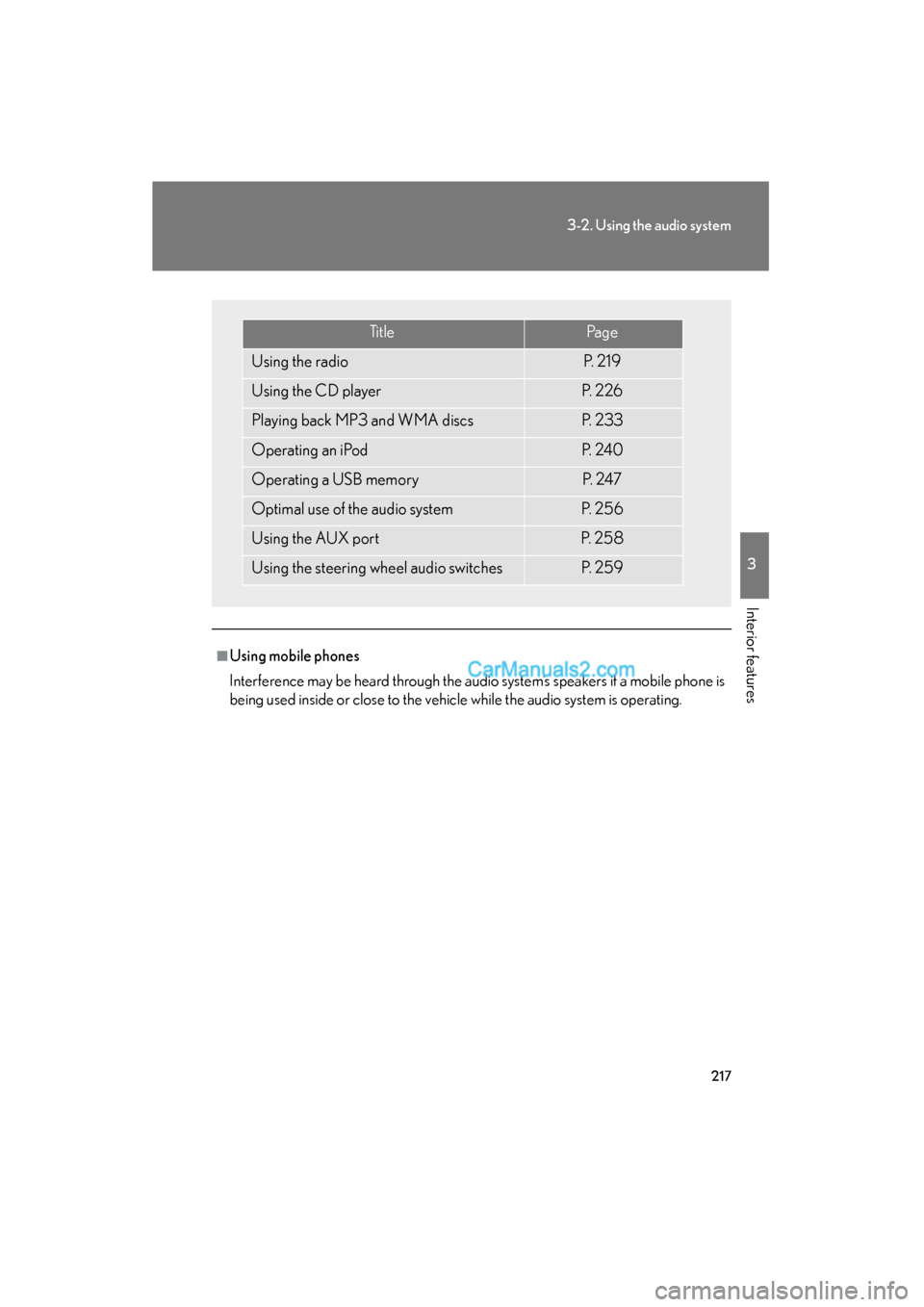
Ti t l ePa g e
Using the radioP. 2 1 9
Using the CD playerP. 2 2 6
Playing back MP3 and WMA discsP. 2 3 3
Operating an iPodP. 2 4 0
Operating a USB memoryP. 2 4 7
Optimal use of the audio systemP. 2 5 6
Using the AUX portP. 2 5 8
Using the steering wheel audio switchesP. 2 5 9
Page 261 of 563
259
3-2. Using the audio system
3
Interior features
ES350_U
Using the steering wheel audio switches
Turning the power onPress when the audio system is turned OFF.
The audio system can be turned off by holding the button down until you hear
a beep.
Some audio features can be controlled using the switches on the steering
wheel.
Turns the power on, selects
an audio source
Increases/decreases volume
Radio mode: Selects a radio station
CD mode: Selects a track, file (MP3 and
WMA) and disc
Bluetooth
® audio mode:
Selects a track and
album
iPod mode (if equipped):
Selects a song
USB memory mode (if
equipped): Selects a file and folder
Page 263 of 563
261
3-2. Using the audio system
3
Interior features
ES350_U
Selecting an albumPress to select Bluetooth
® audio mode.
Press and hold “ ∧” or “ ∨” on until you hear a beep.
Selecting a folder (if equipped)
Press to select USB memory mode.
Press and hold “ ∧” or “ ∨” on until you hear a beep.
Selecting a disc in the CD player
Press to select the CD mode.
Press and hold “ ∧” or “ ∨” on until you hear a beep.
■Canceling automatic selection of a radio station
Press again.
CAUTION
■To reduce the risk of an accident
Exercise care when operating the audio switches on the steering wheel.
STEP1
STEP2
STEP1
STEP2
STEP1
STEP2
Page 273 of 563
271
3-3. Using the Bluetooth® audio system
3
Interior features
ES350_U
Fast-forwarding and rewinding tracksTo fast-forward or rewind, press and hold “
∧” or “ ∨” on
until you hear a beep.
Random playback
Press (RAND).
To cancel, press (RAND) again.
Repeat playPress (RPT).
To cancel, press (RPT) again.
Scanning tracksPress .
To cancel, press again.
Switching the displayPress .
Each time the button is pressed, the display changes in the following order:
Elapsed time → Album title → Track title → Artist name
Using the steering wheel audio switches
→ P. 2 5 9