Page 174 of 563
172
2-4. Using other driving systems
ES350_U
The display and buzzer system■ Corner sensor operation displa y and distance to an obstacle
The system operates when the vehicle approaches within approxi-
mately 1.6 ft. (50 c m) of an obstacle.
Approximately 1.6 ft. (50 cm) to
1.2 ft. (37.5 cm) from the obsta-
cle
Approximately 1.2 ft. (37.5 cm)
to 0.8 ft. (25 cm) from the
obstacle
Flashing: Within 0.8 ft. (25 cm)
of the obstacle
■Intuitive parking assist switch
ON/OFF
When ON, an indicator on the
switch comes on to inform the
driver that the function is opera-
tional.
Page 177 of 563

175
2-4. Using other driving systems
2
When driving
ES350_U
■Sensor detection information
●Certain vehicle conditions and the surrounding environment may affect the
ability of the sensor to correctly detect obstacles. Particular instances where this
may occur are listed below.
• There is dirt, snow or ice on the sensor.
• The sensor is frozen.
• The sensor is covered in any way.
• The vehicle is leaning considerably to one side.
• On an extremely bumpy road, on an incline, on gravel, or on grass
• The vicinity of the vehicle is noisy due to vehicle horns, motorcycle engines,air brakes of large vehicles, or other loud noises producing ultrasonic waves.
• There is another vehicle equipped with parking assist sensors in the vicinity.
• The sensor is coated with a sheet of spray or heavy rain
• The vehicle is equipped with a fender pole or wireless antenna.
• Towing eyelets are installed.
• The bumper or sensor receives a strong impact.
• The vehicle is approaching a tall or curved curb.
• In harsh sunlight or intense cold weather
In addition to the examples above, there are instances in which, because of their
shapes, signs and other objects may be judged by the sensor to be closer than they
are.
●The shape of the obstacle may prevent the sensor from detecting it. Pay particu-
lar attention to the following obstacles.
• Wires, fences, ropes etc.
• Cotton, snow and other materials that absorb radio waves
• Sharply-angled objects
• Low obstacles
• Tall obstacles with upper sections projecting outwards in the direction of your
vehicle
Page 178 of 563

176
2-4. Using other driving systems
ES350_U
■When the display flashes and a message is displayed
→P. 4 5 5
■Certification
For vehicles sold in U.S.A.
This device complies with Part 15 of the FCC Rules.
Operation is subject to the following two conditions: (1) This device may not cause
harmful interference, and (2) this device must accept any interference received,
including interference that may cause undesired operation. For vehicles sold in Canada
This ISM device complies with Canadian ICES-001.
Cet appareil ISM est conforme a la norme NMB-001 du Canada.
■Customization that can be configured at Lexus dealer
Settings (e.g. buzzer volume) can be changed. (Customizable features →P. 5 1 7 )
CAUTION
■Caution when using the intuitive parking assist
Observe the following precautions.
Failing to do so may result in the vehicle being unable to be driven safely and possi-
bly cause an accident.
●Do not use the sensor at speeds in excess of 6 mph (10 km/h).
●Do not attach any accessories within the sensor range.
NOTICE
■Notes when washing the vehicle
Do not apply intensive bursts of water or steam to the sensor area.
Doing so may result in the sensor malfunctioning.
Page 438 of 563

436
5-1. Essential information
ES350_U
Installing towing eyeletRemove the eyelet cover using a
flathead screwdriver.
To protect the bodywork, place a
rag between the screwdriver and
the vehicle body, as shown in the
illustration.
■Emergency towing procedureRelease the parking brake.
Shift the shift lever to N.
Turn the “ENGINE START STOP” switch to ACCESSORY (engine off)
or IGNITION ON mode (engine running).
CAUTION
■Caution while towing
●Use extreme caution when towing the vehicle.
Avoid sudden starts or erratic driving maneuvers which place excessive stress on
the emergency towing eyelets and the cables or chains. Always be cautious of the
surroundings and other vehicles while towing.
●If the engine is not running, the power assist for the brakes and steering will not
function, making steering and braking more difficult.
NOTICE
■To prevent causing serious da mage to the transmission
Never tow this vehicle from the rear with front wheels on the ground.
This may cause serious damage to the transmission.
STEP1
STEP2
STEP3
STEP1
Page 459 of 563
5
When trouble arises
457
5-2. Steps to take in an emergency
ES350_U
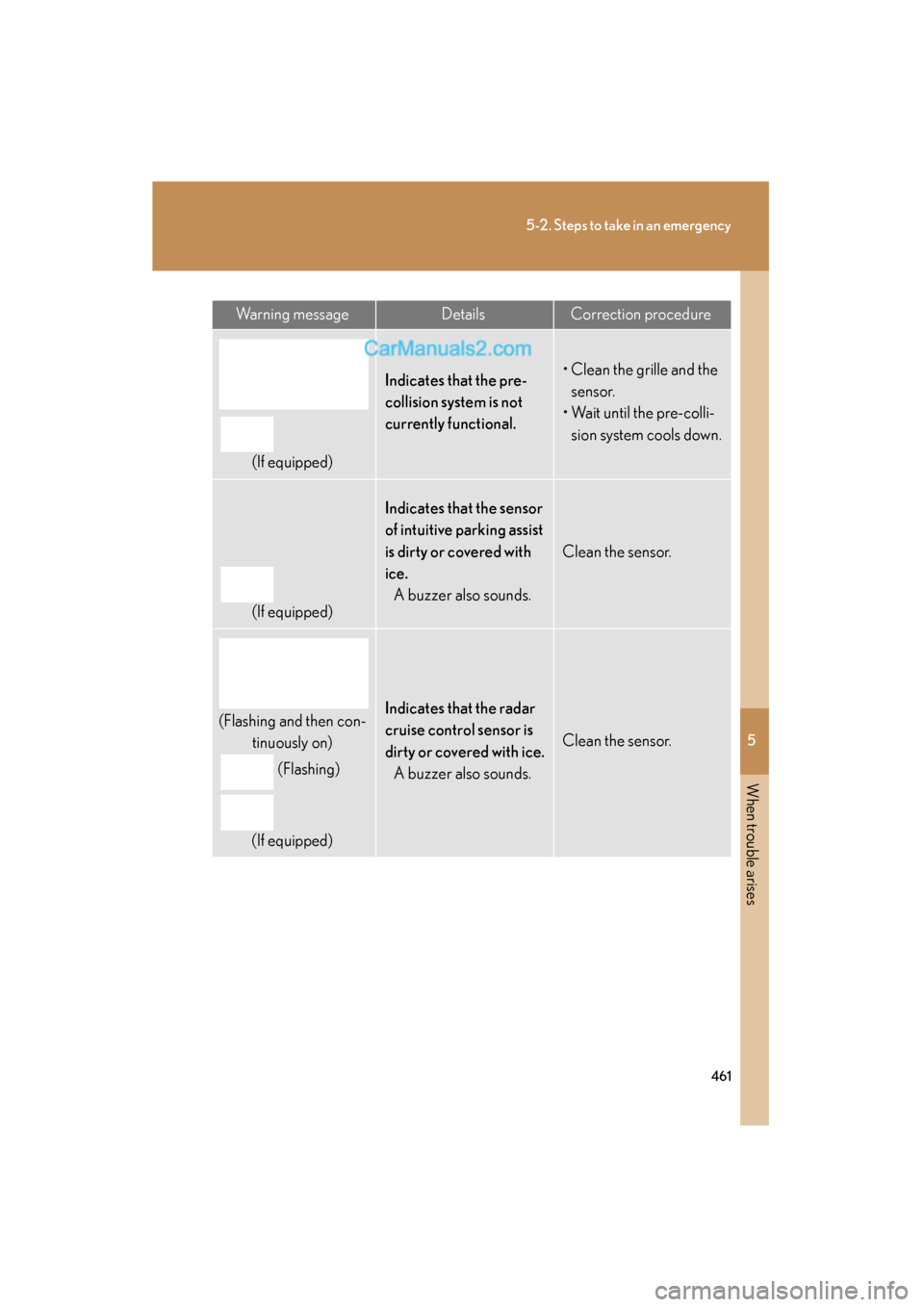
Warning messageDetails
(If equipped)
Indicates intuitive parking assist malfunction.A buzzer also sounds.
The malfunctioning assist-sensor is shown flashing on
the display.
(Flashing and then con-
tinuously on)
(Flashing)or
(Flashing)
(If equipped)Indicates a malfunction in the radar cruise control
system. A buzzer also sounds.
Press the “ON-OFF” button once to deactivate the
system, and then press the button again to reactivate
the system.
Page 463 of 563
5
When trouble arises
461
5-2. Steps to take in an emergency
ES350_U
Warning messageDetailsCorrection procedure
(If equipped)
Indicates that the pre-
collision system is not
currently functional.• Clean the grille and the sensor.
• Wait until the pre-colli- sion system cools down.
(If equipped)
Indicates that the sensor
of intuitive parking assist
is dirty or covered with
ice.A buzzer also sounds.
Clean the sensor.
(Flashing and then con- tinuously on)
(Flashing)
(If equipped)Indicates that the radar
cruise control sensor is
dirty or covered with ice. A buzzer also sounds.
Clean the sensor.
Page 522 of 563
520
6-2. Customization
ES350_U
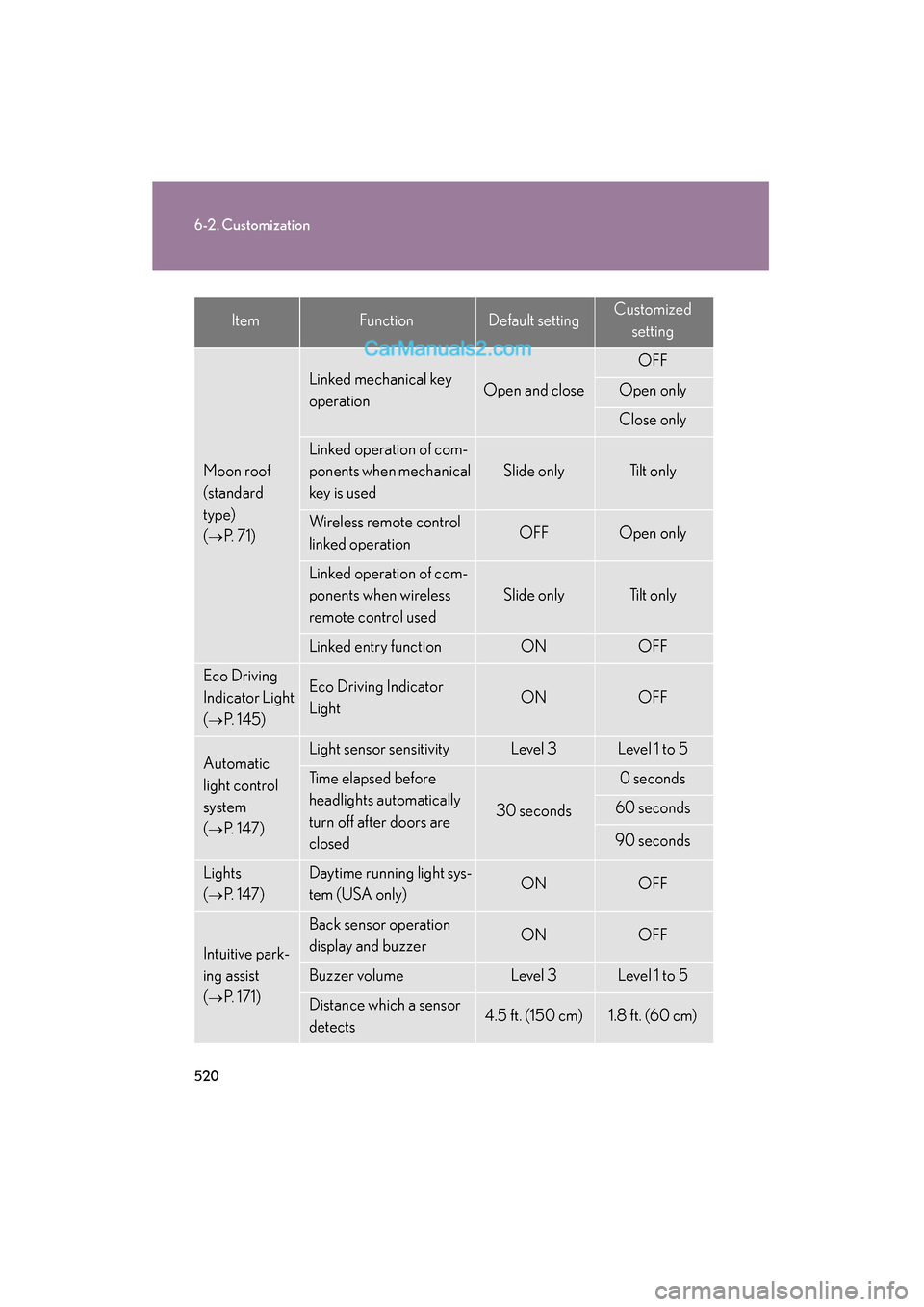
Moon roof
(standard
type)
(
→P. 71)
Linked mechanical key
operationOpen and close
OFF
Open only
Close only
Linked operation of com-
ponents when mechanical
key is used
Slide onlyTilt only
Wireless remote control
linked operationOFFOpen only
Linked operation of com-
ponents when wireless
remote control used
Slide onlyTilt only
Linked entry functionONOFF
Eco Driving
Indicator Light
(
→P. 1 4 5 )
Eco Driving Indicator
LightONOFF
Automatic
light control
system
(
→P. 147)
Light sensor sensitivityLevel 3Level 1 to 5
Time elapsed before
headlights automatically
turn off after doors are
closed
30 seconds
0 seconds
60 seconds
90 seconds
Lights
(
→P. 147)
Daytime running light sys-
tem (USA only)ONOFF
Intuitive park-
ing assist
(
→P. 171)
Back sensor operation
display and buzzerONOFF
Buzzer volumeLevel 3Level 1 to 5
Distance which a sensor
detects4.5 ft. (150 cm)1.8 ft. (60 cm)
ItemFunctionDefault settingCustomizedsetting
Page 547 of 563
545
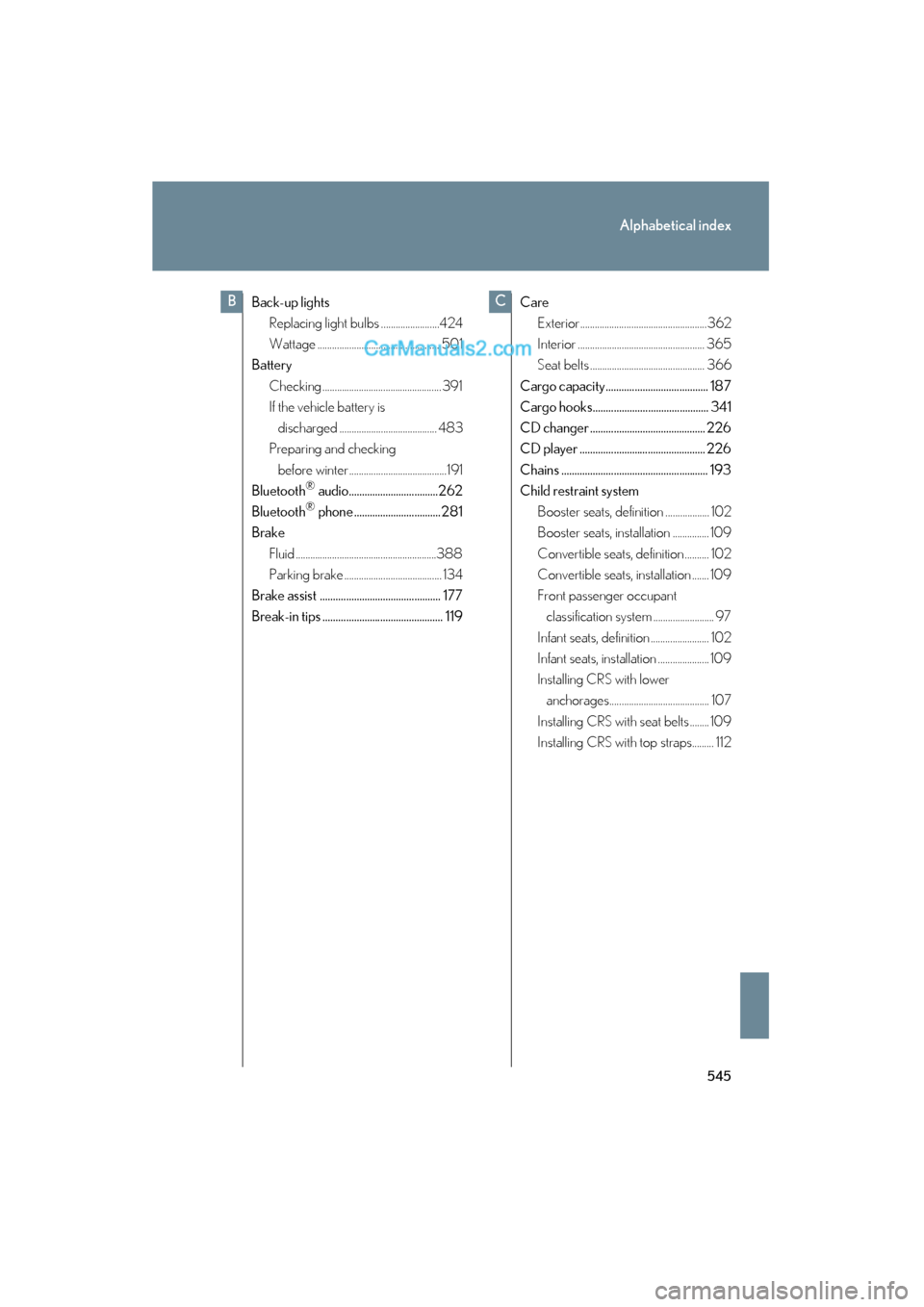
Alphabetical index
ES350_U
Back-up lightsReplacing light bulbs ........................424
Wattage .................................................. 501
Battery
Checking ................................................. 391
If the vehicle battery is discharged ........................................ 483
Preparing and checking
before winter ........................................191
Bluetooth
® audio..................................262
Bluetooth® phone ................................. 281
Brake
Fluid ..........................................................388
Parking brake ........................................ 134
Brake assist .............................................. 177
Break-in tips .............................................. 119 Care
Exterior....................................................362
Interior .................................................... 365
Seat belts ............................................... 366
Cargo capacity....................................... 187
Cargo hooks............................................ 341
CD changer ............................................ 226
CD player ................................................ 226
Chains ........................................................ 193
Child restraint system Booster seats, definition .................. 102
Booster seats, installation ............... 109
Convertible seats, definition .......... 102
Convertible seats, installation ....... 109
Front passenger occupant classification system ......................... 97
Infant seats, definition ........................ 102
Infant seats, installation ..................... 109
Installing CRS with lower anchorages......................................... 107
Installing CRS with seat belts ........ 109
Installing CRS with top straps......... 112
BC