Page 277 of 603

Vehicle Odometer Messages
When the appropriate conditions exist, the following
odometer messages will display:
ECO................... Fuel Saver Indicator Off
ECO-ON ................ Fuel Saver Indicator On
door ............................. Door Ajar
gATE ........................ Swing Gate Ajar
LoW tirE ..................... LowTirePr essure
HOTOIL . . Transmission Oil Temperature Above Normal
Limits
gASCAP ....................... Fuel Cap Fault
noFUSE .......................... Fuse Fault
CHAngE OIL ............... Oil Change Required
ECO / ECO-ON (Fuel Saver Indicator) — If Equipped
The ECO-ON indicator will illuminate when you are
driving in a fuel efficient manner and can be used to
modify driving habits in order to increase fuel economy.
The ECO display will toggle between ECO and ECO-ON depending on driving habits and vehicle usage. Press the
Odometer / Trip Odometer / ECO (Fuel Saver Indicator)
button to change the display from odometer to either of
the two trip odometer settings or the “ECO” display.
LoW tirE
When the appropriate condition exists, the odometer
display will toggle between LoW and tirE for three
cycles.
“HOTOIL” Transmission Temperature Warning
Message
The “HOTOIL” cluster message will appear in the odom-
eter accompanied with a chime to indicate that there is
excessive transmission fluid temperature that might oc-
cur with severe usage such as trailer towing. It may also
occur when operating the vehicle in a high torque
converter slip condition, such as 4-wheel drive operation
4
UNDERSTANDING YOUR INSTRUMENT PANEL 275
Page 278 of 603

(e.g., snow plowing, off-road operation). If this “HOT-
OIL” message turns on, stop the vehicle and run the
engine at idle or faster with the transmission in NEU-
TRAL until the message turns off.
CAUTION!
Continuous driving with the Transmission Tempera-
ture “HOTOIL” Warning message illuminated will
eventually cause severe transmission damage or
transmission failure.
WARNING!
If the Transmission Temperature “HOTOIL” Warn-
ing message is illuminated and you continue operat-
ing the vehicle, in some circumstances you could
cause the fluid to boil over, come in contact with hot
engine or exhaust components and cause a fire.gASCAP
If the vehicle diagnostic system determines that the fuel
filler cap is loose, improperly installed, or damaged, a
“gASCAP” message will display in the odometer display
area. Tighten the fuel filler cap properly and press the
TRIP ODOMETER button to turn off the message. If the
problem continues, the message will appear the next time
the vehicle is started.
noFUSE
If the vehicle diagnostic system determines that the
Ignition Off Draw (IOD) fuse is improperly installed, or
damaged, a “noFUSE” message will display in the odom-
eter display area. For further information on fuses and
fuse locations refer to “Fuses” in “Maintaining Your
Vehicle”.
CHAngE OIL Message
Your vehicle is equipped with an engine oil change
indicator system. The “CHANgE OIL” message will flash
276 UNDERSTANDING YOUR INSTRUMENT PANEL
Page 280 of 603

When the engine is running, the MIL may flash to alert
serious conditions that could lead to immediate loss of
power or severe catalytic converter damage. The vehicle
should be serviced as soon as possible if this occurs.
CAUTION!
Prolonged driving with the MIL on could cause
damage to the engine control system. It also could
affect fuel economy and drivability. If the MIL is
flashing, severe catalytic converter damage and
power loss will soon occur. Immediate service is
required.
WARNING!
A malfunctioning catalytic converter, as referenced
above, can reach higher temperatures than in normal
operating conditions. This can cause a fire if you
drive slowly or park over flammable substances such
as dry plants, wood, cardboard, etc. This could result
in death or serious injury to the driver, occupants or
others.
26. Electronic Stability Control (ESC) Activation/
Malfunction Indicator Light — If Equipped The “ESC Activation/Malfunction Indicator
Light” in the instrument cluster will come on
when the ignition switch is turned to the
ON/RUN position. It should go out with the
engine running. If the “ESC Activation/Malfunction In-
dicator Light” comes on continuously with the engine
running, a malfunction has been detected in the ESC
278 UNDERSTANDING YOUR INSTRUMENT PANEL
Page 281 of 603

system. If this light remains on after several ignition
cycles, and the vehicle has been driven several miles
(kilometers) at speeds greater than 30 mph (48 km/h), see
your authorized dealer as soon as possible to have the
problem diagnosed and corrected.
NOTE:
•The “ESC Off Indicator Light” and the “ESC
Activation/Malfunction Indicator Light” come on mo-
mentarily each time the ignition switch is turned to
ON/RUN.
•Each time the ignition is turned to ON/RUN, the ESC
system will be ON, even if it was turned off previously.
•The ESC system will make buzzing or clicking sounds
when it is active. This is normal; the sounds will stop
when ESC becomes inactive following the maneuver
that caused the ESC activation.
WARNING!
The Electronic Stability Control (ESC) cannot pre-
vent the natural laws of physics from acting on the
vehicle, nor can it increase the traction afforded by
prevailing road conditions. ESC cannot prevent acci-
dents, including those resulting from excessive speed
in turns, driving on very slippery surfaces, or hydro-
planing. The capabilities of an ESC-equipped vehicle
must never be exploited in a reckless or dangerous
manner which could jeopardize the user’s safety or
the safety of others.
27. O/D (Overdrive) OFF Indicator Light This light will illuminate when the O/D OFF
button has been selected and overdrive has been
turned off. The O/D OFF button is located on the center
console.
4
UNDERSTANDING YOUR INSTRUMENT PANEL 279
Page 289 of 603
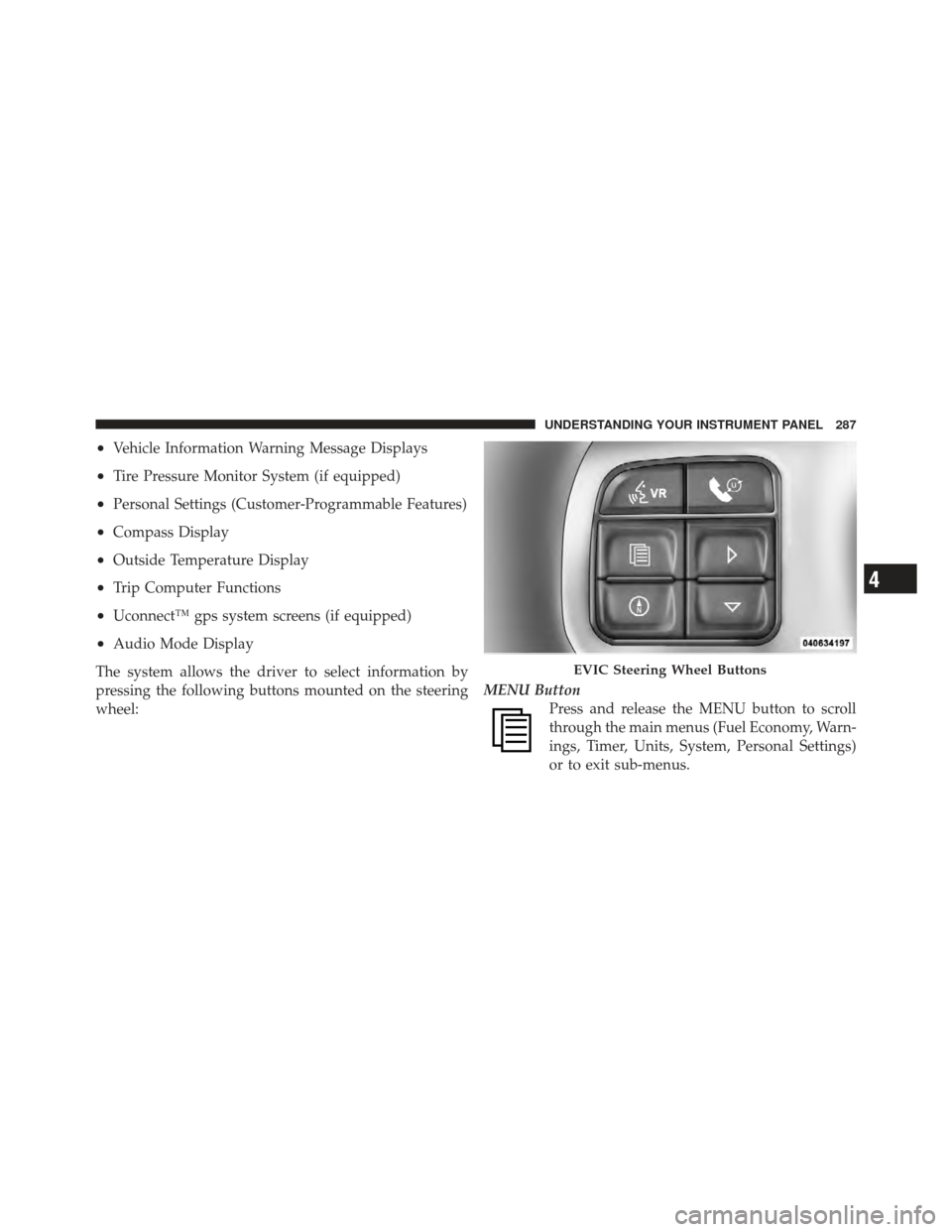
•Vehicle Information Warning Message Displays
•Tire Pressure Monitor System (if equipped)
•Personal Settings (Customer-Programmable Features)
•Compass Display
•Outside Temperature Display
•Trip Computer Functions
•Uconnect™ gps system screens (if equipped)
•Audio Mode Display
The system allows the driver to select information by
pressing the following buttons mounted on the steering
wheel: MENU Button
Press and release the MENU button to scroll
through the main menus (Fuel Economy, Warn-
ings, Timer, Units, System, Personal Settings)
or to exit sub-menus.
EVIC Steering Wheel Buttons
4
UNDERSTANDING YOUR INSTRUMENT PANEL 287
Page 290 of 603
COMPASS ButtonPress and release the COMPASS button to
display one of eight compass readings and the
outside temperature or to exit sub-menus.
SELECT Button Press and release the SELECT button for access
to main menus, sub-menus or to select a per-
sonal setting in the setup menu.
DOWN Button Press and release the DOWN button to scroll
downward through the sub-menus.Electronic Vehicle Information Center (EVIC)
Displays
When the appropriate conditions exist, the EVIC displays
the following messages:
•Low Tire Pressure
•Wrong Key
•Damage Key
•Key Not Programmed
•Key in Ignition
•Turn Signal On (with a continuous warning chime)
•Left Front Turn Signal Light Out (with a single chime)
•Left Rear Turn Signal Light Out (with a single chime)
•Right Front Turn Signal Light Out (with a single
chime)
288 UNDERSTANDING YOUR INSTRUMENT PANEL
Page 349 of 603
device, then follow the same steps to go to the desired
track in that list. Not all iPod�or external USB device
sub-menu levels are available on this system.
•MUSIC TYPE button: TheMUSIC TYPE button is
another shortcut button to the genre listing on your
audio device.
CAUTION!
•Leaving the iPod� or external USB device (or any
supported device) anywhere in the vehicle in
extreme heat or cold can alter the operation or
damage the device. Follow the device manufactur-
er ’s guidelines.
•Placing items on the iPod� or external USB device,
or connections to the iPod� or external USB device
in the vehicle, can cause damage to the device
and/or to the connectors.
WARNING!
Do not plug in or remove the iPod� or external USB
device while driving. Failure to follow this warning
could result in an accident.
Bluetooth Streaming Audio (BTSA)
Music can be streamed from your cellular phone to the
Uconnect™ phone system.
Controlling BTSA Using Radio Buttons
To get into the BTSA mode, press either “AUX” button on
the radio or press the VR button and say “Bluetooth
Streaming Audio”.
Play Mode
When switched to BTSA mode, some audio devices can
start playing music over the vehicle’s audio system, but
some devices require the music to be initiated on the
device first, then it will get streamed to the Uconnect™
4
UNDERSTANDING YOUR INSTRUMENT PANEL 347
Page 370 of 603

▫Replacement Tires .................... 443
� Tire Chains .......................... 445
� Tire Rotation Recommendations ........... 446
� Tire Pressure Monitor System (TPMS) ....... 447
▫ Base System ........................ 449
▫ General Information .................. 452
� Fuel Requirements ..................... 452
▫ Reformulated Gasoline ................ 453
▫ Gasoline/Oxygenate Blends ............. 453
▫ E-85 Usage In Non-Flex Fuel Vehicles ...... 454
▫ MMT In Gasoline .................... 454
▫ Materials Added To Fuel ............... 455 ▫
Fuel System Cautions ................. 455
▫ Carbon Monoxide Warnings ............ 456
� Adding Fuel ......................... 457
▫ Fuel Filler Cap (Gas Cap) .............. 457
▫ Loose Fuel Filler Cap Message ........... 459
� Vehicle Loading ...................... 459
▫ Certification Label ................... 459
� Trailer Towing ........................ 461
▫ Common Towing Definitions ............ 462
▫ Trailer Hitch Classification .............. 464
▫ Trailer Towing Weights
(Maximum Trailer Weight Ratings) ........ 465
368 STARTING AND OPERATING