Page 212 of 490
The EVIC consists of the following:
•System Status
•Vehicle Information Warning Message Displays
•Personal Settings (Customer-Programmable Features)
•Compass Heading
•Outside Temperature Display
•Trip Computer Functions
•Uconnect™ phone Displays (if equipped)
•Audio Mode Display
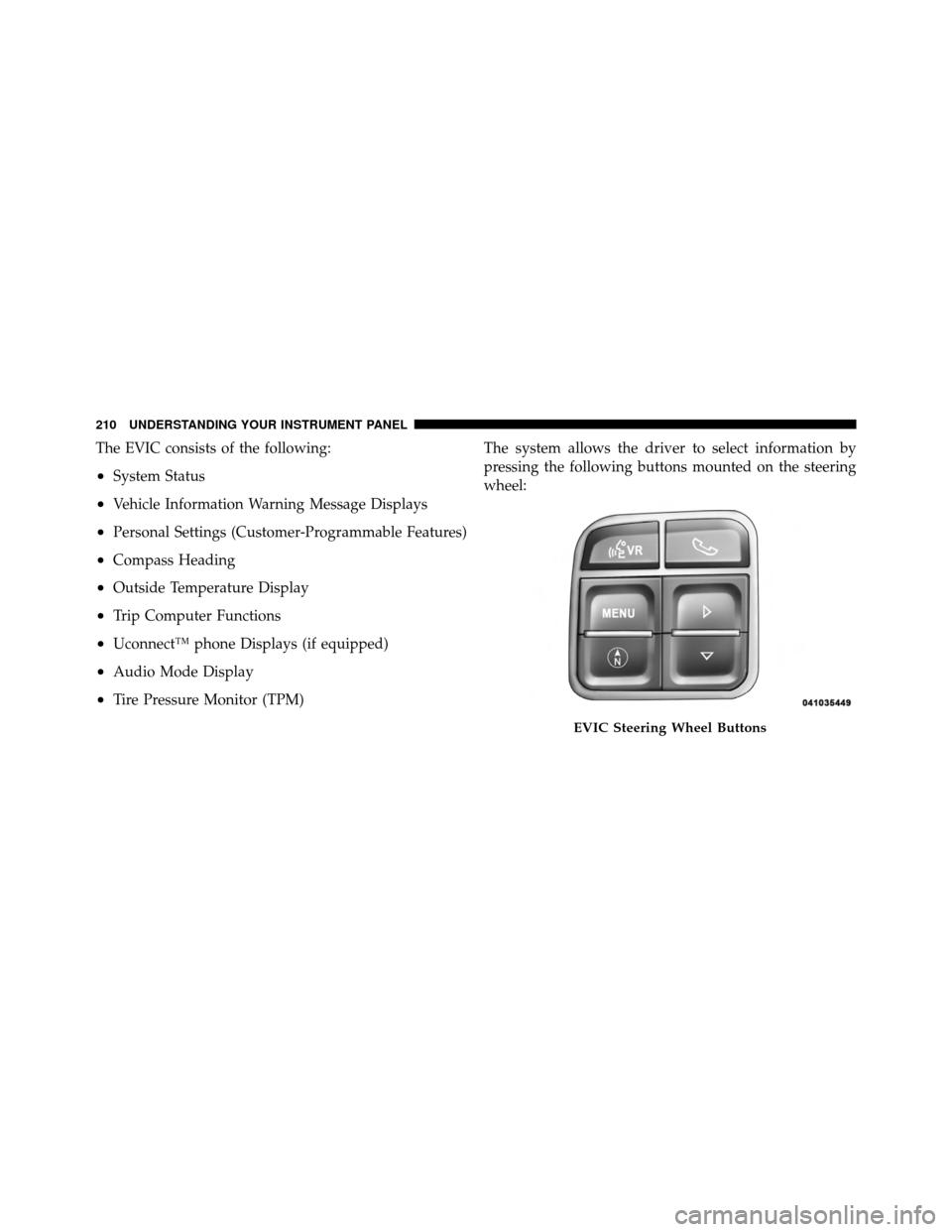
•Tire Pressure Monitor (TPM)The system allows the driver to select information by
pressing the following buttons mounted on the steering
wheel:
EVIC Steering Wheel Buttons
210 UNDERSTANDING YOUR INSTRUMENT PANEL
Page 270 of 490
•Press theSCANbutton to use iPod�/USB/MP3 de-
vice scan mode, which will play the first 10 seconds of
each track in the current list and then forward to the
next song. To stop SCAN mode and start playing the
desired track, when it is playing the track, press the
SCAN button again. During Scan mode, pressing the
<< SEEK andSEEK >> buttons will select the previ-
ous and next tracks.
•RND button (available on sales code RES radio only):
Pressing this button toggles between Shuffle ON and
Shuffle OFF modes for the iPod� or external USB
device, or press the VR button and say �Shuffle ON�or
�Shuffle Off�.IftheRND icon is showing on the radio
display, then the shuffle mode is ON.
List Or Browse Mode
During Play mode, pressing any of the buttons described
below, will bring up List mode. List mode enables
scrolling through the list of menus and tracks on the
audio device.
•TUNE control knob: The TUNEcontrol knob functions
in a similar manner as the scroll wheel on the audio
device or external USB device.
•Turning it clockwise (forward) and counterclock-
wise (backward) scrolls through the lists, displaying
the track detail on the radio display. Once the track
to be played is highlighted on the radio display,
press the TUNEcontrol knob to select and start
playing the track. Turning the TUNEcontrol knob
fast will scroll through the list faster. During fast
scroll, a slight delay in updating the information on
the radio display may be noticeable.
268 UNDERSTANDING YOUR INSTRUMENT PANEL
Page 271 of 490
•During all List modes, the iPod�displays all lists in
“wrap-around” mode. So if the track is at the
bottom of the list, just turn the wheel backward
(counterclockwise) to get to the track faster.
•In List mode, the radio PRESETbuttons are used as
shortcuts to the following lists on the iPod� or
external USB device.
•Preset 1 – Playlists
•Preset 2 – Artists
•Preset 3 – Albums
•Preset 4 – Genres
•Preset 5 – Audiobooks
•Preset 6 – Podcasts
•Pressing a PRESET button will display the current
list on the top line and the first item in that list on
the second line.
•To exit List mode without selecting a track, press the
same PRESET button again to go back to Play
mode.
•LIST button: The LISTbutton will display the top
level menu of the iPod� or external USB device. Turn
the TUNE control knob to list the top-menu item to be
selected and press the TUNEcontrol knob. This will
display the next sub-menu list item on the audio
device, then follow the same steps to go to the desired
track in that list. Not all iPod� or external USB device
sub-menu levels are available on this system.
•MUSIC TYPE button: TheMUSIC TYPE button is
another shortcut button to the genre listing on your
audio device.
4
UNDERSTANDING YOUR INSTRUMENT PANEL 269
Page 273 of 490
2. After the�Ready�prompt and the following beep, say
�Setup�, then �Select Audio Devices�.
3. Say the name of the audio device or ask the
Uconnect™ phone system to list audio devices.
Next Track
Use the SEEK UP button, or press the VR button on the
radio and say “Next Track” to jump to the next track
music on your cellular phone.
Previous Track
Use the SEEK DOWN button, or press the VR button on
the radio and say “Previous Track” to jump to the
previous track music on your cellular phone.
Browse
Browsing is not available on a BTSA device. Only the
current song that is playing will display info.
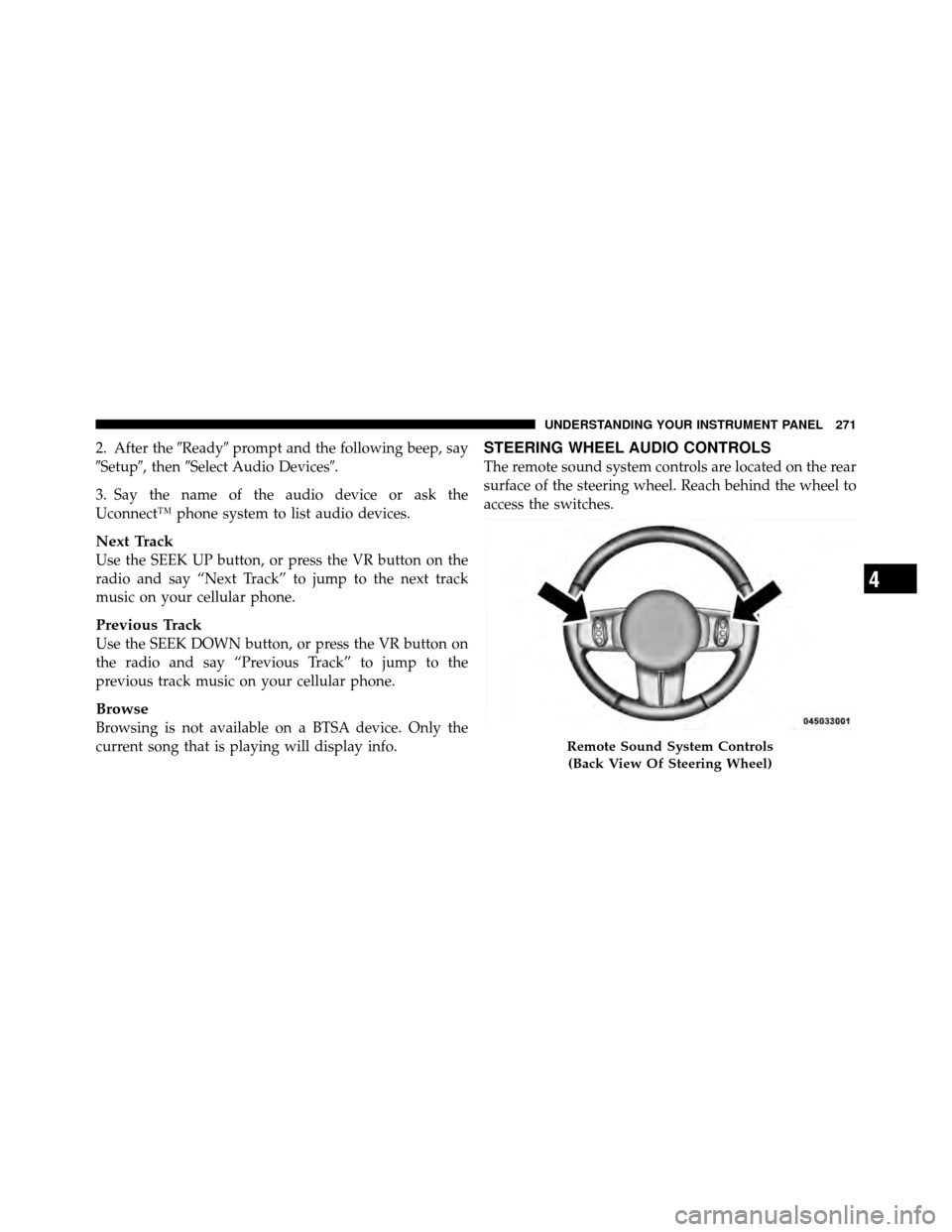
STEERING WHEEL AUDIO CONTROLS
The remote sound system controls are located on the rear
surface of the steering wheel. Reach behind the wheel to
access the switches.
Remote Sound System Controls (Back View Of Steering Wheel)
4
UNDERSTANDING YOUR INSTRUMENT PANEL 271
Page 290 of 490

�AutoStick� — If Equipped ............... 300
▫ Operation ......................... 300
▫ General Information .................. 301
� Four-Wheel Drive Operation — If Equipped . . 302
� On-Road Driving Tips .................. 302
� Off-Road Driving Tips .................. 303
▫ When To Use Low (L Off-Road) With The
4WD Lock Lever Engaged .............. 304
▫ Driving In Snow, Mud And Sand ......... 304
▫ Hill Climbing ....................... 306
▫ Driving Through Water ................ 308
▫ After Driving Off-Road ................ 310
� Power Steering ....................... 311
▫ Power Steering Fluid Check ............. 313�
Parking Brake ........................ 313
� Brake System ........................ 315
▫ Anti-Lock Brake System (ABS) ........... 316
� Electronic Brake Control System ........... 319
▫ Anti-Lock Brake System (ABS) ........... 319
▫ Brake Assist System (BAS) .............. 319
▫ Traction Control System (TCS) ........... 320
▫ Electronic Roll Mitigation (ERM) ......... 321
▫ Hill Descent Control (HDC) – If Equipped . . 322
▫ Hill Start Assist (HSA) – Manual
Transmission Or Off-Road Package Only .... 323
▫ Electronic Stability Control (ESC) ......... 325
▫ ESC Activation/Malfunction Indicator Light
And ESC Off Indicator Light ............ 327
288 STARTING AND OPERATING
Page 291 of 490

�Tire Safety Information ................. 328
▫ Tire Markings ....................... 328
▫ Tire Identification Number (TIN) ......... 332
▫ Tire Terminology And Definitions ......... 333
▫ Tire Loading And Tire Pressure .......... 334
� Tires — General Information ............. 338
▫ Tire Pressure ....................... 338
▫ Tire Inflation Pressures ................ 339
▫ Tire Pressures For High Speed Operation . . . 341
▫ Radial Ply Tires ..................... 341
▫ Spare Tire Matching Original Equipped Tire
And Wheel – If Equipped .............. 341
▫ Compact Spare Tire – If Equipped ........ 342▫
Full Size Spare – If Equipped ............ 343
▫ Limited-Use Spare – If Equipped ......... 343
▫ Tire Spinning ....................... 344
▫ Tread Wear Indicators ................. 345
▫ Life Of Tire ........................ 345
▫ Replacement Tires .................... 346
� Tire Chains .......................... 347
� Snow Tires .......................... 347
� Tire Rotation Recommendations ........... 348
� Tire Pressure Monitoring System (TPMS) ..... 349
▫ Base System ........................ 351
▫ Premium System – If Equipped .......... 353
▫ General Information .................. 357
5
STARTING AND OPERATING 289
Page 293 of 490
STARTING PROCEDURES
Before starting your vehicle, adjust your seat, adjust both
inside and outside mirrors, and fasten your seat belts.
WARNING!
Never leave children alone in a vehicle. Leaving
unattended children in a vehicle is dangerous for a
number of reasons. A child or others could be seri-
ously or fatally injured. Do not leave the key in the
ignition. A child could operate power windows,
other controls, or move the vehicle.
Manual Transmission – If Equipped
Before starting the engine fully apply the parking brake,
press the clutch pedal to the floor, and place the shift
lever in NEUTRAL.NOTE:
•The engine will not start unless the clutch pedal is
pressed to the floor.
•If the key will not turn and the steering wheel is
locked, rotate the wheel in either direction to relieve
pressure on the locking mechanism and then turn the
key.
Automatic Transmission – If Equipped
The shift lever must be in the PARK or NEUTRAL
position before you can start the engine. Apply the brakes
before shifting to any driving gear.
NOTE:
You must press the brake pedal before shifting
out of PARK.5
STARTING AND OPERATING 291
Page 301 of 490

WARNING! (Continued)
•Never leave children alone in a vehicle. Leaving
unattended children in a vehicle is dangerous for a
number of reasons. A child or others could be
seriously or fatally injured. Do not leave the
ignition key in the ignition switch. A child could
operate power windows, other controls, or move
the vehicle.
The following indicators should be used to ensure that
you have engaged the shift lever into the PARK position:
•When shifting into PARK, firmly move the shift lever
all the way forward until it stops.
•Look at the instrument cluster to ensure it is in the
PARK position.
CAUTION!
Before moving the shift lever out of PARK, you must
turn the ignition from LOCK to ON so the steering
wheel and shift lever are released. Otherwise, dam-
age to the steering column or shift lever could result.
You must also press the brake pedal.
REVERSE
This range is for moving the vehicle rearward. Use this
range only after the vehicle has come to a complete stop.
NEUTRAL
This range is used when the vehicle is standing for
prolonged periods with the engine running. The engine
may be started in this range. Set the parking brake and
shift the transmission into PARK if you must leave the
vehicle.
5
STARTING AND OPERATING 299