2011 JEEP LIBERTY instrument cluster
[x] Cancel search: instrument clusterPage 322 of 542
NOTE:TOW/HAUL mode locks out Overdrive.
The “TOW/HAUL Indicator Light” will illuminate in the
instrument cluster to indicate when the switch has been
activated. Pressing the switch a second time restores
normal operation. If the TOW/HAUL mode is desired,
the switch must be pressed each time the engine is started.
Transmission Limp Home Mode
Transmission function is monitored for abnormal condi-
tions. If a condition is detected that could result in
transmission damage, the Transmission Limp Home
Mode will be engaged. In this mode, the transmission
will remain in second gear in any forward driving range.
To reset the transmission, use the following procedure:
1. Stop the vehicle.
2. Move the shift lever into the PARK position.
3. Turn the engine off and turn the key to the LOCK
position.
4. Wait approximately 10 seconds, then restart the en-
gine.
5. Move the shift lever into the desired gear range.
Tow/Haul Button
320 STARTING AND OPERATING
Page 327 of 542

N
Neutral - This range disengages both the front driveshaft
and rear driveshaft from the powertrain. To be used for
flat towing behind another vehicle. Refer to “Recreational
Towing” in “Starting and Operating” for further
information.
Transfer Case Position Indicator Lights
The four-wheel drive indicator lights (4WD and 4 LOW)
are located in the instrument cluster. The NEUTRAL
indicator light is located on the transfer case switch. If
there is no indicator light on or flashing, the transfer case
position is two-wheel drive (2WD). If the indicator light
is on, the desired position (4WD LOCK, 4WD LOW, or
NEUTRAL) has been obtained.
If One Or More Shift Requirements Are Not Met:
•An indicator light will flash.
•The transfer casewill notshift. NOTE:
The “SERV 4WD Warning Light” monitors the
electric shift four-wheel drive system. If this light re-
mains on after engine start up, or it illuminates during
driving, it means that the four-wheel drive system is not
functioning properly and that service is required.
Shifting Procedures
NOTE: If any of the requirements to select a new
transfer case position have not been met, the transfer case
will not shift, the indicator light for the previous position
will remain on, and the newly selected position indicator
light will continue to flash until all the requirements for
the selected position have been met. To retry a shift, move
the transfer case switch back to the original position,
make certain all shift requirements have been met, wait
five seconds, and try the shift again.
2WD To 4WD Lock
Move the transfer case switch to the desired position.
Shifts between 2WD and 4WD LOCK can be done with
5
STARTING AND OPERATING 325
Page 333 of 542
N
Neutral - This range disengages both the front driveshaft
and rear driveshaft from the powertrain. To be used for
flat towing behind another vehicle. Refer to “Recreational
Towing” in “Starting and Operating” for further
information.
Transfer Case Position Indicator Lights
The four-wheel drive indicator lights (4WD, 4 LOW) are
located in the instrument cluster. The NEUTRAL indica-
tor light is located on the transfer case switch. If there is
no indicator light on or flashing, the transfer case posi-
tion is two-wheel drive (2WD). If the indicator light is on,
the desired position (4WD AUTO, 4WD LOW, or NEU-
TRAL) has been obtained.
If One Or More Shift Requirements Are Not Met:
•An indicator light will flash.
•The transfer casewill notshift. NOTE:
The “SERV 4WD Warning Light” monitors the
electric shift four-wheel drive system. If this light re-
mains on after engine start up, or it illuminates during
driving, it means that the four-wheel drive system is not
functioning properly and that service is required.
Shifting Procedures
NOTE: If any of the requirements to select a new
transfer case position have not been met, the transfer case
will not shift, the indicator light for the previous position
will remain on, and the newly selected position indicator
light will continue to flash until all the requirements for
the selected position have been met. To retry a shift, move
the transfer case switch back to the original position,
make certain all shift requirements have been met, wait
five seconds, and try the shift again.
2WD To 4WD Auto
Move the transfer case switch to the desired position.
Shifts between 2WD and 4WD Auto can be done with the
5
STARTING AND OPERATING 331
Page 342 of 542
The parking brake lever is located in the center console.
To apply the parking brake, pull the lever up as firmly as
possible. To release the parking brake, pull the lever up
slightly, press the center button, then lower the lever
completely.When the parking brake is applied with the ignition
switch ON, the “Brake Warning Light” in the instrument
cluster will illuminate.
NOTE:
•When the parking brake is applied and the transmis-
sion is placed in gear, the “Brake Warning Light” will
flash. If vehicle speed is detected, a chime will sound
to alert the driver. Fully release the parking brake
before attempting to move the vehicle.
•This light only shows that the parking brake is ap-
plied. It does not show the degree of brake application.
When parking on a hill, it is important to turn the front
wheels toward the curb on a downhill grade and away
from the curb on an uphill grade. Apply the parking
brake before placing the shift lever in PARK, otherwise
the load on the transmission locking mechanism may
Parking Brake
340 STARTING AND OPERATING
Page 353 of 542
control, the accelerator pedal will increase vehicle speed
in the usual manner. When either the brake or the
accelerator is released, HDC will control the vehicle at the
original set speed.
NOTE:HDC is available on vehicles equipped with the
MP1522 transfer case.
•The transfer case must be in 4WD LOW range to
enable HDC.
•HDC is enabled only when the “Hill Descent Control
Indicator Light” in the instrument cluster is on solid.
•HDC will NOT activate when the automatic transmis-
sion is in PARK.
•HDC will NOT activate on level ground.
•HDC will NOT activate at vehicle speeds above
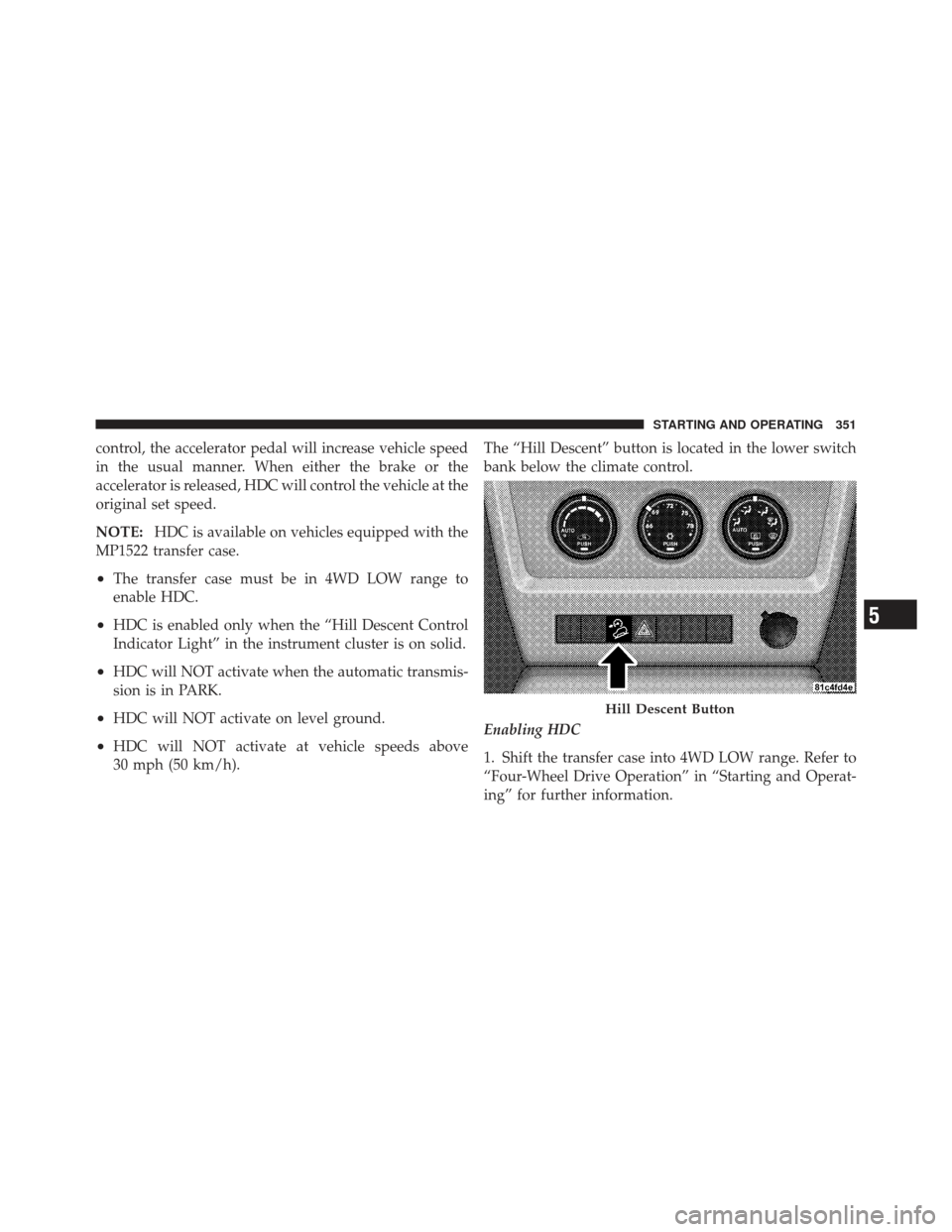
30 mph (50 km/h). The “Hill Descent” button is located in the lower switch
bank below the climate control.
Enabling HDC
1. Shift the transfer case into 4WD LOW range. Refer to
“Four-Wheel Drive Operation” in “Starting and Operat-
ing” for further information.
Hill Descent Button
5
STARTING AND OPERATING 351
Page 354 of 542

2. Press the “Hill Descent” button. The “Hill Descent
Control Indicator Light” in the instrument cluster will
turn on solid.
NOTE:If the transfer case is not in 4WD LOW range,
the “Hill Descent Control Indicator Light” will flash for
five seconds and HDC will not be enabled.
Disabling HDC
1. Press the “Hill Descent” button or shift the transfer
case out of 4WD LOW range. The “Hill Descent Control
Indicator” light in the instrument cluster will turn off.
Electronic Stability Control (ESC)
This system enhances directional control and stability of
the vehicle under various driving conditions. ESC cor-
rects for oversteering or understeering of the vehicle by
applying the brake of the appropriate wheel to assist in counteracting the oversteer or understeer condition. En-
gine power may also be reduced to help the vehicle
maintain the desired path.
ESC uses sensors in the vehicle to determine the vehicle
path intended by the driver and compares it to the actual
path of the vehicle. When the actual path does not match
the intended path, ESC applies the brake of the appro-
priate wheel to assist in counteracting the oversteer or
understeer condition.
•Oversteer - when the vehicle is turning more than
appropriate for the steering wheel position.
•Understeer - when the vehicle is turning less than
appropriate for the steering wheel position.
The “ESC Activation/Malfunction Indicator Light” lo-
cated in the instrument cluster will start to flash as soon
as the tires lose traction and the ESC system becomes
active. The “ESC Activation/Malfunction Indicator
352 STARTING AND OPERATING
Page 358 of 542
ESC Activation/Malfunction Indicator Light And
ESC OFF Indicator Light
The “ESC Activation/Malfunction Indicator
Light” in the instrument cluster will come on
when the ignition switch is turned to the ON
position. It should go out with the engine
running. If the “ESC Activation/Malfunction Indicator
Light” comes on continuously with the engine running, a
malfunction has been detected in the ESC system. If this
light remains on after several ignition cycles, and the
vehicle has been driven several miles (kilometers) at
speeds greater than 30 mph (48 km/h), see your autho-
rized dealer as soon as possible to have the problem
diagnosed and corrected.
The “ESC Activation/Malfunction Indicator Light” (lo-
cated in the instrument cluster) starts to flash as soon as
the tires lose traction and the ESC system becomes active.
The “ESC Activation/Malfunction Indicator Light” also
flashes when TCS is active. If the “ESC Activation/ Malfunction Indicator Light” begins to flash during ac-
celeration, ease up on the accelerator and apply as little
throttle as possible. Be sure to adapt your speed and
driving to the prevailing road conditions.
NOTE:
•The “ESC Activation/Malfunction Indicator Light”
and the “ESC OFF Indicator Light” come on momen-
tarily each time the ignition switch is turned ON.
•Each time the ignition is turned ON, the ESC system
will be ON even if it was turned off previously.
•The ESC system will make buzzing or clicking sounds
when it is active. This is normal; the sounds will stop
when ESC becomes inactive following the maneuver
that caused the ESC activation.
The “ESC OFF Indicator Light” indicates the
Electronic Stability Control (ESC) is off.
356 STARTING AND OPERATING
Page 383 of 542

The TPMS consists of the following components:
•Receiver Module
•Four Tire Pressure Monitoring Sensors
•Tire Pressure Monitoring Telltale Light
The matching full-size spare wheel and tire assembly (if
equipped) has a tire pressure monitoring sensor. The
matching full-size spare can be used in place of any of the
four road tires. The TPMS will only monitor the pressure
in the full-size spare when it is used in place of a road
tire. Otherwise, a spare with a pressure below the low-
pressure limit will not cause the “Tire Pressure Monitor-
ing Telltale Light” to illuminate or the chime to sound.
Tire Pressure Monitoring Low Pressure Warnings
The “Tire Pressure Monitoring Telltale Light” will
illuminate in the instrument cluster and a chime
will sound when tire pressure is low in one or
more of the four active road tires. Should this occur, you
should stop as soon as possible, check the inflation
pressure of each tire on your vehicle, and inflate each tire
to the vehicle’s recommended cold placard pressure
value. Once the system receives the updated tire pres-
sures, the system will automatically update and the “Tire
Pressure Monitoring Telltale Light” will turn off. The
vehicle may need to be driven for up to 20 minutes above
15 mph (24 km/h) in order for the TPMS to receive this
information.
Check TPMS Warning
When a system fault is detected, the “Tire Pressure
Monitoring Telltale Light” will flash on and off for
75 seconds and then remain on solid. The system fault
will also sound a chime. If the ignition key is cycled, this
5
STARTING AND OPERATING 381