Page 217 of 542
UNDERSTANDING YOUR INSTRUMENT PANEL
CONTENTS
�Instrument Panel Features ............... 218
� Instrument Cluster .................... 219
� Instrument Cluster Descriptions ........... 220
� Electronic Vehicle Information Center (EVIC) —
If Equipped .......................... 235
▫ Electronic Vehicle Information Center (EVIC)
Displays ........................... 237
▫ Oil Change Required .................. 239
▫ Trip Functions ...................... 240 ▫
Compass Display / ECO
(Fuel Saver Mode) — If Equipped ........ 241
▫ Personal Settings
(Customer-Programmable Features) ....... 244
� Media Center 230 (REQ) — AM/FM Stereo
Radio And 6–Disc CD/DVD Changer
(MP3/WMA AUX Jack) .................. 248
▫ Operating Instructions - Radio Mode ...... 249
▫ Operation Instructions - (Disc Mode For CD
And MP3/WMA Audio Play, DVD-Video) . . . 257
▫ Notes On Playing MP3/WMA Files ....... 259
4
Page 220 of 542
INSTRUMENT PANEL FEATURES
1 — Air Outlet4 — Radio7 — Power Outlet
2 — Instrument Cluster 5 — Glove Compartment8 — Lower Switch Bank
3 — Storage Tray 6 — Climate Control9 — Storage Bin (if equipped)
218 UNDERSTANDING YOUR INSTRUMENT PANEL
Page 221 of 542
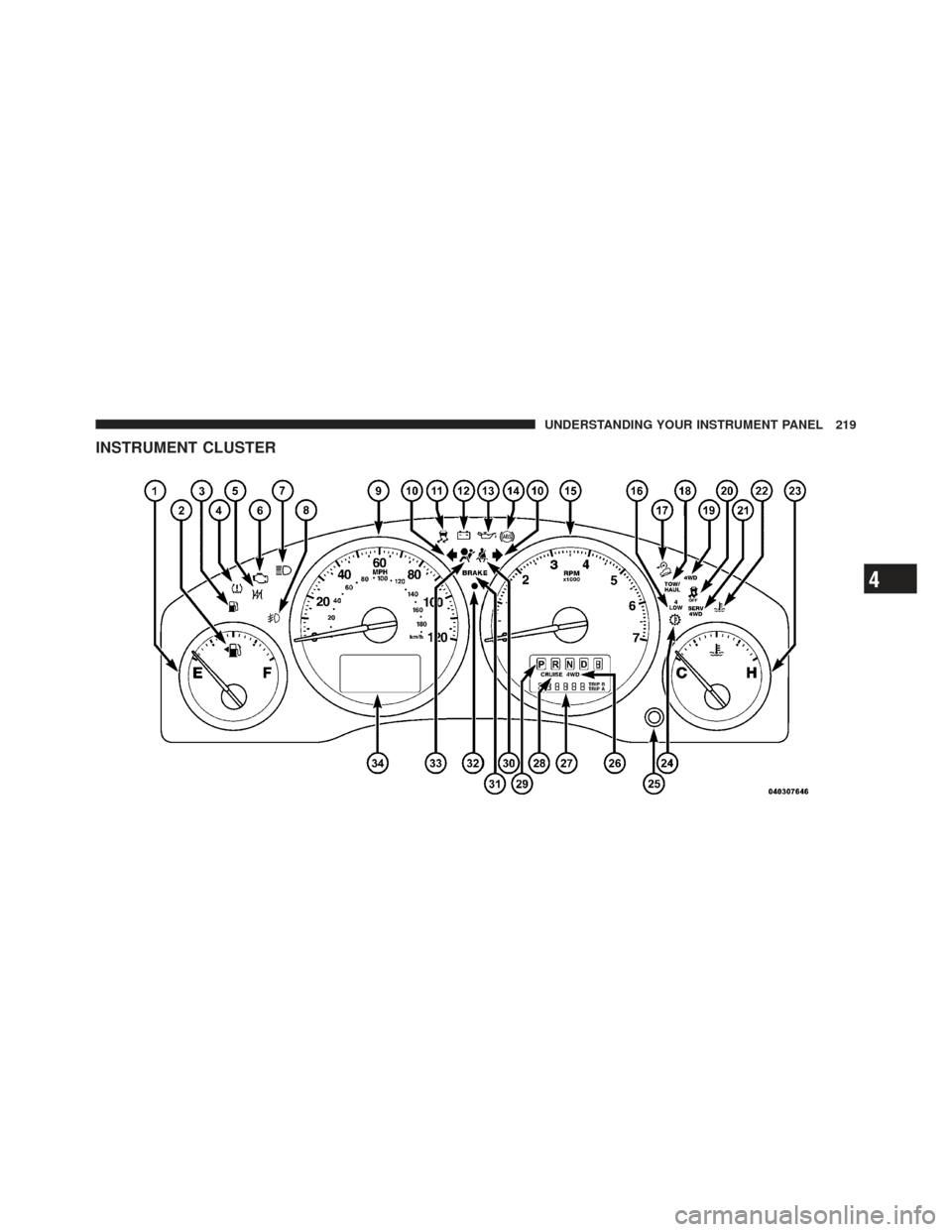
INSTRUMENT CLUSTER
4
UNDERSTANDING YOUR INSTRUMENT PANEL 219
Page 222 of 542

INSTRUMENT CLUSTER DESCRIPTIONS
1. Fuel Gauge
The fuel gauge shows level of fuel in tank when ignition
switch is in the ON/RUN position.
2. Fuel Door ReminderThis symbol indicates the side of the vehicle
where the fuel cap is located.
3. Low Fuel Light This indicator lights when the fuel level drops to
approximately one-eighth tank.
4. Tire Pressure Monitoring Telltale Light Each tire, including the spare (if provided),
should be checked monthly when cold and
inflated to the inflation pressure recommended by the vehicle manufacturer on the vehicle placard or tire
inflation pressure label. (If your vehicle has tires of a
different size than the size indicated on the vehicle
placard or tire inflation pressure label, you should deter-
mine the proper tire inflation pressure for those tires.)
As an added safety feature, your vehicle has been
equipped with a Tire Pressure Monitoring System
(TPMS) that illuminates a low tire pressure telltale when
one or more of your tires is significantly under-inflated.
Accordingly, when the low tire pressure telltale illumi-
nates, you should stop and check your tires as soon as
possible, and inflate them to the proper pressure. Driving
on a significantly under-inflated tire causes the tire to
overheat and can lead to tire failure. Under-inflation also
reduces fuel efficiency and tire tread life, and may affect
the vehicle’s handling and stopping ability.
220 UNDERSTANDING YOUR INSTRUMENT PANEL
Page 226 of 542

If the vehicle electronics sense that the vehicle is driven
more than 1 mile (1.6 km) with either turn signal on, a
continuous chime will sound to alert you to turn the
signals off. If either indicator flashes at a rapid rate, check
for a defective outside light bulb.
11. Electronic Stability Control (ESC) Activation/
Malfunction Indicator Light — If EquippedThe “ESC Activation/Malfunction Indicator
Light” in the instrument cluster will come on
when the ignition switch is turned to the
ON/RUN position. It should go out with the
engine running. If the “ESC Activation/Malfunction In-
dicator Light” comes on continuously with the engine
running, a malfunction has been detected in the ESC
system. If this light remains on after several ignition
cycles, and the vehicle has been driven several miles
(kilometers) at speeds greater than 30 mph (48 km/h), see
your authorized dealer as soon as possible to have the
problem diagnosed and corrected. NOTE:
•The “ESC Off Indicator Light” and the “ESC
Activation/Malfunction Indicator Light” come on mo-
mentarily each time the ignition switch is turned to
ON/RUN.
•Each time the ignition is turned to ON/RUN, the ESC
system will be ON, even if it was turned off previously.
•The ESC system will make buzzing or clicking sounds
when it is active. This is normal; the sounds will stop
when ESC becomes inactive following the maneuver
that caused the ESC activation.
12. Charging System Light This light shows the status of the electrical charg-
ing system. The light should come on when the
ignition switch is first turned to ON/RUN and remain on
briefly as a bulb check. If the light stays on or comes on
while driving, turn off some of the vehicle’s non-essential
electrical devices or increase engine speed (if at idle). If
224 UNDERSTANDING YOUR INSTRUMENT PANEL
Page 231 of 542

CAUTION!
Continuous driving with the Transmission Tempera-
ture Warning Light illuminated will eventually cause
severe transmission damage or transmission failure.
WARNING!
If the Transmission Temperature Warning Light is
illuminated and you continue operating the vehicle,
in some circumstances you could cause the fluid to
boil over, come in contact with hot engine or exhaust
components and cause a fire.25. Odometer / Trip Odometer / ECO (Fuel Saver
Indicator) Button
Changing the Display
Press this button to change the display from odometer to
either of the two trip odometer settings or the “ECO”
display. Trip A or Trip B will appear when in the trip
odometer mode. On vehicles equipped with a Base
Cluster, press and release it once again to display the
outside temperature. On vehicles equipped with a Mid
Line Cluster, press and release it once again to display the
outside temperature and compass heading in the screen
below the speedometer. Refer to “Electronic Vehicle In-
formation Center (EVIC) — If Equipped” for details.
Resetting the Trip Odometer
Display the trip mileage that you want to reset, “Trip A”
or “Trip B.” Then push and hold the button (approxi-
mately two seconds) until the display resets to 0. The
odometer must be in Trip Mode to reset the trip odometer.
4
UNDERSTANDING YOUR INSTRUMENT PANEL 229
Page 234 of 542

CHAngE OIL Message (Base And Mid Line Clusters
Only)
Your vehicle is equipped with an engine oil change
indicator system. The “CHANgE OIL” message will flash
in the instrument cluster odometer for approximately
12 seconds after a single chime has sounded to indicate
the next scheduled oil change interval. The engine oil
change indicator system is duty cycle based, which
means the engine oil change interval may fluctuate
dependent upon your personal driving style.
Unless reset, this message will continue to display each
time you turn the ignition switch to the ON/RUN
position. To turn off the message temporarily, press and
release the Trip Odometer button on the instrument
cluster. To reset the oil change indicator system (after
performing the scheduled maintenance) perform the
following procedure:1. Turn the ignition switch to the ON/RUN position.
Do not start the engine. 2. Fully depress the accelerator pedal slowly three
times within 10 seconds.
3. Turn the ignition switch to the LOCK position.
NOTE: If the indicator message illuminates when you
start the vehicle, the oil change indicator system did not
reset. If necessary, repeat this procedure.
28. Cruise Indicator — If Equipped This indicator lights when the electronic speed
control system is turned on.
29. Shift Lever Indicator
The Shift Lever Indicator is self-contained within the
instrument cluster. It displays the gear position of the
automatic transmission.
30. Seat Belt Reminder Light When the ignition switch is first turned to ON/
RUN, this light will turn on for four to eight
seconds as a bulb check. During the bulb check, if
232 UNDERSTANDING YOUR INSTRUMENT PANEL
Page 237 of 542
33. Airbag Warning LightThis light will turn on for four to eight seconds
as a bulb check when the ignition switch is first
turned to ON/RUN. If the light is either not on
during starting, stays on, or turns on while
driving, have the system inspected at an authorized
dealer as soon as possible. Refer to “Occupant Restraints”
in “Things To Know Before Starting Your Vehicle” for
further information.
34. Electronic Vehicle Information Center (EVIC) /
Compass Display — If Equipped
On vehicles equipped with a Premium Cluster, this
display shows the Electronic Vehicle Information Center
(EVIC) messages when the appropriate conditions exist.
Refer to “Electronic Vehicle Information Center (EVIC) —
If Equipped” for further information.
On vehicles equipped with a Mid Line Cluster, this
display shows the compass heading (N, S, E, W, NE, NW,
SE, and SW) and the outside temperature.ELECTRONIC VEHICLE INFORMATION CENTER
(EVIC) — IF EQUIPPED
The Electronic Vehicle Information Center (EVIC) fea-
tures a driver-interactive display that is located in the
instrument cluster.
Electronic Vehicle Information Center (EVIC)
4
UNDERSTANDING YOUR INSTRUMENT PANEL 235