Page 162 of 587
operate until the wiper switch is moved, vehicle speed
is greater than 0 mph (0 km/h), or the outside tem-
perature is greater than 32°F (0°C).
•Transmission In NEUTRAL Position— When the
ignition is ON, and the transmission is in the NEU-
TRAL position, the Rain Sensing system will not
operate until the wiper switch is moved, vehicle speed
is greater than 5 mph (8 km/h), or the shift lever is
moved out of the NEUTRAL position.
TILT/TELESCOPING STEERING COLUMN
This feature allows you to tilt the steering column
upward or downward. It also allows you to lengthen or
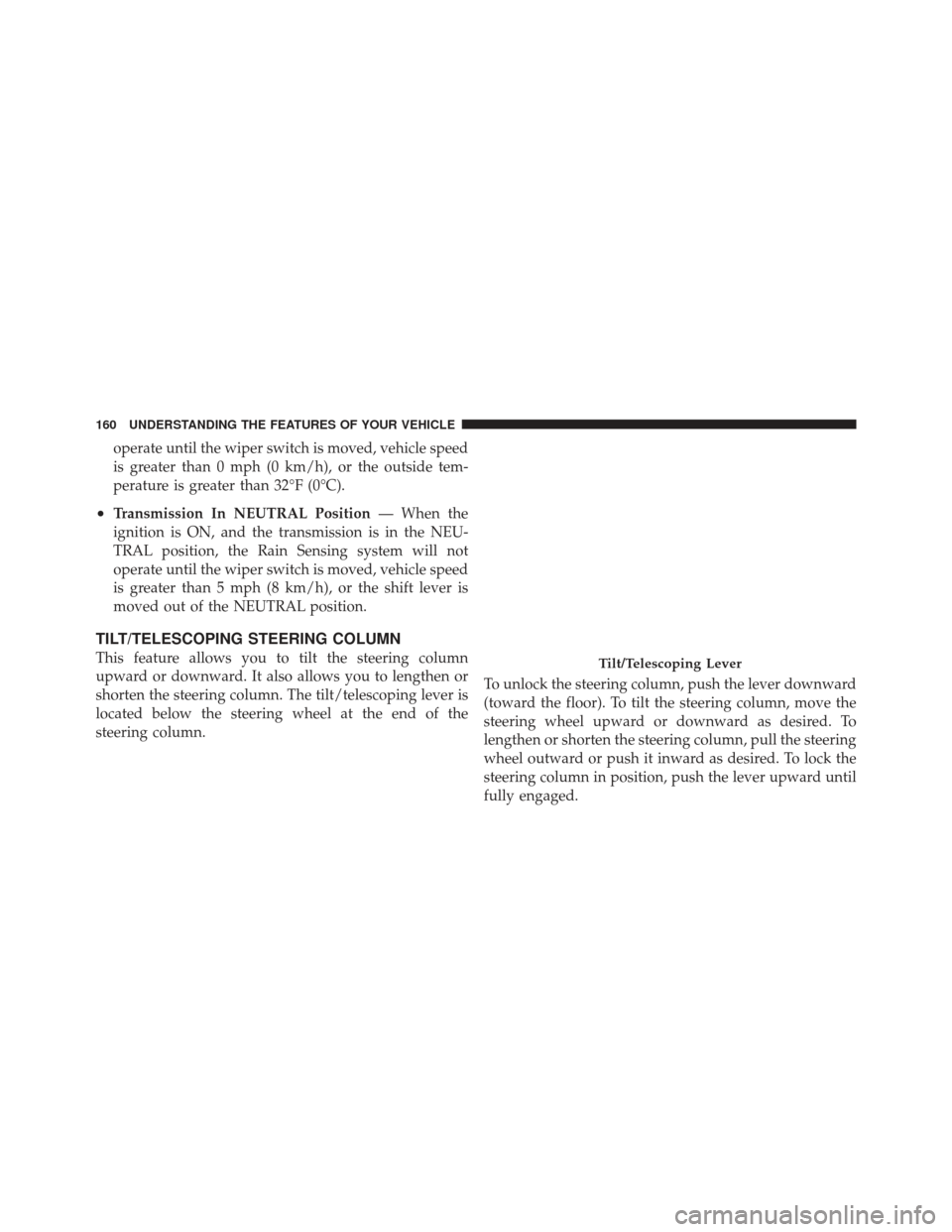
shorten the steering column. The tilt/telescoping lever is
located below the steering wheel at the end of the
steering column. To unlock the steering column, push the lever downward
(toward the floor). To tilt the steering column, move the
steering wheel upward or downward as desired. To
lengthen or shorten the steering column, pull the steering
wheel outward or push it inward as desired. To lock the
steering column in position, push the lever upward until
fully engaged.Tilt/Telescoping Lever
160 UNDERSTANDING THE FEATURES OF YOUR VEHICLE
Page 164 of 587
NOTE:For vehicles equipped with Driver Memory
Seat, you can use your Remote Keyless Entry (RKE)
transmitter or the memory switch on the driver’s door
trim panel to return the tilt/telescopic steering column to
pre-programmed positions. Refer to “Driver Memory
Seat” in this section for further information.
WARNING!
Do not adjust the steering column while driving.
Adjusting the steering column while driving or driv-
ing with the steering column unlocked, could cause
the driver to lose control of the vehicle. Be sure the
steering column is locked before driving your ve-
hicle. Failure to follow this warning may result in
serious injury or death.
HEATED STEERING WHEEL — IF EQUIPPED
The steering wheel contains a heating element that helps
warm your hands in cold weather. The heated steering
wheel has only one temperature setting. Once the heated
steering wheel has been turned on it will operate for
approximately 58 to 70 minutes before automatically shut-
ting off. The heated steering wheel can shut off early or
may not turn on when the steering wheel is already warm.
The heated steering wheel switch is located on the switch
bank below the climate controls.
Press the switch to turn on the heated
steering wheel. The light on the switch
will illuminate to indicate the steering
wheel heater is on. Pressing the switch
a second time will turn off the heated
steering wheel and light indicator.
NOTE: The engine must be running for the heated
steering wheel to operate.
162 UNDERSTANDING THE FEATURES OF YOUR VEHICLE
Page 165 of 587
Vehicles Equipped With Remote Start
On models that are equipped with remote start, the
heated steering wheel and seat can be programmed to
come on during a remote start. Refer to “Remote Starting
System — If Equipped” in “Things to Know Before
Starting Your Vehicle” for further information.
WARNING!
•Persons who are unable to feel pain to the skin
because of advanced age, chronic illness, diabetes,
spinal cord injury, medication, alcohol use, ex-
haustion, or other physical conditions must exer-
cise care when using the steering wheel heater. It
may cause burns even at low temperatures, espe-
cially if used for long periods.(Continued)
WARNING! (Continued)
•Do not place anything on the steering wheel that
insulates against heat, such as a blanket or cush-
ion. This may cause the steering wheel heater to
overheat.
ELECTRONIC SPEED CONTROL
When engaged, the Electronic Speed Control takes over
accelerator operations at speeds greater than 20 mph
(32 km/h).
3
UNDERSTANDING THE FEATURES OF YOUR VEHICLE 163
Page 166 of 587
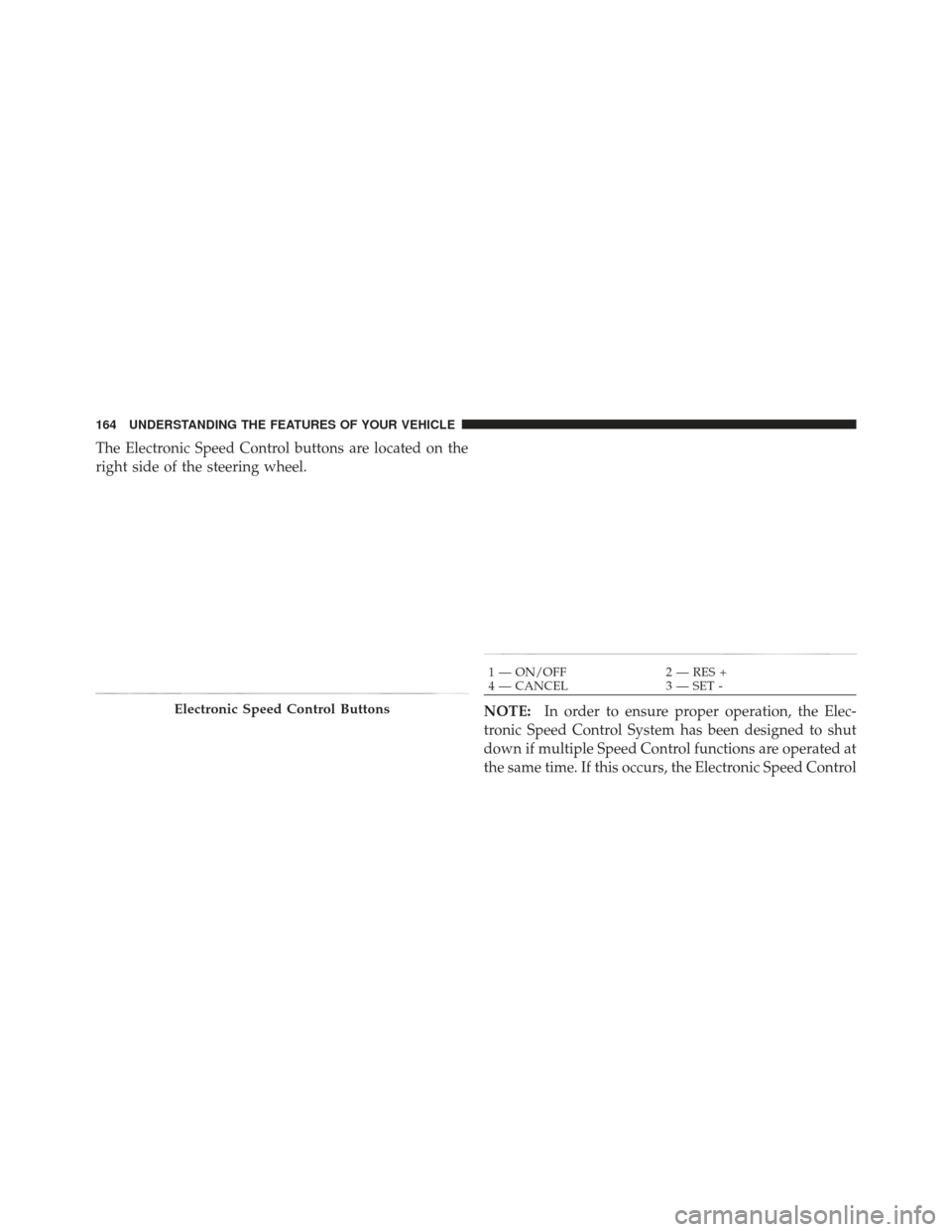
The Electronic Speed Control buttons are located on the
right side of the steering wheel.NOTE:In order to ensure proper operation, the Elec-
tronic Speed Control System has been designed to shut
down if multiple Speed Control functions are operated at
the same time. If this occurs, the Electronic Speed Control
Electronic Speed Control Buttons
1 — ON/OFF 2 — RES +
4 — CANCEL 3 — SET -
164 UNDERSTANDING THE FEATURES OF YOUR VEHICLE
Page 172 of 587
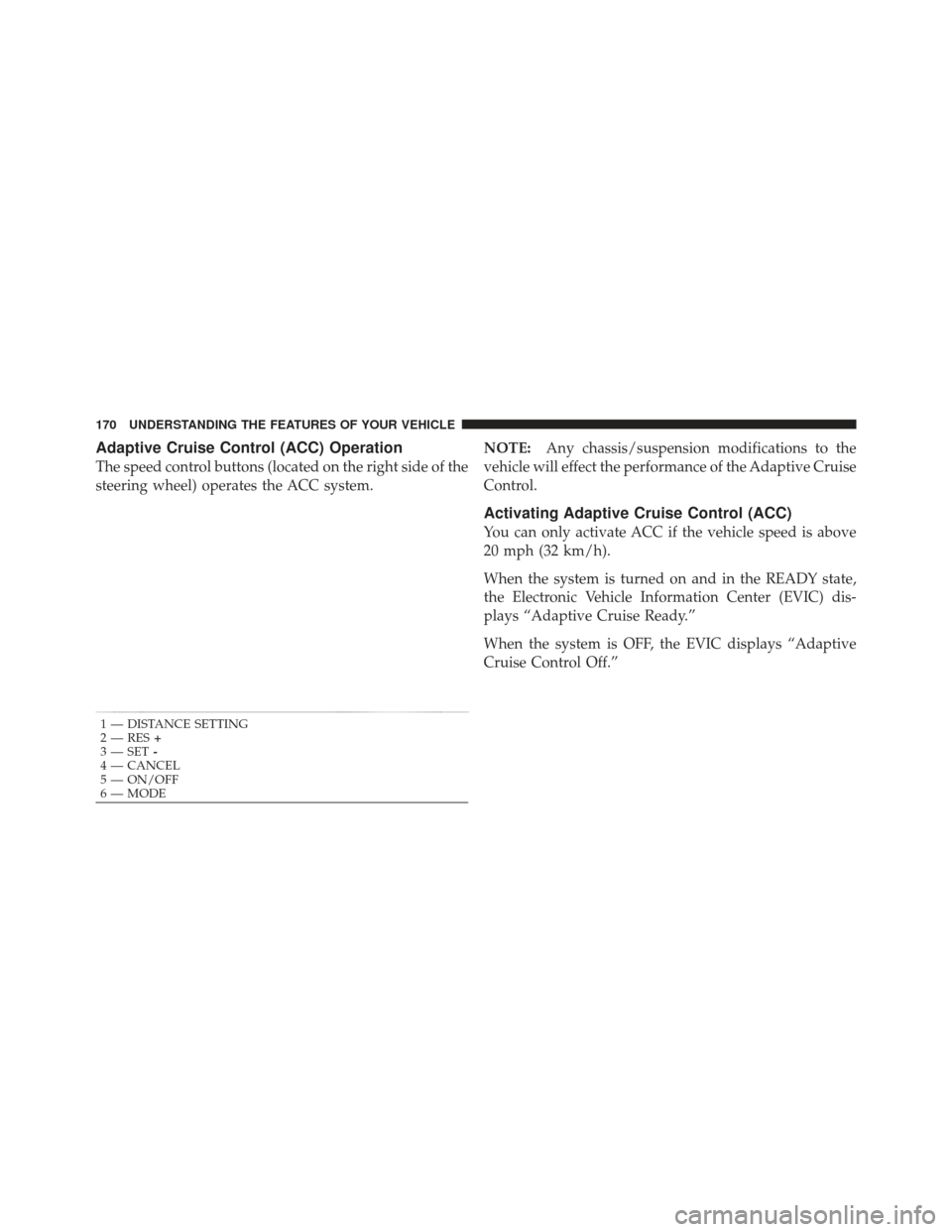
Adaptive Cruise Control (ACC) Operation
The speed control buttons (located on the right side of the
steering wheel) operates the ACC system.NOTE:
Any chassis/suspension modifications to the
vehicle will effect the performance of the Adaptive Cruise
Control.
Activating Adaptive Cruise Control (ACC)
You can only activate ACC if the vehicle speed is above
20 mph (32 km/h).
When the system is turned on and in the READY state,
the Electronic Vehicle Information Center (EVIC) dis-
plays “Adaptive Cruise Ready.”
When the system is OFF, the EVIC displays “Adaptive
Cruise Control Off.”
1 — DISTANCE SETTING
2 — RES +
3 — SET -
4 — CANCEL
5 — ON/OFF
6 — MODE
170 UNDERSTANDING THE FEATURES OF YOUR VEHICLE
Page 247 of 587
�iPod�/USB/MP3 Control — If Equipped ..... 313
▫ Connecting The iPod� Or External USB
Device ............................ 314
▫ Using This Feature ................... 314
▫ Controlling The iPod� Or External USB
Device Using Radio Buttons ............. 315
▫ Play Mode ......................... 315
▫ List Or Browse Mode ................. 317
▫ Bluetooth Streaming Audio (BTSA) ........ 319
� Uconnect™ Multimedia
(Sirius Backseat TV™) — If Equipped ........ 320
� Video Entertainment System™
(Sales Code XRV) — If Equipped ........... 320�
Steering Wheel Audio Controls ............ 321
▫ Radio Operation ..................... 322
▫ CD Player ......................... 322
� CD/DVD Disc Maintenance .............. 323
� Radio Operation And Mobile Phones ....... 323
� Climate Controls ...................... 323
▫ Dual-Zone Manual Heating And Air
Conditioning ....................... 324
▫ Dual-Zone Automatic Temperature Control
(ATC) — If Equipped ................. 328
▫ Operating Tips ...................... 334
▫ Operating Tips Chart ................. 336
4
UNDERSTANDING YOUR INSTRUMENT PANEL 245
Page 261 of 587
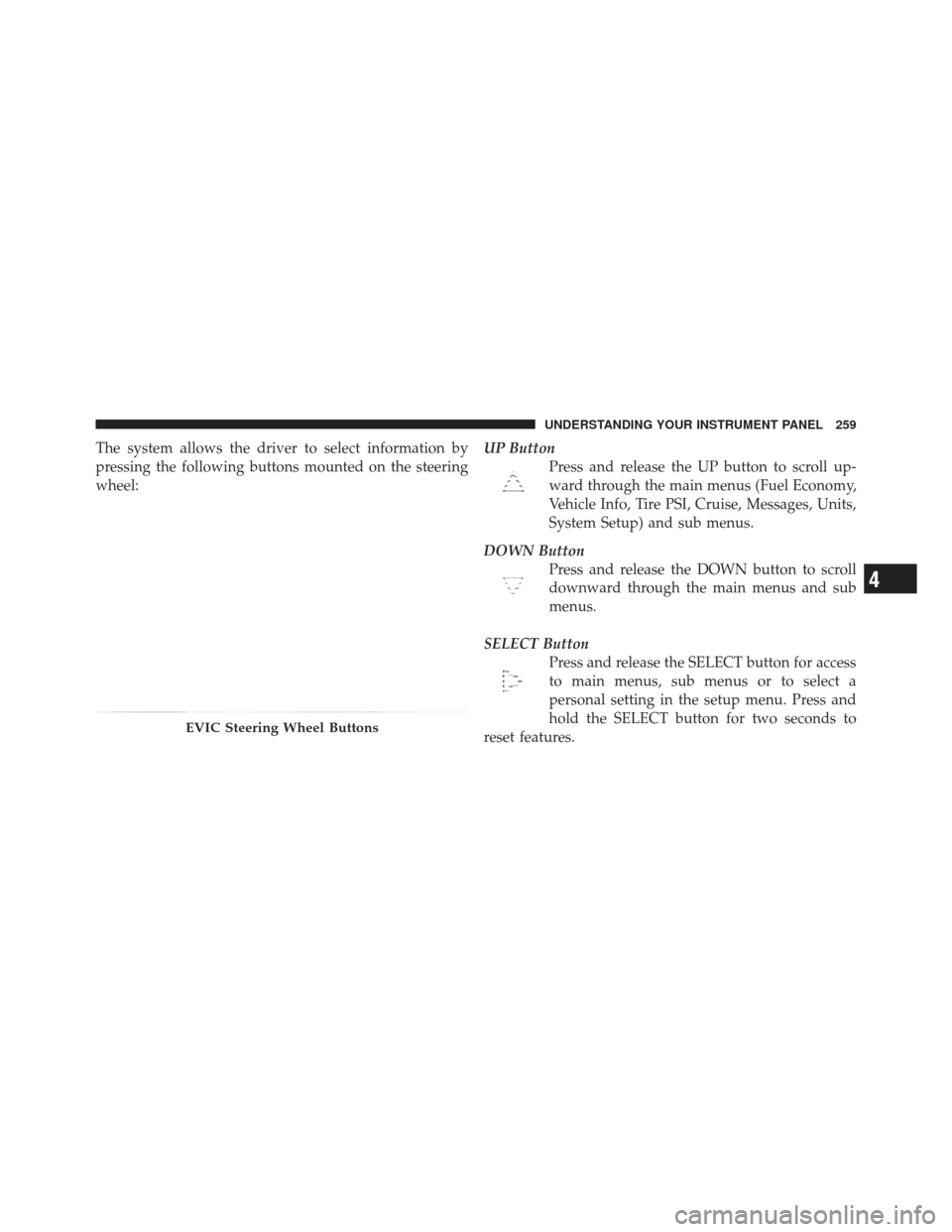
The system allows the driver to select information by
pressing the following buttons mounted on the steering
wheel:UP Button
Press and release the UP button to scroll up-
ward through the main menus (Fuel Economy,
Vehicle Info, Tire PSI, Cruise, Messages, Units,
System Setup) and sub menus.
DOWN Button Press and release the DOWN button to scroll
downward through the main menus and sub
menus.
SELECT Button Press and release the SELECT button for access
to main menus, sub menus or to select a
personal setting in the setup menu. Press and
hold the SELECT button for two seconds to
reset features.
EVIC Steering Wheel Buttons
4
UNDERSTANDING YOUR INSTRUMENT PANEL 259
Page 284 of 587
grasped. With Passive Entry, if Driver Door 1st Press is
programmed touching the handle more than once will
only result in the driver ’s door opening. If driver door
first is selected, once the driver door is opened, the
interior door lock/unlock switch can be used to unlock
all doors (or use RKE transmitter).
RKE Linked To Memory
When this feature is selected, you can use your RKE
transmitter to recall one of two pre-programmed memory
profiles. Each memory profile contains desired position
settings for the driver seat, side mirror, adjustable pedals
(if equipped), power tilt and telescopic steering column
(if equipped), and a set of desired radio station presets.
When OFF is selected, only the MEMORY switch on the
driver’s door trim panel will recall memory profiles. To
make your selection, press and release the SELECT
button a check-mark appears next to the feature showing
the system has been activated or the check-mark isremoved, showing the system has been deactivated.
Refer to “Driver Memory Seat” in “Understanding The
Features Of Your Vehicle”.
Remote Start Comfort Sys.
When this feature is selected and the remote start is
activated, the heated steering wheel and driver heated
seat features will automatically turn on in cold weather.
In warm weather, the driver vented seat feature will
automatically turn on when the remote start is activated.
These features will stay on through the duration of
remote start or until the key is turned to RUN. To make
your selection, press and release the SELECT button until
a check-mark appears next to the feature showing the
system has been activated or the check-mark is removed,
showing the system has been deactivated.
Horn with Remote Lock
When this feature is selected, a short horn sound will
occur when the RKE transmitter LOCK button is pressed.
282 UNDERSTANDING YOUR INSTRUMENT PANEL