Page 5 of 480

INFINITI CUSTOMER CARE PROGRAM
INFINITI CARES ...
Both INFINITI and your INFINITI retailer are dedicated to serving all your automotive needs. Your satisfaction with your vehicle and your INFINITI retailer
are our primary concerns. Your INFINITI retailer is always available to assist you with all your automobile sales and service needs.
However, if there is something that your
INFINITI retailer cannot assist you with or you
would like to provide INFINITI directly with
comments or questions, please contact our
(INFINITI’s) Consumer Affairs Department using
our toll-free number:For U.S. customers1-800-662-6200
For Canadian customers 1-800-361-4792 The Consumer Affairs Department will ask for
the following information:
– Your name, address, and telephone number
– Vehicle identification number (on dash
panel)
– Date of purchase
– Current odometer reading
– Your INFINITI retailer’s name
– Your comments or questions
OR You can write to INFINITI with the information on
the left at:
For U.S. customersINFINITI Division
Nissan North America, Inc.
Consumer Affairs Department
P.O. Box 685003
Franklin, TN 37068-5003
For Canadian customers INFINITI Division
Nissan Canada Inc.
5290 Orbitor Drive
Mississauga, Ontario L4W 4Z5
We appreciate your interest in INFINITI and thank you for buying a quality INFINITI vehicle.
Page 6 of 480
Table of
ContentsIllustrated table of contents
Safety — Seats, seat belts and supplemental restraint system
Instruments and controls
Pre-driving checks and adjustments
Monitor, climate, audio, phone and voice recognition systems
Starting and driving
In case of emergency
Appearance and care
Maintenance and do-it-yourself
Technical and consumer information
Index
01
2 3
4 5
6 7
8 9
10
Page 13 of 480

1. TRIP/RESET switch for twin trip odometer(P. 2-6)
2. Instrument brightness control switch (P. 2-38)
3. Headlight, fog light and turn signal switch (P. 2-34) 4. Trip computer switch (P. 2-27)
5. Windshield wiper and washer switch
(P. 2-32) 6. Warning systems switch (if so equipped)
— Forward Collision Warning (FCW)
(P. 5-66)
— Lane Departure Warning (LDW)
(P. 5-17)
— Blind Spot Warning (BSW)
(P. 5-25)
7. Hood release handle (P. 3-16)
8. Intelligent Key port (P. 5-10)
9. Vehicle Dynamic Control (VDC) OFF switch (P. 5-82)
10. Intelligent Brake Assist (IBA) off switch (if so equipped) (P. 2-43)
11. Electric tilting/telescopic steering wheel lever (if so equipped) (P. 3-19)
12. Steering-wheel-mounted controls (Left side)
— For audio system (P. 4-90)
— For Bluetooth� Hands-Free Phone Sys-
tem (with navigation system)
(P. 4-93)
— For Bluetooth� Hands-Free Phone Sys-
tem (without navigation system)
(P. 4-103)
— For INFINITI Voice Recognition System
(if so equipped) (P. 4-116)
13. Manual tilting/telescopic steering wheel lever (if so equipped) (P. 3-19)
14. Steering wheel — Horn (P. 2-40)
— Driver supplemental air bag (P. 1-37)
SSI0623
COCKPIT
0-6Illustrated table of contents
Page 15 of 480
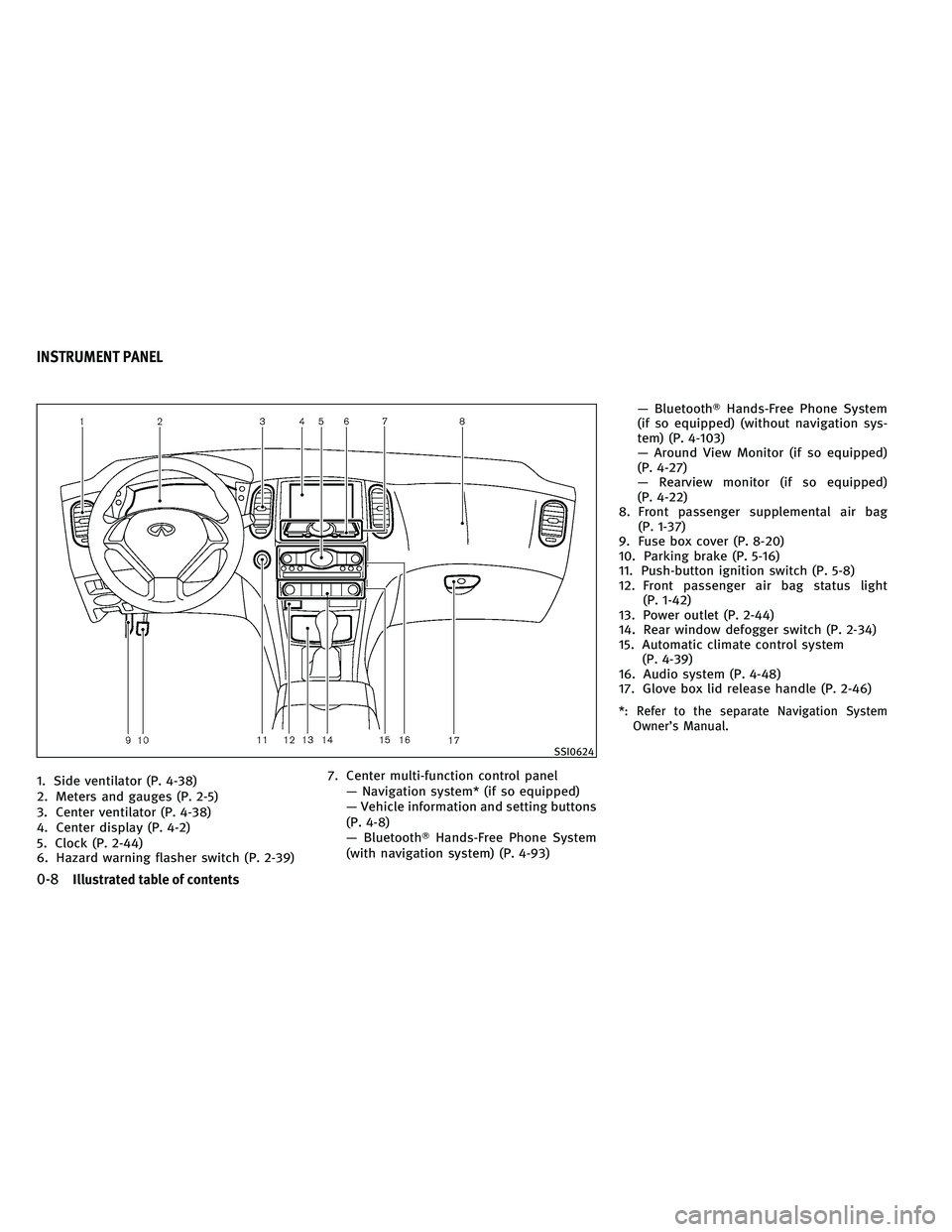
1. Side ventilator (P. 4-38)
2. Meters and gauges (P. 2-5)
3. Center ventilator (P. 4-38)
4. Center display (P. 4-2)
5. Clock (P. 2-44)
6. Hazard warning flasher switch (P. 2-39)7. Center multi-function control panel
— Navigation system* (if so equipped)
— Vehicle information and setting buttons
(P. 4-8)
— Bluetooth� Hands-Free Phone System
(with navigation system) (P. 4-93) — Bluetooth�
Hands-Free Phone System
(if so equipped) (without navigation sys-
tem) (P. 4-103)
— Around View Monitor (if so equipped)
(P. 4-27)
— Rearview monitor (if so equipped)
(P. 4-22)
8. Front passenger supplemental air bag (P. 1-37)
9. Fuse box cover (P. 8-20)
10. Parking brake (P. 5-16)
11. Push-button ignition switch (P. 5-8)
12. Front passenger air bag status light (P. 1-42)
13. Power outlet (P. 2-44)
14. Rear window defogger switch (P. 2-34)
15. Automatic climate control system (P. 4-39)
16. Audio system (P. 4-48)
17. Glove box lid release handle (P. 2-46)
*: Refer to the separate Navigation System Owner’s Manual.
SSI0624
INSTRUMENT PANEL
0-8Illustrated table of contents
Page 73 of 480

1. TRIP/RESET switch for twin trip odometer(P. 2-6)
2. Instrument brightness control switch (P. 2-38)
3. Headlight, fog light and turn signal switch (P. 2-34) 4. Trip computer switch (P. 2-27)
5. Windshield wiper and washer switch
(P. 2-32) 6. Warning systems switch (if so equipped)
— Forward Collision Warning (FCW)
(P. 5-66)
— Lane Departure Warning (LDW)
(P. 5-17)
— Blind Spot Warning (BSW)
(P. 5-25)
7. Hood release handle (P. 3-16)
8. Intelligent Key port (P. 5-10)
9. Vehicle Dynamic Control (VDC) OFF switch (P. 5-82)
10. Intelligent Brake Assist (IBA) off switch (if so equipped) (P. 2-43)
11. Electric tilting/telescopic steering wheel lever (if so equipped) (P. 3-19)
12. Steering-wheel-mounted controls (Left side)
— For audio system (P. 4-90)
— For Bluetooth� Hands-Free Phone Sys-
tem (with navigation system)
(P. 4-93)
— For Bluetooth� Hands-Free Phone Sys-
tem (without navigation system)
(P. 4-103)
— For INFINITI Voice Recognition System
(if so equipped) (P. 4-116)
13. Manual tilting/telescopic steering wheel lever (if so equipped) (P. 3-19)
14. Steering wheel — Horn (P. 2-40)
— Driver supplemental air bag (P. 1-37)
SSI0623
COCKPIT
2-2Instruments and controls
Page 75 of 480
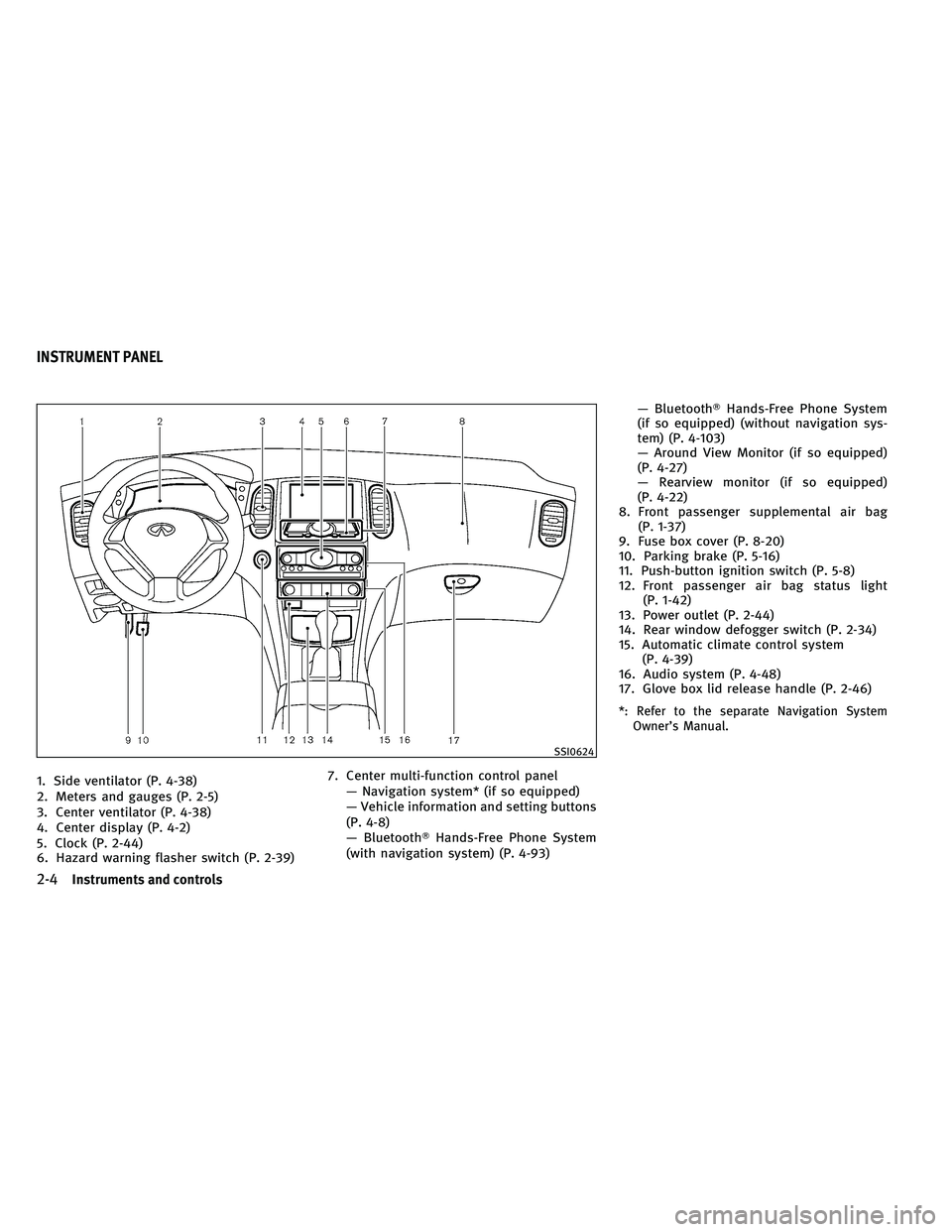
1. Side ventilator (P. 4-38)
2. Meters and gauges (P. 2-5)
3. Center ventilator (P. 4-38)
4. Center display (P. 4-2)
5. Clock (P. 2-44)
6. Hazard warning flasher switch (P. 2-39)7. Center multi-function control panel
— Navigation system* (if so equipped)
— Vehicle information and setting buttons
(P. 4-8)
— Bluetooth� Hands-Free Phone System
(with navigation system) (P. 4-93) — Bluetooth�
Hands-Free Phone System
(if so equipped) (without navigation sys-
tem) (P. 4-103)
— Around View Monitor (if so equipped)
(P. 4-27)
— Rearview monitor (if so equipped)
(P. 4-22)
8. Front passenger supplemental air bag (P. 1-37)
9. Fuse box cover (P. 8-20)
10. Parking brake (P. 5-16)
11. Push-button ignition switch (P. 5-8)
12. Front passenger air bag status light (P. 1-42)
13. Power outlet (P. 2-44)
14. Rear window defogger switch (P. 2-34)
15. Automatic climate control system (P. 4-39)
16. Audio system (P. 4-48)
17. Glove box lid release handle (P. 2-46)
*: Refer to the separate Navigation System Owner’s Manual.
SSI0624
INSTRUMENT PANEL
2-4Instruments and controls
Page 77 of 480

SPEEDOMETER AND ODOMETER
Speedometer
The speedometer indicates vehicle speed in
miles per hour (MPH) and kilometers per hour
(km/h).
Odometer/twin trip odometer
The odometer�1and twin trip odometer�2are
displayed on the dot matrix crystal display
when the ignition switch is in the ON position.
The odometer records the total distance the
vehicle has been driven.
The twin trip odometer records the distance of
individual trips. Changing the display :
Pushing the TRIP A/B RESET switch
�3at the
bottom left of the combination meter panel
changes the display as follows:
TRIP A →TRIP B →TRIP A
Resetting the trip odometer :
Pushing the TRIP A/B RESET switch
�3for more
than 1 second resets the trip odometer to zero.
Average fuel economy and distance to empty
information is also available. (See “DOT MATRIX
LIQUID CRYSTAL DISPLAY” later in this section
and “HOW TO USE STATUS BUTTON” in the “4.
Monitor, climate, audio, phone and voice rec-
ognition systems” section.)
Speedometer
SIC4695
Odometer/twin trip odometer
SIC3259
2-6Instruments and controls
Page 97 of 480

INDICATORS FOR MAINTENANCE
1. Engine oil replacement indicator
This indicator appears when the set time comes
for changing the engine oil. You can set or reset
the distance for changing the engine oil. (See
“TRIP COMPUTER” later in this section.)
2. Oil filter replacement indicator
This indicator appears when the set time comes
for replacing the oil filter. You can set or reset
the distance for replacing the oil filter. (See
“TRIP COMPUTER” later in this section.)
3. Tire replacement indicator
This indicator appears when the set time comes
for replacing tires. You can set or reset the
distance for replacing tires. (See “TRIP COM-
PUTER” later in this section.)
4. “OTHER” indicator
This indicator appears when the set time comes
for replacing items other than the engine oil, oil
filter and tires. You can set or reset the distance
for replacing the items. (See “TRIP COMPUTER”
later in this section.)
More maintenance reminders are also available
on the center display. (See “HOW TO USE INFO
BUTTON” in the “4. Monitor, climate, audio,
phone and voice recognition systems” section.)
SIC4075
2-26Instruments and controls
