Page 205 of 419

4127
Features of your vehicle
D300202AEN
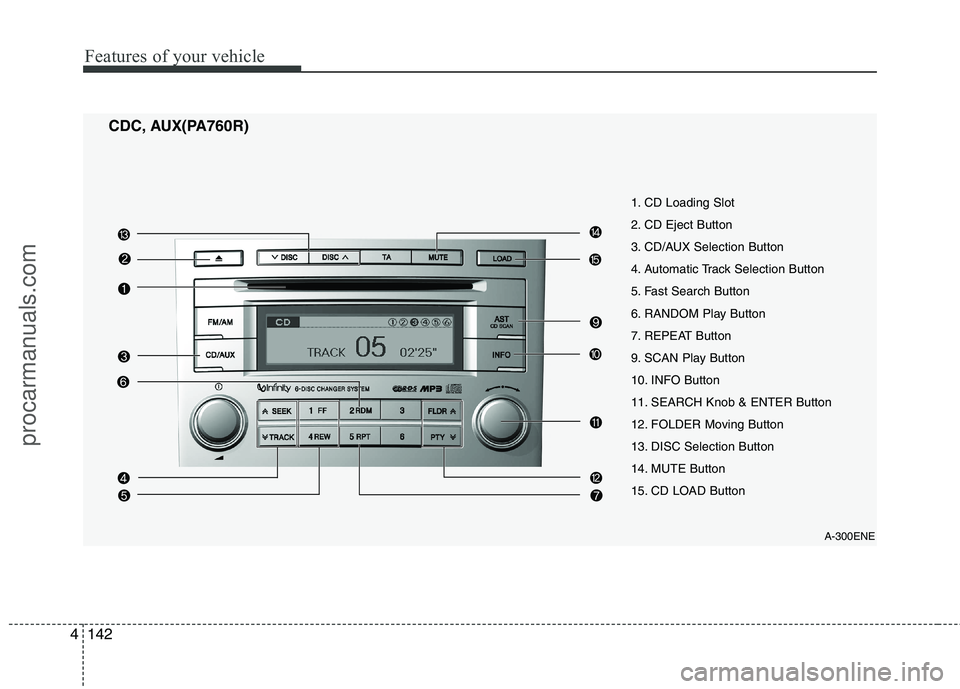
MODE
Press the button to select Radio or CD (compact disc). D300204AEN
VOLUME (VOL +/-)
• Press the up button (+) to increase vol-ume.
Press the down button (-) to decrease volume.
D300205AEN
MUTE
Press the MUTE button to cancel the sound.
Press the MUTE button again to acti- vate the sound.
D300203AEN
SEEK/PRESET ( / )
If the SEEK/PRESET button is pressed
for 0.8 second or more, it will work as fol-
lows in each mode.
RADIO mode
It will function as the AUTO SEEK select
button. CDP mode
It will function as the FF/REW button.
CDC mode
It will function as the DISC UP/DOWN
button.
If the SEEK/PRESET button is pressed
for less than 0.8 second, it will work as
follows in each mode.
RADIO mode
It will function as the PRESET STATION
select buttons.
CDP mode
It will function as the TRACK UP/DOWN
button.
CDC mode
It will function as the TRACK UP/DOWN
button.
Detailed information for audio control
buttons is described in the followingpages in this section.
D300600AEN
Aux, USB and iPod port (if equipped)
If your vehicle has an aux and/or
USB(universal serial bus) port or iPod
port, you can use an aux port to connect
audio devices and an USB port to plug in
an USB and also an iPod port to plug in
an iPod.
✽✽
NOTICE
When using a portable audio device
connected to the power outlet, noise may
occur during playback. If this happens,
use the power source of the portable
audio device.
❈ iPod is a trademark of Apple Inc.
OEN049170L
procarmanuals.com
Page 215 of 419
4137
Features of your vehicle
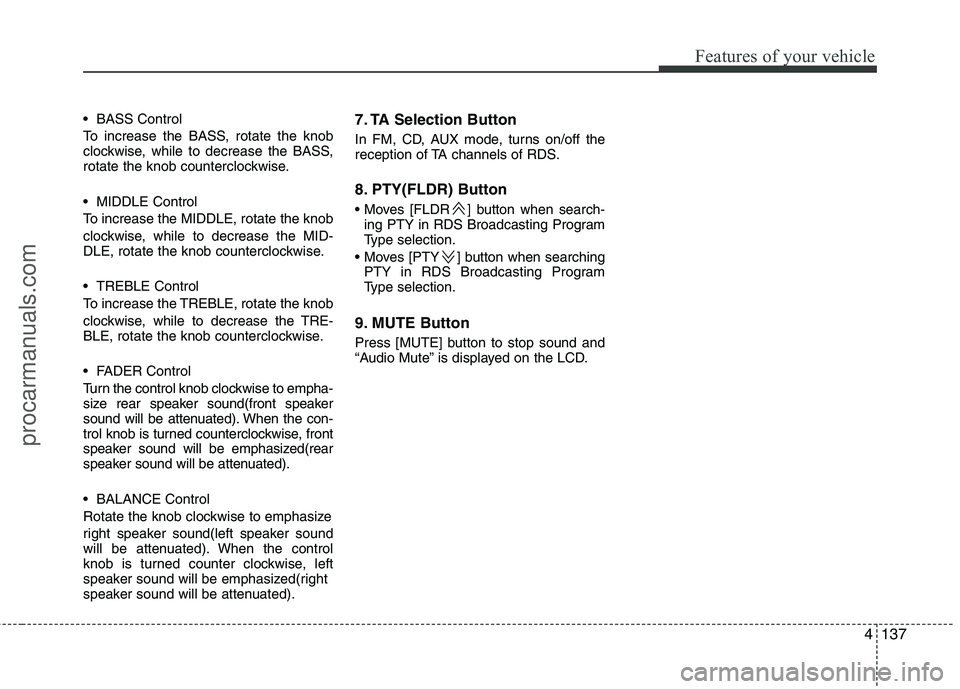
BASS Control
To increase the BASS, rotate the knob
clockwise, while to decrease the BASS,
rotate the knob counterclockwise.
MIDDLE Control
To increase the MIDDLE, rotate the knob
clockwise, while to decrease the MID-
DLE, rotate the knob counterclockwise.
TREBLE Control
To increase the TREBLE, rotate the knob
clockwise, while to decrease the TRE-
BLE, rotate the knob counterclockwise.
FADER Control
Turn the control knob clockwise to empha-
size rear speaker sound(front speaker
sound will be attenuated). When the con-
trol knob is turned counterclockwise, front
speaker sound will be emphasized(rear
speaker sound will be attenuated).
BALANCE Control
Rotate the knob clockwise to emphasize
right speaker sound(left speaker sound
will be attenuated). When the control
knob is turned counter clockwise, left
speaker sound will be emphasized(right
speaker sound will be attenuated).7. TA Selection Button
In FM, CD, AUX mode, turns on/off the
reception of TA channels of RDS.
8. PTY(FLDR) Button
] button when search-
ing PTY in RDS Broadcasting Program
Type selection.
] button when searching PTY in RDS Broadcasting Program
Type selection.
9. MUTE Button
Press [MUTE] button to stop sound and
“Audio Mute” is displayed on the LCD.
procarmanuals.com
Page 216 of 419
Features of your vehicle
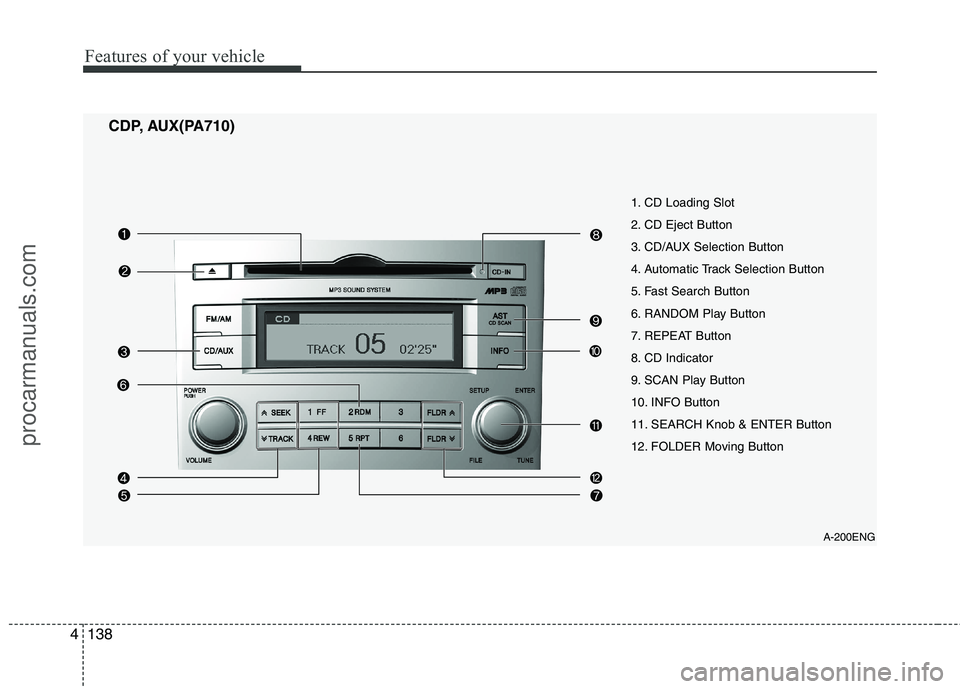
138
4
A-200ENG
1. CD Loading Slot
2. CD Eject Button
3. CD/AUX Selection Button
4. Automatic Track Selection Button
5. Fast Search Button
6. RANDOM Play Button
7. REPEAT Button
8. CD Indicator
9. SCAN Play Button
10. INFO Button
11. SEARCH Knob & ENTER Button
12. FOLDER Moving Button
CDP, AUX(PA710)
procarmanuals.com
Page 217 of 419
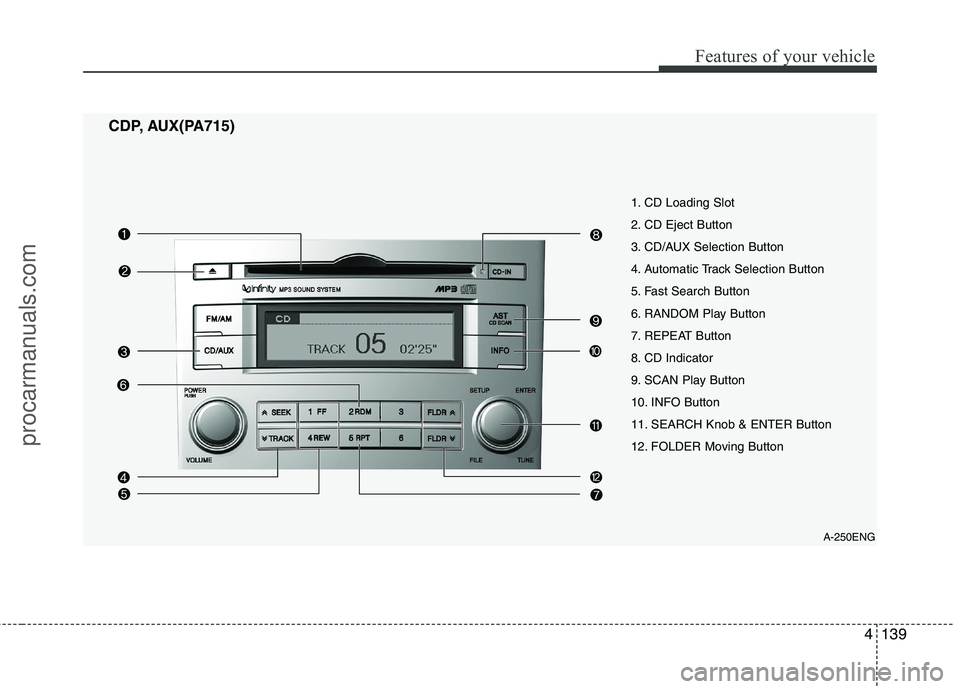
4139
Features of your vehicle
A-250ENG
1. CD Loading Slot
2. CD Eject Button
3. CD/AUX Selection Button
4. Automatic Track Selection Button
5. Fast Search Button
6. RANDOM Play Button
7. REPEAT Button
8. CD Indicator
9. SCAN Play Button
10. INFO Button
11. SEARCH Knob & ENTER Button
12. FOLDER Moving Button
CDP, AUX(PA715)
procarmanuals.com
Page 218 of 419
Features of your vehicle
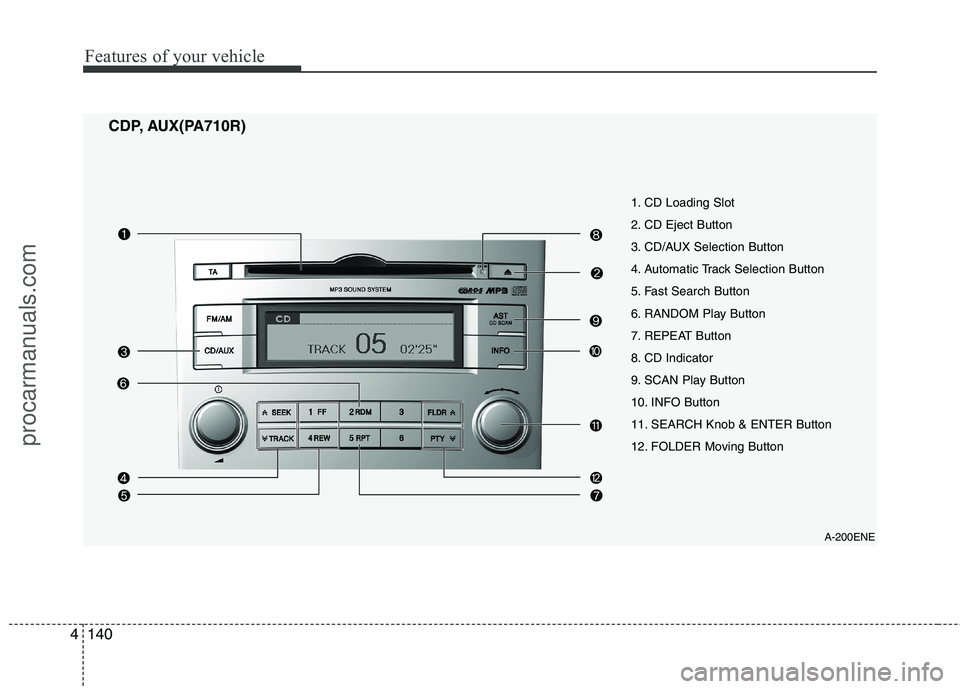
140
4
A-200ENE
1. CD Loading Slot
2. CD Eject Button
3. CD/AUX Selection Button
4. Automatic Track Selection Button
5. Fast Search Button
6. RANDOM Play Button
7. REPEAT Button
8. CD Indicator
9. SCAN Play Button
10. INFO Button
11. SEARCH Knob & ENTER Button
12. FOLDER Moving Button
CDP, AUX(PA710R)
procarmanuals.com
Page 219 of 419
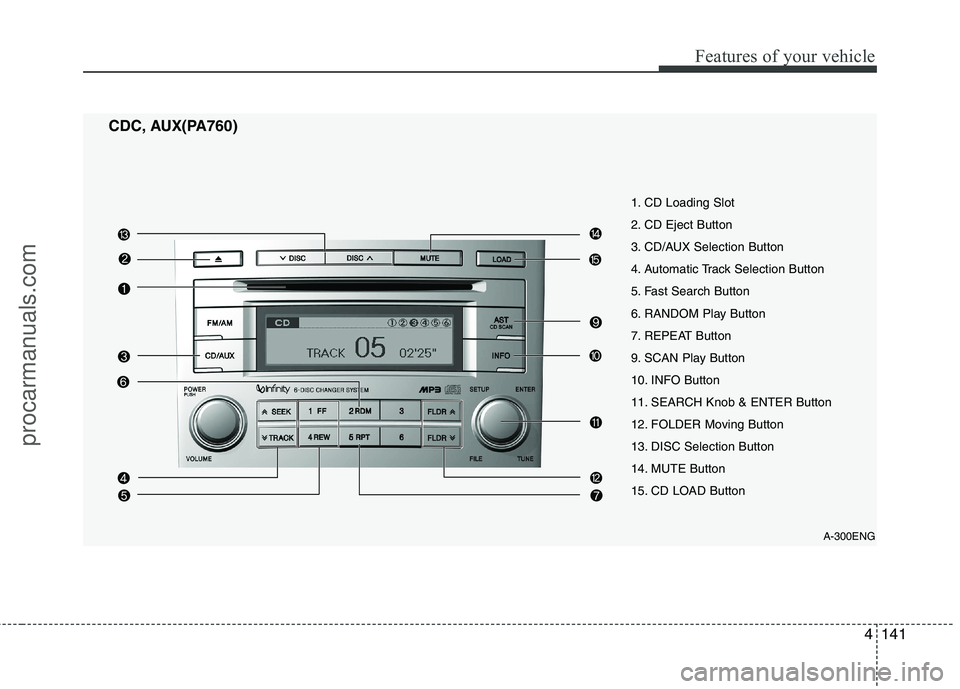
4141
Features of your vehicle
CDC, AUX(PA760)A-300ENG
1. CD Loading Slot
2. CD Eject Button
3. CD/AUX Selection Button
4. Automatic Track Selection Button
5. Fast Search Button
6. RANDOM Play Button
7. REPEAT Button
9. SCAN Play Button
10. INFO Button
11. SEARCH Knob & ENTER Button
12. FOLDER Moving Button
13. DISC Selection Button
14. MUTE Button
15. CD LOAD Button
procarmanuals.com
Page 220 of 419
Features of your vehicle
142
4
CDC, AUX(PA760R)
A-300ENE
1. CD Loading Slot
2. CD Eject Button
3. CD/AUX Selection Button
4. Automatic Track Selection Button
5. Fast Search Button
6. RANDOM Play Button
7. REPEAT Button
9. SCAN Play Button
10. INFO Button
11. SEARCH Knob & ENTER Button
12. FOLDER Moving Button
13. DISC Selection Button
14. MUTE Button
15. CD LOAD Button
procarmanuals.com
Page 221 of 419
4143
Features of your vehicle
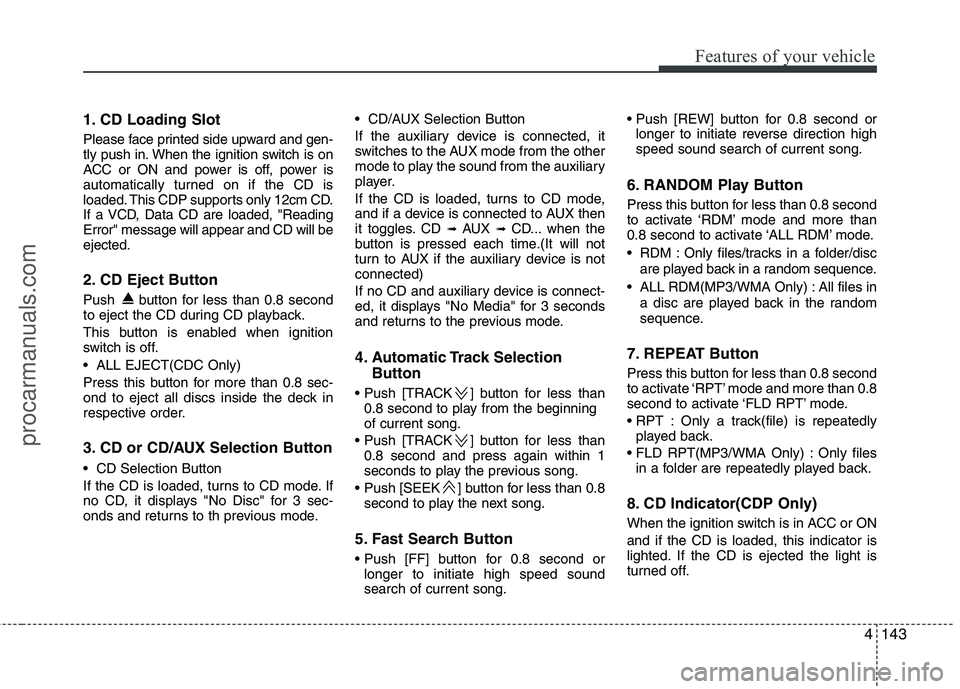
1. CD Loading Slot
Please face printed side upward and gen-
tly push in. When the ignition switch is on
ACC or ON and power is off, power is
automatically turned on if the CD is
loaded. This CDP supports only 12cm CD.
If a VCD, Data CD are loaded, "ReadingError" message will appear and CD will beejected.
2. CD Eject Button
Push button for less than 0.8 second
to eject the CD during CD playback.
This button is enabled when ignition
switch is off.
ALL EJECT(CDC Only)
Press this button for more than 0.8 sec-
ond to eject all discs inside the deck in
respective order.
3. CD or CD/AUX Selection Button
CD Selection Button
If the CD is loaded, turns to CD mode. If
no CD, it displays "No Disc" for 3 sec-
onds and returns to th previous mode. CD/AUX Selection Button
If the auxiliary device is connected, it
switches to the AUX mode from the other
mode to play the sound from the auxiliary
player.
If the CD is loaded, turns to CD mode,
and if a device is connected to AUX then
it toggles. CD
➟
AUX ➟ CD... when the
button is pressed each time.(It will not
turn to AUX if the auxiliary device is notconnected)
If no CD and auxiliary device is connect-
ed, it displays "No Media" for 3 seconds
and returns to the previous mode.
4. Automatic Track Selection
Button
] button for less than 0.8 second to play from the beginning of current song.
] button for less than 0.8 second and press again within 1
seconds to play the previous song.
] button for less than 0.8 second to play the next song.
5. Fast Search Button
longer to initiate high speed sound search of current song.
longer to initiate reverse direction highspeed sound search of current song.
6. RANDOM Play Button
Press this button for less than 0.8 second
to activate ‘RDM’ mode and more than
0.8 second to activate ‘ALL RDM’ mode.
RDM : Only files/tracks in a folder/disc are played back in a random sequence.
ALL RDM(MP3/WMA Only) : All files in a disc are played back in the random
sequence.
7. REPEAT Button
Press this button for less than 0.8 second
to activate ‘RPT’ mode and more than 0.8
second to activate ‘FLD RPT’ mode.
Only a track(file) is repeatedly played back.
Only files in a folder are repeatedly played back.
8. CD Indicator(CDP Only)
When the ignition switch is in ACC or ON and if the CD is loaded, this indicator is
lighted. If the CD is ejected the light is
turned off.
procarmanuals.com