Page 363 of 419
Maintenance
46
7
G190400AEN
Removing the battery
1. Remove the nut (1) and disconnect the
battery cable from the negative termi-
nal of the battery.
2. Remove the nuts (2, 3) and disconnect the battery cable from the positive ter-
minal of the battery.
3. Remove the battery.
4. Reinstall the battery in the reverse order of removal. G190300AEN Reset items
Items should be reset after the battery
has been discharged or the battery hasbeen disconnected.
Power tailgate (See section 4)
Auto up/down window (See section 4)
Sunroof (See section 4)
Driver position memory system
(See section 4)
Trip computer (See section 4)
Climate control system (See section 4)
Clock (See section 4)
Audio (See section 4)
OEN076052
WARNING
Before performing maintenance or recharging the battery, turn off all accessories and stop the
engine.
The negative battery cable must be removed first and installed
last when the battery is discon-nected.
procarmanuals.com
Page 368 of 419
751
Maintenance
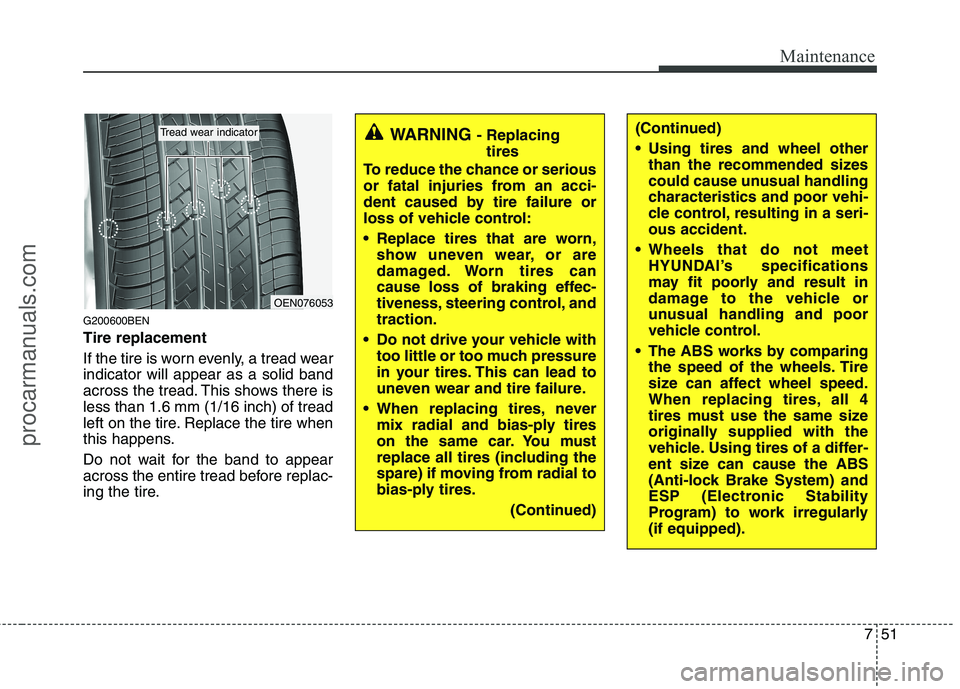
G200600BEN Tire replacement
If the tire is worn evenly, a tread wear indicator will appear as a solid band
across the tread. This shows there isless than 1.6 mm (1/16 inch) of tread
left on the tire. Replace the tire when
this happens.
Do not wait for the band to appear
across the entire tread before replac-
ing the tire.
OEN076053
Tread wear indicatorWARNING - Replacing
tires
To reduce the chance or serious
or fatal injuries from an acci-
dent caused by tire failure or
loss of vehicle control:
Replace tires that are worn, show uneven wear, or are
damaged. Worn tires can
cause loss of braking effec-
tiveness, steering control, andtraction.
Do not drive your vehicle with too little or too much pressure
in your tires. This can lead to
uneven wear and tire failure.
When replacing tires, never mix radial and bias-ply tires
on the same car. You must
replace all tires (including the
spare) if moving from radial to
bias-ply tires.
(Continued)(Continued)
Using tires and wheel otherthan the recommended sizes
could cause unusual handling
characteristics and poor vehi-
cle control, resulting in a seri-ous accident.
Wheels that do not meet HYUNDAI’s specifications
may fit poorly and result in
damage to the vehicle or
unusual handling and poor
vehicle control.
The ABS works by comparing the speed of the wheels. Tire
size can affect wheel speed.
When replacing tires, all 4
tires must use the same size
originally supplied with the
vehicle. Using tires of a differ-
ent size can cause the ABS
(Anti-lock Brake System) and
ESP (Electronic Stability
Program) to work irregularly(if equipped).
procarmanuals.com
Page 376 of 419
759
Maintenance
G210101AUN
Memory fuse
Your vehicle is equipped with a memory
fuse to prevent battery discharge if your
vehicle is parked without being operated
for prolonged periods. Use the following
procedures before parking the vehicle for
prolonged periods.
1. Turn off the engine.
2. Turn off the headlights and tail lights.
3. Open the driver’s side panel cover andpull up the memory fuse.
✽✽ NOTICE
If the memory fuse is pulled up from the fuse panel, the warning chime,
audio, clock and interior lamps, etc.,
will not operate. Some items must be
reset after replacement. Refer to
“Battery” in this section.
Even though the memory fuse is
pulled up, the battery can still be dis-
charged by operation of the head-
lights or other electrical devices.
G210200AEN
Engine compartment fuse replacement
1. Turn the ignition switch and all other switches off.
2. Remove the fuse panel cover by pressing the tab and pulling up.
OEN076023
OEN076024
OEN076025
procarmanuals.com
Page 379 of 419

Maintenance
62
7
Instrument panel fuse panel
Description Fuse rating Protected component
AUDIO 2 10A Audio, Console & rear power outlet relay, Digital clock, BCM
C/LIGHTER 20A Front cigarette lighter & Power outlet
A/BAG 2 10A -
A/BAG 1 15A SRS control module
A/BAG IND 10A Instrument cluster (Air bag indicator lamp)
B/UP LP 10A Back-up lamp relay, TCM, Electro chromic mirror, Back warning control module
CRUISE 10A Multifunction switch, PIC immobilizer module, Driver/Passenger seat warmer switch
ATM CONT 10A ATM key lock unit, 4WD ECM, BCM, Multifunction switch, Semi active engine mounting control module
CLUSTER 10A Instrument cluster, Generator, BCM, PIC immobilizer module
START 10A Burglar alarm relay, Power tailgate control module
EPS 10A BCM, Rheostat, Power window main/assist switch
A/CON 10A Front A/C control module, Blower relay, Rear A/C control module, Rear A/C relay, Rain sensor, Sunroof control module, Electro chromic mirror
FR S/HTR 15A Driver/Passenger Seat warmer switch
RR S/HTR 15A -
IMS 10A IMS control module, Tilt & Telescopic module, PTC heater relay, Power tailgate control module
H/LP, AQS 10A Head lamp low relay, AQS sensor
FR WASHER 15A Front wiper relay, Front washer relay
RR WIPER 15A Rear wiper control module, Rear wiper motor
TAIL LH 10A Head lamp LH, Rear combi lamp LH, Front fog lamp relay, Tailgate handler license lamp
TAIL RH 10A Head lamp RH, Rear combi lamp RH, Glove box lamp, Illuminations
procarmanuals.com
Page 380 of 419

763
Maintenance
Description Fuse ratingProtected component
DR LOCK 20A Power window main switch, Power tailgate relay, Tailgate actuator
STOP LP 15A Stop lamp switch
ADJ-PEDAL 15A -
H/LP WASHER 20A Headlight washer switch
FUEL LID 15A Fuel filler lid switch
RR FOG 15A Rear fog lamp relay
FR WIPER 30A Front wiper motor
TILT & TELE 15A Tilt & Telescopic module
DRL 15A DRL control module
P/WDW LH 25A Driver safety window ECM, Rear power window switch LH
P/WDW RH 25A Front/Rear power window switch RH
MIRR HTD 10A Power outside mirror defogger LH/RH, Rear window defogger
P/SEAT 30A IMS control module, Driver/Passenger seat manual switch
KEY SOL 10A ATM key lock solenoid, 4WD ECM, Back warning buzzer, PIC mechanical steering column lock
DEICER 15A Windshield defogger relay
S/ROOF 15A Sunroof control module
RSE, SMART KEY 10A PIC immobilizer module 15A Audio
15A Instrument cluster, Power window main switch, Door lamp, Room lamp, Data link connector, BCM, Door warning switch
SPARE 10A Spare fuse
SPARE 15A Spare fuse
SPARE 20A Spare fuse
SPARE 30A Spare fuse
AUDIO 1
(MEMORY FUSE)
ROOM LP
(MEMORY FUSE)
procarmanuals.com
Page 381 of 419

Maintenance
64
7
Engine compartment main fuse panel
Description Fuse rating Protected component
IGN 1 40A Ignition switch(ACC, IG1)
IGN 2 40A Start relay, Ignition switch(IG2, START)
I/P B+1 50A Fuse(DR LOCK 20A, STOP LP 15A, TAIL LH/RH 10A)
I/P B+2 50A Fuse(P/SEAT 30A, KEY SOL 10A, SUNROOF 15A, RSE/SMART KEY 10A, DEICER 15A), Memory fuse (AUDIO1 15A, ROOM LP 15A)
P/WDW 40A Fuse(P/WDW LH/RH 25A)
BLOWER 40A Blower relay
RR HTD 40A Rear defogger relay, Fuse(MIRR HTD 10A)
ECU 30A Engine control relay (ECU DSL 20A/IGN COIL 20A, ECU2 10A, SNSR1 15A, SNSR2 15A, SNSR3 15A)
ABS 1 40A ABS/ESP control module, Multipurpose check connector
ABS 2 40A ABS/ESP control module, Multipurpose check connector
TCU 1 15A TCM
TPMS 10A Semi active engine mounting solenoid
B/ALARM 10A Burglar alarm horn relay
F/PUMP 20A Fuel pump relay T/SIG 15A BCM
A/CON 10A A/C relay
ECU 1 10A ECM(GSL)
IGN COIL (GSL) 20A Ignition coil #1~#6, Condenser
SNSR 1 (GSL) 15A ECM(GSL), Mass air flow sensor, Oil control valve, Immobilizer module, PCSV, VIV
SNSR 2 (GSL) 15A Fuel pump relay, Oxygen sensor #1~#4
SNSR 3 (GSL) 10A Injector #1~#6, Condenser/Radiator fan relay, A/C relay
ECU 2 (GSL) 10A ECM(GSL)
ECU DSL 20A ECM(DSL), PTC heater relay #1(DSL)
procarmanuals.com
Page 384 of 419
767
Maintenance
LIGHT BULBS
G220000AEN
Use only the bulbs of the specified wattage.
✽✽ NOTICE
After heavy, driving rain or washing,
headlight and taillight lenses could
appear frosty. This condition is caused by
the temperature difference between the
lamp inside and outside. This is similar
to the condensation on your windows
inside your vehicle during the rain and
doesn’t indicate a problem with your
vehicle. If the water leaks into the lamp
bulb circuitry, have the vehicle checked
by an authorized HYUNDAI dealer.
G220100AUN
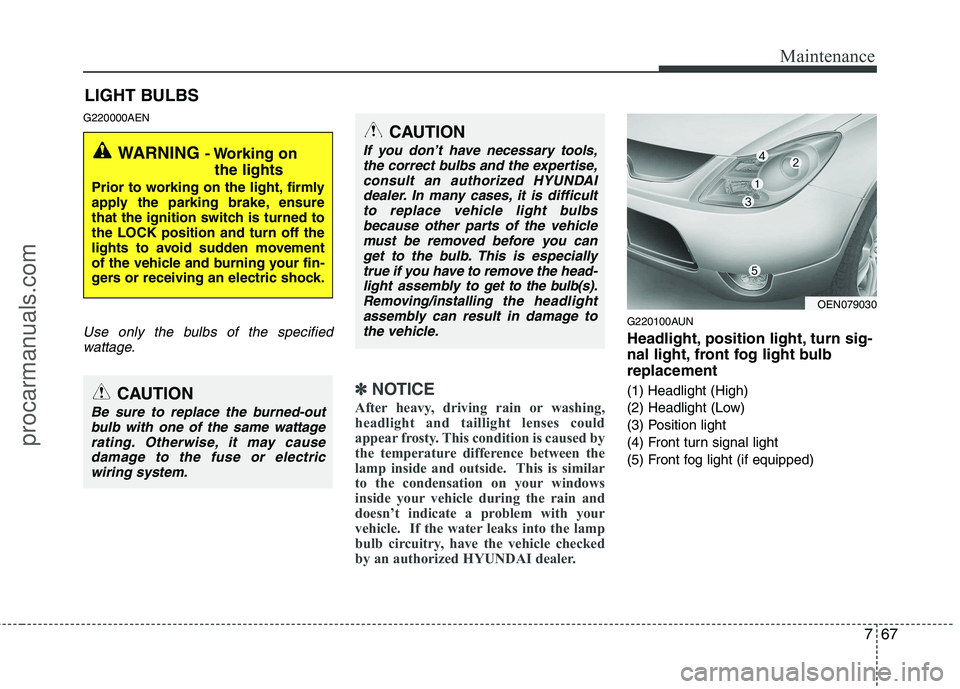
Headlight, position light, turn sig-
nal light, front fog light bulbreplacement
(1) Headlight (High)
(2) Headlight (Low)
(3) Position light
(4) Front turn signal light
(5) Front fog light (if equipped)
WARNING - Working on
the lights
Prior to working on the light, firmly
apply the parking brake, ensure
that the ignition switch is turned tothe LOCK position and turn off the
lights to avoid sudden movement
of the vehicle and burning your fin-
gers or receiving an electric shock.
CAUTION
Be sure to replace the burned-out bulb with one of the same wattage
rating. Otherwise, it may cause damage to the fuse or electricwiring system.
CAUTION
If you don’t have necessary tools,the correct bulbs and the expertise,
consult an authorized HYUNDAIdealer. In many cases, it is difficultto replace vehicle light bulbs because other parts of the vehicle
must be removed before you canget to the bulb. This is especiallytrue if you have to remove the head-
light assembly to
get to the bulb(s).
Removing/installingthe headlight
assembly can result in damage to the vehicle.OEN079030
procarmanuals.com
Page 385 of 419
Maintenance
68
7
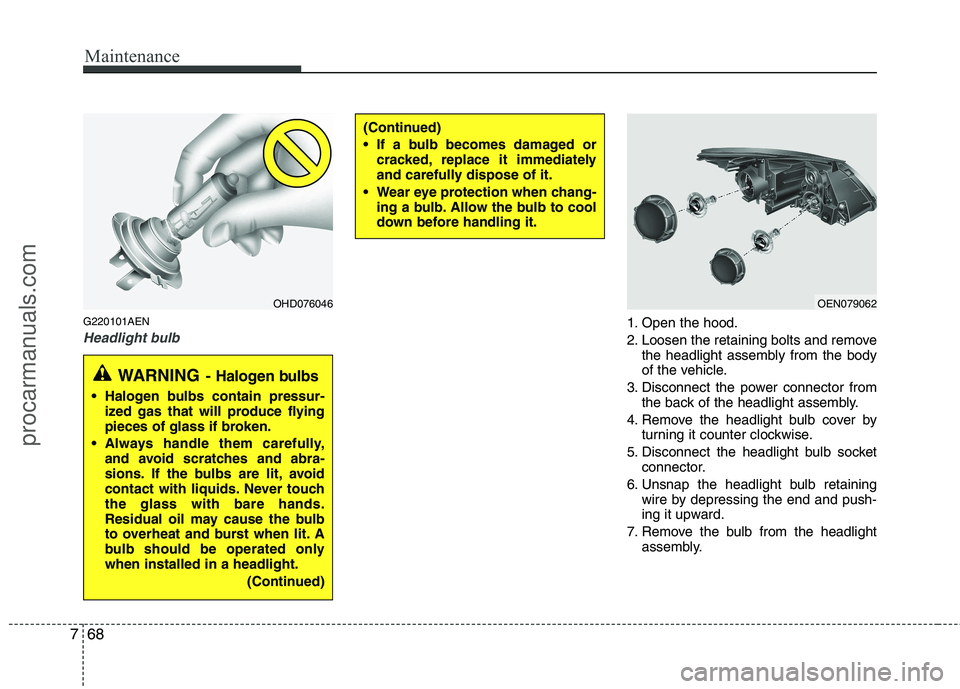
G220101AEN
Headlight bulb1. Open the hood.
2. Loosen the retaining bolts and remove
the headlight assembly from the body
of the vehicle.
3. Disconnect the power connector from the back of the headlight assembly.
4. Remove the headlight bulb cover by turning it counter clockwise.
5. Disconnect the headlight bulb socket connector.
6. Unsnap the headlight bulb retaining wire by depressing the end and push-
ing it upward.
7. Remove the bulb from the headlight assembly.
(Continued)
If a bulb becomes damaged orcracked, replace it immediately
and carefully dispose of it.
Wear eye protection when chang- ing a bulb. Allow the bulb to cool
down before handling it.
OHD076046OEN079062
WARNING - Halogen bulbs
Halogen bulbs contain pressur-
ized gas that will produce flying
pieces of glass if broken.
Always handle them carefully, and avoid scratches and abra-
sions. If the bulbs are lit, avoid
contact with liquids. Never touchthe glass with bare hands.
Residual oil may cause the bulb
to overheat and burst when lit. A
bulb should be operated onlywhen installed in a headlight.
(Continued)
procarmanuals.com

